
자체 호스팅되는 Document Engine을 통해 AI 클라이언트가 PDF 문서에서 텍스트를 추출하고, 분할, 비식별화, 워터마크 삽입, 주석 추가 및 양식 채우기를 수행할 수 있도록 합니다.
다른 이름 PSPDFKit/nutrient-document-engine-mcp-server, nutrient-document-engine-mcp-server, @nutrient-sdk/document-engine-mcp-server
- 스타
- 62
- Tools
- —
- 다운로드, 30일
- —
- 최신 버전
- 0.0.3
- 마지막 커밋
- 2026년 11월 4일
- 라이선스
- MIT
Nutrient Document Engine MCP란?
Nutrient Document Engine은(는) MCP server입니다. 자체 호스팅되는 Document Engine을 통해 AI 클라이언트가 PDF 문서에서 텍스트를 추출하고, 분할, 비식별화, 워터마크 삽입, 주석 추가 및 양식 채우기를 수행할 수 있도록 합니다.
프로젝트 README에서 생성된 요약
Nutrient Document Engine MCP server 정보
이 server는 프라이빗 문서 워크플로우를 구축하는 개발자가 자연어를 통해 PDF 문서를 처리할 수 있도록 지원합니다. AI agent를 자체 호스팅되는 Document Engine에 연결하여, 엄격한 데이터 거주성을 유지할 수 있도록 로컬 또는 온프레미스 배포가 가능합니다. 사용자는 Docker Compose를 통해 engine을 실행함으로써 Claude Desktop, LangGraph 또는 기타 MCP 호환 플랫폼을 사용하여 파일과 상호작용할 수 있습니다.
server는 콘텐츠 액세스, 편집 및 보안을 위한 도구 모음을 제공합니다. AI가 텍스트를 추출하고, 파일을 검색하며, 페이지를 이미지로 렌더링할 수 있습니다. 문서 수정의 경우, 파일 분할, 워터마크 추가 및 PDF 양식 채우기를 지원합니다. 보안 기능에는 사전 설정된 패턴이나 사용자 정의 정규식을 사용하여 사회보장번호 또는 신용카드 정보와 같은 민감한 정보를 비식별화하는 기능이 포함됩니다.
설정에는 Node.js와 기본 URL 및 인증 토큰을 통한 로컬 인스턴스 연결이 필요합니다. 기본적으로 평가용 라이선스로 실행되지만, 활성화 키를 제공하여 제한을 해제할 수 있습니다. 이 설정은 문서 처리 인프라에 대한 배포 제어 권한이 필요한 사용자를 위해 특별히 설계되었습니다.
활용 사례
- 1연락처 정보 추출AI agent에게 송장 모음에서 이름 및 전화번호와 같은 특정 세부 정보를 찾도록 요청합니다.
- 2민감한 데이터 비식별화세금 문서에서 사회보장번호와 같은 개인 정보를 제거하는 작업을 자동화합니다.
- 3대용량 파일 분할agent에게 긴 계약서를 관리하기 쉬운 작은 섹션으로 나누도록 지시합니다.
프로젝트의 README를 바탕으로 작성되었습니다. 모든 활용 사례는 해당 내용의 인용문과 대조하여 확인합니다.
Nutrient Document Engine MCP 설치 방법
형식 확인: 2026년 11월 10일Cursor에 추가Goose에 추가Claude Code에 Nutrient Document Engine MCP 설치
$ claude mcp add --env 'DOCUMENT_ENGINE_API_AUTH_TOKEN=<YOUR_DOCUMENT_ENGINE_API_AUTH_TOKEN>' --env 'DOCUMENT_ENGINE_BASE_URL=<DOCUMENT_ENGINE_BASE_URL>' --env 'DASHBOARD_PASSWORD=<YOUR_DASHBOARD_PASSWORD>' nutrient-document-engine-mcp-server -- npx -y @nutrient-sdk/document-engine-mcp-serverCursor에 Nutrient Document Engine MCP 설치
~/.cursor/mcp.json
{
  "mcpServers": {
    "nutrient-document-engine-mcp-server": {
      "command": "npx",
      "args": [
        "-y",
        "@nutrient-sdk/document-engine-mcp-server"
      ],
      "env": {
        "DOCUMENT_ENGINE_API_AUTH_TOKEN": "<YOUR_DOCUMENT_ENGINE_API_AUTH_TOKEN>",
        "DOCUMENT_ENGINE_BASE_URL": "<DOCUMENT_ENGINE_BASE_URL>",
        "DASHBOARD_PASSWORD": "<YOUR_DASHBOARD_PASSWORD>"
      }
    }
  }
}VS Code에 Nutrient Document Engine MCP 설치
.vscode/mcp.json
{
  "servers": {
    "nutrient-document-engine-mcp-server": {
      "type": "stdio",
      "command": "npx",
      "args": [
        "-y",
        "@nutrient-sdk/document-engine-mcp-server"
      ],
      "env": {
        "DOCUMENT_ENGINE_API_AUTH_TOKEN": "<YOUR_DOCUMENT_ENGINE_API_AUTH_TOKEN>",
        "DOCUMENT_ENGINE_BASE_URL": "<DOCUMENT_ENGINE_BASE_URL>",
        "DASHBOARD_PASSWORD": "<YOUR_DASHBOARD_PASSWORD>"
      }
    }
  }
}VS Code CLI에 Nutrient Document Engine MCP 설치
$ code --add-mcp '{"name":"nutrient-document-engine-mcp-server","type":"stdio","command":"npx","args":["-y","@nutrient-sdk/document-engine-mcp-server"],"env":{"DOCUMENT_ENGINE_API_AUTH_TOKEN":"<YOUR_DOCUMENT_ENGINE_API_AUTH_TOKEN>","DOCUMENT_ENGINE_BASE_URL":"<DOCUMENT_ENGINE_BASE_URL>","DASHBOARD_PASSWORD":"<YOUR_DASHBOARD_PASSWORD>"}}'Claude Desktop에 Nutrient Document Engine MCP 설치
claude_desktop_config.json
{
  "mcpServers": {
    "nutrient-document-engine-mcp-server": {
      "command": "npx",
      "args": [
        "-y",
        "@nutrient-sdk/document-engine-mcp-server"
      ],
      "env": {
        "DOCUMENT_ENGINE_API_AUTH_TOKEN": "<YOUR_DOCUMENT_ENGINE_API_AUTH_TOKEN>",
        "DOCUMENT_ENGINE_BASE_URL": "<DOCUMENT_ENGINE_BASE_URL>",
        "DASHBOARD_PASSWORD": "<YOUR_DASHBOARD_PASSWORD>"
      }
    }
  }
}Codex에 Nutrient Document Engine MCP 설치
$ codex mcp add nutrient-document-engine-mcp-server --env 'DOCUMENT_ENGINE_API_AUTH_TOKEN=<YOUR_DOCUMENT_ENGINE_API_AUTH_TOKEN>' --env 'DOCUMENT_ENGINE_BASE_URL=<DOCUMENT_ENGINE_BASE_URL>' --env 'DASHBOARD_PASSWORD=<YOUR_DASHBOARD_PASSWORD>' -- npx -y @nutrient-sdk/document-engine-mcp-serverCodex config.toml에 Nutrient Document Engine MCP 설치
~/.codex/config.toml
[mcp_servers.nutrient-document-engine-mcp-server]
command = "npx"
args = ["-y", "@nutrient-sdk/document-engine-mcp-server"]

[mcp_servers.nutrient-document-engine-mcp-server.env]
DOCUMENT_ENGINE_API_AUTH_TOKEN = "<YOUR_DOCUMENT_ENGINE_API_AUTH_TOKEN>"
DOCUMENT_ENGINE_BASE_URL = "<DOCUMENT_ENGINE_BASE_URL>"
DASHBOARD_PASSWORD = "<YOUR_DASHBOARD_PASSWORD>"
Gemini CLI에 Nutrient Document Engine MCP 설치
$ gemini mcp add -s user -e 'DOCUMENT_ENGINE_API_AUTH_TOKEN=<YOUR_DOCUMENT_ENGINE_API_AUTH_TOKEN>' -e 'DOCUMENT_ENGINE_BASE_URL=<DOCUMENT_ENGINE_BASE_URL>' -e 'DASHBOARD_PASSWORD=<YOUR_DASHBOARD_PASSWORD>' nutrient-document-engine-mcp-server npx -- -y @nutrient-sdk/document-engine-mcp-serverGemini settings.json에 Nutrient Document Engine MCP 설치
~/.gemini/settings.json
{
  "mcpServers": {
    "nutrient-document-engine-mcp-server": {
      "command": "npx",
      "args": [
        "-y",
        "@nutrient-sdk/document-engine-mcp-server"
      ],
      "env": {
        "DOCUMENT_ENGINE_API_AUTH_TOKEN": "<YOUR_DOCUMENT_ENGINE_API_AUTH_TOKEN>",
        "DOCUMENT_ENGINE_BASE_URL": "<DOCUMENT_ENGINE_BASE_URL>",
        "DASHBOARD_PASSWORD": "<YOUR_DASHBOARD_PASSWORD>"
      }
    }
  }
}구성
DOCUMENT_ENGINE_API_AUTH_TOKEN필수비밀API auth token for your Document Engine instance.
DOCUMENT_ENGINE_BASE_URL필수Base URL of your Nutrient Document Engine instance (e.g. http://localhost:5000).
DASHBOARD_PASSWORD비밀Optional: local status dashboard password.
DASHBOARD_PASSWORDDASHBOARD_USERNAMEDASHBOARD_USERNAMEOptional: enables the local status dashboard (Basic auth username).
DOCUMENT_ENGINE_API_AUTH_TOKENDOCUMENT_ENGINE_BASE_URLLOG_LEVELOptional log level (default info).
MCP_TRANSPORT
| 이름 | 설명 | 유형 |
|---|---|---|
| DOCUMENT_ENGINE_API_AUTH_TOKEN | API auth token for your Document Engine instance. | 필수비밀 |
| DOCUMENT_ENGINE_BASE_URL | Base URL of your Nutrient Document Engine instance (e.g. http://localhost:5000). | 필수 |
| DASHBOARD_PASSWORD | Optional: local status dashboard password. | 비밀 |
| DASHBOARD_PASSWORD | — | |
| DASHBOARD_USERNAME | — | |
| DASHBOARD_USERNAME | Optional: enables the local status dashboard (Basic auth username). | |
| DOCUMENT_ENGINE_API_AUTH_TOKEN | — | |
| DOCUMENT_ENGINE_BASE_URL | — | |
| LOG_LEVEL | Optional log level (default info). | |
| MCP_TRANSPORT | — |
자동 검사
2026년 11월 13일에 실행됨전체 보고서 →자동 검사를 통과했습니다. 이는 보안 감사가 아닙니다. 코드를 직접 읽고 서버에 필요한 최소한의 권한만 부여하십시오. 검사 방식

- 소스 저장소 연결 및 접근 가능pspdfkit/nutrient-document-engine-mcp-server is public and reachablegithub.com/pspdfkit/nutrient-document-engine-mcp-server ↗통과
- 패키지가 이 저장소를 소스로 명시@nutrient-sdk/document-engine-mcp-server names pspdfkit/nutrient-document-engine-mcp-server as sourcenpmjs.com/package/@nutrient-sdk/document-engine-mcp-server ↗통과
- 빌드 출처(Sigstore 증명)No build attestation published for this release검사되지 않음
- 오픈 소스 라이선스 (OSI)MITspdx.org/licenses/MIT.html ↗통과
- 최근 1년 내 커밋 또는 릴리스Last commit or release 2026-11-04github.com/pspdfkit/nutrient-document-engine-mcp-server ↗통과
- OpenSSF Scorecard검사되지 않음
- 패키지 이름이 인기 패키지와 유사하지 않음No popular package one edit away from @nutrient-sdk/document-engine-mcp-server통과
- 패키지 및 해당 종속성에 중요한 보안 권고 없음128 resolved dependencies checked; no critical advisoryosv.dev ↗통과
- 모델에 대한 숨겨진 지침 없음0 tool descriptions and the README read; no override phrases, credential paths or hidden characters통과
- 파괴적인 도구에 라벨 표시됨검사되지 않음
- 원격 엔드포인트가 MCP 핸드셰이크에 응답검사되지 않음
README
GitHub에서 보기Nutrient Document Engine MCP Server
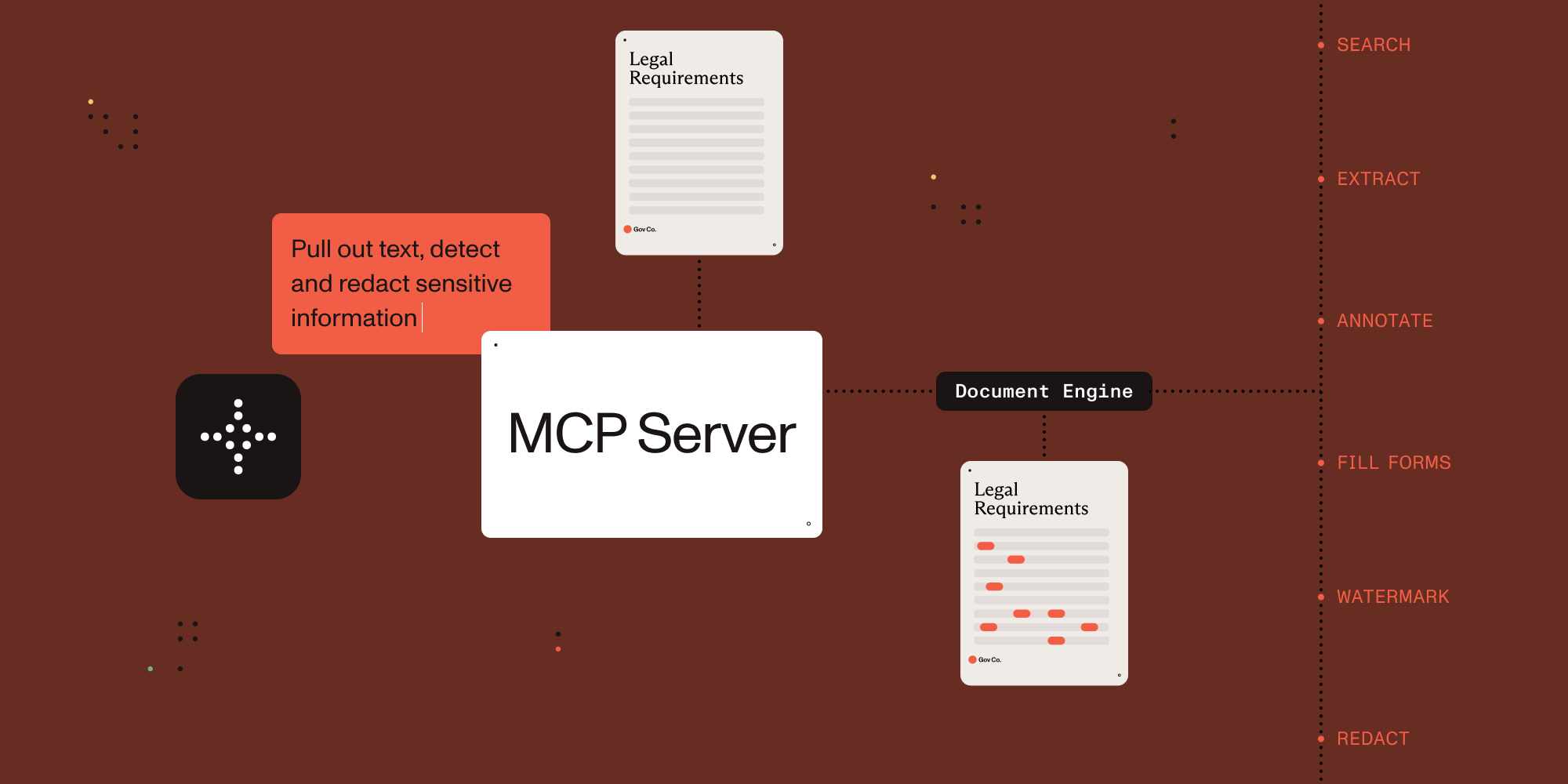

Connect AI agents to document processing.
This MCP server exposes document processing capabilities through natural language, supporting both direct human interaction and AI agent tool calling.
Which MCP Server Should I Use?
| Server | Best for | Deployment | Core capabilities |
|---|---|---|---|
| Nutrient DWS MCP Server | Cloud document workflows | Nutrient-hosted API (API key) | Convert, OCR, redact, sign, extract, watermark, automation |
| Nutrient Document Engine MCP Server | Self-hosted document workflows | On-prem/private cloud | Document processing with deployment control and data residency |
You are in the Document Engine MCP Server repo. Choose this when you need self-hosted/on-prem document workflows and deployment control.
- Ecosystem overview: Nutrient AI Infrastructure
- Product landing page: Nutrient MCP Server
Example Conversations
Once configured, you (or your agent) can interact with documents through natural language:
You: "What documents do I have available?"
AI: "I can see you have 3 documents: annual-report.pdf, contract-draft.pdf, and tax-form-2023.pdf. Would you like me to analyze any of these?"
You: "Extract all the names and phone numbers from these invoices"
AI: "I found 12 contacts: John Smith (555-0123), Sarah Johnson (555-0456)..."
You: "Redact all social security numbers from these tax forms"
AI: "I've identified and redacted 3 SSNs across 2 documents. The redacted versions are ready."
You: "Split this 50-page contract into separate sections"
AI: "I've split the contract into 5 sections: Terms (pages 1-8), Payment (pages 9-15)..."
Setup with Claude Desktop
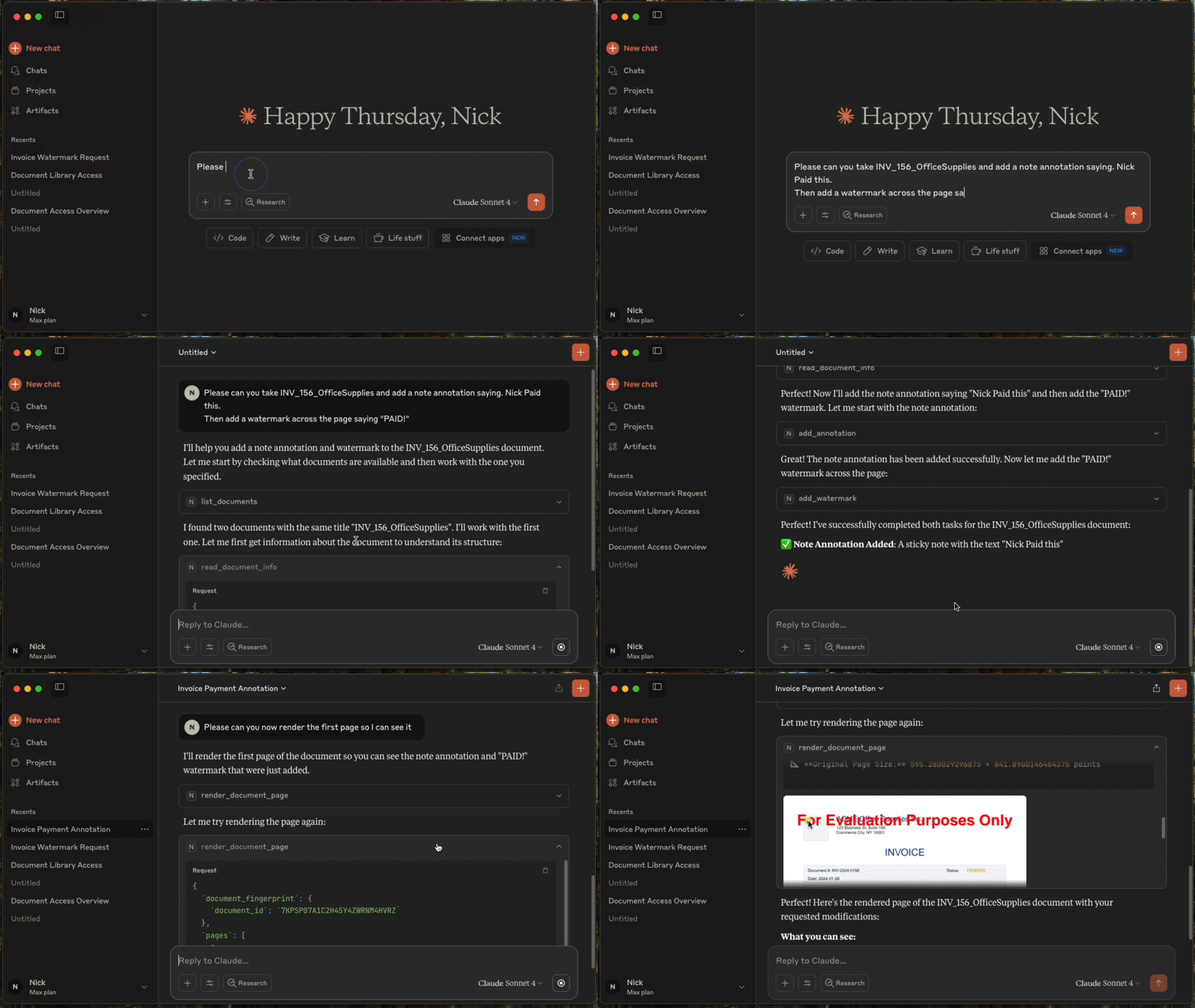
Prerequisites
- Claude Desktop - Download from Anthropic.
- Docker Compose - Download from Docker. For running Nutrient Document Engine locally.
- Node.js 22.x (22.23.4+), 24.x (24.22.1+), or 26.x (26.12.1+) - This MCP server runs via
npx.
Licensing
Nutrient Document Engine runs with an evaluation license by default. Please see Removing Evaluation Limitations section on how to remove the evaluation limitations.
1. Start Nutrient Document Engine
Open a terminal window, then run:
git clone https://github.com/PSPDFKit/nutrient-document-engine-mcp-server.git
cd nutrient-document-engine-mcp-server
docker-compose up -d
2. Connect Claude Desktop
Add this to your Claude Desktop config (Settings → Developer → Edit Config):
{
  "mcpServers": {
    "nutrient-document-engine": {
      "command": "npx",
      "args": ["-y", "@nutrient-sdk/document-engine-mcp-server"],
      "env": {
        "DASHBOARD_USERNAME": "admin",
        "DASHBOARD_PASSWORD": "password",
        "DOCUMENT_ENGINE_BASE_URL": "http://localhost:5000",
        "DOCUMENT_ENGINE_API_AUTH_TOKEN": "secret"
      }
    }
  }
}
3. Restart Claude Desktop
4. Upload and Process Documents
- Open your web browser and go to http://localhost:5100/dashboard.
- Upload the documents you want to work with by using the drag-and-drop interface.
- Switch back to Claude Desktop and ask questions like: "List my documents and extract text from the contract"
HTTP Transport Security
The optional HTTP transport binds to 127.0.0.1 by default. A non-loopback MCP_HOST requires
MCP_HTTP_AUTH_TOKEN; the server refuses to start without a nonempty token. Clients must send the
token on every /mcp request as Authorization: Bearer <token>. If a token is set for a loopback
HTTP server, /mcp requires it there too. This token does not protect /health or /dashboard;
dashboard access uses DASHBOARD_USERNAME and DASHBOARD_PASSWORD.
# Local-only HTTP transport; no MCP bearer token required.
MCP_TRANSPORT=http npx @nutrient-sdk/document-engine-mcp-server

# Network-accessible HTTP transport; bearer authentication is required.
MCP_TRANSPORT=http MCP_HOST=0.0.0.0 MCP_HTTP_AUTH_TOKEN=replace-with-a-secret \
  npx @nutrient-sdk/document-engine-mcp-server
The default stdio transport is unchanged and never requires MCP_HTTP_AUTH_TOKEN.
Features
This MCP server provides document processing tools in these areas:
Content Access: Extract text, search documents, render pages as images, extract form data and table structures.
Document Editing: Split documents, add watermarks, duplicate documents, fill PDF forms.
Security: Create and apply redactions for sensitive data using preset patterns (SSNs, credit cards, etc.) or custom regex.
Annotations: Add, read, and delete document annotations including highlights, notes, and stamps.
System: Document discovery, metadata retrieval, and health monitoring.
Use with Other AI Platforms
This MCP server works with any AI platform that supports the Model Context Protocol:
- Claude Desktop - Quick setup with the configuration above.
- LangGraph - Integrate with LangGraph agents for complex workflows.
- OpenAI APIs - Connect through MCP-compatible frameworks.
- Custom agents - Any MCP-compatible AI system.
Examples and Documentation
Examples
- LangGraph Document Processing - Workflow examples for contract processing, form filling, and report generation.
- OpenAI Agents SDK Document Processing - Workflow examples for contract processing, form filling, and report generation.
- Document Chat Interface - Web application with React and LangGraph.
- Procurement AI Agent - An AI Agent written with Langgraph.js, that classifies and collates POs, invoices, and payment documents into groups and flags for human review
Documentation
- Configuration Guide - Environment variables, transport modes, dashboard.
- Features Reference - Detailed description of all document processing tools.
- Evaluation Framework - Testing and benchmarking tools.
Removing Evaluation Watermarks and Limitations
Document Engine runs in evaluation mode with limitations by default. To remove them:
- Contact Sales to purchase a license from Nutrient
- Configure your license by setting the
ACTIVATION_KEYenvironment variable in your Docker Compose configuration or Document Engine setup - Restart Document Engine to apply the license
For detailed licensing configuration, see the Document Engine licensing guide.
Server Based Document Engine Setups
On-Premise Installation: Follow the Nutrient Document Engine installation guide.
Managed Cloud: Use a hosted Document Engine instance - setup guide.
Contributing
We welcome contributions! See CONTRIBUTING.md for development setup, testing guidelines, and how to submit pull requests.
License
MIT License - see LICENSE file for details.
Nutrient Document Engine MCP 질문
Nutrient Document Engine MCP를 Claude Code에 추가하려면 어떻게 하나요?
터미널에서 claude mcp add --env 'DOCUMENT_ENGINE_API_AUTH_TOKEN=<YOUR_DOCUMENT_ENGINE_API_AUTH_TOKEN>' --env 'DOCUMENT_ENGINE_BASE_URL=<DOCUMENT_ENGINE_BASE_URL>' --env 'DASHBOARD_PASSWORD=<YOUR_DASHBOARD_PASSWORD>' nutrient-document-engine-mcp-server -- npx -y @nutrient-sdk/document-engine-mcp-server를 실행합니다. 모든 프로젝트에서 사용할 수 있게 하려면 --scope user를 추가합니다.
Nutrient Document Engine MCP를 Cursor에 추가하려면 어떻게 하나요?
~/.cursor/mcp.json를 열고 mcpServers 아래에 서버를 추가합니다. 위 설치 섹션에 표시된 Cursor 구성을 사용합니다.
Nutrient Document Engine MCP server를 어떻게 설치하나요?
저장소를 클론하고 Docker Compose로 Document Engine을 실행합니다. 그 다음 Claude Desktop 설정에서 Document Engine URL과 인증 정보를 포함한 npx 명령어를 지정합니다. 클라이언트를 재시작하여 연결합니다.
이 server로 사회보장번호와 같은 민감한 데이터를 비식별화할 수 있나요?
네, 사회보장번호(SSN)나 신용카드와 같은 사전 설정된 패턴 또는 사용자 정의 정규식을 사용하여 비식별화 영역을 생성하고 적용할 수 있습니다.
Nutrient Document Engine MCP server가 Claude Desktop 외에 다른 AI 플랫폼에서도 작동하나요?
네, LangGraph, OpenAI API, 커스텀 agent를 포함하여 MCP와 호환되는 모든 플랫폼에서 작동합니다.
MCP HTTP 인증 토큰이 필요한가요?
루프백(non-loopback)이 아닌 HTTP 호스트의 경우에만 필요합니다. 해당 경우 토큰이 없으면 server가 시작되지 않습니다. 기본 stdio 전송 방식은 토큰이 필요하지 않습니다.