
Magic Cloud MCP server
2026년 11월 14일 커밋보안이 적용된 CRUD API를 생성하고, 데이터베이스를 관리하며, 백그라운드 작업을 실행합니다. 또한 MCP를 통해 엔드포인트를 AI agent용 도구로 제공합니다.
다른 이름 polterguy/magic, magic
- 스타
- 1,251
- Tools
- —
- 다운로드, 30일
- —
- 최신 버전
- 24.4.21
- 마지막 커밋
- 2026년 11월 14일
- 라이선스
- MIT
Magic Cloud MCP란?
Magic Cloud은(는) MCP server입니다. 보안이 적용된 CRUD API를 생성하고, 데이터베이스를 관리하며, 백그라운드 작업을 실행합니다. 또한 MCP를 통해 엔드포인트를 AI agent용 도구로 제공합니다.
프로젝트 README에서 생성된 요약
Magic Cloud MCP server 정보
Magic Cloud를 사용하면 자체 하드웨어에서 풀스택 애플리케이션과 데이터베이스 기반 AI agent를 구축할 수 있습니다. 이 플랫폼은 개발자가 전통적인 빌드나 배포 단계 없이도 일반 영어를 데이터베이스, 보안 API, 비즈니스 로직을 포함한 실제 작동하는 백엔드로 변환할 수 있게 해줍니다. 독점 서비스의 셀프 호스팅 대안으로 작동하며, 데이터와 로직을 관리할 수 있는 통합 대시보드가 포함된 완전한 환경을 제공합니다.
사용자는 서버를 기존 MySQL, PostgreSQL, SQL Server 또는 MariaDB 스키마에 연결하여 보안이 적용된 CRUD 엔드포인트를 즉시 생성할 수 있습니다. MCP 플러그인을 설치하면 이러한 엔드포인트를 Claude, Cursor 또는 Codex와 같은 AI 클라이언트에 도구로 노출할 수 있습니다. 이 설정을 통해 agent는 역할 기반 액세스 제어(RBAC) 뒤에 있는 특정 데이터베이스를 쿼리하고 커스텀 엔드포인트를 호출할 수 있습니다. 시스템은 샌드박스 실행 모델을 사용하여 생성된 코드가 안전하게 유지되고 화이트리스트에 등록된 함수로 제한되도록 보장합니다.
활용 사례
- 1보안 CRUD API 생성기존 데이터베이스 스키마를 몇 초 만에 완전히 보안이 적용된 REST API로 변환합니다.
- 2AI agent에 엔드포인트 노출MCP를 통해 Claude 또는 Cursor에 백엔드 도구에 대한 직접적인 액세스 권한을 제공합니다.
- 3근거 기반 챗봇 생성특정 웹사이트에서 크롤링한 콘텐츠로 학습된 임베드형 챗봇을 구축합니다.
- 4서드파티 서비스 래핑OpenAPI 또는 Swagger 사양을 가져와 타입이 지정되고 문서화된 엔드포인트를 생성합니다.
프로젝트의 README를 바탕으로 작성되었습니다. 모든 활용 사례는 해당 내용의 인용문과 대조하여 확인합니다.
Magic Cloud MCP 설치 방법
형식 확인: 2026년 11월 10일Claude Code에 Magic Cloud MCP 설치
$ claude mcp add --env magic_host=<magic_host> magic -- docker run -i --rm docker.io/servergardens/magic-aio:v24.4.21Cursor에 Magic Cloud MCP 설치
~/.cursor/mcp.json
{
  "mcpServers": {
    "magic": {
      "command": "docker",
      "args": [
        "run",
        "-i",
        "--rm",
        "docker.io/servergardens/magic-aio:v24.4.21"
      ],
      "env": {
        "magic_host": "<magic_host>"
      }
    }
  }
}VS Code에 Magic Cloud MCP 설치
.vscode/mcp.json
{
  "servers": {
    "magic": {
      "type": "stdio",
      "command": "docker",
      "args": [
        "run",
        "-i",
        "--rm",
        "docker.io/servergardens/magic-aio:v24.4.21"
      ],
      "env": {
        "magic_host": "<magic_host>"
      }
    }
  }
}Claude Desktop에 Magic Cloud MCP 설치
claude_desktop_config.json
{
  "mcpServers": {
    "magic": {
      "command": "docker",
      "args": [
        "run",
        "-i",
        "--rm",
        "docker.io/servergardens/magic-aio:v24.4.21"
      ],
      "env": {
        "magic_host": "<magic_host>"
      }
    }
  }
}Codex에 Magic Cloud MCP 설치
~/.codex/config.toml
[mcp_servers.magic]
command = "docker"
args = ["run", "-i", "--rm", "docker.io/servergardens/magic-aio:v24.4.21"]

[mcp_servers.magic.env]
magic_host = "<magic_host>"
Gemini CLI에 Magic Cloud MCP 설치
~/.gemini/settings.json
{
  "mcpServers": {
    "magic": {
      "command": "docker",
      "args": [
        "run",
        "-i",
        "--rm",
        "docker.io/servergardens/magic-aio:v24.4.21"
      ],
      "env": {
        "magic_host": "<magic_host>"
      }
    }
  }
}구성
magic_host필수Hostname of your own Magic instance, e.g. magic.example.com
| 이름 | 설명 | 유형 |
|---|---|---|
| magic_host | Hostname of your own Magic instance, e.g. magic.example.com | 필수 |
자동 검사
2026년 11월 12일에 실행됨전체 보고서 →아직 인증되지 않았습니다. 서버는 80점 이상의 점수, 심각한 결함 없음, 그리고 검사에 충분한 데이터를 갖추어야 합니다. 검사 방식

- 소스 저장소 연결 및 접근 가능통과
- 오픈 소스 라이선스 (OSI)통과
- 최근 1년 내 커밋 또는 릴리스통과
- 패키지 이름이 인기 패키지와 유사하지 않음검사되지 않음
- 원격 엔드포인트가 HTTPS 사용검사되지 않음
- 파괴적인 도구에 라벨 표시됨검사되지 않음
- 모델에 대한 숨겨진 지침 없음통과
- 패키지와 의존성에 심각한 보안 권고 없음검사되지 않음
README
GitHub에서 보기Instant SECURE Full Stack Apps and AI Agents
Turn plain English into a working full-stack app — database, secure API, business logic, and frontend — running on your own hardware, with zero lock-in. An open-source alternative to Lovable, Bolt44, and Replit that gives you the whole backend, plus an MCP server that turns every endpoint into a tool for Claude, Cursor, or Codex. Read more about Hyperlambda.


Run it in 60 seconds
curl -fsSL https://hyperlambda.dev/docker-compose.yaml | docker compose -f - up
Then open localhost:5555, point it at localhost:4444, and log in with root / root.
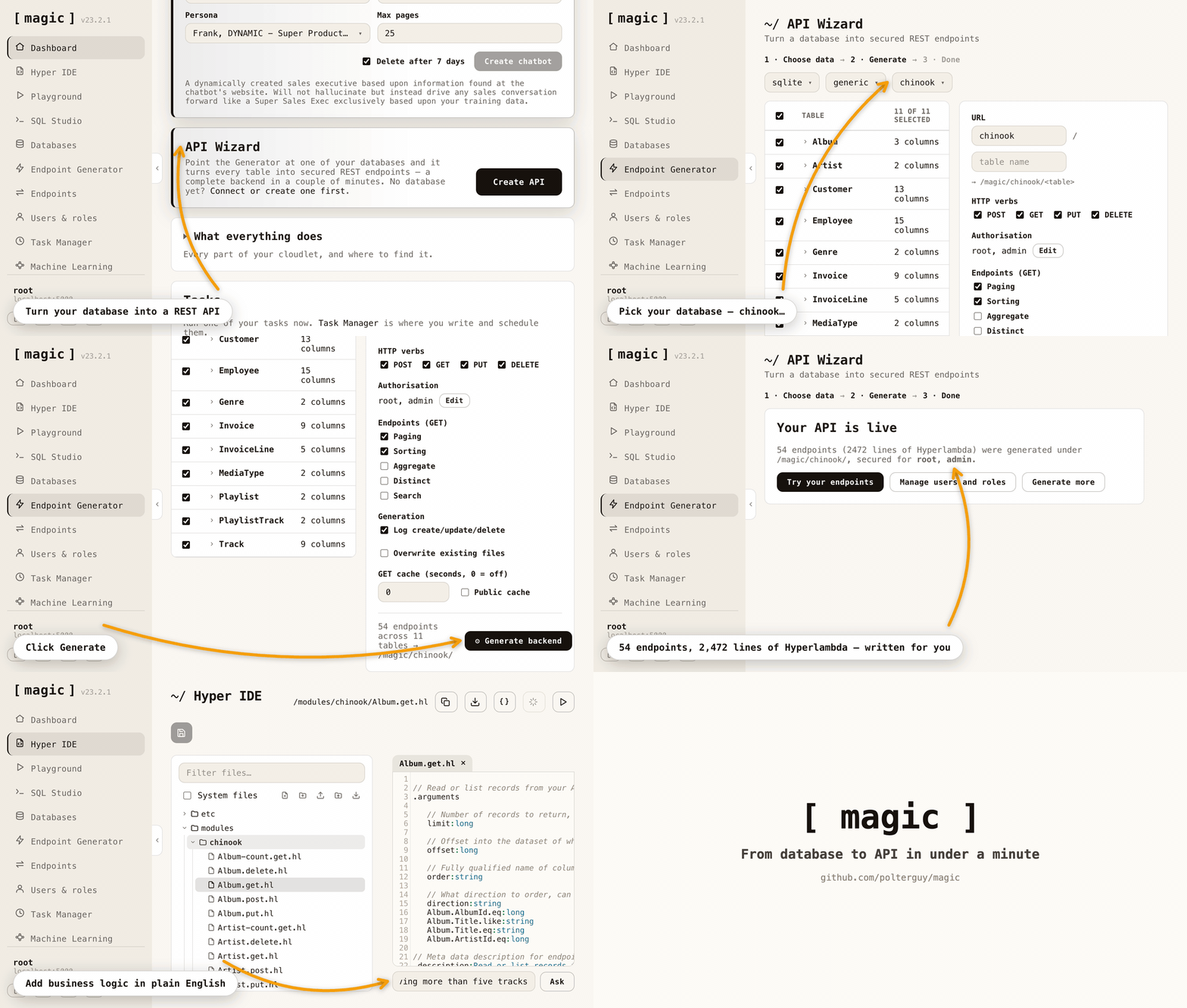
Point the API Wizard at your database, and it generates a complete, secured REST API — then extend it in plain English, without a build or deploy step.
⭐ If this saves you time, star the repo — it's the main way other developers find it.
What you can build
- Full-stack business apps — CRM systems, admin panels, booking systems, internal tools; database, secure API and frontend generated from natural language
- Database-driven AI agents — agents that query and update your database and invoke your endpoints, behind your own role-based access control
- AI chatbots and expert systems — crawl a website, get an embeddable chatbot grounded in your own content
- Secure APIs over legacy databases — point it at an existing MySQL, PostgreSQL, SQL Server or MariaDB schema and get a CRUD API in seconds
- Wrappers around third-party APIs — paste an OpenAPI or Swagger URL and get typed, documented endpoints wrapping Stripe, GitHub, Slack or anything else publishing a spec
- MCP tool servers — expose your endpoints to Claude, Cursor, Codex, Qoder or any MCP client
- Background jobs and automation — scheduled tasks written in Hyperlambda, or generated from a plain English description
- Static sites and SPAs — your cloudlet serves files directly, next to the APIs powering them
How it compares
| Magic Cloud | Lovable / Bolt | n8n / Zapier / Make | |
|---|---|---|---|
| License | MIT, fully open source | Proprietary | Mixed |
| Self-hostable | Yes — your hardware, your data | No | Partly |
| Backend included | Database, API, auth, RBAC, jobs | Frontend + third-party BaaS | Workflows only |
| Deploy step before you can test | None — save and run | Deploy to third parties first | Publish step |
| Execution model | Compiled .NET runtime | — | Interprets JSON/YAML workflows |
| MCP server | Built in | No | No |
| Vendor lock-in | None | Yes | Yes |
The LLM that cannot hallucinate functions
Magic runs Hyperlambda, which can be generated by our own proprietary LLM. Because we generate an AST rather than text, the output is analysed and rejected if it contains functions that don't exist. The Hyperlambda Generator cannot return hallucinated function invocations — like any LLM it can still write logically wrong code, but every function it invokes is guaranteed to exist.
Combined with the ability to restrict the vocabulary, this lets you ship AI agents that grow their own tool space on demand, without widening your attack surface.
Unique security model
Hyperlambda runs sandboxed, with no file system access outside its sandbox, and can whitelist individual functions through its RBAC system — so your server can accept code as input and execute it safely without knowing where it came from. Restricting invocations at the execution level makes Hyperlambda, as far as we know, the only language that currently does this.
I'm so confident in the codebase quality, I'll give you $100 if you can find a severe security-related bug in its backend code — and another $100 if you can exploit the natural language API, which has accepted arbitrary public input for 3 months with nobody succeeding.
MCP support — and an 80% token saving
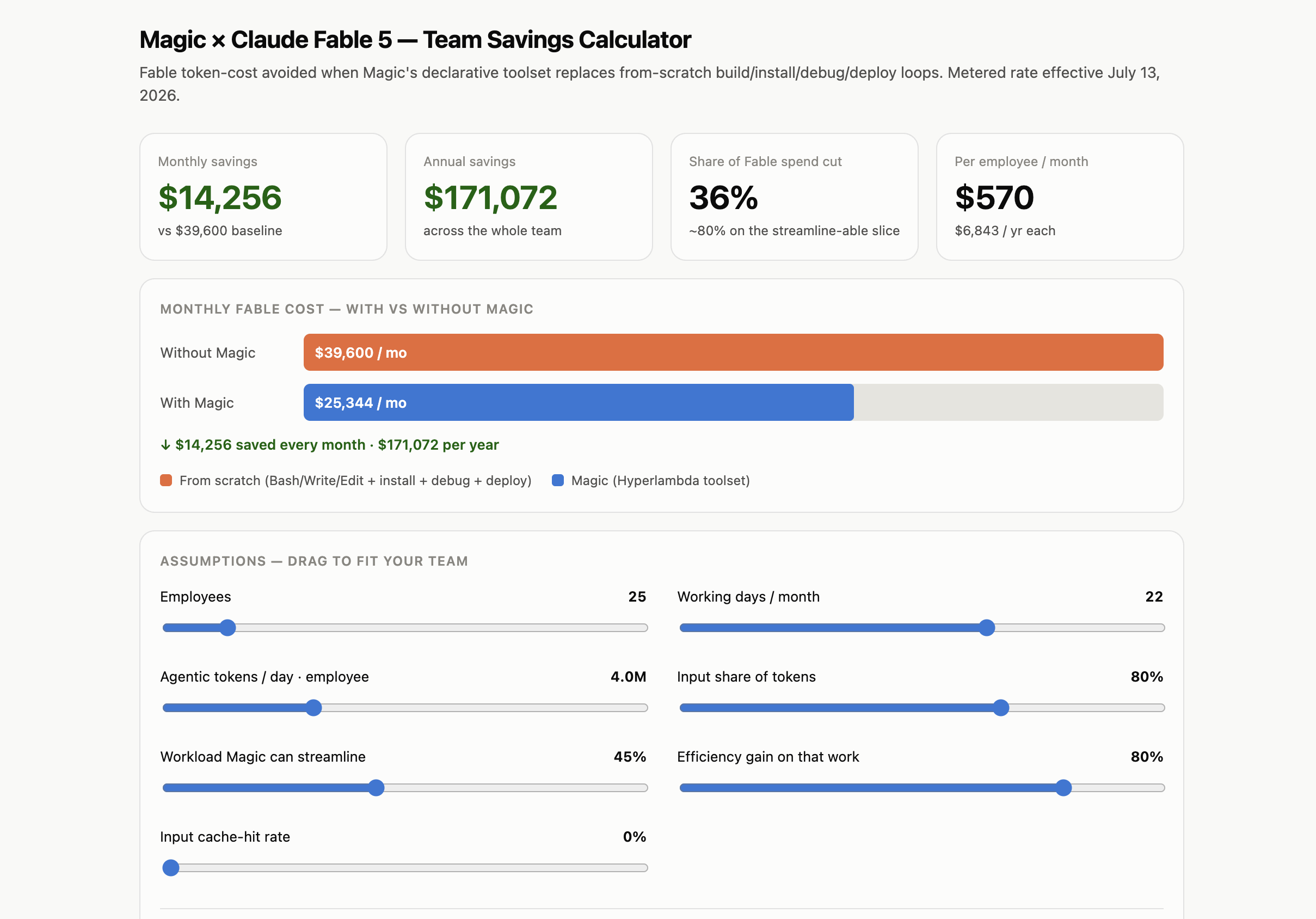
Install the mcp plugin, point Claude Code, Cowork, or OpenAI's Codex at your cloudlet, and every HTTP endpoint in your modules folder becomes a tool the agent can invoke. In our measurements this also cuts token consumption by roughly 80%. Calculate your own savings here.
Performance
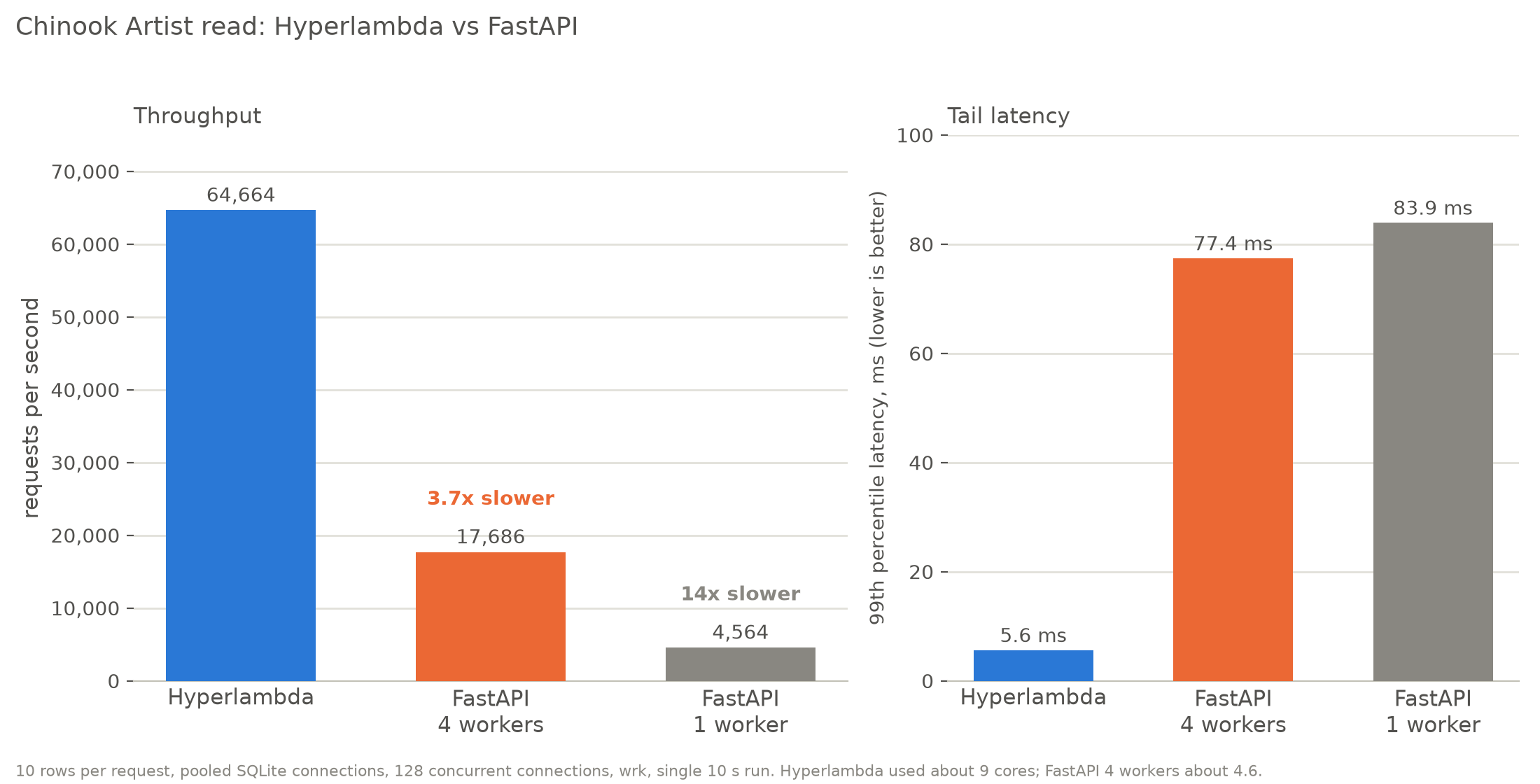
On a Chinook read endpoint (10 rows per request, pooled SQLite connections, 128 concurrent connections, measured with wrk), Hyperlambda served 64,664 requests per second, 3.7× the throughput of FastAPI with 4 workers (17,686) and 14× that of FastAPI with 1 worker (4,564). The 99th percentile latency was 5.6 ms, against 77.4 ms and 83.9 ms for FastAPI. Hyperlambda used about 9 cores and FastAPI with 4 workers about 4.6, so this is a measurement of throughput on one machine, not of efficiency per core: per core the gap is 1.8×. It needs connection pooling (Pooling=True), which is not the shipped default, it was measured mostly by an AI model (Claude) under the author's supervision, on one laptop, and it has not been independently replicated. The conditions, the caveats and the results as JSON are at hyperlambda.dev/benchmark, and the scripts to reproduce it are in benchmarks/fastapi.
The dashboard
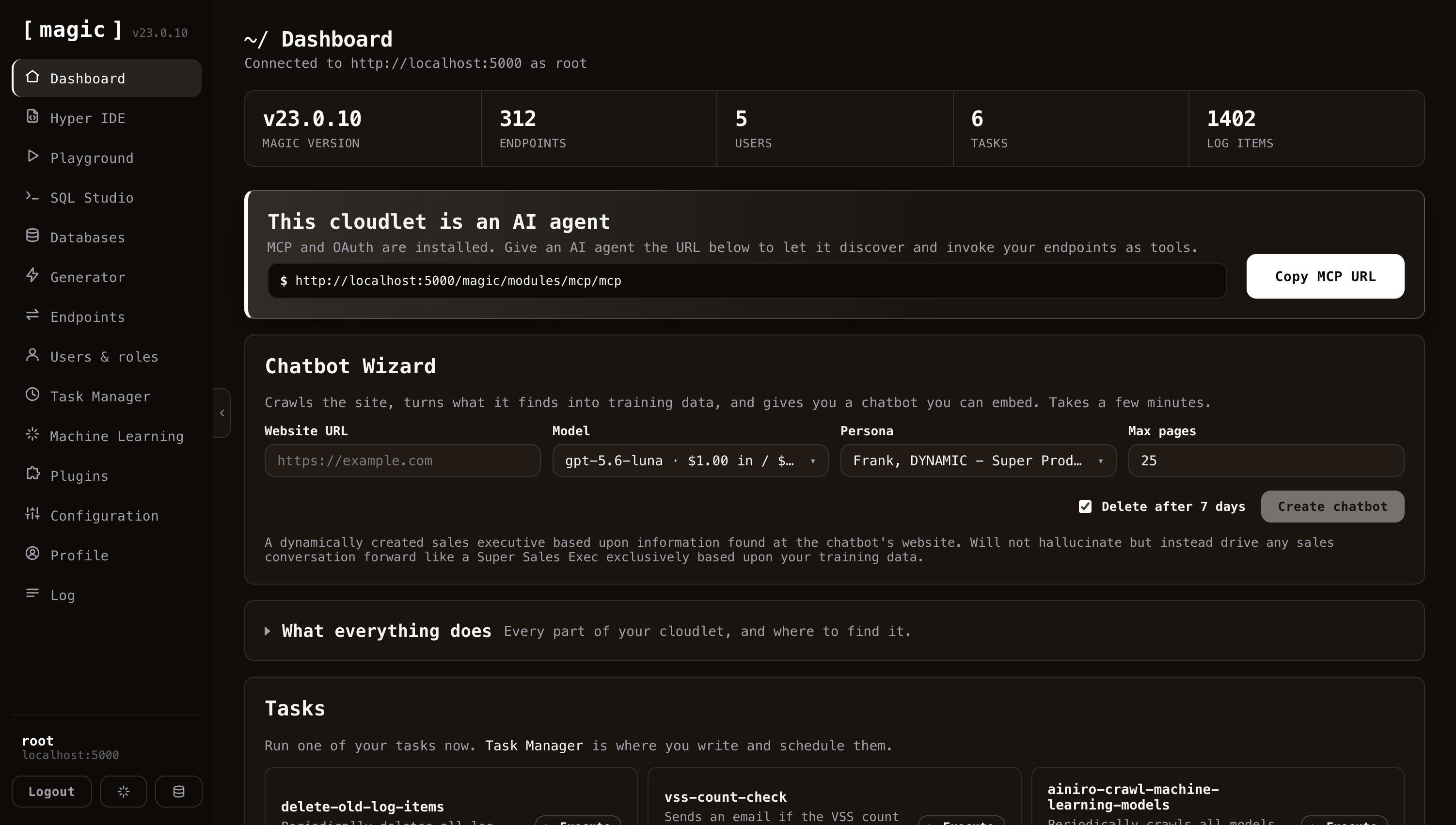
The sidebar is the whole platform: Hyper IDE for editing, running and replaying any file on the server, Playground for executing Hyperlambda without saving it first, SQL Studio for querying and designing databases, Endpoint Generator for turning tables into secured CRUD endpoints, wrapping caller-supplied code in a role-scoped sandbox, and importing third-party APIs from their OpenAPI specifications, plus users and roles, scheduled tasks, machine learning, and the plugin store.
Your cloudlet is also an AI agent. With the MCP plugin installed, the URL at the top hands any MCP-capable agent your endpoints as tools. The Chatbot Wizard goes the other way: give it a website, and it crawls the site, turns what it finds into training data, and hands you an embeddable chatbot grounded in your own content.
Once you save the code, you can test it — no deployment or publish step required.
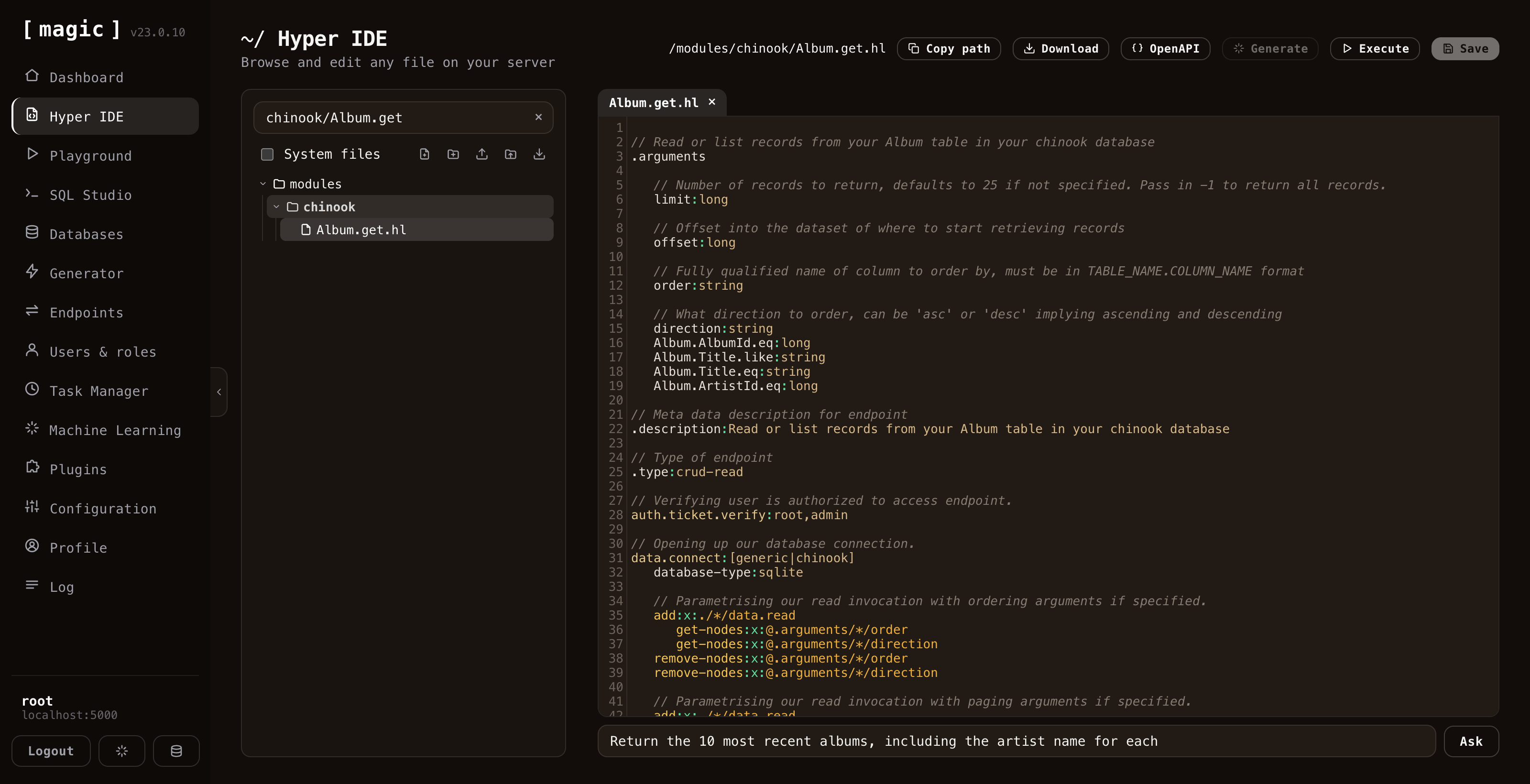
Notice the prompt bar below the editor, where "the Machine Creates the Code". Describe what you want in plain English and the built-in generator writes it straight into the file you're editing. The same bar follows you into the Playground and SQL Studio, generating Hyperlambda, SQL, HTML, or whatever fits the file you have open.
Web Designer
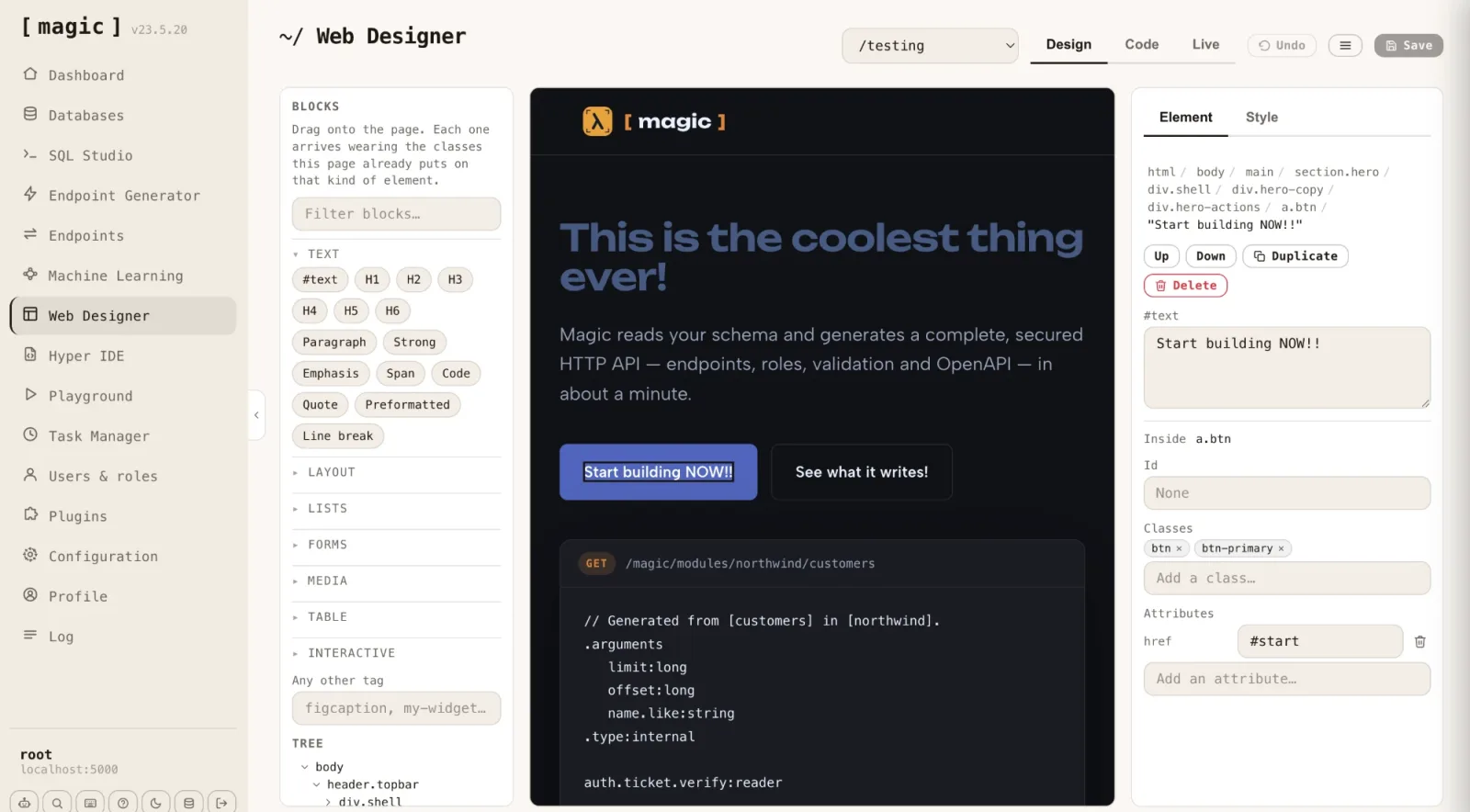
Design your frontend in the browser, on the real file. Web Designer opens any HTML page your cloudlet serves and lets you edit it the way you would edit a document — click an element to select it, double-click a run of text to rewrite it, drag a block in from the palette, drag it somewhere else to move it.
There is no project format and no build step. The page in the middle is the file on disk: scripts are disabled inside the canvas, so what the browser has parsed is exactly what will be saved back. That is also why selection can reach a bare #text node — every run of text is its own thing in the tree, not a property of the tag around it.
The palette carries 60+ blocks, and each one arrives wearing the classes that page already puts on that kind of element — drop a button into the navbar and it lands looking like the other nav items. Style changes go into the page's own stylesheet, inside a fenced block, so your hand-written CSS above and below it is returned to disk untouched.
Code view puts the same file in an editor — HTML, or any stylesheet the page links, picked from a dropdown — with the "the Machine Creates the Code" prompt bar underneath. Live view runs the page for real, scripts and all.
Chat Ops
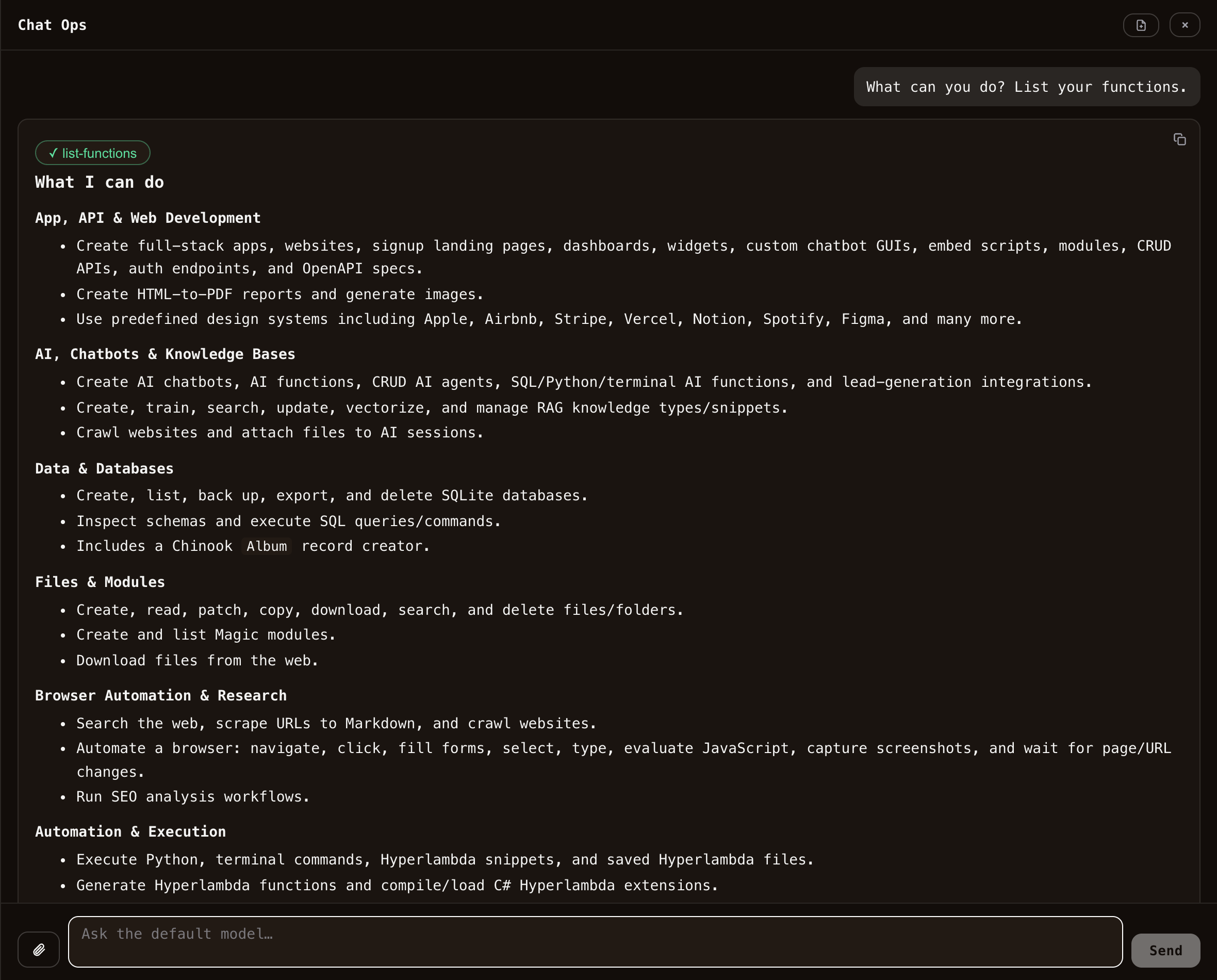
Ctrl+. anywhere in the dashboard opens Chat Ops: a conversation with your cloudlet that slides in over whatever screen you are on, and stays there while you navigate. Ask it to generate an endpoint from Hyper IDE and the file lands in the tree behind you — the conversation is still open when you turn round to look at it.
It talks to the default model, the developer-tools model, and it does not merely answer. It executes AI functions on your behalf: crawl a site, query a database, generate a CRUD API, scrape a URL, run a Hyperlambda snippet. Each invocation appears as a pill — amber while it runs, green when it succeeds, red when it throws — and clicking one opens the exact file and JSON arguments the model sent, so you can see what it actually did rather than trust a summary.
The whole loop is enforced server-side. A function the model tries to invoke that is not declared on the type is rejected before it executes, every function file carries its own auth.ticket.verify, and the invocation runs under your JWT — so Chat Ops can never do anything you could not do yourself from the dashboard.
Answers stream in as Markdown with syntax-highlighted code (Hyperlambda included), Mermaid diagrams render inline, and you can attach up to five files — either uploaded to the cloudlet for a function to work on, or handed to the model to read. Copy any code block, or the whole response, with one click.
Chat Ops appears only when an OpenAI API key is configured, and the key dialog is where you pick which model default runs.
Import any API
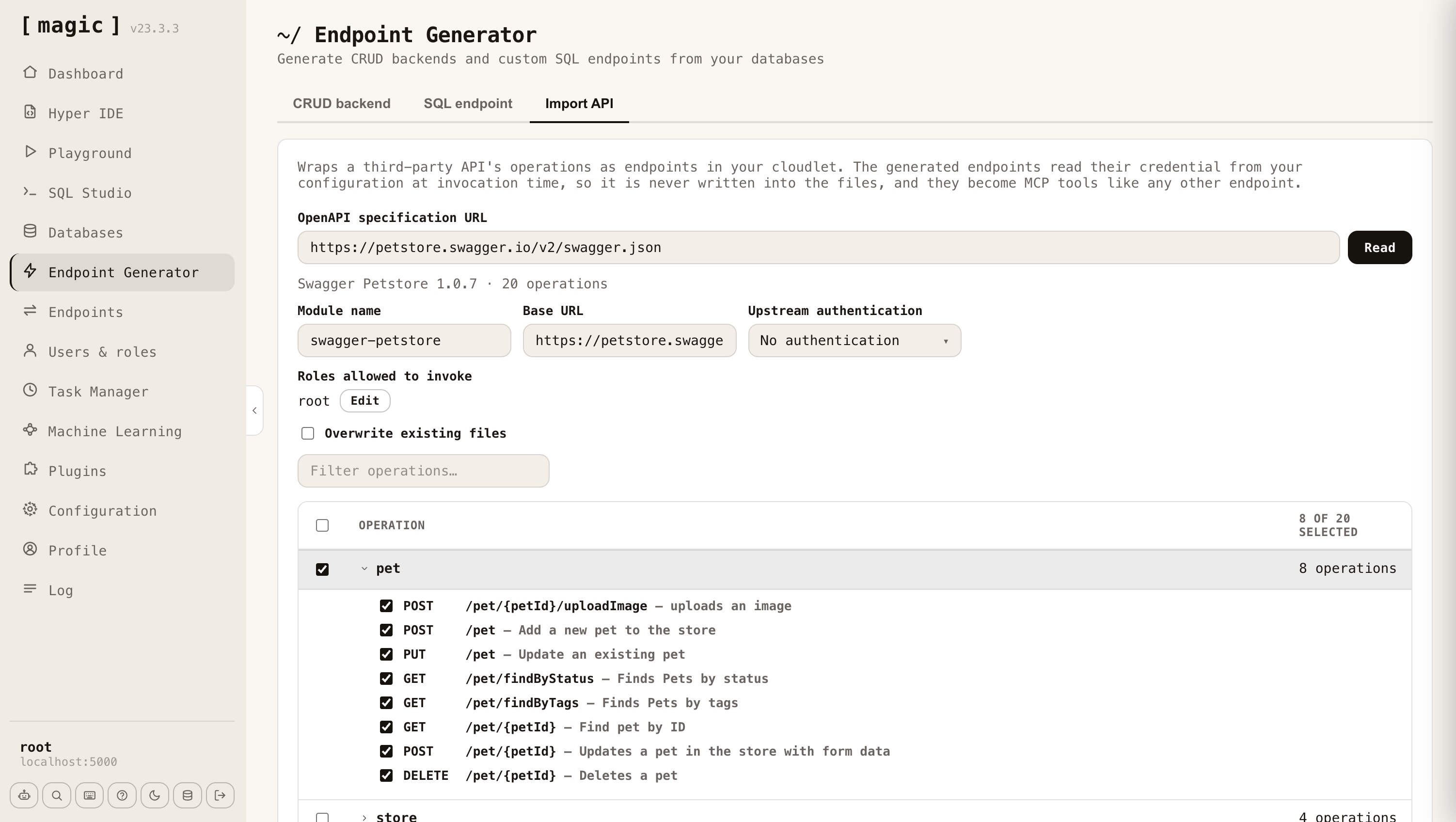
Point the Import API tab at any OpenAPI or Swagger URL — OpenAPI 3.x or Swagger 2.0, JSON or YAML — and Magic generates Hyperlambda endpoints wrapping whichever operations you tick. Query parameters and form fields become named, typed arguments carrying the specification's own types, defaults, enums and descriptions, and required ones get validators, so a missing argument is refused before the upstream API is ever contacted.
Because Magic publishes an endpoint's file comment as its MCP tool description and each argument's comment as that argument's description, an imported API arrives at your agent as a set of self-describing tools. Slack's chat.postMessage becomes fifteen individually typed, individually described arguments — not one of them written by hand.
The upstream credential is never written into the generated files. It is read from your configuration at the moment the endpoint is invoked, so the files stay safe to commit, and you declare which of your roles are allowed to invoke the wrapper.
Sandbox API — run caller-supplied code, safely
The Sandbox API tab of the Endpoint Generator turns the security model above into a feature you ship. It generates a single HTTP endpoint that executes code its own callers send it — Hyperlambda, or plain English turned into Hyperlambda by the generator — inside a whitelist you define per role.
You build a policy from an everybody base vocabulary plus per-role rules that add functions on top. A caller runs with the union of what their roles grant, so one role can reach a database another role cannot, and a function you did not grant does not exist as far as their code is concerned. A referenced function that doesn't exist is refused before anything runs, and an argument you pin — data.connect:northwind — restricts access to exactly that resource. Rate limit and execution timeout are set per role too. Capability wizards write the function lines for you — Database, HTTP, Files, Email, Logging and more — and the generated endpoint is a self-describing MCP tool like every other.
Pins take wildcards. data.connect:test-* allows every database with that prefix and nothing else; http.post:"https://api.example.com/v3/*" allows one API and no other host. File and folder functions compare the path segment by segment, so a wildcard stays inside the segment it occurs in the way it does in a shell — /etc/* grants a folder's files but not its sub-folders, /etc/*.md grants one extension within it. A pattern we don't implement throws rather than silently matching something its author didn't intend. Functions that read files on your behalf go through the file functions, so attaching a file to an email or hashing one needs the file pin too, not just the function.
There's a live one you can attack: a guest-only endpoint that grants nothing but read access to the Chinook sample database. Try to make it write — walkthrough and token here.
Rewind — step through an execution after it ran
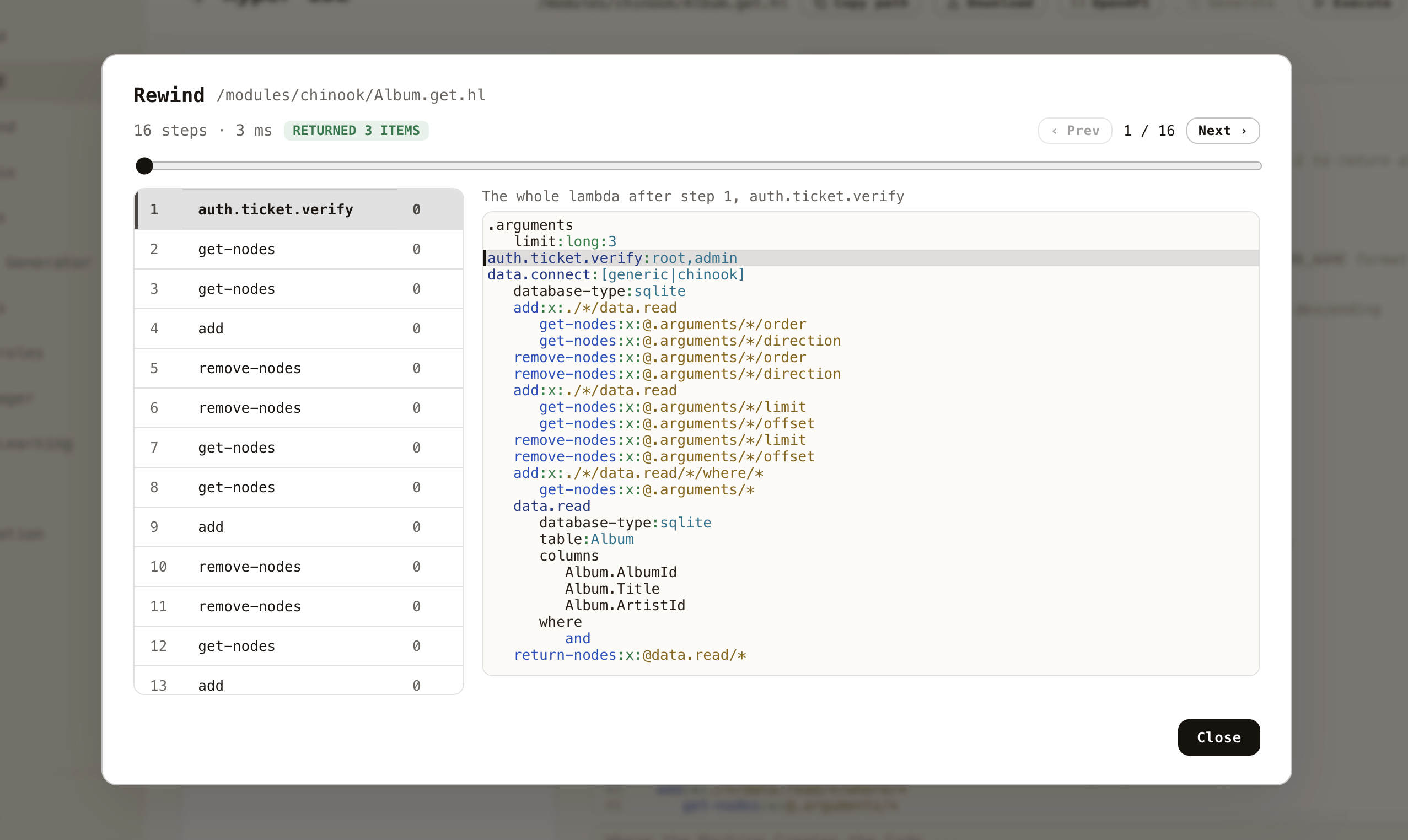
A stack trace tells you where your code died. It rarely tells you why, because the values are gone by the time you read it.
Click Execute on any Hyperlambda file, fill in your arguments, then click Debug instead of Invoke. Magic runs the file while recording every slot it invokes, and hands you the recording. Each step carries your entire program as it looked immediately afterwards — so stepping through the list is watching your own state evolve, rather than guessing at it.
Click a step and the code highlights the statement that was executing. Arrow keys step back and forward. When something throws, the statement that threw is marked in red and everything that happened before it survives — if a loop ran forty times and the forty-first line failed, you can see the state the loop had built up at the moment it broke.
Recording happens only when you ask for it and lives only in memory. Nothing is written to disk, nothing leaves the server, and code running normally is unaffected — there is nothing switched on to slow it down.
OIDC sign-in
The dashboard signs in over OpenID Connect against Google, GitHub, LinkedIn, Microsoft Entra ID, Okta, Auth0, Keycloak and Slack — configured from the Configuration screen with a client ID (and, where the provider requires it, a secret) per provider. Code-flow exchanges run server-side with PKCE, only provider-verified email addresses are trusted, and identities are provider-scoped so a sign-in can never collide with another account. A provider is a single Hyperlambda file — drop in a new one and the login screen picks it up automatically.
Getting started
Deploy to DigitalOcean (recommended)
One droplet running the full stack, with persistent volumes for your data, configuration and modules. Create your droplet — edit the single DOMAIN= line in .do/cloud-init.yaml and paste it into the User Data field. HTTPS is automatic through Caddy and Let's Encrypt. Full guide: DigitalOcean deployment guide
Kubernetes (own cluster)
The root docker.backend/docker.frontend images run unmodified in your own cluster. To make request.ip/request.scheme resolve the true end user behind your ingress (and Cloudflare, if in front), follow the client-IP deployment note.
Docker Compose (self-hosted)
The one-liner at the top of this README is the fastest route. If you'd rather keep the file around:
services:
  backend:
    image: servergardens/magic-backend:latest
    platform: linux/amd64
    container_name: magic_backend
    restart: unless-stopped

    ports:
      - "4444:4444"

    volumes:
      - magic_files_etc:/magic/files/etc
      - magic_files_data:/magic/files/data
      - magic_files_config:/magic/files/config
      - magic_files_modules:/magic/files/modules

  frontend:
    image: servergardens/magic-frontend:latest
    container_name: magic_frontend
    restart: unless-stopped

    depends_on:
      - backend

    ports:
      - "5555:80"

volumes:
  magic_files_etc:
  magic_files_data:
  magic_files_config:
  magic_files_modules:
Run docker compose up, visit localhost:5555, log in with root / root, and configure the system. More installation options here.
Run from source
You'll need .NET 10 and Node.js (latest LTS).
# Backend — starts the API on http://localhost:5000
cd backend
dotnet run

# Frontend (in a second terminal) — dashboard on http://localhost:4201
cd frontend
npm install
npm run dev
Open http://localhost:4201 and log in using http://localhost:5000 as your backend URL, with root / root.
Bring your own OpenAI API key
Magic uses OpenAI by default — create a key here. If you'd rather not use OpenAI, there are Ollama and HuggingFace plugins that override the inference functions, and chatbots can use BM25 keyword retrieval instead of embeddings — full-text search over your training data, running entirely inside SQLite, needing no OpenAI key and no vectorisation. Semantic and hybrid retrieval still use OpenAI's embeddings API. And if you drive Magic through the MCP server, you don't need an OpenAI key at all.
AI agents
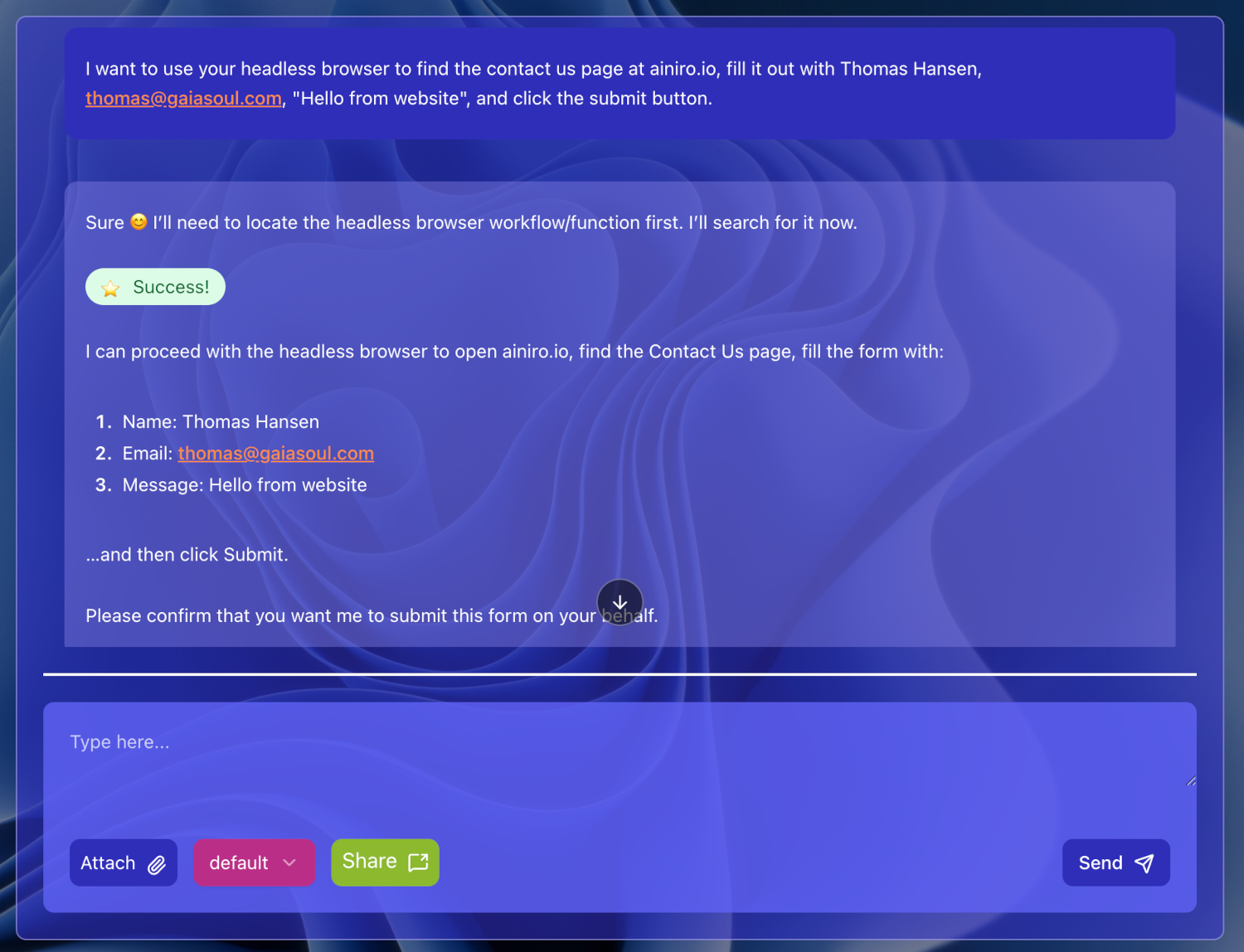
Below is Magic's AI agent autonomously browsing the web and filling out a "contact us" form, using the integrated headless browser that lets your agent see the web and solve tasks on it.
You can vibe code AI agents integrated with your CRM, ERP, or legacy databases. Magic fundamentally is an AI agent for building software and AI agents — what you use it for is up to you.
Headless browser
Magic embeds PuppeteerSharp, so agents can browse like a human — filling forms, clicking buttons. An example prompt: "Go to xyz website, identify their contact us form and change URLs if required, and fill out their contact us form." The screenshot above is the result of exactly that prompt.
Python, terminal, and C# integration
Generate and execute Python on the fly and let the LLM use it as a tool, use Bash and the underlying terminal, and create Hyperlambda keywords in C#. Persisted Python scripts can be referenced later as tools, permanently widening your agents' capabilities.
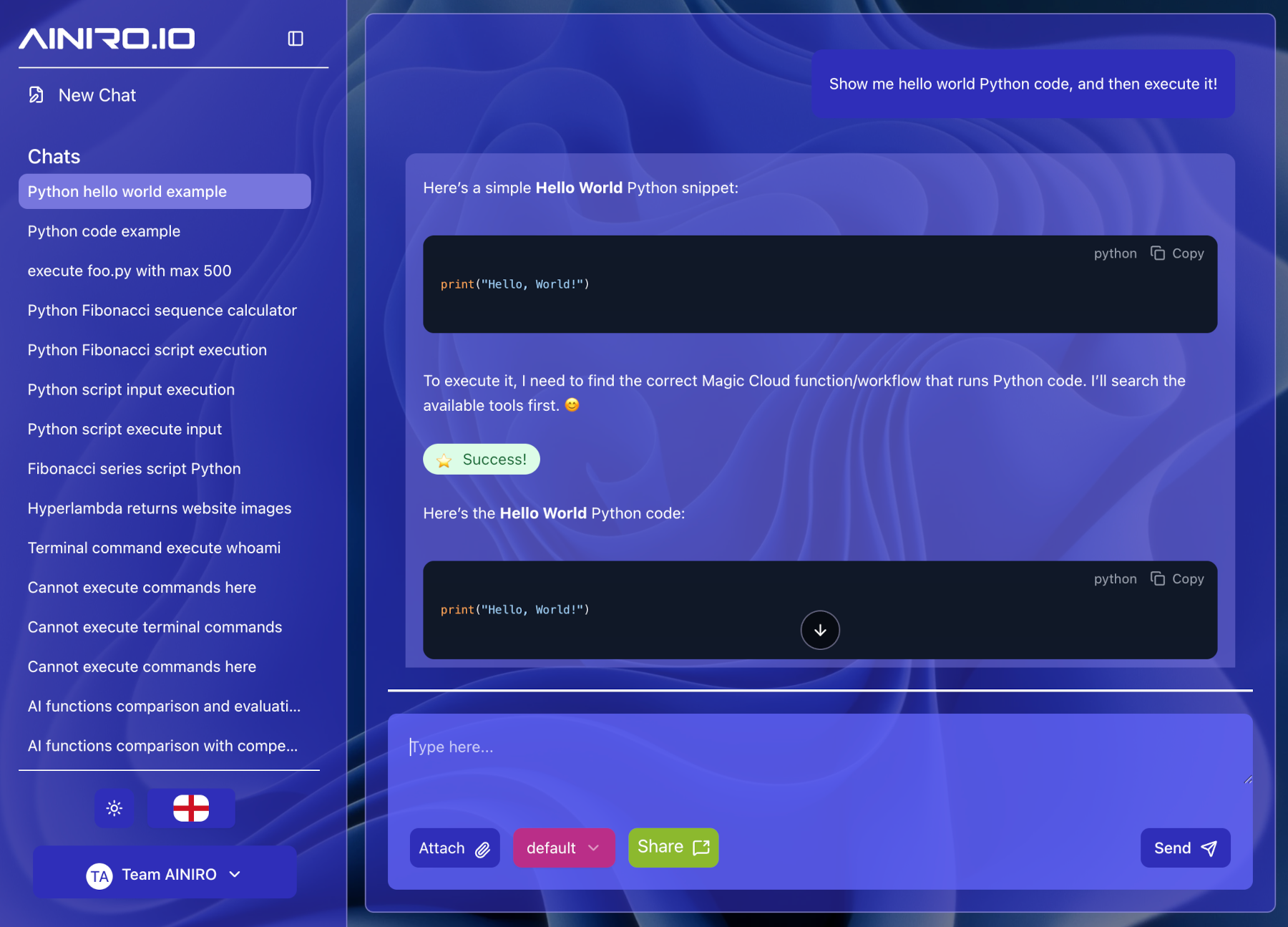
Notice — you must be logged in as root to generate and execute Python or terminal scripts, or create C# extensions. Magic's security model eliminates entire classes of holes, but it is not a magic pill; don't expose endpoints that let third parties execute arbitrary code.
AI chatbots and expert systems
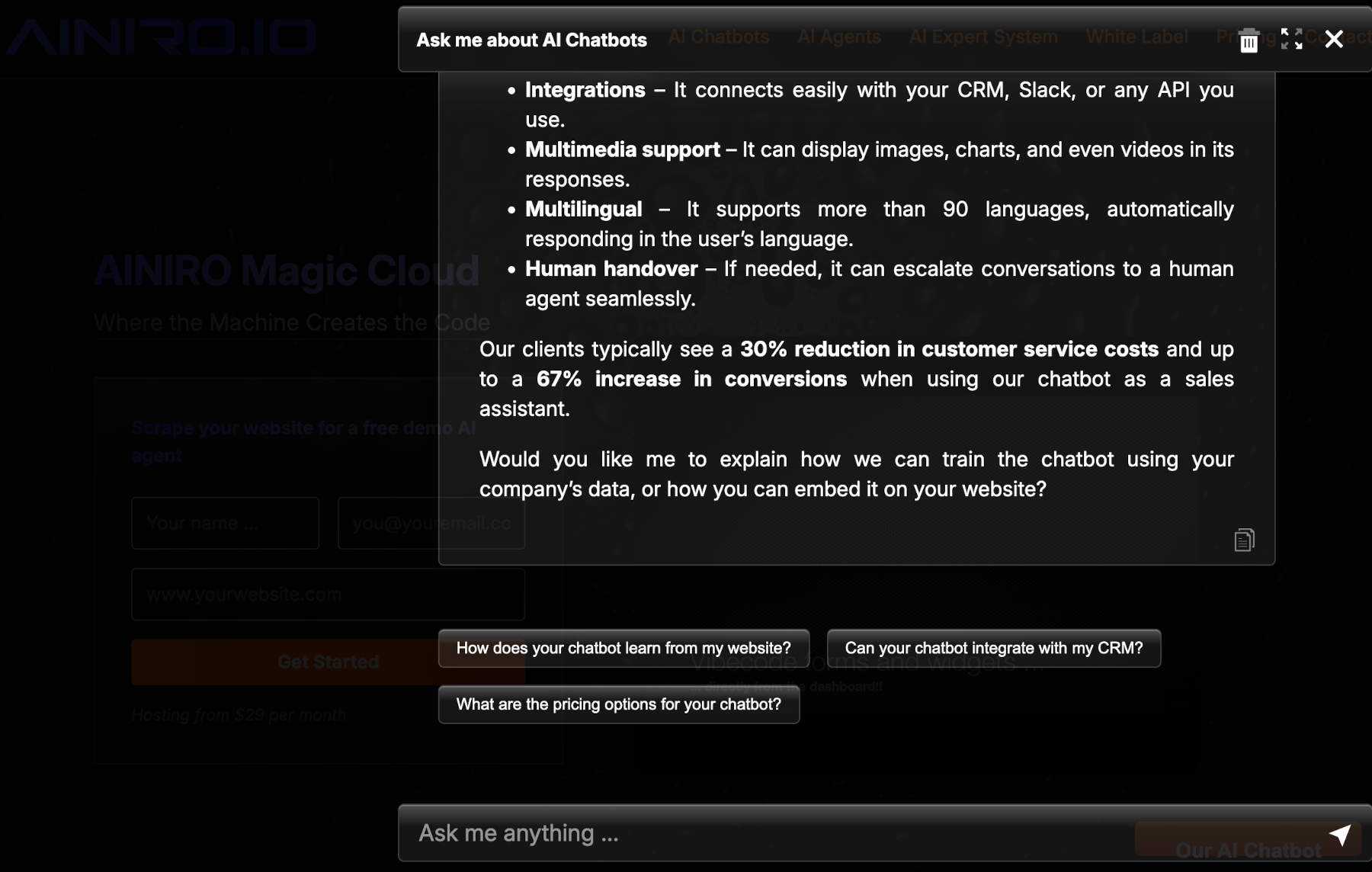
Deliver your agents as password-protected AI expert systems, or as embeddable chatbots on any website. Try ours here.
Chatbots are grounded in your own content through RAG, with three retrieval modes per model: semantic (cosine similarity over OpenAI embeddings), keyword (BM25 full-text search — built on SQLite's FTS5, no OpenAI key and no vectorise step needed), or hybrid, fusing both rankings so paraphrased questions and exact terms such as product names each find the right training snippet. The crawler splits pages into subject-scoped snippets titled as the questions users actually ask, which is what makes retrieval precise in the first place.
Also a web server
Magic serves your frontend itself, so there's no compilation, build process or pipeline between writing code and testing it:
- Create your prompt
- Press enter
- Test
This is in stark contrast to tools such as Lovable and Bolt, which require deploying into two different third-party providers before you can even test. It also ships pre-built frontends, such as the AI Expert System for serving password-protected agents or entire SaaS AI solutions.
... and, arguably, a CMS
Install the Hyper CMS plugin (hyper-cms) from the plugin store and your cloudlet becomes a website platform as well: a templated starter kit with blogging built in, served straight from your cloudlet, with pages that can pull content from the backend through server-side rendering. Magic is no longer only the thing behind your site, it is also the site.
It also combines with the rest of the platform:
- Web Designer edits the CMS pages visually, on the real files, with no build step.
- Chat Ops lets you ask your cloudlet to add a page, write a blog post or change the layout, instead of clicking through an admin panel.
- MCP connector lets Claude Code, Cowork or Codex build and maintain the website for you, creating pages and publishing articles with the same tools they use for your endpoints.
Edit by hand, by dragging blocks, by chatting, or by delegating to an agent, and it is all the same files on disk.
Magic Cloud MCP 질문
Magic Cloud MCP를 Claude Code에 추가하려면 어떻게 하나요?
터미널에서 claude mcp add --env magic_host=<magic_host> magic -- docker run -i --rm docker.io/servergardens/magic-aio:v24.4.21를 실행합니다. 모든 프로젝트에서 사용할 수 있게 하려면 --scope user를 추가합니다.
Magic Cloud MCP를 Cursor에 추가하려면 어떻게 하나요?
~/.cursor/mcp.json를 열고 mcpServers 아래에 서버를 추가합니다. 위 설치 섹션에 표시된 Cursor 구성을 사용합니다.
MCP 지원 방식은 어떻게 되나요?
MCP 플러그인을 설치하면 modules 폴ender 내의 모든 HTTP 엔드포인트가 Claude 또는 Cursor와 같은 AI agent가 호출할 수 있는 도구가 됩니다.