
Plumb MCP server
2026년 11월 10일 커밋LSP 기반의 시맨틱 인텔리전스, 트랜잭션 파일 편집, 공유 데몬을 통한 멀티 에이전트 협업 기능을 코딩 에이전트에게 제공합니다.
다른 이름 plumbkit/plumb
- 스타
- 4
- Tools
- —
- 다운로드, 30일
- —
- 최신 버전
- 0.27.0
- 마지막 커밋
- 2026년 11월 10일
- 라이선스
- MIT
Plumb MCP란?
Plumb은(는) MCP server입니다. LSP 기반의 시맨틱 인텔리전스, 트랜잭션 파일 편집, 공유 데몬을 통한 멀티 에이전트 협업 기능을 코딩 에이전트에게 제공합니다.
프로젝트 README에서 생성된 요약
Plumb MCP server 정보
Plumb는 코딩 에이전트에게 IDE에서 흔히 볼 수 있는 시맨틱 인텔리전스를 제공합니다. Language Server Protocol (LSP)과 tree-sitter를 사용하는 MCP server로서, 에이전트가 심볼 정의, 참조 및 코드 계층 구조에 접근할 수 있도록 지원합니다. 이를 통해 에이전트는 단순한 텍스트 파일을 읽는 수준을 넘어 코드 구조를 이해할 수 있으며, 컨텍스트 효율성과 정확도가 향상됩니다.
시스템은 백그라운드 데몬을 실행하는 단일 바이너리로 작동합니다. 이 데몬은 여러 에이전트를 위한 공유 협업 레이어 역할을 하여, 에이전트들이 서로의 활성 워크스페이스 세션을 확인하고 메일박스 시스템을 통해 통신할 수 있게 합니다. 데몬을 공유하므로 경로별 잠금을 관리하여 동시 쓰기 충돌을 방지할 수 있으며, 파일 무결성을 보장하기 위해 롤백 기능이 포함된 원자적 멀티 파일 트랜잭션을 제공합니다.
개발자는 plumb setup 명령어를 사용하여 Claude Code, Cursor, Gemini와 같은 다양한 클라이언트를 연결할 수 있습니다. 서버는 Go와 Python에 대한 최상급 통합을 지원하며, 30개 이상의 다른 언어에 대해 tree-sitter 기반 내비게이션을 제공합니다. 또한 에이전트가 자리를 비운 사이 저장소를 보호하기 위해 범위 제한 파일 시스템 접근 및 단계별 git 게이팅과 같은 안전 기능을 포함하고 있습니다.
활용 사례
- 1멀티 에이전트 협업개발자는 여러 에이전트가 작업을 중복하거나 서로의 코드를 덮어쓰지 않도록 하면서 동일한 프로젝트에서 작업하게 할 수 있습니다.
- 2원자적 멀티 파일 편집 실행에이전트에게 여러 파일에 걸친 변경 사항을 적용하도록 지시할 수 있으며, 작업 중 일부라도 실패할 경우 전체 작업이 롤백되도록 보장합니다.
- 3시맨틱 읽기를 통한 토큰 사용량 절감에이전트가 파일 전체를 읽는 대신 특정 심볼이나 라인 범위를 요청함으로써 컨텍스트 윈도우 공간을 절약할 수 있습니다.
프로젝트의 README를 바탕으로 작성되었습니다. 모든 활용 사례는 해당 내용의 인용문과 대조하여 확인합니다.
자동 검사
2026년 11월 14일에 실행됨전체 보고서 →아직 인증되지 않았습니다. 서버는 80점 이상의 점수, 심각한 결함 없음, 그리고 검사에 충분한 데이터를 갖추어야 합니다. 검사 방식 · 점수를 높이기 위해 수정할 항목

- 소스 저장소 연결 및 접근 가능plumbkit/plumb is public and reachablegithub.com/plumbkit/plumb ↗통과
- 패키지가 이 저장소를 소스로 명시검사되지 않음
- 빌드 출처(Sigstore 증명)검사되지 않음
- 오픈 소스 라이선스 (OSI)MITspdx.org/licenses/MIT.html ↗통과
- 최근 1년 내 커밋 또는 릴리스Last commit or release 2026-11-10github.com/plumbkit/plumb ↗통과
- OpenSSF Scorecard검사되지 않음
- 패키지 이름이 인기 패키지와 유사하지 않음검사되지 않음
- 패키지 및 해당 종속성에 중요한 보안 권고 없음검사되지 않음
- 모델에 대한 숨겨진 지침 없음0 tool descriptions and the README read; no override phrases, credential paths or hidden characters통과
- 파괴적인 도구에 라벨 표시됨검사되지 않음
- 원격 엔드포인트가 MCP 핸드셰이크에 응답검사되지 않음
README
GitHub에서 보기


IDE intelligence for agents — guardrails for unattended work, coordination for fleets.
Plumb is an MCP server that gives a coding agent the intelligence layer of an IDE — LSP-backed semantics, a tree-sitter code index, and project memory — inside guardrails: atomic, lock-serialised writes with transactional rollback, scoped filesystem and git access, and a daemon that survives its own crashes. And because every agent you run shares that one daemon, plumb is also the coordination layer between them: peers see the writes others made, message each other, and hand off work instead of duplicating it. A single binary; nothing else to install.
Why Plumb
LLM agents usually work by reading whole files into the context window — token-heavy, lossy at scale, blind to symbol semantics, and unsafe to let loose on a real repo. Plumb is built on four pillars, in priority order.
1. Reliability & write-safety
Leaving an agent to edit a codebase for an hour is only viable if writes can't corrupt files and a crash can't wedge your session.
- Atomic I/O — every write is staged in a temp file and renamed into place. No partial writes, ever. Symlink-aware, CRLF-tolerant.
- Per-path locking — the daemon serialises concurrent writes to the same file across every session and chat window. No races.
- Multi-file transactions — apply edits across dozens of files with guaranteed atomic rollback if any step fails.
- Crash-resilient daemon —
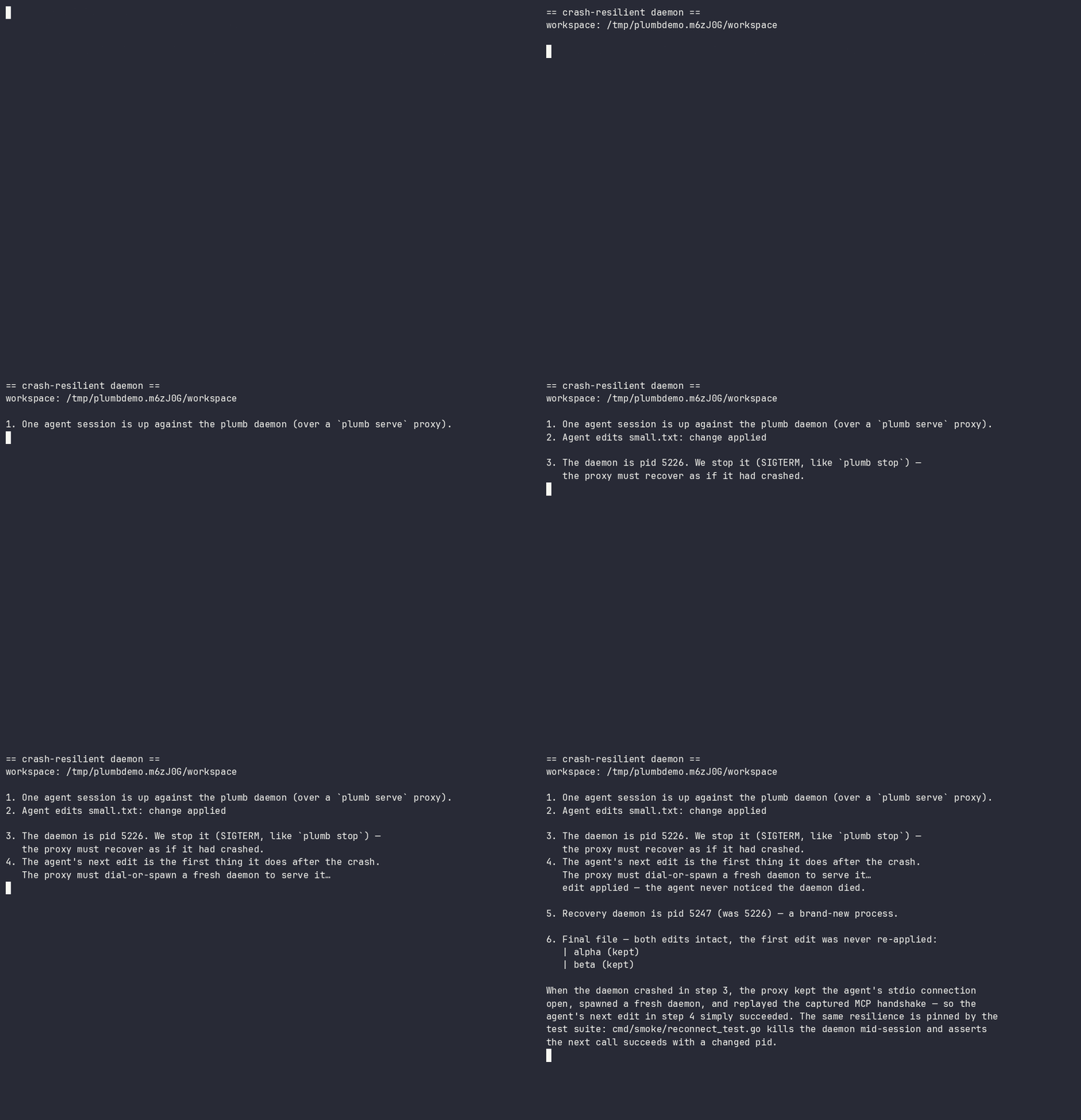
plumb serveis a reconnecting proxy. If the daemon crashes or hangs, it respawns one and replays the handshake; the agent never notices. In-flight writes are never silently re-run. - Optimistic concurrency — mtime/sha guards catch stale edits before they clobber newer changes.
See it run: docs/demos/ — two-agents-one-file.sh (a stale write is refused, nothing is lost) and daemon-respawn.sh (below — the daemon is killed mid-session; the agent's next edit still succeeds):
2. Multi-agent coordination
One daemon serves every agent you run — which makes it the natural place for agents to see and talk to each other, not merely avoid each other's writes. Locks stop two agents corrupting a file; coordination stops them duplicating a task, rebasing onto a function signature a peer is mid-rewrite of, or shipping a change a peer's in-flight work is about to invalidate.
- Peer awareness (on by default) —
workspace_sessionsnames every active session and the writes it made, as the daemon recorded them. Recorded activity, not another agent's say-so: an agent about to start a task can see that a peer is already in those files. (Read-only operations never appear, and a write that failed or was refused is kept but marked[failed — no change applied]— so "a peer is working here" and "this landed" are distinguishable at a glance.) - An agent-to-agent mailbox (on by default, same workspace) —
leave_note/check_messagesgive sessions a threaded channel: hand a change to the peer already rewriting those files, or ask a peer to measure a behaviour instead of assuming it. Messages ride on ordinary tool results, so a working agent receives them without polling. - Advisory intents (opt-in:
[collab] intents) —share_intentdeclares what an agent is working on; a peer whose write touches a claimed path gets a hint at the moment of the would-be collision. Intents are deliberately labelled as unverified claims, kept distinct from the daemon-recorded activity feed, and never block anything. - Durable findings (opt-in:
[collab] knowledge_handoff) —share_findingsturns what an agent just learned into a searchable, secret-scrubbed project memory immediately, so the knowledge outlives the session that produced it.
Coordination is advisory by design — the write-safety above never depends on agents cooperating. Reference: Cross-agent sharing in the tool docs and the [collab] config section.
3. Semantic intelligence
The same primitives your editor has, exposed as structured tools:
- LSP-backed refactors —
rename_symbol,replace_symbol_body,safe_delete_symbolunderstand scope, types, and references. - Real diagnostics inline — actual
gopls/pyrightoutput is appended to every write, so the agent learns it broke the build immediately. - Symbol search — scoped to your code, no stdlib or dependency noise.
4. Context efficiency & safety controls
- Read only what you need — symbols or line ranges, not 2,000-line files.
- Scoped access you control — a per-connection path allowlist (read-only vs read-write roots) plus tiered git gating (destructive and network operations are off by default and need explicit confirmation). See SECURITY.md.
- One-round-trip bootstrap —
session_startreturns workspace, branch, recent commits, diagnostics, and project memory.
See the measured, reproducible numbers behind this: docs/use-cases.md — reading one function is 2.9×–33.4× less context than the whole file (the ratio is how much of the file you didn't need), and find_references returns the real call sites where a text search is 60% noise. The page publishes the losses too: read_multiple_files costs 1.31× more payload than reading the files natively (down from 1.32×, but still a loss — see Scenario 10 for why it isn't smaller). Every figure is regenerated by scripts/measure-use-cases.py.
Get started
Plumb is a single binary — from zero to your first answer:
1. Install
# Homebrew (macOS + Linux) — recommended
brew install plumbkit/plumb/plumb

# or with Go
go install github.com/plumbkit/plumb/cmd/plumb@latest

# or grab a prebuilt binary: https://github.com/plumbkit/plumb/releases
macOS note: prebuilt binaries are not yet notarised — on first run you may need
xattr -d com.apple.quarantine ./plumb, or right-click → Open. Homebrew installs avoid this.
2. Connect your agent
plumb setup claude-code # also: claude-desktop, codex, gemini, cursor, …
plumb setup writes the MCP config for you — no hand-editing JSON.
3. Open your project and try it
Make sure the language server you need is on your $PATH (gopls for Go,
pyright for Python, …), then point your agent at a real question. In Claude
Code:
cd your/project
claude "Use plumb to orient in this repo (session_start), then show me
everywhere <Handler> is called and what would break if I changed its signature."
Plumb resolves the workspace and runs session_start for orientation, then
answers with real LSP and topology data — actual call sites and blast radius —
instead of guessing from file dumps. It's read-only; nothing is modified. (Any
connected agent works — just paste the prompt.)
No
go.mod/pyproject.tomland not a git repo? Runplumb initonce to pin the workspace root (it also seeds.plumb/context.mdand project config).
Full walkthrough → docs/getting-started.md.
Language support (honest version)
Plumb negotiates LSP capabilities per language and also ships a built-in tree-sitter index for search and navigation with no language server. Support comes in tiers — we'd rather be precise than claim a big number.
| Tier | Languages | What you get |
|---|---|---|
| First-class (CI-tested, real-binary integration) | Go (gopls), Python (pyright) | Full LSP: definitions, references, rename, diagnostics, hierarchies + all write tools |
| Validated | Java (jdtls), Rust (rust-analyzer), Swift (sourcekit-lsp), TypeScript/JS (typescript-language-server), Zig (zls), Kotlin (kotlin-lsp), HTML (vscode-html-language-server) | Full LSP; just put the server on $PATH and it activates automatically (exclude any language with [lsp.<lang>] enabled = false). HTML carries one caveat: that server has no filesystem access, so it answers only from documents already opened |
| Search & navigation (tree-sitter, no LSP needed) | 31+ incl. JS/TS/TSX, Ruby, C, C#, Elixir, Scala, PHP, JSON, CSS, SCSS, XML, Lua, C++, Objective-C, Dart, Bash, SQL, HCL, Dockerfile, TOML, YAML, Markdown | Ranked symbol search, outlines, graph exploration via the Topology index |
Real-binary validation has been exercised on macOS and Linux — as of 2026-08-21, all nine adapters pass their integration tests against real server binaries on both. Details, including three toolchain traps that look like adapter bugs, are in docs/adding-an-lsp.md. Windows is tracked but not yet supported — the daemon's Unix-socket architecture needs a port.
How it works
plumb serve is a thin, reconnecting stdio proxy. The real work happens in one shared background daemon, so language servers stay warm across chats.
flowchart TD
    A1["Claude"] --> S1["plumb serve *"]
    A2["Codex"] --> S2["plumb serve *"]
    A3["Gemini"] --> S3["plumb serve *"]
    S1 --> K["plumb.sock"]
    S2 --> K
    S3 --> K
    K --> D["plumb daemon **"]
    D --> SDB[("stats.db ***<br/>global — all projects")]
    D --> G["gopls → /projects/foo"]
    D --> P["pyright → /projects/bar"]
    G --> F1[("/projects/foo/.plumb/ ***<br/>topology.db · memory.db")]
    P --> F2[("/projects/bar/.plumb/ ***<br/>topology.db · memory.db")]
* plumb serve is a reconnecting proxy — if the daemon crashes or hangs it respawns one and replays the handshake, so your session survives without the agent noticing.
** one shared process, reused across every conversation.
*** SQLite. One global stats.db (tool stats + episodic summaries); two per-project indexes under each workspace's .plumb/ — topology.db (the code graph) and memory.db (memory search). Schema details → docs/architecture.md.
Servers stay warm across chats, per-path locks are shared across every connection, and symbol indexes update live after each write. Full architecture → docs/architecture.md.
Monitoring (TUI)
Run plumb with no arguments for a live dashboard — see what your agent is doing in real time: every tool call as it happens, daemon health, per-tool stats, and streaming logs you can follow and filter. The fastest way to catch a runaway loop or confirm an edit landed.
Core capabilities
Plumb exposes 61 tools. The ones you'll use constantly:
session_start · workspace_symbols · get_definition · find_references · rename_symbol · edit_file · transaction_apply · diagnostics
The rest cover filesystem reads/writes, LSP hierarchies, tiered git, an optional local Topology index (ranked search + blast-radius/route analysis, no language server needed), durable per-project memory, and cross-agent coordination (peer sessions, an agent mailbox, opt-in intents and knowledge handoff). Full API reference: docs/tools.md.
Configuration
Global or per-project config.toml, or environment variables. Run plumb config show to see the resolved config with provenance.
[edits]
strict = true                  # require read_file before edit_file
rate_limit_per_minute = 30     # bound runaway agent loops

[git]
allow_destructive = false      # reset/checkout/rebase off by default
allow_push = false             # push/fetch/pull off by default
Full settings reference: docs/configuration.md.
The hard part
Agents can already read code well enough; writing it unsupervised — concurrently, transactionally, recoverably — is what's still unsolved. Plumb is the bet that this is the half worth getting right first. It's early, and the language coverage says so: a small validated core, the rest clearly marked experimental.
Roadmap
Plumb is pre-1.0. The core — write-safety, the resilient daemon, the topology index, and project memory — is in daily use. The road to 1.0 is mostly about proving it beyond the validated core and smoothing distribution. Issues and ideas welcome.
Shipped
- Concurrency-safe, atomic, transactional writes with rollback
- Crash-resilient reconnecting daemon
- Tree-sitter topology index + per-project memory
- Cross-agent coordination: peer awareness + agent mailbox (default on), intents + knowledge handoff (opt-in)
- Go and Python LSP adapters validated (real-binary)
Getting to 1.0. Rather than jump from 0.9 straight to 1.0, Plumb ships a series of focused minor releases — 0.10 through 0.19 — each with one coherent theme. 0.19.x is the last 0.x release; 1.0 follows it as a deliberate stability commitment. Native Windows support is intentionally a post-1.0 (1.1) item, not a 1.0 gate. The themed plan:
- 0.10 — distribution + honest claims (Homebrew, semantic re-rank → GA)
- 0.11 — validate the experimental LSP adapters on real binaries (zls ✓ validated; Kotlin ✓ validated on JetBrains' kotlin-lsp)
- 0.12 — Swift on Xcode via Build Server Protocol guidance
- 0.13 — daemon robustness (git-write crash safety, liveness probe)
- 0.14 — agent ergonomics + tool surface
- 0.15 — honesty + full config surface
- 0.16 — stabilisation + cross-platform proving
- 0.17 — distribution + discoverability (registries)
- 0.18 — proof + docs
- 0.19 — soak + feedback, the last 0.x (rolling patches, not a formal RC)
- 1.0 — general availability: the stability + validated-core promise
Full detail, rationale, and the post-1.0 items (Windows, tree-sitter cleanup) are in docs/roadmap.md.
Contributing
See CONTRIBUTING.md and AGENTS.md for architecture and code style. We follow Australian English in all prose. By contributing you agree to the Code of Conduct.
License
MIT — see LICENSE.
Plumb MCP 질문
Plumb는 코드 편집 시 쓰기 안전성을 어떻게 보장하나요?
쓰기 작업을 임시 파일에 먼저 수행하는 원자적 I/O, 경합 상태를 방지하기 위한 경로별 잠금(per-path locking), 그리고 롤백이 보장되는 멀티 파일 트랜잭션을 사용합니다.
여러 에이전트가 동시에 동일한 코드베이스에서 작업할 수 있나요?
네, Plumb는 에이전트들이 서로의 활성 세션을 확인하고, 메일박스를 통해 메시지를 교환하며, 발견한 내용을 공유할 수 있는 협업 레이어 역할을 합니다.
세션 도중 Plumb 데몬이 충돌하면 어떻게 되나요?
plumb serve 프록시는 충돌 복구 기능을 갖추고 있습니다. 데몬을 재시작하고 핸드셰이크를 다시 수행하므로 에이전트는 중단 사실을 인지하지 못합니다.
Plumb는 다양한 프로그래밍 언어를 지원하나요?
네, LSP를 통해 Go 및 Python을 지원하며, JavaScript, Ruby, C++를 포함한 31개 이상의 언어에 대해 내장된 tree-sitter 인덱스를 제공합니다.