
Dbento MCP server
2026년 11월 14일 커밋보안이 강화된 MCP server를 통해 AI 클라이언트가 여러 SQL 및 NoSQL 데이터베이스에 읽기 전용으로 접근할 수 있도록 지원합니다.
다른 이름 PhongGuy/dbento
- 스타
- 2
- Tools
- —
- 다운로드, 30일
- —
- 최신 버전
- —
- 마지막 커밋
- 2026년 11월 14일
- 라이선스
- Apache-2.0
Dbento MCP란?
Dbento은(는) MCP server입니다. 보안이 강화된 MCP server를 통해 AI 클라이언트가 여러 SQL 및 NoSQL 데이터베이스에 읽기 전용으로 접근할 수 있도록 지원합니다.
프로젝트 README에서 생성된 요약
Dbento MCP server 정보
dbento는 MCP server를 통해 AI 클라이언트가 다양한 데이터베이스 엔진에 읽기 전용으로 접근할 수 있는 환경을 제공합니다. 개발자는 PostgreSQL, MySQL, SQLite, SQL Server, DuckDB와 같은 SQL 엔진은 물론, MongoDB, Redis, DynamoDB, SurrealDB와 같은 NoSQL 옵션을 포함하여 다양한 데이터 저장소가 포함된 워크스페이스에 AI를 연결할 수 있습니다. 이 server는 stdio를 통해 작동하며, 데이터 탐색을 용이하게 하기 위해 list_connections, list_tables, describe_table, query를 포함한 10가지 특정 도구를 사용합니다.
보안은 핵심적인 요소입니다. server는 기본적으로 읽기 전용 접근 방식을 취하며, execute 도구를 통한 모든 쓰기 작업은 데스크톱 앱에서 수동 승인을 거쳐야 합니다. 이러한 설정 덕분에 AI가 사람의 개입 없이 승인되지 않은 변경을 수행할 수 없습니다. 시스템은 dbento.toml 파일을 통해 연결을 관리하며, AI가 일반 텍텍스트 파일로 저장된 쿼리와 상호작용할 수 있도록 합니다. 이 아키텍처를 통해 사용자가 데이터 수정에 대한 최종 권한을 유지하면서 AI가 스키마를 조사하고 쿼리를 실행할 수 있는 안전하고 통제된 환경을 구축할 수 있습니다.
활용 사례
- 1읽기 전용 데이터 분석 실행AI에게 SQL 또는 NoSQL 데이터베이스에 대한 복잡한 쿼리를 수행하여 특정 데이터 세트를 가져오도록 요청합니다.
- 2쿼리 실행 계획 미리보기쿼리를 실행하기 전에 Postgres 또는 SQLite에서 특정 문이 어떻게 실행될지 AI에게 설명하도록 합니다.
- 3승인된 데이터 변경 실행AI에게 쓰기 작업을 수행하도록 지시하면, 사용자가 데스크톱 애플리케이션에서 이를 수동으로 승인해야 합니다.
프로젝트의 README를 바탕으로 작성되었습니다. 모든 활용 사례는 해당 내용의 인용문과 대조하여 확인합니다.
구성
DOCKER_HOST
| 이름 | 설명 | 유형 |
|---|---|---|
| DOCKER_HOST | — |
자동 검사
2026년 11월 15일에 실행됨전체 보고서 →아직 인증되지 않았습니다. 서버는 80점 이상의 점수, 심각한 결함 없음, 그리고 검사에 충분한 데이터를 갖추어야 합니다. 검사 방식 · 점수를 높이기 위해 수정할 항목

- 소스 저장소 연결 및 접근 가능phongguy/dbento is public and reachablegithub.com/phongguy/dbento ↗통과
- 패키지가 이 저장소를 소스로 명시검사되지 않음
- 빌드 출처(Sigstore 증명)검사되지 않음
- 오픈 소스 라이선스 (OSI)Apache-2.0spdx.org/licenses/Apache-2.0.html ↗통과
- 최근 1년 내 커밋 또는 릴리스Last commit or release 2026-11-14github.com/phongguy/dbento ↗통과
- OpenSSF Scorecard검사되지 않음
- 패키지 이름이 인기 패키지와 유사하지 않음검사되지 않음
- 패키지 및 해당 종속성에 중요한 보안 권고 없음검사되지 않음
- 모델에 대한 숨겨진 지침 없음0 tool descriptions and the README read; no override phrases, credential paths or hidden characters통과
- 파괴적인 도구에 라벨 표시됨검사되지 않음
- 원격 엔드포인트가 MCP 핸드셰이크에 응답검사되지 않음
README
GitHub에서 보기Dbento
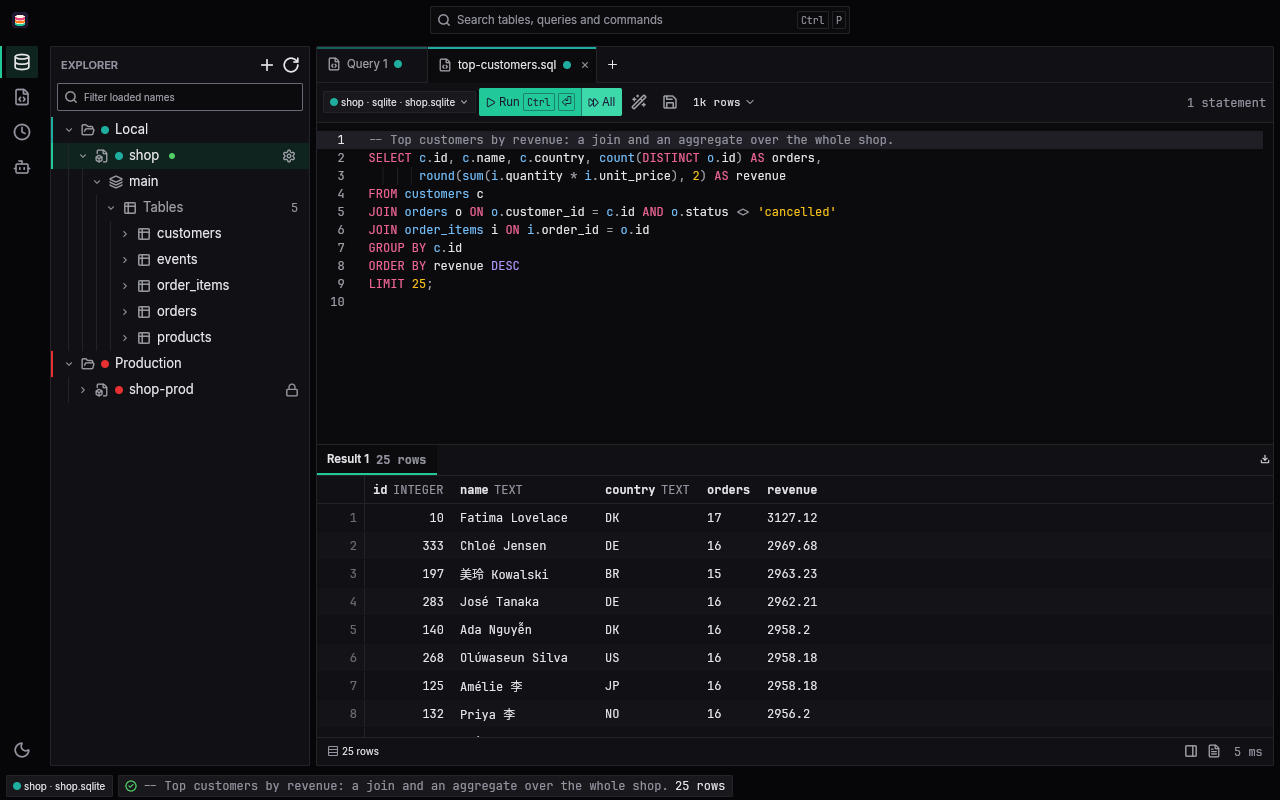
A fast, native database client. Dbento is free and open source, written in Rust and drawn on the GPU: no Electron, no webview. It comes as a desktop app, a command line, and an MCP server that gives an AI client read-only access to your databases by default. It speaks SQL to Postgres, SQLite, MySQL, SQL Server and DuckDB, and each NoSQL store's own language to MongoDB, SurrealDB, Redis and DynamoDB. The name is db + bento: data in neat compartments.
Why Dbento
- Native and fast. The desktop app is built on GPUI and rendered through the GPU. Results stream into a virtualized grid, so a large result scrolls as smoothly as a small one.
- Your workspace is a folder. Connections live in
dbento.tomland saved queries in plain text files, so a team can review them in git. No password is ever written to a file. - The database enforces safety. A read-only connection is opened read-only by the database itself, rather than by Dbento guessing from the SQL whether a statement writes.
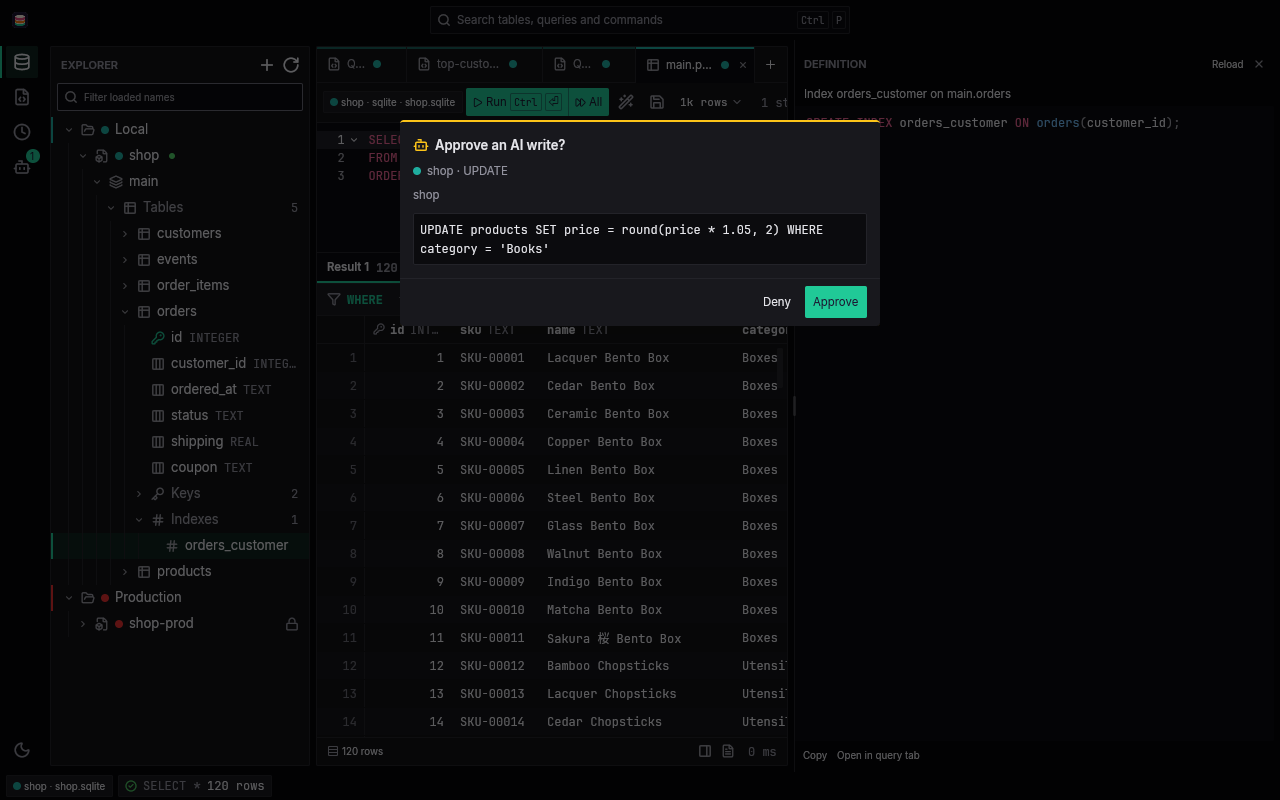
- AI access with you in the loop. The MCP server is read-only by default. A write runs only after you approve that exact call in the desktop app, and the AI can never approve itself.
Supported databases
| Database | engine in dbento.toml |
Query language | Saved query files |
|---|---|---|---|
| PostgreSQL | postgres |
SQL | .sql |
| SQLite | sqlite |
SQL | .sql |
| MySQL and MariaDB | mysql (or mariadb) |
SQL | .sql |
| SQL Server | mssql (or sqlserver) |
T-SQL | .sql |
| DuckDB | duckdb |
SQL | .sql |
| MongoDB | mongodb (or mongo) |
a subset of mongosh: find, aggregate, insertOne, updateMany and more |
.js |
| SurrealDB | surrealdb (or surreal) |
SurrealQL, over WebSocket | .surql |
| Redis and Valkey | redis (or valkey) |
Redis commands, one per line | .redis |
| Amazon DynamoDB | dynamodb (or dynamo) |
PartiQL | .partiql |
DuckDB, MongoDB, SurrealDB, Redis and DynamoDB are default Cargo features (duckdb, mongodb, surrealdb, redis, dynamodb) of the core, the command line, the MCP server and the app. A build with --no-default-features leaves them out, and leaving out DuckDB skips its C++ compile. Other engines are tracked in the issue tracker.
Features
A result grid that keeps up
Results stream in as the database sends them, into a virtualized grid that fetches the next batch as you scroll. A row limit (1k, 10k, 100k or 1M rows, or none, with only a memory budget) stops collecting and marks the result truncated. Dbento never rewrites your SQL to add a LIMIT, and a type it does not know is shown, never turned into NULL. Copy cells as TSV, CSV, JSON, Markdown or INSERT statements, export loaded rows to CSV or JSON, and step through one row in the record view.
An editor that knows your schema
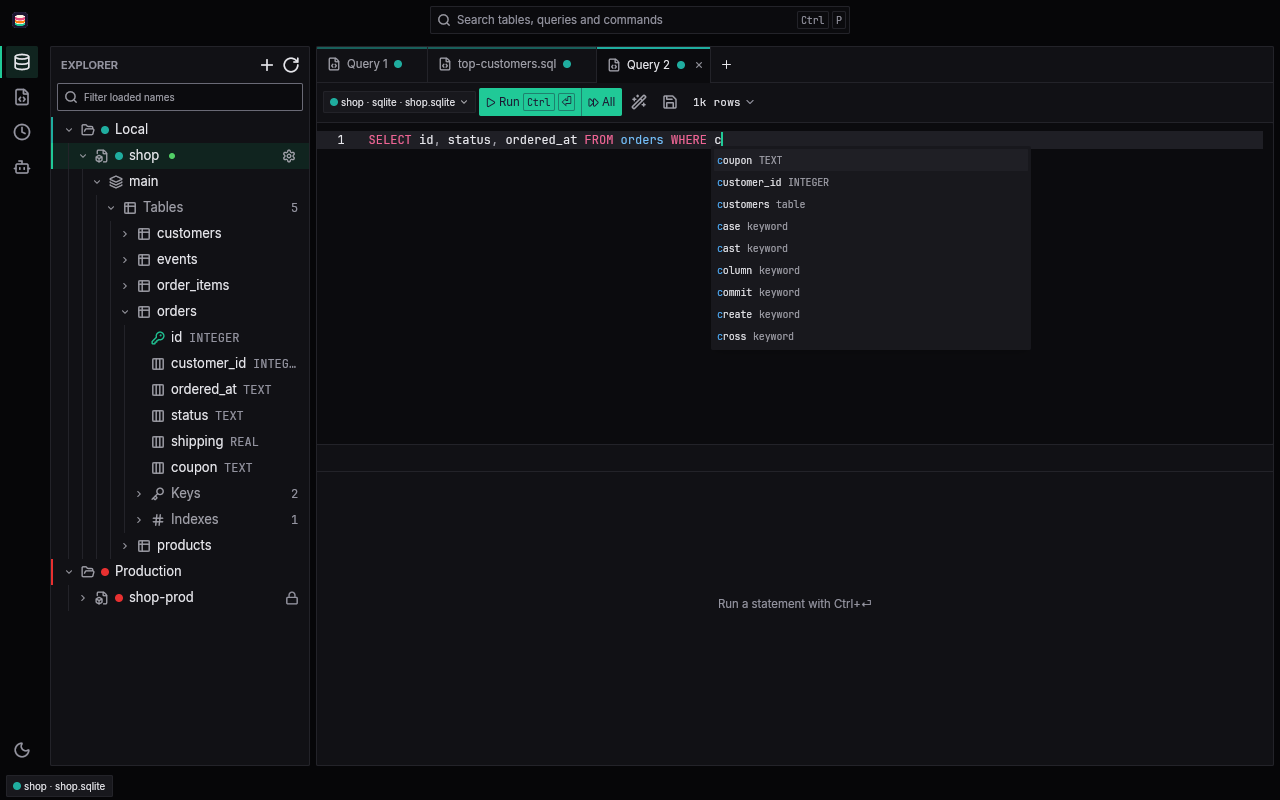
SQL highlighting, formatting, and completion of schemas, tables, columns and keywords from the connection's live catalog. Queries open in tabs, saved queries are plain .sql files, every run lands in a searchable history, and the command palette (Ctrl+P, Cmd+P on macOS) finds tables, saved queries and commands. A running query can be cancelled.
An explorer down to the indexes
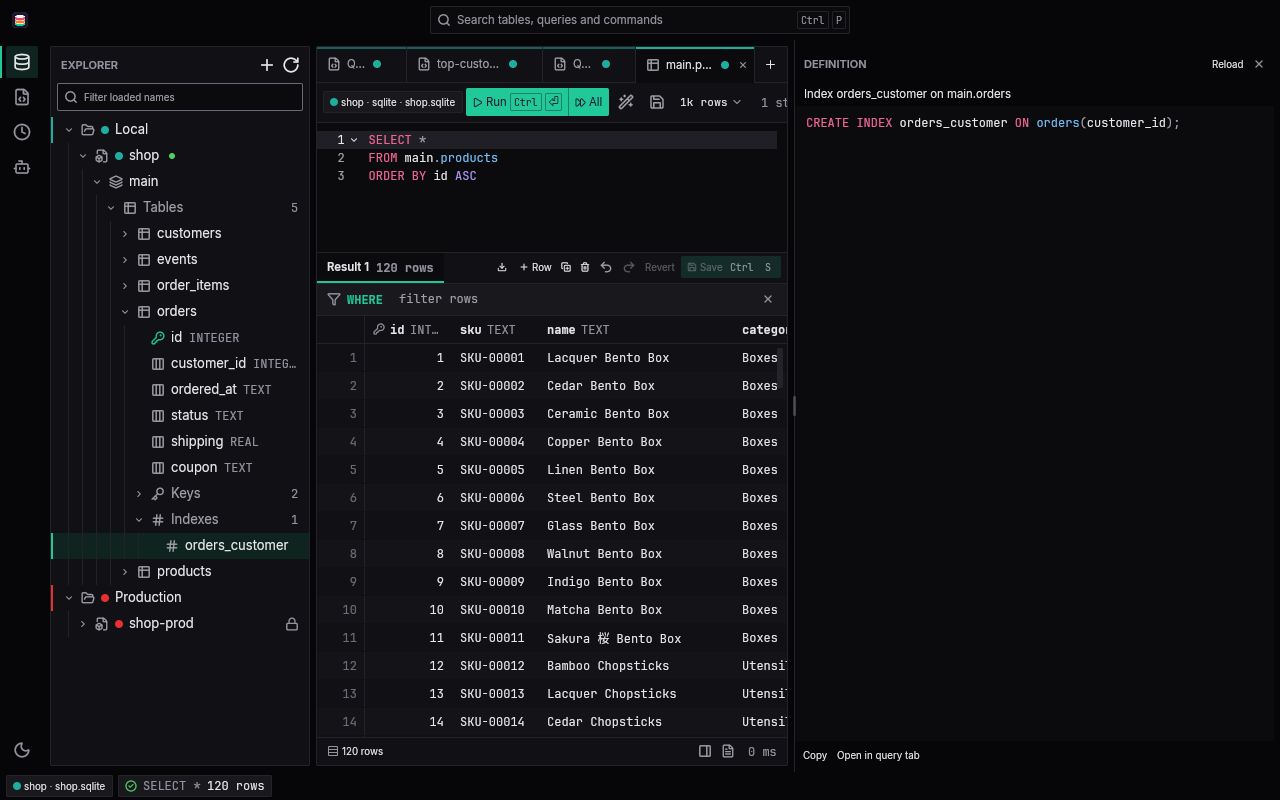
The schema tree shows tables, views, materialized views and foreign tables, and under each one its columns, keys, indexes, checks and triggers, plus types and routines on Postgres. Open any object to read its definition, copy it, or open it in a query tab.
Documents, keys and items
The NoSQL stores share the same explorer, editor and grid, each in its own language.
- MongoDB: databases and collections, with fields inferred from a sample of documents, and indexes. Opening a collection runs its
find(). Columns come from the first documents, and fields that appear later land in a(more fields)column. - Redis and Valkey: each DB index with its key count, and the keys grouped into folders by
:. Keys are listed with aSCANwalk that shows each key's type and TTL, and the filter takes a pattern plustype:<kind>. Opening a string, hash, list, set, sorted set or stream shows its value in a paged grid, with its type, length and TTL. Command completion comes from the server'sCOMMAND DOCS. - DynamoDB: one schema per region, with tables, their key attributes, indexes, and attributes sampled from items. Opening a table or an index runs a PartiQL
SELECT, and attributes beyond the first items land in a(more attributes)column. - SurrealDB: the namespace's databases and their tables, read from
INFOand sampled rows, with fields, indexes and triggers. Opening a table runsSELECT * FROMit.
Editing you review before it lands
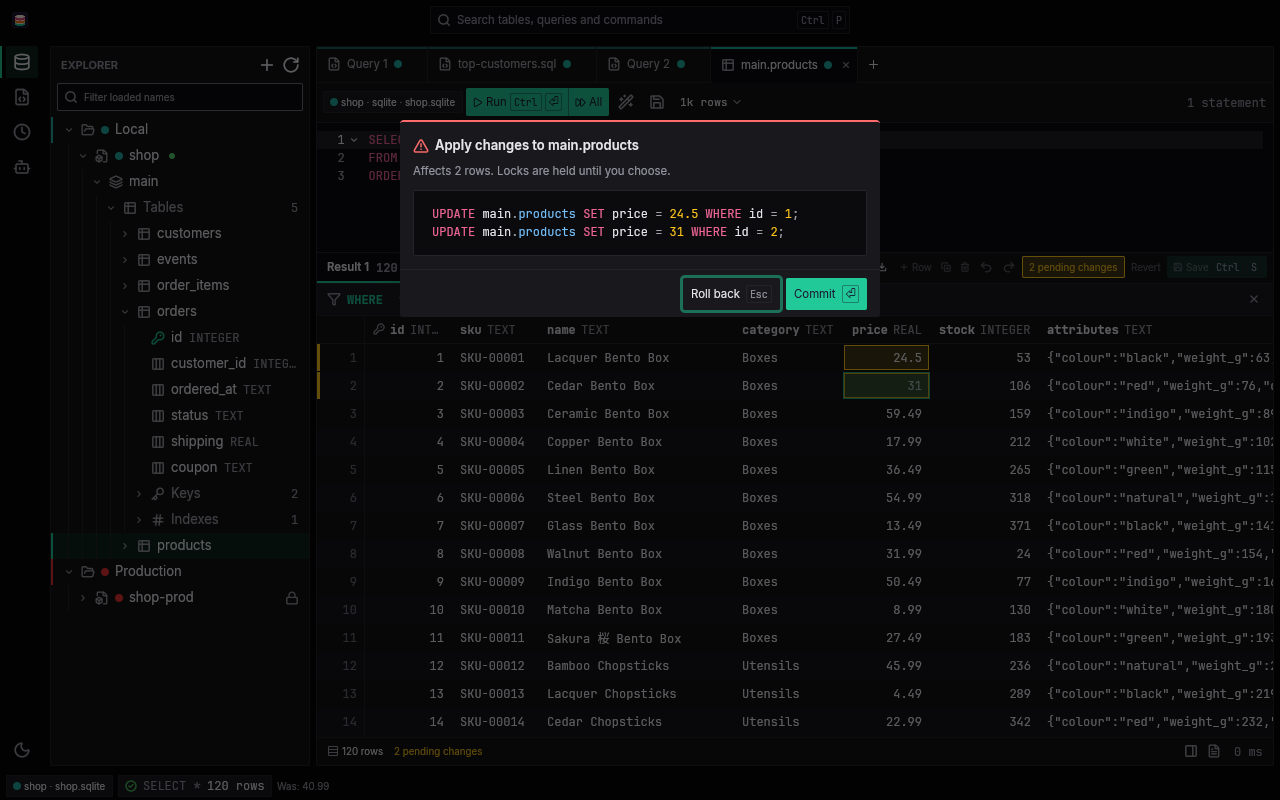
Edit cells, add rows and delete rows in a browsed Postgres or SQLite table. Changes are staged, then applied in one transaction with typed parameters, after a prompt that says how many rows they affect and asks you to commit or roll back. Rows without a primary key are found by ctid and xmin on Postgres and by rowid on SQLite, and a row someone else changed or deleted in the meantime is marked instead of overwritten.
AI access through MCP
dbento mcp serves a workspace to an AI client over MCP on stdio, with ten tools: list_connections, list_databases, list_schemas, list_tables, describe_table, query, explain, list_saved_queries, read_saved_query and execute.
queryalways runs read-only, one statement in the connection's own language: SQL, a mongosh statement, SurrealQL, one Redis command, or PartiQL. Redis commands in the@dangerous,@blocking,@scriptingand@pubsubcategories are refused. It returns 100 rows by default and at most 1,000, about 64 KiB, under a statement timeout of 30 seconds by default.explainshows the plan of one statement on Postgres and SQLite in the same read-only session, so an AI can preview anUPDATEorDELETEwithout running it.ANALYZEis refused.list_saved_queriesandread_saved_queryread the saved query files (.sql,.js,.surql,.redis,.partiql) under the workspace'squeries/folder and nothing outside it, not even through a symlink.executewaits until you approve that exact call in the desktop app, once. When you deny a call you can type a reason, and the AI gets it back with the denial.
Query results are passed to the AI as untrusted data. The app's approvals panel shows the command to connect your AI client.
Safety the database enforces
- A
read_onlyconnection runs every statement inBEGIN READ ONLYon Postgres and opens SQLite and DuckDB read-only, so the database itself refuses a write. Aread_onlyDuckDB connection also has file access off, soread_csvand Parquet reads of local files do not work there. - On Postgres the server still lets a few things through: functions that open their own connections, such as
dblink_execwhere the dblink extension is installed, and admin functions whose effect is not transactional, such aspg_terminate_backend,pg_cancel_backendandpg_stat_reset. For a production database, use a role without the privileges the rest need; it can still cancel or terminate backends of its own role. - A MySQL or MariaDB
read_onlyconnection, and every MCP session on one, runs each statement inSTART TRANSACTION READ ONLY. The server still lets a few things through:SELECT ... INTO OUTFILEorDUMPFILE,SET GLOBALandSET PERSIST,FLUSH,GET_LOCK, and an existing stored procedure that commits and then writes. For a production database, use an account without the FILE, RELOAD, SYSTEM_VARIABLES_ADMIN or SUPER privileges and without EXECUTE on such procedures, ideally one granted only SELECT. - On SQL Server, give a
read_onlyconnection aread_only_user(a login that can only read) and the database enforces it. Without one the session is best effort: Dbento fences each batch in a transaction it rolls back and refuses the batches it can parse as writes, but a login with the rights can get past the fence with a hidden commit.list_connectionsstates the level of each connection to an AI client. - On MongoDB, Dbento reads the user's privileges when it connects. A user that can only read is enforced by the server; for any other user Dbento refuses every command it cannot show reads.
- On SurrealDB each statement runs in a transaction that is cancelled, and a VIEWER login is enforced by the server. At either level, stored logic reached from a
SELECTcan still advance sequences, callhttp::*functions or write files, and a root OWNER or anonymous login can runALTER SYSTEM. - On Redis and Valkey, Dbento checks the user's ACL against the server's command table when it connects. A user whose ACL refuses every write is enforced by the server; otherwise Dbento refuses writes and commands it cannot classify. The check runs once, so a later
ACL SETUSERcan widen the user. - DynamoDB has no read-only session. A read-only connection sends only
ListTables,DescribeTable,Scanand PartiQLSELECT, but only IAM stops someone with the same keys from writing, so give a production connection keys that can only read. - A connection tagged red is marked as production in the tab line and the status bar.
UPDATEorDELETEwithoutWHERE,DROP,TRUNCATE,updateManyordeleteManywith an empty filter, andFLUSHDBorFLUSHALLask before they run.- Write detection follows each engine:
pg_queryfor Postgres and DuckDB, so a write hidden in a CTE is still caught; SQLite's own read-only check; sqlparser for MySQL and SQL Server; an allowlist of read methods for MongoDB; and the server's command table for Redis. Outside a read-only session, a statement the parser cannot handle is never blocked for that reason alone.
Also
- Light and dark themes, or follow the system.
dbento import datagrip,dbento import dbeaveranddbento import beekeeperbring over connections and saved queries from DataGrip, DBeaver and Beekeeper Studio, and saved passwords go to the keychain.- Try it without a database server:
make demo(see Try the demo).
How it works
One core, thin shells
All of the logic lives in dbento-core, a library with no UI: the workspace format, the keychain, the database drivers behind one async interface, streamed results, and the safety checks. Three thin shells call only its public API:
| Crate | What it is |
|---|---|
dbento-cli |
The dbento command line, which also hosts the MCP server. |
dbento-mcp |
The MCP server itself, built on rmcp. |
dbento-app |
The dbento-app desktop app, built on GPUI. |
A workspace is a folder
A workspace is any folder with a dbento.toml in it. Connections live in that file, and saved queries in queries/<connection>/, as .sql files or the extension of the connection's language, so a query file knows which connection it runs on. Folders group connections and give them a color.
dbento = 1

[connections.app-dev]
engine = "postgres"
host = "localhost"
database = "app"
user = "app"

[connections.app-prod]
engine = "postgres"
host = "db.example.com"
database = "app"
user = "readonly"
read_only = true
color = "red"

[connections.local]
engine = "sqlite"
path = "data/app.db"
The NoSQL stores take their own keys:
[connections.docs]
engine = "mongodb"
uri = "mongodb://app@localhost:27017/app?authSource=admin"

[connections.cache]
engine = "redis"
host = "localhost"
database = "2"
secret = "none"

[connections.items]
engine = "dynamodb"
region = "eu-north-1"
access_key_id = "AKIAEXAMPLEKEYID"
consistent_read = true

[connections.graph]
engine = "surrealdb"
host = "localhost"
namespace = "app"
database = "main"
user = "reader"
auth_level = "database"
- MongoDB takes everything in
uri, options such asauthSourceandtls=trueincluded. A password inuriis refused; the secret is stored like any other. - Redis and Valkey take
host(default127.0.0.1),port(6379),user, anddatabaseas a DB index (0 when left out). - DynamoDB takes
region, elseAWS_REGIONorAWS_DEFAULT_REGION, and anendpointfor a local server; plainhttpis allowed only on this machine. Withaccess_key_idthe secret access key is the connection's secret; without it the credentials come fromAWS_ACCESS_KEY_ID,AWS_SECRET_ACCESS_KEYandAWS_SESSION_TOKEN.consistent_read = truemakes reads strongly consistent. - SurrealDB takes
host,port(8000),namespace,database, and with auseranauth_levelofroot,namespaceordatabase. Without a user the session is anonymous. - SQL Server can take a
read_only_user, a user that can only read, for its read-only work (see Safety the database enforces).
A Postgres or SQL Server connection can also reach the other databases on its server. Set databases to a list of names, such as databases = ["billing", "audit"], or to "all", and each database becomes a child connection named <parent>/<database>, for example app-dev/billing. A child uses its parent's credentials and safety settings, and works anywhere a connection name does: dbento query, dbento run, dbento connections, and the MCP server, where list_databases lists a parent's databases.
Secrets stay out of files
No password is ever written to dbento.toml. A server connection's secret is stored in the OS keychain (the Secret Service on Linux, Keychain on macOS, Credential Manager on Windows), and only the secret, never the whole connection URL. When the keychain has no entry, Dbento reads the environment variable DBENTO_SECRET_<NAME>, the connection name in upper case with - as _ (so app-prod reads DBENTO_SECRET_APP_PROD). A connection can also name its own variable with secret = { env = "PGPASSWORD" }, or say it needs none with secret = "none".
Download
| System | Desktop app | Command line |
|---|---|---|
| Linux x86_64 | .deb · AppImage | tar.gz |
| Linux arm64 | .deb · AppImage | tar.gz |
| macOS Apple silicon | Dbento_aarch64.dmg | tar.gz |
| macOS Intel | Dbento_x86_64.dmg | tar.gz |
| Windows x64 | Installer (.exe) | zip |
No release has been published yet, so these links start working with the first one. Until then, build from source. The macOS and Windows packages have not yet been tested on those systems.
Releases will be listed on the releases page, with checksums. See Install notes for the first launch on macOS and Windows.
Install notes
A release holds these files, where <v> is the version. Each one also has a copy without the version in its name, which is what the download links above point to.
| Platform | Desktop app | Command line |
|---|---|---|
| Linux x86_64 | dbento-app_<v>_amd64.deb, dbento-app_<v>_x86_64.AppImage |
dbento-<v>-x86_64-unknown-linux-gnu.tar.gz |
| Linux arm64 | dbento-app_<v>_arm64.deb, dbento-app_<v>_aarch64.AppImage |
dbento-<v>-aarch64-unknown-linux-gnu.tar.gz |
| macOS Apple silicon | Dbento_<v>_aarch64.dmg |
dbento-<v>-aarch64-apple-darwin.tar.gz |
| macOS Intel | Dbento_<v>_x86_64.dmg |
dbento-<v>-x86_64-apple-darwin.tar.gz |
| Windows x64 | dbento-app_<v>_x64-setup.exe |
dbento-<v>-x86_64-pc-windows-msvc.zip |
Linux: the .deb installs both /usr/bin/dbento and /usr/bin/dbento-app. The AppImage cannot put dbento on your PATH, so AppImage users also take the CLI archive for their architecture.
macOS: the app is ad-hoc signed and not notarized, so Gatekeeper blocks the first open. Move Dbento.app to /Applications before the first launch, then clear the quarantine flag:
xattr -dr com.apple.quarantine /Applications/Dbento.app
Windows: the installer and dbento.exe are not code-signed, so SmartScreen warns about an unknown publisher; choose "More info", then "Run anyway".
Checksums: every package and archive carries THIRD-PARTY-NOTICES.html, the licenses of the crates it is built from. One SHA256SUMS file covers every file, the unversioned copies included; check your downloads with:
sha256sum -c --ignore-missing SHA256SUMS
Build from source
You need:
-
Rust 1.99 or newer (the workspace's
rust-version), from rustup. -
A C and C++ compiler and libclang, for the bundled
pg_queryparser and DuckDB. -
On Linux, the system libraries GPUI draws with. On Debian or Ubuntu:
sudo apt-get install pkg-config libfontconfig-dev libfreetype-dev libwayland-dev \
  libx11-xcb-dev libxkbcommon-x11-dev libvulkan1 libegl1 libclang-dev
From a checkout, run:
make
This builds with 4 jobs (make JOBS=8 for more) and installs dbento (the command line) and dbento-app (the desktop app) with cargo install. On Linux it also adds a desktop entry and the icon under ~/.local/share. make PREFIX=/some/dir installs the binaries under /some/dir/bin instead, and make uninstall removes everything again. On macOS only the binaries are installed. On Windows, or to install without make, run the two installs by hand:
cargo install --locked --path crates/dbento-cli
cargo install --locked --path crates/dbento-app
To build without installing, cargo build --release puts both binaries in target/release.
Quick start
Try the demo
make demo
This opens the app on a small shop: customers, products, orders and 200,000 events in SQLite, with saved queries to open with Ctrl+O (Cmd+O on macOS) from the workspace's queries/ folder (top customers, a scroll through every event, an UPDATE without WHERE, a slow query to cancel, and a write that the read-only shop-prod connection refuses). No database server or keychain is needed. Each run copies examples/demo fresh to ~/.cache/dbento-demo/workspace and builds shop.sqlite from its seed.sql, and the app keeps its state in ~/.cache/dbento-demo/state, so nothing you do in the demo reaches the repo or your own app settings.
Your own workspace
Create a workspace in a new folder:
mkdir my-databases && cd my-databases
dbento init
This writes dbento.toml and an empty queries/ folder. Add a connection to dbento.toml, such as app-dev from the example above, then store its password in the keychain. dbento secret set prompts for it, or reads the first line of stdin, and never takes it from the command line:
dbento secret set app-dev
dbento connections
Run SQL on a connection, or run a saved query file. A file under queries/app-dev/ runs on app-dev; pass --conn for a file anywhere else:
dbento query app-dev "select * from users order by created_at desc"
dbento run queries/app-dev/recent-orders.sql
dbento run report.sql --conn app-dev --format csv > report.csv
On a MongoDB, SurrealDB, Redis or DynamoDB connection, dbento query takes that engine's language instead of SQL, and dbento run refuses a file whose extension belongs to another language.
Both commands take --format table|json|csv, --max-rows N, --read-only, --timeout 30s, and --yes to run an UPDATE or DELETE without WHERE, a DROP or a TRUNCATE without asking. Every command finds the nearest dbento.toml above the working directory, or takes --workspace <dir>.
The desktop app
Open the app on a workspace by passing its folder:
dbento-app ~/my-databases
Connect an AI client
Register dbento mcp as a stdio MCP server in your AI client. Most clients take a JSON entry like this one:
{
  "mcpServers": {
    "dbento": {
      "command": "dbento",
      "args": ["--workspace", "/home/you/my-databases", "mcp"]
    }
  }
}
--connection <name> (repeatable) exposes only the connections you name, and --timeout <secs> sets the statement timeout for every call (30 by default). Keep the desktop app open on the same workspace to approve or deny the writes the AI asks for.
Development
Make targets
| Target | What it does |
|---|---|
make check |
The merge gate: cargo fmt --check, clippy with warnings as errors, and the full test suite. |
make pilot-check |
Builds and runs the gpui-pilot tests in tools/dbento-pilot, which drive the real app, except the two wheel-scroll timing recordings. |
make pilot-timing |
The wheel-scroll timing recordings alone. They wait for a quiet machine and refuse to measure a loaded one; a pass stamps the committed tree it ran on. |
make timing-guard |
Fails when the grid, its scrolling or rendering, the wheel test or the gpui pins changed since BASE (default origin/master) and the current tree has no pilot-timing stamp. |
make script-test |
The bash suites under scripts/tests. |
make workflows-lint |
actionlint over .github/workflows. |
make icons-check, make notices-check, make windows-check |
The icon exports, the third-party notices, and a Windows type-check through mingw. |
make xwin-check, make xwin-build |
An msvc check and release-style build from Linux through cargo-xwin; xwin-build compiles shaders at runtime, so it is not for shipping. |
make package |
The Linux CLI archive, .deb and AppImage, verified, in target/dist/linux. |
make screenshots |
Regenerates the screenshots in assets/screenshots from the demo workspace under gpui-pilot. |
make demo |
Opens the app on the demo workspace. |
make pilot-check and make screenshots need the gpui-pilot server on your PATH, or GPUI_PILOT_BIN naming it. Install it with:
cargo install --locked --git https://github.com/PhongGuy/gpui-pilot --tag v0.3.2 gpui-pilot
A change to the results grid, its scrolling or rendering merges only once make timing-guard passes: run make pilot-timing on a quiet machine on the commit you merge. The paths it watches are listed in scripts/timing-guard.sh.
Dbento MCP 질문
MCP server가 제 데이터를 안전하게 보호하나요?
네, MCP server는 기본적으로 읽기 전용입니다. 모든 쓰기 작업은 Dbento 데스크톱 앱에서 수동 승인이 필요하며, AI가 스스로의 호출을 승인할 수는 없습니다.
어떤 데이터베이스를 지원하나요?
Dbento는 Postgres, SQLite, MySQL, MariaDB, SQL Server, DuckDB, MongoDB, SurrealDB, Redis, Valkey, Amazon DynamoDB를 지원합니다.
AI가 제 쿼리에 어떻게 접근하나요?
AI는 도구를 사용하여 연결, 데이터베이스, 스키마, 테이블 목록을 확인하고, 쿼리를 실행하거나 특정 워크스페이스 폴더에 저장된 쿼리 파일을 읽을 수 있습니다.