
GABS MCP server
2026년 9월 30일 커밋로컬 게임 프로세스를 시작하고 관리하며, 각 게임의 브리지 도구를 MCP로 미러링하여 AI 에이전트가 실행 중인 게임을 탐색하고 제어할 수 있도록 합니다.
다른 이름 pardeike/GABS
- 스타
- 37
- Tools
- 10
- 다운로드, 30일
- —
- 최신 버전
- —
- 마지막 커밋
- 2026년 9월 30일
- 라이선스
- MIT
GABS MCP란?
로컬 게임 프로세스를 시작하고 관리하며, 각 게임의 브리지 도구를 MCP로 미러링하여 AI 에이전트가 실행 중인 게임을 탐색하고 제어할 수 있도록 합니다. 10개 도구를 제공합니다. 예: games_list, games_show, games_start.
프로젝트 README에서 생성된 요약
GABS MCP server 정보
GABS는 AI 에이전트를 통해 로컬 게임 프로세스를 관리하고 제어할 수 있게 해줍니다. 설정 우선 방식의 이 MCP server를 사용하면 개발자는 JSON 설정 파일에 게임을 선언하고 그 생명주기를 관리할 수 있습니다. 게임이 GABP 브리지를 통해 연결되면, 서버는 해당 게임 전용 도구들을 안정적인 MCP 인터페이스로 미러링하여 AI 클라이언트가 게임별 명령을 직접 탐색하고 실행할 수 있도록 지원합니다.
사용자는 AI 에이전트를 위한 MCP server 또는 수동 제어를 위한 CLI를 통해 시스템과 상호작용합니다. 설정을 위해서는 Windows, macOS 또는 Linux에 GABS 바이너리를 로컬에 설치해야 합니다. Claude Desktop과 같은 AI 클라이언트에 연결하려면 MCP 설정에 서버를 추가해야 합니다. 이 서버는 직접 경로, SteamAppId, EpicAppId를 포함한 다양한 실행 모드를 지원하며, games_start, games_stop, games_call_tool와 같은 도구를 제공하여 워크로드를 관리합니다.
활용 사례
- 1자동화된 게임 프로세스 관리AI 에이전트가 사용자 요청에 따라 특정 게임 프로세스를 시작, 중지 또는 강제 종료할 수 있습니다.
- 2게임용 동적 도구 탐색AI 클라이언트가 브리지가 활성화된 후 서버에 쿼리하여 사용 가능한 모든 게임 전용 도구를 찾을 수 있습니다.
- 3설정 가능한 게임 실행 프로필개발자는 프로필을 사용하여 특정 인자 및 환경 변수가 포함된 반복 가능한 실행 컨텍스트를 정의할 수 있습니다.
- 4AI를 통한 직접적인 게임 제어에이전트가 인벤토리 관리와 같이 미러링된 도구를 호출하여 게임 내 특정 동작을 실행할 수 있습니다.
프로젝트의 README를 바탕으로 작성되었습니다. 모든 활용 사례는 해당 내용의 인용문과 대조하여 확인합니다.
GABS MCP 도구 10
README에서 감지됨games_listgames_showgames_startgames_stopgames_killgames_statusgames_connectgames_tool_namesgames_tool_detailgames_call_tool
| games_list | — | |
| games_show | — | |
| games_start | — | |
| games_stop | — | |
| games_kill | — | |
| games_status | — | |
| games_connect | — | |
| games_tool_names | — | |
| games_tool_detail | — | |
| games_call_tool | — |
자동 검사
2026년 11월 14일에 실행됨전체 보고서 →아직 인증되지 않았습니다. 서버는 80점 이상의 점수, 심각한 결함 없음, 그리고 검사에 충분한 데이터를 갖추어야 합니다. 검사 방식 · 점수를 높이기 위해 수정할 항목

- 소스 저장소 연결 및 접근 가능pardeike/gabs is public and reachablegithub.com/pardeike/gabs ↗통과
- 패키지가 이 저장소를 소스로 명시검사되지 않음
- 빌드 출처(Sigstore 증명)검사되지 않음
- 오픈 소스 라이선스 (OSI)MITspdx.org/licenses/MIT.html ↗통과
- 최근 1년 내 커밋 또는 릴리스Last commit or release 2026-09-30github.com/pardeike/gabs ↗통과
- OpenSSF Scorecard검사되지 않음
- 패키지 이름이 인기 패키지와 유사하지 않음검사되지 않음
- 패키지 및 해당 종속성에 중요한 보안 권고 없음검사되지 않음
- 모델에 대한 숨겨진 지침 없음10 tool descriptions and the README read; no override phrases, credential paths or hidden characters통과
- 파괴적인 도구에 라벨 표시됨No tool named like delete, drop or exec통과
- 원격 엔드포인트가 MCP 핸드셰이크에 응답검사되지 않음
README
GitHub에서 보기GABS - Game Agent Bridge Server
Compatible with GABP v1.1 on wire major gabp/1.
GABS is a configuration-first MCP server that manages local game processes and mirrors each game's GABP bridge tools into a stable MCP surface. You declare your games once in a config file; GABS starts and supervises those processes, and when a game's GABP bridge connects, GABS mirrors that bridge's tools into MCP. An AI agent then discovers and controls a running game entirely through GABS.
If you are installing GABS from a release archive, start with Quick Start below. For the full copy-paste setup guide, read the AI Client Setup Guide.
How GABS works
Each launch resolves along one axis:
stable game identity → optional named profile → optional declared, typed launch inputs
- Games are declared in a config file. GABS re-reads it on the next call —
edits to game entries apply automatically, with no GABS or MCP-client
restart. After an edit,
games_show <id>shows the new profiles, inputs, warnings, or the exact error. Top-level settings (apiKey,toolNormalization,portRanges,timeouts,stripOutputSchema) are read at startup only and still require a GABS restart. - Profiles select a repeatable launch context (args, env, working directory,
lifecycle overrides) without changing the game's identity or transport. A bare
start uses the
defaultProfile. - Launch inputs add bounded, declared per-launch variation: the config
author declares named, typed inputs (
boolean/string/integer), and callers may supply only those. GABS never exposes raw argument/environment passthrough on MCP. - Lifecycle hooks (
status,stop,kill) let you integrate wrapped or containerized process management — GABS runs your commands to observe and control the workload.
Two frontends share one implementation:
- MCP server (
gabs server) — for AI agents. - CLI (
gabs games ...) — for humans and scripts.
The mental model most users need:
- Your AI client starts
gabs server - GABS starts or attaches to your game
- If the game-side bridge speaks GABP, GABS mirrors that bridge's tools into MCP
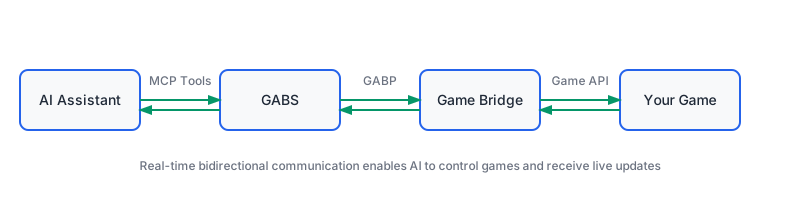
AI Agent ← MCP → GABS ← GABP Client → GABP Server (Game Bridge) ← Game API → Game
In the GABP layer, your game-side bridge is the server and GABS is the client.
Quick Start
1. Download and verify the binary
Download the latest release bundle for your system from GitHub Releases.
Available archives are named like:
- Windows x64:
gabs-<version>-windows-amd64.zip - macOS Apple Silicon:
gabs-<version>-darwin-arm64.zip - macOS Intel:
gabs-<version>-darwin-amd64.zip - Linux x64:
gabs-<version>-linux-amd64.zip - Linux ARM64:
gabs-<version>-linux-arm64.zip
Each archive contains the gabs binary (gabs.exe on Windows), README.md,
the full docs/ folder, example-config.json, and LICENSE.
After unzipping:
Windows
.\gabs.exe version
macOS / Linux
chmod +x gabs
./gabs version
2. Configure a game
Games live in your config file (~/.gabs/config.json by default). You can write
entries by hand or let the interactive setup do it for you:
gabs games add mygame
A minimal entry looks like this — see example-config.json for a fully profiled
game with launch inputs and lifecycle hooks:
{
  "version": "1.0",
  "games": {
    "mygame": {
      "id": "mygame",
      "name": "My Game",
      "launchMode": "DirectPath",
      "target": "/opt/mygame/bin/server",
      "stopProcessName": "server",
      "defaultProfile": "dev",
      "profiles": {
        "dev": { "description": "Fast local iteration" }
      }
    }
  }
}
launchMode may be a direct path, a managed Steam game, an Epic App ID, or a
custom command. For launcher URL modes such as SteamAppId and EpicAppId,
games_stop and games_kill need a way to reach the real game process:
declare stopProcessName, or a game-level status hook plus a stop or
kill hook — either satisfies the requirement. Because game-entry edits apply
automatically, gabs games show mygame always reflects what an edit would
launch.
3. Add GABS to your AI client
Paste one of these into your AI client's MCP config.
Claude Desktop:
{
  "mcpServers": {
    "gabs": {
      "command": "/path/to/gabs",
      "args": ["server"]
    }
  }
}
Codex CLI:
[mcp_servers.gabs]
command = "/absolute/path/to/gabs"
args = ["server"]
Generic MCP client:
{
  "command": "/absolute/path/to/gabs",
  "args": ["server"]
}
If your client uses strict OpenAI-style tool naming, enable toolNormalization
in ~/.gabs/config.json. See
OpenAI Tool Normalization. If your client
disconnects after tools/list because it rejects a public tool's outputSchema
fields, set stripOutputSchema to true (see the
Configuration Guide). If a game or bridge starts slowly,
tune the background connection budget with timeouts.startup; games_start
still returns after a bounded initial wait so MCP clients do not time out while
the game keeps loading.
From a configured game to a tool call
One end-to-end flow, from a declared game to calling a game-specific tool:
1. See what's configured (CLI or the games_list MCP tool):
gabs games list
2. Start the game. From the CLI:
gabs games start mygame --profile dev
Pass --input NAME=VALUE (repeatable) to supply declared launch inputs — see the
fully profiled world input in example-config.json. The CLI verifies the
launch and then exits without holding a bridge connection
(outcome started_attachment_deferred). From an agent session, games_start
starts the game and keeps the bridge attached; if the game was started from the
CLI, an agent picks it up with games_connect.
3. Discover and call the game's mirrored tools (agent / MCP session). Once
the bridge connects, GABS mirrors its GABP tools into strict-safe MCP names.
The public tools/list stays core-only, so discovery goes through the core
surface:
games_connect     {"gameId": "mygame"}
games_tool_names  {"gameId": "mygame", "brief": true}
games_tool_detail {"tool": "mygame_inventory_get"}
games_call_tool   {"tool": "mygame_inventory_get", "arguments": {...}}
Discovery entries contain the callable name, optional tags, and a summary
when brief: true. A single-game response carries gameId once at the top
level; discovery across games includes gameId per entry. Pass name unchanged
to detail or call. See the discovery response contract and migration note
if your client previously read name aliases from the list.
games_tool_names may be empty right after start while the bridge is still
connecting (started_bridge_pending) — retry rather than assuming a tool is
missing.
In an agent chat this is just: "Start mygame, then show me its game-specific tools."
Core MCP tools
Release builds expose strict-safe MCP tool names by default because some clients reject dots in tool names:
games_list- List configured game IDs (with profiles + warning counts)games_show- Show one saved game config, profiles, and launch inputsgames_start- Start a game (profile,launchInputsoptional)games_stop- Stop a game gracefullygames_kill- Force stop a gamegames_status- Check whether a game is runninggames_connect- Reconnect to a running game's bridgegames_tool_names- List mirrored game-specific tools after a bridge connectsgames_tool_detail- Show the schema for one mirrored toolgames_call_tool- Call a connected game tool through the stable core surface
Mirrored game tools are named like mygame_inventory_get (the bridge's
canonical inventory/get in strict-safe form); profile names never appear in
mirrored tool names. Older dotted names such as games.list remain accepted as
call aliases, but tools/list advertises strict-safe names unless you disable
normalization. For the full MCP surface, see the
AI Integration Guide.
Common Setup Notes
- Steam/Epic stopping: use the real game process name, not the launcher name.
- Steam bridge games: prefer
SteamManagedlaunch. It resolves the Steam app manifest to the installed executable, starts Steam if needed, and launches with GABP environment variables. On macOS, GABS first proves that Steam's IPC/global-user interface, the configured app's subscription/install state, and a process-local Steamworks API initialization are ready; a merely running Steam process or connected global user is not enough.store_client_not_readymeans no game process was started: retry the same request after Steam settles (a largertimeoutcan help when the reason isreadiness_timeout). Some managed apps can still relaunch the final process without those variables;games_statusreports that asprocess-bridge-environment-missing. Usegabs games doctor <id>to inspect a config,gabs games repair <id>to convert an olderSteamAppIdlauncher-URL config, andDirectPathorCustomCommandwhen the final process does not inherit the bridge environment. - More than one AI session: that is fine. GABS coordinates ownership per game
with a short active-owner lease.
games_connecttakes over naturally after the previous session goes idle, while active game-bound calls are still protected. - Game bridge cannot find GABP configuration: the game-side bridge should
read
GABP_SERVER_PORT,GABP_TOKEN, andGABS_GAME_IDfrom its process environment. Thebridge.jsonfile is GABS' endpoint cache/debug artifact, not runtime input for game-side bridge code. - Start says the endpoint cache port is already in use: use
games_connectif an existing game-side bridge owns that endpoint. Usegames_startwithresetEndpoint: trueonly after confirming the cache should be rotated. - Confusing bridge state: start with
games_status. Ifdiagnostics.codeisprocess-bridge-environment-missing, the running process is visible but not attachable through the expected GABP environment; adjust the launch mode instead of retryinggames_connect.
Documentation
- AI Client Setup Guide - Install a release bundle and connect Claude Desktop, Codex CLI, or generic MCP clients
- v1.1.0 Release Notes - Upgrade order, compatibility changes, and profile-migration guidance
- Configuration Guide - Config schema, profiles, launch inputs, lifecycle hooks, and tool normalization
- AI Integration Guide - Connect GABS to different AI tools and deployment scenarios
- GABP Bridge Development Guide - Add GABP support to your game integrations
- Advanced Usage Guide - Multiple instances, HTTP mode, scripting, and more
- Deployment Guide - Production deployments and cloud setups
- OpenAI Tool Normalization - Configure tool name compatibility for OpenAI API
- Dynamic Tools Guide - How AI agents handle expanding tool sets
- AI Dynamic Tools FAQ - Common questions about dynamic tool discovery
For Bridge Developers
Want your game to work with GABS? Add GABP support to your game-side bridge:
-
Read GABP configuration from environment variables when your game starts:
GABS_GAME_ID- Your game's identifierGABP_SERVER_PORT- Port your game-side bridge should listen onGABP_TOKEN- Authentication token for GABS connections
The
bridge.jsonfile is GABS' endpoint cache/debug artifact. Do not read it as game-side runtime configuration. -
Start a local GABP server to listen for GABS connections (your game-side bridge = server, GABS = client).
-
Implement the current GABP runtime methods (
session/hello,tools/list,tools/call) or use the officialgabp-runtimelibrary so your schemas match what GABS expects.- For GABP v1.1 bridges, advertise optional attention support through capabilities before exposing
attention/current,attention/ack, and the attention lifecycle channels.
- For GABP v1.1 bridges, advertise optional attention support through capabilities before exposing
-
Expose game features as tools, resources, and events using canonical GABP tool names such as
inventory/getorcore/ping.
See the GABP Bridge Development Guide for complete examples in C#, Java, and Python.
Build from Source
Requirements: Go 1.22+
# Simple build
go build ./cmd/gabs

# Build with version information (recommended)
make build

# Build with custom version
go build -ldflags "-X github.com/pardeike/gabs/internal/version.Version=vX.Y.Z" ./cmd/gabs
Contributing & Support
- Issues & Ideas: GitHub Issues
- GABP Protocol: GABP Repository
- Example Configuration: See
example-config.jsonfor sample configurations
License
MIT License - see LICENSE for details.
GABS makes AI-game interaction simple. Configure once, control naturally.
GABS MCP 질문
GABS MCP는 어떤 도구를 제공하나요?
10개 도구를 제공합니다. 예: games_list, games_show, games_start, games_stop, games_kill.
AI 에이전트가 GABS를 통해 실행 중인 게임을 어떻게 제어하나요?
GABS가 설정된 게임을 시작하거나 연결하면, 게임의 GABP 브리지가 연결되는 즉시 해당 브리지의 도구들을 안정적인 MCP 인터페이스로 미러링합니다. 에이전트는 코어 도구를 통해 미러링된 도구 목록을 확인하고 호출할 수 있습니다.
설정 파일에서 게임 항목을 수정한 후 GABS를 재시작해야 하나요?
아니요. GABS는 다음 호출 시 설정을 다시 읽으므로, 게임 항목을 수정하면 GABS나 MCP 클라이언트를 재시작하지 않아도 자동으로 적용됩니다. 단, 최상위 설정(top-level settings)을 변경할 때는 재시작이 필요합니다.
Claude Desktop에 GABS를 어떻게 추가하나요?
mcpServers에 gabs 항목을 추가합니다. command에는 gabs 바이너리 경로를, args에는 ["server"]를 입력합니다.
GABS가 게임을 시작할 때 사용할 수 있는 실행 모드는 무엇인가요?
launchMode는 직접 경로, 관리되는 Steam 게임, Epic App ID 또는 사용자 정의 명령어를 사용할 수 있습니다.
게임을 시작한 직후에 games_tool_names가 왜 비어 있나요?
브리지가 연결 중일 수 있습니다. 게임이 started_bridge_pending 상태인 동안에는 목록이 비어 있을 수 있으므로, 도구가 없다고 판단하기보다 다시 시도해 보시기 바랍니다.