
모드를 검색하고 의존성을 해결하며 r2modman 프로필을 내보내어 Thunderstore 모드 팩을 구축하고 관리합니다.
다른 이름 packwarden-dev/packwarden, @packwarden-dev/thunderstore-mcp
- 스타
- 0
- Tools
- 5
- 다운로드, 30일
- —
- 최신 버전
- 0.1.0
- 마지막 커밋
- 2026년 10월 26일
- 라이선스
- MIT
PackWarden MCP란?
모드를 검색하고 의존성을 해결하며 r2modman 프로필을 내보내어 Thunderstore 모드 팩을 구축하고 관리합니다. 5개 도구를 제공합니다. 예: list_communities, search_mods, resolve_dependencies.
프로젝트 README에서 생성된 요약
PackWarden MCP server 정보
Packwarden은 AI 어시스턴트를 사용하는 개발자가 Lethal Company, Risk of Rain 2, Valheim과 같은 게임의 Thunderstore 모드 팩을 구축하고 관리할 수 있도록 지원합니다. 이 MCP server는 공개 Thunderstore API에 연결하여 사용자가 모드를 찾고, 복잡한 의존성 트리를 관리하며, 구버전이나 누락된 파일과 같은 기존 모드 목록의 문제를 감사할 수 있도록 돕습니다. Claude Desktop 및 Cursor를 위해 Node.js를 통해 로컬에서 작동하거나, streamable HTTP 모드를 사용하여 원격 서비스로 실행할 수 있습니다.
사용자는 search_mods와 같은 특정 도구를 사용하여 제작자나 카테고리별로 콘텐츠를 검색하고, resolve_dependencies를 사용하여 전체 전이적 의존성 폐쇄를 계산할 수 있습니다. 또한 server는 check_pack_health를 통해 충돌이나 지원이 중단된 패키지를 식별할 수 있습니다. 팩 준비가 완료되면 export_r2modman_profile을 통해 r2modman 또는 Thunderstore Mod Manager에서 사용할 수 있는 .r2z 파일을 생성합니다. 시스템은 속도 향상을 위해 로컬 캐시를 사용하지만, Lethal Company와 같은 대규모 커뮤니티는 초기 로드 시 상당한 메모리와 시간이 필요합니다.
활용 사례
- 1복잡한 의존성 해결특정 모드를 작동시키는 데 필요한 모든 필수 패키지와 버전을 계산합니다.
- 2모드 목록 상태 감사모드 목록을 확인하여 구버전, 누락된 의존성 또는 중복 항목을 찾습니다.
- 3커뮤니티 콘텐츠 검색키워드, 제작자 또는 카테고리를 사용하여 특정 게임 커뮤니티 내의 모드를 찾습니다.
프로젝트의 README를 바탕으로 작성되었습니다. 모든 활용 사례는 해당 내용의 인용문과 대조하여 확인합니다.
PackWarden MCP 설치 방법
형식 확인: 2026년 11월 10일Cursor에 추가Goose에 추가Claude Code에 PackWarden MCP 설치
$ claude mcp add packwarden -- npx -y @packwarden-dev/thunderstore-mcpCursor에 PackWarden MCP 설치
~/.cursor/mcp.json
{
  "mcpServers": {
    "packwarden": {
      "command": "npx",
      "args": [
        "-y",
        "@packwarden-dev/thunderstore-mcp"
      ]
    }
  }
}VS Code에 PackWarden MCP 설치
.vscode/mcp.json
{
  "servers": {
    "packwarden": {
      "type": "stdio",
      "command": "npx",
      "args": [
        "-y",
        "@packwarden-dev/thunderstore-mcp"
      ]
    }
  }
}VS Code CLI에 PackWarden MCP 설치
$ code --add-mcp '{"name":"packwarden","type":"stdio","command":"npx","args":["-y","@packwarden-dev/thunderstore-mcp"]}'Claude Desktop에 PackWarden MCP 설치
claude_desktop_config.json
{
  "mcpServers": {
    "packwarden": {
      "command": "npx",
      "args": [
        "-y",
        "@packwarden-dev/thunderstore-mcp"
      ]
    }
  }
}Codex에 PackWarden MCP 설치
$ codex mcp add packwarden -- npx -y @packwarden-dev/thunderstore-mcpCodex config.toml에 PackWarden MCP 설치
~/.codex/config.toml
[mcp_servers.packwarden]
command = "npx"
args = ["-y", "@packwarden-dev/thunderstore-mcp"]
Gemini CLI에 PackWarden MCP 설치
$ gemini mcp add -s user packwarden npx -- -y @packwarden-dev/thunderstore-mcpGemini settings.json에 PackWarden MCP 설치
~/.gemini/settings.json
{
  "mcpServers": {
    "packwarden": {
      "command": "npx",
      "args": [
        "-y",
        "@packwarden-dev/thunderstore-mcp"
      ]
    }
  }
}PackWarden MCP 도구 5
README에서 감지됨list_communitiessearch_modsresolve_dependenciescheck_pack_healthexport_r2modman_profile
| list_communities | — | |
| search_mods | — | |
| resolve_dependencies | — | |
| check_pack_health | — | |
| export_r2modman_profile | — |
구성
TEST_COMMUNITYTSMCP_EXPORT_DIR
| 이름 | 설명 | 유형 |
|---|---|---|
| TEST_COMMUNITY | — | |
| TSMCP_EXPORT_DIR | — |
자동 검사
2026년 11월 13일에 실행됨전체 보고서 →자동 검사를 통과했습니다. 이는 보안 감사가 아닙니다. 코드를 직접 읽고 서버에 필요한 최소한의 권한만 부여하십시오. 검사 방식

- 소스 저장소 연결 및 접근 가능통과
- 오픈 소스 라이선스 (OSI)통과
- 최근 1년 내 커밋 또는 릴리스통과
- 패키지 이름이 인기 패키지와 유사하지 않음통과
- 원격 엔드포인트가 HTTPS 사용검사되지 않음
- 파괴적인 도구에 라벨 표시됨통과
- 모델에 대한 숨겨진 지침 없음통과
- 패키지 및 해당 종속성에 중요한 보안 권고 없음통과
README
GitHub에서 보기PackWarden — Thunderstore Mod-Pack MCP Server (v0.1.0)
PackWarden is not affiliated with or endorsed by Thunderstore. "Thunderstore" is used only to describe compatibility. Mod data comes from the public Thunderstore API (https://thunderstore.io).
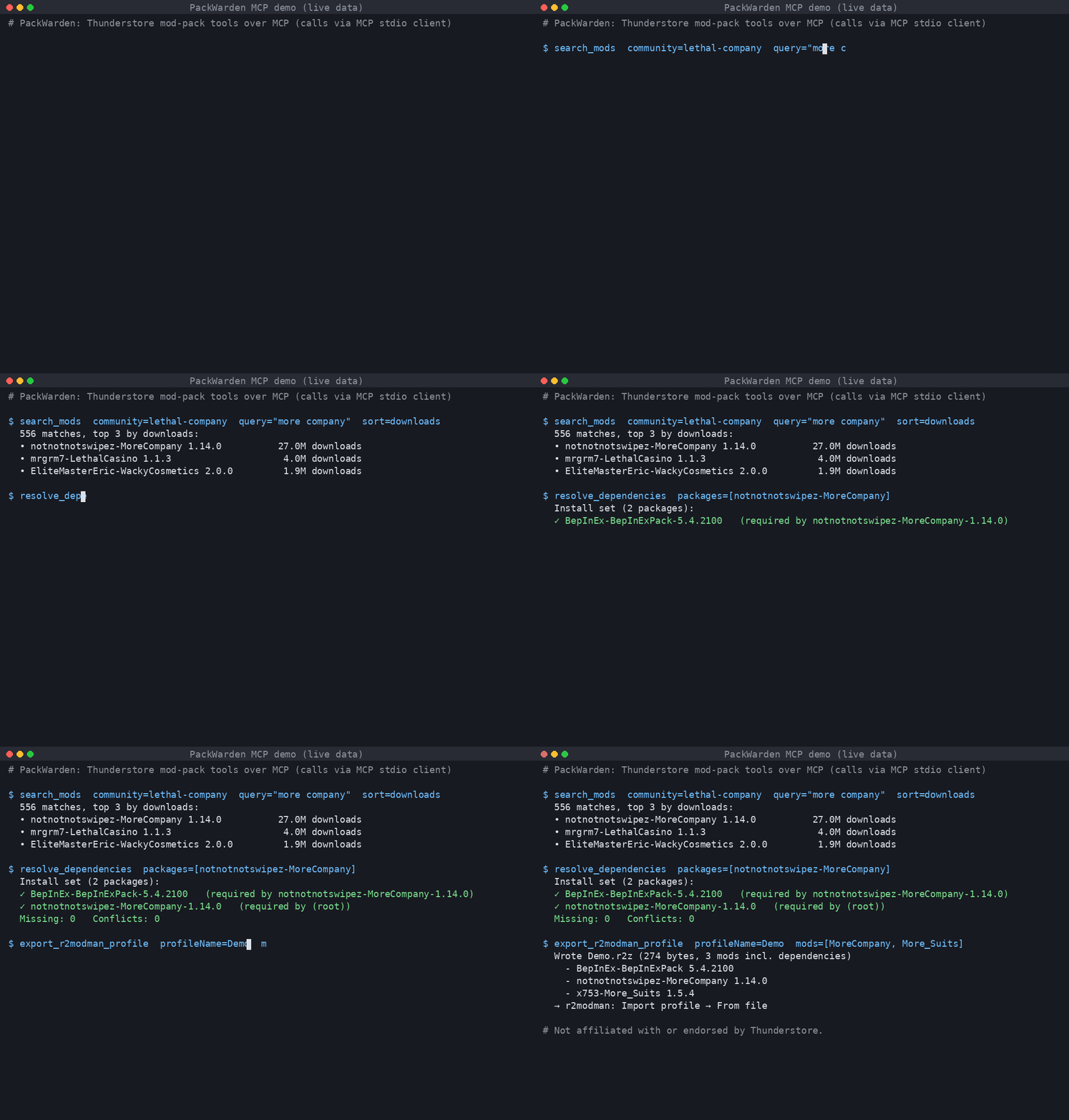
Live output: searching Lethal Company mods, resolving MoreCompany's dependencies, and exporting an r2modman .r2z profile.
An MCP server that helps AI assistants build and maintain Thunderstore mod packs (Lethal Company, Risk of Rain 2, Valheim, and every other Thunderstore community).
Tools
| Tool | What it does |
|---|---|
list_communities |
List Thunderstore game communities (identifier + name). |
search_mods |
Search a community by name/owner/description/category; sort by relevance, downloads, rating, updated. |
resolve_dependencies |
Full transitive dependency closure for one or more packages/versions; final install set, missing deps, multi-version pins, optional tree. |
check_pack_health |
Audit a mod list: not found, removed version, deprecated, outdated, missing deps, dependency version conflicts, duplicates, NSFW. |
export_r2modman_profile |
Write an .r2z profile (r2modman / Thunderstore Mod Manager "Import profile → From file"), optionally with deps and config files. Nothing is uploaded. |
Mods are referenced as Owner-Name (latest) or Owner-Name-1.2.3.
Install
Requires Node.js ≥ 18.17.
git clone <repo> thunderstore-mcp && cd thunderstore-mcp
npm install && npm run build
Claude Desktop
Edit claude_desktop_config.json (macOS: ~/Library/Application Support/Claude/, Windows: %APPDATA%\Claude\):
{
  "mcpServers": {
    "thunderstore": {
      "command": "node",
      "args": ["/absolute/path/to/thunderstore-mcp/dist/main.js"],
      "env": { "TSMCP_EXPORT_DIR": "/absolute/path/for/profiles" }
    }
  }
}
Restart Claude Desktop.
Cursor
~/.cursor/mcp.json (global) or .cursor/mcp.json (project):
{
  "mcpServers": {
    "thunderstore": {
      "command": "node",
      "args": ["/absolute/path/to/thunderstore-mcp/dist/main.js"]
    }
  }
}
Streamable HTTP (remote / self-hosted)
npm run start:http            # http://127.0.0.1:3333/mcp
PORT=8080 HOST=0.0.0.0 node dist/main.js --http
Cursor: { "mcpServers": { "thunderstore": { "url": "http://127.0.0.1:3333/mcp" } } }.
The HTTP mode is stateless (POST-only, JSON responses) and has no auth. Put it behind a reverse proxy with TLS and auth before exposing it.
Configuration (env)
| Var | Default | Meaning |
|---|---|---|
TSMCP_CACHE_DIR |
~/.cache/thunderstore-mcp |
Slim package-index cache |
TSMCP_LIST_TTL_MS |
3600000 (1h) |
Package-list freshness |
TSMCP_MIN_INTERVAL_MS |
1000 |
Minimum gap between outbound requests |
TSMCP_EXPORT_DIR |
./exports |
Where .r2z files are written |
TSMCP_CONTACT |
support@packwarden.dev |
Contact put in the User-Agent. Override if you run your own copy. |
TSMCP_BRAND |
PackWarden |
Brand in server name/User-Agent |
TSMCP_BASE_URL |
https://thunderstore.io |
API base |
Be a good API citizen
- One full package list download per community per TTL, then conditional requests (
If-Modified-Since). Results are cached on disk as a slim index. - Outbound requests are serialized (concurrency 1) and spaced ≥1s apart. On 429/5xx the client backs off and honours
Retry-After. - Identifying User-Agent with a contact address.
- If the network fails, the server keeps serving stale cache.
Tests (live API)
npm test                         # default community: valheim
TEST_COMMUNITY=valheim npm test
Tests cover stdio and streamable HTTP end-to-end against the live Thunderstore API.
Limitations
- Large communities are heavy. The first load of Lethal Company is about 330 MB of JSON, takes about 14 s, and uses about 1.4 GB of RAM. After that, loads from cache take about 3 s.
- Resolution follows r2modman behaviour (highest requested version wins). It does not do semver range solving, because Thunderstore pins exact versions.
- No profile code sharing, which would need an upload to Thunderstore. Only file export is supported.
- Search is local keyword scoring, not Thunderstore's own search ranking.
PackWarden MCP 질문
PackWarden MCP를 Claude Code에 추가하려면 어떻게 하나요?
터미널에서 claude mcp add packwarden -- npx -y @packwarden-dev/thunderstore-mcp를 실행합니다. 모든 프로젝트에서 사용할 수 있게 하려면 --scope user를 추가합니다.
PackWarden MCP를 Cursor에 추가하려면 어떻게 하나요?
~/.cursor/mcp.json를 열고 mcpServers 아래에 서버를 추가합니다. 위 설치 섹션에 표시된 Cursor 구성을 사용합니다.
PackWarden MCP는 어떤 도구를 제공하나요?
5개 도구를 제공합니다. 예: list_communities, search_mods, resolve_dependencies, check_pack_health, export_r2modman_profile.
PackWarden은 어떤 게임을 지원하나요?
Lethal Company, Risk of Rain 2, Valheim을 포함한 모든 Thunderstore 커뮤니티를 지원합니다.
모드 목록을 어떻게 내보내나요?
서버에서 .r2z 프로필을 생성할 수 있으며, 이를 r2modman 또는 Thunderstore Mod Manager로 가져올 수 있습니다.
대규모 커뮤니티를 위한 하드웨어 요구 사항은 무엇인가요?
Lethal Company와 같은 대규모 커뮤니티를 로드하려면 약 1.4 GB의 RAM이 필요하며 첫 로드 시 약 14초가 소요될 수 있습니다.