
Model Context Protocol 도구를 지원하는 프레임워크를 사용하여 AI-native IDE 제품을 구축합니다.
다른 이름 opensumi/core
- 스타
- 3,666
- Tools
- —
- 다운로드, 30일
- —
- 최신 버전
- —
- 마지막 커밋
- 2026년 10월 15일
- 라이선스
- MIT
OpenSumi MCP란?
Model Context Protocol 도구를 지원하는 프레임워크를 사용하여 AI-native IDE 제품을 구축합니다.
프로젝트 README에서 생성된 요약
OpenSumi MCP server 정보
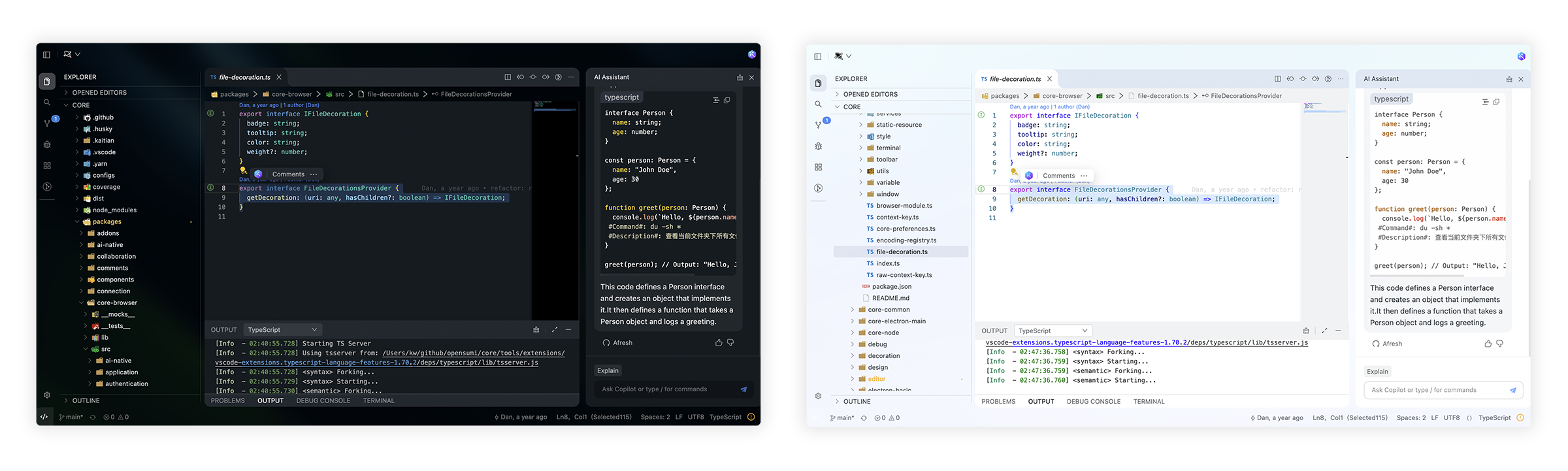
AI-native 통합 개발 환경을 구축하는 것이 이 프레임워크의 주요 목표입니다. 개발자가 Model Context Protocol 도구를 기본적으로 지원하는 특화된 코딩 제품을 만들 수 있도록 필요한 도구를 제공합니다. 이를 통해 개발 환경과 AI 기능 간의 깊은 통합이 가능합니다.
개발자는 Electron을 사용하는 데스크톱 애플리케이션, 클라우드 기반 IDE 또는 브라우저에서 직접 실행되는 경량 웹 버전을 포함한 다양한 플랫폼에 이 프레임워크를 구현할 수 있습니다. 설정에는 yarn install 및 yarn run start와 같은 표준 개발 명령이 포함되며, 환경 변수를 통해 로컬 워크스페이스 디렉토리를 지정할 수 있습니다. 순수 웹 IDE 프레임워크부터 미니 앱 스타일의 개발 환경까지 모든 것을 구축하려는 사용자를 위해 설계되었습니다.
활용 사례
- 1데스크톱 IDE 구축개발자는 Electron 기반 템플릿을 사용하여 로컬 코딩 애플리케이션을 구축할 수 있습니다.
- 2클라우드 IDE 출시팀은 스타트업 템플릿을 활용하여 클라우드에 개발 환경을 배포할 수 있습니다.
- 3브라우저 기반 에디터 개발웹 브라우저 내에서 완전히 작동하는 경량 IDE를 구축할 수 있습니다.
프로젝트의 README를 바탕으로 작성되었습니다. 모든 활용 사례는 해당 내용의 인용문과 대조하여 확인합니다.
자동 검사
2026년 11월 15일에 실행됨전체 보고서 →아직 인증되지 않았습니다. 서버는 80점 이상의 점수, 심각한 결함 없음, 그리고 검사에 충분한 데이터를 갖추어야 합니다. 검사 방식 · 점수를 높이기 위해 수정할 항목

- 소스 저장소 연결 및 접근 가능opensumi/core is public and reachablegithub.com/opensumi/core ↗통과
- 패키지가 이 저장소를 소스로 명시검사되지 않음
- 빌드 출처(Sigstore 증명)검사되지 않음
- 오픈 소스 라이선스 (OSI)MITspdx.org/licenses/MIT.html ↗통과
- 최근 1년 내 커밋 또는 릴리스Last commit or release 2026-10-15github.com/opensumi/core ↗통과
- OpenSSF Scorecard검사되지 않음
- 패키지 이름이 인기 패키지와 유사하지 않음검사되지 않음
- 패키지 및 해당 종속성에 중요한 보안 권고 없음검사되지 않음
- 모델에 대한 숨겨진 지침 없음0 tool descriptions and the README read; no override phrases, credential paths or hidden characters통과
- 파괴적인 도구에 라벨 표시됨검사되지 않음
- 원격 엔드포인트가 MCP 핸드셰이크에 응답검사되지 않음
README
GitHub에서 보기






Changelog · Report Bug · Request Feature · English · 中文
🌟 Getting Started
Here you can find some of our example projects and templates:
- Cloud IDE
- Desktop IDE - based on the Electron
- CodeFuse IDE - AI IDE based on OpenSumi
- CodeBlitz - A pure web IDE Framework
- Lite Web IDE - A pure web IDE on the Browser
- The Mini-App liked IDE
⚡️ Development
$ yarn install
$ yarn run init
$ yarn run download-extension  # Optional
$ yarn run start
By default, the tools/workspace folder in the project would be opened, or you can run the project by specifying the directory in the following way:
$ MY_WORKSPACE={local_path} yarn run start
Usually, you may still encounter some system-level environment dependencies. You can visit Development Environment Preparation to see how to install the corresponding environment dependencies.
📕 Documentation
For complete documentation: opensumi.com
📍 ReleaseNotes & BreakingChanges
You can see all the releasenotes and breaking changes here: CHANGELOG.md.
🔥 Contributing
Read through our Contributing Guide to learn about our submission process, coding rules and more.
🙋♀️ Want to Help?
Want to report a bug, contribute some code, or improve documentation? Excellent! Read up on our Contributing Guidelines for contributing and then check out one of our issues labeled as help wanted or good first issue.
🧑💻 Needs some help?
Go to our issues or discussions to create a topic, it will be resolved as soon as we can.
✨ Contributors
Let's build a better OpenSumi together.
We warmly invite contributions from everyone. Before you get started, please take a moment to review our Contributing Guide. Feel free to share your ideas through Pull Requests or GitHub Issues.
📃 License
Copyright (c) 2019-present Alibaba Group Holding Limited, Ant Group Co. Ltd.
Licensed under the MIT license.
This project contains various third-party code under other open source licenses.
See the NOTICE.md file for more information.
OpenSumi MCP 질문
OpenSumi로 개발을 시작하려면 어떻게 해야 하나요?
yarn install, yarn run init을 실행한 다음 yarn run start를 실행하여 시작할 수 있습니다.