
컴파일 후 실행(compile-then-execute) 아키텍처를 사용하여 AI 클라이언트가 고해상도 현미경 이미징 워크플로를 검사, 작성, 검증 및 실행할 수 있도록 합니다.
다른 이름 OpenHCSDev/OpenHCS
- 스타
- 7
- Tools
- —
- 다운로드, 30일
- 378
- 최신 버전
- 0.8.6
- 마지막 커밋
- 2026년 11월 12일
- 라이선스
- MIT
OpenHCS MCP란?
OpenHCS은(는) MCP server입니다. 컴파일 후 실행(compile-then-execute) 아키텍처를 사용하여 AI 클라이언트가 고해상도 현미경 이미징 워크플로를 검사, 작성, 검증 및 실행할 수 있도록 합니다.
프로젝트 README에서 생성된 요약
OpenHCS MCP server 정보
OpenHCS는 이미징 과학자가 고해상도 현미경 이미지를 재현 가능한 측정값으로 변환할 수 있는 전문 환경을 제공합니다. 이 시스템은 프로세싱을 시작하기 전에 선택된 실행 축에 따라 파이프라인을 검증하는 컴파일 후 실행 아키텍처를 사용합니다. 이러한 접근 방식은 구성 요소를 해결하고 메모리 계약, 소스 및 워커 요구 사항을 사전에 확인하여 비용이 많이 드는 오류를 방지합니다. 플랫폼은 ImageXpress, Opera Phenix, Bio-Formats, OMERO를 포함한 다양한 이미지 소스를 지원합니다.
사용자는 데스크톱 GUI, Python 코드 또는 로컬 MCP agent를 통해 시스템과 상호작용할 수 있습니다. 로컬 MCP server를 사용하면 Claude Desktop 또는 ChatGPT와 같은 AI 클라이언트가 사용 가능한 함수를 검사하고, 타입이 지정된 파이프라인을 구축하며, 워크플로를 실행할 수 있습니다. 시스템은 실시간 이미지 스트리밍을 위해 Napari 및 Fiji/ImageJ와 같은 뷰어와 통합됩니다. 또한 CellProfiler .cppipe 파일을 네이티브 파이프라인 구성으로 가져오는 기능을 지원합니다. 개발자는 메모리 타입 데코레이터를 사용하여 커스텀 Python 함수를 등록함으로써 PyTorch, JAX 또는 CuPy와 같은 프레임워크를 통한 GPU 가속을 활성화할 수 있습니다.
활용 사례
- 1자동화된 파이프라인 생성AI agent가 현미경 폴더와 분석 목표를 입력받아 타입이 지정된 파이프라인을 구축하고 검증할 수 있습니다.
- 2양방향 워크플로 편집연구자가 GUI에서 파이프라인을 시각적으로 설계한 후, 프로그래밍 방식의 편집을 위해 Python으로 내보낼 수 있습니다.
- 3실시간 이미지 검사개발자는 파이프라인 실행 중에 처리된 이미지를 Napari 또는 Fiji/ImageJ로 스트리밍할 수 있습니다.
프로젝트의 README를 바탕으로 작성되었습니다. 모든 활용 사례는 해당 내용의 인용문과 대조하여 확인합니다.
OpenHCS MCP 설치 방법
형식 확인: 2026년 11월 10일Cursor에 추가Goose에 추가Claude Code에 OpenHCS MCP 설치
$ claude mcp add openhcs -- uvx openhcsCursor에 OpenHCS MCP 설치
~/.cursor/mcp.json
{
  "mcpServers": {
    "openhcs": {
      "command": "uvx",
      "args": [
        "openhcs"
      ]
    }
  }
}VS Code에 OpenHCS MCP 설치
.vscode/mcp.json
{
  "servers": {
    "openhcs": {
      "type": "stdio",
      "command": "uvx",
      "args": [
        "openhcs"
      ]
    }
  }
}VS Code CLI에 OpenHCS MCP 설치
$ code --add-mcp '{"name":"openhcs","type":"stdio","command":"uvx","args":["openhcs"]}'Claude Desktop에 OpenHCS MCP 설치
claude_desktop_config.json
{
  "mcpServers": {
    "openhcs": {
      "command": "uvx",
      "args": [
        "openhcs"
      ]
    }
  }
}Codex에 OpenHCS MCP 설치
$ codex mcp add openhcs -- uvx openhcsCodex config.toml에 OpenHCS MCP 설치
~/.codex/config.toml
[mcp_servers.openhcs]
command = "uvx"
args = ["openhcs"]
Gemini CLI에 OpenHCS MCP 설치
$ gemini mcp add -s user openhcs uvx -- openhcsGemini settings.json에 OpenHCS MCP 설치
~/.gemini/settings.json
{
  "mcpServers": {
    "openhcs": {
      "command": "uvx",
      "args": [
        "openhcs"
      ]
    }
  }
}구성
OPENHCS_CPU_ONLY
| 이름 | 설명 | 유형 |
|---|---|---|
| OPENHCS_CPU_ONLY | — |
자동 검사
2026년 11월 13일에 실행됨전체 보고서 →자동 검사를 통과했습니다. 이는 보안 감사가 아닙니다. 코드를 직접 읽고 서버에 필요한 최소한의 권한만 부여하십시오. 검사 방식

- 소스 저장소 연결 및 접근 가능통과
- 오픈 소스 라이선스 (OSI)통과
- 최근 1년 내 커밋 또는 릴리스통과
- 패키지 이름이 인기 패키지와 유사하지 않음통과
- 원격 엔드포인트가 HTTPS 사용검사되지 않음
- 파괴적인 도구에 라벨 표시됨검사되지 않음
- 모델에 대한 숨겨진 지침 없음통과
- 패키지 및 해당 종속성에 중요한 보안 권고 없음통과
README
GitHub에서 보기Turn high-content microscopy images into reproducible measurements
One reviewable workflow across the GUI, Python, CellProfiler, and local agents


OpenHCS is designed for imaging scientists and research software teams running high-content studies where many wells, sites, channels, Z planes, or time points must be analysed consistently. Source selection, processing steps, and result definitions stay together in one validated pipeline instead of being split across interface-only state, scripts, and automation.
It is a good fit when a workflow must remain reviewable across visual editing,
code, and automation. The same pipeline can be edited in the desktop GUI or as
Python, imported from supported CellProfiler .cppipe files, and built or
reviewed through the local MCP surface.
Install
Windows installer · macOS installer · Installation options
The graphical installers set up an isolated CPU-safe desktop environment with the OpenHCS GUI, CellProfiler compatibility, local MCP server, Napari, Fiji/ImageJ, and Bio-Formats. GPU libraries remain optional.
See OpenHCS in use
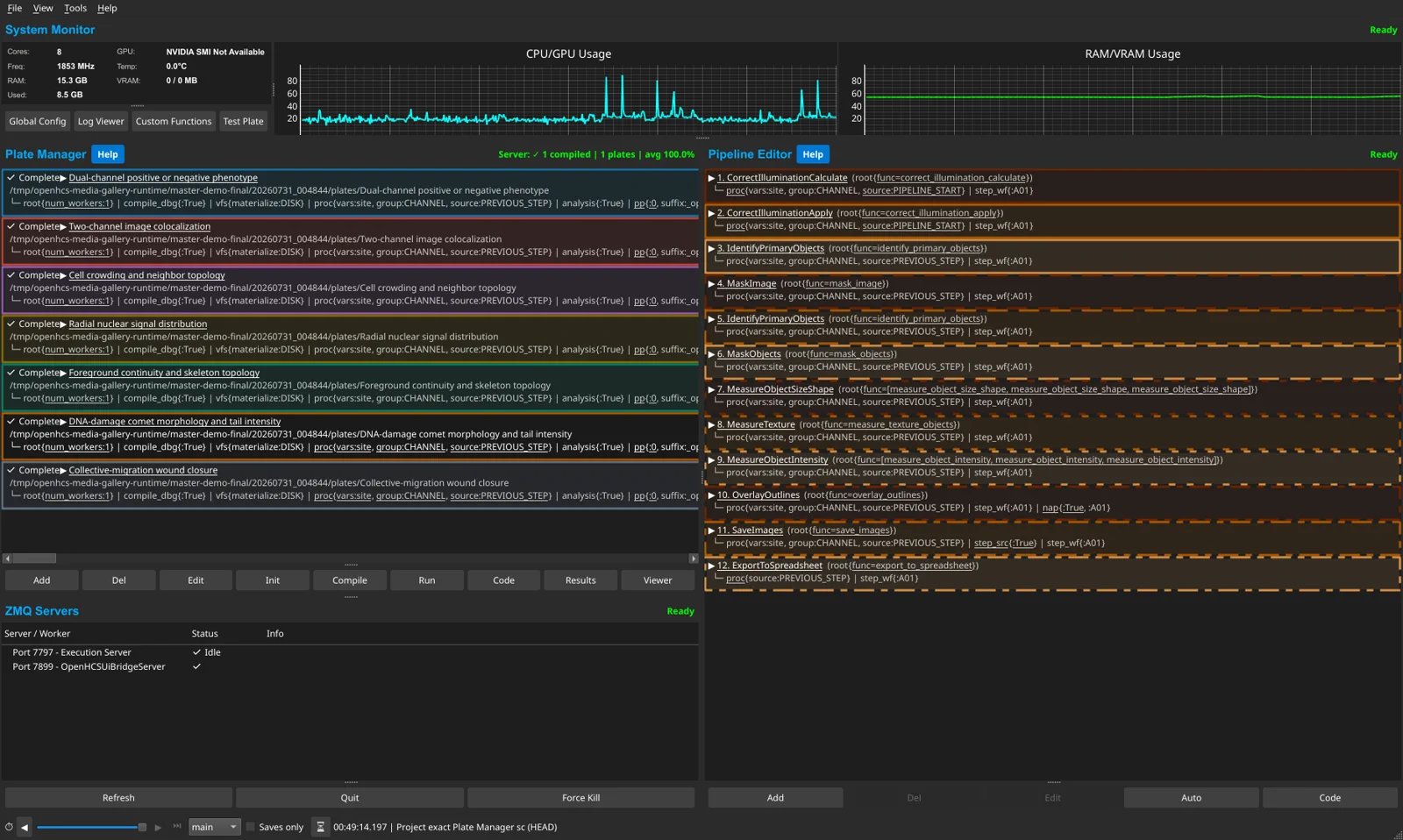
Browse the UI and viewer gallery · Watch an agent build, debug, run, and inspect a workflow
OpenHCS processes large microscopy datasets with a compile-then-execute architecture. Pipelines are validated across the selected execution axes before processing starts, preventing late failures after expensive work. Design pipelines in the GUI, export to Python, edit as code, and re-import — switching between visual and programmatic workflows. The local MCP exposes that same workflow model to supported agents, so agent-authored pipelines remain visible, editable, and reviewable in the GUI and generated Python.
graph LR
    subgraph Sources
        IX[ImageXpress]
        OP[Opera Phenix]
        BF[Bio-Formats]
        OM[OMERO]
    end

    subgraph OpenHCS Platform
        PD["Pipeline Designer<br/>(GUI ⇄ Code ⇄ Agent)"]
        CO["Typed Compiler<br/>(resolve + validate)"]
        EX["Bounded Worker Executor<br/>(well scheduling · multi-GPU)"]
        FN["Registry-Discovered Functions<br/>scikit-image · CuPy · pyclesperanto<br/>PyTorch · JAX · TF · CuCIM · custom"]
        PS["PolyStore<br/>(Memory ↔ Disk ↔ Zarr ↔ Stream)"]
    end

    subgraph Viewers
        NA[Napari]
        FJ[Fiji/ImageJ]
    end

    IX --> PD
    OP --> PD
    BF --> PD
    OM --> PD
    PD --> CO --> EX
    EX --> FN --> PS
    PS --> NA
    PS --> FJ
⚡ Key Capabilities
🛡️ Compile-Time Validation
Configuration is resolved once into step snapshots and a compilation session. Typed plans then validate sources, artifacts, materialization, memory contracts, and worker requirements before execution begins. Errors surface immediately, not after hours of processing.
🔄 Bidirectional GUI ↔ Code
Design pipelines visually, export as executable Python, edit in your IDE, re-import to the GUI. Code generation works at any scope level — function patterns, individual steps, pipeline configs, full orchestrator scripts — any window holding objects can generate and re-import code.
🧠 Agent-Assisted Workflows
Give a supported MCP client a microscopy folder or plate and an analysis goal. It can inspect the connected execution server's functions, build and validate a typed pipeline, run it, inspect results in OpenHCS or a viewer, and revise the generated Python.
⚡ Multiprocessing & GPU Acceleration
Bounded worker lanes use ProcessPoolExecutor by default, with deterministic
well assignment and sequential processing inside each lane. Compiled callable
contracts select framework-local GPU devices independently; single-worker and
debugging configurations can use inline or threaded execution.
🔌 Any Python Function
Register any Python function by decorating it with @numpy, @cupy, @pyclesperanto, @torch, or another memory-type decorator. Custom functions receive contract validation, UI integration, multiprocessing-safe import identity, and the same server-owned catalog projection as built-in functions. Persisted functions live in the platform-specific OpenHCS user-data directory.
📊 Results Materialization
Callable and module artifact contracts declare semantic outputs independently of Python argument names. The artifact graph and materialization plans route images, measurements, object labels, relationships, tables, and files to their configured stores and exporters.
🔬 Process-Isolated Napari & Fiji
Stream images to Napari and Fiji/ImageJ in real time during pipeline execution. OpenHCS StreamingConfig declarations and viewer adapters own identity, display, and persistence policy. PolyStore builds generic storage and streaming payloads; ZMQRuntime supplies process-isolated transport, readiness, acknowledgments, and lifecycle.
🪟 Live Cross-Window Updates
Edit a value in GlobalPipelineConfig — watch it propagate in real-time to PipelineConfig and StepConfig windows. Dual-axis resolution (context hierarchy × class MRO) with scope isolation per orchestrator.
🧬 CellProfiler Pipeline Import
Open .cppipe files in the desktop application or lower them from Python into ordinary PipelineConfig and FunctionStep declarations. Named images, objects, measurements, relationships, and exports use the same typed compiler and runtime as native OpenHCS pipelines. The source-backed Official30 suite continuously exercises 30 pipelines from CellProfiler examples, tutorials, and benchmark supplements under explicit equivalence policies.
🤖 MCP Agent Automation
Use the local stdio MCP server with ChatGPT desktop, Codex, Claude Desktop, and other supported clients, or deploy the separately secured HTTP surface. The graphical installers register detected local clients automatically. Capability profiles, schemas, knowledge, UI attachment, authoring, execution, runtime inspection, viewer review, and governed custom-function registration are projected from typed authorities rather than duplicated tool lists.
🧩 The OpenHCS Ecosystem
OpenHCS is built on 8 purpose-extracted, separately published libraries — each solving a general problem and all composed into one platform:
graph TD
    OH["OpenHCS Platform<br/>(domain wiring + pipelines)"]

    OH --> OS["ObjectState<br/>(config)"]
    OH --> AB["ArrayBridge<br/>(arrays)"]
    OH --> PS["PolyStore<br/>(I/O + streaming)"]
    OH --> ZR["ZMQRuntime<br/>(exec)"]
    OH --> QR["PyQT-reactive<br/>(Qt forms)"]
    OH --> FB["formbridge<br/>(form model + UI bridge)"]
    QR --> FB

    OS --> PI["python-introspect<br/>(signatures)"]
    OH --> MR["metaclass-registry<br/>(plugins)"]
    OH --> PC["pycodify<br/>(serialization)"]
| Library | Role in OpenHCS | What It Does |
|---|---|---|
| ObjectState | Configuration framework | Lazy dataclasses with dual-axis inheritance (context hierarchy × class MRO) and contextvars-based resolution |
| ArrayBridge | Memory type conversion | Unified API across NumPy, CuPy, PyTorch, JAX, TensorFlow, pyclesperanto with DLPack zero-copy transfers |
| PolyStore | Unified I/O & stream payloads | Generic storage and streaming payload primitives, backend lifecycle, virtual workspaces, atomic writes, format detection, and ROI extraction |
| ZMQRuntime | Process & transport runtime | Generic request, status, progress, cancellation, process-lifecycle, and viewer-control transport protocols |
| PyQT-reactive | UI form generation | React-style reactive forms from dataclasses with cross-window sync and flash animations |
| formbridge | Toolkit-neutral forms and UI bridge | The form model, help and code documents, and the running-UI bridge contracts, client and server; imports no GUI toolkit, so headless MCP uses it without Qt |
| pycodify | Code ↔ object conversion | Python source as serialization format — type-preserving, diffable, editable, with collision handling |
| python-introspect | Signature analysis | Pure-Python function/dataclass introspection for automatic UI generation and contract analysis |
| metaclass-registry | Plugin discovery | Zero-boilerplate registry system powering microscope handler and storage backend auto-discovery |
🔬 Microscope & Function Support
Image Sources
| Source | Support |
|---|---|
| ImageXpress | Native plate and metadata handling |
| Opera Phenix | Native plate and metadata handling |
| Bio-Formats | Arbitrary folders and supported microscopy containers |
| OMERO | Remote image and metadata access |
| OpenHCS format | Native generated and materialized plates |
Source handlers are auto-detected and extensible through metaclass-registry.
Functions — Automatic Discovery
| Library or route | Execution memory |
|---|---|
| scikit-image and OpenHCS native | NumPy / CPU |
| pyclesperanto | OpenCL GPU |
| CuPy and cuCIM | CUDA GPU |
| PyTorch, JAX, and TensorFlow functions | Declared CPU/GPU arrays |
| User custom functions | Declared by their memory-type decorator |
The connected execution server owns the available catalog, so remote GPU and
custom-function availability is reflected without a manually maintained list.
ArrayBridge provides compatible memory conversion, including zero-copy paths
where supported.
Processing domains: image preprocessing · segmentation · cell counting · stitching (MIST + Ashlar GPU) · neurite tracing · morphology · measurements
Dimensionality is function-defined rather than a global mode: true volumetric segmentation and measurement routes coexist with plane-local functions, whose labels are not silently stitched across Z. See the dimensionality and measurement capability reference.
🚀 Quick Start
For most desktop users, download the Windows installer or macOS installer. Neither download requires ZIP extraction or an existing Python installation. When upgrading OpenHCS 0.7.23 or earlier, follow the one-time installer migration.
If macOS blocks the official bootstrap because it is unsigned and not notarised, try to open OpenHCS Installer.app, then go to System Settings > Privacy & Security, scroll to Security, click Open Anyway, authenticate, and confirm Open. Only override Gatekeeper for the disk image downloaded from the official OpenHCS GitHub release. Apple documents the current recovery steps here.
For a manual installation, create a virtual environment and install the same CPU-safe desktop surface as the graphical installers:
# Complete CPU-safe desktop environment
python -m pip install "openhcs[gui,viz,bioformats,mcp,cellprofiler-compat]"

# Launch the application
openhcs

# Launch the local MCP server over stdio
openhcs-mcp
Smaller environments can select only the required features:
# Basic installation with GUI
python -m pip install "openhcs[gui]"

# Add Napari viewer
python -m pip install "openhcs[gui,napari]"

# Add Fiji/ImageJ viewer
python -m pip install "openhcs[gui,fiji]"

# Add both viewers
python -m pip install "openhcs[gui,viz]"

# Add GPU acceleration on a compatible CUDA 12 system
python -m pip install "openhcs[gui,gpu]"

# Full installation (GUI + viewers + GPU)
python -m pip install "openhcs[gui,viz,gpu]"

# Add the local MCP server for agent clients
python -m pip install "openhcs[gui,mcp,viz]"
# Or lower a CellProfiler pipeline into public OpenHCS declarations
from pathlib import Path

from objectstate import ensure_global_config_context
from openhcs.core.config.pipeline_config import GlobalPipelineConfig
from openhcs.core.orchestrator.orchestrator import PipelineOrchestrator
from openhcs.interop.cellprofiler.pipeline_import import import_cellprofiler_pipeline

plate_path = Path("/data/plate").resolve()
ensure_global_config_context(GlobalPipelineConfig, GlobalPipelineConfig())
steps, pipeline_config = import_cellprofiler_pipeline(
    "analysis.cppipe",
    source_root=plate_path,
)

orchestrator = PipelineOrchestrator(
    plate_path,
    pipeline_config=pipeline_config,
).initialize()
execution_bundle = orchestrator.compile_pipelines(steps)
The GUI and execution services consume the same list[FunctionStep],
PipelineConfig, and typed execution bundle. See the
API orientation for the explicit
low-level execution call and progress lifecycle.
Maintainers running CellProfiler/OpenHCS comparisons can use the packaged
openhcs-benchmark command. openhcs-benchmark list-cases --manifest PATH
checks declared case sources without acquiring data or starting a run; the
expert openhcs_list_benchmark_cases MCP tool exposes the same selection.
Each comparison run records a typed receipt with
its lifecycle state, exact rerun command, declared work, and structured result
artifacts. Use a new or empty output directory; an occupied one is rejected
before the run loads its manifest. On the expert full MCP surface,
openhcs_inspect_benchmark_run
can inspect an existing result directory allowed by the local read-path policy.
openhcs-benchmark inspect-run --output-dir PATH reads the same typed inspection;
both routes page structured artifacts through artifact_limit and
artifact_offset instead of returning an unbounded inventory.
openhcs_report_benchmark_run and openhcs-benchmark inspect-run --output-dir PATH --report render bounded case outcomes from the typed receipt and
observations. These MCP routes are read-only: they do not launch, resume, cancel, or rerun a
benchmark, and a recorded receipt is provenance rather than a scientific parity
claim.
For a single ordinary measured pipeline, openhcs-benchmark inspect-measured --output-dir PATH
and the expert MCP inspection/report tools read the same
validated-run receipt and check retained source, observation, and summary
digests. Archived receipts without the latter two digests remain readable but
cannot verify those files. These routes do not create a
second pipeline runner or job-status system.
openhcs-benchmark run-measured --plate PLATE --pipeline-source-file PIPELINE.py --output-dir EVIDENCE --run-id ID --wait-timeout-ms 120000 submits that
pipeline through ordinary headless job control, then calls the same receipt
finalizer as MCP. Use --execution-plate PREPARED_PLATE when the input workspace
has been prepared separately; the evidence directory must be empty.
Use --observation-scope outcomes to retain per-axis success and provenance
without transferring runtime arrays; this does not compare output values.
After an ordinary headless job completes, the expert
openhcs_finalize_measured_pipeline_run tool can validate its runtime
observation and retain that receipt from the exact submitted pipeline and
server completion record. It does not submit another job.
python -m pip install "openhcs"              # Headless engine
python -m pip install "openhcs[gui]"         # Desktop GUI
python -m pip install "openhcs[gui,napari]"  # GUI + Napari viewer
python -m pip install "openhcs[gui,viz]"     # GUI + Napari + Fiji
python -m pip install "openhcs[gui,viz,gpu]" # Full installation
python -m pip install "openhcs[gpu]"         # Headless + GPU
python -m pip install "openhcs[omero]"       # OMERO integration
python -m pip install -e ".[all,dev]"         # Development (all features)
The gpu extra requires a compatible CUDA 12 environment on a supported
NVIDIA platform. For a CPU-only
desktop installation, install openhcs[gui] without the gpu extra.
OMERO requires zeroc-ice, whose compatible wheels are not published through
the normal project metadata. Install the helper requirements before the extra:
python scripts/install_omero_deps.py
pip install 'openhcs[omero]'
Equivalent requirements-file installation:
pip install -r requirements-omero.txt
pip install 'openhcs[omero]'
Supported on Python 3.11 and 3.12. See Glencoe Software for manual installation.
📖 Documentation
| 📘 Read the Docs | Full API docs, tutorials, guides |
| 🏗️ Architecture | Typed compiler · sources · artifacts · runtime values · package boundaries |
| 🎓 Getting Started | Installation · First pipeline |
⚙️ Architecture Highlights
PipelineConfig + list[FunctionStep]
        ↓ resolve once
StepSnapshot + CompilationSession
        ↓ derive and validate
typed CompiledStepPlan objects
        ↓ package
CompiledExecutionBundle
        ↓ execute
runtime values + materialized artifacts
The authoring surface remains an ordered linear step list. ObjectState inheritance keeps defaulted configuration sparse, while compilation derives and exposes the exact source and artifact dependencies required for execution; the derived dependency graph is not a second workflow the user must author.
Pipelines are compiled for every selected execution axis before processing begins. Runtime workers consume the compiled bundle rather than reinterpreting mutable declaration objects. Read more →
Resolution walks two axes simultaneously: the context stack (Global → Pipeline → Step) and the class MRO (inheritance chain). Built on contextvars for thread-safe, scope-isolated resolution. Preserves None vs concrete value distinction for proper field-level inheritance. Powered by ObjectState. Read more →
Any window holding ObjectState objects can generate and re-import executable Python:
Function patterns · Individual steps · Pipeline configs · Full orchestrator scripts
              ↕  generate / AST-parse back  ↕
Each scope encapsulates all lower-scope imports. Generated code is fully executable without additional setup. Edit in your IDE or external editor, save, and the GUI re-imports via AST parsing. Powered by pycodify + python-introspect. Read more →
A class-level registry tracks all active form managers. When a value changes in any config window, Qt signals propagate the change to every affected window with debounced, scope-isolated refreshes. Global → Pipeline → Step cascading with per-orchestrator isolation. Powered by PyQT-reactive. Read more →
- Storage and viewer streaming: PolyStore owns generic storage and streaming payload primitives; ZMQRuntime owns process, transport, readiness, acknowledgment, and lifecycle protocols; OpenHCS
StreamingConfigdeclarations plus the Napari/Fiji adapters own viewer identity, display, and application policy. - Automatic Function Discovery: registry-discovered functions with contract analysis and type-safe integration via
python-introspect+metaclass-registry - Memory Type Management: Compile-time validation of array type compatibility with zero-copy conversion via
ArrayBridge - Custom Function Registration: Any Python function decorated with
@numpy,@cupy,@pyclesperanto, etc. is auto-integrated with contracts, UI forms, and the function registry - Evolution-Proof UI: Type-based form generation from Python annotations — adapts automatically when signatures change
🤝 Contributing
git clone --recurse-submodules https://github.com/OpenHCSDev/OpenHCS.git
cd OpenHCS
# Install the eight local packages using docs/source/development/repository_setup.rst,
# then install OpenHCS itself:
python -m pip install -e ".[dev,gui]"
OPENHCS_CPU_ONLY=1 python -m pytest tests/unit
Contribution areas: microscope formats · processing functions · GPU backends · documentation
📄 License
MIT — see LICENSE.
OpenHCS MCP 질문
OpenHCS MCP를 Claude Code에 추가하려면 어떻게 하나요?
터미널에서 claude mcp add openhcs -- uvx openhcs를 실행합니다. 모든 프로젝트에서 사용할 수 있게 하려면 --scope user를 추가합니다.
OpenHCS MCP를 Cursor에 추가하려면 어떻게 하나요?
~/.cursor/mcp.json를 열고 mcpServers 아래에 서버를 추가합니다. 위 설치 섹션에 표시된 Cursor 구성을 사용합니다.
OpenHCS를 CellProfiler와 함께 사용할 수 있나요?
네, 데스크톱 애플리케이션에서 .cppipe 파일을 열거나 Python에서 OpenHCS 파이프라인 선언으로 가져올 수 있습니다.
MCP server는 AI agent와 어떻게 작동하나요?
로컬 stdio MCP server를 통해 Claude Desktop 또는 ChatGPT와 같은 클라이언트가 함수를 검사하고, 파이프라인을 구축 및 검증하며, 이를 실행하고 결과를 확인할 수 있습니다.
OpenHCS는 GPU 가속을 지원하나요?
네, CuPy, PyTorch, JAX, TensorFlow와 같은 라이브러리를 통해 GPU 가속을 지원하며, 컴파일된 호출 가능 계약(callable contracts)이 프레임워크별 로컬 GPU 장치를 선택합니다.