
데코레이터, 의존성 주입, 인증 및 UI 위젯을 사용하여 TypeScript MCP server를 구축, 테스트 및 배포할 수 있습니다.
다른 이름 nitrocloudofficial/nitrostack, @nitrostack/cli, @nitrostack/core, @nitrostack/widgets
- 스타
- 2,565
- Tools
- —
- 다운로드, 30일
- —
- 최신 버전
- —
- 마지막 커밋
- 2026년 11월 11일
- 라이선스
- Apache-2.0
NitroStack MCP란?
데코레이터, 의존성 주입, 인증 및 UI 위젯을 사용하여 TypeScript MCP server를 구축, 테스트 및 배포할 수 있습니다.
프로젝트 README에서 생성된 요약
NitroStack MCP server 정보
이 프레임워크를 사용하는 개발자의 주요 목표는 프로덕션 환경에 적합한 TypeScript MCP server를 구축하는 것입니다. 데코레이터 기반 방식을 통해 인증, 의존성 주입, 스키마 검증과 같은 일반적인 백엔드 요구 사항을 처리하는 최적화된 환경을 제공합니다. 개발자는 @nitrostack/cli를 사용하여 새로운 프로젝트를 스캐폴딩하고 개발 라이프사이클을 관리할 수 있습니다.
사용자는 JWT, OAuth 2.1, API key를 포함한 다양한 보안 프로토콜을 서버 로직에 직접 통합할 수 있습니다. 또한 UI 위젯을 통해 tool 출력에 React 컴포넌트를 연결할 수 있어, AI 클라이언트 내에서 인터랙티브한 응답을 제공할 수 있습니다. 테스트 및 디버깅을 위해 NitroStudio 데스크톱 애플리케이션은 도구를 실행하고, 페이로드를 검사하며, 서버와 실시간으로 채팅할 수 있는 시각적 인터페이스를 제공합니다.
이 환경을 구축하려면 Node.js 20.18 이상 및 npm 9 이상의 버전이 필요합니다. 에코시스템은 모듈식으로 구성되어 있어, 런타임을 위한 @nitrostack/core나 인터랙티브한 사용자 인터페이스 구축을 위한 @nitrostack/widgets와 같은 특정 패키지를 선택하여 설치할 수 있습니다.
활용 사례
- 1새 프로젝트 스캐폴딩개발자는 CLI를 사용하여 새로운 MCP server 디렉토리를 빠르게 초기화할 수 있습니다.
- 2인터랙티브한 tool 출력 생성React 컴포넌트를 tool 출력에 연결하여 사용자에게 풍부하고 인터랙티브한 응답을 제공할 수 있습니다.
- 3안전한 tool 액세스 구현개발자는 API key와 같은 내장 인증 가드를 사용하여 특정 도구에 대한 접근을 보호할 수 있습니다.
프로젝트의 README를 바탕으로 작성되었습니다. 모든 활용 사례는 해당 내용의 인용문과 대조하여 확인합니다.
NitroStack MCP 설치 방법
형식 확인: 2026년 11월 10일Cursor에 추가Goose에 추가Claude Code에 NitroStack MCP 설치
$ claude mcp add nitrostack -- npx -y @nitrostack/cliCursor에 NitroStack MCP 설치
~/.cursor/mcp.json
{
  "mcpServers": {
    "nitrostack": {
      "command": "npx",
      "args": [
        "-y",
        "@nitrostack/cli"
      ]
    }
  }
}VS Code에 NitroStack MCP 설치
.vscode/mcp.json
{
  "servers": {
    "nitrostack": {
      "type": "stdio",
      "command": "npx",
      "args": [
        "-y",
        "@nitrostack/cli"
      ]
    }
  }
}VS Code CLI에 NitroStack MCP 설치
$ code --add-mcp '{"name":"nitrostack","type":"stdio","command":"npx","args":["-y","@nitrostack/cli"]}'Claude Desktop에 NitroStack MCP 설치
claude_desktop_config.json
{
  "mcpServers": {
    "nitrostack": {
      "command": "npx",
      "args": [
        "-y",
        "@nitrostack/cli"
      ]
    }
  }
}Codex에 NitroStack MCP 설치
$ codex mcp add nitrostack -- npx -y @nitrostack/cliCodex config.toml에 NitroStack MCP 설치
~/.codex/config.toml
[mcp_servers.nitrostack]
command = "npx"
args = ["-y", "@nitrostack/cli"]
Gemini CLI에 NitroStack MCP 설치
$ gemini mcp add -s user nitrostack npx -- -y @nitrostack/cliGemini settings.json에 NitroStack MCP 설치
~/.gemini/settings.json
{
  "mcpServers": {
    "nitrostack": {
      "command": "npx",
      "args": [
        "-y",
        "@nitrostack/cli"
      ]
    }
  }
}자동 검사
2026년 11월 12일에 실행됨전체 보고서 →자동 검사를 통과했습니다. 이는 보안 감사가 아닙니다. 코드를 직접 읽고 서버에 필요한 최소한의 권한만 부여하십시오. 검사 방식

- 소스 저장소 연결 및 접근 가능통과
- 오픈 소스 라이선스 (OSI)통과
- 최근 1년 내 커밋 또는 릴리스통과
- 패키지 이름이 인기 패키지와 유사하지 않음통과
- 원격 엔드포인트가 HTTPS 사용검사되지 않음
- 파괴적인 도구에 라벨 표시됨검사되지 않음
- 모델에 대한 숨겨진 지침 없음통과
- 패키지 및 해당 종속성에 중요한 보안 권고 없음검사되지 않음
README
GitHub에서 보기
Documentation · Quick Start · Blog · NitroStudio · Discord
Quick Start
Prerequisites
- Node.js >= 20.18 (download)
- npm >= 9
1. Scaffold a new project
npx @nitrostack/cli init my-server
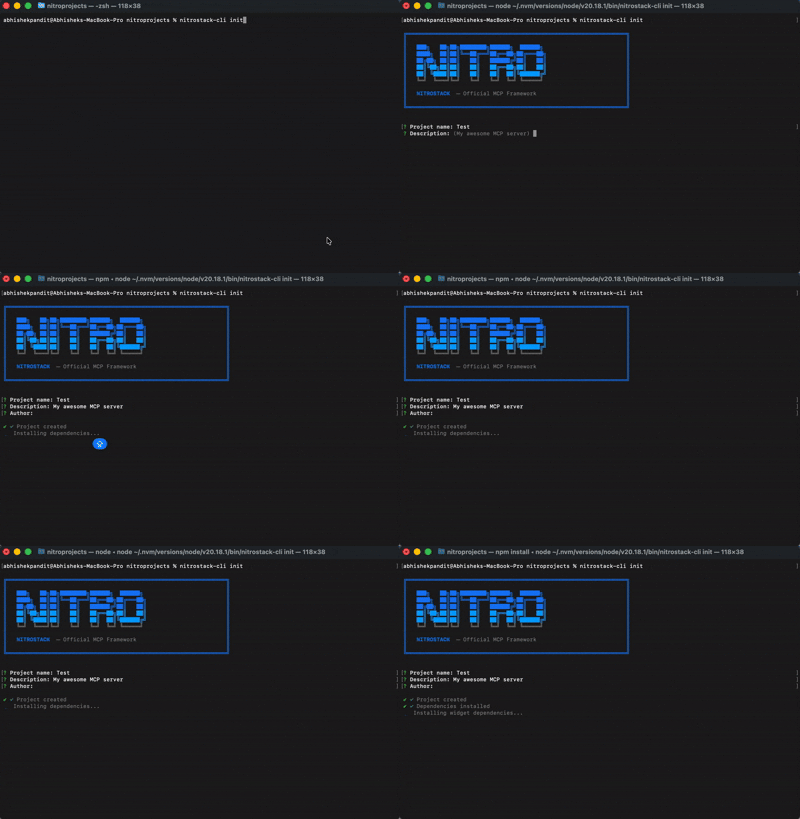
2. Start developing
cd my-server
npm install
npm run dev
Your MCP server is running. Connect it to any MCP-compatible client.
3. Open in NitroStudio
Once your project is scaffolded, open the same folder in NitroStudio for visual testing and debugging.
- Download: https://nitrostack.ai/studio
- Open your
my-serverproject folder - Use NitroStudio to test tools, inspect payloads, and chat with your MCP server
Why NitroStack?
Building MCP servers today means stitching together boilerplate, reinventing authentication, and hoping your tooling scales. NitroStack gives you an opinionated, batteries-included framework so you can focus on what your server actually does.
- Decorator-driven — Define tools, resources, and prompts with clean, declarative TypeScript decorators
- Dependency injection — First-class DI container with singleton, transient, and scoped lifecycles
- Auth built in — JWT, OAuth 2.1, and API key authentication out of the box
- Middleware pipeline — Guards, interceptors, pipes, and exception filters just like enterprise backends
- UI Widgets — Attach React components to tool outputs for rich, interactive responses
- Zod validation — End-to-end type safety from schema to runtime
- NitroStudio — A dedicated desktop app for testing, debugging, and chatting with your server
See It in Action
import { McpApp, Module, ToolDecorator as Tool, z, ExecutionContext } from '@nitrostack/core';

@McpApp({
  module: AppModule,
  server: { name: 'my-server', version: '1.0.0' }
})
@Module({ imports: [] })
export class AppModule {}

export class SearchTools {
  @Tool({
    name: 'search_products',
    description: 'Search the product catalog',
    inputSchema: z.object({
      query: z.string().describe('Search query'),
      maxResults: z.number().default(10)
    })
  })
  @UseGuards(ApiKeyGuard)
  @Cache({ ttl: 300 })
  @Widget('product-grid')
  async search(input: { query: string; maxResults: number }, ctx: ExecutionContext) {
    ctx.logger.info('Searching products', { query: input.query });
    return this.productService.search(input.query, input.maxResults);
  }
}
One decorator stack gives you: API definition + validation + auth + caching + UI — zero boilerplate.
Ecosystem
NitroStack is modular. Install only what you need:
The implementation workspace for NitroStack packages lives in typescript/.
| Package | What it does | Install |
|---|---|---|
@nitrostack/core |
The framework — decorators, DI, server runtime | npm i @nitrostack/core |
@nitrostack/cli |
Scaffolding, dev server, code generators | npm i -g @nitrostack/cli |
@nitrostack/widgets |
React SDK for interactive tool output UIs | npm i @nitrostack/widgets |
NitroStudio
NitroStudio is a desktop app purpose-built for developing MCP servers. Open your project folder — it handles the dev server for you.
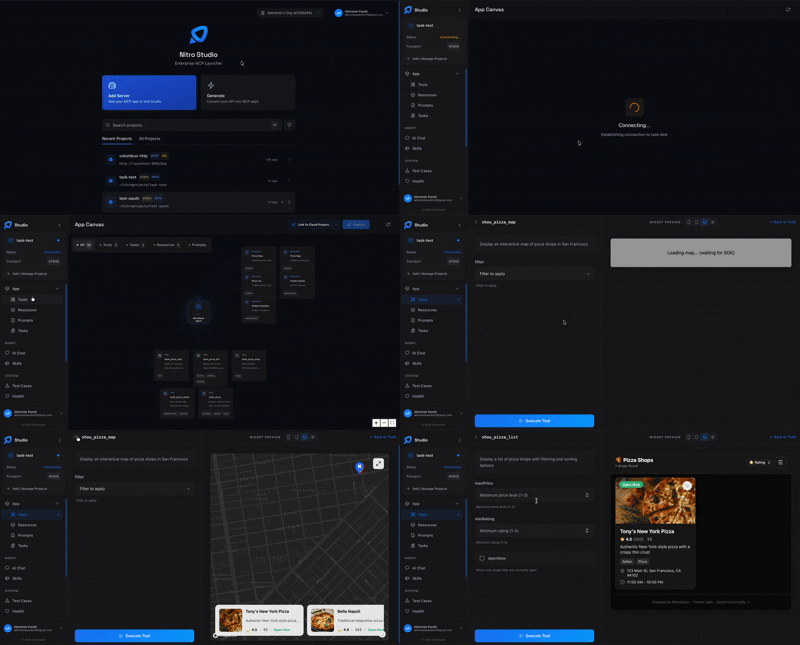
Real-time tool testing Execute tools, inspect payloads, and debug request/response cycles.
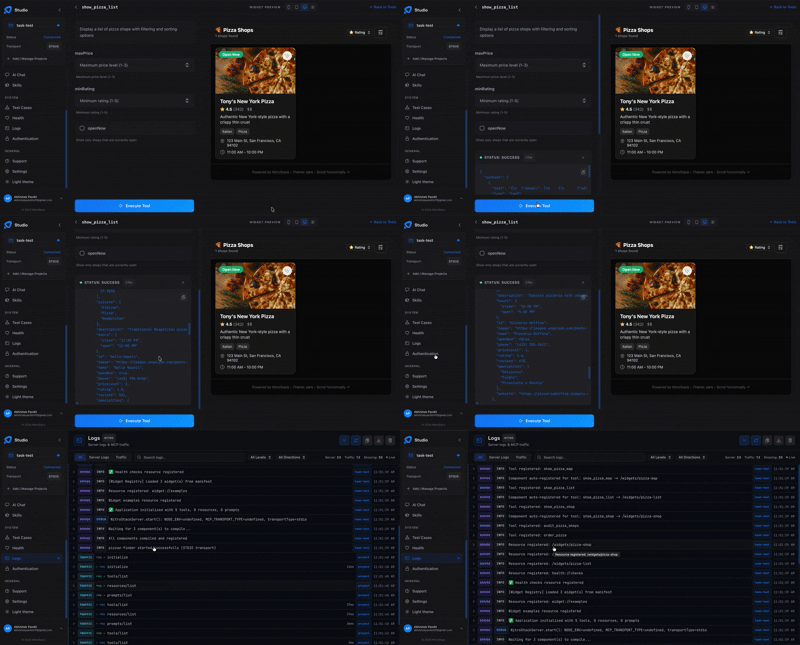
Built-in AI chat Talk to your MCP server through an integrated AI assistant.
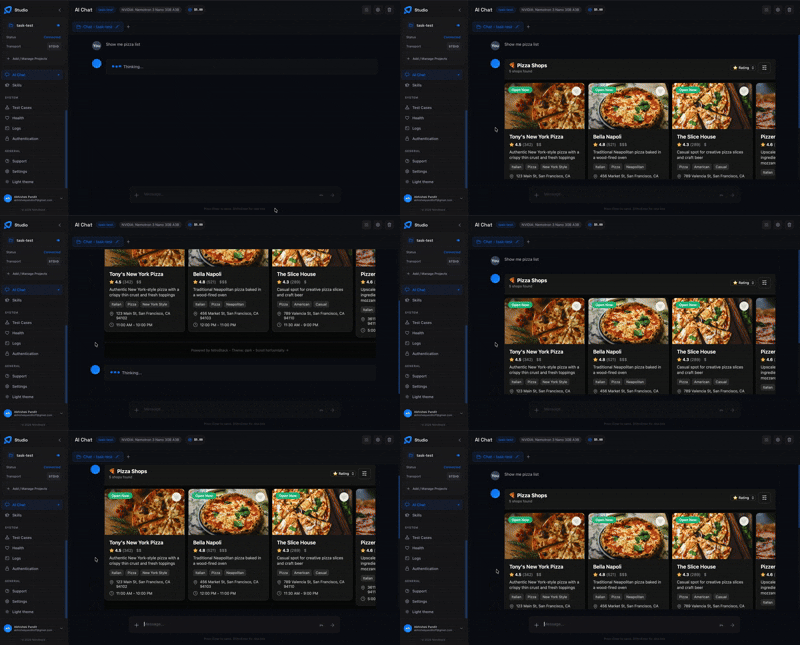
- Widget preview — Instantly visualize your interactive UI components
- Hot reload — Changes reflect in real time as you develop
Documentation
| Resource | Description |
|---|---|
| Getting Started | Installation, quick start, and first project |
| Server Concepts | Modules, DI, and architecture deep dive |
| Tools Guide | Defining tools, validation, annotations |
| Widgets Guide | Building interactive UI components |
| Authentication | JWT, OAuth 2.1, API key setup |
| CLI Reference | All CLI commands and options |
| Deployment | Production checklist, Docker, cloud platforms |
Community
- Discord — Ask questions, share projects, get help
- GitHub Discussions — Proposals, ideas, and Q&A
- Twitter / X — Announcements and updates
- YouTube — Product demos and walkthroughs
- LinkedIn — Company news and updates
- GitHub — Organization profile and open-source work
- Blog — Tutorials, deep dives, and release notes
Contributing
We welcome contributions of all kinds — bug fixes, features, docs, and ideas. Read the Contributing Guide to get started.
Looking for a place to begin? Check out issues labeled good first issue.
Contributors
License
NitroStack is open-source software licensed under the Apache License 2.0.
NitroStack MCP 질문
NitroStack MCP를 Claude Code에 추가하려면 어떻게 하나요?
터미널에서 claude mcp add nitrostack -- npx -y @nitrostack/cli를 실행합니다. 모든 프로젝트에서 사용할 수 있게 하려면 --scope user를 추가합니다.
NitroStack MCP를 Cursor에 추가하려면 어떻게 하나요?
~/.cursor/mcp.json를 열고 mcpServers 아래에 서버를 추가합니다. 위 설치 섹션에 표시된 Cursor 구성을 사용합니다.
NitroStack이란 무엇인가요?
NitroStack은 프로덕션 환경에 적합한 MCP server 및 AI 네이티브 백엔드를 구축하기 위한 엔터프라이즈급 TypeScript 프레임워크입니다. 데코레이터, 의존성 주입, 위젯 및 내장 인증 기능을 포함합니다.
새로운 NitroStack MCP server 프로젝트를 스캐폴딩하려면 어떻게 하나요?
npx @nitrostack/cli init my-server를 실행한 후, 해당 폴더로 이동하여 의존성을 설치하고 npm run dev를 실행합니다. Node.js >= 20.18 및 npm >= 9 버전이 필요합니다.
NitroStack은 인증을 지원하나요?
네, JWT, OAuth 2.1 및 API key 인증을 기본적으로 제공합니다. ApiKeyGuard와 같은 가드를 데코레이터로 적용할 수 있습니다.
NitroStudio란 무엇인가요?
NitroStudio는 MCP server를 테스트, 디버깅하고 채팅할 수 있는 데스크톱 앱입니다. 프로젝트 폴더를 열면 개발 서버를 자동으로 관리합니다.
MCP tool 출력에 UI 컴포넌트를 연결할 수 있나요?
네, @nitrostack/widgets 패키지는 React SDK로, @Widget 데코레이터를 통해 tool 출력에 인터랙티브한 UI 컴포넌트를 연결할 수 있습니다.