
로컬 SQLite 리서치 코퍼스를 사용하여 AI 에이전트가 GitHub repository를 조사하고, issue를 분석하며, 코드 컨텍스트를 확인하고, 변경 사항을 검증할 수 있도록 지원합니다.
다른 이름 morluto/gitcontribute
- 스타
- 36
- Tools
- —
- 다운로드, 30일
- —
- 최신 버전
- 3.0.2
- 마지막 커밋
- 2026년 9월 14일
- 라이선스
- MIT
GitContribute MCP란?
GitContribute은(는) MCP server입니다. 로컬 SQLite 리서치 코퍼스를 사용하여 AI 에이전트가 GitHub repository를 조사하고, issue를 분석하며, 코드 컨텍스트를 확인하고, 변경 사항을 검증할 수 있도록 지원합니다.
프로젝트 README에서 생성된 요약
GitContribute MCP server 정보
GitContribute는 코딩 에이전트가 GitHub repository에 고품질의 기여를 할 수 있도록 리서치 워크벤치를 제공합니다. 이 도구는 MCP server, CLI 또는 터미널 UI로 작동하며, 개발자와 AI 에이전트가 issue를 찾는 단계부터 검증된 pull request를 준비하는 단계까지 원활하게 이동할 수 있도록 돕습니다. 시스템은 repository 가이드, 토론 내용 및 코드 컨텍스트를 로컬 SQLite 코퍼스로 동기화하여, 지속적인 네트워크 호출 없이도 오프라인 리서치와 조사가 가능하게 합니다.
사용자는 Node.js 또는 Go를 사용하여 환경을 설정하며, 인증을 위해 GitHub CLI와 통합할 수 있습니다. 많은 자동화 도구와 달리, GitHub에 직접 쓰기 작업을 수행하지 않습니다. 대신 증거 수집, 중복 작업 확인, 테스트나 벤치마크와 같은 로컬 검증 명령 실행에 집중합니다. 이를 통해 제안된 모든 변경 사항이 기록된 관찰 결과에 의해 뒷받침되고, 사람이 최종 초안을 검토하기 전에 기준점(baseline)을 바탕으로 검증되었는지 확인합니다.
활용 사례
- 1적절한 기여 작업 식별에이전트에게 특정 repository의 open issue를 범위와 조정 리스크에 따라 찾아보고 순위를 매기도록 요청합니다.
- 2심층적인 issue 리서치 수행에이전트에게 특정 issue 번호를 조사하여 문제점과 관련 코드 컨텍스트를 요약하도록 지시합니다.
- 3중복 작업 여부 확인특정 issue가 이미 other pull requests나 리포트에 의해 해결되었는지 확인을 요청합니다.
- 4로컬 코드 변경 사항 검증에이전트가 승인된 테스트 명령을 실행하여 후보 변경 사항을 기존 기준점과 비교하도록 합니다.
프로젝트의 README를 바탕으로 작성되었습니다. 모든 활용 사례는 해당 내용의 인용문과 대조하여 확인합니다.
GitContribute MCP 설치 방법
형식 확인: 2026년 11월 10일Cursor에 추가Goose에 추가Claude Code에 GitContribute MCP 설치
$ claude mcp add gitcontribute -- npx -y gitcontributeCursor에 GitContribute MCP 설치
~/.cursor/mcp.json
{
  "mcpServers": {
    "gitcontribute": {
      "command": "npx",
      "args": [
        "-y",
        "gitcontribute"
      ]
    }
  }
}VS Code에 GitContribute MCP 설치
.vscode/mcp.json
{
  "servers": {
    "gitcontribute": {
      "type": "stdio",
      "command": "npx",
      "args": [
        "-y",
        "gitcontribute"
      ]
    }
  }
}VS Code CLI에 GitContribute MCP 설치
$ code --add-mcp '{"name":"gitcontribute","type":"stdio","command":"npx","args":["-y","gitcontribute"]}'Claude Desktop에 GitContribute MCP 설치
claude_desktop_config.json
{
  "mcpServers": {
    "gitcontribute": {
      "command": "npx",
      "args": [
        "-y",
        "gitcontribute"
      ]
    }
  }
}Codex에 GitContribute MCP 설치
$ codex mcp add gitcontribute -- npx -y gitcontributeCodex config.toml에 GitContribute MCP 설치
~/.codex/config.toml
[mcp_servers.gitcontribute]
command = "npx"
args = ["-y", "gitcontribute"]
Gemini CLI에 GitContribute MCP 설치
$ gemini mcp add -s user gitcontribute npx -- -y gitcontributeGemini settings.json에 GitContribute MCP 설치
~/.gemini/settings.json
{
  "mcpServers": {
    "gitcontribute": {
      "command": "npx",
      "args": [
        "-y",
        "gitcontribute"
      ]
    }
  }
}자동 검사
2026년 11월 14일에 실행됨전체 보고서 →자동 검사를 통과했습니다. 이는 보안 감사가 아닙니다. 코드를 직접 읽고 서버에 필요한 최소한의 권한만 부여하십시오. 검사 방식

- 소스 저장소 연결 및 접근 가능morluto/gitcontribute is public and reachablegithub.com/morluto/gitcontribute ↗통과
- 패키지가 이 저장소를 소스로 명시gitcontribute names morluto/gitcontribute as sourcenpmjs.com/package/gitcontribute ↗통과
- 빌드 출처(Sigstore 증명)Sigstore attestation for gitcontributenpmjs.com/package/gitcontribute/v/3.0.2#provenance ↗통과
- 오픈 소스 라이선스 (OSI)MITspdx.org/licenses/MIT.html ↗통과
- 최근 1년 내 커밋 또는 릴리스Last commit or release 2026-09-14github.com/morluto/gitcontribute ↗통과
- OpenSSF Scorecard검사되지 않음
- 패키지 이름이 인기 패키지와 유사하지 않음No popular package one edit away from gitcontribute통과
- 패키지 및 해당 종속성에 중요한 보안 권고 없음1 resolved dependencies checked; no critical advisoryosv.dev ↗통과
- 모델에 대한 숨겨진 지침 없음0 tool descriptions and the README read; no override phrases, credential paths or hidden characters통과
- 파괴적인 도구에 라벨 표시됨검사되지 않음
- 원격 엔드포인트가 MCP 핸드셰이크에 응답검사되지 않음
README
GitHub에서 보기GitContribute
Contribution research for agents: check repository guidance, related work, code context, and validation before writing a patch.



Quick start · Workflow · CLI · MCP · Safety · Documentation
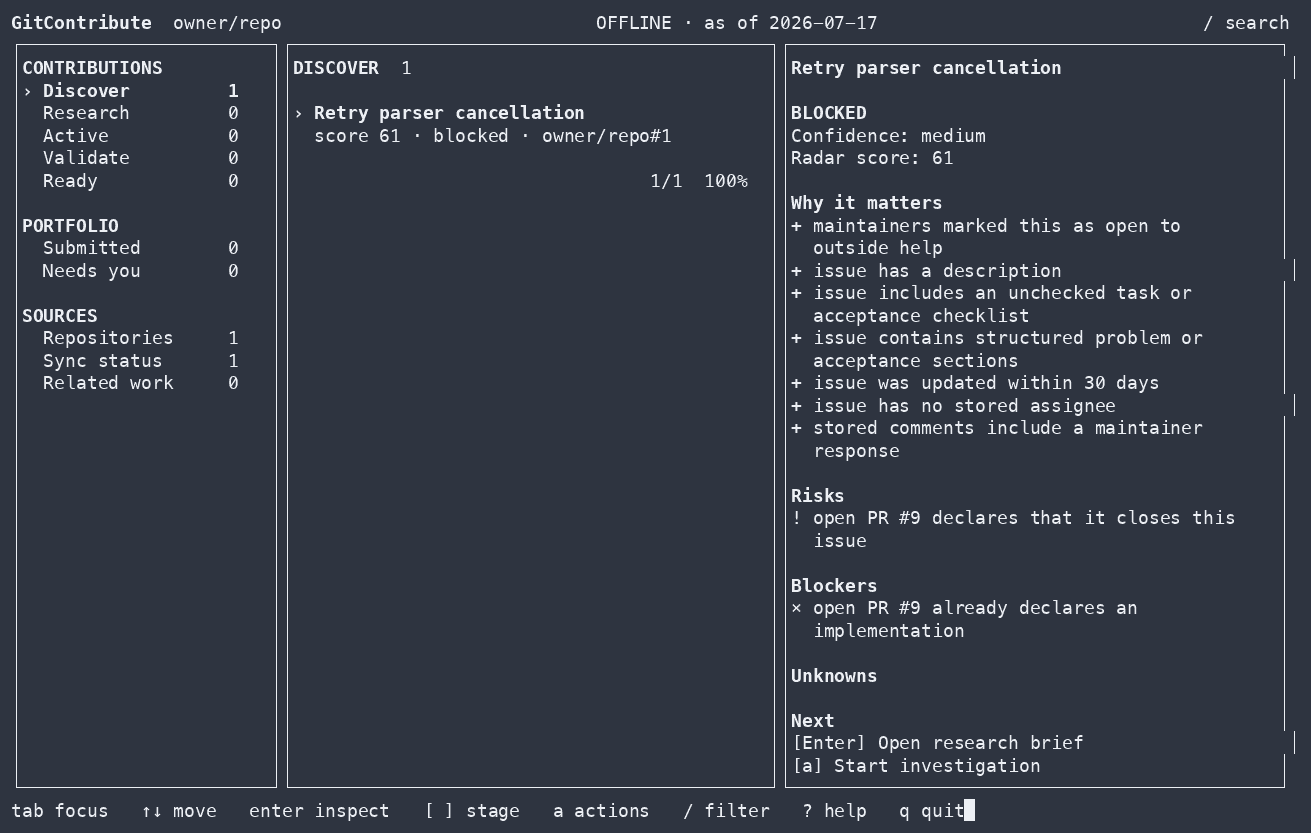
gitcontribute is available as a CLI, terminal UI, and MCP server for coding
agents.
GitHub can show you open issues. It cannot tell you whether an issue is still relevant, already being implemented, appropriate for an outside contributor, or supported by enough evidence to work on safely.
GitContribute collects repository guidance, related issues and pull requests, code context, accepted contribution patterns, and validation results in a local SQLite corpus. Results identify missing or stale coverage.
find work -> understand it -> check competing work -> prove the change -> prepare the handoff
[!IMPORTANT] GitContribute never writes to GitHub. It prepares local research and drafts for you to review.
Quick start
Run the guided setup with Node.js 18 or newer:
npx --yes gitcontribute@latest setup
Choose MCP to use GitContribute from a supported coding agent, CLI for the terminal and TUI, or Both. The wizard shows every planned change before applying it. Adding a repository during setup does not contact GitHub or start a sync.
After setup, start with a repository or an exact issue:
| Task | Coding agent | CLI |
|---|---|---|
| Find candidates | Find contribution candidates in owner/repo. Rank them by contribution fit, evidence, scope, and coordination risk. |
gitcontribute archive sync owner/repogitcontribute radar owner/repo --limit 10 |
| Research an issue | Investigate owner/repo#42. Check guidance, discussion, code, prior fixes, competing work, and missing evidence. |
gitcontribute archive sync owner/repo --numbers 42gitcontribute research brief issue:owner/repo#42 |
Results include source references, coverage gaps, and suggested next steps.
Install a persistent command:
npm install --global gitcontribute@latest
gitcontribute setup
Pin GitContribute to a project:
npm install --save-dev gitcontribute
npm exec -- gitcontribute setup --mode mcp --codex --token-source none --yes
Build from source with Go 1.26 or newer:
go install github.com/morluto/gitcontribute/cmd/gitcontribute@latest
Native npm binaries are included for macOS ARM64/x64, Linux ARM64/x64, and
Windows x64. You also need git. The gh CLI is optional and can provide
authentication through gh auth token.
Contribution workflow
1. Find a candidate
Search a repository or rank its open issues by available evidence, scope, risks, blockers, and signs that maintainer coordination is needed.
Find contribution candidates in golang/go. Exclude issues with active
implementation work and explain why each remaining candidate is worth
investigating.
The ranking only covers stored observations. Results report incomplete coverage.
2. Research an issue
Build a research brief from the issue, repository guidance, discussion, linked work, indexed code, and historical contributions. Extracted maintainer text and checkboxes are not presented as complete acceptance criteria.
Investigate issue owner/repo#42. Summarize the confirmed problem, likely scope,
relevant code, maintainer guidance, and open questions.
3. Check related work
Look for duplicate reports, linked pull requests, closing relationships, and semantically overlapping work before investing in an implementation.
Check whether owner/repo#42 has duplicate reports or competing implementation
work. Tell me what you checked and identify any missing coverage.
Incomplete coverage is reported instead of being treated as proof that no competing work exists. In the MCP workflow, follow the returned typed recovery action, poll the durable job, and reread the affected exact thread or repository before drawing that conclusion.
4. Validate a change
Record a reproduction, test, benchmark, or other validation and compare the unmodified baseline with a candidate. Validation commands run only after explicit approval.
Validate my candidate change against the baseline. Run the approved checks,
record both results, and explain whether the evidence supports the change.
Stored runs include the command, outcome, timing, and available process metrics.
5. Prepare a draft
Create a local issue, pull-request, or review draft tied to the research and validation evidence already collected.
Prepare a pull-request draft for this contribution. Tie its claims to the
recorded evidence, include the validation results, and do not post anything.
Draft revisions retain their exact rendered bytes and provenance.
Interfaces and storage
GitContribute stores repositories, threads, code snapshots, investigations, evidence, validation results, and contribution outcomes in SQLite. Network access is explicit; once information has been synced, corpus search and inspection work offline.
 GitHub read APIs                  Local checkout
       |                                |
       | explicit sync / hydrate        | explicit index / acquire
       v                                v
  +------------------------------------------------+
  |              Local SQLite corpus               |
  | observations · coverage · evidence · outcomes  |
  +------------------------+-----------------------+
                           | offline reads
                 +---------+---------+
                 v                   v
              CLI / TUI          Coding agents
The CLI and MCP server use the same application services and side-effect boundaries.
CLI
The CLI exposes the same workflow without requiring an MCP client:
# Sync repository context and current threads
gitcontribute archive sync-context owner/repo
gitcontribute archive sync owner/repo

# Find and inspect contribution candidates
gitcontribute radar owner/repo --limit 10
gitcontribute research brief issue:owner/repo#42

# Search stored threads and indexed code
gitcontribute search threads "connection timeout" --repo owner/repo
gitcontribute search code "context.WithTimeout" --repo owner/repo
For implementation work:
gitcontribute investigation start-thread issue:owner/repo#42 --json
gitcontribute workspace create <investigation-id>
gitcontribute validation define --kind=test --command="go test ./..." \
  --working-dir=/path/to/workspace <investigation-id>
gitcontribute validation run <validation-id> --kind=base --execute
gitcontribute validation run <validation-id> --kind=candidate --execute
gitcontribute validation compare <base-run-id> <candidate-run-id>
gitcontribute readiness opportunity <opportunity-id>
gitcontribute prepare pr --approach="Bound retries with context" \
  --workspace <workspace-id> <opportunity-id>
Run gitcontribute --help or gitcontribute <command> --help for the complete
command and flag reference. Most non-interactive commands accept --json;
machine-readable output goes to stdout and progress goes to stderr.
Launch the local TUI with:
gitcontribute tui
MCP
The MCP server advertises one unified catalog. Hosts such as Codex and Claude Code can discover large MCP catalogs with native tool search, so setup does not ask users to choose permanent capability profiles.
gitcontribute setup --mode mcp --codex --token-source none --yes
gitcontribute setup --mode mcp --all-clients --token-source none --yes
To start the stdio server directly:
gitcontribute mcp serve --transport=stdio
Add --read-only to remove tools that permit network access, local writes, or
execution. See MCP catalog and composition for capability
boundaries, snapshot recovery, resource handoffs, and common tool sequences.
GitHub users are stored as first-class actors. Live discovery records identity only; profile, social-account, organization, pinned-item, repository, and contribution facts are synchronized independently. See the actor corpus for the data and freshness model.
Side-effect boundaries
GitContribute separates corpus reads, GitHub reads, local writes, process execution, and external mutation.
| Operation | Network | Local write | Runs a process | GitHub write |
|---|---|---|---|---|
| Search and inspect stored research | No | No | No | No |
| Record investigations and evidence | No | Yes | No | No |
| Sync or hydrate GitHub context | Yes | Yes | No | No |
| Acquire and index code | Yes | Yes | git only |
No |
| Run an explicitly approved validation | No by default | Yes | Yes | No |
- Corpus reads never fetch data.
- Crawling and indexing never execute repository-controlled code.
- Explicit validation commands run on your host with your user permissions.
- GitContribute has no GitHub mutation capability.
- There is no hosted corpus or product telemetry.
See Architecture for the complete boundary definitions.
Documentation
- Onboarding and configuration
- MCP catalog and composition
- Actor corpus
- Architecture and side-effect boundaries
- Operational runbooks
- Security policy
- Contributing
Storage
GitContribute follows platform conventions:
| Platform | Configuration | Data |
|---|---|---|
| Linux | $XDG_CONFIG_HOME/gitcontribute or ~/.config/gitcontribute |
$XDG_DATA_HOME/gitcontribute or ~/.local/share/gitcontribute |
| macOS | ~/Library/Application Support/gitcontribute |
~/Library/Application Support/gitcontribute/Data |
| Windows | %APPDATA%\gitcontribute |
%LOCALAPPDATA%\gitcontribute\Data |
The default corpus is gitcontribute.db in the data directory. Run
gitcontribute metadata or gitcontribute doctor --json to inspect the local
setup.
Platform support
Linux and macOS are the primary development and test targets. Windows builds
are tested in CI and use the standard %APPDATA% and %LOCALAPPDATA%
locations.
Development
make verify
go run ./cmd/gitcontribute --help
Before changing package boundaries or side effects, read docs/architecture.md. See CONTRIBUTING.md for the repository workflow.
GitContribute MCP 질문
GitContribute MCP를 Claude Code에 추가하려면 어떻게 하나요?
터미널에서 claude mcp add gitcontribute -- npx -y gitcontribute를 실행합니다. 모든 프로젝트에서 사용할 수 있게 하려면 --scope user를 추가합니다.
GitContribute MCP를 Cursor에 추가하려면 어떻게 하나요?
~/.cursor/mcp.json를 열고 mcpServers 아래에 서버를 추가합니다. 위 설치 섹션에 표시된 Cursor 구성을 사용합니다.
GitContribute가 GitHub에 직접 쓰기 작업을 수행하나요?
아니요, GitContribute는 GitHub에 절대 직접 쓰지 않습니다. 사용자의 검토를 위한 로컬 리서치와 초안만 준비합니다.
리서치 데이터는 어떻게 저장되나요?
모든 repository 데이터, 조사 내용 및 검증 결과는 로컬 SQLite 코퍼스에 저장됩니다.
GitContribute를 오프라인에서 사용할 수 있나요?
네, 정보가 로컬 코퍼스에 동기화되면 네트워크 연결 없이도 데이터 검색 및 조사가 가능합니다.