
Deft MCP server
2026년 11월 13일 커밋공유 채팅, 작업, 지식 및 MCP 기반 컨텍스트를 통해 인간과 AI agent가 협업할 수 있는 셀프 호스팅 워크스페이스입니다.
다른 이름 Maneek21/Deft
- 스타
- 598
- Tools
- —
- 다운로드, 30일
- —
- 최신 버전
- —
- 마지막 커밋
- 2026년 11월 13일
- 라이선스
- AGPL-3.0
Deft MCP란?
Deft은(는) MCP server입니다. 공유 채팅, 작업, 지식 및 MCP 기반 컨텍스트를 통해 인간과 AI agent가 협업할 수 있는 셀프 호스팅 워크스페이스입니다.
프로젝트 README에서 생성된 요약
Deft MCP server 정보
Deft는 인간의 논의와 자동화된 실행 사이의 간극을 메우고자 하는 팀을 위해 통합 워크스페이스에서 AI agent와 협업할 수 있는 환경을 제공합니다. 이 셀프 호스팅 가능 오픈 소스 플랫폼은 실시간 채팅, 작업 관리, 영구적인 지식을 하나의 작업 기록으로 통합합니다. Docker를 통해 환경을 로컬에 호스팅함으로써 조직은 데이터와 agent 권한을 직접 제어할 수 있습니다.
사용자는 Claude, ChatGPT 또는 Codex와 같은 개인용 AI 클라이언트를 MCP로 연결하여 특정 권한 범위 내에서 승인된 사용자로 활동하게 할 수 있습니다. 더욱 통합된 자동화를 위해, 이 플랫폼은 작업, 메시지, 캘린더 이벤트를 처리하기 위해 네이티브 도구를 사용하는 Defty 및 agent 직원을 제공합니다. 이러한 agent는 관리되는 승인 흐름에 따라 작동하므로, 워크스페이스에 제안된 모든 변경 사항은 반드시 인간의 검토를 거쳐야 합니다. 시스템은 OpenAI, Anthropic 및 로컬 Ollama 스타일 엔드포인트를 포함한 다양한 AI 제공업체를 지원하여 유연하고 중립적인 설정을 가능하게 합니다.
활용 사례
- 1논의 내용을 실행 가능한 작업으로 변환AI agent는 최근 채팅 컨텍스트를 바탕으로 제목, 담당자, 설명이 포함된 새로운 작업을 제안할 수 있습니다.
- 2지속적인 조직 메모리 유지팀은 휘발성 채팅 메시지와 결정 사항 및 절차와 같은 영구적 지식을 분리하여 agent가 쿼리할 수 있도록 관리할 수 있습니다.
- 3인간의 감독을 통한 agent 작업 제어공식적인 승인 및 수신 시스템을 통해 agent가 제안한 모든 쓰기 작업이 검토되도록 보장할 수 있습니다.
프로젝트의 README를 바탕으로 작성되었습니다. 모든 활용 사례는 해당 내용의 인용문과 대조하여 확인합니다.
구성
DEFT_IMAGE
| 이름 | 설명 | 유형 |
|---|---|---|
| DEFT_IMAGE | — |
자동 검사
2026년 11월 13일에 실행됨전체 보고서 →아직 인증되지 않았습니다. 서버는 80점 이상의 점수, 심각한 결함 없음, 그리고 검사에 충분한 데이터를 갖추어야 합니다. 검사 방식 · 점수를 높이기 위해 수정할 항목

- 소스 저장소 연결 및 접근 가능통과
- 오픈 소스 라이선스 (OSI)통과
- 최근 1년 내 커밋 또는 릴리스통과
- 패키지 이름이 인기 패키지와 유사하지 않음검사되지 않음
- 원격 엔드포인트가 HTTPS 사용검사되지 않음
- 파괴적인 도구에 라벨 표시됨검사되지 않음
- 모델에 대한 숨겨진 지침 없음통과
- 패키지 및 해당 종속성에 중요한 보안 권고 없음검사되지 않음
README
GitHub에서 보기Deft
Where humans and agents work together.



Website | Self-hosting guide | Contributing
Deft is a self-hostable, open-source workspace where people and AI agents share chat, tasks, knowledge, calendar context, approvals, and action history.
Capture a team discussion into knowledge, ask Defty to propose a task using that context, review and approve the proposal, and keep the agreed details in the resulting task.
Alpha: for technical evaluation and controlled pilots. The walkthrough uses seeded demo data; it is not evidence of a live customer workspace or an active external agent runtime.

Watch the full walkthrough — 5:09.
Quick start with Docker
Use the prebuilt v0.3.0-preview.141 release, the latest published prerelease, for evaluation. It targets Linux amd64 and needs Docker Desktop or Docker Engine with Compose v2. An AI provider is optional. No source build, Node.js, or pnpm is needed for this path.
Download docker-compose.yml, compose.prod.yml, compose.release.yml, and default.env.example from that release into a new directory. In Bash (macOS, Linux, or Git Bash on Windows):
cp default.env.example .env
openssl rand -hex 32  # POSTGRES_PASSWORD
openssl rand -hex 32  # JWT_SECRET
openssl rand -hex 32  # JWT_REFRESH_SECRET
openssl rand -hex 32  # ENCRYPTION_KEY
Paste each independently generated secret into its corresponding .env variable. All four are required for Docker, including local evaluation. Keep the encryption key with your backups. Leave AI keys empty and OLLAMA_URL commented unless you intend to configure a provider.
Add this pinned release image to .env:
DEFT_IMAGE=ghcr.io/maneek21/deft@sha256:2239e1cee9443d2266210e0ecb6d35abf67dfb78d8347c5f60c475324f3403c8
Then run, from that directory:
docker compose -f docker-compose.yml -f compose.prod.yml -f compose.release.yml config --quiet
docker compose -f docker-compose.yml -f compose.prod.yml -f compose.release.yml pull
docker compose -f docker-compose.yml -f compose.prod.yml -f compose.release.yml up -d postgres
docker compose -f docker-compose.yml -f compose.prod.yml -f compose.release.yml run --rm init
docker compose -f docker-compose.yml -f compose.prod.yml -f compose.release.yml up -d deft
docker compose -f docker-compose.yml -f compose.prod.yml -f compose.release.yml run --rm doctor
docker compose -f docker-compose.yml -f compose.prod.yml -f compose.release.yml run --rm smoke
Open http://localhost:3000 and create the first account, which owns the workspace. Subsequent users join by invitation. This creates an empty workspace with the platform bundle, not the video's demo records. Create a chat message and a task to try the core workspace without AI.
Use init only with a fresh database. For custom ports, public URLs, image verification, source builds, backups, and upgrades, follow the self-hosting guide. Versioned upgrades start at v0.2.0-preview.1; use the backup-first upgrade flow for existing workspaces. Historical releases through v0.2.0-preview.4 retain their shipped BSL 1.1 license; the selected release is AGPL-3.0-only.
Try Deft: install a workspace, connect your AI client, or build an internal App. See the current availability map before enabling an experimental feature.
Architecture · Current limitations · Licensing
Try one workflow
- Set up your first workspace
- Ask Defty for a task and approve it
- Connect a personal AI client
- Build a small vendor Module
The core loop
- Capture the discussion. Save useful decisions and references in Knowledge with links back to their source conversation.
- Ask Defty for a task. With an AI provider configured, Defty can use workspace context to propose the title, owner, dates, and description.
- Review and approve. Defty's chat requests always wait for your approval, whatever the trust level; inspect the proposed details before approving. The workspace trust level applies only to Defty's approved plans and background work, and each agent employee has its own trust level.
- Keep the agreed details. The task stores the approved content, and governed agent actions have approval history and receipts to inspect.
Optional video chapters: Knowledge capture — 1:09 · Defty task request and approval — 2:06 · ChatGPT connection and workspace read/write — 3:25.
Personal MCP connections use a different authority model. ChatGPT and other personal clients act as the authorizing user within their granted scopes and normal permissions. Their writes do not automatically enter Deft's agent approval queue. Defty and Agent Employees use agent identities and policy-based approval flows. See MCP access and agents.
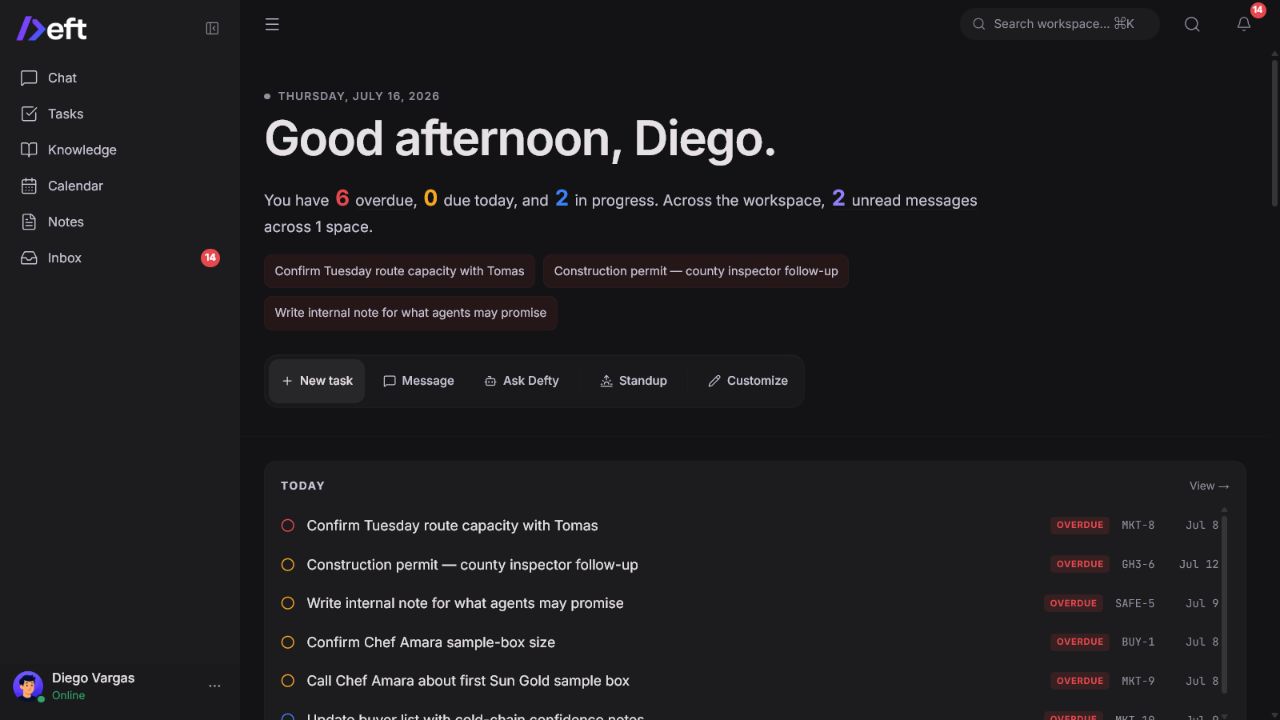
What ships today
A workspace people can use normally
- Real-time chat with spaces, DMs, threads, mentions, reactions, files, presence, and rich text
- Task management with Board, Table, Timeline, Calendar, and personal views
- Notes, company knowledge, channel memory, decisions, references, and knowledge graph views
- Native calendar events plus read-only ICS subscriptions
- Dashboard, inbox, notifications, people, teams, roles, and profile management
- Dark and light themes, desktop and mobile layouts
A work record agents can use safely
- Built-in Defty workflows for workspace questions and governed native actions
- Personal MCP access for Codex, Claude, ChatGPT, and streamable HTTP MCP clients
- Agent employees that can participate in channels, receive assignments, and use Deft tools
- Native task, message, wiki, note, calendar, member, team, and context-packet tools
- Approval tiers, trust levels, token scopes, revocation, activity history, and action receipts
- Provider-neutral AI configuration: OpenAI, Anthropic, OpenRouter, OpenAI-compatible endpoints, or local Ollama-style providers
Deft still works as a normal workspace without an AI provider key. Chat, tasks, notes, knowledge, calendar, people, and teams remain available; AI features stay disabled until a provider is configured.
An extensible workspace through Modules and Apps
Modules add domain records, relationships, and native views. Apps package Module resources and may request supported connected actions. They use different manifests and installation flows; start with Modules and Apps. Declarative internal Apps, connected Apps, and bounded scheduled actions are opt-in alpha capabilities. General release defaults remain off; the explicitly Apps-enabled developer-preview profile described below compiles the supported browser gates on. Arbitrary custom UI and public portals are planned rather than part of the current contract.
The bundled Contacts module is the first example of this model. The goal is not to turn Deft's core into every application a company might need, but to let new capabilities live on the same shared substrate instead of becoming another disconnected system.
See Deft, App Kit and domain App boundaries for authoring contracts, permissions and execution limits. The Apps developer preview exposes generic Protocol 7 forms, external Runtime and source contracts. Standalone Email is the reference implementation. Host v0.3.0-preview.141 is published with the Apps-enabled browser profile and Author Kit 0.1.0-alpha.43. Follow the connected App author guide and the compatibility.json attached to the Email release you install, which names the Host version it requires. Use an explicitly Apps-enabled preview image; enabling runtime variables cannot turn on browser features omitted at build time. This is an operator-managed developer preview, not a production Gmail replacement.
Product surfaces
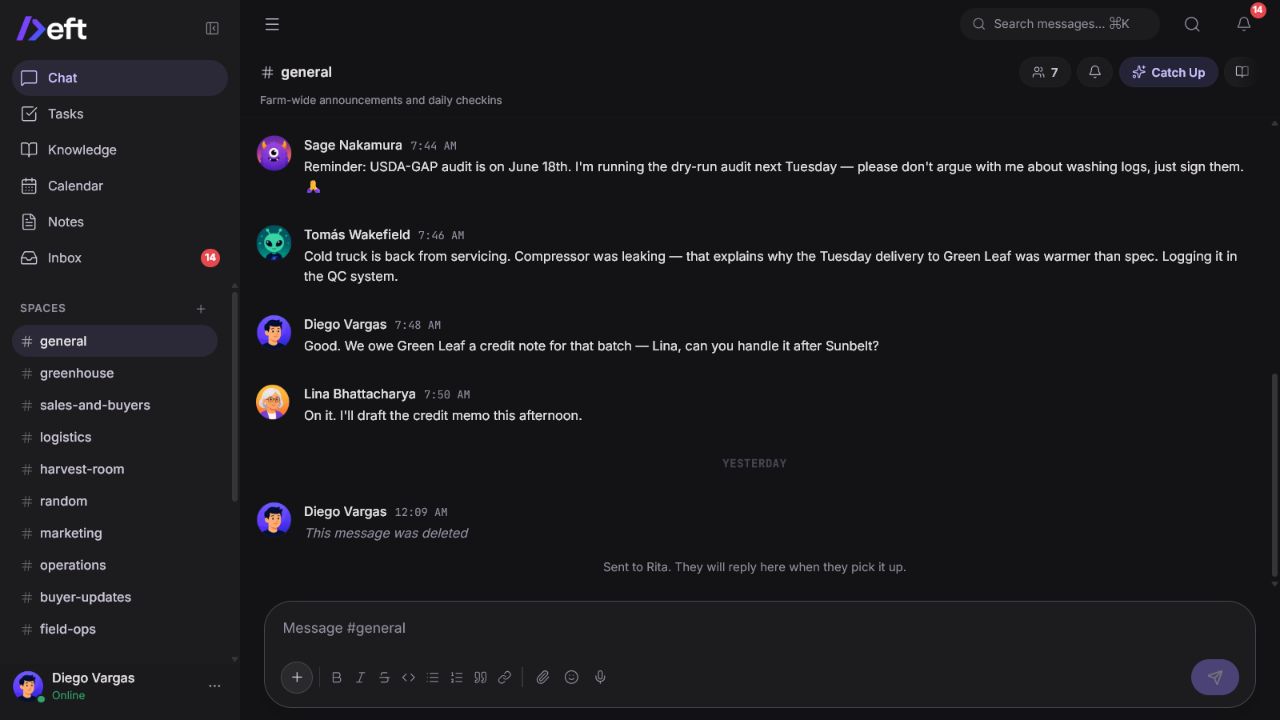
Chat keeps the source conversation attached
Chat is both a human communication surface and part of the workspace record. Threads, structured mentions, quiet knowledge capture, and agent replies keep decisions close to their source.
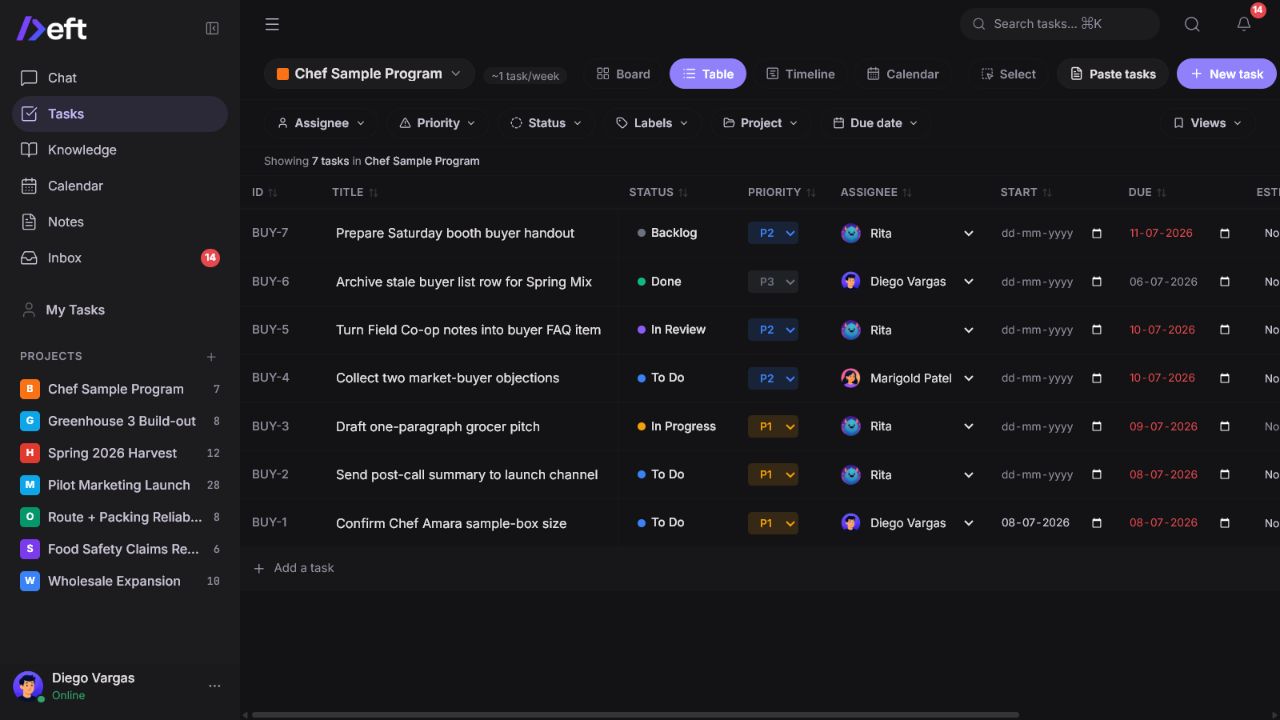
Tasks turn context into accountable work
Projects support Board, Table, Timeline, and Calendar views, plus dependencies, subtasks, recurrence, comments, activity diffs, bulk actions, and agent-created drafts.
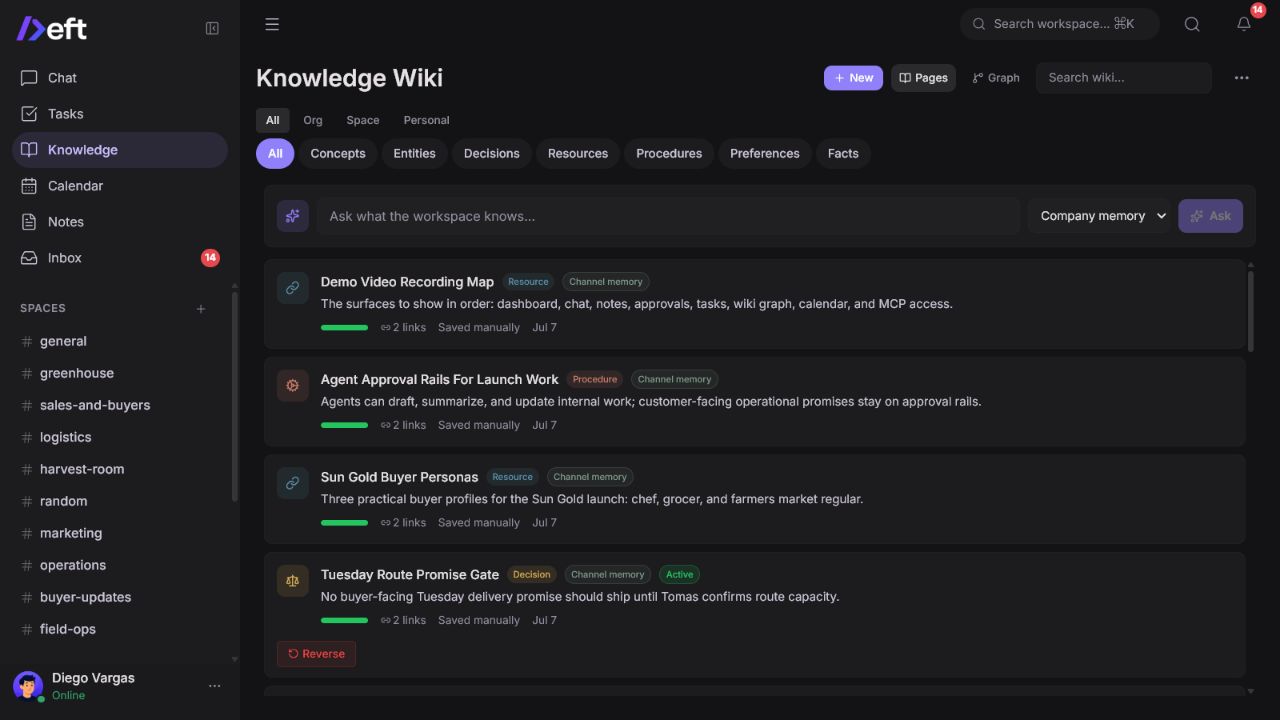
Knowledge becomes durable team memory
Deft separates transient conversation from durable concepts, entities, decisions, resources, procedures, preferences, and facts. Agents can ask for org-wide or channel-specific context instead of reading an undifferentiated transcript.
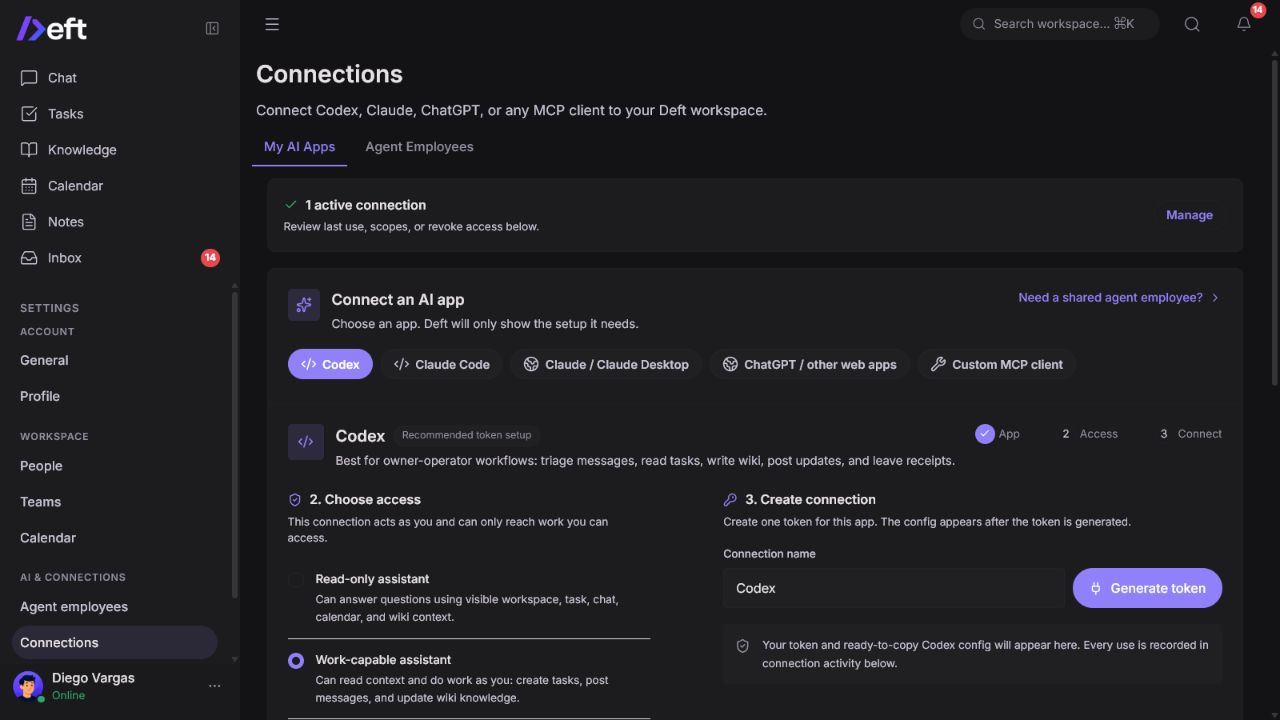
Connect the AI app you already use
The Connections page guides each user through the setup required by their client. Personal connections act as that user, inherit their access boundaries, expose explicit scopes, and can be revoked.
Why Deft is different
| Traditional stack | Deft |
|---|---|
| Chat, tasks, docs, calendar, and AI live in separate products | One work record connects the discussion, assigned work, durable memory, and agent action |
| Context is copied into an AI conversation by hand | Agents retrieve permission-aware workspace context through MCP or native tools |
| Agent writes are invisible or happen outside the workspace | Proposed writes can require approval and completed work leaves a receipt |
| AI is tied to one vendor or sidebar | Teams can use Defty, Codex, Claude, ChatGPT, or their own agent runtime |
| SaaS data and behavior are controlled by a vendor | The product is self-hostable and open source under AGPL-3.0-only |
Local development
Requirements: Node.js 22.13+, the pnpm version pinned in package.json, and a running PostgreSQL 16 database with pgvector. Set the four secrets in .env and DATABASE_URL for your disposable development database before initialization; see Contributing.
git clone https://github.com/Maneek21/Deft.git
cd Deft
pnpm install
cp .env.example .env
# Set the four secrets and DATABASE_URL before continuing.
pnpm db:push-full
pnpm db:seed
pnpm dev
Useful development seeds:
pnpm db:seed:demo   # Testers Tomatoes demo data
pnpm db:seed:pilot  # Demo data plus pilot fixtures
Both development seeds reset the database. Never run them against a production workspace.
Architecture
deft/
|-- apps/
|   |-- web/       Next.js 16, React 19, Tailwind CSS, TipTap
|   `-- api/       Hono, Socket.io, PostgreSQL job workers, agent and MCP runtime
|-- packages/
|   |-- app-kit/   Author Kit for Modules and Apps
|   |-- db/        PostgreSQL, pgvector, Drizzle schema and migrations
|   |-- mcp/       Shared MCP protocol support
|   `-- shared/    Shared types, schemas, and constants
|-- docker-compose.yml
`-- pnpm-workspace.yaml
| Layer | Technology |
|---|---|
| Web | Next.js 16, React 19, TypeScript, Tailwind CSS v4, TipTap |
| API | Hono on Node.js |
| Data | PostgreSQL 16, pgvector, Drizzle ORM |
| Realtime | Socket.io in-process (single app instance) |
| Jobs | PostgreSQL job_queue and in-process workers |
| Auth | Email/password with bcrypt, JWT access tokens, and refresh tokens |
| AI | Provider-neutral routing plus MCP |
| Storage | Local disk with R2-compatible paths |
| Monorepo | pnpm workspaces |
Project status and limitations
Deft is an alpha. It is suitable for technical evaluation, internal dogfooding, and controlled pilots. Expect breaking changes before a stable release.
Important current boundaries:
- One workspace per self-hosted deployment is the supported product contract.
- Versioned upgrades are supported from the
v0.2.0-preview.1baseline forward; older untracked alpha databases require a reviewed migration or fresh install. - Native Google, Slack, Gmail, and GitHub OAuth integrations are not part of the current self-hosted v1 promise. Use ICS for calendar subscriptions and bring external tools through your own agent or MCP runtime.
- Agent quality depends on the configured model, scopes, workspace data, and approval policy.
- The per-employee daily cost budget is not enforced: nothing records spend against it, so do not rely on it to cap cost. The daily action cap and the unhealthy (circuit breaker) state do apply.
- This repository is open source under GNU AGPL v3.0 only.
Security reports should follow SECURITY.md. Operational support boundaries are documented in docs/self-hosted-v1-contract.md.
Contributing
Contributions are welcome. Start with CONTRIBUTING.md, run the relevant tests, and open a focused pull request.
If Deft is useful to you, starring the repository helps more teams find the project.
Contact
Email maneek@deft.ing for questions, demos, or private support requests. See SUPPORT.md for community support and SECURITY.md for private vulnerability reporting.
License
Deft is free software licensed under the GNU Affero General Public License
v3.0 only (AGPL-3.0-only). You may use, study, modify, and
redistribute it subject to the license terms. If you modify Deft and let users
interact with that version over a network, section 13 requires you to offer
those users its Corresponding Source.
Public modified deployments should set DEFT_SOURCE_CODE_URL to the
public URL for the exact source they run. See NOTICE for the project
copyright notice and THIRD-PARTY-LICENSES.md for
third-party attribution.
Deft MCP 질문
AI agent는 워크스페이스와 어떻게 상호작용하나요?
Agent는 네이티브 도구를 사용하거나 MCP를 통해 권한이 부여된 워크스페이스 컨텍스트를 가져올 수 있으며, Agent가 제안한 쓰기 작업은 인간의 승인을 거치도록 설정할 수 있습니다.
Deft는 오픈 소스인가요?
네, Deft는 AGPL-3.0-only 라이선스를 따르는 셀프 호스팅 가능 오픈 소스 워크스페이스입니다.