
box MCP server
2026년 11월 6일 커밋AI agent의 도구 실행을 안전하게 보호하기 위해 읽기 전용 파일 시스템과 엄격한 네트워크 정책을 적용한 격리된 Docker 샌드박스 내에서 MCP server를 실행합니다.
다른 이름 lowcache/mcp-box
- 스타
- 15
- Tools
- —
- 다운로드, 30일
- —
- 최신 버전
- —
- 마지막 커밋
- 2026년 11월 6일
- 라이선스
- MIT
box MCP란?
box은(는) MCP server입니다. AI agent의 도구 실행을 안전하게 보호하기 위해 읽기 전용 파일 시스템과 엄격한 네트워크 정책을 적용한 격리된 Docker 샌드박스 내에서 MCP server를 실행합니다.
프로젝트 README에서 생성된 요약
box MCP server 정보
mcp-box는 Model Context Protocol server를 격리된 Docker 샌드박스 내에서 실행하여 보안 계층을 제공합니다. 이 도구는 호스트 머신의 무결성을 해치지 않으면서 쉘 명령, 파일 시스템 작업 또는 데이터베이스 쿼리와 같은 도구를 실행해야 하는 개발자와 AI agent 사용자를 위해 설계되었습니다. 시스템은 읽기 전용 루트 파일 시스템과 엄격한 네트워크 정책을 사용하여, 에이전트가 악성 명령을 받더라도 SSH 키나 클라우드 자격 증명과 같은 민감한 파일에 접근할 수 없도록 보장합니다.
사용자는 이 도구를 휴대 가능한 Go 바이너리로 실행할 수 있으며, 로컬 시스템에 Docker만 활성화되어 있으면 됩니다. 결정론적인 이미지 빌드를 위해 Nix를 사용할 수 있지만, Nix가 없는 경우 서버는 GitHub Container Registry에서 고정된 OCI 이미지를 가져오는 방식으로 자동 전환됩니다. sqlite, shell, filesystem, fetch와 같은 특정 프로필에 대한 내장 지원을 포함합니다. Claude Desktop 또는 Claude Code용 JSON 스니펫을 생성하는 구성 생성기를 통해 통합이 간소화되며, --workspace 플래그를 통해 범위가 지정된 워크스페이스를 빠르게 설정할 수 있습니다.
활용 사례
- 1안전한 쉘 명령 실행루트 파일 시스템이 읽기 전용이고 기본적으로 네트워크 액세스가 비활성화된 샌드박스에서 임의의 스크립트를 실행합니다.
- 2격리된 데이터베이스 쿼리제한된 환경 내에서 sqlite server를 사용하여 고성능 데이터베이스 작업을 수행합니다.
- 3안전한 웹 스크래핑컨테이너 경계를 유지하는 제어된 네트워크 모드를 사용하여 AI agent가 웹 콘텐츠를 가져올 수 있도록 허용합니다.
프로젝트의 README를 바탕으로 작성되었습니다. 모든 활용 사례는 해당 내용의 인용문과 대조하여 확인합니다.
자동 검사
2026년 11월 14일에 실행됨전체 보고서 →아직 인증되지 않았습니다. 서버는 80점 이상의 점수, 심각한 결함 없음, 그리고 검사에 충분한 데이터를 갖추어야 합니다. 검사 방식 · 점수를 높이기 위해 수정할 항목

- 소스 저장소 연결 및 접근 가능lowcache/mcp-box is public and reachablegithub.com/lowcache/mcp-box ↗통과
- 패키지가 이 저장소를 소스로 명시검사되지 않음
- 빌드 출처(Sigstore 증명)검사되지 않음
- 오픈 소스 라이선스 (OSI)MITspdx.org/licenses/MIT.html ↗통과
- 최근 1년 내 커밋 또는 릴리스Last commit or release 2026-11-06github.com/lowcache/mcp-box ↗통과
- OpenSSF Scorecard검사되지 않음
- 패키지 이름이 인기 패키지와 유사하지 않음검사되지 않음
- 패키지 및 해당 종속성에 중요한 보안 권고 없음검사되지 않음
- 모델에 대한 숨겨진 지침 없음0 tool descriptions and the README read; no override phrases, credential paths or hidden characters통과
- 파괴적인 도구에 라벨 표시됨검사되지 않음
- 원격 엔드포인트가 MCP 핸드셰이크에 응답검사되지 않음
README
GitHub에서 보기mcp-box


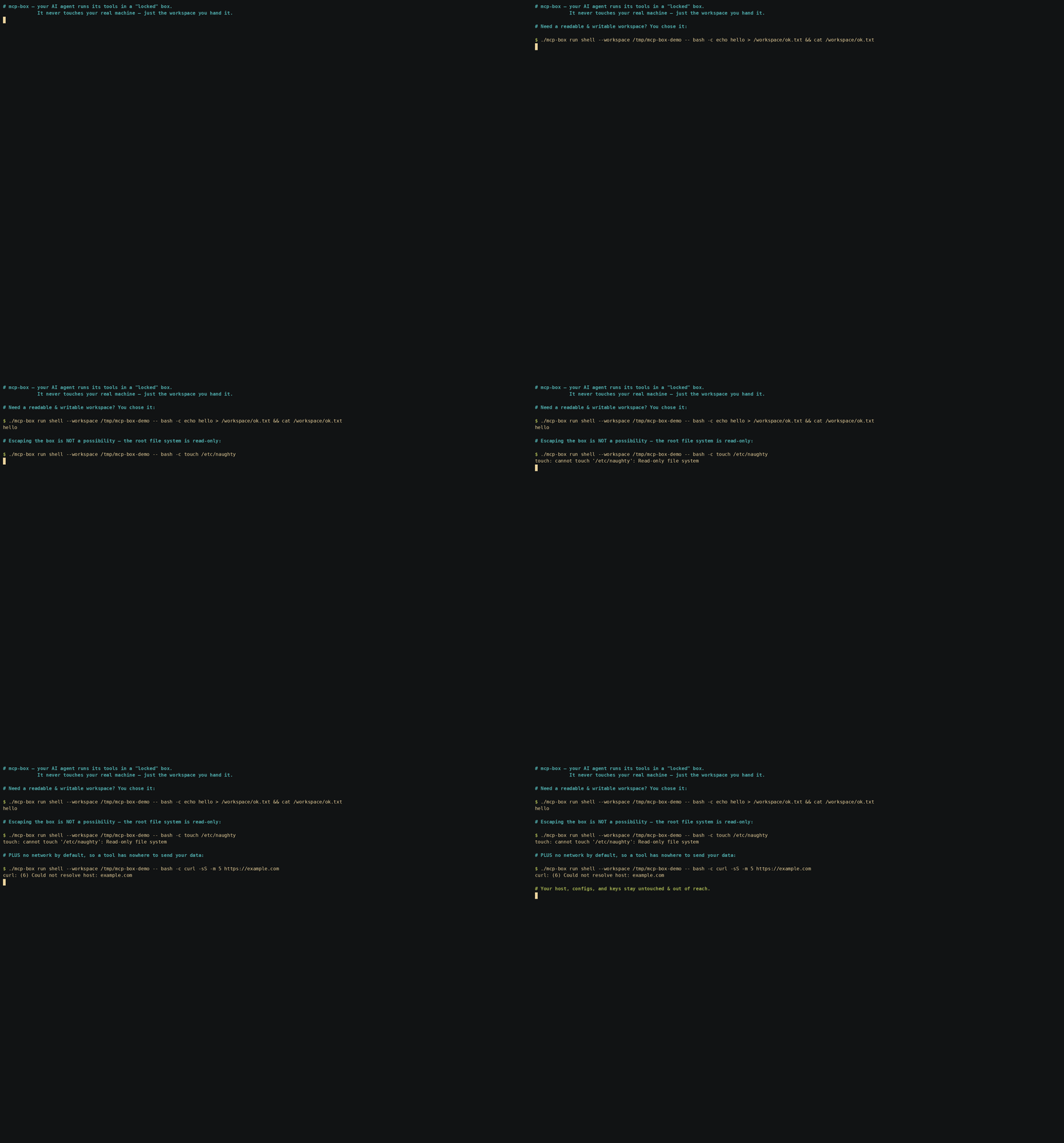
Your AI agent's tools run with your permissions. When an MCP server can call run_command or write files,
a buggy prompt or a malicious instruction can reach your home directory, your SSH keys, and your cloud credentials.
mcp-box puts every MCP server inside a locked-down Docker sandbox with a read-only root filesystem, explicit writable mounts,
dropped Linux capabilities, and per-profile network policy. Only the folders you mount are writable; the rest of your host stays out of reach.
mcp-box is the boringly reliable way to run MCP servers safely: inspectable, reproducible, and default-deny by design.
mcp-box is a single, portable Go binary that launches turnkey, immutable, strictly-isolated
container sandboxes for Model Context Protocol (MCP) servers. Nix is used for deterministic image builds
when present, but it is entirely optional. Without Nix, mcp-box pulls the same pinned OCI image definitions
from GHCR and runs them under the same Docker isolation model. Docker is the only hard requirement.
Same server, same hardening, same sandbox boundary — only the image source changes.
Security Audit Checks
You can audit the sandbox boundary directly by overriding the container command with -- bash -c '...'. These checks prove the boundary itself, not just the MCP server running inside it. The hardening (read-only root, no network, dropped capabilities, host UID mapping) applies to any process in the box:
- Read-only filesystem — writes outside
/workspaceare rejected:./mcp-box run shell -- bash -c 'touch /etc/naughty' # => touch: cannot touch '/etc/naughty': Read-only file system (exit 1) - Network isolation — with the default
--network none, DNS/egress fail:./mcp-box run shell -- bash -c 'curl -I https://google.com' # => curl: (6) Could not resolve host: google.com (exit 6) - No privilege escalation —
sudois not even present in the image:./mcp-box run shell -- bash -c 'sudo -l' # => bash: line 1: sudo: command not found (exit 127) - Host UID/GID mapping — the process is you, not root:
./mcp-box run shell -- bash -c 'id'
# => uid=<your uid> gid=<your gid> ...   (files in /workspace are owned by you)
Key Features
- Strict Sandboxing:
- Immutable Root (
--read-only): The entire root filesystem is mounted read-only. - Transient State (
--tmpfs): Writable spaces (/tmpand/run) exist solely in RAM and disappear once the container stops. - Zero Capabilities (
--cap-drop=ALL): The running processes have no special Linux kernel capabilities. - No Privilege Escalation (
no-new-privileges:true): Prevents elevation to root inside the sandbox. - Per-Profile Network Policy:
- Most sandboxes default to
--network none. - Networked profiles are explicit and opt-in, so a server only gets egress when its job genuinely requires it.
- The
fetchprofile is the exception by design: it uses a controlled network mode for web access, while still keeping the container boundary intact.
- Most sandboxes default to
- Scoped Workspaces: Only specifically mounted host directories (
--workspace) are visible to the server at/workspace.
- Immutable Root (
- Correct File Ownership:
- Containers run mapped to your host UID/GID (
-u $(id -u):$(id -g)), ensuring that files written to mounted workspaces are owned by you (notroot) and don't trigger host-side permission errors.
- Containers run mapped to your host UID/GID (
- Painless Integration:
- Built-in configuration generator (
mcp-box config <server>) prints out paste-ready JSON snippets to plug directly intoclaude_desktop_config.jsonor OpenClaw configurations.
- Built-in configuration generator (
- Zero-Dependency Nix Autonomy:
- If Nix is installed, running a sandbox automatically triggers a local rebuild and load of the OCI image.
- If Nix is absent,
mcp-boxautomatically detects this and falls back to pulling pre-built, identical, and secure OCI images directly from the GitHub Container Registry (ghcr.io/lowcache), making Nix entirely optional for the end-user.
CLI Surface
mcp-box is designed to be inspectable, scriptable, and auditable.
mcp-box run <server>— launch a sandboxed MCP servermcp-box stop <id>— stop a running sandboxmcp-box ps— list active sandboxesmcp-box inspect <id>— show the full sandbox spec and policymcp-box logs <id>— read audit logsmcp-box logs --follow— stream live eventsmcp-box config <server>— print paste-ready client configmcp-box build <server>— rebuild or refresh an OCI image
Quickstart
# 1. Get the binary (Docker is the only dependency)
curl -sSL https://github.com/lowcache/mcp-box/releases/latest/download/mcp-box-linux-amd64 -o mcp-box
chmod +x mcp-box && mv mcp-box ~/.local/bin/

# 2. Prove the sandbox holds — this write MUST fail
mcp-box run shell --workspace /tmp/demo -- bash -c 'touch /etc/naughty'
# => touch: cannot touch '/etc/naughty': Read-only file system

# 3. Wire it into your AI client (paste the output into claude_desktop_config.json)
mcp-box config sqlite
Pre-Packaged Sandboxes
| Server Name | Language | Included Utilities | Network Mode | Primary Purpose |
|---|---|---|---|---|
sqlite |
Python | sqlite3 CLI, fastmcp SDK |
none |
High-performance, isolated database querying. |
shell |
Python | bash, ripgrep, fd, git, curl, jq, sqlite, tar |
none |
Safe, sandboxed script running and file operations. |
filesystem |
Node.js | ripgrep, fd, git |
none |
Scoped filesystem read/write and code searching. |
fetch |
Node.js | curl |
bridge |
Safe, isolated web fetching and scraping. |
Policy, Compose, and Auditability
mcp-box is not just a runner — it is a trust layer for MCP execution.
Planned core platform features:
- Policy profiles for common trust levels:
readonly,dev,trusted,internet-off,internet-on - Compose-style specs for multi-server setups
- Append-only audit logs for sandbox lifecycle and denied actions
ps/inspect/logsso every sandbox can be checked after launch- Pinned image digests for reproducible, reviewable execution
Dependencies
Depending on your installation path, mcp-box has distinct dependency requirements:
- Runtime Boundary (All Users):
- Docker Engine (Must be active and running locally on the host system).
- Local Image Building (Source Flow with Nix):
- Nix (with experimental
flakesandnix-commandenabled).
- Nix (with experimental
- CLI Compilation (Source Flow with Go):
- Go compiler v1.22 or higher (only required if building the executable from source without using Nix).
- Zero-Dependency Fallback Flow:
- None. The pre-compiled CLI binary runs standalone and automatically pulls the pre-built, multi-arch OCI images straight from GHCR into your local Docker daemon.
Architecture
graph TD
    subgraph Host [Host Environment]
        Agent[AI Agent / Claude Desktop] <-->|stdio piping| CLI[mcp-box CLI]
        CLI -->|Checks for Nix| NixDetect{Nix Installed?}

        NixDetect -->|Yes: Source Flow| NixBuild[nix build .#server]
        NixBuild -->|Stream tarball| DockerLoad[docker load]

        NixDetect -->|No: Registry Flow| DockerPull[docker pull ghcr.io]
        DockerPull -->|Tag locally| DockerLoad

        DockerLoad -->|Loads image| Docker[Docker Engine]
    end

    subgraph Sandbox [Docker Sandbox]
        Server[MCP Server]
        Tools[Isolated Tools: git, rg, sqlite3, curl]
        Workspace[Mounted Workspace: /workspace]
    end

    Docker -->|spawns with strict isolation| Sandbox
    CLI <-->|stdio piping| Server
Installation
Depending on your host environment, you can install and run mcp-box with three different avenues:
Option A: Pre-built Go Binary (No Nix / Docker-only)
For systems that only have Docker installed:
- Download the compiled CLI binary (pick the asset matching your OS/arch —
linux/darwin,amd64/arm64):curl -sSL https://github.com/lowcache/mcp-box/releases/latest/download/mcp-box-linux-amd64 -o mcp-box chmod +x mcp-box - Move to PATH (Optional):
mv mcp-box ~/.local/bin/ # Or another folder in your PATH
On first execution, mcp-box will automatically detect the absence of Nix and pull the pre-built OCI images from ghcr.io/lowcache into your local Docker daemon.
Option B: From Source via Nix Flake (Nix/NixOS)
For systems running Nix/NixOS:
- Run directly without installing:
nix run github:lowcache/mcp-box -- list - Install to your user profile:
nix profile install github:lowcache/mcp-box - Declarative Installation (NixOS / Home Manager):
Add the flake input and package to your configuration:
# flake.nix inputs:
inputs.mcp-box.url = "github:lowcache/mcp-box";

# In systemPackages or home.packages:
inputs.mcp-box.packages.${pkgs.system}.default
On first execution, mcp-box will build the Go binary and OCI images purely from source and load them directly into your local Docker daemon.
Option C: Compile from Source (Go Compiler)
If you want to compile the CLI binary manually without Nix:
- Clone the repository:
git clone https://github.com/lowcache/mcp-box.git cd mcp-box - Compile the binary (the Go module lives in
src/go):cd src/go go build -o ../../mcp-box .
You can now run ./mcp-box directly, which will pull OCI layers from the registry or build locally using Nix based on your host environment.
Usage Guide
1. Show Help & Supported Servers
./mcp-box help
./mcp-box list
2. Run a Sandbox Interactively
You can launch any server interactively to test its behavior and tools:
./mcp-box run sqlite --workspace /tmp/sandbox-db -- --db /workspace/test.db
3. Build/Force-Update an OCI Image
If you want to manually rebuild or force-update a Nix-built image:
./mcp-box build sqlite
4. Integration with AI Clients
mcp-box config <server> prints a ready-to-paste mcpServers JSON block (with an
absolute path to the binary). The same block works for both Claude Desktop and
Claude Code.
./mcp-box config sqlite
Claude Code (CLI)
Claude Code does not use claude_desktop_config.json. Add the server with one
command — note the nested -- (the first separates claude's flags from the
subprocess; the second is consumed by mcp-box to forward server args):
# user scope (available in every project); drop -s user for the current project only
claude mcp add -s user mcp-box-sqlite -- \
  mcp-box run sqlite --workspace /abs/path/to/workspace -- --db /workspace/db.sqlite
Or, to commit a shareable config to your repo, drop the mcp-box config JSON block
straight into a project-root .mcp.json — it uses the exact {"mcpServers": …}
shape that config emits.
Verify with claude mcp list.
Claude Desktop
Paste the config block into claude_desktop_config.json. Its location is
OS-specific:
| OS | Path |
|---|---|
| macOS | ~/Library/Application Support/Claude/claude_desktop_config.json |
| Windows | %APPDATA%\Claude\claude_desktop_config.json |
| Linux | ~/.config/Claude/claude_desktop_config.json |
box MCP 질문
mcp-box가 호스트 시스템을 어떻게 보호하나요?
읽기 전용 루트 파일 시스템, Linux capability 제거, 프로필별 네트워크 정책을 사용하는 Docker 샌드박스를 활용하여 지정된 폴더만 쓰기가 가능하도록 보장합니다.
mcp-box를 사용하려면 Nix가 필요한가요?
아니요, Nix는 선택 사항입니다. Nix가 설치되어 있지 않으면 도구가 GitHub Container Registry에서 고정된 OCI 이미지를 자동으로 가져옵니다.
mcp-box 실행을 위한 주요 의존성은 무엇인가요?
로컬 호스트에서 활성화되어 실행 중인 Docker Engine만 있으면 됩니다.