
Element Node MCP server
2026년 10월 14일 커밋Elementor 스타일의 에디터를 통한 수동 편집을 지원하는 비주얼 CMS를 통해 AI agent가 전체 웹사이트를 구축하고 관리할 수 있습니다.
다른 이름 LorenzArtik/element-node, element-node-mcp
- 스타
- 0
- Tools
- —
- 다운로드, 30일
- —
- 최신 버전
- —
- 마지막 커밋
- 2026년 10월 14일
- 라이선스
- AGPL-3.0
Element Node MCP란?
Element Node은(는) MCP server입니다. Elementor 스타일의 에디터를 통한 수동 편집을 지원하는 비주얼 CMS를 통해 AI agent가 전체 웹사이트를 구축하고 관리할 수 있습니다.
프로젝트 README에서 생성된 요약
Element Node MCP server 정보
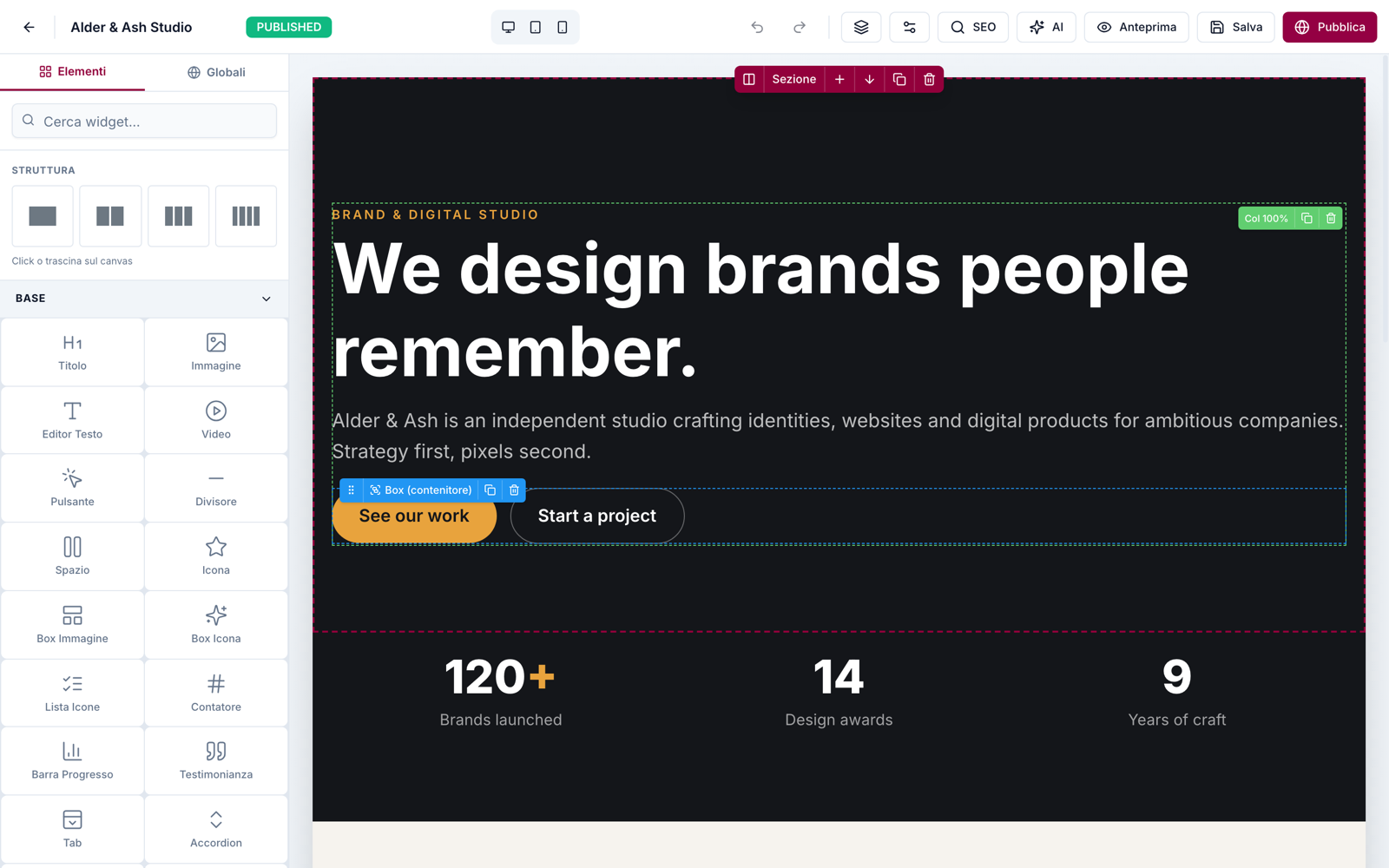
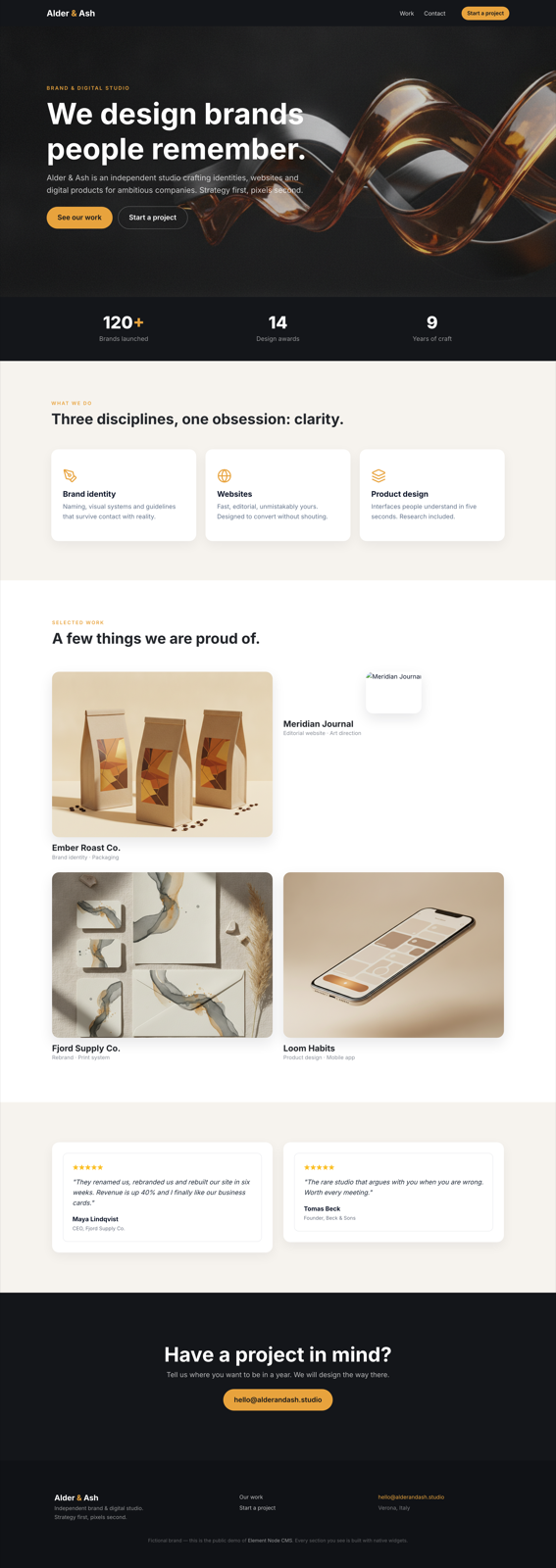
Element Node는 AI agent가 웹사이트를 구축하고 관리할 수 있도록 설계된 셀프 호스팅 비주얼 콘텐츠 관리 시스템입니다. Next.js 15, Prisma, MySQL 스택을 사용하여 agent가 브리프나 클론을 기반으로 전체 사이트를 구축할 수 있는 플랫폼을 제공합니다. agent가 초기 구축을 완료하면, 기술 지식이 없는 사용자도 드래그 앤 드롭 기능이 포함된 3패널 인터페이스의 Elementor 스타일 비주얼 에디터를 사용하여 작업을 이어받을 수 있습니다.
개발자는 Cursor 및 Windsurf와 같은 클라이언트와 호환되는 MCP server를 통하거나 공식 Claude Code skill을 사용하여 시스템에 연결할 수 있습니다. 이 server는 페이지, 테마, 미디어 관리 및 전체 Site Blueprint 가져오기/내보내기 도구를 제공합니다. Node.js 20 이상이 실행되는 로컬 또는 원격 server와 MySQL 또는 MariaDB 데이터베이스가 필요합니다. 또한 사용자는 사이트 가져오기 또는 내보내기와 같은 특정 스코프에 대한 Bearer API key를 사용하여 REST API를 통해 시스템과 상호작용할 수 있습니다.
활용 사례
- 1자동 웹사이트 구축AI agent가 간단한 텍스트 브리프나 기존 사이트 클로닝을 통해 완전한 웹사이트를 구축할 수 있습니다.
- 2비주얼 콘텐츠 정교화agent의 작업이 완료된 후, 기술 지식이 없는 클라이언트가 드래그 앤 드롭 인터페이스를 사용하여 웹사이트 섹션을 수동으로 편집할 수 있습니다.
- 3사이트 블루프린트 마이그레이션개발자는 JSON 가져오기 및 내보내기 기능을 사용하여 인스턴스 간에 전체 웹사이트 구조를 이동할 수 있습니다.
- 4비주얼 정확도 검증agent가 스크린샷과 구축된 사이트 간의 비주얼 비교를 수행하여 정확성을 보장할 수 있습니다.
프로젝트의 README를 바탕으로 작성되었습니다. 모든 활용 사례는 해당 내용의 인용문과 대조하여 확인합니다.
Element Node MCP 설치 방법
형식 확인: 2026년 11월 10일Cursor에 추가Goose에 추가Claude Code에 Element Node MCP 설치
$ claude mcp add element-node -- npx -y element-node-mcpCursor에 Element Node MCP 설치
~/.cursor/mcp.json
{
  "mcpServers": {
    "element-node": {
      "command": "npx",
      "args": [
        "-y",
        "element-node-mcp"
      ]
    }
  }
}VS Code에 Element Node MCP 설치
.vscode/mcp.json
{
  "servers": {
    "element-node": {
      "type": "stdio",
      "command": "npx",
      "args": [
        "-y",
        "element-node-mcp"
      ]
    }
  }
}VS Code CLI에 Element Node MCP 설치
$ code --add-mcp '{"name":"element-node","type":"stdio","command":"npx","args":["-y","element-node-mcp"]}'Claude Desktop에 Element Node MCP 설치
claude_desktop_config.json
{
  "mcpServers": {
    "element-node": {
      "command": "npx",
      "args": [
        "-y",
        "element-node-mcp"
      ]
    }
  }
}Codex에 Element Node MCP 설치
$ codex mcp add element-node -- npx -y element-node-mcpCodex config.toml에 Element Node MCP 설치
~/.codex/config.toml
[mcp_servers.element-node]
command = "npx"
args = ["-y", "element-node-mcp"]
Gemini CLI에 Element Node MCP 설치
$ gemini mcp add -s user element-node npx -- -y element-node-mcpGemini settings.json에 Element Node MCP 설치
~/.gemini/settings.json
{
  "mcpServers": {
    "element-node": {
      "command": "npx",
      "args": [
        "-y",
        "element-node-mcp"
      ]
    }
  }
}자동 검사
2026년 11월 15일에 실행됨전체 보고서 →아직 인증되지 않았습니다. 서버는 80점 이상의 점수, 심각한 결함 없음, 그리고 검사에 충분한 데이터를 갖추어야 합니다. 검사 방식 · 점수를 높이기 위해 수정할 항목

- 소스 저장소 연결 및 접근 가능lorenzartik/element-node is public and reachablegithub.com/lorenzartik/element-node ↗통과
- 패키지가 이 저장소를 소스로 명시element-node-mcp names lorenzartik/element-node as sourcenpmjs.com/package/element-node-mcp ↗통과
- 빌드 출처(Sigstore 증명)No build attestation published for this release검사되지 않음
- 오픈 소스 라이선스 (OSI)AGPL-3.0spdx.org/licenses/AGPL-3.0.html ↗통과
- 최근 1년 내 커밋 또는 릴리스Last commit or release 2026-10-14github.com/lorenzartik/element-node ↗통과
- OpenSSF Scorecard검사되지 않음
- 패키지 이름이 인기 패키지와 유사하지 않음No popular package one edit away from element-node-mcp통과
- 패키지 및 해당 종속성에 중요한 보안 권고 없음검사되지 않음
- 모델에 대한 숨겨진 지침 없음0 tool descriptions and the README read; no override phrases, credential paths or hidden characters통과
- 파괴적인 도구에 라벨 표시됨검사되지 않음
- 원격 엔드포인트가 MCP 핸드셰이크에 응답검사되지 않음
README
GitHub에서 보기Element Node
The AI-agent CMS your clients can still edit visually.
Element Node is an open-source visual CMS built on Next.js 15 + Prisma/MySQL. AI agents build entire sites on it — through the official Claude Code skill or the MCP server (Cursor, Windsurf, any MCP client) — and after the agent is done, the site stays in an Elementor-style visual editor that a non-technical client can safely use. Self-hosted: your server, your data.
🇮🇹 Documentazione in italiano: elementnode.cloud/it/docs
Quickstart
bash <(curl -fsSL https://elementnode.cloud/install.sh)
Requirements: Node.js ≥ 20, MySQL/MariaDB. The installer clones the repo, installs dependencies, creates .env and the DB schema, builds, and leaves you at the /install wizard (admin user, site, AI).
Non-interactive mode (for AI agents / provisioning): export DB_NAME, DB_USER, DB_PASS, SITE_URL (optional DB_HOST, DB_PORT) before running — no prompts. For Plesk see PLESK_DEPLOY.md.
One-prompt setup: the entire path — server, CMS, skill and first site — can be driven by a single prompt pasted into Claude Code. Template: elementnode.cloud/it/docs#prompt
Built for AI agents
| Integration | For | What it does |
|---|---|---|
| Official skill | Claude Code / Codex | Builds entire sites: from a brief, or pixel-perfect clones of existing sites verified by a visual-comparison agent (screenshot → diff → fix, until convergence) |
| MCP server | Cursor, Windsurf, any MCP client | Pages, theme, media, full Site Blueprint import/export, always-fresh widget docs |
| REST API | Anything else | Bearer API keys with scopes (site.import, site.export, …) |
Real production numbers (agent build time, human review on top): a 24-page WordPress migration in ~1 hour · a complete bilingual site in half a day · a React SPA cloned at 95/100 automated visual fidelity in ~2 hours. See showcase.
What's in the box
- Visual editor — 3-panel Elementor-style UI: widget library · canvas · properties. Drag & drop, inline text editing, undo/redo, revisions, responsive preview, style controls (spacing, borders, shadows, gradients)
- 51 native widgets — heading, text, button, image, video, icon-box, counters, tabs, accordion, gallery, contact form, posts grid, marquee, nav drawer, nested boxes…
- Theme blocks — global header/footer with display conditions + priority (per-URL-prefix → native multilingual sites)
- Content — pages (nested slugs), posts, custom post types + taxonomies, redirects, popups
- Forms — reusable form entities, submissions in DB, SMTP/Brevo delivery, GDPR consent fields
- Privacy — native cookie consent banner (variants per language, click-to-load embeds), site access modes (public / password / maintenance) with automatic noindex
- AI built in (bring your own Anthropic key) — editor chat that generates and edits sections, one-click SEO (title/description/keyword in the page's language)
- SEO — per-page meta, OG image, sitemap, robots, SEO score panel
- Media — local uploads, sharp-optimized thumbnails (WebP/AVIF), lazy loading
- Ops — 1-click self-update from the panel (with automatic pre-update DB backup), multi-user roles, API keys, health endpoint
- Performance — React Server Components, standalone output, HTTP cache + ISR. No plugin ecosystem needed: it's all native
Stack
Next.js 15 (App Router, standalone output) · Prisma + MySQL · NextAuth v5 · Tailwind · @dnd-kit · TipTap · sharp · Anthropic Claude (optional, BYO key)
Architecture notes
- Public pages render through
PageRenderer(RSC) with a responsive core (columns stack under 768px, opt-out per column) - Content is a JSON tree: sections → columns → widgets (see skill/element-node-builder/references/widget-reference.md)
- Site Blueprint import/export moves whole sites as JSON (merge or replace)
- License validation is fail-open: the CMS works without a license — a license activates managed updates, security patches and support (pricing)
License
- CMS core: AGPL-3.0 — free to use, self-host and modify. Building and running your own sites (or client sites) carries no obligations; the AGPL kicks in only if you modify the CMS and offer it to others as a service.
- Claude Code skill and MCP server: MIT — integrate freely.
Managed updates, security patches, priority support and the white-label agency tier are commercial: elementnode.cloud/en/pricing. For commercial licensing outside AGPL terms, get in touch.
Element Node MCP 질문
Element Node MCP를 Claude Code에 추가하려면 어떻게 하나요?
터미널에서 claude mcp add element-node -- npx -y element-node-mcp를 실행합니다. 모든 프로젝트에서 사용할 수 있게 하려면 --scope user를 추가합니다.
Element Node MCP를 Cursor에 추가하려면 어떻게 하나요?
~/.cursor/mcp.json를 열고 mcpServers 아래에 서버를 추가합니다. 위 설치 섹션에 표시된 Cursor 구성을 사용합니다.
직접 호스팅할 수 있나요?
네, 서버와 데이터를 직접 제어할 수 있는 셀프 호스팅 솔루션입니다.
어떤 기술로 구축되었나요?
CMS는 Next.js 15, Prisma, MySQL, NextAuth v5, Tailwind, @dnd-kit, TipTap, sharp를 사용하여 구축되었습니다.
CMS 작동을 위해 라이선스가 필요한가요?
CMS 코어는 AGPL-3.0이며 라이선스 없이 작동합니다. 라이선스는 관리형 업데이트, 보안 패치 및 기술 지원을 활성화하는 데에만 필요합니다.