
TempestKeep MCP server
2026년 11월 2일 커밋AI 클라이언트가 타입 지정된 도구와 인터랙티브 차트를 통해 WeatherFlow Tempest 실시간 날씨 데이터, 예보 및 로컬 SQLite 아카이브에 접근할 수 있게 합니다.
다른 이름 lennrt/tempestkeep
- 스타
- 1
- Tools
- —
- 다운로드, 30일
- —
- 최신 버전
- —
- 마지막 커밋
- 2026년 11월 2일
- 라이선스
- MIT
TempestKeep MCP란?
TempestKeep은(는) MCP server입니다. AI 클라이언트가 타입 지정된 도구와 인터랙티브 차트를 통해 WeatherFlow Tempest 실시간 날씨 데이터, 예보 및 로컬 SQLite 아카이브에 접근할 수 있게 합니다.
프로젝트 README에서 생성된 요약
TempestKeep MCP server 정보
TempestKeep을 사용하면 AI 클라이언트 내에서 WeatherFlow Tempest 실시간 날씨 데이터와 과거 기록 아카이브에 접근할 수 있습니다. 이 MCP server는 에이전트가 현재 기상 상태, 일일 예보 및 스테이션 메타데이터를 가져올 수 있도록 29개의 타입 지정된 도구를 제공합니다. 또한 로컬 SQLite 아카이브를 관리하여 사용자가 과거 데이터를 백필하거나 SQL 쿼리를 실행해 시간 경과에 따른 날씨 패턴을 분석할 수 있도록 지원합니다.
개발자는 stdio를 통해 통신하는 단일 Go 실행 파일을 실행하여 이 서버를 사용할 수 있습니다. 실시간 데이터에 접근하려면 WeatherFlow 개인 액세스 토큰이 필요하며, 기존 SQLite 데이터베이스는 토큰 없이 읽기 전용 모드로 접근할 수 있습니다. 이 서버는 대화창에 날씨 차트, wind rose, 검색 가능한 테이블을 직접 보여주는 인터랙티브 MCP Apps를 지원합니다. 이러한 설정을 통해 현재 상태를 과거 기록과 비교하거나 특화된 프롬프트를 통해 기후 리뷰를 생성하는 등 정교한 날씨 분석이 가능합니다.
활용 사례
- 1로컬 날씨 아카이브 구축에이전트에게 스테이션 아카이브를 설정하고 과거 데이터를 최신 상태로 유지하도록 지시합니다.
- 2극한 기상 이벤트 식별최근 특정 기간 내에 기록된 가장 강한 돌풍을 검색하도록 요청합니다.
프로젝트의 README를 바탕으로 작성되었습니다. 모든 활용 사례는 해당 내용의 인용문과 대조하여 확인합니다.
구성
TEMPEST_DBTEMPEST_TOKEN
| 이름 | 설명 | 유형 |
|---|---|---|
| TEMPEST_DB | — | |
| TEMPEST_TOKEN | — |
자동 검사
2026년 11월 15일에 실행됨전체 보고서 →아직 인증되지 않았습니다. 서버는 80점 이상의 점수, 심각한 결함 없음, 그리고 검사에 충분한 데이터를 갖추어야 합니다. 검사 방식 · 점수를 높이기 위해 수정할 항목

- 소스 저장소 연결 및 접근 가능lennrt/tempestkeep is public and reachablegithub.com/lennrt/tempestkeep ↗통과
- 패키지가 이 저장소를 소스로 명시검사되지 않음
- 빌드 출처(Sigstore 증명)검사되지 않음
- 오픈 소스 라이선스 (OSI)MITspdx.org/licenses/MIT.html ↗통과
- 최근 1년 내 커밋 또는 릴리스Last commit or release 2026-11-02github.com/lennrt/tempestkeep ↗통과
- OpenSSF Scorecard검사되지 않음
- 패키지 이름이 인기 패키지와 유사하지 않음검사되지 않음
- 패키지 및 해당 종속성에 중요한 보안 권고 없음검사되지 않음
- 모델에 대한 숨겨진 지침 없음0 tool descriptions and the README read; no override phrases, credential paths or hidden characters통과
- 파괴적인 도구에 라벨 표시됨검사되지 않음
- 원격 엔드포인트가 MCP 핸드셰이크에 응답검사되지 않음
README
GitHub에서 보기TempestKeep



Explore your WeatherFlow Tempest data inside your Model Context Protocol (MCP) client. TempestKeep provides live weather, forecasts, and a local SQLite archive through typed tools. MCP Apps adds interactive charts and tables directly to conversations in supporting hosts.
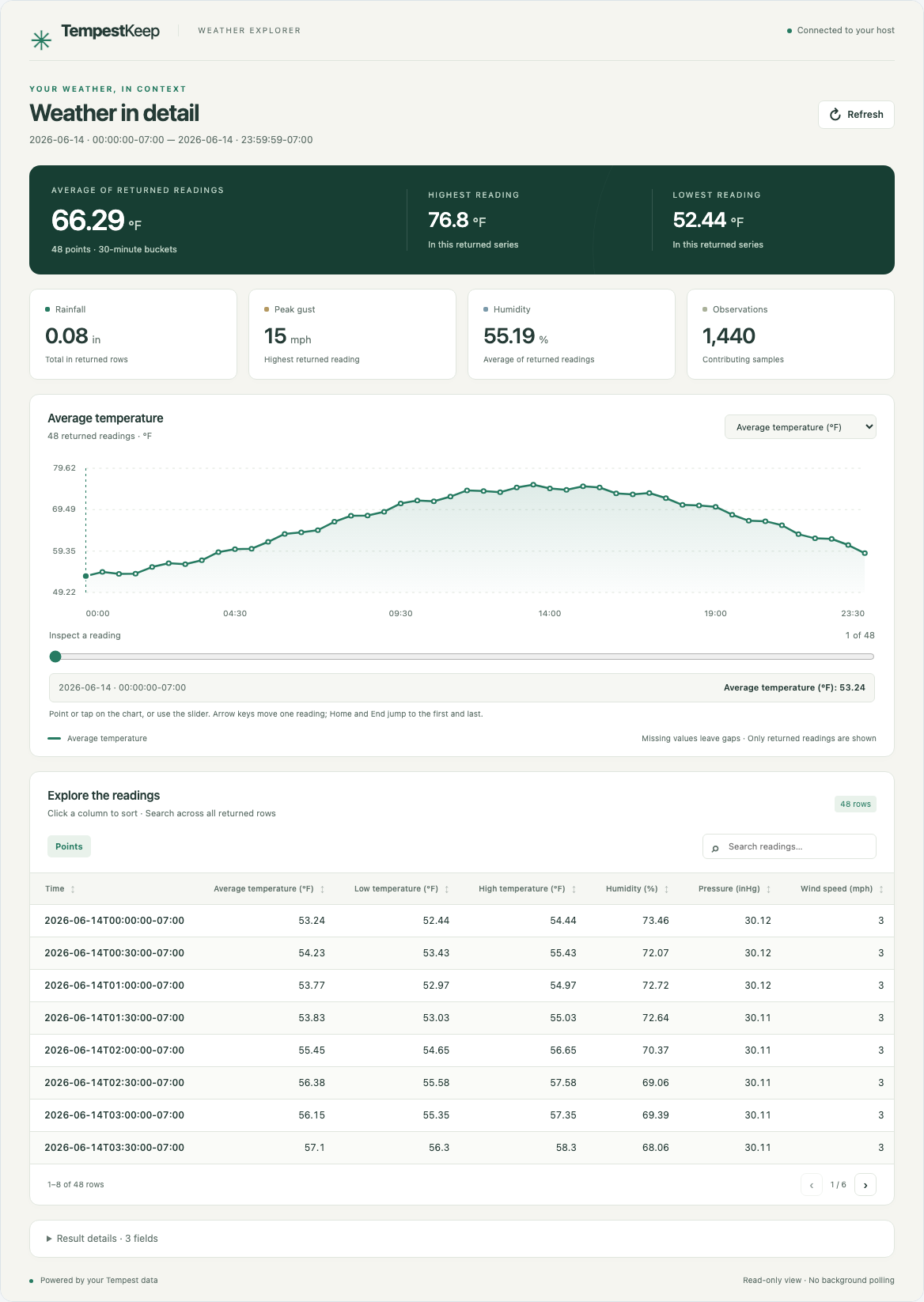
Synthetic weather in the local MCP Apps test host, captured with Playwright. This preview does not certify a specific client.
Connect your client · Explore MCP Apps · Try synthetic data · CLI and terminal UI
One Go executable serves MCP over stdio and includes the complete app UI. You do not need Node.js, a web server, or the separate TUI to explore data in an MCP Apps host. The same executable still provides terminal dashboards, reports, and CSV or JSON Lines exports. An existing archive works without a token.
Interactive MCP Apps
Ask for weather or an archive query, then explore the result in your conversation. The host opens the view for the tool it calls. Use the same MCP connection and credentials described below.
| Explore | In the app |
|---|---|
| Daily forecast | Read daily high, low, and maximum rain probability, then switch to hourly details. |
| Weather over time | Switch metrics, inspect chart points with pointer, touch, or keyboard, and explore the wind rose. |
| Archive and SQL results | Search rows, inspect long cells, sort columns, and move between table pages. |
| Several stations | Find device IDs beside their parent station names for use in configuration. |
| Updated results | Refresh the same read-only tool with its original arguments. |
| Your working environment | Use responsive views that follow the host's light or dark theme. |
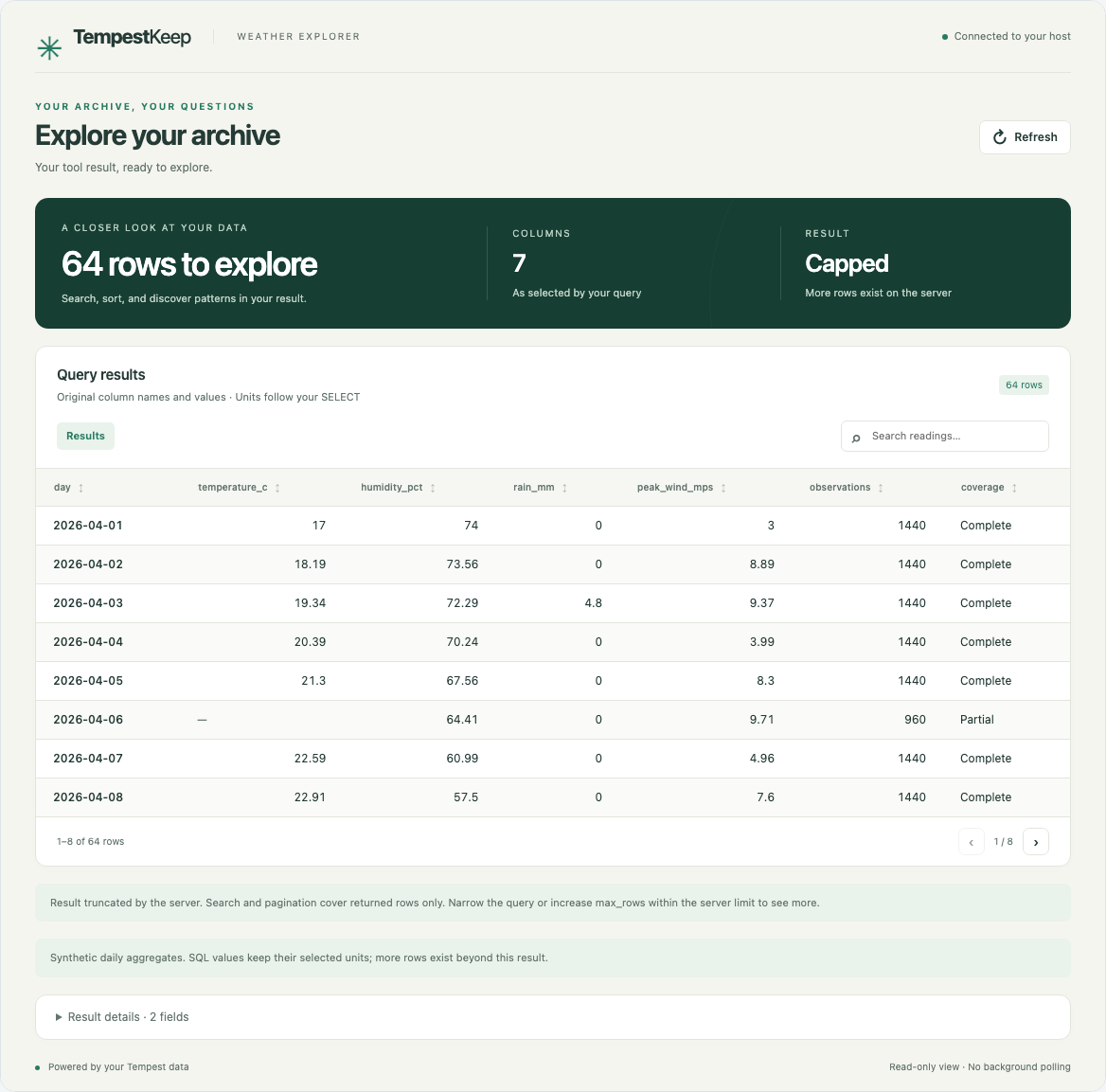
Synthetic table data in the local MCP Apps test host, captured with Playwright.
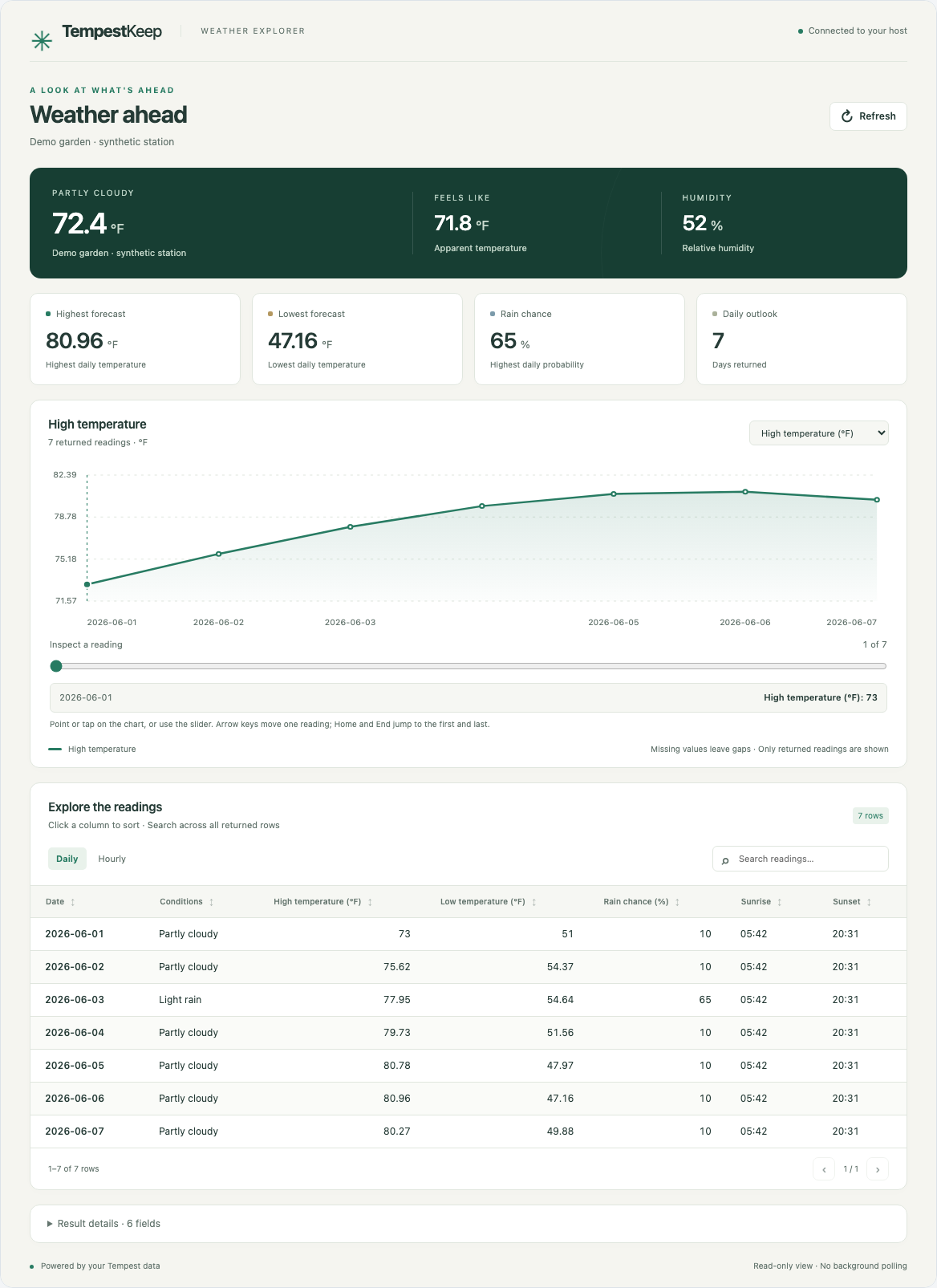
Synthetic daily forecast. Cards summarize the returned days, including the highest rain probability. Missing values remain unavailable.
Search and pagination cover the returned rows. Views display up to 2,000 rows and 64 columns, with a notice when a limit applies. If a server limit truncates the result, narrow the tool request before drawing conclusions about the archive. Missing readings remain distinct from zero. The app does not run archive writes. Observation-series views show when rain or lightning readings are missing or partial. Available totals do not imply complete sensor coverage. Historical rainfall tables also distinguish missing rain, measured zero, and partial totals. Their reading counts describe samples, not uninterrupted coverage.
MCP Apps support depends on the host and its version. Clients without the extension retain the existing text and structured tool results. See the MCP Apps guide for usage, host compatibility, privacy, and screenshot reproduction.
What your agent can do
With live access and a writable archive, TempestKeep exposes 29 typed tools, 2 archive documentation resources, and 3 prompts. Each tool has an input schema and structured output. The 27 read-only tools also have MCP Apps UI resources.
| Ask your agent | MCP workflow |
|---|---|
| "Build my station's archive and keep it current." | archive_status → resumable backfill_archive → sync_archive |
| "Which day had the strongest gust in the last 30 days?" | daily_summary → get_observations for that day |
| "Where does the wind usually come from?" | wind_rose over the local archive |
| "Is today's weather unusual for this station?" | current_conditions → this_day_in_history → records |
| "Explain the archive before writing a query." | Read the schema and data-dictionary resources, then use query_sql |
The weather_report, climate_review, and build_archive prompts package
common workflows. The resources explain the schema, units, and aggregation
rules so a client can work with the stored data.
Capabilities follow configuration:
| Inputs | Available operations |
|---|---|
| token | live conditions, station metadata, and forecast |
| archive | local observations, archive status, summaries, records, and read-only SQL |
| token and writable archive | bounded archive backfill and sync |
Use --read-only or TEMPEST_READ_ONLY=true to remove MCP archive write tools.
Live API reads remain available when a token exists. SQL queries use a read-only
database handle and limits on time, rows, and bytes. Open-ended backfill calls
save progress between bounded batches.
See the MCP guide for configuration, capabilities, and limits.
Connect your agent
Build
You need Go 1.27.3 and a local filesystem for SQLite. Live data and collection
also need a WeatherFlow personal access token. The build commands below use
make and a Unix-like shell. The normal build uses pure Go. Race tests need
a C toolchain.
git clone https://github.com/lennrt/tempestkeep.git
cd tempestkeep
go mod download
make build
The executable is bin/tempestkeep. Use its absolute path in a desktop MCP
client, or put it on that client's PATH.
For a build without make, run go build -o bin/tempestkeep ./cmd/tempestkeep.
On native Windows, use bin/tempestkeep.exe as the output filename and client
command. Direct Go builds use the module version metadata when Go supplies it.
Configure the MCP client
For clients that use an mcpServers configuration, add the following to the
client's private local configuration. Replace the paths, token placeholder,
and timezone with your own values:
{
  "mcpServers": {
    "tempestkeep": {
      "command": "/absolute/path/to/tempestkeep/bin/tempestkeep",
      "args": ["mcp"],
      "env": {
        "TEMPEST_TOKEN": "YOUR_WEATHERFLOW_TOKEN",
        "TEMPEST_DB": "/absolute/path/to/weather/tempest.sqlite",
        "TZ": "America/Los_Angeles"
      }
    }
  }
}
Use your client's secret store if it provides one. Keep credentials out of Git and command arguments. Clients with a different configuration format need the same command, arguments, and environment values.
Restart or reconnect the MCP client, then ask it to build your station's local archive. With a token and explicit database path, TempestKeep creates the archive and exposes the backfill tools. Collection happens when the client calls those tools. Starting the server does not install a background collector.
For an existing archive without live access, omit TEMPEST_TOKEN and add
--read-only to args. Also remove any token inherited from the process
environment or loaded from .env. The server reads .env from its working
directory, which can differ from your terminal's directory.
If the token can access several devices, use list_stations or
tempestkeep list-devices to find the intended device. Set TEMPEST_DEVICE_ID
or add --device-id with that ID to the MCP arguments. See the
device selection rules before collecting.
The host launches tempestkeep mcp and exchanges JSON-RPC over stdin/stdout.
Diagnostics go to stderr. SIGINT and SIGTERM cancel work and close the archive.
The archive remains local. Tool results go to the connected MCP client, which
can send them to its model provider.
In an MCP Apps host, ask for a forecast, daily summary, or SQL query to open its interactive result. Reconnect after replacing an older binary so the client refreshes its tool list. No additional TempestKeep app configuration is required.
The optional Claude Code plugin uses the same server. A plugin connection alone does not establish MCP Apps support in that client.
Try it without a station
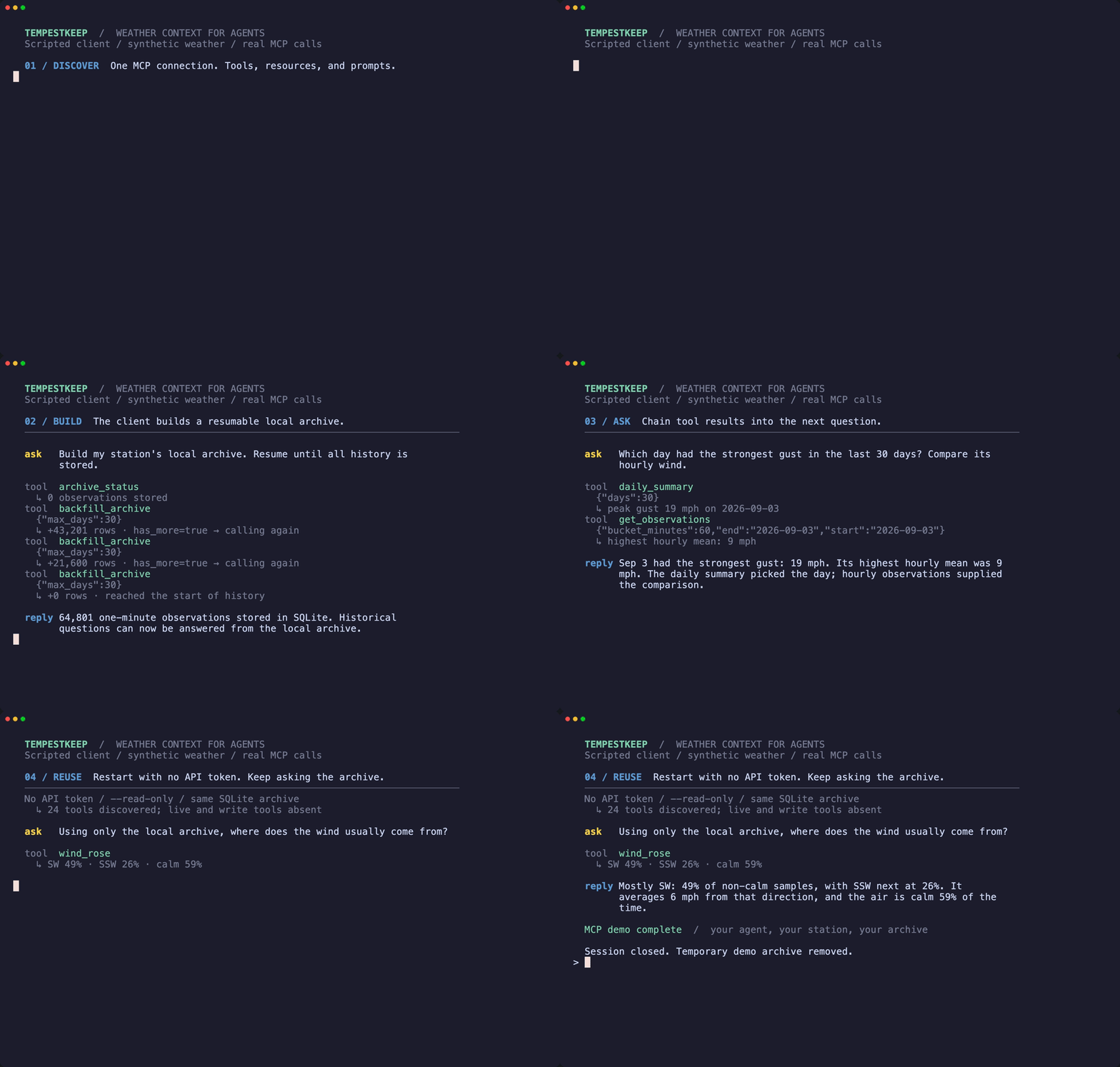
Watch the MP4 clip. The clip uses a scripted Go client and synthetic weather. Discovery, tool calls, archive writes, and offline reuse run through the real MCP server. It demonstrates the underlying MCP tools, rather than the app UI.
Run that MCP session with a local synthetic API and a temporary archive. No real token or model provider is used:
make mcp-demo
The demo discovers capabilities and builds 45 days of history. It uses a daily summary to select an hourly query, then reconnects without a token in read-only mode. It removes its temporary archive and stops the synthetic API when finished.
To record the GIF and MP4 with Charm's VHS, install VHS v0.11.0, ttyd,
and ffmpeg, then run:
make demo-agent
The recording is defined in docs/agent.tape, with a reproduction guide covering the transcript and recording checks.
CLI and terminal UI
The CLI gives you direct access to the same live data and archive. Start with the interactive setup wizard, then collect history and open the dashboard:
./bin/tempestkeep setup
./bin/tempestkeep collect
./bin/tempestkeep now
./bin/tempestkeep explore
To fill a gap in an existing archive, collect an explicit range:
./bin/tempestkeep collect --start 2025-06-01 --end 2025-06-03
Both local dates are included. A range can cover at most 366 calendar days.
Repeating it is safe and leaves ordinary collection progress unchanged.
MCP clients can use backfill_archive and pass its exact next_before value
as before_epoch to continue a bounded request; repeat start and max_days.
For manual setup on Unix-like systems, copy .env.example to .env and run
chmod 600 .env before entering the token. Commands read that file from their
current working directory. Use the CLI guide for
configuration, collection, protected exports, and report examples.
tempestkeep setup          Configure the token and archive.
tempestkeep list-devices   List stations and device identifiers.
tempestkeep collect        Create or update the archive.
tempestkeep now            Show current conditions and forecast.
tempestkeep explore        Explore archived days, months, and records.
tempestkeep status         Inspect archive freshness and internal gaps.
tempestkeep stats          Print archive statistics.
tempestkeep export         Write CSV or JSON Lines to stdout.
tempestkeep mcp            Serve live and archived data over MCP stdio.
tempestkeep version        Print the installed version.
tempestkeep help           Show command help.
Use tempestkeep help <command> for flags, bounds, results, and failure behavior.
Machine-readable commands keep data on stdout and diagnostics on stderr.
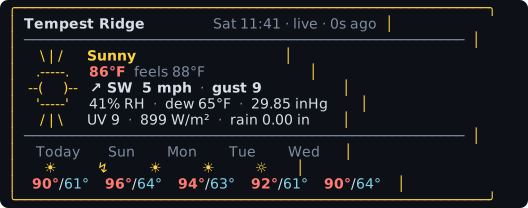
Terminal controls
The current-conditions card needs 61 columns. The explorer needs 68. Narrower windows show a resize notice. On short terminals, use Up/Down (or k/j) and Page Up/Page Down to scroll. A position hint appears when content extends beyond the screen. Resizing returns to the top.
In now, r refreshes or retries. In explore, Enter refreshes or retries,
Left/Right (or h/l) moves between periods, d/w/m/y/r selects a view, and Tab
cycles the month/year metric. The g or Home key returns to the latest period.
The q, Esc, and Ctrl+C keys exit either dashboard.
In the day view, a gap in the rain sparkline means that no rain reading exists.
The lowest block represents zero or a small positive reading. Partial summary
rain totals carry a ≥ marker.
tempestkeep version reports the build's injected version, then Go's module
version when available. If neither exists, it falls back to v0.5.0-dev.
make build injects a version from Git tags or that development fallback.
Version 0.5.0 is the proposed next minor release. See CHANGELOG.md
for its scope. This change does not publish a release.
Archive behavior
Each archive belongs to one Tempest device. Collection supports obs_st
observations from Tempest ST hardware. TempestKeep rejects another device's
rows because mixed observations invalidate rain, wind, and temperature totals.
Collection requests at most five days per API call. Each chunk is committed in
one transaction. Observation inserts use the (device_id, epoch) key, so replay
does not create duplicate rows. Open-ended collection stores a cursor after each
committed chunk and resumes from that cursor after interruption.
Without an explicit device selection, CLI collection reuses an existing archive's device. New archives and empty archives without a saved device discover the first accessible Tempest device. An empty archive with a saved device keeps that device. Explicit zero device IDs fail before archive or API access.
Use tempestkeep status --format json to inspect an archive without a token.
It reports freshness, saved backfill state, and up to ten internal gaps over
one hour. Sample timestamps do not establish continuous sensor coverage.
The default tempestkeep collect run creates a timestamped backup after a
successful checkpoint. Backups live in the backups directory beside the
archive. A private temporary copy becomes a snapshot without replacing an
existing file. Set --backup-keep from 0 through 365. Zero disables backups.
MCP collection does not create these snapshots.
Keep the active database on a local filesystem. Stop writers before copying the database. Move a completed backup or export between machines. Do not place an active WAL database in a cloud-synchronized folder.
The archive stores SI units. Default exports and raw SQL retain those units. History tools and CLI reports use US units for temperature, wind, pressure, and rain. Every result remains limited by available observations and sensor readings. See query examples and interpretation.
Calendar summaries use the process timezone. On Unix-like systems, set TZ
to the station's IANA timezone before starting the process. Native Windows uses
the host timezone. See the timezone rules
before comparing reports across hosts.
Security and privacy
Treat these files as sensitive:
.envand access tokens.- The SQLite archive, WAL, and shared-memory files.
- Backups and exports.
- Terminal output that lists station, device, coordinate, or serial data.
The repository ignores common archive and configuration paths. A custom path or export filename can fall outside those rules. The application requests owner-only permissions where the platform supports them. A shell redirect creates its own output file and controls that file's permissions.
See SECURITY.md for private reporting and the threat model for controls and residual risks.
Verification
Run the repository checks with Go 1.27.3:
make fmtcheck       # gofmt and goimports
make docs-check     # Markdown format and local links
make tidy-check     # go.mod and go.sum drift
make vet
make test           # pure-Go tests
make demo-smoke     # real MCP demo against synthetic data
make race
make fuzz           # bounded fuzz smoke tests
make lint
make workflows      # GitHub Actions syntax and semantics
make generated      # public API snapshot
make vuln
make licenses
make sbom
make secrets        # tracked files and Git history
make build-pure
make build-arm64
make verify runs the full set. Tests use finite timeouts. HTTP and MCP end-to-
end tests use local deterministic servers and do not need a token. A live smoke
test needs an explicit test token in the process environment:
# Load TEMPEST_TOKEN from a private secret manager first.
make live-smoke
unset TEMPEST_TOKEN
The command lists devices, fetches current conditions and a forecast, and collects one bounded history range. It reads the temporary archive without a token, then deletes that archive. It discards API output. Do not run it with a production token.
CI runs on pushes to main, pull requests, and manual dispatch. Ubuntu runs
the full Go checks. macOS and Windows run native tests, documentation checks,
and pure-Go builds. Separate jobs validate OpenSpec requirements and the MCP
Apps bundle and browser behavior.
CI cancels obsolete runs.
Demo recording and release qualification are manual. Release qualification builds a snapshot and does not publish it. Node.js is development tooling for OpenSpec and the MCP Apps frontend. It is not required to build or run TempestKeep. For UI changes, run the frontend checks in addition to the Go checks.
Use the documentation index to find command guides, design records, security evidence, support policy, and release procedures. See CONTRIBUTING.md before proposing a change. The OpenSpec workflow tracks proposed behavior and review evidence.
Verification scope
- The repository checks do not include a production load test or formal verification.
- No Antithesis run was launched or recorded.
- Live behavior depends on the WeatherFlow service and the permissions of the supplied token.
- CodeQL, dependency review, and some repository security features can require GitHub Advanced Security for a private repository.
Contribute and report problems
Use GitHub Issues for bugs, feature requests, and public discussion. English reports and contributions are welcome. See SUPPORT.md for useful diagnostics and CONTRIBUTING.md for the pull request process, coding rules, and required tests. Report vulnerabilities privately using SECURITY.md.
For connection failures, missing tools, interrupted collection, and unexpected reports, start with troubleshooting.
The OpenSSF badge above displays the live status of the existing project entry. The OpenSSF evidence guide maps the Passing criteria to the repository's controls and records the assessment date and limits.
Affiliation
TempestKeep is an independent project. It is not affiliated with, endorsed by, or sponsored by WeatherFlow or the Tempest weather platform. WeatherFlow and Tempest names and marks belong to their respective owners. See NOTICE.md.
License
TempestKeep uses the MIT License. See LICENSE.
TempestKeep MCP 질문
WeatherFlow 토큰 없이 TempestKeep를 사용할 수 있나요?
네, 토큰 없이 기존 로컬 아카이브를 읽기 전용 모드로 사용할 수 있습니다.
서버가 백그라운드에서 자동으로 날씨 데이터를 수집하나요?
아니요, 서버를 실행한다고 해서 백그라운드 수집기가 설치되는 것은 아닙니다. 클라이언트가 특정 backfill 도구를 호출할 때 데이터 수집이 이루어집니다.
서버를 빌드하려면 어떤 프로그래밍 언어가 필요한가요?
실행 파일을 빌드하려면 Go 1.27.3 버전이 설치되어 있어야 합니다.