
코딩 에이전트가 간헐적인 테스트 실패를 재현하고, 재현 입력을 최소화하며, 실증적 근거를 통해 코드 수정 사항을 검증할 수 있도록 지원합니다.
다른 이름 LBarimi/FailTrace
- 스타
- 0
- Tools
- —
- 다운로드, 30일
- —
- 최신 버전
- 1.5.0
- 마지막 커밋
- 2026년 9월 7일
- 라이선스
- MIT
FailTrace MCP란?
FailTrace은(는) MCP server입니다. 코딩 에이전트가 간헐적인 테스트 실패를 재현하고, 재현 입력을 최소화하며, 실증적 근거를 통해 코드 수정 사항을 검증할 수 있도록 지원합니다.
프로젝트 README에서 생성된 요약
FailTrace MCP server 정보
FailTrace는 디버깅을 위한 실증적 근거를 생성하여 코딩 에이전트가 간헐적인 테스트 실패를 처리할 수 있는 방법을 제공합니다. 로컬 stdio MCP server 또는 CLI를 통해 작동하며, 개발자가 실패한 베이스라인을 캡처하고, 재현 입력을 최소화하며, 코드 패치를 검증할 수 있도록 돕습니다. 이 도구는 Node.js 22.12+ 및 npm을 사용하여 로컬 머신에서 실행되므로, 작동을 위해 외부 AI API, 계정 또는 텔레메트리가 필요하지 않습니다.
에이전트는 회귀 탐색, 최소화, 검증을 포함하여 조사 라이프사이클을 관리하기 위해 7가지 특정 MCP 도구를 사용할 수 있습니다. 시스템은 여러 시도에 걸쳐 실패 시그니처와 조사 근거를 추적합니다. 기존 테스트 러너와 어설션을 지원하며, NUnit 및 Unity EditMode 테스트에 대한 특정 지원도 포함합니다. 데이터 비대화를 방지하기 위해, 서버는 보관되는 stdout 및 stderr를 trial당 16 MiB, run 또는 minimization 프로세스당 256 MiB로 제한합니다.
활용 사례
- 1재현 입력 최소화에이전트가 복잡한 입력 세트를 특정 테스트 실패를 유발하는 데 필요한 최소한의 데이터로 줄일 수 있습니다.
- 2코드 패치 검증개발자가 저장된 베이스라인과 비교하여 제안된 수정 사항이 대상 실패를 실제로 해결하는지 확인하는 데 사용할 수 있습니다.
- 3회귀 원인 식별bisect 프로세스를 통해 어떤 특정 Git 변경 사항이 테스트 실패를 유발했는지 찾는 데 도움을 줍니다.
- 4간헐적 실패 캡처사용자가 명령을 실행하여 테스트를 여러 번 반복함으로써 일관된 실패 시그니처를 캡처할 수 있습니다.
프로젝트의 README를 바탕으로 작성되었습니다. 모든 활용 사례는 해당 내용의 인용문과 대조하여 확인합니다.
FailTrace MCP 설치 방법
형식 확인: 2026년 11월 10일Cursor에 추가Goose에 추가Claude Code에 FailTrace MCP 설치
$ claude mcp add failtrace -- npx -y failtraceCursor에 FailTrace MCP 설치
~/.cursor/mcp.json
{
  "mcpServers": {
    "failtrace": {
      "command": "npx",
      "args": [
        "-y",
        "failtrace"
      ]
    }
  }
}VS Code에 FailTrace MCP 설치
.vscode/mcp.json
{
  "servers": {
    "failtrace": {
      "type": "stdio",
      "command": "npx",
      "args": [
        "-y",
        "failtrace"
      ]
    }
  }
}VS Code CLI에 FailTrace MCP 설치
$ code --add-mcp '{"name":"failtrace","type":"stdio","command":"npx","args":["-y","failtrace"]}'Claude Desktop에 FailTrace MCP 설치
claude_desktop_config.json
{
  "mcpServers": {
    "failtrace": {
      "command": "npx",
      "args": [
        "-y",
        "failtrace"
      ]
    }
  }
}Codex에 FailTrace MCP 설치
$ codex mcp add failtrace -- npx -y failtraceCodex config.toml에 FailTrace MCP 설치
~/.codex/config.toml
[mcp_servers.failtrace]
command = "npx"
args = ["-y", "failtrace"]
Gemini CLI에 FailTrace MCP 설치
$ gemini mcp add -s user failtrace npx -- -y failtraceGemini settings.json에 FailTrace MCP 설치
~/.gemini/settings.json
{
  "mcpServers": {
    "failtrace": {
      "command": "npx",
      "args": [
        "-y",
        "failtrace"
      ]
    }
  }
}자동 검사
2026년 11월 15일에 실행됨전체 보고서 →자동 검사를 통과했습니다. 이는 보안 감사가 아닙니다. 코드를 직접 읽고 서버에 필요한 최소한의 권한만 부여하십시오. 검사 방식

- 소스 저장소 연결 및 접근 가능lbarimi/failtrace is public and reachablegithub.com/lbarimi/failtrace ↗통과
- 패키지가 이 저장소를 소스로 명시failtrace names lbarimi/failtrace as sourcenpmjs.com/package/failtrace ↗통과
- 빌드 출처(Sigstore 증명)No build attestation published for this release검사되지 않음
- 오픈 소스 라이선스 (OSI)MITspdx.org/licenses/MIT.html ↗통과
- 최근 1년 내 커밋 또는 릴리스Last commit or release 2026-09-07github.com/lbarimi/failtrace ↗통과
- OpenSSF Scorecard검사되지 않음
- 패키지 이름이 인기 패키지와 유사하지 않음No popular package one edit away from failtrace통과
- 패키지 및 해당 종속성에 중요한 보안 권고 없음6 resolved dependencies checked; no critical advisoryosv.dev ↗통과
- 모델에 대한 숨겨진 지침 없음0 tool descriptions and the README read; no override phrases, credential paths or hidden characters통과
- 파괴적인 도구에 라벨 표시됨검사되지 않음
- 원격 엔드포인트가 MCP 핸드셰이크에 응답검사되지 않음
README
GitHub에서 보기FailTrace
Reproduce the failure. Check the fix.
A test fails intermittently. Your coding agent changes the code. One passing retry leaves you guessing.
FailTrace repeats the same check, saves a failing baseline, and checks the proposed fix against it. Use the CLI or MCP tools to get trial results, a smaller reproducer, and evidence your agent can inspect before accepting a patch.


Local execution. No AI API, account, or telemetry required. Keep your existing test runner and assertions.
Quick start
With Node.js 22.12+ and npm, run this in any working directory:
npx --yes failtrace demo
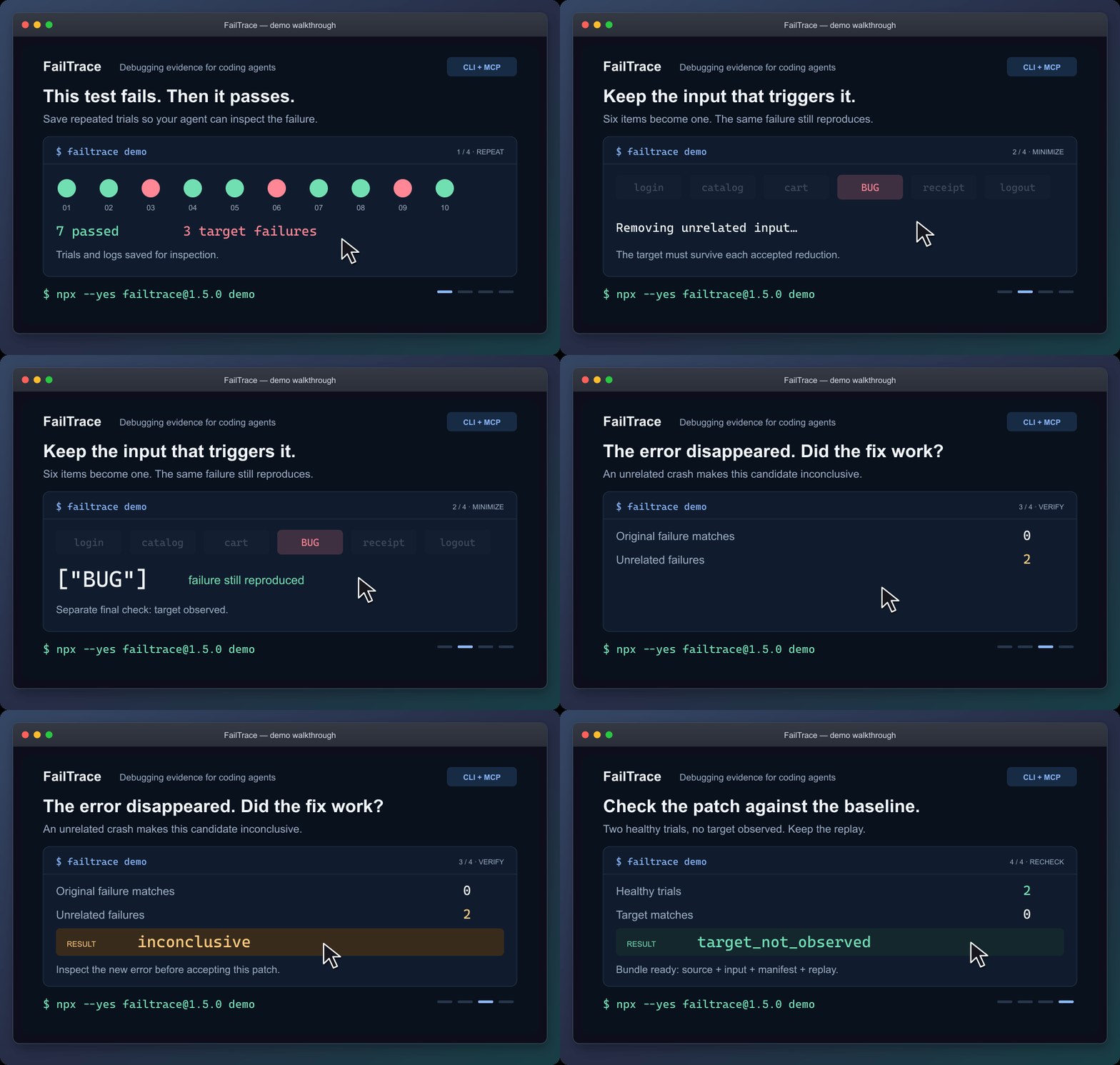
Static walkthrough · Static poster · Demo guide
The demo reduces six input items to ["BUG"], rejects a patch that crashes for another reason, and checks a working patch. It saves the evidence in .failtrace/ and prints a replay command.
For coding agents
Connect the local stdio MCP server through your client's configuration:
npx --yes failtrace@1.5.0 mcp --cwd "/absolute/path/to/your/project"
Copy the MCP configuration and check the connection →
Your client launches this command. Running it alone in a terminal waits for MCP requests. The guide includes Windows setup.
Then ask your agent:
Use FailTrace to capture this test failure before editing. Choose the exact test or failure message, save a bounded baseline, and inspect the matching trial. After the change, verify against that baseline and explain any unrelated errors or incomplete evidence.
The seven MCP tools share the CLI's Core engine. They retain the failure signature and investigation evidence across repetition, comparison, regression search, minimization, verification and replay. Agents can retrieve saved trial and log pages without rerunning the command. Shell-capable agents can also use the CLI with --json.
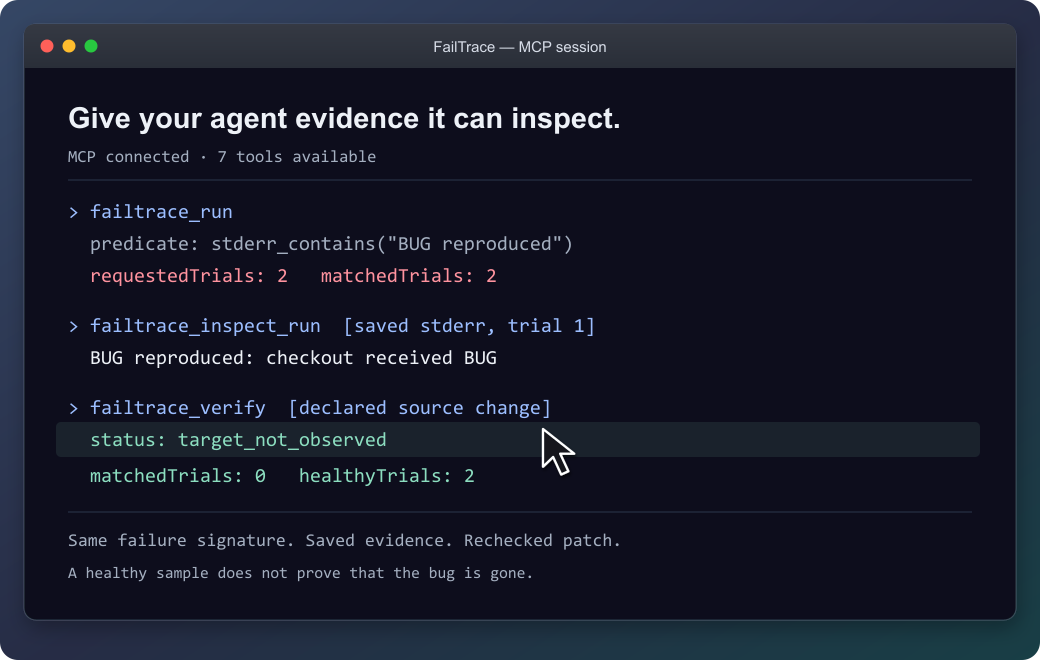
The agent can inspect the saved failure before checking the patch.
Recheck an existing unit test
Follow an exact NUnit or Unity test through a fix. Each attempt gets a fresh NUnit 3 report. Missing or skipped tests and unrelated failures stay inconclusive, so an agent cannot accept them as evidence that the selected test passed.
Connect your test or try the original EditMode example →
NUnit support is included in 1.3.0 through CLI and MCP. The documented Unity validation covers the Windows EditMode example.
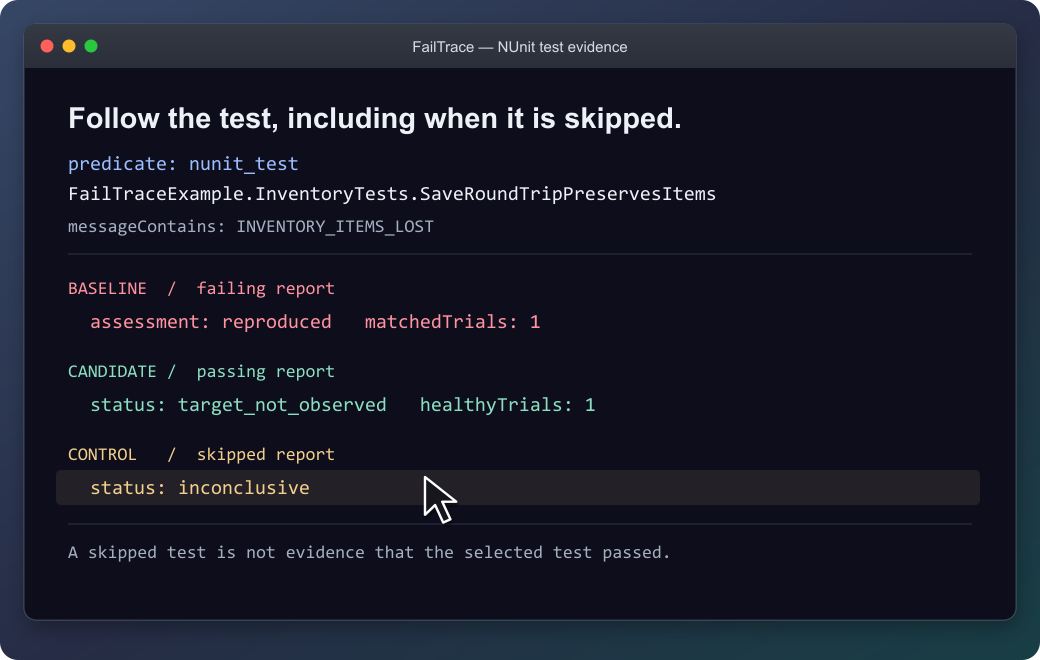
The selected test stays the same; a skipped report is not accepted as a passing test.
Use it on your own failure
From your project, replace the command and message with your own:
npx --yes failtrace@1.5.0 run "npm test -- checkout" --repeat 20 --stderr-contains "checkout failed" --capture-context
Run this before editing in a Git project. --capture-context records source identity for Verify; outside Git, select files with --context-source. Each trial saves its output, and exit 1 can mean the target was captured successfully. Then edit and verify the patch →
| Your next question | Command |
|---|---|
| How often does this failure appear? | run |
| What differs between a healthy and failing trial? | compare |
| Which Git change introduced it? | bisect |
| What input is enough to reproduce it? | minimize |
| What happened after the proposed fix? | verify |
| How can I replay this investigation? | bundle |
Command reference · Literal executable arguments · Reusable project scripts
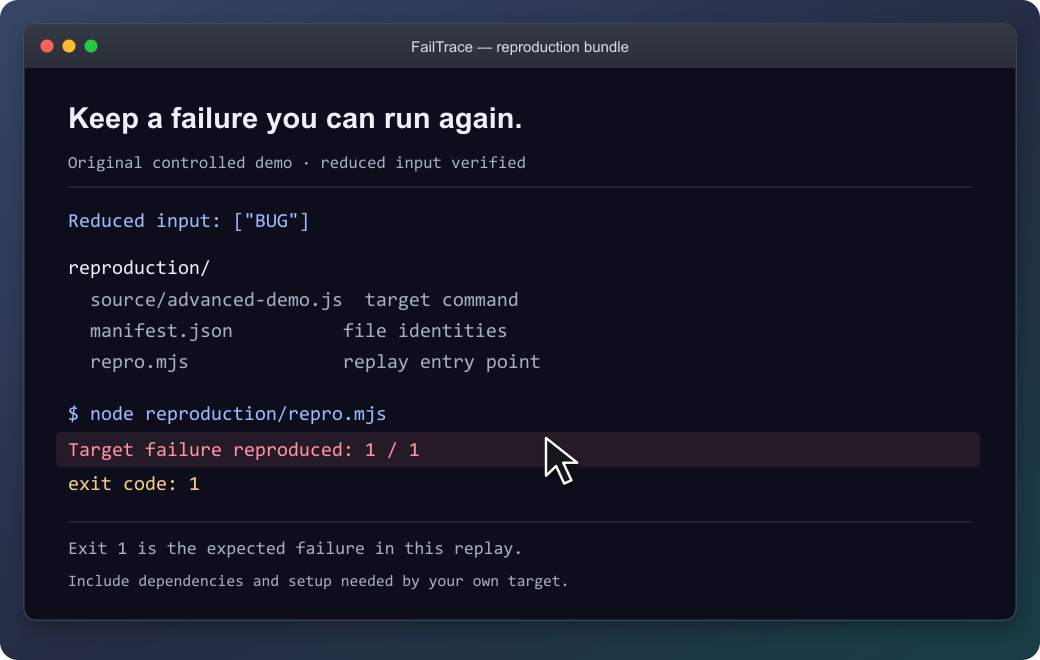
The demo's bundle reproduces its original failure with exit 1. Keep the source, input and replay together; supply the target's prerequisites when packaging your own investigation.
What the results establish
FailTrace reports observations under the chosen settings. Verify separates a target observed, a healthy sample without that target, and inconclusive evidence. Bisect reports a sampled first-parent boundary; minimization rechecks its result without promising the smallest possible input.
The demo shows controlled example outcomes, not performance measurements. A passing sample does not prove a bug is gone.
Commands run with your permissions, and process cleanup is best effort. Retained stdout/stderr is capped by default at 16 MiB per trial and 256 MiB per run or bisect/minimization. Previous investigations accumulate separately. Review logs, commands and selected files before sharing; bundles still require the target's dependencies and setup.
Result and exit-code reference · Resource limits · Storage inventory · Bundle guide
Availability and contributing
The quick start uses npm's latest release; the verified version is 1.5.0. MCP configuration and repeatable installation examples keep that exact version pinned: installation options, GitHub release, and MCP Registry entry.
Version 1.5.0 adds: short run references, Verify readiness and next-step guidance, and intermittent-minimization guidance. See the changelog.
Documentation: choose your next task →
Development instructions · Compatibility · Roadmap · Third-party notices
FailTrace MCP 질문
FailTrace MCP를 Claude Code에 추가하려면 어떻게 하나요?
터미널에서 claude mcp add failtrace -- npx -y failtrace를 실행합니다. 모든 프로젝트에서 사용할 수 있게 하려면 --scope user를 추가합니다.
FailTrace MCP를 Cursor에 추가하려면 어떻게 하나요?
~/.cursor/mcp.json를 열고 mcpServers 아래에 서버를 추가합니다. 위 설치 섹션에 표시된 Cursor 구성을 사용합니다.
FailTrace를 사용하려면 AI API나 계정이 필요한가요?
아니요, AI API, 계정 또는 텔레메트리 없이 로컬에서 실행됩니다.
NUnit 테스트와 함께 FailTrace를 사용할 수 있나요?
네, 버전 1.3.0 이상부터 CLI와 MCP를 통해 NUnit을 지원합니다.
로그 리소스 제한은 어떻게 되나요?
보관되는 stdout/stderr는 trial당 16 MiB, run, bisect 또는 minimization 과정당 256 MiB로 제한됩니다.
테스트가 통과하면 버그가 수정되었다는 증거가 되나요?
아니요, 테스트 통과가 버그가 완전히 사라졌음을 보장하는 절대적인 증거는 아닙니다.