
webhooks-cc MCP server
2026년 11월 14일 커밋AI 에이전트가 자연어를 통해 webhook 엔드포인트를 관리하고, 들어오는 요청을 검사하며, 페이로드를 재전송하고, 로컬 사이트를 공유할 수 있도록 지원합니다.
다른 이름 kroqdotdev/webhooks-cc, @webhooks-cc/mcp
- 스타
- 3
- Tools
- —
- 다운로드, 30일
- —
- 최신 버전
- —
- 마지막 커밋
- 2026년 11월 14일
- 라이선스
- AGPL-3.0
webhooks-cc MCP란?
webhooks-cc은(는) MCP server입니다. AI 에이전트가 자연어를 통해 webhook 엔드포인트를 관리하고, 들어오는 요청을 검사하며, 페이로드를 재전송하고, 로컬 사이트를 공유할 수 있도록 지원합니다.
프로젝트 README에서 생성된 요약
webhooks-cc MCP server 정보
이 MCP server는 AI 코딩 에이전트를 사용하는 개발자가 자연어를 통해 webhook 엔드포인트를 관리하고 들어오는 요청을 검사할 수 있게 해줍니다. Claude Code, Cursor 또는 VS Code와 같은 도구에 연결하면, 에이전트가 새로운 엔드포인트를 생성하고, 테스트 페이로드를 전송하며, 캡처된 요청을 로컬 서버로 재전송할 수 있습니다. 이는 AI 어시스턴트와 webhooks.cc 인프라 사이의 가교 역할을 하여, 대시보드를 수동으로 탐색하지 않고도 실시간 디버깅을 가능하게 합니다.
사용자는 WHK_API_KEY 환경 변수를 통해 API key를 제공하여 서버를 설정합니다. 이 서버는 에이전트가 초기 생성부터 공개 링크를 통한 로컬 사이트 공유까지 webhook의 전체 라이프사이클을 관리할 수 있도록 57개의 도구를 제공합니다. 이 설정은 Stripe나 GitHub와 같은 제공업체의 정확한 헤더, 바디, 서명을 확인해야 하는 결제 연동 또는 CI/CD hook 테스트에 특히 유용합니다.
활용 사례
- 1결제 연동 테스트AI 에이전트가 Stripe 이벤트의 페이로드 구조를 검사하기 위한 특정 엔드포인트를 생성할 수 있습니다.
- 2CI/CD 워크플로우 디버깅배포 또는 pull request 중에 GitHub가 정확히 어떤 데이터를 전송하는지 에이전트에게 모니터링하도록 요청할 수 있습니다.
- 3에러 핸들링 시뮬레이션에이전트가 특정 에러 코드를 반환하도록 엔드포인트를 구성하여 애플리케이션의 재시도 로직을 테스트할 수 있습니다.
- 4로컬 개발 환경으로 요청 재전송AI에게 캡처된 webhook을 가져와 테스트를 위해 로컬 서버로 직접 전송하도록 지시할 수 있습니다.
프로젝트의 README를 바탕으로 작성되었습니다. 모든 활용 사례는 해당 내용의 인용문과 대조하여 확인합니다.
webhooks-cc MCP 설치 방법
형식 확인: 2026년 11월 10일Cursor에 추가Goose에 추가Claude Code에 webhooks-cc MCP 설치
$ claude mcp add webhooks-cc -- npx -y @webhooks-cc/mcpCursor에 webhooks-cc MCP 설치
~/.cursor/mcp.json
{
  "mcpServers": {
    "webhooks-cc": {
      "command": "npx",
      "args": [
        "-y",
        "@webhooks-cc/mcp"
      ]
    }
  }
}VS Code에 webhooks-cc MCP 설치
.vscode/mcp.json
{
  "servers": {
    "webhooks-cc": {
      "type": "stdio",
      "command": "npx",
      "args": [
        "-y",
        "@webhooks-cc/mcp"
      ]
    }
  }
}VS Code CLI에 webhooks-cc MCP 설치
$ code --add-mcp '{"name":"webhooks-cc","type":"stdio","command":"npx","args":["-y","@webhooks-cc/mcp"]}'Claude Desktop에 webhooks-cc MCP 설치
claude_desktop_config.json
{
  "mcpServers": {
    "webhooks-cc": {
      "command": "npx",
      "args": [
        "-y",
        "@webhooks-cc/mcp"
      ]
    }
  }
}Codex에 webhooks-cc MCP 설치
$ codex mcp add webhooks-cc -- npx -y @webhooks-cc/mcpCodex config.toml에 webhooks-cc MCP 설치
~/.codex/config.toml
[mcp_servers.webhooks-cc]
command = "npx"
args = ["-y", "@webhooks-cc/mcp"]
Gemini CLI에 webhooks-cc MCP 설치
$ gemini mcp add -s user webhooks-cc npx -- -y @webhooks-cc/mcpGemini settings.json에 webhooks-cc MCP 설치
~/.gemini/settings.json
{
  "mcpServers": {
    "webhooks-cc": {
      "command": "npx",
      "args": [
        "-y",
        "@webhooks-cc/mcp"
      ]
    }
  }
}자동 검사
2026년 11월 14일에 실행됨전체 보고서 →아직 인증되지 않았습니다. 서버는 80점 이상의 점수, 심각한 결함 없음, 그리고 검사에 충분한 데이터를 갖추어야 합니다. 검사 방식 · 점수를 높이기 위해 수정할 항목

- 소스 저장소 연결 및 접근 가능kroqdotdev/webhooks-cc is public and reachablegithub.com/kroqdotdev/webhooks-cc ↗통과
- 패키지가 이 저장소를 소스로 명시@webhooks-cc/mcp names kroqdotdev/webhooks-cc as sourcenpmjs.com/package/@webhooks-cc/mcp ↗통과
- 빌드 출처(Sigstore 증명)No build attestation published for this release검사되지 않음
- 오픈 소스 라이선스 (OSI)AGPL-3.0spdx.org/licenses/AGPL-3.0.html ↗통과
- 최근 1년 내 커밋 또는 릴리스Last commit or release 2026-11-14github.com/kroqdotdev/webhooks-cc ↗통과
- OpenSSF Scorecard검사되지 않음
- 패키지 이름이 인기 패키지와 유사하지 않음No popular package one edit away from @webhooks-cc/mcp통과
- 패키지 및 해당 종속성에 중요한 보안 권고 없음검사되지 않음
- 모델에 대한 숨겨진 지침 없음0 tool descriptions and the README read; no override phrases, credential paths or hidden characters통과
- 파괴적인 도구에 라벨 표시됨검사되지 않음
- 원격 엔드포인트가 MCP 핸드셰이크에 응답검사되지 않음
README
GitHub에서 보기webhooks.cc
Inspect and debug webhooks and email without deploying to production.
Get a unique URL, point your webhook there, and see every request in real time. No signup required. Every endpoint also has an email address at mailhooks.cc that captures mail the same way.
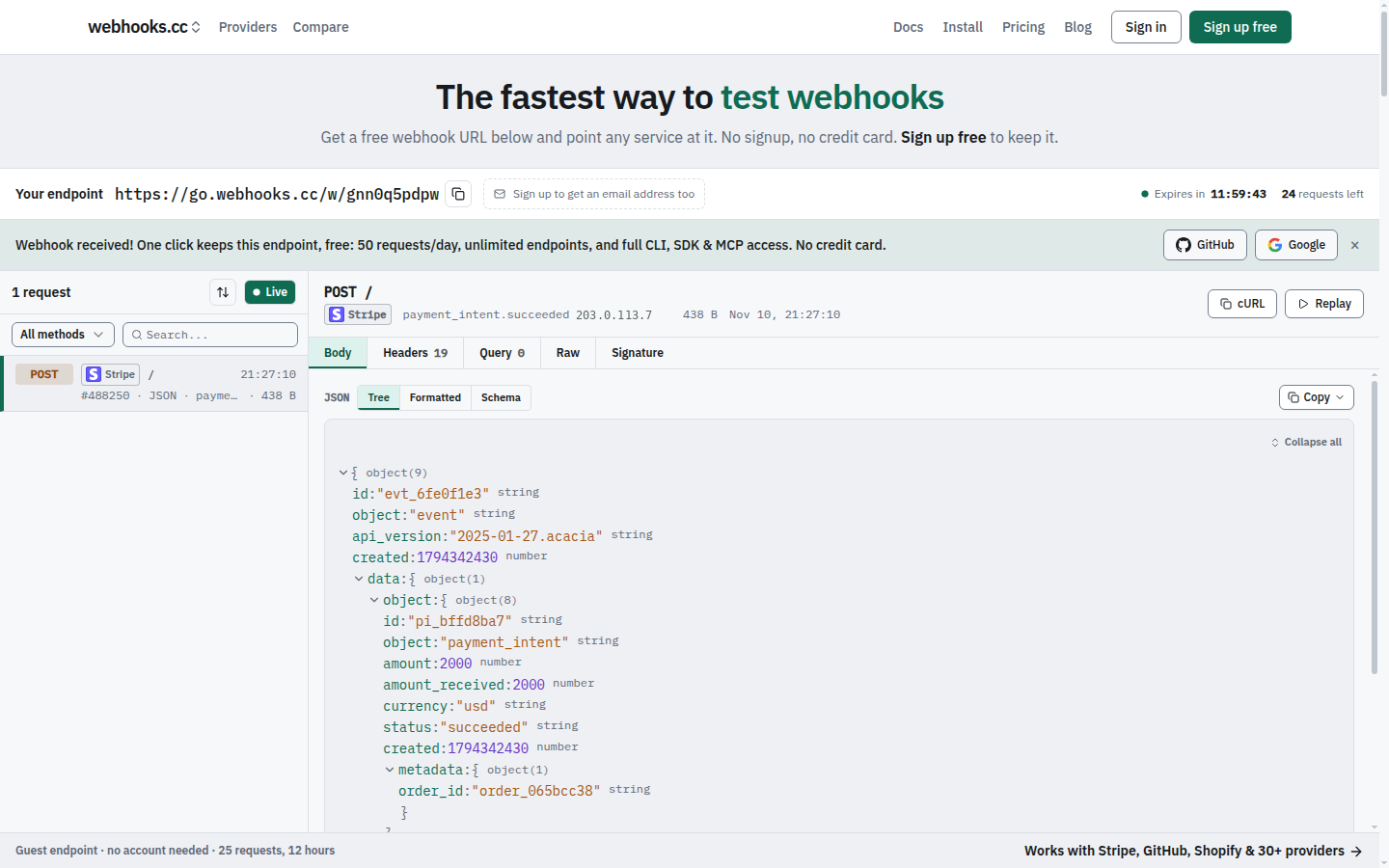
Getting Started
- Visit webhooks.cc
- Copy your unique webhook URL
- Send a test request:
curl -X POST https://go.webhooks.cc/w/<slug> -d '{"test": true}' - Watch it appear in the dashboard
Features
- Capture requests: store incoming webhooks with headers, body, query parameters and metadata
- Capture email: every endpoint receives mail at
{slug}@mailhooks.cc, with parsed fields, attachments and authentication results - Inspect in real time: see requests the moment they arrive
- Configure responses: return custom status codes, headers and bodies, chosen by rules, to test error paths
- Verify signatures: check provider signatures (Stripe, GitHub, Shopify and more) on captured requests
- Forward: tunnel webhooks to localhost during development (with
--live, the sender gets your local app's answer), or forward them to other URLs, chat and file drops - Share localhost: put the site on your machine at a public link on sharehooks.cc with
whk share - CLI with interactive TUI: manage endpoints, tunnel and stream requests from your terminal
- SDKs for TypeScript, Python and Go: wait for and assert on webhooks in tests and CI, and share a local port from code
- MCP server: connect AI coding agents (Claude Code, Cursor, VS Code, Codex) to your webhooks
Use Cases
Testing payment integrations: point Stripe's test webhooks at your endpoint. Inspect the payload structure before writing handlers.
Debugging CI/CD hooks: see exactly what GitHub sends when a push, PR, or deployment occurs.
Developing locally: forward production-like webhooks to localhost without exposing your machine to the internet.
Mocking failure scenarios: configure your endpoint to return 500 errors and test your retry logic.
Pricing
Free: 50 requests a day, 7-day retention. Enough for development and testing.
Pro ($8/month): 100,000 requests a month, 31-day retention.
Business ($29/month): 250,000 requests a month, 90-day retention, attachment parsing, custom inbound domains and file drops.
Teams share endpoints under a per-seat subscription. See plans and limits for details.
Install
CLI
curl -fsSL https://webhooks.cc/install.sh | sh
# or
brew install kroqdotdev/tap/whk
# without root: any directory you can write to (created when missing)
curl -fsSL https://webhooks.cc/install.sh | WHK_INSTALL_DIR="$HOME/.local/bin" sh
With WHK_INSTALL_DIR, put that directory on your PATH (the installer prints the line to add) before running whk.
Then launch interactive terminal:
whk
SDK
npm install @webhooks-cc/sdk
MCP server
# Claude Code
claude mcp add -s user webhooks-cc -e WHK_API_KEY=whcc_... -- npx -y @webhooks-cc/mcp

# Cursor, VS Code, Devin Desktop (formerly Windsurf), Claude Desktop
npx @webhooks-cc/mcp setup cursor --api-key whcc_...
See webhooks.cc/installation for all install methods, one-click buttons, and setup guides.
CLI
Run whk to launch the interactive TUI:
$ whk

  webhooks.cc

  ● Logged in as you@example.com

  ▸ Tunnel    Forward webhooks to localhost
    Listen    Stream incoming requests
    Create    Create a new endpoint
    Endpoints Manage your endpoints
    Auth      Login / logout
    Update    Check for updates
All commands also work directly from the command line:
whk tunnel 8080                       # Forward webhooks to localhost:8080
whk share 3000                        # Share localhost:3000 at https://<name>.sharehooks.cc
whk listen <slug>                     # Stream incoming requests
whk create my-endpoint                # Create a new endpoint
whk list                              # List your endpoints
whk replay <request-id> --to :3000    # Replay a captured request
Pass --nogui or set WHK_NOGUI=1 to skip the TUI and print help.
SDK
import { WebhooksCC, matchMethod, matchHeader, matchAll } from "@webhooks-cc/sdk";

const client = new WebhooksCC({ apiKey: "whcc_..." });

const endpoint = await client.endpoints.create({ name: "my-webhook" });
console.log(endpoint.url);

// Wait for a matching request with human-readable timeout
const req = await client.requests.waitFor(endpoint.slug, {
  timeout: "30s",
  match: matchAll(matchMethod("POST"), matchHeader("stripe-signature")),
});

// Replay captured requests to your local server
await client.requests.replay(req.id, "http://localhost:3000/webhooks");
MCP server
The @webhooks-cc/mcp package exposes 57 tools (54 on the remote server) that let AI agents manage endpoints, inspect webhooks, send test payloads, replay requests, and share a local site at a public link through natural language.
You: "Create a webhook endpoint for testing Stripe"
Agent: Created endpoint "stripe-test" at https://go.webhooks.cc/w/abc123

You: "Send a test checkout.session.completed event"
Agent: Sent POST to stripe-test

You: "Replay that to my local server"
Agent: Replayed to http://localhost:3000/webhooks: 200 OK
See packages/mcp/README.md for full setup and tool reference.
Why the code is public
webhooks.cc holds other people's webhooks and email, so the code that handles them should be open to inspection. You can read exactly how a request is captured, stored, forwarded and deleted, and check that the service does what it says. The repository is also where security scanning, dependency updates and bug reports happen in the open.
webhooks.cc is built and run by one developer. The hosted service at webhooks.cc is the product; the repository is not a community project.
Issues and contributions
- Bugs and feature requests are welcome as issues.
- Questions about your account, billing or data go to webhooks.cc/support, never to a public issue.
- Security vulnerabilities are reported privately, see SECURITY.md.
- Pull requests are accepted only from people who have signed the Contributor License Agreement. Open an issue first: most changes are made in-house, and a pull request may be closed or reimplemented. See CONTRIBUTING.md.
License
This project uses a split license:
- AGPL-3.0: the web app, receiver, email-capture SMTP host, tunnel edge, attachment parser and database schema (
apps/web/,apps/receiver-rs/,apps/mx-rs/,apps/edge-rs/,apps/parser-rs/,supabase/). See LICENSE. - MIT: the CLI and its tunnel protocol crate, the TypeScript, Python and Go SDKs, the MCP server, the Zapier and Make apps, and the Claude Code plugin (
apps/cli-rs/,crates/tunnel/,packages/sdk/,packages/sdk-python/,packages/sdk-go/,packages/mcp/,packages/zapier-app/,packages/make-app/,plugins/). See theLICENSEfile in each directory.
The CLI, SDKs and MCP server are MIT so you can use them freely in your own projects, open or closed.
webhooks-cc MCP 질문
webhooks-cc MCP를 Claude Code에 추가하려면 어떻게 하나요?
터미널에서 claude mcp add webhooks-cc -- npx -y @webhooks-cc/mcp를 실행합니다. 모든 프로젝트에서 사용할 수 있게 하려면 --scope user를 추가합니다.
webhooks-cc MCP를 Cursor에 추가하려면 어떻게 하나요?
~/.cursor/mcp.json를 열고 mcpServers 아래에 서버를 추가합니다. 위 설치 섹션에 표시된 Cursor 구성을 사용합니다.
MCP server로 무엇을 할 수 있나요?
AI 에이전트가 자연어를 사용하여 엔드포인트를 관리하고, webhook을 검사하며, 테스트 페이로드를 전송하고, 요청을 재전송하며, 로컬 사이트를 공유할 수 있습니다.
들어오는 이메일 요청을 테스트할 수 있나요?
네, 모든 엔드포인트는 mailhooks.cc의 대응하는 이메일 주소를 가집니다. 이를 통해 필드가 파싱된 메일과 첨부 파일을 캡처할 수 있습니다.