AI 에이전트를 사용하여 Raindrop.io 북마크를 검색하고, 컬렉션을 검사하며, 정리 계획을 생성합니다.
다른 이름 KingPsychopath/raindrop-cli, raindrop-cli, @machineyearn/raindrop-cli
- 스타
- 2
- Tools
- —
- 다운로드, 30일
- —
- 최신 버전
- 0.2.1
- 마지막 커밋
- 2026년 11월 3일
- 라이선스
- MIT
rdrop MCP란?
rdrop은(는) MCP server입니다. AI 에이전트를 사용하여 Raindrop.io 북마크를 검색하고, 컬렉션을 검사하며, 정리 계획을 생성합니다.
프로젝트 README에서 생성된 요약
rdrop MCP server 정보
rdrop for Raindrop.io는 CLI 도구 또는 AI 에이전트를 사용하여 Raindrop.io 북마크 라이브러리를 관리, 검색 및 정리할 수 있는 방법을 제공합니다. 이 도구는 네이티브 Go CLI이자 MCP server로 작동하며, 컬렉션 검사, 정리 필요 항목 식별, 정리 계획 생성을 지원합니다. 사용자는 터미널을 통해 데이터를 조작하거나 Claude 또는 Codex와 같은 AI 클라이언트를 연결하여 복잡한 읽기 및 계획 작업을 수행할 수 있습니다.
이 server를 사용하려면 개인 설정 파일에 저장된 Raindrop 토큰을 제공해야 합니다. 이 시스템은 특정 제공자에 종속되지 않도록 설계되어 호스트된 모델을 연결하거나 Qwen, Laya와 같은 로컬 옵션을 실행할 수 있습니다. 또한 새로운 태그 추가나 컬렉션 이동과 같은 제안된 변경 사항을 계정에 실제로 적용하기 전에 dry-run 프로세스를 통해 검토할 수 있도록 하여 안전성을 강조합니다. 이를 통해 재정리 과정 중에도 기존 태그와 메모가 손상되지 않도록 보장합니다.
활용 사례
- 1라이브러리 정리 감사 수행보고서를 실행하여 주의가 필요하거나 재정리가 필요한 북마크를 식별합니다.
- 2CLI를 통한 컬렉션 검색 및 관리셸 명령어를 사용하여 특정 유형의 링크를 검색하거나 컬렉션 트리를 관리합니다.
- 3제안된 변경 사항의 안전한 검토정리 계획을 확정하기 전에 정확히 어떤 북마크와 태그가 수정될지 확인합니다.
프로젝트의 README를 바탕으로 작성되었습니다. 모든 활용 사례는 해당 내용의 인용문과 대조하여 확인합니다.
rdrop MCP 설치 방법
형식 확인: 2026년 11월 10일Cursor에 추가Goose에 추가Claude Code에 rdrop MCP 설치
$ claude mcp add --env 'RAINDROP_TOKEN=<YOUR_RAINDROP_TOKEN>' raindrop-cli -- npx -y @machineyearn/raindrop-cliCursor에 rdrop MCP 설치
~/.cursor/mcp.json
{
  "mcpServers": {
    "raindrop-cli": {
      "command": "npx",
      "args": [
        "-y",
        "@machineyearn/raindrop-cli"
      ],
      "env": {
        "RAINDROP_TOKEN": "<YOUR_RAINDROP_TOKEN>"
      }
    }
  }
}VS Code에 rdrop MCP 설치
.vscode/mcp.json
{
  "servers": {
    "raindrop-cli": {
      "type": "stdio",
      "command": "npx",
      "args": [
        "-y",
        "@machineyearn/raindrop-cli"
      ],
      "env": {
        "RAINDROP_TOKEN": "<YOUR_RAINDROP_TOKEN>"
      }
    }
  }
}VS Code CLI에 rdrop MCP 설치
$ code --add-mcp '{"name":"raindrop-cli","type":"stdio","command":"npx","args":["-y","@machineyearn/raindrop-cli"],"env":{"RAINDROP_TOKEN":"<YOUR_RAINDROP_TOKEN>"}}'Claude Desktop에 rdrop MCP 설치
claude_desktop_config.json
{
  "mcpServers": {
    "raindrop-cli": {
      "command": "npx",
      "args": [
        "-y",
        "@machineyearn/raindrop-cli"
      ],
      "env": {
        "RAINDROP_TOKEN": "<YOUR_RAINDROP_TOKEN>"
      }
    }
  }
}Codex에 rdrop MCP 설치
$ codex mcp add raindrop-cli --env 'RAINDROP_TOKEN=<YOUR_RAINDROP_TOKEN>' -- npx -y @machineyearn/raindrop-cliCodex config.toml에 rdrop MCP 설치
~/.codex/config.toml
[mcp_servers.raindrop-cli]
command = "npx"
args = ["-y", "@machineyearn/raindrop-cli"]

[mcp_servers.raindrop-cli.env]
RAINDROP_TOKEN = "<YOUR_RAINDROP_TOKEN>"
Gemini CLI에 rdrop MCP 설치
$ gemini mcp add -s user -e 'RAINDROP_TOKEN=<YOUR_RAINDROP_TOKEN>' raindrop-cli npx -- -y @machineyearn/raindrop-cliGemini settings.json에 rdrop MCP 설치
~/.gemini/settings.json
{
  "mcpServers": {
    "raindrop-cli": {
      "command": "npx",
      "args": [
        "-y",
        "@machineyearn/raindrop-cli"
      ],
      "env": {
        "RAINDROP_TOKEN": "<YOUR_RAINDROP_TOKEN>"
      }
    }
  }
}구성
RAINDROP_TOKEN비밀Raindrop.io API token. Alternatively configure the private rdrop env/token file; see setup.
| 이름 | 설명 | 유형 |
|---|---|---|
| RAINDROP_TOKEN | Raindrop.io API token. Alternatively configure the private rdrop env/token file; see setup. | 비밀 |
자동 검사
2026년 11월 13일에 실행됨전체 보고서 →자동 검사를 통과했습니다. 이는 보안 감사가 아닙니다. 코드를 직접 읽고 서버에 필요한 최소한의 권한만 부여하십시오. 검사 방식

- 소스 저장소 연결 및 접근 가능kingpsychopath/raindrop-cli is public and reachablegithub.com/kingpsychopath/raindrop-cli ↗통과
- 패키지가 이 저장소를 소스로 명시@machineyearn/raindrop-cli names kingpsychopath/raindrop-cli as sourcenpmjs.com/package/@machineyearn/raindrop-cli ↗통과
- 빌드 출처(Sigstore 증명)No build attestation published for this release검사되지 않음
- 오픈 소스 라이선스 (OSI)MITspdx.org/licenses/MIT.html ↗통과
- 최근 1년 내 커밋 또는 릴리스Last commit or release 2026-11-03github.com/kingpsychopath/raindrop-cli ↗통과
- OpenSSF Scorecard검사되지 않음
- 패키지 이름이 인기 패키지와 유사하지 않음No popular package one edit away from @machineyearn/raindrop-cli통과
- 패키지 및 해당 종속성에 중요한 보안 권고 없음7 resolved dependencies checked; no critical advisoryosv.dev ↗통과
- 모델에 대한 숨겨진 지침 없음0 tool descriptions and the README read; no override phrases, credential paths or hidden characters통과
- 파괴적인 도구에 라벨 표시됨검사되지 않음
- 원격 엔드포인트가 MCP 핸드셰이크에 응답검사되지 않음
README
GitHub에서 보기rdrop for Raindrop.io
Find, review and organize your saved links. Keep your tags. Bring your own AI.


Turn a growing Raindrop.io library into something easier to use. Search saved links, inspect collections, find cleanup opportunities and review suggestions before making changes. Use it from your terminal or let your favorite agent do the reading and planning.
A Raindrop.io CLI, MCP server and reviewed bookmark organizer from Machineyearn, built as an independent integration.
- Your organization stays yours. Start with the tags and collections you already created; preserve existing tags when applying a plan.
- Changes you can inspect. See exact bookmarks, proposed tags and destinations, then dry-run the plan before applying it.
- AI that fits your workflow. Connect Codex or Claude, use a hosted tool-capable model, or run local Qwen and Laya.
- A useful CLI without AI. Search, edit, export, manage highlights and collections, and build shell pipelines.
Get started
1. Install
brew install machineyearningengineer/tap/rdrop
# Or Node 22+, with optional dependencies enabled:
npm install --global @machineyearn/raindrop-cli@0.2.1
rdrop version
Prefer no global install? Use npx --yes @machineyearn/raindrop-cli@0.2.1 COMMAND. Native downloads cover macOS, Linux and Windows on Intel/AMD and ARM. Builds and checksums.
2. Connect Raindrop
Create a token in your Raindrop integration settings. Add it to the private file ~/.config/rdrop/env:
RAINDROP_TOKEN=your_token_here
Give the directory permissions 700 and the file 600, then run rdrop doctor. Keep the token out of chat and Git. Setup and troubleshooting.
3. Ask your agent
Copy this into Codex, Claude or your preferred coding agent. It can help with setup too:
Set up https://github.com/machineyearningengineer/raindrop-cli so you can help
manage my Raindrop library. Use its plugin/MCP when available, otherwise
use the CLI. Check installation and authentication; have me add the token
privately. Use the existing model and configured services first.

Start with a cleanup report and a small sample. Use my existing tags and
collections. Choose useful tools for search, content, classification and
planning; connect extra model providers, Executor or ACP only if needed.
Show the exact proposed changes and a dry-run. Preserve my tags and notes,
flag uncertain suggestions, and apply only the exact plan I approve.
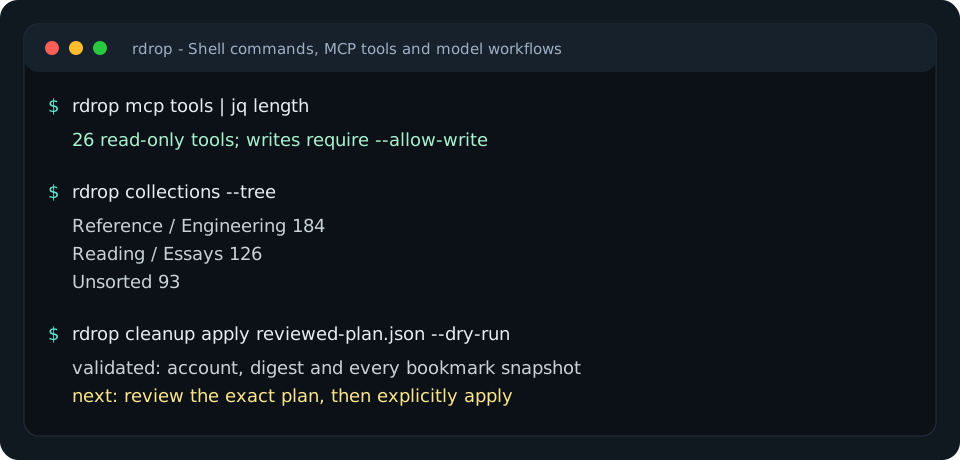
Connect an agent, or start in your shell with rdrop collections --tree, rdrop search 'type:article #go' --json and rdrop cleanup report --json.
Choose your workflow
| You want to… | Start here |
|---|---|
| Find links, manage collections or export your library | Shell commands |
| Use Codex, Claude or another MCP client | Client setup and plugins |
| Ask a model to inspect your library and propose changes | Run a model directly |
| Use Raindrop's semantic search and AI-assisted reads | Official MCP tools |
| Classify selected bookmarks with Jev, Laya or Clef | Decision providers |
| Run portable Raindrop tools in Executor | Executor setup |
Organize with a plan
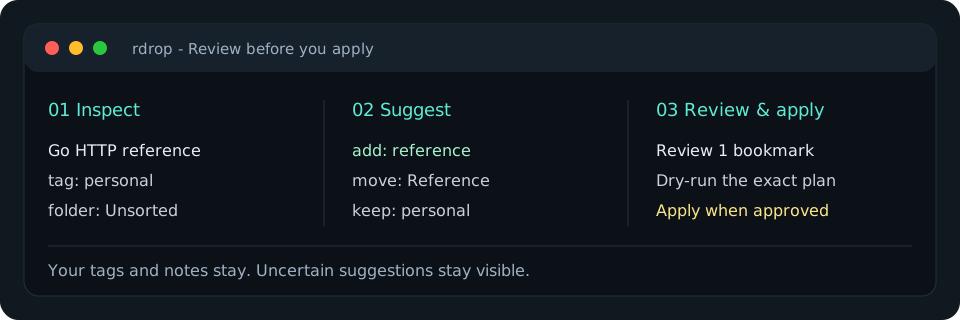
Begin with a report and select the exact bookmarks you want to review:
rdrop cleanup report --json > cleanup-report.json
rdrop context --ids 101,102 > library-context.json
jq 'del(.snapshots)' library-context.json > model-context.json
The model view contains your existing tag names, collection paths and bookmark metadata. Keep the original context private: its snapshots are used to detect edits before applying. Ask any model or rule engine for the proposal format, then validate it:
rdrop organize plan --context library-context.json --proposal proposal.json > organization.json
jq '.plan // error("No accepted changes")' organization.json > reviewed-plan.json
# Review accepted changes, needsReview and unmentioned items.
rdrop cleanup apply reviewed-plan.json --dry-run
rdrop cleanup apply reviewed-plan.json --yes
Plans keep existing tags and can combine new tags with a collection move. Unknown names and destinations fail validation; new tags need explicit naming rules. Account, digest and snapshots are checked before writing. Concurrent edits or partial failures need inspection and a fresh plan. Organizing and recovery.
Use your agent
The Codex and Claude plugin bundles a shared organizing skill and a read-only MCP connection. Install instructions also cover direct setup for other local clients.
rdrop connect mcp                         # client configuration, without tokens
rdrop mcp serve                           # read-only tools over stdio
rdrop mcp tools --search 'organize tags'   # discover relevant schemas offline
rdrop mcp tools --name raindrop_context    # inspect one exact schema
rdrop mcp serve --official                # also include Raindrop's hosted AI reads
Default tools read and plan. Enable writes only for an authorized host that enforces review. The official extension imports documented read tools; its plan limits and service availability still apply. Coverage and comparison with the official server.
You can also run a model directly:
# With your model API key in a private environment:
rdrop agent --model your-tool-capable-model --json \
  'Review the first page of untagged bookmarks. Use existing tags and propose a plan.' > agent-result.json
The model receives actual tool results and returns a response plus exact generated plans. Step, call and time limits bound the run. Local Chat Completions servers and hosted Responses APIs are supported. Jev, Laya and Cloudflare Clef provide typed category decisions; uncertainty stays visible. Model setup and exact commands.
Verified and maintained
A real Qwen/Laya loop classified bookmarks, generated a plan and applied it to a disposable test library while preserving existing tags and notes. The local Executor deployment passed connected-account health and live read checks. Repeat the verification, including its limits: this smoke check is not an accuracy benchmark, and Jev/Clef live inference requires provider credentials.
The product focuses on Raindrop. Model providers and proposal formats are agnostic; Obsidian and other note sources remain future options.
For developers
The public name is rdrop for Raindrop.io. Stable technical identifiers are the raindrop-cli repository, @machineyearn/raindrop-cli npm package, rdrop command and raindrop@machineyearn plugin. Storage support currently focuses on Raindrop.io; model and agent connections are provider-neutral.
A native Go CLI, local MCP server and direct model loop share the command implementation. The REST client, model clients and planning code use the standard library; MCP uses the official Go SDK. ACP configuration supplies this server to an existing ACP agent. Executor offers a smaller portable REST adapter. Docker is available as a packaging option.
make check               # Go checks, build and generated-doc parity
make check-integrations  # npm, Executor and Laya contracts
make assets              # regenerate the terminal graphic
rdrop MCP 질문
rdrop MCP를 Claude Code에 추가하려면 어떻게 하나요?
터미널에서 claude mcp add --env 'RAINDROP_TOKEN=<YOUR_RAINDROP_TOKEN>' raindrop-cli -- npx -y @machineyearn/raindrop-cli를 실행합니다. 모든 프로젝트에서 사용할 수 있게 하려면 --scope user를 추가합니다.
rdrop MCP를 Cursor에 추가하려면 어떻게 하나요?
~/.cursor/mcp.json를 열고 mcpServers 아래에 서버를 추가합니다. 위 설치 섹션에 표시된 Cursor 구성을 사용합니다.
기존 태그가 유지되나요?
네, 이 도구는 기존 태그와 컬렉션을 기반으로 시작하며 정리 계획을 적용할 때 이를 그대로 유지하도록 설계되었습니다.
변경 사항을 적용하기 전에 미리 확인할 수 있나요?
정리 계획을 적용할 때 dry-run 플래그를 사용하면 실제 실행 없이 제안된 변경 사항을 미리 볼 수 있습니다.