
ContextQuant MCP server
2026년 11월 9일 커밋JSON 도구 결과 크기를 최대 90%까지 줄이고, 에이전트가 누락된 데이터를 다시 가져올 수 있는 도구를 제공하는 MCP proxy입니다.
다른 이름 khankaif/ContextQuant
- 스타
- 5
- Tools
- —
- 다운로드, 30일
- —
- 최신 버전
- —
- 마지막 커밋
- 2026년 11월 9일
- 라이선스
- MIT
ContextQuant MCP란?
ContextQuant은(는) MCP server입니다. JSON 도구 결과 크기를 최대 90%까지 줄이고, 에이전트가 누락된 데이터를 다시 가져올 수 있는 도구를 제공하는 MCP proxy입니다.
프로젝트 README에서 생성된 요약
ContextQuant MCP server 정보
ContextQuant는 AI 에이전트를 위한 대규모 JSON 도구 결과의 크기를 줄여주는 역할을 합니다. Claude Code와 같은 MCP client와 GitHub, Jira 또는 데이터베이스와 같은 기존 MCP server 사이에서 프록시로 동작합니다. 도구가 방대한 페이로드를 반환할 때, 이 프록시는 필수 필드를 선택하고 긴 텍스트를 제거하며 반복되는 값을 하나의 헤더로 통합하여 데이터를 축소합니다. 이 과정을 통해 토큰 사용량을 최대 90%까지 줄일 수 있습니다.
단순히 텍스트를 자르는 방식과 달리, 이 프록시는 무엇이 삭제되었는지 명시적으로 선언하므로 에이전트가 누락된 정보를 추측할 필요가 없습니다. 또한 contextquant_more라는 특정 도구를 제공하여 에이전트가 핸들을 사용해 누락된 데이터나 특정 필드를 다시 가져올 수 있도록 합니다. 이 구성은 jq와 같은 명령어를 실행할 셸 환경이 없는 채팅 앱이나 호스팅된 에이전트를 사용하는 개발자에게 이상적입니다. 사용자는 설정 파일이나 명령줄 인수를 통해 토큰 예산, 텍스트 글자 수 제한, 특정 필드 요구 사항을 구성할 수 있습니다.
활용 사례
- 1GitHub 또는 Jira 이슈 분류에이전트가 컨텍스트 윈도우를 소모하지 않고도 수십 개의 이슈를 빠르게 스캔하여 특정 라벨이나 담당자를 확인할 수 있습니다.
- 2CRM 프로필 데이터 필터링수십 개의 프로필 속성을 포함하는 방대한 API 응답에서 프록시를 사용하여 몇 가지 핵심 필드만 추출할 수 있습니다.
- 3대규모 데이터베이스 또는 로그 쿼리많은 레코드에 걸쳐 대부분의 컬럼이 반복되거나 비어 있는 SELECT 스타일의 결과물을 처리할 수 있습니다.
- 4코드 실행 권한이 없는 에이전트 지원jq를 실행할 수 없는 채팅 애플리케이션 사용자도 복구 도구를 통해 전체 데이터셋에 접근할 수 있습니다.
프로젝트의 README를 바탕으로 작성되었습니다. 모든 활용 사례는 해당 내용의 인용문과 대조하여 확인합니다.
자동 검사
2026년 11월 15일에 실행됨전체 보고서 →아직 인증되지 않았습니다. 서버는 80점 이상의 점수, 심각한 결함 없음, 그리고 검사에 충분한 데이터를 갖추어야 합니다. 검사 방식 · 점수를 높이기 위해 수정할 항목

- 소스 저장소 연결 및 접근 가능khankaif/contextquant is public and reachablegithub.com/khankaif/contextquant ↗통과
- 패키지가 이 저장소를 소스로 명시검사되지 않음
- 빌드 출처(Sigstore 증명)검사되지 않음
- 오픈 소스 라이선스 (OSI)MITspdx.org/licenses/MIT.html ↗통과
- 최근 1년 내 커밋 또는 릴리스Last commit or release 2026-11-09github.com/khankaif/contextquant ↗통과
- OpenSSF Scorecard검사되지 않음
- 패키지 이름이 인기 패키지와 유사하지 않음검사되지 않음
- 패키지 및 해당 종속성에 중요한 보안 권고 없음검사되지 않음
- 모델에 대한 숨겨진 지침 없음0 tool descriptions and the README read; no override phrases, credential paths or hidden characters통과
- 파괴적인 도구에 라벨 표시됨검사되지 않음
- 원격 엔드포인트가 MCP 핸드셰이크에 응답검사되지 않음
README
GitHub에서 보기ContextQuant
An MCP proxy that shrinks large JSON tool results before they reach an AI agent. It tells the agent exactly what it cut, and gives it a tool to get the cut parts back.
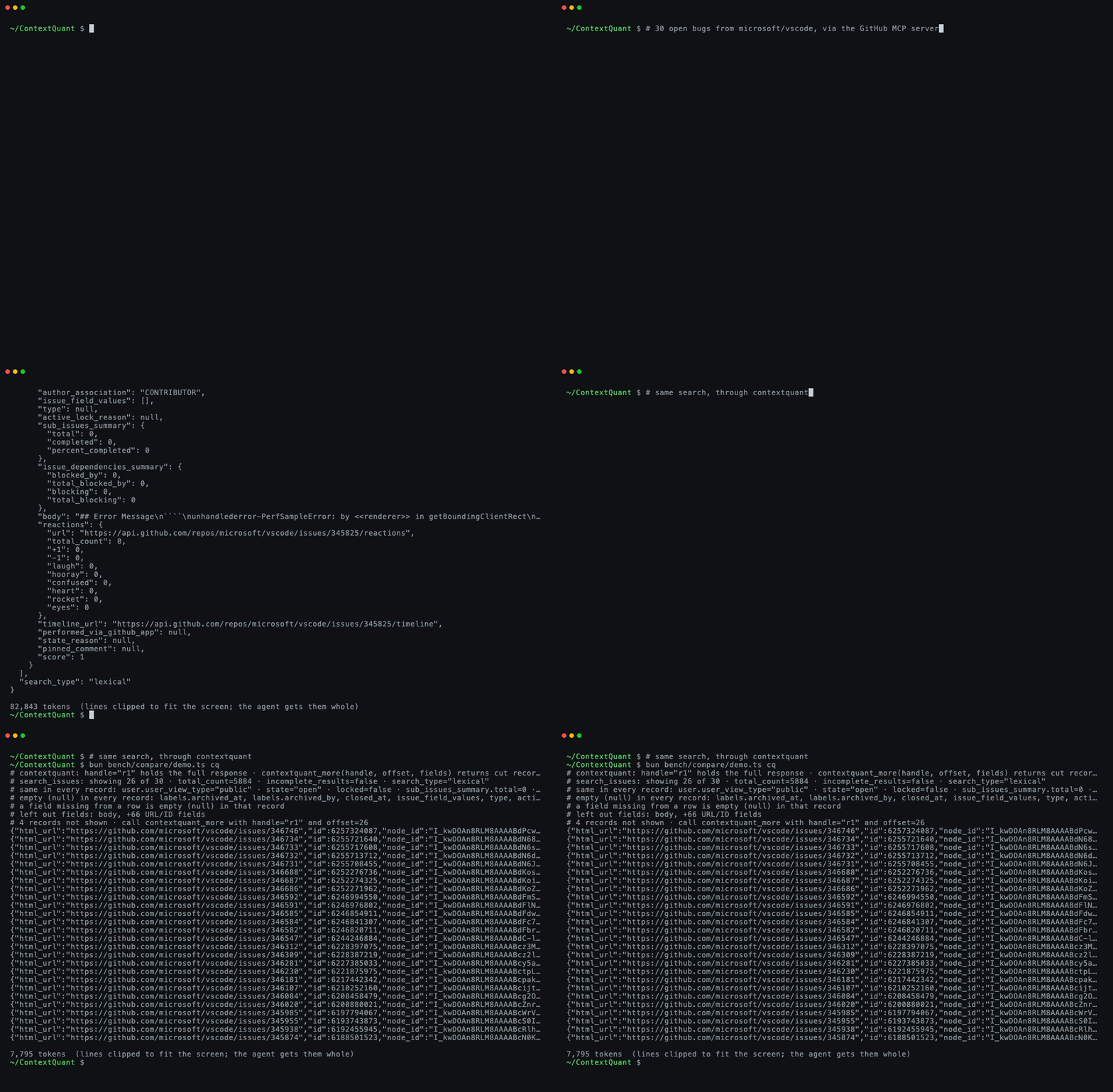
Real GitHub data, recorded with vhs from media/demo.tape.
The problem
MCP tools often return far more than the agent needs. One GitHub search_issues call for 30 issues is
about 70,000 tokens: every issue body, about 60 API links per issue, and the same author metadata
repeated 30 times. To answer "which open auth bugs are unassigned?" the agent needs four fields:
number, title, labels and assignee.
Clients deal with oversized results in one of three ways, and all three hurt:
| What the client does | What goes wrong |
|---|---|
| Puts the whole result in context | Fills the context window; every later turn re-reads it |
| Truncates it, or keeps only some fields | The agent can't tell what's missing, so it guesses or searches again |
| Saves it to a file | Fine if the agent can run code (jq); otherwise it never sees the data |
ContextQuant takes a fourth approach: cut the result down, and declare every cut.
How it works
ContextQuant sits between the agent and any MCP server. Tool calls pass through unchanged; only the results are rewritten.
agent (Claude Code, any MCP client)
   │   tool call ──────────────► passes through unchanged
   ▼
ContextQuant proxy ──────────────► wrapped MCP server (GitHub, Jira, a database…)
   │   ◄─────────────────────────  70k-token JSON result
   │
   │   1. find the list of records in the JSON
   │   2. pick the fields worth keeping (short values stay; long text and API links go)
   │   3. print fields that are the same in every record once, not 30 times
   │   4. fit as many records as the token budget allows (default 8,000)
   │   5. write a header saying what was left out and how to get it
   │   6. keep the original in memory under a handle, e.g. "r1"
   ▼
agent reads ~6k tokens, and can call contextquant_more("r1", …) for anything cut
What the agent reads for 18 GitHub issues (37,903 tokens raw, 5,556 through ContextQuant):
# contextquant: handle="r1" holds the full response · contextquant_more(handle, offset, fields) returns cut records or left-out fields
# search_issues: showing 18 of 18 · total_count=18 · incomplete_results=false
# same in every record: user.type="User" · state="open" · locked=false · …
# empty (null) in every record: closed_at, milestone, …
# left out fields: body, +66 URL/ID fields
{"html_url":"https://github.com/modelcontextprotocol/typescript-sdk/issues/2510","number":2510,"title":"Mid-session re-auth after refresh-token expiry dead-ends: …","labels":[{"name":"bug",…}],…}
…
Each header line tells the agent something it would otherwise have to guess:
| Line | What it tells the agent |
|---|---|
showing 18 of 18 |
How many records came back and how many are shown |
same in every record: … |
Values shared by all records, printed once; nothing is missing |
empty (null) in every record: … |
Fields that exist but are empty, so "nobody is assigned" is an answer, not a gap |
left out fields: body, … |
Fields removed from the rows; contextquant_more(handle, fields=["number","body"]) returns them |
12 records not shown · call contextquant_more with handle="r1" and offset=18 |
Records cut to fit the budget, with the exact call for the next page |
Why declaring the cuts matters. A model that can't see a field and isn't told it was removed tends to fill the gap with something plausible. In testing, a model asked for a person's "headline" answered with their job title every time when the field had been dropped silently, and said "not shown" when the cut was declared. The header turns a silent gap into a known one.
Results that aren't a list of records (plain text, single objects, errors), results that wouldn't get smaller, and results with a declared output schema pass through untouched.
Use cases
It fits any tool that returns many records when the agent needs a few fields from each:
- Issue and ticket triage. GitHub, Jira, Linear or Sentry searches: "which open bugs are unassigned?"
- CRM and people search. HubSpot or enrichment APIs return 50+ fields per profile; the agent filters on five.
- Database and log queries.
SELECT *-style results where most columns repeat or are empty. - Agents that can't run code. Chat apps, connectors and hosted agents can't
jqa saved file. This is where ContextQuant measured best (see Results).
It doesn't fit:
- Prose, code or logs. It only works on JSON lists of records.
- Coding agents with a shell, if cost is the goal. Raw results saved to a file plus
jqwere as accurate and about 2× cheaper. ContextQuant was faster there, but not cheaper. - Tools whose every field is needed every time. Mark them
skipin the config.
Quick start
Needs Node 20+. Put ContextQuant in front of any MCP server's own command:
claude mcp add --env GITHUB_PERSONAL_ACCESS_TOKEN=ghp_... github-cq \
  -- npx -y contextquant proxy -- npx -y @modelcontextprotocol/server-github
Any MCP client works the same way: npx -y contextquant proxy -- <the server's command>.
Remote (HTTP) servers use --url:
npx -y contextquant proxy --url https://api.githubcopilot.com/mcp/ --header "Authorization: Bearer ghp_..."
Environment variables (API tokens) pass through to the wrapped server. Each shaped call logs its
saving to stderr, e.g. contextquant search_issues: 37903 → 5556 tokens (o200k).
Configuration (optional)
npx -y contextquant proxy --budget 8000 --config contextquant.json -- <server command>
{
  "budget_tokens": 8000,
  "long_text_chars": 200,
  "keep_responses": 50,
  "timeout_seconds": 600,
  "tools": {
    "search_issues": { "fields": ["number", "title", "labels.name", "assignee.login"], "counts": ["labels.name"] },
    "get_file_contents": { "skip": true }
  }
}
| Key | Meaning (values above are the defaults) |
|---|---|
budget_tokens |
Max tokens per result. 8,000 keeps it under Claude Code's 10,000-token warning |
long_text_chars |
Text fields averaging more characters than this are left out |
keep_responses |
How many original responses contextquant_more can still reach |
tools.<name>.fields |
Fields to keep for that tool, replacing the automatic choice |
tools.<name>.counts |
Adds value counts over all records, so the agent reads counts instead of counting rows |
tools.<name>.skip |
Pass that tool's results through unchanged |
Results
Token counts use a real tokenizer (o200k). All data is live GitHub results, captured once and replayed byte for byte so every option sees the same input.
Size. Five searches of 30 issues each (MCP SDK, bun, vscode, rust, next.js):
| Tokens | Facts visible to the agent | |
|---|---|---|
| Raw JSON | 373,363 | 100% |
| ContextQuant | 37,883 (−90%) | 90%; the rest declared and one call away |
| mcp-trunc-proxy | 9,165 | ~3%; the rest behind its grep tool |
| headroom | 312,290 | 99%; compressed 2 of the 5 |
Accuracy. 12 questions about two of those searches, graded in code, 3 runs each, on Claude Haiku,
Claude Sonnet and Gemini 3.8 Flash (eval/github-agent.ts, results in eval/results/).
Agent with only the MCP tool (no shell):
| Correct | Confidently wrong | |
|---|---|---|
| Raw JSON | 19/108 | 0 (the client saved the result to a file the agent couldn't read) |
| ContextQuant | 105/108 | 0 |
| mcp-trunc-proxy | 93/108 | 6 (its grep returns JSON lines without saying which record they belong to) |
Agent with a read-only shell (jq, grep, head…), Claude only:
| Correct | Turns (Sonnet) | Cost, all runs | |
|---|---|---|---|
| Raw JSON | 71/72 | 3.9 | $1.22 |
| ContextQuant | 71/72 | 2.7 | $2.97 |
| mcp-trunc-proxy | 71/72 | 7.0 | $2.41 |
With a shell, raw is cheapest: the big result stays in a file and jq pulls out only what's needed,
while ContextQuant's ~8k tokens sit in the context and are re-read every turn. A smaller budget didn't
fix that. Small sample (my own 12 questions); full numbers and caveats in notes/findings.md.
Compared to other tools
| What it reduces | How | |
|---|---|---|
| ContextQuant | JSON tool results from any MCP server | Picks fields, prints shared values once, declares every cut, recovery tool |
| mcp-trunc-proxy | Large MCP tool results | Stores them, returns head/tail lines and a grep tool |
| headroom | All agent context: JSON, code, logs, history | Content-aware compressors, originals retrievable |
| rtk | Shell command output | Per-command filters |
| TOON | JSON in prompts | A more compact notation for the same data |
Code map
src/
  proxy.ts      MCP proxy: wraps a server, shapes each result, serves contextquant_more
  shape.ts      the core: records → kept fields → budget → header + rows
  auto.ts       automatic field choice (what counts as long text or a machine link)
  ids.ts        shortens opaque IDs (UUIDs, hashes) to aliases like @1
  tokens.ts     token counting (o200k / cl100k)
  cli.ts        command line: proxy, gateway, shape, bench
  gateway/      a built-in MCP server with hand-tuned GitHub, Jira and HubSpot tools
  adapters/     per-API rendering for the gateway (Jira and HubSpot tested against fixtures only)
bench/compare/  capture live GitHub results, replay them, compare tools by tokens
eval/           agent accuracy eval on the replayed results
notes/          measurements, research and what failed
Also usable as a library: shape(responseText, { fields: "auto", maxTokens: 4000 }) from src/index.ts.
Development
Needs Bun 1.1+.
bun install
bun test                     # unit, stress and end-to-end proxy tests
bunx tsc --noEmit -p .
bun run bench                # token comparison on a synthetic people fixture
bun bench/compare/capture.ts && bun bench/compare/compare.ts   # live GitHub comparison
Status
Finished at v0.3.1. The question it set out to answer (does declaring cuts beat sending everything or cutting silently?) has an answer: yes for agents that can't run code, no for cost when they can. See notes/next.md for what a restart would pick up.
The first version was a C dictionary compressor (only-c branch).
Measured with real tokenizers it saved nothing, because rare symbols cost more tokens than the words
they replaced. That is why this version removes fields instead of compressing text.
License
MIT
ContextQuant MCP 질문
ContextQuant는 대규모 JSON 결과에 대해 어떤 작업을 수행하나요?
필수 필드 선택, 중복 값 제거, 그리고 무엇이 삭제되었는지 명시하는 과정을 통해 결과 크기를 축소합니다. 이를 통해 에이전트는 나중에 필요한 데이터를 요청할 수 있습니다.
에이전트가 삭제된 데이터를 어떻게 다시 가져올 수 있나요?
에이전트는 contextquant_more 도구를 사용하여 결과 핸들, 오프셋, 그리고 가져올 특정 필드를 전달함으로써 누락된 정보를 조회할 수 있습니다.
모든 MCP server와 함께 사용할 수 있나요?
네, 에이전트와 MCP server 사이에서 프록시 역할을 수행하며 서버의 명령을 래핑합니다.
처리 가능한 토큰 수에 제한이 있나요?
네, 설정 가능한 토큰 예산이 있으며 기본값은 결과당 8,000 토큰입니다.