
Lean Studio MCP server
2026년 11월 10일 커밋AI 어시스턴트가 Lean 4 정리 증명기 및 IDE와 상호작용할 수 있도록 지원하는 MCP server입니다.
다른 이름 keithadler/leanstudio
- 스타
- 8
- Tools
- —
- 다운로드, 30일
- —
- 최신 버전
- —
- 마지막 커밋
- 2026년 11월 10일
- 라이선스
- MIT
Lean Studio MCP란?
Lean Studio은(는) MCP server입니다. AI 어시스턴트가 Lean 4 정리 증명기 및 IDE와 상호작용할 수 있도록 지원하는 MCP server입니다.
프로젝트 README에서 생성된 요약
Lean Studio MCP server 정보
수학 연구자와 형식 검증 엔지니어는 이 MCP server를 사용하여 AI 어시스턴트를 Lean 4 정리 증명기에 직접 연결할 수 있습니다. Lean Studio IDE와 통합되어 AI가 형식 증명과 상호작용하고, 선언을 확인하며, 복잡한 수학적 구조를 탐색할 수 있도록 지원합니다. 이 설정을 통해 AI는 macOS, Windows 또는 Linux의 네이티브 데스크톱 환경에서 전술(tactic)을 제안하거나 정리의 정확성을 검증하며 형식화 과정에 참여할 수 있습니다.
이 통합의 차별점은 기반이 되는 검증 아키텍처에 있습니다. 이 server는 컴파일된 파일에서 구축된 모든 선언을 재검토하여 기본 Lean kernel의 버그 유무를 확인하는 독립 커널인 Tenet과 함께 작동합니다. 이를 통해 AI가 생성한 증명에 대해 높은 수준의 신뢰성을 제공합니다. 사용자는 Lean Studio 인터페이스를 통해 프로젝트를 관리할 수 있으며, 여기에는 여러 전술을 테스트하기 위한 Prove It과 같은 특화된 도구 및 특정 증명 단계의 계산 비용을 모니터링하는 프로파일러가 포함됩니다.
활용 사례
- 1자동 전술 제안특정 목표에 대해 여러 전략을 테스트하여 증명을 완료할 방법을 AI에게 요청합니다.
- 2증명 무결성 검증AI를 사용하여 정리가 검증되지 않은 공리나 플레이스홀더에 의존하지 않고 실제로 증명되었는지 확인합니다.
- 3형식 정의 디버깅AI 어시스턴트를 활용하여 특정 수학적 선언이 실패하거나 예상치 못한 방식으로 동작하는 원인을 파악합니다.
- 4증명 복잡도 분석형식 증명의 어느 부분이 가장 많은 계산 리소스를 소비하는지 분석을 요청합니다.
프로젝트의 README를 바탕으로 작성되었습니다. 모든 활용 사례는 해당 내용의 인용문과 대조하여 확인합니다.
자동 검사
2026년 11월 14일에 실행됨전체 보고서 →아직 인증되지 않았습니다. 서버는 80점 이상의 점수, 심각한 결함 없음, 그리고 검사에 충분한 데이터를 갖추어야 합니다. 검사 방식 · 점수를 높이기 위해 수정할 항목

- 소스 저장소 연결 및 접근 가능keithadler/leanstudio is public and reachablegithub.com/keithadler/leanstudio ↗통과
- 패키지가 이 저장소를 소스로 명시검사되지 않음
- 빌드 출처(Sigstore 증명)검사되지 않음
- 오픈 소스 라이선스 (OSI)MITspdx.org/licenses/MIT.html ↗통과
- 최근 1년 내 커밋 또는 릴리스Last commit or release 2026-11-10github.com/keithadler/leanstudio ↗통과
- OpenSSF Scorecard검사되지 않음
- 패키지 이름이 인기 패키지와 유사하지 않음검사되지 않음
- 패키지 및 해당 종속성에 중요한 보안 권고 없음검사되지 않음
- 모델에 대한 숨겨진 지침 없음0 tool descriptions and the README read; no override phrases, credential paths or hidden characters통과
- 파괴적인 도구에 라벨 표시됨검사되지 않음
- 원격 엔드포인트가 MCP 핸드셰이크에 응답검사되지 않음
README
GitHub에서 보기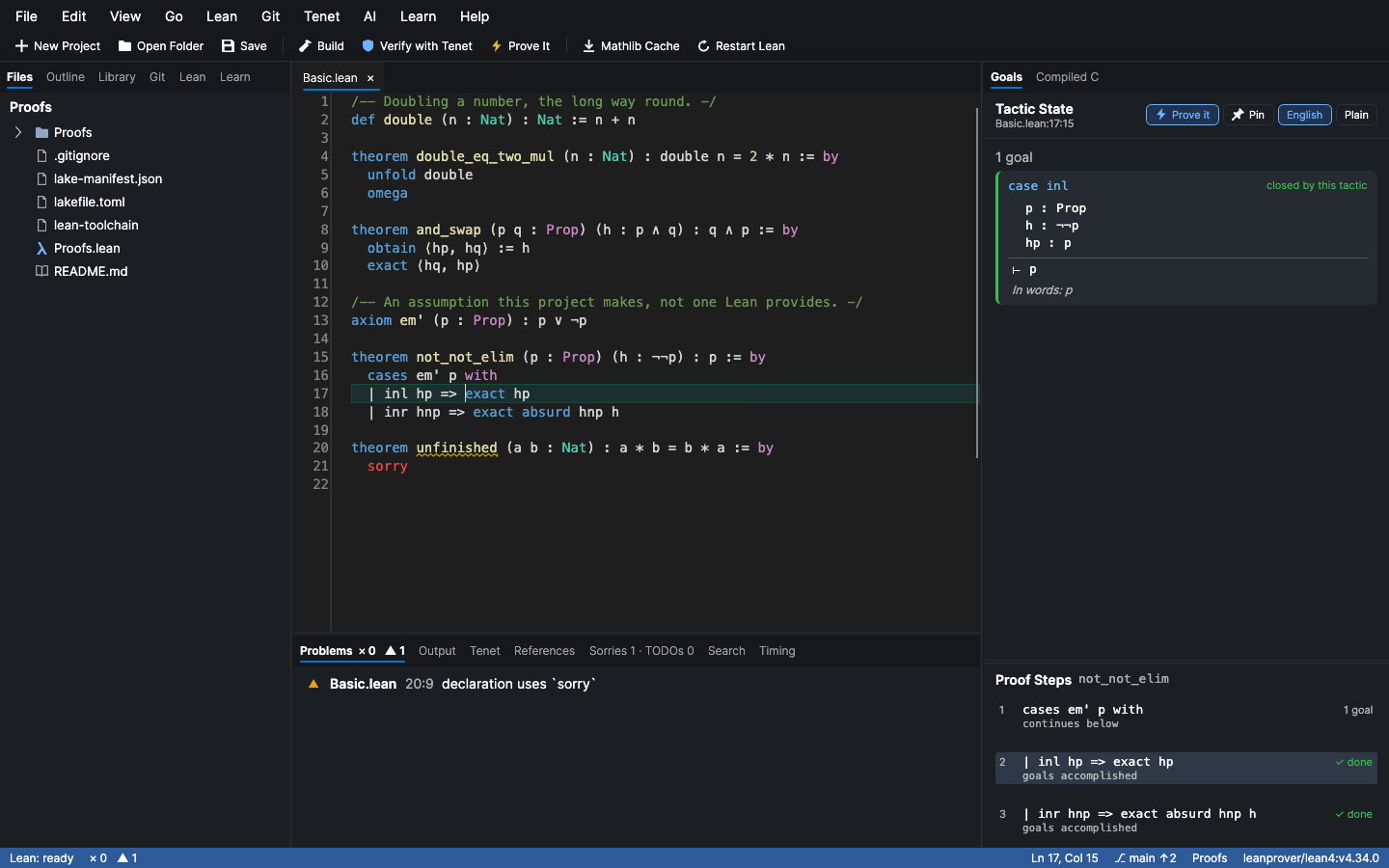
A Lean proof is only as trustworthy as the kernel that accepted it. Lean Studio doesn't take one kernel's word for it. Every declaration you build is re-checked from the compiled .olean files by Tenet, a separate implementation of Lean's type checker. If Lean's kernel had a bug, Tenet would have to repeat the same bug to agree. Each theorem then shows, in the gutter, whether it is really proved, rests on sorry, or rests on an axiom, and Why? takes you to the lemma responsible.
Around that sits a complete IDE built only for Lean. It is a native app, not a plugin or a web view inside another editor. The tactic state gets a full panel, every step of a proof is listed with what it changed, Prove It tries 17 tactics on any sorry at once, and a tutorial, plain-English goals and explained errors make it the place to start if you are new to Lean.
brew install --cask keithadler/tap/lean-studio # macOS
Windows and Linux: download from Releases, or see Install for winget and the AppImage. It is free and open source.
Tested on a real result: ζ(5) is irrational
In September 2026 Lean Studio ran @mo271's formalization that ζ(5) is irrational (mo271/zeta5), about 218,000 lines on top of Mathlib, start to finish on a Mac:
| Step | Result |
|---|---|
| Mathlib cache | 8,700 files in 2 minutes |
| Build, 8,951 jobs | No errors, in about 43 minutes |
Solution.lean |
No errors and no sorry |
| Tenet's independent re-check | 14,953 declarations in 213 modules, in 8 minutes: 14,952 verified, 0 rejected. The one resting on sorry is the challenge statement, as intended. |
Axioms under irrational_five |
propext, Classical.choice and Quot.sound, and nothing else |
The statement Solution.lean proves is exactly the one in Challenge.lean, which is copied verbatim from Google DeepMind's Formal Conjectures. Any Lake project gets the same treatment: open it, Build, and Verify with Tenet.
How it compares
Most people write Lean in VS Code with the official lean4 extension, and it's very good. Here's what Lean Studio has, side by side:
| VS Code + lean4 | Lean Studio | |
|---|---|---|
| Goals and messages as you type, go to definition, hover, completion, rename, references | ✓ | ✓ |
Unicode input (\alpha), semantic highlighting, inlay hints, call hierarchy, trace trees |
✓ | ✓ |
| Every step of a proof listed with what it changed | ✓ | |
Prove It: a portfolio of tactics tried on each sorry, with counterexamples when the goal is false |
✓ | |
| Extract a goal as a lemma, with the hypotheses it needs | ✓ | |
| Independent re-checking of every declaration by a second kernel (Tenet) | ✓ | |
Why a theorem isn't fully proved, and a map of what rests on sorry |
✓ | |
| A profiler: live as you edit, flame graphs, cost per tactic line, heartbeats, simp and instance counters, and a heartbeat regression check for CI | ✓ | |
| Search Mathlib in plain English, and Loogle, built in | ✓ | |
Sorry Burndown: the project's sorry count over its last commits, from Git, and a branch's added, removed and restated theorems with proofs ignored, as Markdown for the pull request |
✓ | |
Junk values: where Lean quietly returns a made-up value (sInf of an empty set, xs[i]!, x / 0), so a definition or statement can compile while describing something that does not exist |
✓ | |
| Docstring claims: a definition said to be equivalent to another with no theorem stating it, or a docstring that claims generality the definition's hypotheses lack, the prose that lets a wrong definition pass a cursory read | ✓ | |
| Definitions that changed under unchanged theorems: the statement diff lists each definition whose body changed, whether its docstring changed with it, and the theorems that mention it | ✓ | |
| Mathlib housekeeping: sort imports, tidy whitespace, wrap long comments, add the copyright header, delete old deprecations, a Mathlib-style name for a theorem, theorems that state the same thing, a project health summary | ✓ | |
| Proof walkthroughs as web pages; share links to the web editor | ✓ | |
| An onramp for people new to Lean: a tutorial, a puzzle a day with hints, goals read in English, errors explained, a hint for the goal under the cursor, a warning when a tutorial is Lean 3, practice typing symbols, badges for your firsts | ✓ | |
Projects the size of Fermat's Last Theorem: which sorry to prove next, which block the most, work split fairly among N people, how old each is, a completion forecast, the build's critical path, locked theorem statements, module layer rules |
✓ | |
C FFI: @[extern] checked against the C code, stubs, clangd |
✓ | |
| Built-in AI that prefers a model on your computer (Apple's on-device model on macOS 27, Ollama, LM Studio, llama.cpp, MLX), with every proof it suggests checked by Lean before you see it | ✓ | |
| An MCP server so AI assistants can use Lean | ✓ | |
| ProofWidgets and other JavaScript widgets in the infoview | ✓ | ✓ (Lean's own infoview, in the window or a browser) |
| Vim mode | ✓ (an extension) | ✓ built in |
| Integrated terminal, side-by-side diffs, merge-conflict actions, sticky scroll, breadcrumbs, minimap, Markdown preview | ✓ | ✓ |
| AI completion as you type | ✓ (Copilot, an extension) | ✓ checked by Lean before it is shown |
| Lean on another machine, in a dev container or in WSL | ✓ (no mount needed) | ✓ (SSH needs the folder mounted) |
| The VS Code ecosystem: its other extensions, Codespaces, the browser, Live Share | ✓ |
Lean Studio is tested against real Lean on macOS, Windows and Linux on every change, and against a real Mathlib project every week.
New to Lean?
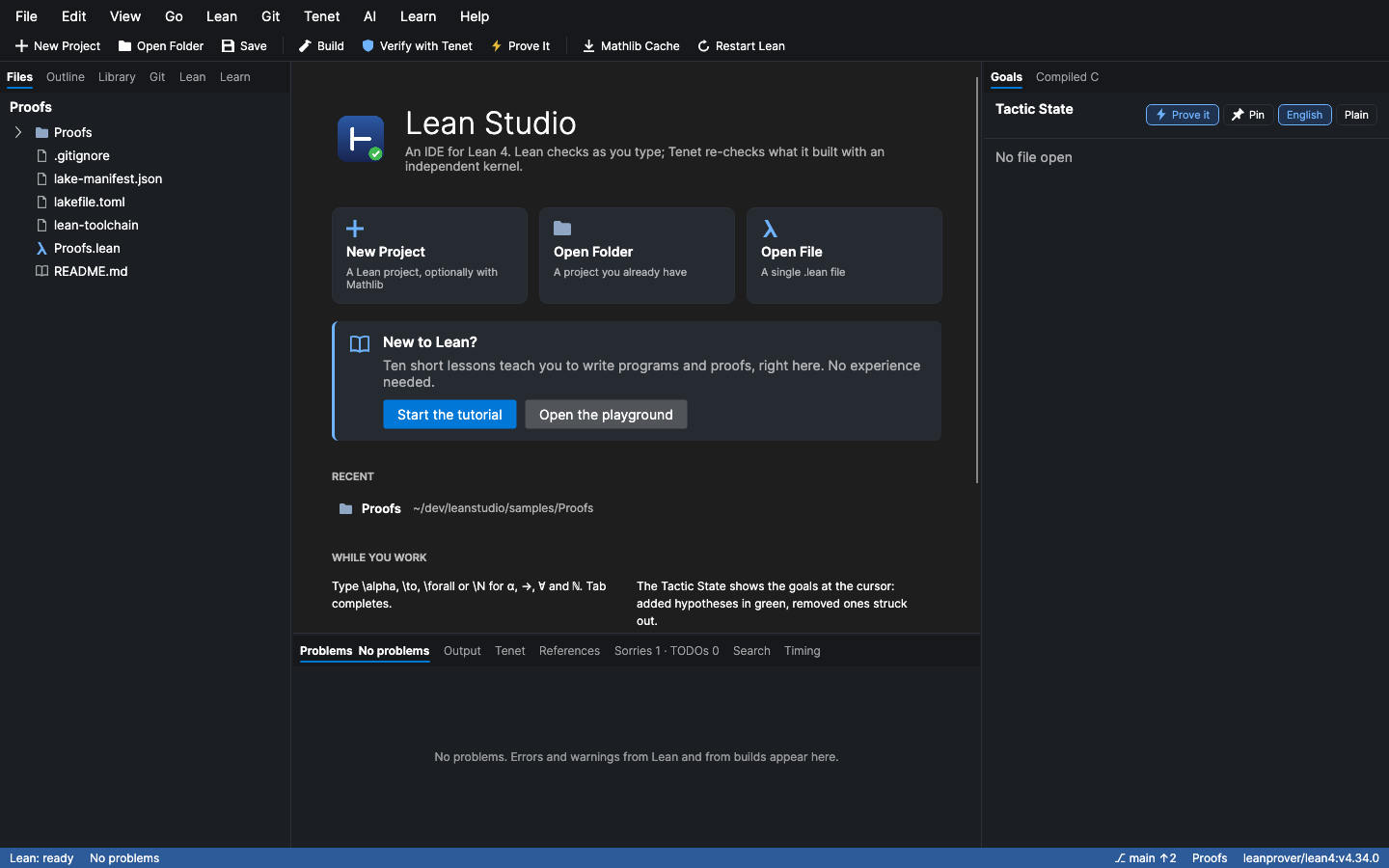
Lean Studio is built to be the place to start, whether you're curious about theorems or you write code. Everything below is inside the editor, in the Learn menu (and the command palette), with nothing to install but Lean Studio itself.
The onramp
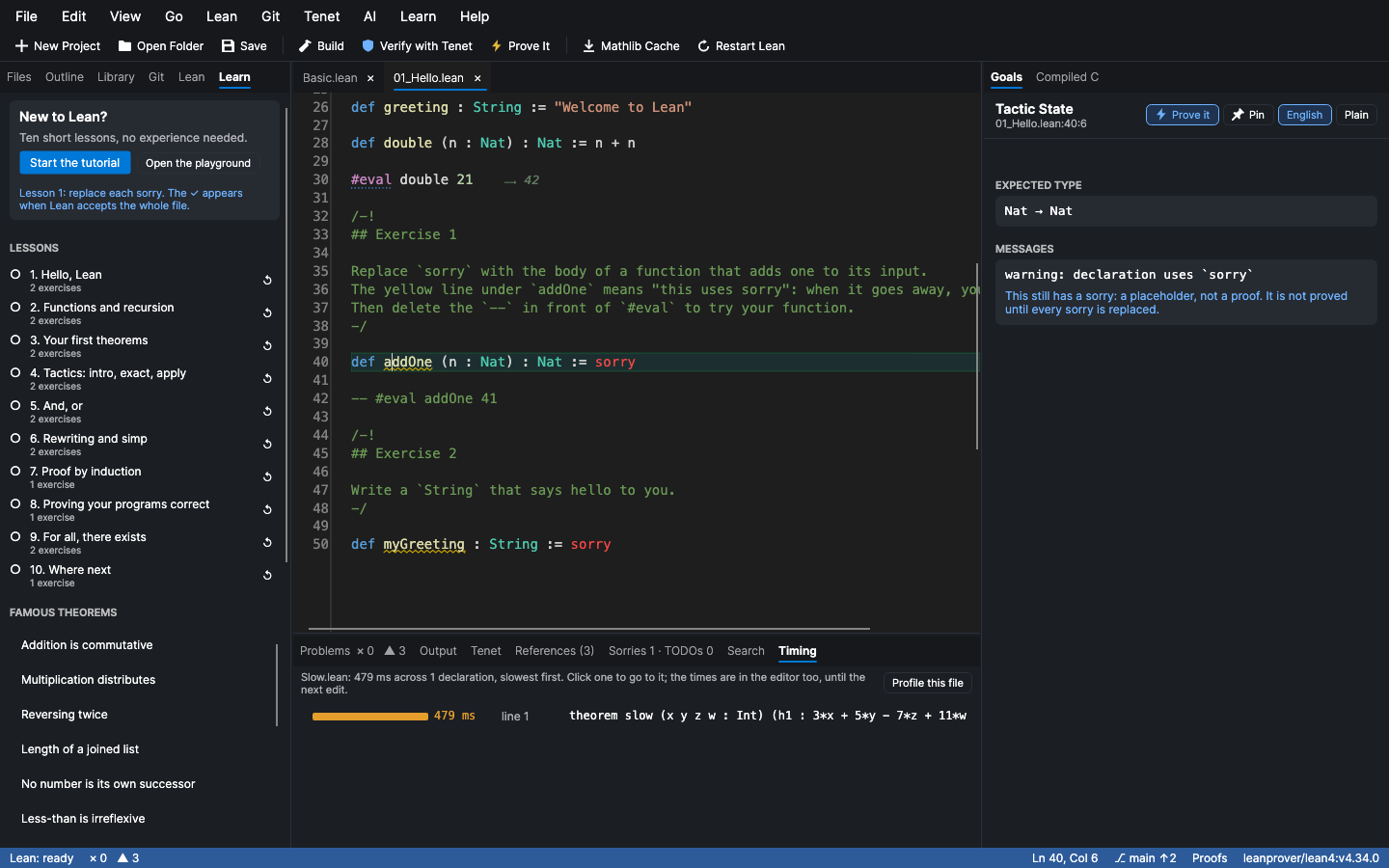
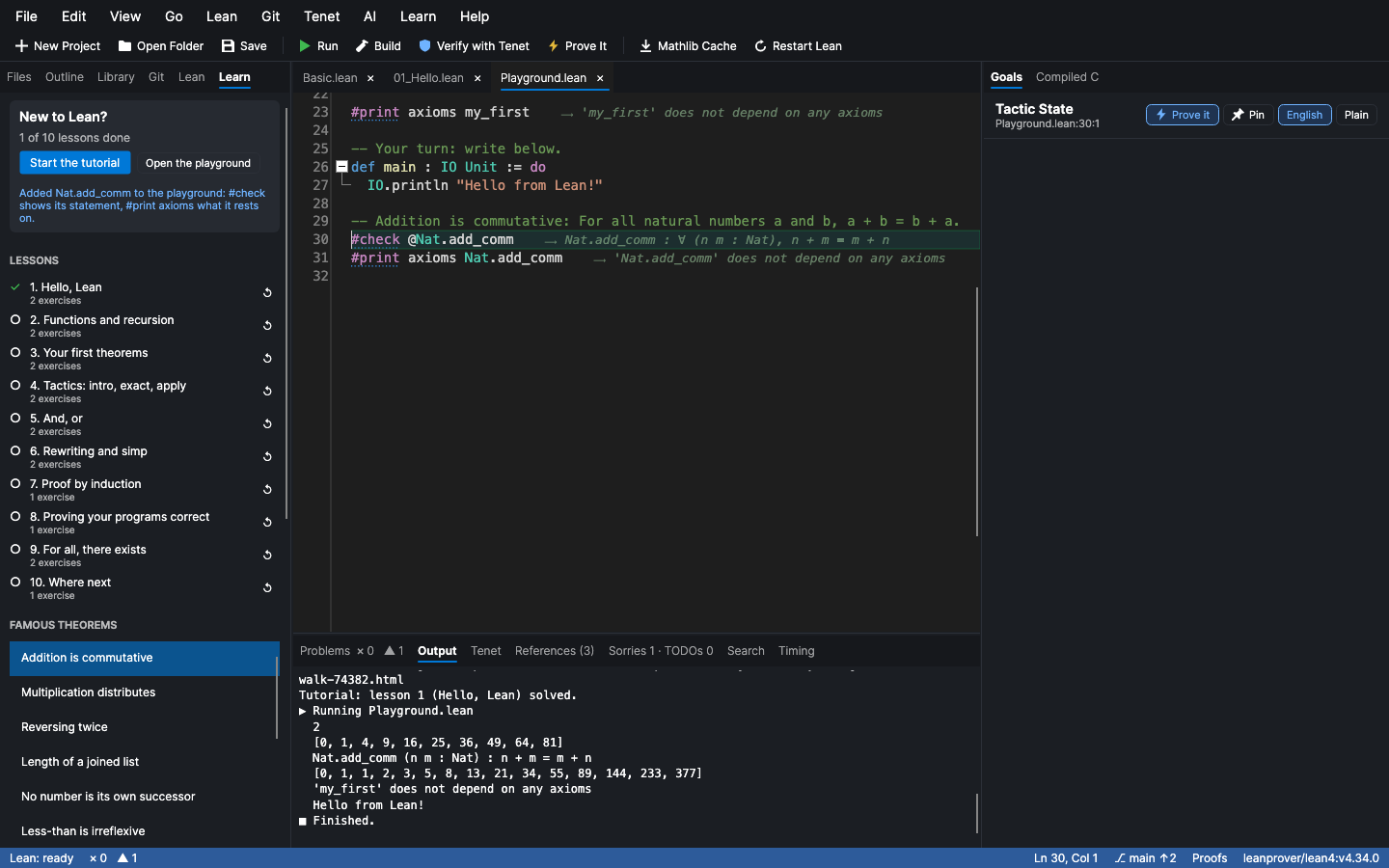
1. Start playing. Open the Playground: one Lean file to experiment in, with no project to set up. #eval and #check answer at the end of their own line, like a notebook, and a file with a main gets a ▶ Run button. Pick a snippet (a function, a structure, a pattern match, a proof by induction, a calc chain) and fill it in.
2. Learn in order. The tutorial is ten short lessons, in Lean files, from #eval 2 + 2 to induction and proving your own programs correct. Each ends in exercises (sorrys to replace), and the Learn tab ticks a lesson off when Lean accepts it. Every exercise is checked against real Lean by the tests, so none is impossible. Famous theorems (addition is commutative, reversing a list twice, the law of excluded middle and, with Mathlib, infinitely many primes and √2 is irrational) come with a plain-English statement, and "Try it in Lean" shows the exact statement and the axioms it rests on.
3. Practise, with a puzzle a day. New Puzzle opens a small proof to finish: twelve of them, easiest first, from 2 + 2 = 4 to "there is a number whose square is 49". Replace the sorry and Lean tells you at once. Puzzle Hint gives a bigger hint each time you ask, and Show Puzzle Solution is there when you have really tried. Today's puzzle comes first. Every solution is checked against real Lean by the tests.
4. Get unstuck without being told the answer.
- Hint for This Goal reads the goal under your cursor and gives three hints, each a little bigger: what it says in words, what kind of goal it is ("an if-then: assume the left side"), and the tactic to try, written out.
- Explain This Declaration in Plain English reads a
def,theorem,structureorinductivealoud: "doubleis a function. Given n (a natural number), it gives back a natural number." - Hover any tactic or keyword (
intro,simp,omega,theorem) for what it does, in plain words, with an example. The Proof Steps list explains each step's tactic too. - Goals in words, under each goal: "In words: For all propositions p and q: if p and q, then q and p."
- Errors in plain words. Under Lean's message, "What this means" gives the gist of "unsolved goals", "type mismatch", "unknown identifier" and more than twenty others, and what to try.
- My Cheat Sheet collects the tactics and keywords your file actually uses, each explained with an example, in the order you first used them. You learn from what you have already written.
5. Dodge the traps.
- Is This Lean 3? Most tutorials, forum answers and blog posts online are about Lean 3, which looks like Lean 4 and does not run in it. Paste something in and this finds
begin … end,λ x,,assume,cases h with x hx, lower-case imports and more, and says what each is now. - Surprises in This File explains the things that catch people who already program:
3 - 5is0for natural numbers,7 / 2is3,7 / 0is0, decimals are approximate,==is not=, and a natural number never overflows. None of them is a mistake: they are how Lean works, and each says why.
6. Type the symbols. Practice Typing Symbols opens a worksheet in the editor: each line names a symbol (for all, there exists, an arrow…) and shows what to type (\forall and a space). Type it where the real abbreviation input works, then Check My Symbol Practice marks each line. The symbol palette in the Learn tab inserts ∀ ∃ → ℕ ⟨⟩ and the rest with a click and shows how to type each, and hovering any symbol in your code does the same.
7. Coming from another language? Coming From… writes out how a Python, Haskell, JavaScript or Rust idea is said in Lean: a function, if/else, a list, map and filter, a record, printing, "maybe nothing", a loop, a comment.
8. See how far you have come. My Badges and What's Next scores small firsts, worked out from the Lean files you have written (so there is nothing to track): your first #eval, first function, first proof Lean accepts with no sorry, first induction, and so on, seventeen in the order you meet them, and it tells you what to try next. Tip of the Day shows one small thing that makes Lean nicer.
9. Start a real verified project. New Project… offers three templates of Lean Studio's own, each a small program that is already fully proved, laid out the way verified code stays honest: Spec.lean (what it should do, written to be obviously right), Impl.lean (what runs), Proofs.lean (why they agree, for every input), Tests.lean (known answers), a README explaining the layout, and the assurance check in CI.
- Verified crypto primitive: modular exponentiation by square-and-multiply, the operation underneath RSA and Diffie–Hellman, proved equal to
b ^ e % m, with Diffie–Hellman agreement proved and the textbook RSA example as a test. - Verified parser: prefix arithmetic expressions, with the round trip
parse (print e) = some eproved. - Verified file format: tag-length-value records, the shape of TLS and ASN.1, with decoding an encoded file proved to give back exactly its records.
Each starts at 100% on the assurance report: no sorry, no axiom, no native_decide, and a theorem about every definition.
The Outline also shows, live, which theorems Lean accepts (✓), which still use sorry (◐) and which have errors (✗).
Very large projects
Fermat's Last Theorem and Navier–Stokes are not one file; they are hundreds of files and thousands of declarations, with a team and a blueprint. The Big Projects menu (and the command palette, and the MCP server) reads the whole project as one dependency graph, with no Lean running, and answers the questions a project lead asks. On 36,000 declarations in 600 files it takes about a second.
- Sorries to Prove Next: the
sorrys you can prove right now, because everything their statements use is already proved, biggest unblocker first. - Sorries Blocking the Most: the
sorrys that most other declarations rest on, directly or not. - Share Out the Work for N People: the open
sorrys in N balanced packages, each kept together by file so people do not collide. - Oldest Sorries: how long each
sorryhas stood, bygit blame. - Completion Forecast: the burndown continued, with the date the last
sorrywould go at the recent rate. - Build Critical Path: the import chain that sets the minimum build time however many cores you have.
- Longest Proofs: the proofs most worth splitting.
- Where to Split This File: groups of declarations that share nothing, so a long file can be cut cleanly.
- Module Layers: list your layers, lowest first, in
.leanstudio/layers.json({"layers": [["Foundations"], ["Algebra"], ["Geometry"]]}) and the editor finds the imports that point upward. - Lock Statements: freeze every theorem statement (not proof) as a hash, and later see which statements changed. A blueprint formalized by many hands stays faithful.
Features
Five things other Lean editors don't do
-
⚡ Prove It. Put the cursor on a
sorryand press ⌘⌥P (Ctrl+Alt+P), or click ⚡ Prove it in the Tactic State. Lean Studio triesrfl,decide,simp,omega,norm_num,ring,linarith,nlinarith,positivity,aesop,grind,exact?and more on that goal. Each tactic runs separately from the same state, with its own time budget, in a single pass of Lean. You see every one that closes the goal and how long it took; one click puts it in place of thesorry. Every sorry in the file does the whole file at once, and Fill in every sorry it proved applies them all. A search tactic likeexact?is replaced by what it found (exact Nat.mul_comm a b), so the proof doesn't search again on every check. Tactics that your imports don't provide (Mathlib's, in a file without Mathlib) are skipped rather than breaking anything.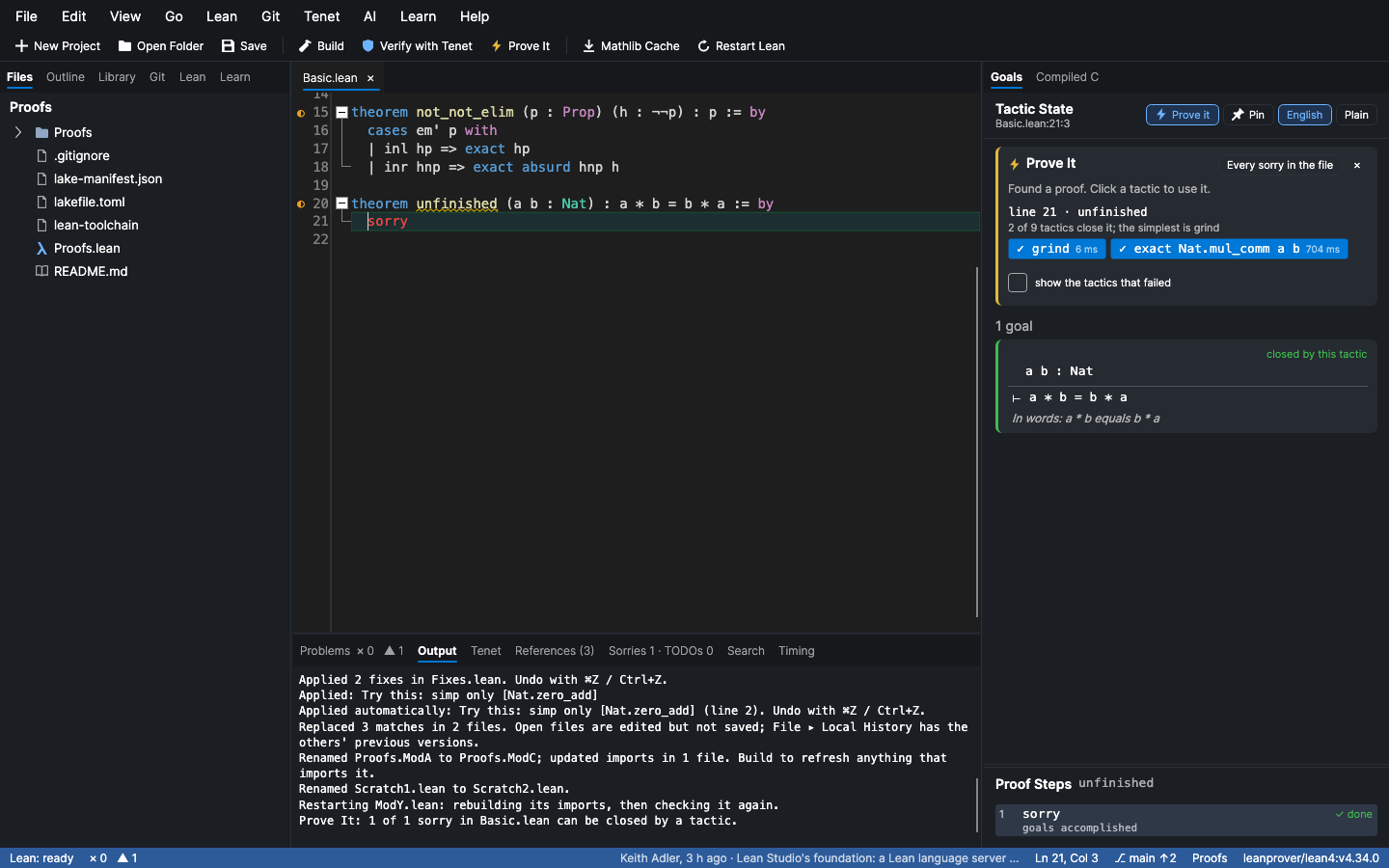
-
Why isn't this proved? When Tenet says a theorem rests on
sorryor on an axiom, Why? (in the Tenet panel, from the ◐ badge in the gutter, or from Tenet ▸ Why Isn't This Proved?) shows the chain of lemmas from that theorem down to thesorry. It finds the shortest chain through what each declaration uses, and marks the lemma that uses thesorryitself. Every link opens its source. In a big project, it answers "which lemma, three files away, is still unfinished?" in one click.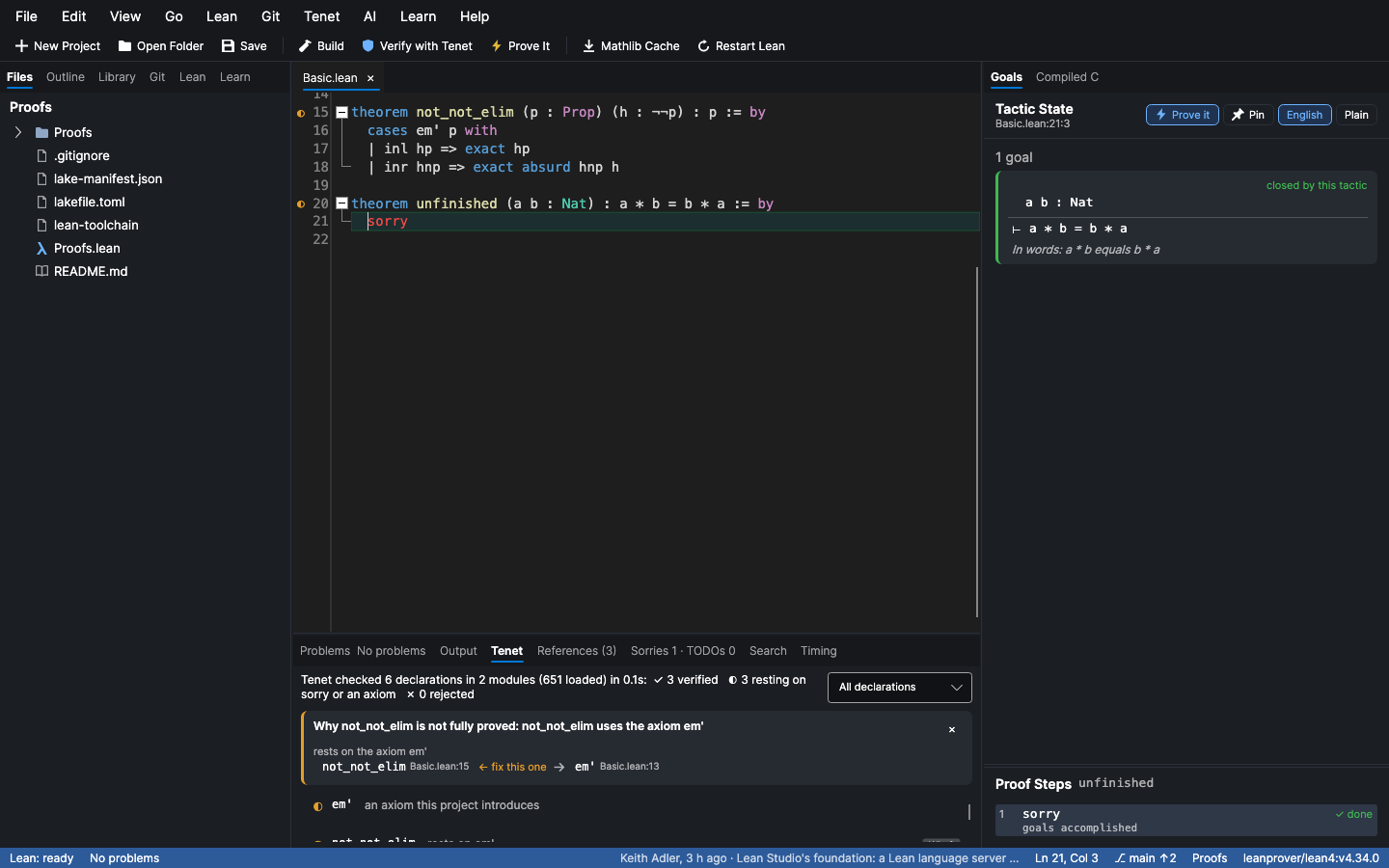
-
A profiler. Lean ▸ Profiler ▸ Profile File (⌘⌥T, Ctrl+Alt+T) runs Lean's own profilers over the file and opens the Profiler panel. Every declaration is listed by how long it takes to check, costliest first, with the step inside it that costs the most (
omega, asimpcall, an instance search, the kernel). Click one for its details, and pick what to see beside it:- a flame graph of Lean's trace, every step as wide as its cost and the steps inside it underneath, coloured by the kind of work; click a step to zoom in on it;
- bottom up: every step summed by what it is, so twenty cheap
simpcalls add up in one row; - tactic lines: the cost of each line of the proof, which the editor also shows at the end of the line;
- Lean's profiler: Lean's time per category (elaboration, type class inference,
simp, type checking, compilation) and per tactic; - counters: what it made Lean do, from
set_option diagnostics true: thesimplemmas it tried and how many of those worked, the instances it used, the definitions it unfolded.
This declaration profiles only the one at the cursor, so it is quick to repeat while you tune a proof. Heartbeats measures Lean's heartbeats instead of time: the unit of
maxHeartbeats, the same on every run, with each declaration's share of the limit. Times vary a little between runs, so Median of 3 or 5 runs Lean again and shows how much each time varied. Live profiles as you edit: a copy of the file with Lean's profilers on stays open in the running Lean server, and a moment after each change the panel and the editor show every declaration's cost as it is now, with the full trace of the one you are editing (any other's is fetched when you pick it). Lean re-checks only from your edit down, so this costs about what the edit does: on a 1,300-line Mathlib file, an edit shows in two seconds. Baseline sets what to compare with: this profile, the file as last committed, any branch or commit (profiled with today's toolchain and imports, so only the file's own change counts), or a profile saved earlier (every profile is kept, with the commit it was taken at). Each declaration then shows its change, live too. Under More, Check for Regressions runs the same check as CI (below), Profile Whole Project profiles every file and lists the costliest declarations of all of them, Copy as Markdown gives a table for an issue or Zulip, and Save for the Firefox Profiler saves Lean's trace for profiler.firefox.com. The last build's slowest modules are under Build. It profiles unsaved text, and your file is never modified.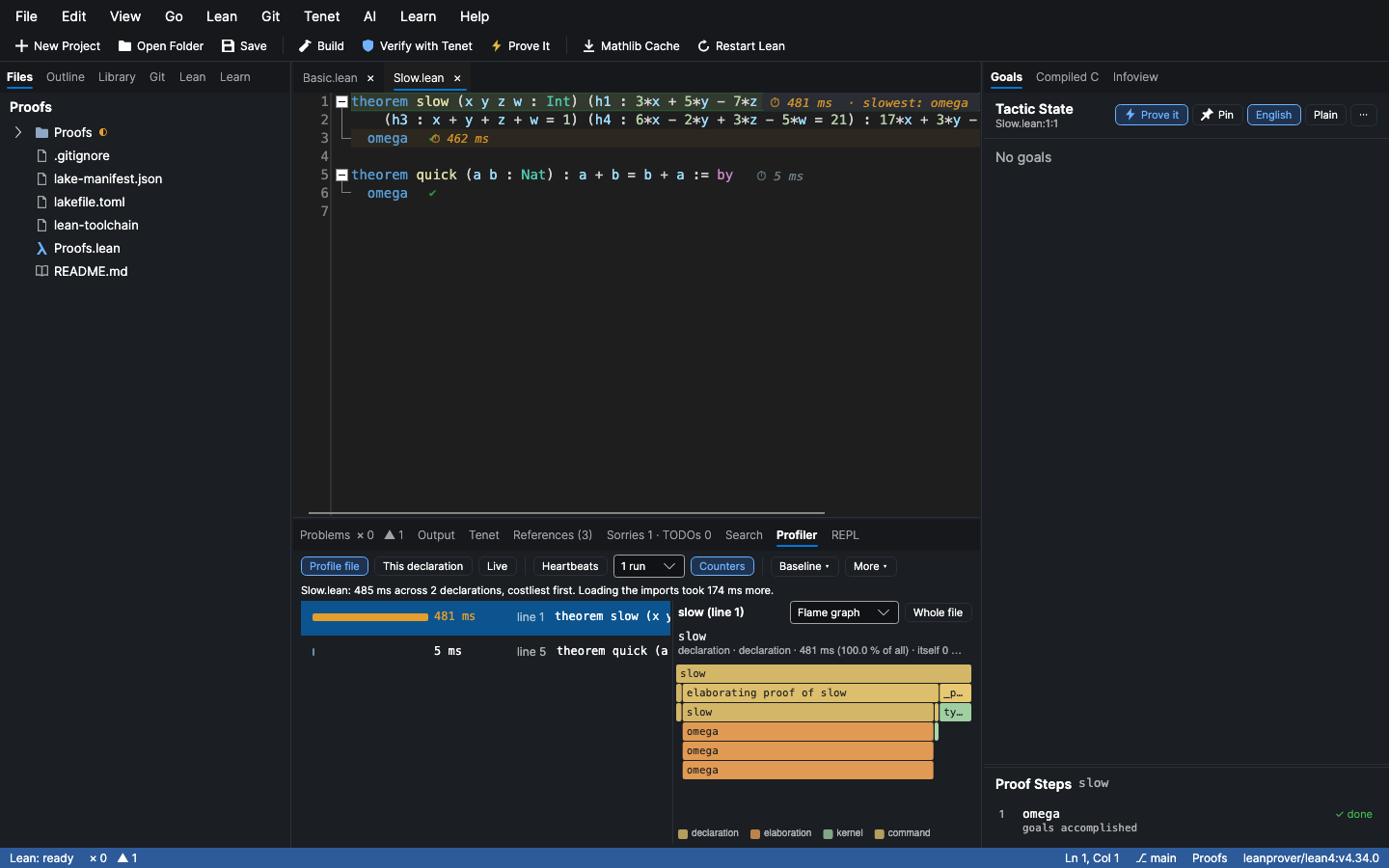
-
Proof walkthroughs and share links. File ▸ Export Proof Walkthrough… writes every tactic proof in the file to one self-contained web page, step by step. Each step shows the tactic, what it does in plain words, and the goals before and after, exactly as Lean reported them. You can step through with ← and →. It works for a class handout, a blog post or a code review, and readers don't need Lean installed. Open in the Lean 4 Web Editor and Copy Share Link give a link that runs the file at live.lean-lang.org, which has Mathlib.
-
Ask Mathlib in plain English. The Library panel takes a description, such as "the sum of the first n odd numbers is n squared" or "a continuous function on a closed interval attains its maximum". It returns the Mathlib results that say that, with their informal statements, using LeanSearch. Loogle (below it) finds what you can name or write the shape of. This finds what you can only describe.
AI assistants get all five too: the prove, why_not_proved, profile, export_walkthrough and search_mathlib tools.
Lean Studio MCP 질문
AI 어시스턴트가 Lean Studio를 사용할 수 있나요?
네, AI 어시스턴트가 Lean을 사용할 수 있도록 전용 MCP server를 포함하고 있습니다.