
CloudPing MCP server
2026년 10월 15일 커밋전 세계에 분산된 에이전트를 통해 ping, traceroute, DNS, HTTP 프로브를 실행하고 그 결과를 JSON으로 스트리밍하여 AI 클라이언트에서 사용할 수 있게 합니다.
다른 이름 internetworklab/cloudping
- 스타
- 24
- Tools
- —
- 다운로드, 30일
- —
- 최신 버전
- —
- 마지막 커밋
- 2026년 10월 15일
- 라이선스
- MIT
CloudPing MCP란?
CloudPing은(는) MCP server입니다. 전 세계에 분산된 에이전트를 통해 ping, traceroute, DNS, HTTP 프로브를 실행하고 그 결과를 JSON으로 스트리밍하여 AI 클라이언트에서 사용할 수 있게 합니다.
프로젝트 README에서 생성된 요약
CloudPing MCP server 정보
네트워크 엔지니어와 개발자는 CloudPing을 사용하여 AI 클라이언트 내부에서 전 세계적인 연결성 진단을 수행할 수 있습니다. 이 도구를 사용하면 다양한 지리적 위치에서 ping, traceroute, DNS, HTTP 테스트를 포함한 분산 네트워크 프로브를 실행할 수 있습니다. MCP server 인터페이스를 사용하면 시스템이 구조화된 JSON 형식으로 결과를 클라이언트에 스트리밍하므로, AI가 네트워크 지연 시간과 라우팅 경로를 쉽게 해석할 수 있습니다.
아키텍처는 분산된 에이전트가 실제 측정을 수행하는 허브-에이전트 모델을 사용합니다. 인터넷 전체 또는 DN42 네트워크 내에서 테스트를 실행할 수 있습니다. 서버는 TCP ping, UDP 또는 ICMP traceroute, DoT 및 DoH 프로토콜을 포함하는 DNS 프로브와 같은 다양한 프로브 유형을 지원합니다. 또한 HTTP/1.1, HTTP/2, HTTP/3를 위한 HTTP 프로브도 제공합니다. 서비스를 사용하려면 MCP server는 streamable HTTP와 JWT 인증을 활용하여 클라이언트와 중앙 허브 간의 보안 통신을 보장합니다.
활용 사례
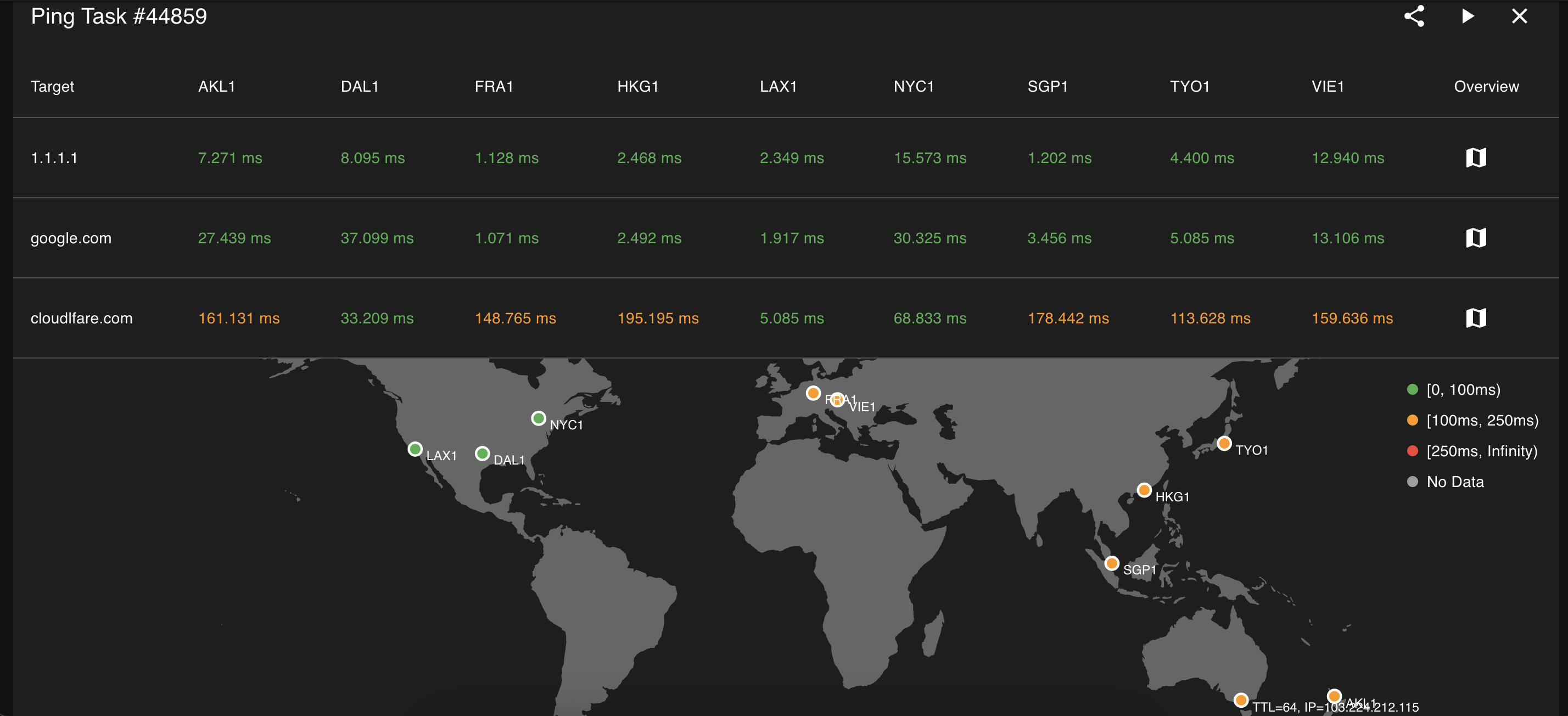
- 1글로벌 지연 시간 문제 진단AI에게 여러 글로벌 위치에서 ping 테스트를 실행하도록 요청하여 네트워크 지연이 발생하는 지점을 식별합니다.
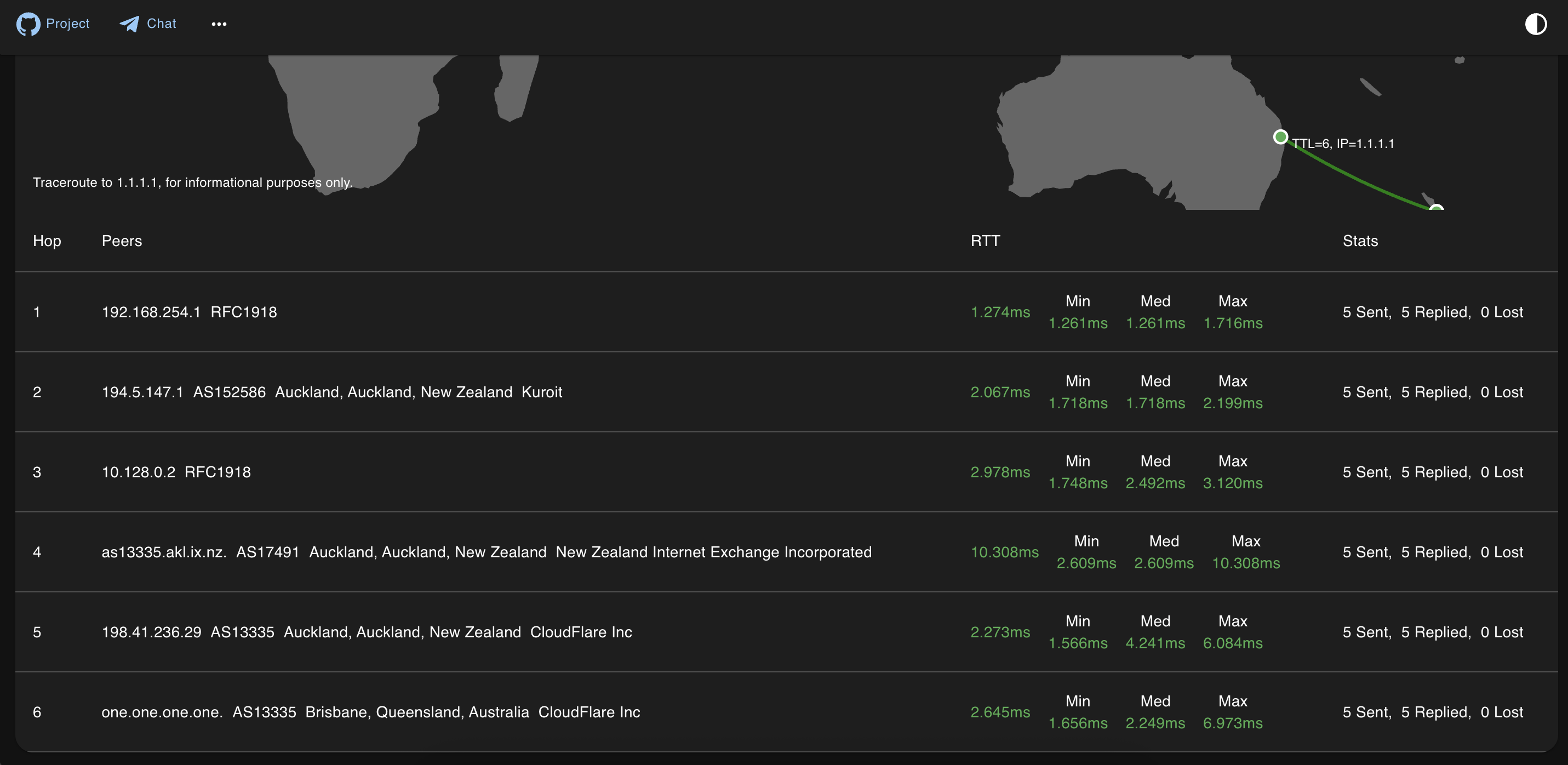
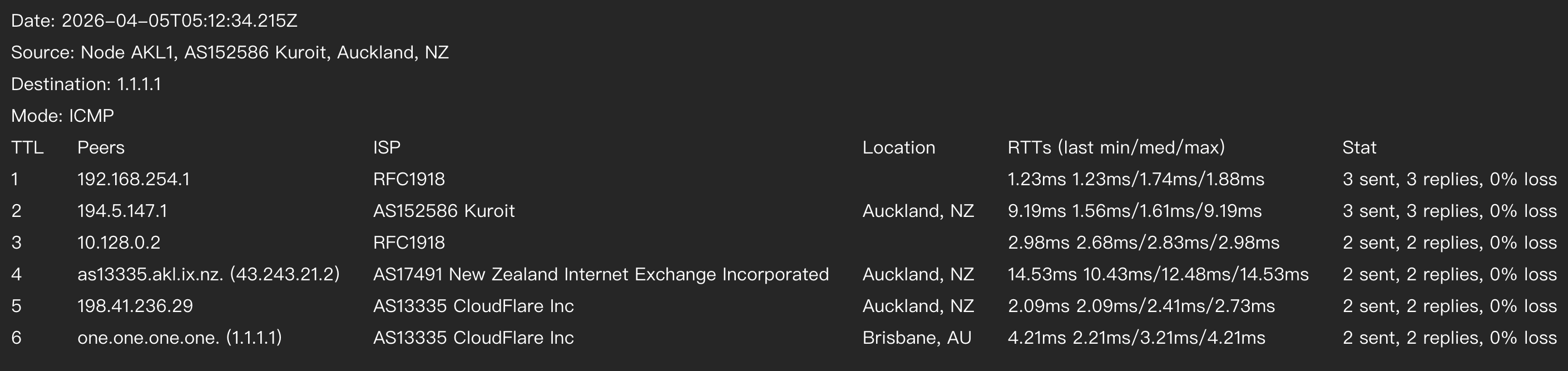
- 2네트워크 라우팅 경로 추적traceroute를 요청하여 특정 목적지에 대한 홉 단위의 피어 및 지연 시간 상세 정보를 확인합니다.
- 3DNS 및 HTTP 가용성 확인클라이언트를 사용하여 특정 DNS 레코드를 프로브하거나 HTTP/3 엔드포인트의 응답성을 확인합니다.
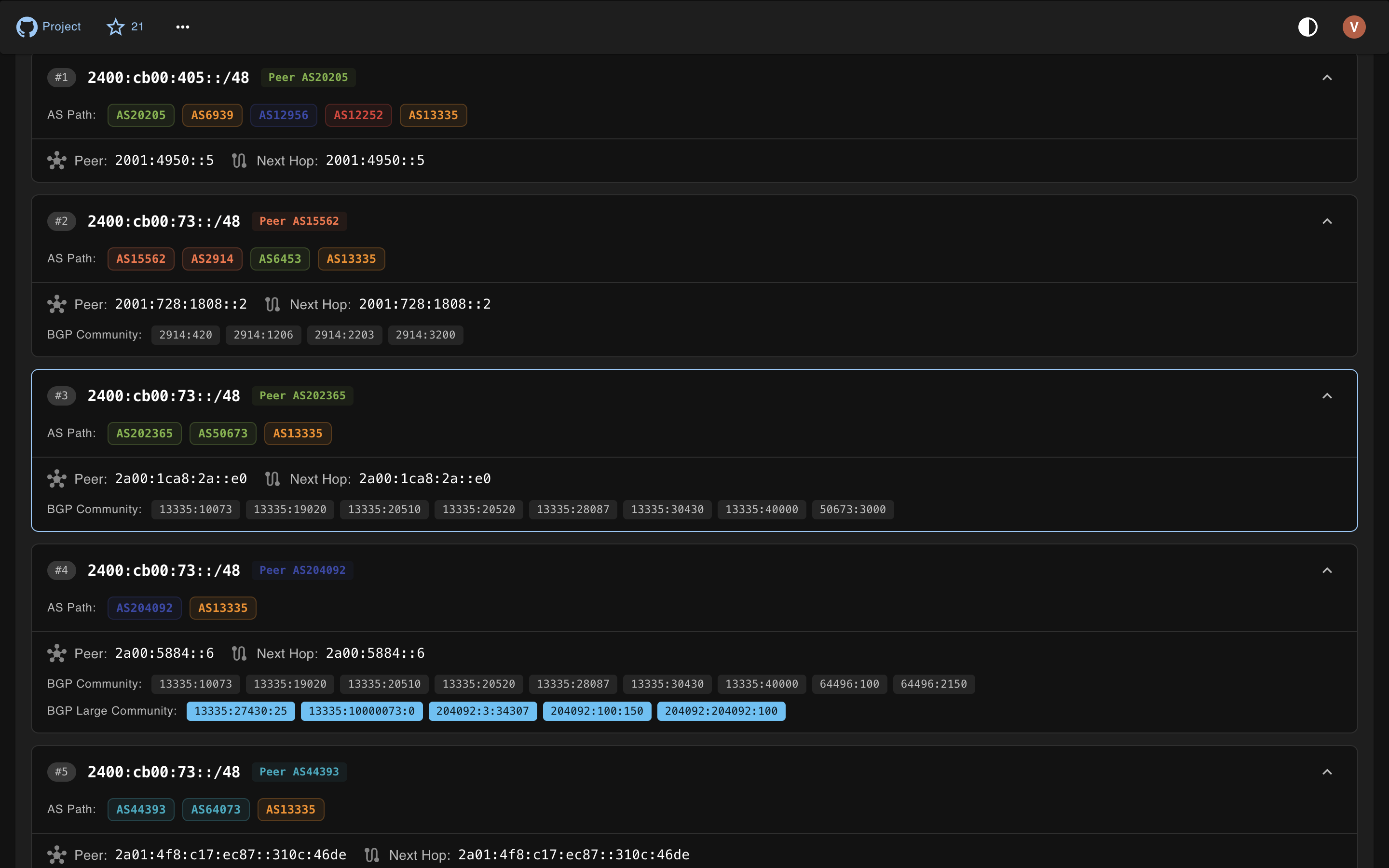
- 4BGP 라우팅 데이터 분석BGP route lookup을 수행하여 IP prefix가 어떻게 광고되고 있는지 이해합니다.
프로젝트의 README를 바탕으로 작성되었습니다. 모든 활용 사례는 해당 내용의 인용문과 대조하여 확인합니다.
구성
DN42_ASNDN42_ISPEXACT_LOCATION_LAT_LONJWT_TOKENNODE_NAMESUBNET_OVERRIDE
| 이름 | 설명 | 유형 |
|---|---|---|
| DN42_ASN | — | |
| DN42_ISP | — | |
| EXACT_LOCATION_LAT_LON | — | |
| JWT_TOKEN | — | |
| NODE_NAME | — | |
| SUBNET_OVERRIDE | — |
자동 검사
2026년 11월 14일에 실행됨전체 보고서 →아직 인증되지 않았습니다. 서버는 80점 이상의 점수, 심각한 결함 없음, 그리고 검사에 충분한 데이터를 갖추어야 합니다. 검사 방식 · 점수를 높이기 위해 수정할 항목

- 소스 저장소 연결 및 접근 가능internetworklab/cloudping is public and reachablegithub.com/internetworklab/cloudping ↗통과
- 패키지가 이 저장소를 소스로 명시검사되지 않음
- 빌드 출처(Sigstore 증명)검사되지 않음
- 오픈 소스 라이선스 (OSI)MITspdx.org/licenses/MIT.html ↗통과
- 최근 1년 내 커밋 또는 릴리스Last commit or release 2026-10-15github.com/internetworklab/cloudping ↗통과
- OpenSSF Scorecard검사되지 않음
- 패키지 이름이 인기 패키지와 유사하지 않음검사되지 않음
- 패키지 및 해당 종속성에 중요한 보안 권고 없음검사되지 않음
- 모델에 대한 숨겨진 지침 없음0 tool descriptions and the README read; no override phrases, credential paths or hidden characters통과
- 파괴적인 도구에 라벨 표시됨검사되지 않음
- 원격 엔드포인트가 MCP 핸드셰이크에 응답검사되지 않음
README
GitHub에서 보기CloudPing

CloudPing is a web-based ping and traceroute tool that provides an easy-to-use interface, giving users an intuitive view of network information such as how IP packets are routed and what the round-trip latency looks like. We believe that making these network tracing and diagnostic capabilities available via the cloud is a great idea — hence the name "CloudPing".
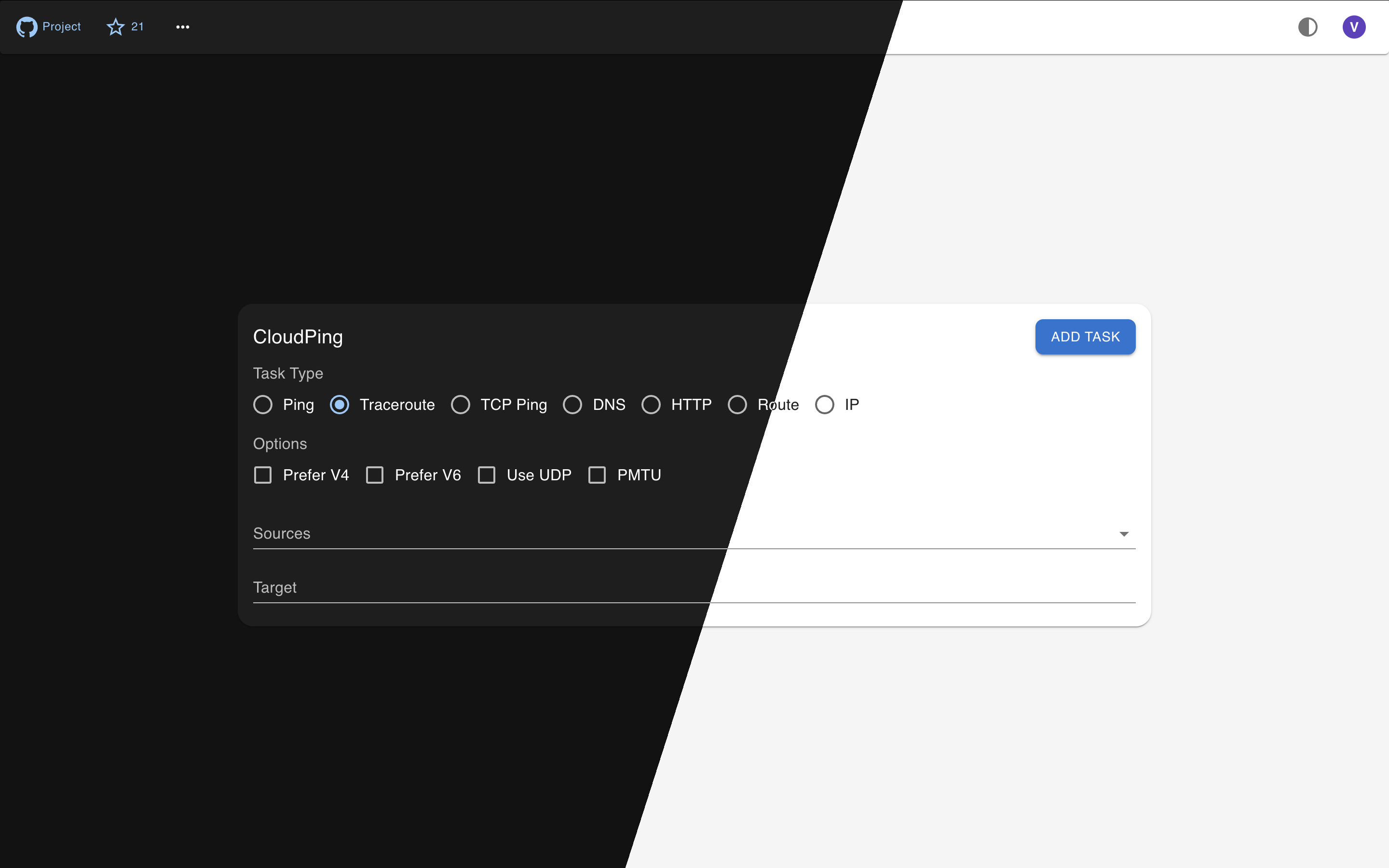
Features
- Ping, Traceroute (UDP flavor or ICMP flavor)
- TCP Ping
- DNS Probe (UDP, TCP, RFC7858 DoT, RFC8484 DoH)
- HTTP Probe (HTTP/1.1, HTTP/2 and HTTP/3)
- DN42 Dual Stack support, Internet support
- Displaying IP information of many aspects, like ASN, Org name, City, Country, and probably Lat Lon
- QUIC for hub-agent communication support and NAT-traversal
- JWT authentication with multi-provider SSO login (GitHub, Google, Microsoft Entra ID, Generic OIDC, and guest/visitor)
- Telegram Bot (Currently supporting:
/ping,/traceroute, and/probe) - Email Interface (Interact via Email)
- MCP Server (StreamableHTTP + JWT)
- Multiple GeoIP/IPInfo provider support: IPInfo.io, IP2Location.io, IPRegistry.co, and MaxMind MMDB
- BGP Route Lookup via MRT data
- Prometheus Metrics
Architecture
CloudPing is designed with a three-layer architecture that separates user-facing interfaces, control logic, and actual probe execution.
┌───────────────────────────────────────────────────────────────────────────────┐
│                           Access Layer                                        │
│  ┌──────────────┐  ┌──────────────┐  ┌──────────────┐  ┌───────────────────┐  │
│  │  Web Client  │  │ Telegram Bot │  │ Email Client │  │    MCP Server     │  │
│  │  (Next.js)   │  │   (@bot)     │  │ (SMTP/IMAP)  │  │ (Streamable HTTP) │  │
│  └──────┬───────┘  └──────┬───────┘  └──────┬───────┘  └──────┬────────────┘  │
└─────────┼─────────────────┼─────────────────┼─────────────────┼───────────────┘
          │                 │                 │                 │
          │                 │                 ▼                 │
          │                 │      ┌────────────────────┐       │
          │                 │      │   Email Gateway    │       │
          │                 │      │(Cloudflare Email)  │       │
          │                 │      └─────────┬──────────┘       │
          ▼                 ▼                ▼                  ▼
┌─────────────────────────────────────────────────────────────────────────────┐
│                           Control Layer                                     │
│  ┌─────────────────────────────────────────────────────────────────────┐    │
│  │                              Hub                                    │    │
│  │   (HTTP API, WebSocket/QUIC for agents, JWT Auth, Request Routing)  │    │
│  └─────────────────────────────────────────────────────────────────────┘    │
└─────────────────────────────────────────────────────────────────────────────┘
          │
          │  QUIC / mTLS / WebSocket / HTTP(s)
          ▼
┌─────────────────────────────────────────────────────────────────────────────┐
│                         Execution Layer                                     │
│  ┌─────────┐  ┌─────────┐  ┌─────────┐  ┌─────────┐  ┌──────────────┐       │
│  │ Agent 1 │  │ Agent 2 │  │   ...   │  │ Agent N │  │ MRT Query    │       │
│  │(at-vie1)│  │(us-nyc1)│  │         │  │(jp-tyo1)│  │ Service      │       │
│  └─────────┘  └─────────┘  └─────────┘  └─────────┘  └──────────────┘       │
│      Ping, Traceroute, DNS Probe, HTTP Probe, TCP Ping, BGP Route Lookup    │
└─────────────────────────────────────────────────────────────────────────────┘
- Access Layer: End-user interfaces including the web UI, Telegram bot, email interface, and MCP server.
- Email Gateway: Sits between the Email Client and the Hub. Currently, the only supported email gateway is Cloudflare Email Service.
- Control Layer: The Hub acts as the central coordinator — it exposes the public API, authenticates requests, and routes probe tasks to the appropriate agents.
- Execution Layer: Distributed agents at various geographical locations performing network measurements (ping, traceroute, DNS, HTTP probes), plus the MRT Query Service for BGP route lookup.
Try
If you are in a hurry, just go straight to try our deployed instance at here, or here(DN42). Which is ready to use, and doesn't require you to build or install anything.
Telegram Bot service is available via @as4242421771_bot.
Build
Make sure golang of newer version is already installed, if not, go visit go.dev/doc/install to download and un-tar a tarball, and make sure that $GOPATH/bin, and /usr/local/go/bin are in the $PATH.
git clone https://github.com/internetworklab/cloudping
cd cloudping
./buildversion.sh # to generate version metadata dependence
go build -o bin/globalping ./cmd/globalping
Now the binary bin/globalping can serve as an agent or a hub depending on the CLI arguments provided.
Optionally, to embed the web frontend assets into the binary (so that globalping web can serve the web UI without an external static file server such as nginx), build the frontend static export first:
cd web
npm ci && npm run build # generates web/out
cd -
go build -o bin/globalping ./cmd/globalping
Debugging
For how to generate self-signed certs (and CA) for testing, see Notes.md.
After the binary is built, to see how it goes, try launch a testing purpose localhost agent:
Open a terminal window, launch the testing hub in foreground:
scripts/launch_example_clustered_hub.sh
Then open one or more terminal winodws, launch the testing agent(s) in foreground:
scripts/launch_example_clustered_agent_1.sh # ls scripts/*.sh to see all
It binds on 127.0.0.1:8084, listens for plaintext HTTP requests, you can call the API with whaever HTTP client you like, for example:
curl --url-query targets=1.1.1.1 --url-query count=3 localhost:8084/simpleping
Doing so cause it send out 3 icmp echo request packets to the destination specified, 1.1.1.1, and the response will be stream to stdout in realtime in JSON line format.
It's better to use the web UI directly, since it has much richer feature set as well as easier to use UI.
Screenshots
Currently the UI is still rugged, but we are actively iterating it.
| Traceroute | Ping Matrix | MRT Route Query Service |
|---|---|---|
 |
 |
 |
| Telegram Bot — Traceroute | Telegram Bot — Probe | Email — Traceroute |
|---|---|---|
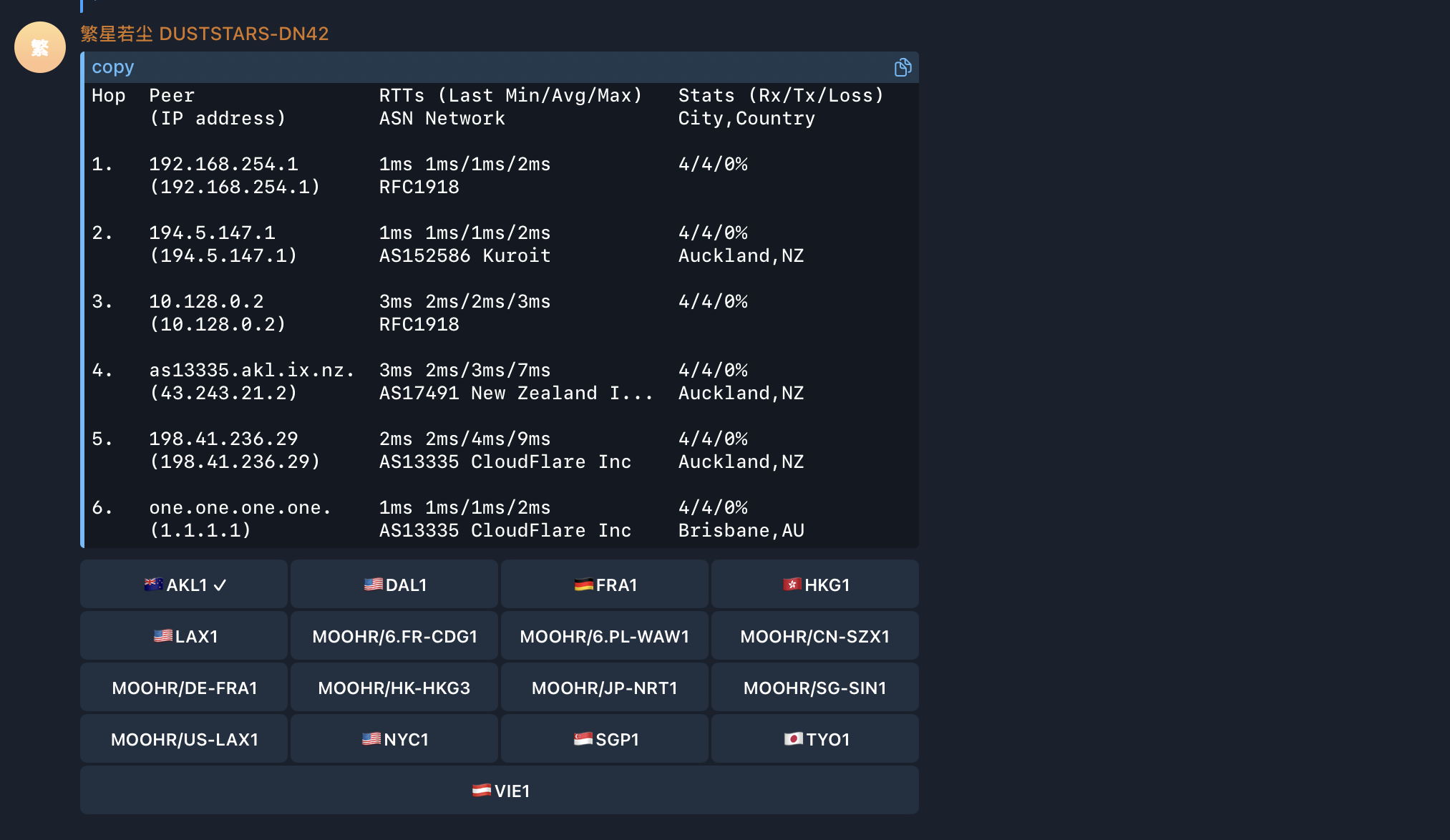 |
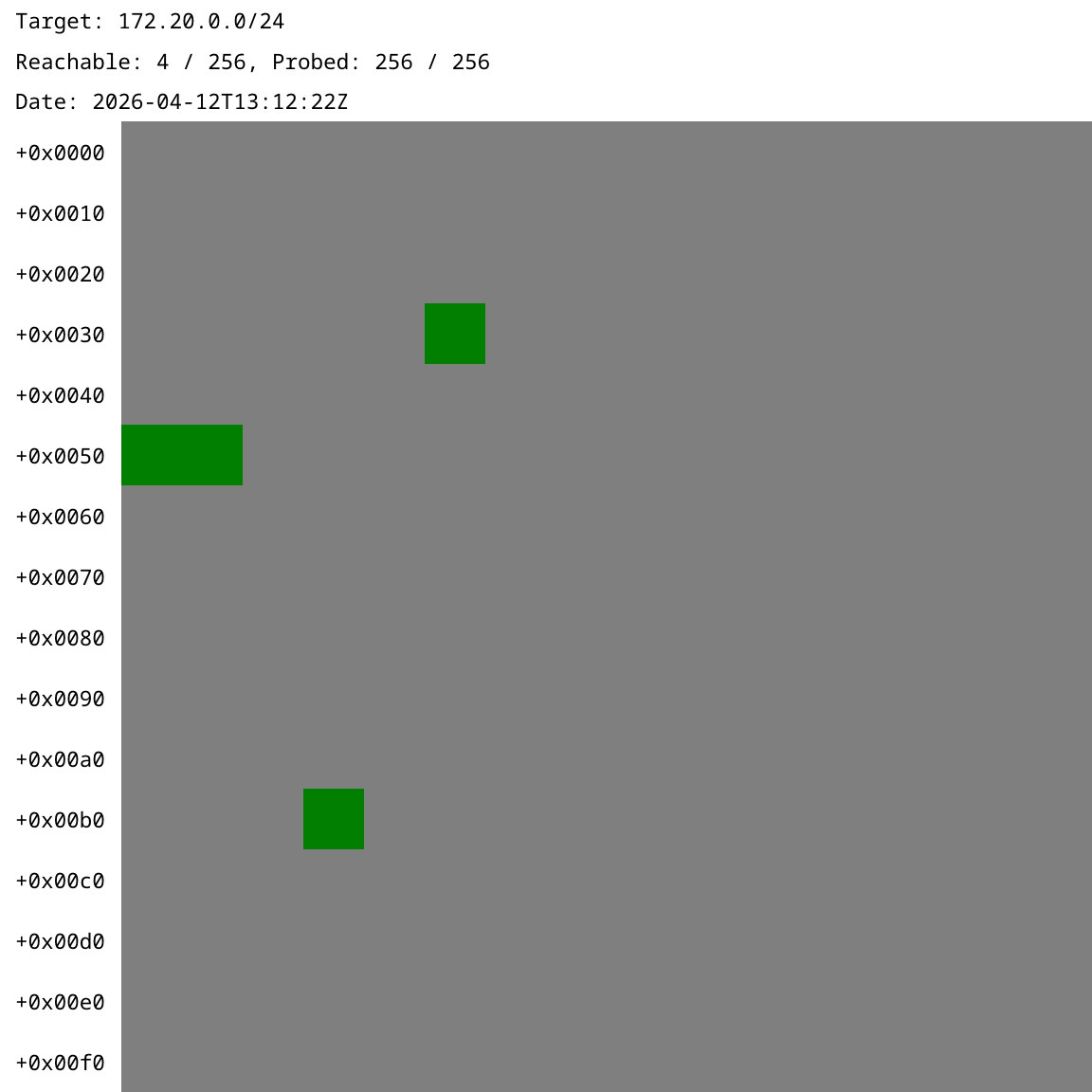 |
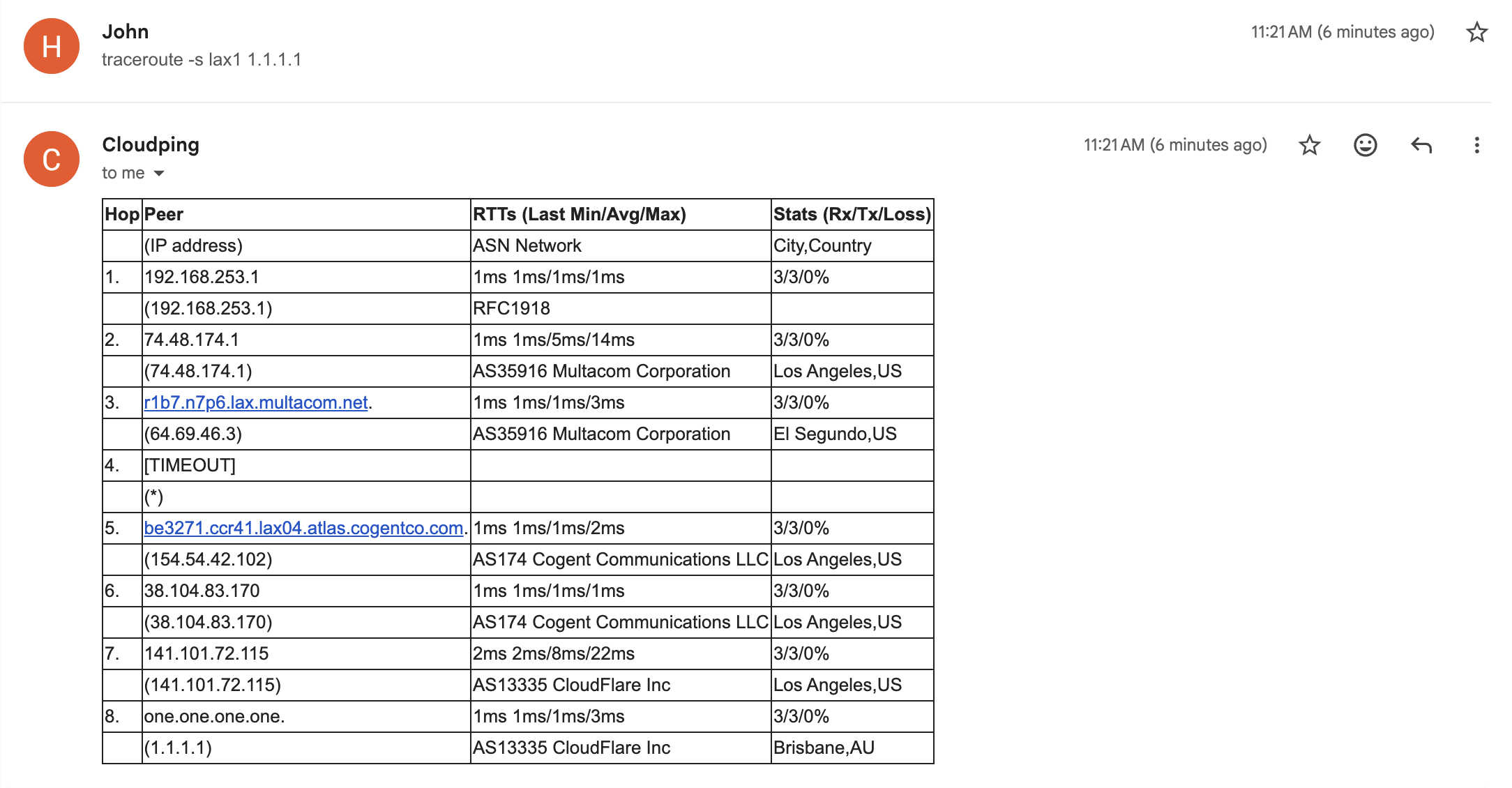 |
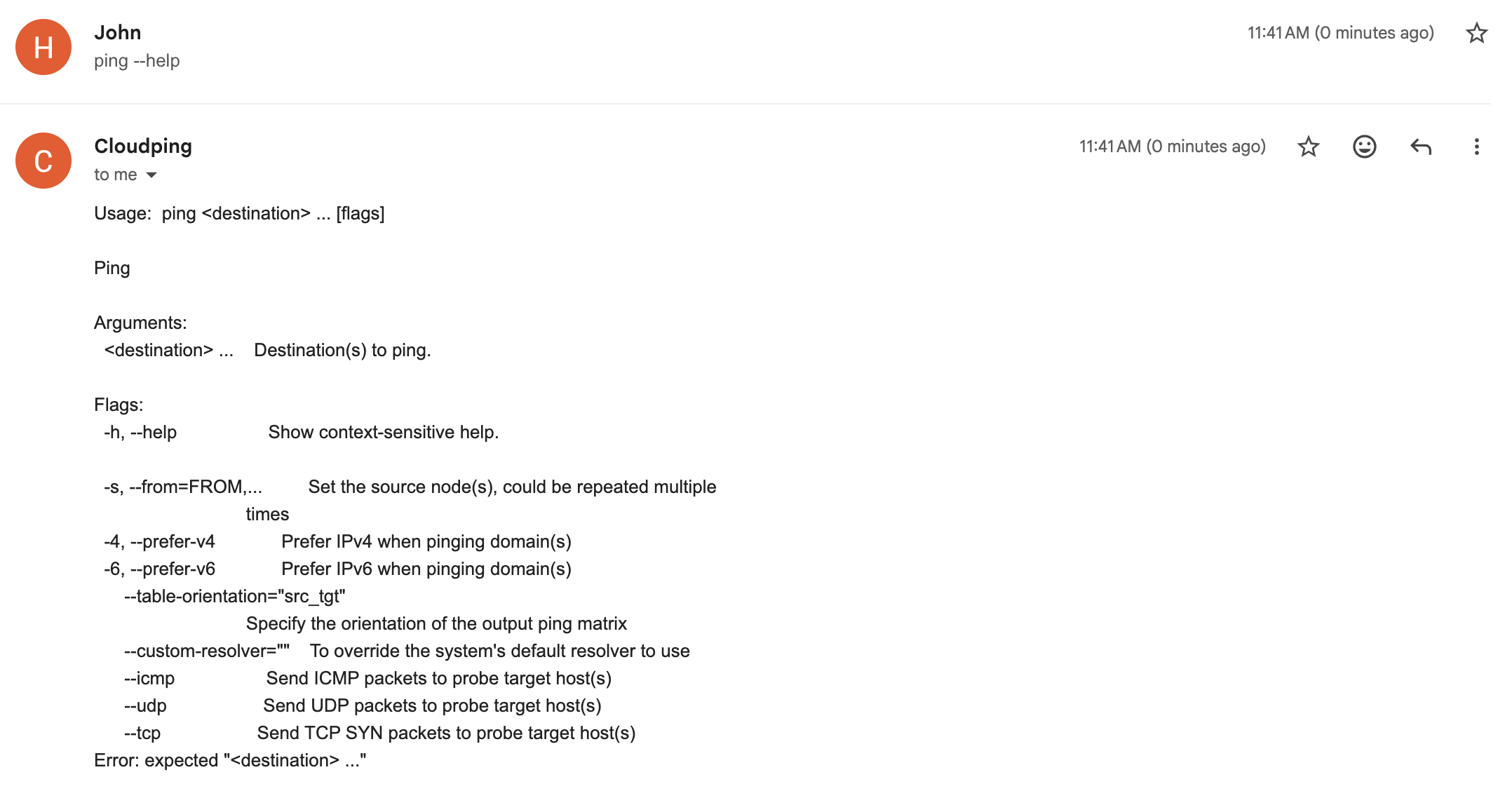
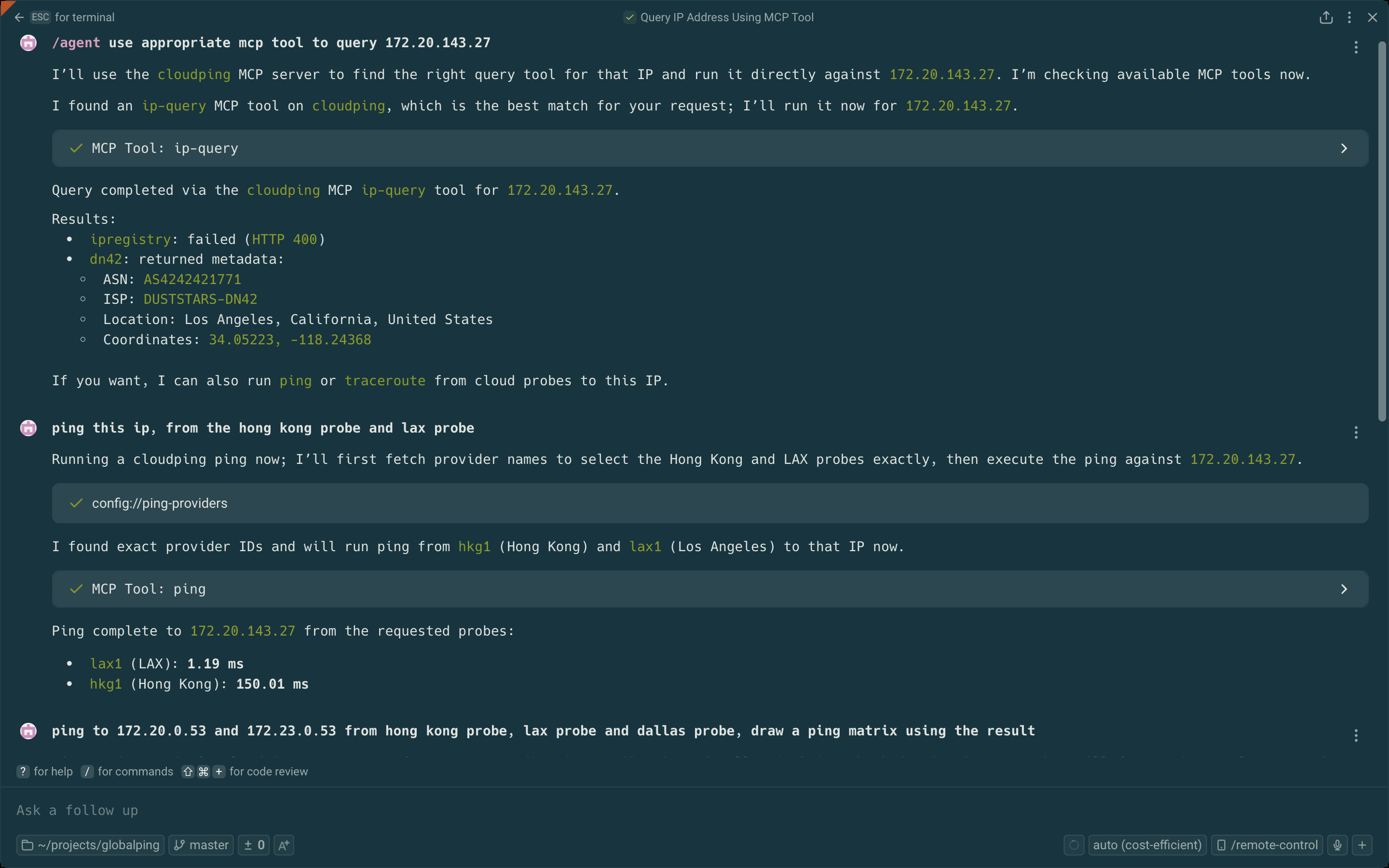
| Email — Ping Matrix | Email — Help Reply | MCP Server Tools |
|---|---|---|
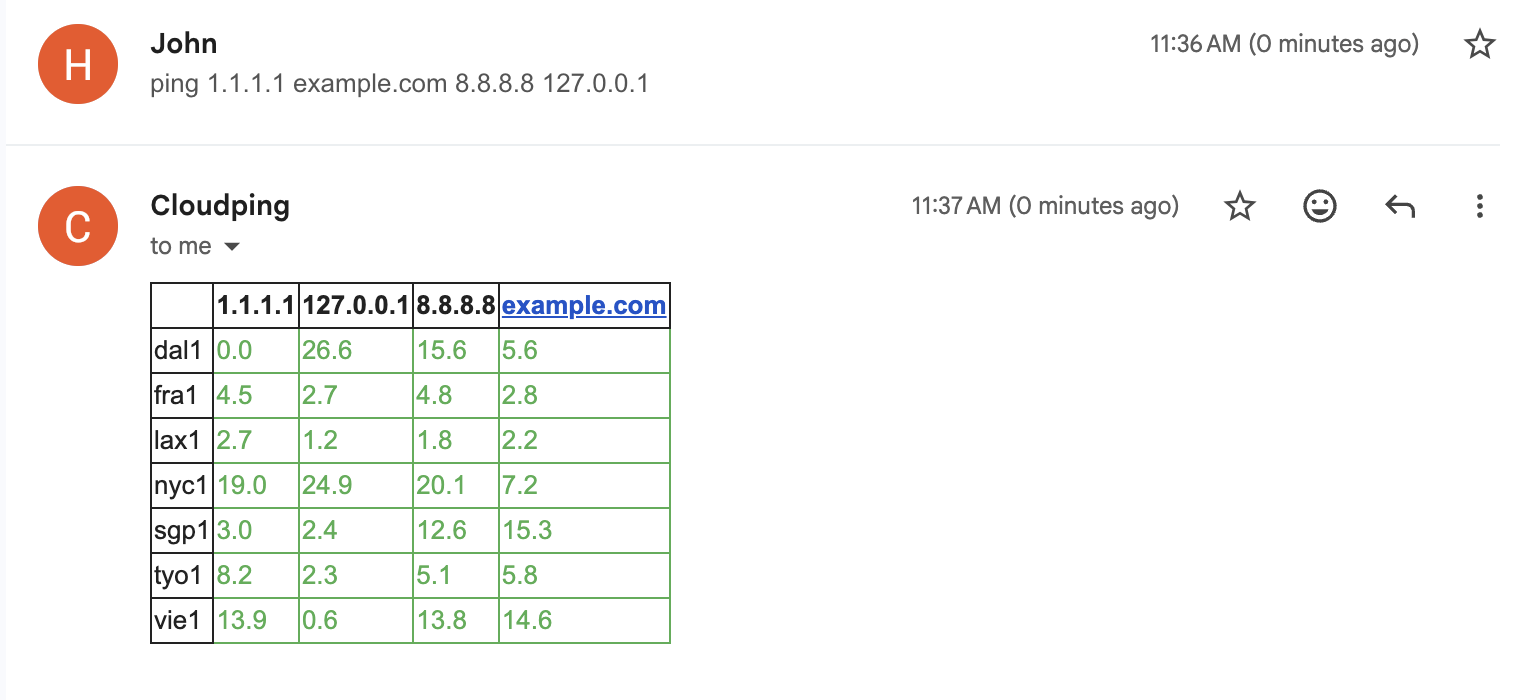 |
 |
 |
| Traceroute Canvas Export | ||
|---|---|---|
 |
API Design
Endpoints Overview
| Component | Endpoint | Method | Target Parameter | Targets Supported |
|---|---|---|---|---|
| Agent | /simpleping |
GET | destination |
Single target |
| Hub | /ping |
GET | targets |
Multiple (comma-separated) |
Port numbers are configured via command-line arguments.
Request Format
Parameters are encoded as URL search params. For available parameters and their effects, see:
- pkg/pinger/request.go - Supported parameters
- pkg/pinger/ping.go - Parameter effects
Example (curl):
Bring up the testing hub and agent(s) as described in the Debugging section
# Agent
curl --url-query targets=1.1.1.1 --url-query count=3 localhost:8085/simpleping

# Hub
curl --url-query from=us-lax1 --url-query targets=1.1.1.1 --url-query count=3 localhost:8084/ping
Note:
--url-queryis curl syntax sugar for encoding URL search params.
Prometheus Metrics:
Agents can expose Prometheus metrics by setting --metrics-listen-address (e.g. :2112). The metrics path defaults to /metrics.
# Agent (requires --metrics-listen-address to be set when launching the agent)
curl localhost:2112/metrics
Response Format
Both endpoints return a stream of JSON lines. Use line feed (\n) as the delimiter.
Developer Note
These APIs are intended for developers only. End users should use the Web UI.
MRT Query Service
The MRT Query Service provides BGP route lookup by streaming MRT (RFC6396, Multi-threaded Routing Toolkit Routing Information Export Format) data entries. Results are delivered as newline-delimited JSON (ndjson) streams, supporting queries by origin ASN, neighbor ASN, AS path segments, and IP/CIDR prefix.
For the data format specification and the reference implementation, see internetworklab/mrtparse-stream. The reference implementation uses GoBGP to parse MRT files and PostgreSQL to store and index the resulting entries.
Bot Interface
Currently, only Telegram Bot is supported.
| Command | Description | Example |
|---|---|---|
/ping |
Ping a destination with real-time streaming statistics. Supports IPv4/IPv6 preference and interactive location switching. | /ping -c 3 example.com |
/traceroute |
Traceroute to a destination with hop-by-hop peer and latency details. Supports IPv4/IPv6 preference and packet count. | /traceroute -6 example.com |
/probe |
Probe a CIDR subnet and generate a bitmap visualization. Requires a source node. | /probe -s us-lax1 172.23.0.0/24 |
/list |
List all available probe nodes with their network (ASN/ISP) and location information. | /list |
/version |
Show build version information as a JSON payload. | /version |
For how to deploy your own bot, see the docker-compose.yaml file in example1 or the dev scripts in scripts/.
Email Interface
Send email to cli at ping2.sh to interact with it. To display the help, send --help or [subcommand] --help (e.g. traceroute --help, no backtick).
| Command | Description | Example |
|---|---|---|
list |
List all available probe nodes with their network (ASN/ISP) and location information. | list |
ping |
Ping one or more destinations from specified source nodes. Supports IPv4/IPv6 preference and protocol selection (ICMP/UDP/TCP). | ping example.com |
traceroute |
Traceroute to a destination from a specified source node with hop-by-hop latency details. Supports IPv4/IPv6 preference and packet count. | traceroute -s lax1 -c example.com |
Connect to the MCP server
First, grab a JWT token by sending a /token command to the bot @as4242421771_bot.
Our MCP server: https://mcp.ping2.sh/mcp .
Authentication: JWT.
Example MCP server config on Warp.dev terminal's MCP server setting page:
{
  "cloudping": {
    "headers": {
      "Authorization": "bearer the_token_here"
    },
    "url": "https://mcp.ping2.sh/mcp"
  }
}
And the MCP client have to be able to use StreamableHTTP as transport.
Deployment
Web (frontend)
The Web UI is built with Next.js and supports the following build-time environment variables:
| Variable | Description | Default (Example) |
|---|---|---|
NEXT_PUBLIC_API_ENDPOINT |
API endpoint to use (prefix prepended to every request path) | /api |
NEXT_PUBLIC_GITHUB_REPO |
Link to the repository website | internetworklab/cloudping |
NEXT_PUBLIC_REPO_OWNER |
For display count of stargazers of the repo in the page | internetworklab |
NEXT_PUBLIC_REPO_NAME |
For display count of stargazers of the repo in the page | cloudping |
NEXT_PUBLIC_SITE_NAME |
WebUI title for self-hosted deployments | CloudPing |
NEXT_PUBLIC_DEFAULT_RESOLVER |
Resolver to specify in every probe request send to backend | 127.0.0.11:53 |
NEXT_PUBLIC_<NAME>_LOGIN_URL |
URL of oauth login page | /login/as/<name>/start |
These variables are evaluated at build time and embedded into the frontend bundle.
For 3rd-parth OAuth2 Login, currently we supports: Github, Google, Microsoft Entra ID, iEdon, Kioubit, Visitor, available env variables are: NEXT_PUBLIC_GITHUB_LOGIN_URL, NEXT_PUBLIC_GOOGLE_LOGIN_URL, NEXT_PUBLIC_ENTRA_LOGIN_URL, NEXT_PUBLIC_IEDON_LOGIN_URL, NEXT_PUBLIC_KIOUBIT_LOGIN_URL, NEXT_PUBLIC_VISITOR_LOGIN_URL.
Full Deployment (Docker Compose)
A complete self-hosted deployment example is available under docker/example1/. It includes a docker-compose.yaml that brings up all components — web frontend (Caddy), hub, Telegram bot, probe agents, and a Cloudflare Tunnel (cloudflared) for public ingress — along with setup scripts for provisioning tunnels, DNS records, and self-signed mTLS certificates for securing hub-to-agent's bidirectional communication.
Note: This is intended as a hands-on demonstration, not a production-ready setup, for a production setup, the agents should be deployed at where they actually are.
For step-by-step instructions, see docker/example1/README.md.
Join Agent
To run your cloudping agent and join our cluster, prepare three files:
docker-compose.yaml:
networks:
  globalping:
    name: globalping
    enable_ipv6: false
    ipam:
      driver: default
      config:
        - subnet: "${SUBNET_OVERRIDE}"
services:
  agent:
    container_name: globalping-agent
    pull_policy: always
    image: ghcr.io/internetworklab/cloudping:${VERSION}
    working_dir: /app/globalping
    networks:
      - globalping
    volumes:
      - "./.env.inside:/app/globalping/.env:ro" # .env.inside has some sensitive data, such as apikeys for invoking third-party services.
    command:
      - "/usr/local/bin/globalping"
      - "agent"
      - "--node-name=${NODE_NAME}"
      - "--exact-location-lat-lon=${EXACT_LOCATION_LAT_LON}"
      - "--country-code=${ALPHA2}"
      - "--city-name=${CITY}"
      - "--asn=${ASN}"
      - "--isp=${ISP}"
      - "--dn42-asn=${DN42_ASN}"
      - "--dn42-isp=${DN42_ISP}"
    mem_limit: 256m
.env:
NODE_NAME=nickname-nue1
SUBNET_OVERRIDE=192.168.253.0/30
EXACT_LOCATION_LAT_LON=48.1952,16.3503
VERSION=latest
ALPHA2=DE
CITY=Nuremberg
ASN=AS197540
ISP=netcup GmbH
DN42_ASN=AS4242421234
DN42_ISP=YOUR-DN42-AS
Just don't forget to replace the informations in .env with that of yours, such as node name (node name must not be conflict with current node names), locations and ASNs.
.env.inside:
JWT_TOKEN=<jwt_token>
Grab the JWT token from bot @as4242421771_bot, with command /token.
Credits
Thanks the following GeoIP datasources, in no particular order:
Todos
- introduce text-based cross-session AI memories (like personal-site), and design-doc (like personal-site)
- improve planar worldmap to allow infinite panning and infinite zooming
- add 3d globe / 2d plannar worldmap toggle
- add dnssec switch toggle
- add supportness of more dns query types, e.g.: NAPTR
CloudPing MCP 질문
CloudPing에서 어떤 프로브를 실행할 수 있나요?
ping, traceroute (UDP 또는 ICMP), TCP ping, DNS 프로브, HTTP/1.1, HTTP/2, HTTP/3 기반의 HTTP 프로브, 그리고 MRT 데이터를 통한 BGP 경로 조회를 지원합니다.
CloudPing MCP server는 클라이언트를 어떻게 인증하나요?
MCP server는 JWT 인증을 사용하는 streamable HTTP를 사용합니다.
CloudPing API 응답은 어떤 형식을 사용하나요?
응답은 줄바꿈 구분자를 사용하는 newline-delimited JSON 형식으로 스트리밍됩니다.
직접 빌드하지 않고 이미 배포된 CloudPing 인스턴스를 사용할 수 있나요?
네, ping2.sh에서 공개 인스턴스를 사용할 수 있으며, DN42 인스턴스는 ping.dn42에서 사용할 수 있습니다. 별도로 빌드하거나 설치할 필요가 없습니다.
CloudPing이 BGP 경로 조회를 지원하나요?
네, MRT 데이터를 통한 BGP Route Lookup을 제공하며, origin ASN, neighbor ASN, AS path segments, IP/CIDR prefix로 쿼리할 수 있습니다.