
AI 코딩 에이전트가 로컬 또는 클라우드에 호스팅된 코드베이스와 로그에 대해 하이브리드 키워드, 시맨틱 및 SQL 검색을 수행할 수 있도록 지원합니다.
다른 이름 infino-ai/code-context, @infino-ai/code-context
- 스타
- 31
- Tools
- 3
- 다운로드, 30일
- 344
- 최신 버전
- 0.5.1
- 마지막 커밋
- 2026년 11월 15일
- 라이선스
- Apache-2.0
SuperGrep MCP란?
AI 코딩 에이전트가 로컬 또는 클라우드에 호스팅된 코드베이스와 로그에 대해 하이브리드 키워드, 시맨틱 및 SQL 검색을 수행할 수 있도록 지원합니다. 3개 도구를 제공합니다. 예: search, sql, reindex.
프로젝트 README에서 생성된 요약
SuperGrep MCP server 정보
code-context는 하이브리드 검색 기능을 통해 AI 코딩 에이전트가 대규모 코드베이스와 로그를 탐색할 수 있도록 돕습니다. 개발자는 이 MCP server를 사용하여 에이전트에게 정확한 문자열 매칭, 시맨틱 유사도 및 읽기 전용 SQL 쿼리 도구를 제공할 수 있습니다. 무거운 검색 작업을 인덱스로 오프로드함으로써, 에이전트는 방대한 컨텍스트 윈도우나 토큰을 소비하지 않고도 특정 코드 패턴을 찾거나 여러 저장소에 걸친 정보를 요약할 수 있습니다.
이 서버는 로컬과 클라우드 모두에서 작동합니다. find와 sql 도구는 키워드 인덱스를 사용하여 사용자의 기기에서 직접 실행되는 반면, search 도구는 Infino 클라우드를 활용하여 시맨틱 추론 및 임베딩을 수행합니다. 이러한 설정을 통해 에이전트는 로그, 테스트 출력, 오브젝트 스토리지의 Parquet 파일과 같은 대규모 데이터셋을 로컬 메모리에 전부 로드하지 않고도 처리할 수 있습니다. 설정에는 Node.js 22.19 이상의 버전이 필요하며, stdio를 통해 Claude Code, Cursor 또는 Cline과 같은 클라이언트에 통합할 수 있습니다.
활용 사례
- 1종합적인 코드 리뷰 수행에이전트가 특정 함수의 모든 호출자를 식별하여 변경 사항의 영향을 파악할 수 있습니다.
- 2멀티 저장소 프로젝트 분석개발자가 서비스, 클라이언트 및 공유 라이브러리에 걸친 질문을 동시에 던질 수 있습니다.
- 3통합 테스트 실패 진단에이전트가 소스 코드와 로그 및 이슈 내보내기 데이터를 상관 분석하여 실패의 근본 원인을 찾을 수 있습니다.
- 4대규모 로그 파일 검색서버가 모델이 처리하기 전에 크고 반복적인 로그 파일을 관련 스팬(span)으로 압축합니다.
프로젝트의 README를 바탕으로 작성되었습니다. 모든 활용 사례는 해당 내용의 인용문과 대조하여 확인합니다.
SuperGrep MCP 설치 방법
형식 확인: 2026년 11월 10일Cursor에 추가Goose에 추가Claude Code에 SuperGrep MCP 설치
$ claude mcp add code-context -- npx -y @infino-ai/code-context mcpCursor에 SuperGrep MCP 설치
~/.cursor/mcp.json
{
  "mcpServers": {
    "code-context": {
      "command": "npx",
      "args": [
        "-y",
        "@infino-ai/code-context",
        "mcp"
      ]
    }
  }
}VS Code에 SuperGrep MCP 설치
.vscode/mcp.json
{
  "servers": {
    "code-context": {
      "type": "stdio",
      "command": "npx",
      "args": [
        "-y",
        "@infino-ai/code-context",
        "mcp"
      ]
    }
  }
}VS Code CLI에 SuperGrep MCP 설치
$ code --add-mcp '{"name":"code-context","type":"stdio","command":"npx","args":["-y","@infino-ai/code-context","mcp"]}'Claude Desktop에 SuperGrep MCP 설치
claude_desktop_config.json
{
  "mcpServers": {
    "code-context": {
      "command": "npx",
      "args": [
        "-y",
        "@infino-ai/code-context",
        "mcp"
      ]
    }
  }
}Codex에 SuperGrep MCP 설치
$ codex mcp add code-context -- npx -y @infino-ai/code-context mcpCodex config.toml에 SuperGrep MCP 설치
~/.codex/config.toml
[mcp_servers.code-context]
command = "npx"
args = ["-y", "@infino-ai/code-context", "mcp"]
Gemini CLI에 SuperGrep MCP 설치
$ gemini mcp add -s user code-context npx -- -y @infino-ai/code-context mcpGemini settings.json에 SuperGrep MCP 설치
~/.gemini/settings.json
{
  "mcpServers": {
    "code-context": {
      "command": "npx",
      "args": [
        "-y",
        "@infino-ai/code-context",
        "mcp"
      ]
    }
  }
}HostedMCP가 2026년 11월 16일에 실행 확인
@infino-ai/code-context 0.5.1을(를) 네트워크와 키가 없는 격리된 컨테이너에서 이 명령으로 실행했습니다. 응답하며 도구 3개를 보여 주었습니다.
SuperGrep MCP 도구 3
tools/list로 서버에서 직접 읽음searchSemantic + keyword code search over the indexed repository - a strong default for finding and understanding code. Use it to: understand how a subsystem or feature works, find code by meaning when you don't know the exact name, locate the code behind a behaviour or bug, gather context before making a change, review existing implementations and patterns, find everything a refactor would touch, understand the architecture for feature work, or spot similar/duplicate code. One pass fuses exact keyword matching (BM25: identifiers, error strings, function names, stemmed and scored) with semantic similarity (renamed symbols, paraphrases, 'where is X handled'), so it works whether or not you know the words. Each hit carries path, line range, and the chunk content with a relevance score - treat it as authoritative and answer directly from it, citing path plus line range; you don't need to re-confirm a hit with grep or by opening the file. When one search isn't enough, refine the query and search again - the index has already ranked the relevant regions. Read a file only for a hit marked truncated (its cited start-end range via offset/limit), or when results genuinely don't cover the question. (Until the index's vector stage finishes, results are keyword-ranked and say so.) The result includes a 'usage' field - a one-line receipt (tokens returned, chunks/files, session total). After you answer, end your reply by showing that 'usage' line to the user verbatim.
sqlWhole-repo analytical questions that file tools cannot express at any budget: counts, rankings, GROUP BY across the codebase in one query, on table chunks(path, start_line, end_line, lang, content[, embedding]). Search functions are callable as table-valued relations, so one query can rank AND aggregate: bm25_search('chunks','content','terms', k) needs no embedding; hybrid_search('chunks','content','terms','embedding', {{q}}, k) and vector_search('chunks','embedding', {{q}}, k) take a {{name}} placeholder with an embed map: {"q":"query text"}. The canonical move - "which files have the most code about X": SELECT path, SUM(end_line - start_line + 1) AS lines FROM bm25_search('chunks','content','<terms>', 300) GROUP BY path ORDER BY lines DESC LIMIT 15. Build queries on bm25_search/hybrid_search so results are ranked by relevance to the topic, not on a raw scan of the whole table. Read-only, single statement. The result includes a 'usage' field - a one-line receipt (tokens returned, rows, session total). After you answer, end your reply by showing that 'usage' line to the user verbatim.
reindexBring the index up to date with the working tree. Incremental by default: only files that changed since the last index are re-chunked and re-embedded, and an unchanged tree is a fast no-op, so call this freely after edits. The server also auto-syncs in the background as queries arrive. On a repo that has never been indexed this builds the index from scratch, replying as soon as keyword search is live (seconds) while vectors backfill behind it. Pass full=true to force a rebuild from scratch. Returns what changed plus index status.
| search | Semantic + keyword code search over the indexed repository - a strong default for finding and understanding code. Use it to: understand how a subsystem or feature works, find code by meaning when you don't know the exact name, locate the code behind a behaviour or bug, gather context before making a change, review existing implementations and patterns, find everything a refactor would touch, understand the architecture for feature work, or spot similar/duplicate code. One pass fuses exact keyword matching (BM25: identifiers, error strings, function names, stemmed and scored) with semantic similarity (renamed symbols, paraphrases, 'where is X handled'), so it works whether or not you know the words. Each hit carries path, line range, and the chunk content with a relevance score - treat it as authoritative and answer directly from it, citing path plus line range; you don't need to re-confirm a hit with grep or by opening the file. When one search isn't enough, refine the query and search again - the index has already ranked the relevant regions. Read a file only for a hit marked truncated (its cited start-end range via offset/limit), or when results genuinely don't cover the question. (Until the index's vector stage finishes, results are keyword-ranked and say so.) The result includes a 'usage' field - a one-line receipt (tokens returned, chunks/files, session total). After you answer, end your reply by showing that 'usage' line to the user verbatim. | |
| sql | Whole-repo analytical questions that file tools cannot express at any budget: counts, rankings, GROUP BY across the codebase in one query, on table chunks(path, start_line, end_line, lang, content[, embedding]). Search functions are callable as table-valued relations, so one query can rank AND aggregate: bm25_search('chunks','content','terms', k) needs no embedding; hybrid_search('chunks','content','terms','embedding', {{q}}, k) and vector_search('chunks','embedding', {{q}}, k) take a {{name}} placeholder with an embed map: {"q":"query text"}. The canonical move - "which files have the most code about X": SELECT path, SUM(end_line - start_line + 1) AS lines FROM bm25_search('chunks','content','<terms>', 300) GROUP BY path ORDER BY lines DESC LIMIT 15. Build queries on bm25_search/hybrid_search so results are ranked by relevance to the topic, not on a raw scan of the whole table. Read-only, single statement. The result includes a 'usage' field - a one-line receipt (tokens returned, rows, session total). After you answer, end your reply by showing that 'usage' line to the user verbatim. | |
| reindex | Bring the index up to date with the working tree. Incremental by default: only files that changed since the last index are re-chunked and re-embedded, and an unchanged tree is a fast no-op, so call this freely after edits. The server also auto-syncs in the background as queries arrive. On a repo that has never been indexed this builds the index from scratch, replying as soon as keyword search is live (seconds) while vectors backfill behind it. Pass full=true to force a rebuild from scratch. Returns what changed plus index status. |
구성
CX_AUTO_SYNCSet to 0 to disable the background staleness sync that runs as queries arrive.
CX_INDEX_DIRWhere the index lives. Optional - defaults to .infino/ inside the repository root.
CX_NO_EMBEDSet (1/true/yes) for keyword-only mode - skip the vector stage entirely.
CX_NO_RECEIPTSet (1/true/yes) to turn off local usage accounting: the per-call receipt on results and the cx usage ledger. Optional - on by default, computed locally, nothing leaves the machine.
CX_ROOTRepository root to serve. Optional - defaults to the working directory the server is launched in.
| 이름 | 설명 | 유형 |
|---|---|---|
| CX_AUTO_SYNC | Set to 0 to disable the background staleness sync that runs as queries arrive. | |
| CX_INDEX_DIR | Where the index lives. Optional - defaults to .infino/ inside the repository root. | |
| CX_NO_EMBED | Set (1/true/yes) for keyword-only mode - skip the vector stage entirely. | |
| CX_NO_RECEIPT | Set (1/true/yes) to turn off local usage accounting: the per-call receipt on results and the cx usage ledger. Optional - on by default, computed locally, nothing leaves the machine. | |
| CX_ROOT | Repository root to serve. Optional - defaults to the working directory the server is launched in. |
자동 검사
2026년 11월 16일에 실행됨전체 보고서 →자동 검사를 통과했습니다. 이는 보안 감사가 아닙니다. 코드를 직접 읽고 서버에 필요한 최소한의 권한만 부여하십시오. 검사 방식

- 소스 저장소 연결 및 접근 가능infino-ai/code-context is public and reachablegithub.com/infino-ai/code-context ↗통과
- 패키지가 이 저장소를 소스로 명시@infino-ai/code-context names infino-ai/code-context as sourcenpmjs.com/package/@infino-ai/code-context ↗통과
- 빌드 출처(Sigstore 증명)Sigstore attestation for @infino-ai/code-contextnpmjs.com/package/@infino-ai/code-context/v/0.5.1#provenance ↗통과
- 오픈 소스 라이선스 (OSI)Apache-2.0spdx.org/licenses/Apache-2.0.html ↗통과
- 최근 1년 내 커밋 또는 릴리스Last commit or release 2026-11-15github.com/infino-ai/code-context ↗통과
- OpenSSF Scorecard검사되지 않음
- 패키지 이름이 인기 패키지와 유사하지 않음No popular package one edit away from @infino-ai/code-context통과
- 패키지 및 해당 종속성에 중요한 보안 권고 없음201 resolved dependencies checked; no critical advisoryosv.dev ↗통과
- 모델에 대한 숨겨진 지침 없음3 tool descriptions and the README read; no override phrases, credential paths or hidden characters통과
- 파괴적인 도구에 라벨 표시됨No tool named like delete, drop or exec통과
- 원격 엔드포인트가 MCP 핸드셰이크에 응답검사되지 않음
README
GitHub에서 보기


SuperGrep
Retrieval + inference offload for AI coding agents. Help your agents find answers faster and at lower cost, while keeping the same answer quality. Particularly useful for cheaper models.
Try it live at infino.ai/supergrep - put a question to a real codebase and watch the same model answer it with and without SuperGrep, side by side, with the bill for each. Supergrep uses Infino for retrieval, which tightly integrates small language models with indexes for scalable agent retrieval on object storage.
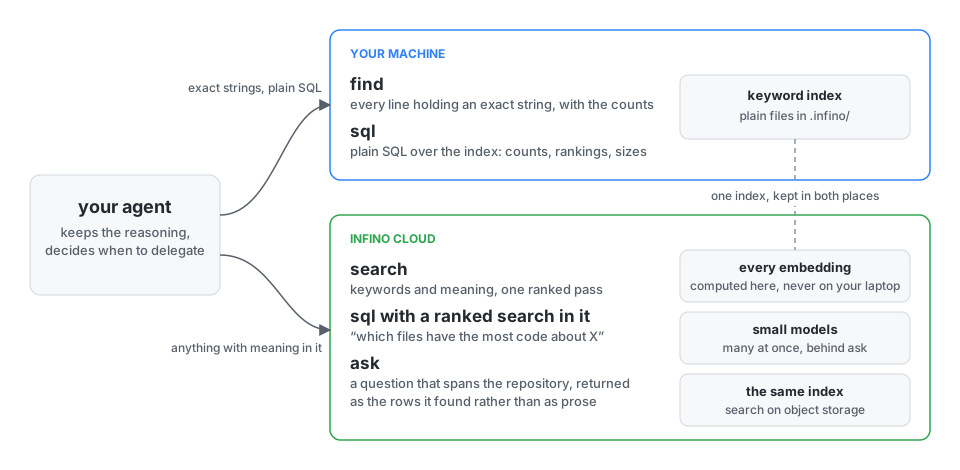
SuperGrep offers agents three tools over an Infino index, kept in two places. find and plain sql run on your machine, over the keyword index. Conversely, anything with meaning in it - search, and a sql statement with a ranked search inside it - runs in the Infino cloud, so heavy compute and embeddings stay off your laptop. Your agent keeps the reasoning, writes the answer, and decides when to use SuperGrep. No configuration.
| tool | what it does |
|---|---|
find |
Every line containing an exact string, like grep -n: complete, unranked, with the repo-wide total and per-file counts. Tens of milliseconds from the index. |
search |
One ranked pass fusing exact keyword matching with semantic similarity, so it works whether or not you know the words. Hits carry the code, cited path:line. |
sql |
Read-only SQL over the index. The ranked searches are table-valued, so "which files have the most code about X" ranks and tallies in one query. |
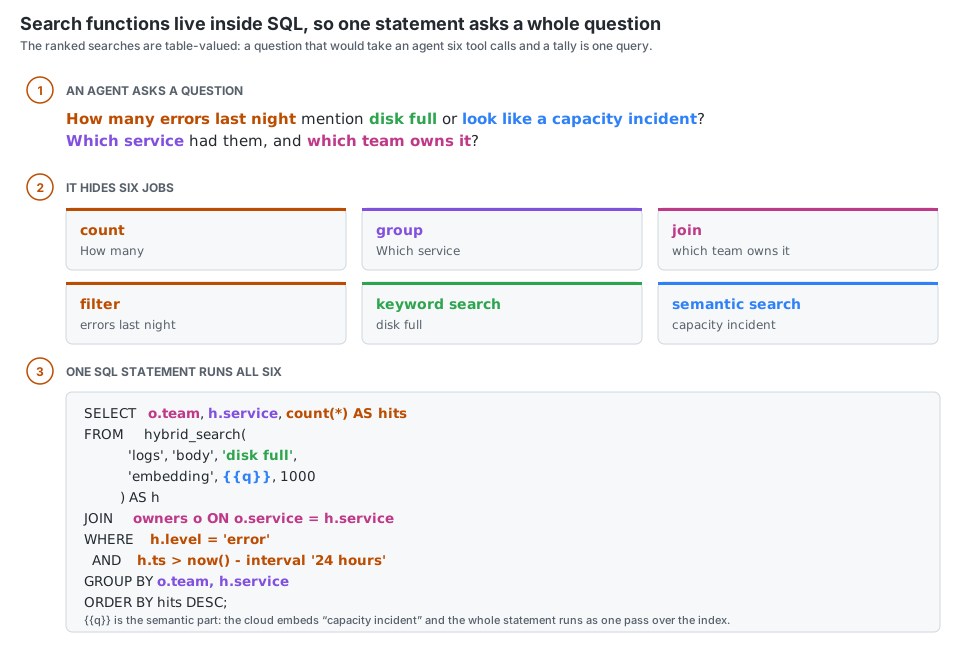
What people use it for
- Code review. The reviewer's question is "what else calls this, and what breaks if it changes".
findanswers with every caller and the counts in one call, so the review is about the change rather than about finding it. - Several codebases at once. Every local tool takes a repository path, so one session roams across every repo it touches - the service, the client, the shared library - without a checkout per question.
- Code, logs and issues together. Index the logs, the test output and the issue export beside the source, and "why did this integration test start failing?" is one question over all of them.
Your agent reaches for it on its own
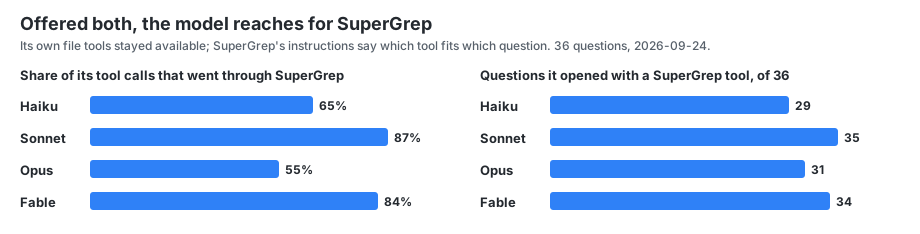
The model's own file tools stayed available throughout. What it had from SuperGrep was the server's instructions, which say which tool fits which kind of question; the choice on each call was the model's. The calls that are not SuperGrep are mostly Read: the model opens a file after the index has told it which one, rather than instead of asking. That is the shape you want - the index does the finding, and the model still opens what it needs to quote.
Go beyond code - index your entire laptop or any corpus
SuperGrep looks across all the files a question needs, not just the source. Logs, test output, stack traces, CI output, configuration and docs go in beside the code -
.log, .out, .err, .jsonl and .ndjson are chunked at record boundaries, so a stack trace stays with the message that explains it -
and the same three tools run over all of it: find for an exact stack frame, search for a failure you can only describe, and sql to count and rank across a
run.
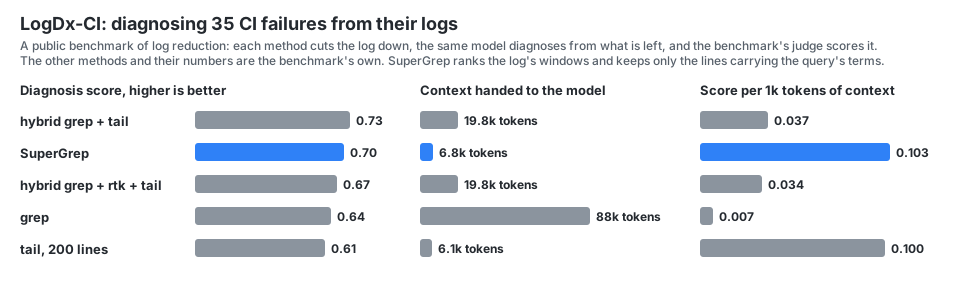
That matters most where a frontier model is weakest. A log is the pathological case for a context window - large, repetitive, mostly irrelevant, and paid for again on every turn it stays in the transcript. An index collapses it to the spans that matter before the model sees any of it. On a public benchmark of CI-failure diagnosis, scored by the benchmark's own judge, that puts SuperGrep second on the score and first by a distance on score per token of context:
For files that don't fit on your laptop - write them out to Parquet files in object storage and point SuperGrep at them without ever loading them onto your laptop (how). You can search them together with your code or laptop files using the same tools.
What it saves
The same model, the same 36 questions about a 256,000-line codebase, with and without SuperGrep. Every answer was checked against the code. Fully correct means every claim held and the whole question was answered. The bill is everything you pay: your model, its subagents, and SuperGrep.
Real agent runs through the Claude Agent SDK, the same minimal prompt in every arm, on the infino engine repository, measured 2026-09-24. Thirty-six questions in five categories: aggregation (10), comprehension (6), by meaning (6), pinpoint (8), known file (6). The file-tools arm is stock Claude Code: Glob, Grep, Read, LS, Bash, and the Agent tool with the built-in Explore subagent. The SuperGrep arm is the same plus SuperGrep's MCP tools. The judge is Opus 5.5.
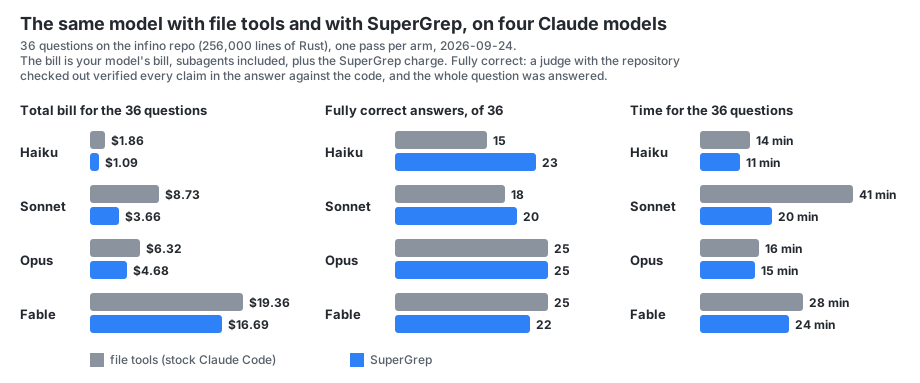
Your mileage will vary with the model.
- Cheaper on every model. Haiku 41% off the total bill, Sonnet 58%, Opus 26%, Fable 14%.
- Quality increases on the cheaper models. Haiku gets eight more fully correct answers with SuperGrep than without. On Sonnet, Opus and Fable the answers are level: the judge is itself a model, and graded four times the same answers came back with 19, 20, 17 and 23 claims it could not verify, so a difference under about six answers in 36 is noise, and those three are inside it.
- No surprise bills. On about a third of the questions, Sonnet with file tools sends a subagent off to read through the repository. That one question then costs four to five times as much and takes four times as long. With SuperGrep it asks the index instead. Over the 36 questions that is $3.66 against $8.73 and 20 minutes against 41, with 20 fully correct answers against 18.
- On your own code the gap is wider. These runs are on a public, open-source repository, because that is a test anyone can repeat - and the large models have seen it in training, which is a head start for reading files. On a private codebase the model has never seen, the index does more of the work, and the effect of SuperGrep is larger.
Where it wins, and where it does not
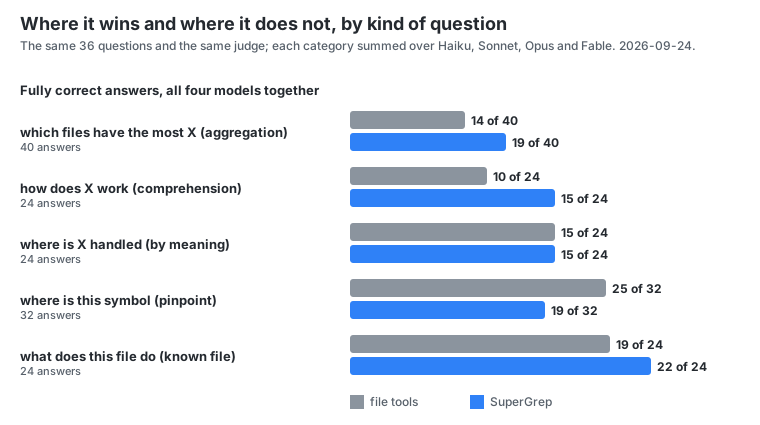
It wins on questions about the whole codebase: counts, rankings, every occurrence. Grep gives the first forty matches; an index gives the total. It loses on finding one named thing with a large model, which reads whole files well.
The cheapest model with SuperGrep against the most expensive without
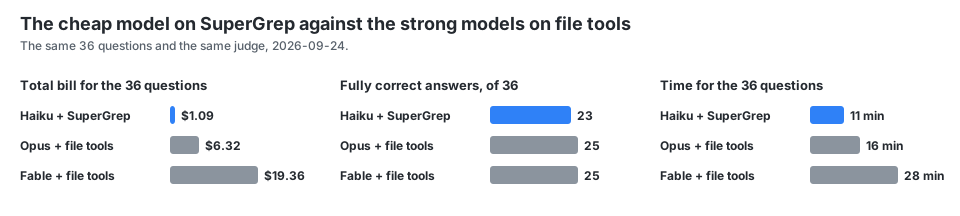
23 correct answers to their 25, for $1.09 instead of $6.32 (Opus) or $19.36 (Fable).
Install
Two commands, once per machine. You need Claude Code and Node.js 22.19 or newer, on macOS or Linux.
claude plugin marketplace add infino-ai/supergrep
claude plugin install supergrep@infino-ai
(The plugin was called code-context before; an earlier install is replaced with claude plugin uninstall code-context@infino-ai and the two commands above. The MCP server inside keeps its name, so nothing the agent learned changes.)
That is the setup. Open Claude Code in any directory - a repository, a folder of logs, your notes, anything - and ask a question. The first question indexes the directory, and find, sql and read answer from then on. Nothing is configured per directory, no account exists yet, and nothing has left your machine.
search is the cloud half - the embeddings run on the Infino platform, over a copy of the index kept there - and it needs an account. The first time a question needs it, Claude tells you the one command and does not run it, because it is yours to run. Once, in a terminal:
npx -y @infino-ai/code-context login --platform https://api.supergrep.infino.ai
A free account, no credit card required. There is no form, no email, no password and no card, and nothing is created without your say-so: the command tells you that the contents of the directories you use search in will be uploaded to Infino, asks, and only on your yes creates the account and stores its key at ~/.infino/key, mode 600, readable only by you. No config file ever holds a key or a path to one. Infino is SOC 2 Type 2 certified.
Keep that key. Because the free account asks for no email and no card, the key is the only thing that identifies you: it is how you get back in, and nothing else can. Back it up somewhere safe. When you add your details in the Infino console the same account gains a sign-in, and keys can be managed from there.
Restart the session and every directory you open has all three tools. Each one gets its own database on your account, named after the directory and loaded the first time you use search there - a directory you only ever find in is never uploaded. One server answers for every directory a session touches: the tools take a path, so a session that spans several projects names the one it means. When the free credit runs out, add billing details and a card to the same account; find and plain sql keep working throughout.
If you already have an Infino account
Sign in once per machine instead. The key comes from a file or standard input, never from an argument - argv is readable by every process on the machine - and --yes is the same agreement the sign-up asks for, since a piped key leaves no terminal to ask on:
npx -y @infino-ai/code-context login --db https://api.supergrep.infino.ai --yes < keyfile
Other MCP clients, and one entry per repository
Cursor, Codex CLI, Gemini CLI, Windsurf and Cline take the same server over stdio. cx install in a repository writes its entry into .mcp.json there (--config for another client's file); with the account stored it names the repository's database and nothing else, --local-only writes the keyword-only entry, and install --platform https://api.supergrep.infino.ai is the sign-up and the entry in one for a machine with no account. The reference has every flag, and CONTRIBUTING how to build from source.
Hermes
Hermes loads SuperGrep as a plugin, hermes_supergrep/ in this repository: a profile names the repositories it reads, the plugin starts the server over them, registers the code-context skill as supergrep:code-context, and syncs every repository that has a finished index in the background when a session starts. A repository with no index yet is built by the server on its first query, or ahead of time by hermes supergrep index; one whose vectors are still being built is left to the server building them. One process at a time writes an index: a session-start sync that finds the server, or another cx index, writing the same one skips it (cx index exits 75 and writes nothing). Memory stays whatever plugin the profile uses for it; this one keeps to the code, and the two load side by side.
1. Build the client. Node.js 22.19 or newer; Hermes's installer keeps one in ~/.hermes/tools/.
git clone https://github.com/infino-ai/supergrep.git
cd supergrep
export PATH="$(ls -d ~/.hermes/tools/node-*/bin | sort -V | tail -n 1):$PATH"
npm ci && npm run build
2. Install the plugin. Hermes copies the plugin directory out of the repository; it has no Python dependencies.
hermes plugins install https://github.com/infino-ai/supergrep/tree/main/hermes_supergrep --enable
3. Add the tools, naming the client from step 1 and the repositories the profile reads, first one first: it is the tools' default root, and the others are reached by the path each tool takes.
hermes config set mcp_servers.supergrep.command hermes
hermes config set mcp_servers.supergrep.args '["supergrep", "mcp"]'
hermes config set mcp_servers.supergrep.env.SUPERGREP_CLIENT /full/path/to/supergrep/dist/cli.js
hermes config set mcp_servers.supergrep.env.SUPERGREP_REPOS /full/path/to/repo-one,/full/path/to/repo-two
hermes config set mcp_servers.supergrep.connect_timeout 120
hermes supergrep status says whether Node, the client and each repository are in place, and hermes supergrep index indexes them now: a first build where there is no index, a sync where there is. The session-start sync runs with the same env block as the server, so file settings there (CX_INCLUDE, CX_NO_IGNORE, ...) hold for both. The block takes SUPERGREP_NODE for a Node other than the one on Hermes's path (without it, the first node on PATH, else Hermes's own under ~/.hermes/tools), SUPERGREP_AUTO_INDEX=off to leave syncing to the first query, and SUPERGREP_MCP_SERVER when the entry is named something other than supergrep (environment only, since it names the block). search needs the account from the install above, stored once per machine, as with any other client. With the account stored, each sync also loads the repository's changes into its own database on the platform, so every named repository with an index uploads at each session start; SUPERGREP_AUTO_INDEX=off leaves that to the first query on each.
Indexing it yourself
The first question in a directory indexes it and the MCP server keeps it current, so most of the time you never run an index by hand. When you want to - a first pass over a huge tree, a CI step, a corpus that is not a git repository - index is the command. (cx below is npx -y @infino-ai/code-context, or cx itself after npm install -g @infino-ai/code-context.)
cx index                      # bring the index up to date; incremental, full on first run
cx index ~/notes              # index some other directory
cx index --full               # force a full rebuild
cx index --watch              # keep watching the tree and sync on every change
cx index --no-embed           # signed in: load the platform table without vectors
cx index --max-files 1000000  # raise the cap past the 500,000 default; over it, the index is
                              # partial and says so, with the value to pass to get all of it
The index is plain files under .infino/ in the directory you indexed. Keyword search is live within seconds of the first cx index. The local index stays keyword-only: search by meaning runs on the platform copy, once you are signed in. cx status says what the index holds and how fresh it is.
Signed in, cx index loads the platform copy in the same pass - the directory's own database on your account, so search sees the same content as find. To load a database you name instead:
cx index --db https://api.supergrep.infino.ai/<database>
--embed-provider platform (the default) has the platform fill that table's vectors with its own model, server-side; local embeds on this machine and ships the vectors instead.
Your data, through the same tools
The same plugin reaches every table in your Infino account, not only the directories it indexed. Signed in, the agent has three more tools and a database argument on the three it had:
| tool | what it does |
|---|---|
tables |
What the account holds: every database with its tables; a table's columns, which are indexed for search and which the platform embeds, the column that names a row, and the table's card - statistics, sample rows and what each column means. |
hydrate |
Load a dataset into a database of the account, from wherever it is: a bucket prefix the platform reads itself, files on your laptop, files on a machine you reach with ssh, or a prefix already in the database's storage. Parquet, CSV, NDJSON, Iceberg and parsed documents. The database is created if it is new; the load runs on the platform and hydrate_status follows it. |
hydrate_status, hydrate_cancel |
Where a load stands; stop one. |
sql, search and find take database (and table) to run over a table of the account instead of a repository - the statement, the ranked search and the exact match, with the platform's verdict on a statement's rows and its keys for a join, exactly as over code. So one session asks "which files call this" of the checkout and "which accounts moved the most money last quarter" of the data, through one MCP, and a question can span both.
Nothing is configured per table or per database. Point the agent at a folder of CSVs, a Parquet export, a bucket, or a directory on a dev box, and ask it to load it; then ask questions. Files on your laptop or on a remote machine go straight into the database's storage over the platform's upload sessions (ssh is yours: the plugin runs one find and one cat per file over it and installs nothing there); a bucket is read in place and nothing is copied.
As a connector, with sign-in
The same server runs over Streamable HTTP, as one URL that claude.ai, Claude Desktop, Claude Code and any other MCP client add as a remote connector:
cx mcp --http 9121 --db https://<platform> --sign-in https://<host>/.well-known/oauth-protected-resource/mcp
With --sign-in, every call carries an Infino account's key, and a call with none is told where to sign in (the OAuth resource metadata at that URL), which is how Claude knows to sign the person in. Every call then runs on that account's own databases. Without it, every session runs on the one account the process was started with (add --read-only for a URL shared with no sign-in).
Indexing from object storage
For a corpus too big for your laptop - years of logs, a document dump, anything you already keep in a bucket as Parquet or JSON - leave it there, point the platform at the bucket, and it builds the index from there. Nothing is copied, nothing is downloaded to your machine, and no row passes through your laptop or through the API. The hydrate tool above does this from inside a session; the API it calls is below.
1. Grant read on your bucket to Infino's service account - we give you its address - on the prefix you want indexed: roles/storage.objectViewer on GCS, s3:GetObject + s3:ListBucket on S3. Read only: the platform writes nothing there.
2. Submit the job. One POST, naming the bucket and prefix, and it returns straight away - the build runs on the platform, not in the request:
curl -sS -X POST https://api.supergrep.infino.ai/v1/hydrate/<database> \
  -H "authorization: Bearer $(cat ~/.infino/key)" \
  -H 'content-type: application/json' \
  -d '{
        "table": "logs",
        "source": { "kind": "bucket", "bucket": "<your-bucket>", "prefix": "exports/logs/" },
        "fts":    [ { "column": "message" } ],
        "embed":  { "column": "embedding", "source": ["message"] }
      }'
(A database that lives in your own bucket can also read shards staged under its own _source/ prefix: "source": { "kind": "prefix", "prefix": "_source/logs/" }.)
{ "job": "hydrate/<customer>/<database>/logs", "state": "pending" }
Leave fts and embed out and the job reads a sample and picks the roles itself. columns narrows which source columns are carried; no_embed: true builds no vector column at all.
3. Follow it. The reply carries the state, how far it has got, the schema it settled on, and what it has cost so far:
curl -sS "https://api.supergrep.infino.ai/v1/hydrate/<database>?table=logs" \
  -H "authorization: Bearer $(cat ~/.infino/key)"
States are pending, running, cancelling, stopped, succeeded, failed. A job that stopped - a cancel, or an outage that outlasted its budget - resumes from its own checkpoint rather than starting over:
# resume where it left off
curl -sS -X POST https://api.supergrep.infino.ai/v1/hydrate/<database> -H "authorization: Bearer $(cat ~/.infino/key)" \
  -H 'content-type: application/json' \
  -d '{"table":"logs","source":{"kind":"bucket","bucket":"<your-bucket>","prefix":"exports/logs/"},"resume":true}'

# stop a running job at its next commit boundary
curl -sS -X DELETE "https://api.supergrep.infino.ai/v1/hydrate/<database>?table=logs" \
  -H "authorization: Bearer $(cat ~/.infino/key)"
By default a job that fails for good drops its half-built table, so a partial table is never served; "on_failure": "keep" keeps what was committed.
The table is then searchable like any other, and one question can span it and your code at once.
Note: Hydrate API needs to be enabled per account. Contact support@infino.ai to enable.
Learn more
License
Apache-2.0
SuperGrep MCP 질문
SuperGrep MCP를 Claude Code에 추가하려면 어떻게 하나요?
터미널에서 claude mcp add code-context -- npx -y @infino-ai/code-context mcp를 실행합니다. 모든 프로젝트에서 사용할 수 있게 하려면 --scope user를 추가합니다.
SuperGrep MCP를 Cursor에 추가하려면 어떻게 하나요?
~/.cursor/mcp.json를 열고 mcpServers 아래에 서버를 추가합니다. 위 설치 섹션에 표시된 Cursor 구성을 사용합니다.
SuperGrep MCP는 어떤 도구를 제공하나요?
3개 도구를 제공합니다. 예: search, sql, reindex.
SuperGrep는 에이전트에게 어떤 도구를 제공하나요?
정확한 문자열 매칭을 위한 find, 순위가 지정된 시맨틱 유사도 검색을 위한 search, 인덱스에 대한 읽기 전용 SQL 쿼리를 위한 sql 등 세 가지 도구를 제공합니다.
SuperGrep를 사용하면 AI 모델 비용이 더 많이 드나요?
아니요, 모델이 대용량 파일을 컨텍스트 윈도우에 직접 읽는 대신 인덱스를 쿼리하도록 하여 일반적으로 비용을 절감합니다.
데이터가 자동으로 클라우드에 업로드되나요?
시맨틱 검색 기능만 클라우드 사용이 필요합니다. 로컬 키워드 검색은 사용자의 기기에서 실행되며, search 도구를 사용하는 경우에만 데이터가 Infino로 업로드됩니다.