
AI 코딩 에이전트가 작업 목표, 결정 사항, 체크포인트를 리포지토리에 기록하여 이후 세션에서 중단된 지점부터 작업을 재개할 수 있도록 합니다.
다른 이름 ihorponom/agentpack, agentpack-cli
- 스타
- 19
- Tools
- —
- 다운로드, 30일
- 1,337
- 최신 버전
- 1.11.1
- 마지막 커밋
- 2026년 10월 25일
- 라이선스
- MIT
Agentpack MCP란?
AI 코딩 에이전트가 작업 목표, 결정 사항, 체크포인트를 리포지토리에 기록하여 이후 세션에서 중단된 지점부터 작업을 재개할 수 있도록 합니다.
프로젝트 README에서 생성된 요약
Agentpack MCP server 정보
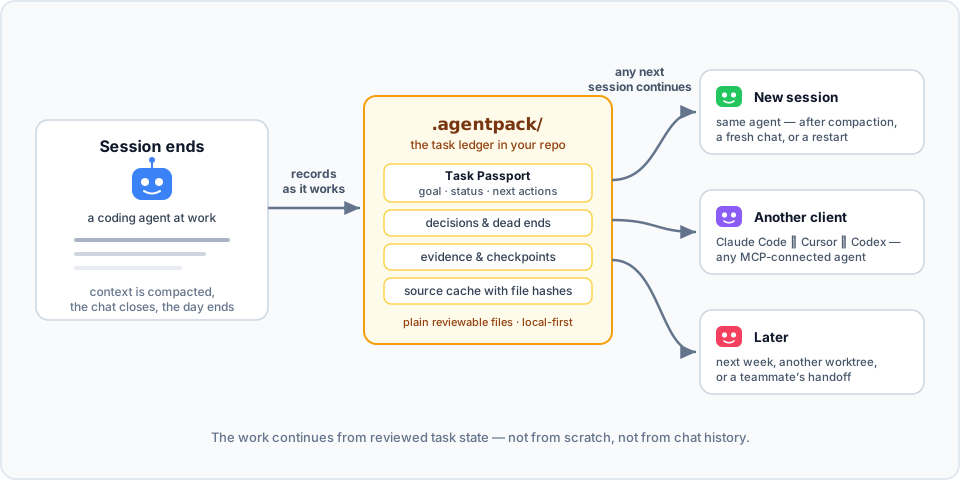
Agentpack은 진행 상황을 리포지토리에 직접 저장함으로써 AI 코딩 에이전트의 작업 연속성을 보장합니다. 채팅 기록이 삭제되거나 컨텍스트가 압축되어 진행 상황을 잃어버리는 대신, 에이전트는 이 도구를 사용하여 목표, 결정 사항, 막혔던 부분 및 검증 증거를 로컬 .agentpack 디렉토리에 기록합니다. 이 방식을 통해 Claude Code, Cursor, Codex, Claude Desktop과 같은 다양한 클라이언트가 이전 세션이 중단된 지점부터 정확히 작업을 이어갈 수 있습니다.
이 로컬 우선 솔루션은 클라우드 저장소나 텔레메트리 없이 작동하며, 모든 작업 상태를 리포지토리 내의 일반 파일로 유지합니다. 개발자는 CLI를 사용하여 이러한 기록을 관리하고 상태를 점검하거나, 체크포인트를 생성하거나, 작업 번들을 내보낼 수 있습니다. 시스템은 Task Passport를 사용하여 제약 조건과 다음 작업을 포함한 특정 목표의 라이프사이클을 추적합니다. 또한 에이전트가 정의된 쓰기 범위를 벗어나지 않도록 편집을 경고하거나 차단할 수 있는 task gate 기능도 제공합니다.
활용 사례
- 1중단된 코딩 세션 재개컨텍스트 압축이 발생하거나 새로운 채팅 세션이 시작된 후에도 에이전트가 특정 목표와 최근 결정 사항을 다시 불러올 수 있습니다.
- 2서로 다른 AI 클라이언트 간 전환조사 이력을 잃지 않고 Claude Code에서 Cursor로 작업을 옮길 수 있습니다.
- 3작업 경계 강제 적용task gate를 사용하여 쓰기 범위를 모니터링함으로써 에이전트가 권한 없는 변경을 수행하는 것을 방지합니다.
- 4파일별 결론 추적특정 파일의 역할에 대한 노트를 기록하고, 나중에 해당 파일이 수정될 경우 경고를 받습니다.
프로젝트의 README를 바탕으로 작성되었습니다. 모든 활용 사례는 해당 내용의 인용문과 대조하여 확인합니다.
Agentpack MCP 설치 방법
형식 확인: 2026년 11월 10일Cursor에 추가Goose에 추가Claude Code에 Agentpack MCP 설치
$ claude mcp add agentpack -- npx -y agentpack-cliCursor에 Agentpack MCP 설치
~/.cursor/mcp.json
{
  "mcpServers": {
    "agentpack": {
      "command": "npx",
      "args": [
        "-y",
        "agentpack-cli"
      ]
    }
  }
}VS Code에 Agentpack MCP 설치
.vscode/mcp.json
{
  "servers": {
    "agentpack": {
      "type": "stdio",
      "command": "npx",
      "args": [
        "-y",
        "agentpack-cli"
      ]
    }
  }
}VS Code CLI에 Agentpack MCP 설치
$ code --add-mcp '{"name":"agentpack","type":"stdio","command":"npx","args":["-y","agentpack-cli"]}'Claude Desktop에 Agentpack MCP 설치
claude_desktop_config.json
{
  "mcpServers": {
    "agentpack": {
      "command": "npx",
      "args": [
        "-y",
        "agentpack-cli"
      ]
    }
  }
}Codex에 Agentpack MCP 설치
$ codex mcp add agentpack -- npx -y agentpack-cliCodex config.toml에 Agentpack MCP 설치
~/.codex/config.toml
[mcp_servers.agentpack]
command = "npx"
args = ["-y", "agentpack-cli"]
Gemini CLI에 Agentpack MCP 설치
$ gemini mcp add -s user agentpack npx -- -y agentpack-cliGemini settings.json에 Agentpack MCP 설치
~/.gemini/settings.json
{
  "mcpServers": {
    "agentpack": {
      "command": "npx",
      "args": [
        "-y",
        "agentpack-cli"
      ]
    }
  }
}자동 검사
2026년 11월 12일에 실행됨전체 보고서 →자동 검사를 통과했습니다. 이는 보안 감사가 아닙니다. 코드를 직접 읽고 서버에 필요한 최소한의 권한만 부여하십시오. 검사 방식

- 소스 저장소 연결 및 접근 가능통과
- 오픈 소스 라이선스 (OSI)통과
- 최근 1년 내 커밋 또는 릴리스통과
- 패키지 이름이 인기 패키지와 유사하지 않음통과
- 원격 엔드포인트가 HTTPS 사용검사되지 않음
- 파괴적인 도구에 라벨 표시됨검사되지 않음
- 모델에 대한 숨겨진 지침 없음통과
- 패키지 및 해당 종속성에 중요한 보안 권고 없음통과
README
GitHub에서 보기Agentpack


Repo-native task continuity for AI coding agents.
Agent memory remembers how you work. Agentpack remembers where the task stands.
Your agent spent an hour on a task. It found the cause, rejected two approaches, and wrote down the next step. Then the context was compacted, or the chat closed. The next session starts from zero and does the same investigation again.
Agentpack keeps the task state in your repo. Connected agents record the goal, decisions, dead ends, verification evidence, and checkpoints in .agentpack/ while they work. Then the next session loads that state and continues: the same agent after compaction, a different client, or you next week.
Here it is in action. In session 1, an agent works on a flaky test and records a decision, a dead end, and a checkpoint through the Agentpack MCP tools. In session 2, the next day with an empty context, one load_context call brings the task back:

▶ Watch the 80-second explainer, with sound
To try the same flow by hand from the CLI, see docs/DEMOS.md.
- Local-first. Plain files in your repo. No cloud, no telemetry, no network calls.
- Made for agents. A local MCP server and generated project instructions (
AGENTS.md,CLAUDE.md, Cursor rules) tell agents when to load and record state. - Open to people. The CLI shows the same state, so you can inspect it, fix it, or hand it off yourself.
How is this different from agent memory?
Claude Code memory, Codex memories, and CLAUDE.md or AGENTS.md keep how to work: your preferences, project conventions, and facts that stay true. Agentpack keeps where the work is: the goal of the current task, its constraints, decisions, dead ends, next actions, and verification result.
| Agent memory | Agentpack | |
|---|---|---|
| Holds | Preferences, conventions, long-lived facts | The state of one task |
| Lives in | The profile or account of one client | .agentpack/ in the repo, local by default, portable with task bundles |
| Read by | That client only | Any MCP client: Claude Code, Codex, Cursor, Claude Desktop |
| Shape | Free-form notes, recalled by relevance | A Task Passport per task: goal, lifecycle, the paths it may change, and verification bound to a commit |
| Staleness | Not tied to file changes | Notes about files store the file hash, so Agentpack flags a note when its file changes |
Use both. Memory keeps how you like to work. Agentpack keeps what the task needs next.
Quick start
Agentpack needs Node.js 20 or later.
npm install -g agentpack-cli

cd path/to/your/repo
agentpack init                     # once per repo
agentpack install claude --write   # per client: codex | claude | cursor | claude-desktop
agentpack install git-hooks --write  # optional: task gate check before each commit
Restart or reconnect your coding agent, and approve the Agentpack server or hooks when the client asks. From then on, the agent loads the task state when a session starts, records decisions and evidence while it works, and creates checkpoints at meaningful points.
To check the setup, run agentpack doctor. To see the task state yourself, run agentpack resume --preset agent --query "<topic>".
In a Git repository, init adds the local Agentpack files to .git/info/exclude. The list includes .agentpack/, .mcp.json, .claude, .codex, .cursor, AGENTS.md, and CLAUDE.md. Agentpack does not change your .gitignore. Files that Git already tracks stay tracked.
For each client, docs/INTEGRATIONS.md shows what the installer writes and why.
How it works
- When a session starts, the agent loads a compact summary: the current Task Passport, recent checkpoints, decisions, and source conclusions.
- While it works, the agent records what is worth keeping: decisions, failed approaches, and verification evidence. It can also record a source conclusion: a short note about what a file does, stored with the file hash. If the file changes later, Agentpack flags the conclusion. A matching hash shows that the file is unchanged, not that the conclusion is correct.
- At a natural stop, the agent creates a checkpoint with the status, the next actions, and the Git state.
- The next session, in any MCP client, continues from that state. It does not rebuild the task from chat history.
Each task has a Task Passport: the goal, status, constraints, write scope (the paths the task may change), next actions, and verification. You can start, park, switch, and finalize tasks, so each handoff is explicit.
The task gate checks edits against the current Passport. The client installers add native hooks for Claude Code, Codex, and Cursor. install git-hooks adds a pre-commit check. By default, the gate only warns. Set "gateMode" in .agentpack/config.json to "block" to stop edits outside the write scope or outside an active task, or to "off" to turn the gate off. Hooks are a guardrail, not a sandbox. See docs/CLI.md.
The summary stays inside a token budget. The agent gets the useful state back, not the full history.
More features
- Task bundles. Export a task to one JSON file, and import it in a fresh clone or on another machine. See docs/TASK-PASSPORT.md.
- Tasks across repositories. One Passport can cover changes in several repositories, each with its own write scope.
- Monorepo focus. Give each part of a monorepo (
api/,frontend/,cron/) short tasks with their own write scope. The task gate warns when the agent leaves that part. - Usage reports.
agentpack usage reportreads local Claude Code and Codex transcripts and shows the token use of a task, including the Agentpack share. Nothing leaves your machine. - Read-only inspector.
agentpack tuishows tasks, evidence, and checkpoints in the terminal. See docs/TUI.md. - Builder subagent. Codex, Claude Code, and Cursor installs include an optional builder for larger implementation work. The main agent says what it will hand off before it uses the builder. Small tasks stay with the main agent.
When it helps
- The context is compacted in the middle of a task, and the next turn needs the state back.
- You start a new chat on a task that is still open.
- You change between Claude Code, Cursor, Codex, or another MCP client.
- You come back to a refactor or a bug fix days later.
- Another agent continues from your checkpoint.
Agentpack context also uses tokens. The compact output keeps the task state available without the full ledger history.
Security posture
- Zero runtime dependencies, exact dev dependencies, a committed lockfile, and
ignore-scripts=true. - No telemetry and no network calls in normal CLI or MCP operation.
- Best-effort redaction of values that look like secrets in stored context and handoff output.
- GitHub Actions publishes each release with npm provenance (Trusted Publisher, no long-lived tokens). To verify, run
npm audit signatures.
See SECURITY.md for the full policy, including what Agentpack reads outside the repo.
Documentation
- docs/INTEGRATIONS.md: setup for Codex, Claude Code, Cursor, Claude Desktop, and Git hooks
- docs/TASK-PASSPORT.md: task lifecycle, handoffs, additional repositories, and task bundles
- docs/CLI.md: full CLI reference, budgets, and manual workflows
- docs/MCP.md: MCP server contract and tools
- docs/DEMOS.md: short continuity demos to run yourself
- docs/TUI.md: the read-only terminal inspector
- docs/LEDGER-HYGIENE.md: keep the ledger small and useful
Contributing
Clone the repo and use Node.js 20 or later:
npm ci --ignore-scripts
npm test
npm run mcp:smoke
node dist/src/agentpack.js --help
See docs/SETUP.md for the development setup and docs/RELEASING.md for the release steps.
Mirror: Codeberg. Issues, releases, and npm provenance stay on GitHub.
Agentpack MCP 질문
Agentpack MCP를 Claude Code에 추가하려면 어떻게 하나요?
터미널에서 claude mcp add agentpack -- npx -y agentpack-cli를 실행합니다. 모든 프로젝트에서 사용할 수 있게 하려면 --scope user를 추가합니다.
Agentpack MCP를 Cursor에 추가하려면 어떻게 하나요?
~/.cursor/mcp.json를 열고 mcpServers 아래에 서버를 추가합니다. 위 설치 섹션에 표시된 Cursor 구성을 사용합니다.
Agentpack은 작업 상태를 어디에 저장하나요?
클라우드나 네트워크 호출 없이 리포지토리 내부의 .agentpack/ 디렉토리에 일반 파일 형태로 작업 상태를 저장합니다.
Agentpack은 어떤 MCP 클라이언트와 호환되나요?
Claude Code, Codex, Cursor, Claude Desktop 및 other MCP 클라이언트와 호환됩니다.
Agentpack은 에이전트 메모리와 어떻게 다른가요?
에이전트 메모리는 선호도나 장기적인 컨벤션을 유지하는 반면, Agentpack은 목표, 결정 사항, 막혔던 부분, 다음 작업, 검증 내용 등 현재 작업의 상태를 유지합니다.
Agentpack을 어떻게 설치하나요?
agentpack-cli npm 패키지(Node.js 20 이상)를 설치하고, 리포지토리에서 agentpack init을 실행한 다음 사용하는 클라이언트에 맞는 통합 기능을 설치합니다.
Agentpack이 클라우드로 데이터를 전송하나요?
아니요. 텔레메트리를 수집하지 않으며 일반적인 CLI 또는 MCP 작동 중에는 네트워크 호출을 수행하지 않습니다.