
Kanera MCP server
2026년 11월 12일 커밋AI agent이 Kanera에서 카드를 가져오고, 실행 과정을 추적하며, 보드, 작업, 체크리스트, 댓글, 노트 및 자동화 항목을 업데이트할 수 있습니다.
다른 이름 happendev/Kanera
- 스타
- 17
- Tools
- —
- 다운로드, 30일
- —
- 최신 버전
- 4.3.0
- 마지막 커밋
- 2026년 11월 12일
- 라이선스
- —
Kanera MCP란?
AI agent이 Kanera에서 카드를 가져오고, 실행 과정을 추적하며, 보드, 작업, 체크리스트, 댓글, 노트 및 자동화 항목을 업데이트할 수 있습니다.
프로젝트 README에서 생성된 요약
Kanera MCP server 정보
Kanera는 개발 팀과 프로젝트 매니저가 AI agent와 함께 프로젝트 작업을 관리할 수 있도록 지원합니다. 이 MCP server를 사용하면 Claude, Cursor, Codex와 같은 agent가 프로젝트 보드와 직접 상호작용하여 카드를 가져오고, 체크리스트를 업데이트하며, 댓글을 추가하고, 자동화를 관리할 수 있습니다. OAuth 연결을 사용하므로 agent는 팀원과 동일한 보드에서 작업하며, 모든 진행 상황이 가시적으로 표시되고 작업 주체가 정확하게 기록됩니다.
사용자는 Docker를 통해 Kanera를 셀프 호스팅하거나 호스팅 서비스를 이용할 수 있습니다. 시스템은 Kanban, Table, Calendar, Timeline 등 다양한 뷰를 지원합니다. 의존성 맵 및 크리티컬 패스 분석과 같은 도구를 통해 프로젝트 상태를 심층적으로 파악할 수 있습니다. MCP server가 CLI와 동일한 도구 계층을 노출하므로, agent는 AI 클라이언트에서 직접 일정 충돌 식별이나 예상 완료일 계산과 같은 복잡한 스케줄링 작업을 수행할 수 있습니다.
활용 사례
- 1agent에게 작업 실행 위임특정 카드를 AI agent에게 할당하여 작업을 수행하게 하고 진행 상황을 보드에 보고하도록 합니다.
- 2프로젝트 타임라인 및 리스크 분석AI 클라이언트에 프로젝트 완료 시점을 확인하거나 어떤 작업이 크리티컬 패스에 있는지 묻습니다.
- 3동기화된 팀 워크플로우 유지단일 워크스페이스 내의 여러 보드에서 레이블과 커스텀 필드가 일관되게 유지되도록 합니다.
- 4agent 활동 및 차단 요소 추적AI agent가 작업 진행을 위해 사람의 개입이 필요한 정체 상태인지 모니터링합니다.
프로젝트의 README를 바탕으로 작성되었습니다. 모든 활용 사례는 해당 내용의 인용문과 대조하여 확인합니다.
Kanera MCP 설치 방법
형식 확인: 2026년 11월 10일Cursor에 추가Goose에 추가Claude Code에 Kanera MCP 설치
$ claude mcp add --transport http kanera https://mcp.kanera.app/mcpCursor에 Kanera MCP 설치
~/.cursor/mcp.json
{
  "mcpServers": {
    "kanera": {
      "url": "https://mcp.kanera.app/mcp"
    }
  }
}VS Code에 Kanera MCP 설치
.vscode/mcp.json
{
  "servers": {
    "kanera": {
      "type": "http",
      "url": "https://mcp.kanera.app/mcp"
    }
  }
}VS Code CLI에 Kanera MCP 설치
$ code --add-mcp '{"name":"kanera","type":"http","url":"https://mcp.kanera.app/mcp"}'Codex에 Kanera MCP 설치
$ codex mcp add kanera --url https://mcp.kanera.app/mcpCodex config.toml에 Kanera MCP 설치
~/.codex/config.toml
[mcp_servers.kanera]
url = "https://mcp.kanera.app/mcp"
Gemini CLI에 Kanera MCP 설치
$ gemini mcp add -s user --transport http kanera https://mcp.kanera.app/mcpGemini settings.json에 Kanera MCP 설치
~/.gemini/settings.json
{
  "mcpServers": {
    "kanera": {
      "url": "https://mcp.kanera.app/mcp",
      "type": "http"
    }
  }
}자동 검사
2026년 11월 14일에 실행됨전체 보고서 →아직 인증되지 않았습니다. 서버는 80점 이상의 점수, 심각한 결함 없음, 그리고 검사에 충분한 데이터를 갖추어야 합니다. 검사 방식 · 점수를 높이기 위해 수정할 항목

- 소스 저장소 연결 및 접근 가능happendev/kanera is public and reachablegithub.com/happendev/kanera ↗통과
- 패키지가 이 저장소를 소스로 명시검사되지 않음
- 빌드 출처(Sigstore 증명)검사되지 않음
- 오픈 소스 라이선스 (OSI)No license결함 발견
- 최근 1년 내 커밋 또는 릴리스Last commit or release 2026-11-12github.com/happendev/kanera ↗통과
- OpenSSF Scorecard검사되지 않음
- 패키지 이름이 인기 패키지와 유사하지 않음검사되지 않음
- 패키지 및 해당 종속성에 중요한 보안 권고 없음검사되지 않음
- 모델에 대한 숨겨진 지침 없음0 tool descriptions and the README read; no override phrases, credential paths or hidden characters통과
- 파괴적인 도구에 라벨 표시됨검사되지 않음
- 원격 엔드포인트가 MCP 핸드셰이크에 응답HTTPS endpoint answered 401 (sign-in required)통과
README
GitHub에서 보기One clear view. Keep work moving.
See what is assigned, what changed, what is blocked, and what has been completed across every project, client, and team.
Start free · Explore features · Read the docs · Work with AI agents · Explore dependencies · Connect GitHub · Self-host Kanera
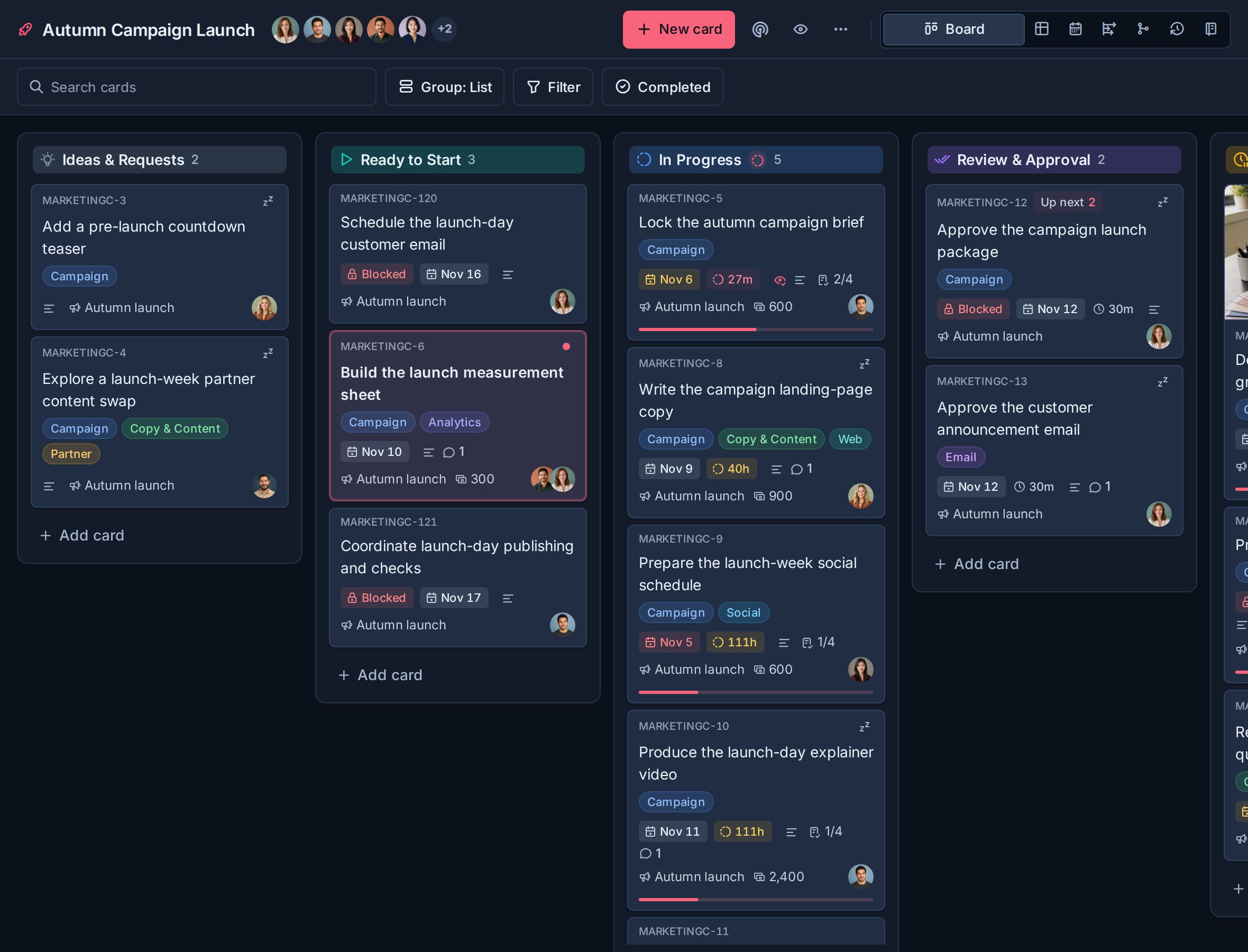
Kanera coordinates assigned, active, blocked, and completed work across projects, clients, and teams from one fast, polished workspace. It brings boards, structured tasks, dependency maps and timelines, notes, assignments, progress history, automation, and integrations into one focused system—more visibility than a basic Kanban board without the overhead of a heavyweight work suite.
Use the hosted service and get started in minutes, or self-host Kanera on your own infrastructure.
One place for moving work forward
- Plan in the view that fits. Move between Kanban, Table, Calendar, Dependencies, My Cards, Team Cards, and Work Done without duplicating work.
- See what unblocks the team. Connect prerequisites across boards, trace the chain in Map, Timeline, or Steps, spot risks and bottlenecks, and edit blocking links directly on the map.
- Keep the details with the task. Add descriptions, comments, attachments, labels, custom fields, watchers, and assignable checklist items to cards.
- Connect the code to the task. Link GitHub pull requests automatically through card keys, follow their review and merge states, and render commit links with readable change summaries.
- Set clear priorities. Use Home and a ranked Up next queue to keep urgent work visible across every board.
- Make progress visible. Review what was created, moved, completed, or checked off without chasing another status update.
- Keep knowledge nearby. Use personal, workspace, and board notes for decisions, processes, references, and project context, with Scratchpad ready for quick capture.
- Stay in flow from the keyboard. Open search and personal tools, jump between core pages, switch board views, create cards, and update an open card with contextual shortcuts. Press
?to see what is available. - Delegate to AI agents. Give your agent cards to work on, follow live runs and blockers, and review results with clear agent attribution.
- Automate and integrate. Handle repetitive updates with trigger-based automations, post card activity into Slack, Discord, Telegram, or Zulip, and connect other tools through the REST API, webhooks, and MCP server.
- Get told what matters, where you want it. Choose per notification type whether an update reaches email, browser push, ntfy, Gotify, or your own webhook, then add per-workspace exceptions so one busy board does not drown out the rest.
- Work together in real time. Stay current with live updates, mentions, activity history, and controlled guest access.
- Work from any screen. The full Kanera experience adapts to phones, tablets, and desktops, and installs as a PWA on iOS, Android, and desktop.
Workspaces and standalone boards
Organisation
  ├─ Workspace
  │    └─ Board
  │         └─ Card
  └─ Standalone board
       └─ Card
Use a workspace when several boards should follow the same operating model. Lists, labels, custom fields, checklist templates, and automations are configured once and used across its boards, keeping workflows and reporting consistent as projects grow.
That means a status like In Review or a field like Client has the same meaning everywhere—no rebuilding each board or reconciling mismatched setups later.
For work that does not need to share that setup, create a standalone board. It keeps its own lists, labels, custom fields, checklist templates, automations, members, access, and integrations independently of your workspaces.
Work with AI agents, with progress you can see
Use Claude, ChatGPT, Codex, Cursor, or another agent you already work with to pick up cards, read their context, carry out tasks, and report back in Kanera. Agent work stays on the same boards as your team's work, with live progress, visible blockers, and a record of who did what for whom.
Know what is running and what needs you
An agent opens a run before multi-step work and updates it with a short progress note. Everyone viewing the board sees a live chip on the card; it turns amber when the agent is waiting on a person. Open the card to see the agent, its current work, and when it last reported. A pull request or session link can take you straight to the result.
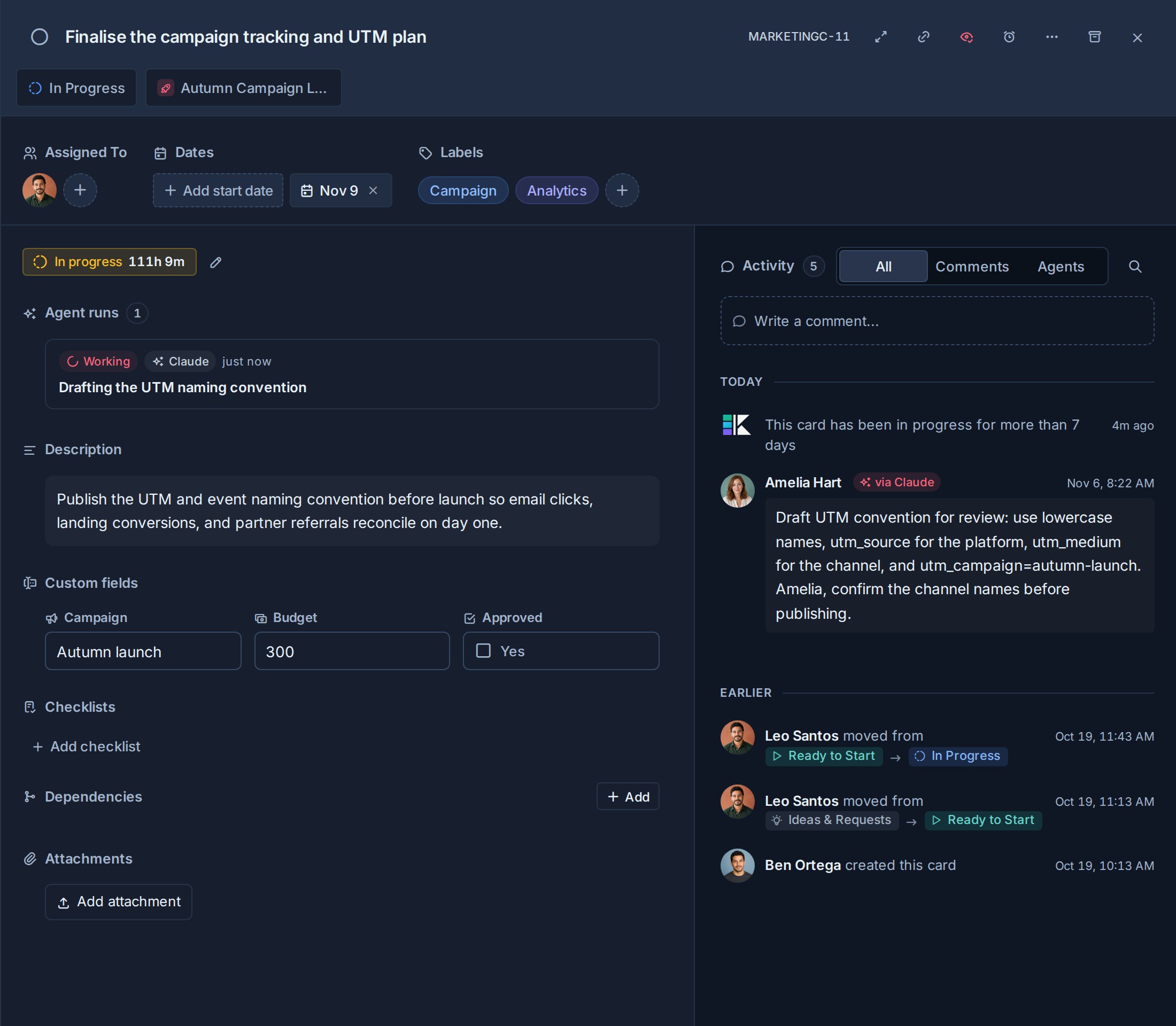
When the run ends, its outcome and closing summary stay in the card's activity. Runs that stop reporting are marked stalled after fifteen minutes, so an interrupted agent does not leave work looking active. A blocked run makes the wait visible; the agent should also comment with its question so watchers and assignees are notified.
Follow your agent's work without losing attribution
With an OAuth connection, comments and changes show the person the agent acted for plus a via Claude, via Codex, or other agent badge. That includes browser sign-in through the CLI: name the agent with kanera auth login --agent "Claude Code". Personal API keys attribute actions to their owner without a via badge; workspace and board keys use the key's name.
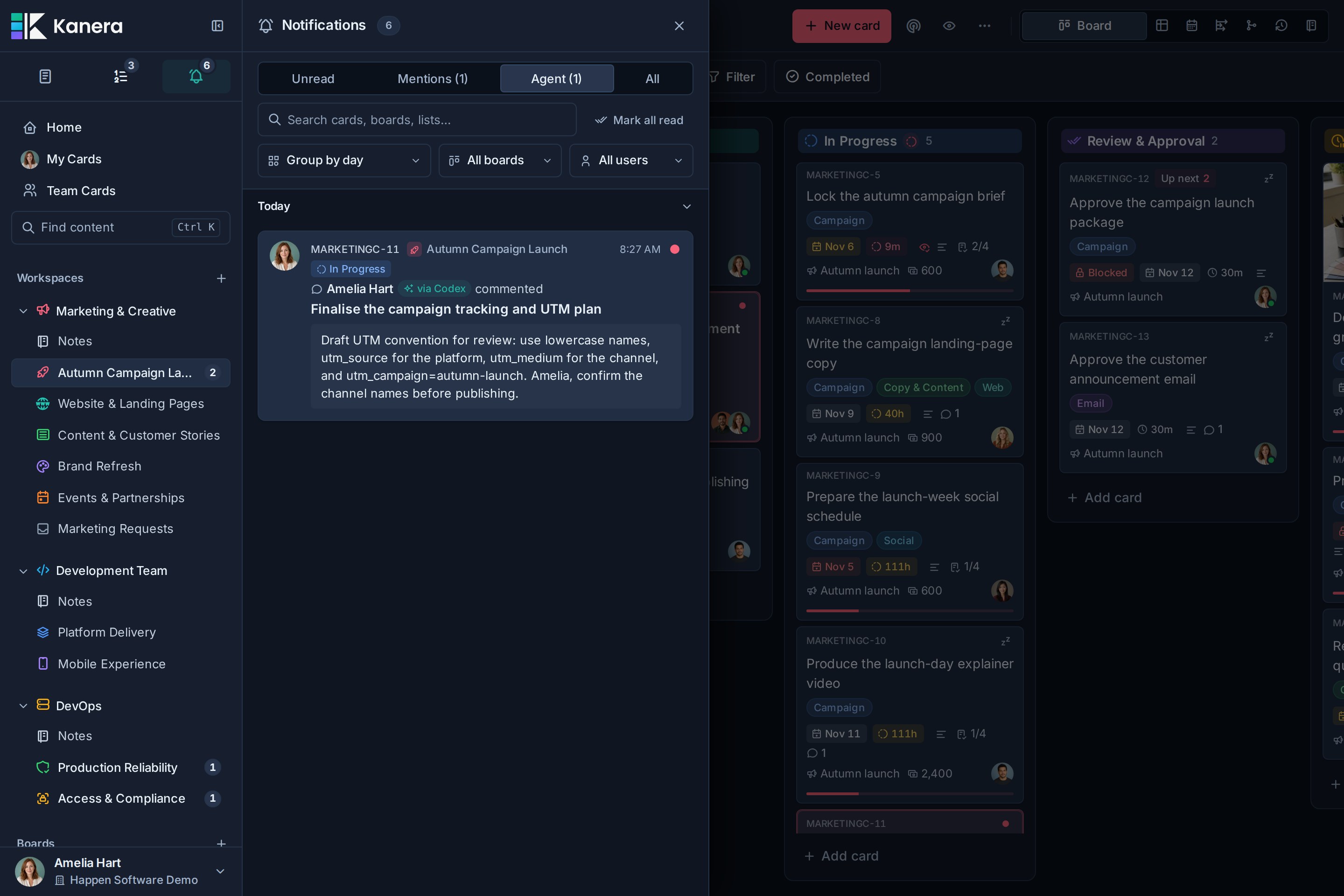
Your agent's changes can notify you even though it acts on your behalf. The Agent tab brings those updates together, and Work Done distinguishes agent output from your own actions. Agents still operate within the connected person's current board permissions, and read-only credentials prevent writes at the server.
Read more about agent runs, attribution, and the Agent Workflow template.
Connect your agent through MCP or the CLI
| Interface | Use it for | Get started |
|---|---|---|
kanera CLI |
Terminals, scripts, CI, and coding agents that can run shell commands | npm install --global @kanera/cli · CLI docs |
| MCP server | Claude, ChatGPT, Codex, GitHub Copilot, Cursor, Gemini CLI, OpenCode, and other MCP clients, connected with OAuth | https://mcp.kanera.app/mcp · MCP setup guides |
| Agent Skill | Teaching Claude Code, Codex, and other agents to use Kanera reliably | kanera setup claude or npx -y skills add https://github.com/happendev/Kanera/tree/main/integrations/skills/kanera · skill source |
| TypeScript SDK | Your own applications and integrations | npm install @kanera/sdk · SDK docs |
| REST API and webhooks | Any language, sync jobs, and event-driven integrations | API docs |
The CLI and the MCP server expose the same tool layer, so anything an agent can do over MCP it can also do with kanera from a shell. That includes the Timeline view's schedule: work.schedule (CLI kanera schedule <boardId>, SDK kanera.work.schedule()) returns the critical path, slack in working days, scheduling conflicts and the projected finish for a board or workspace, so an agent can answer "when will this finish" and "what slips if this moves" with the same numbers the chart shows, and the schedule.conflict_detected and schedule.critical_path_slipped events, or scheduling_conflict_appears / critical_path_slips automations, tell it when a plan needs attention. Try the CLI without installing it:
npx -y @kanera/cli commands
Read-only credentials are enforced by the server, and self-hosted Kanera exposes its own MCP address and API for the same CLI and SDK. See Work with coding agents from the terminal for picking up cards and reporting progress from Claude Code or Codex.
A board for delegating work and reviewing results
Start with the Agent Workflow template: Backlog → Agent Working → Waiting on Me → Review → Done. Describe the task on a card, then ask your agent to pick it up. Following Kanera's agent instructions, it moves the card as work starts, needs your input, or finishes. You review the result and decide when it belongs in Done.
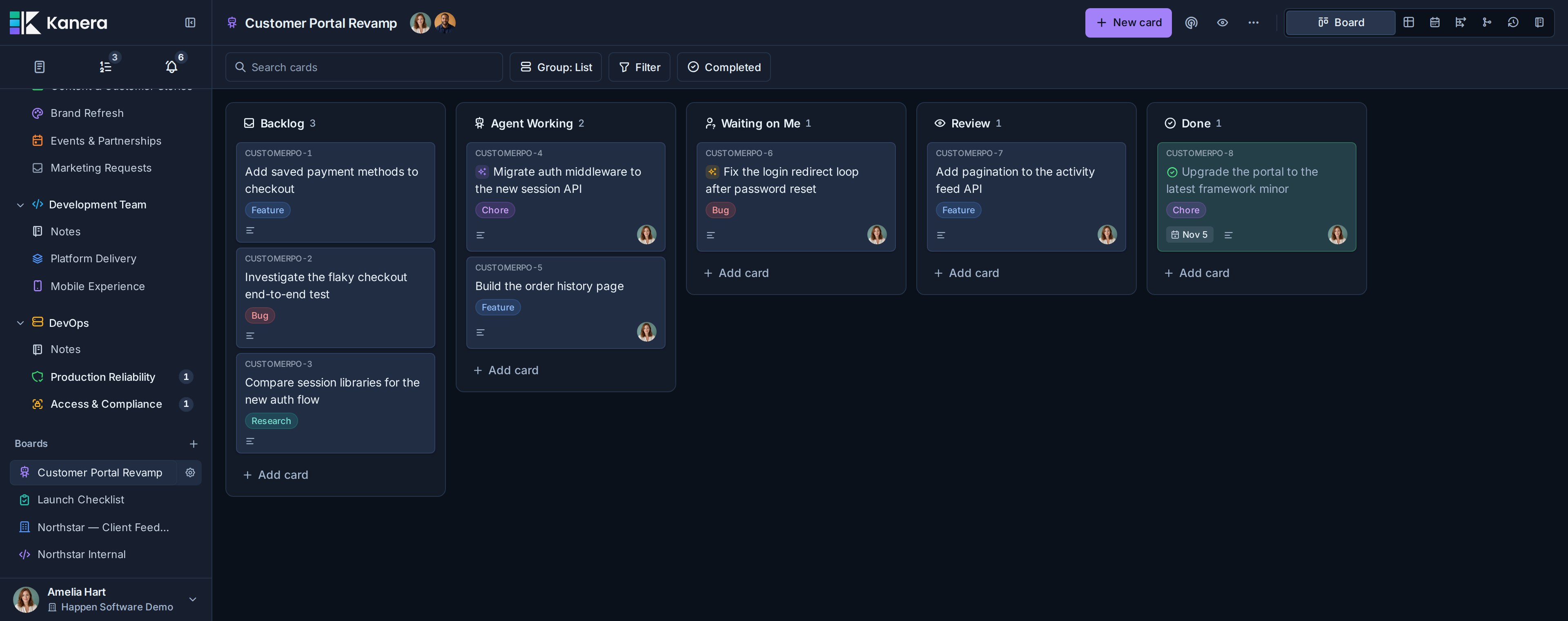
The workflow combines ordinary cards with agent runs. Runs track a working session; card moves remain explicit actions by the agent or a person, so starting or finishing a run does not silently move the card.
See Kanera in action
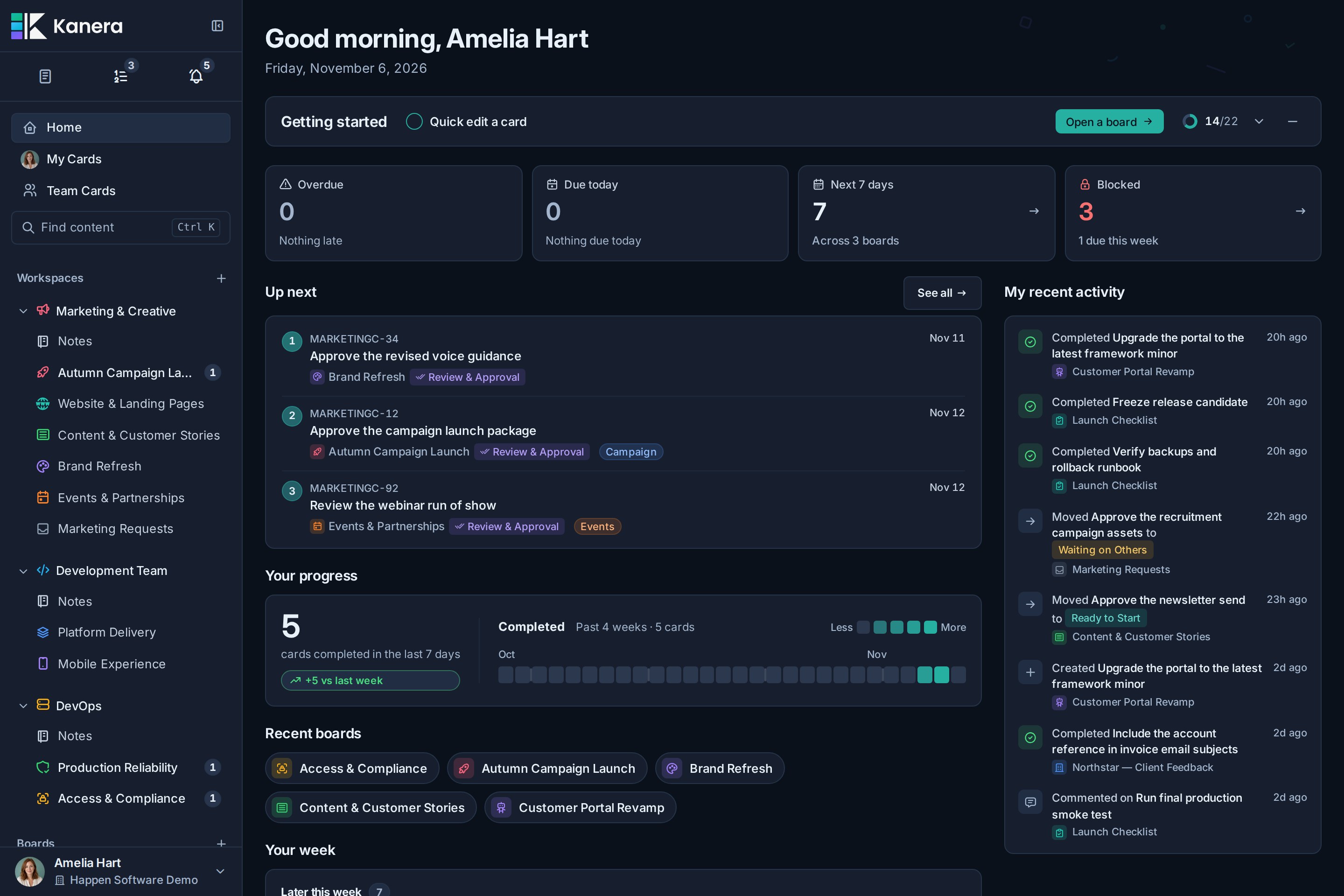
Home keeps today and the week in focus
Start with overdue work, items due today, the next seven days, and recent progress in one focused view. Jump back into active boards and scan the week without opening each project separately.
Boards and shared lists keep the workflow visible
Move cards through lists while keeping labels, assignees, due dates, checklist progress, and visual covers in view. Boards in a workspace share the same ordered lists, so stages such as Intake, In progress, Review, and Done remain consistent across related projects.
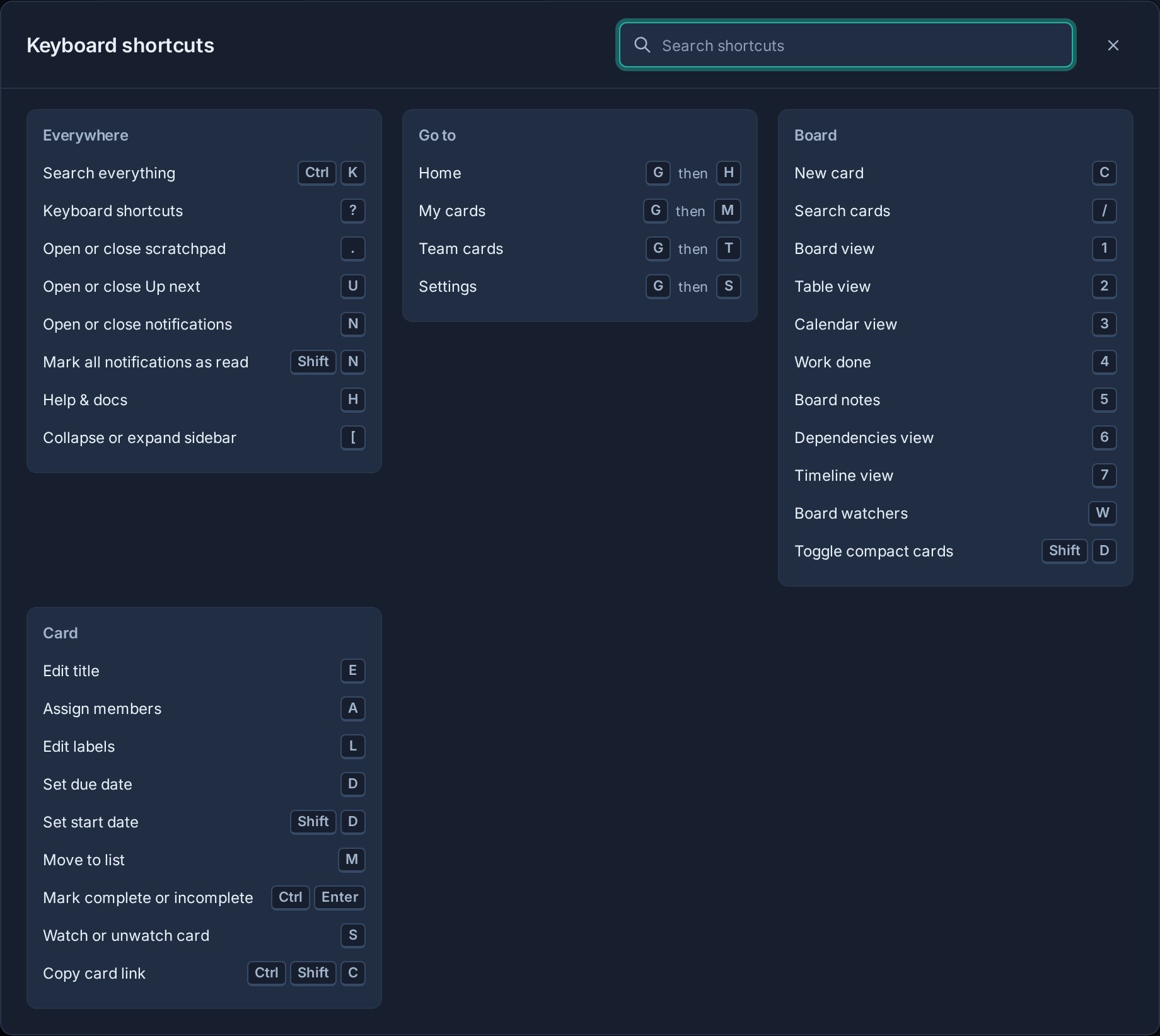
Keyboard shortcuts keep routine actions close
Press ? to open a shortcut sheet that reflects the current screen. Use two-key sequences to jump to Home, My Cards, Team Cards, or Settings; single keys to open Scratchpad, Up next, notifications, and board tools; and contextual card shortcuts for assignment, labels, due dates, lists, completion, watching, and copying links. Letter shortcuts automatically stand down while you type.
Up next keeps priorities in order
Build one ranked queue from cards assigned to you across every accessible board. Reorder it as priorities change, keep source boards and due dates visible, and see the same order on Home, My Cards, board cards, and Table.
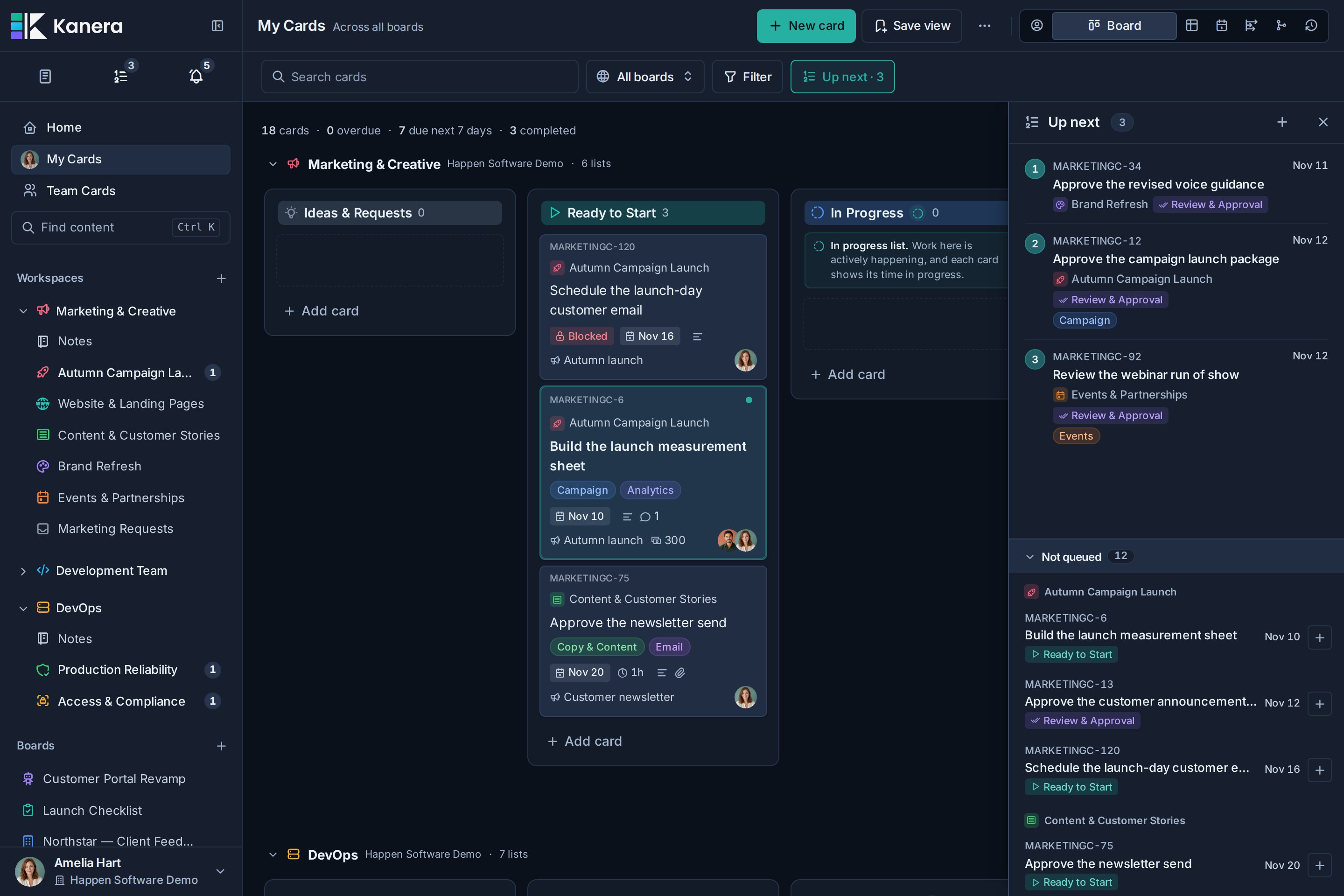
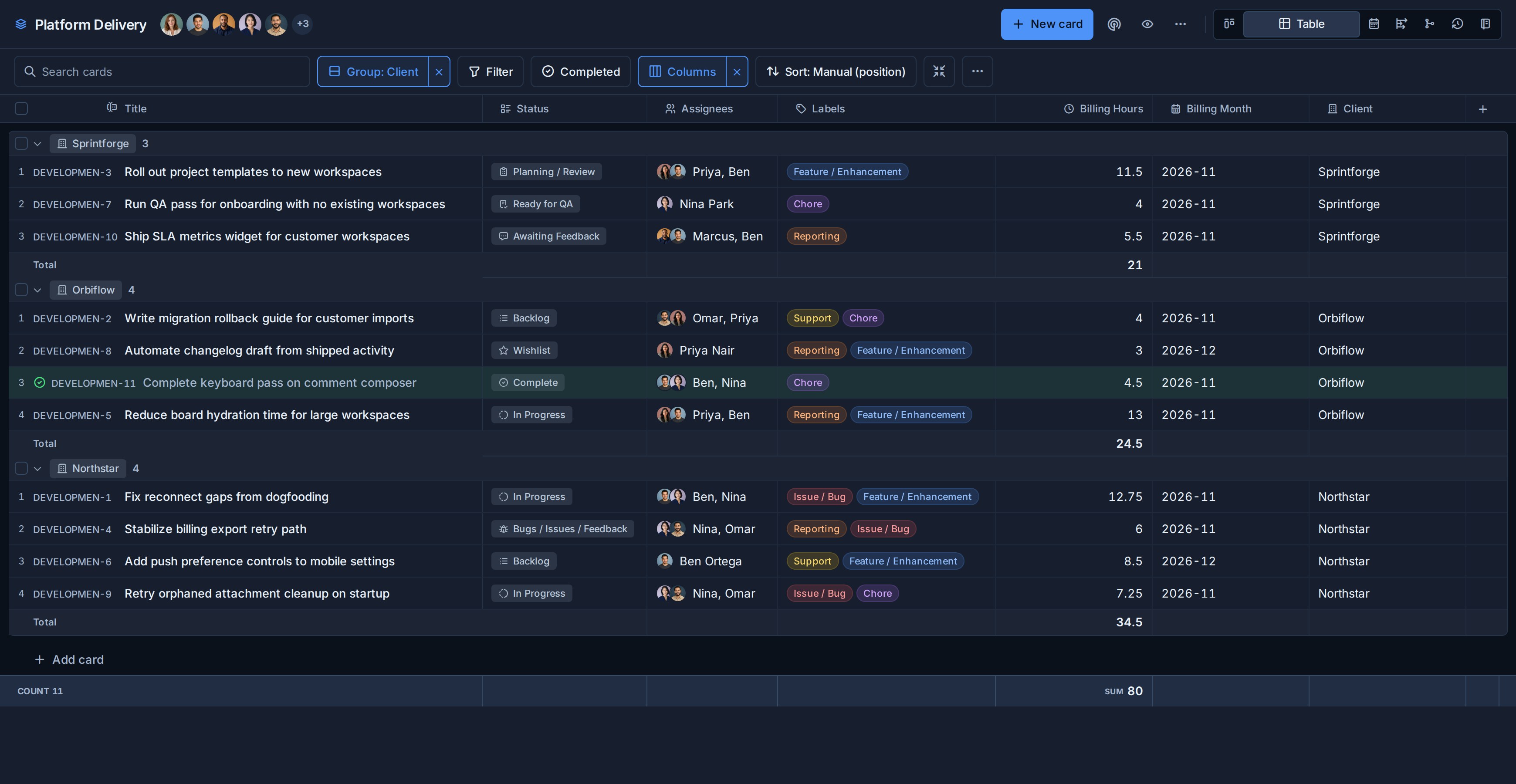
Table view turns live work into structured reports
Group and sort cards by list, assignee, due date, label, status, or custom field, then choose the columns that matter and edit any of them in place. Numeric custom fields support sum and average aggregates per group, with a second breakdown dimension for questions such as hours by client and work type.
Export the filtered result to Excel as a multi-sheet workbook containing card rows, spreadsheet-friendly summaries, and a readable report when aggregates are enabled.
Team Cards Overview shows what everyone is busy with
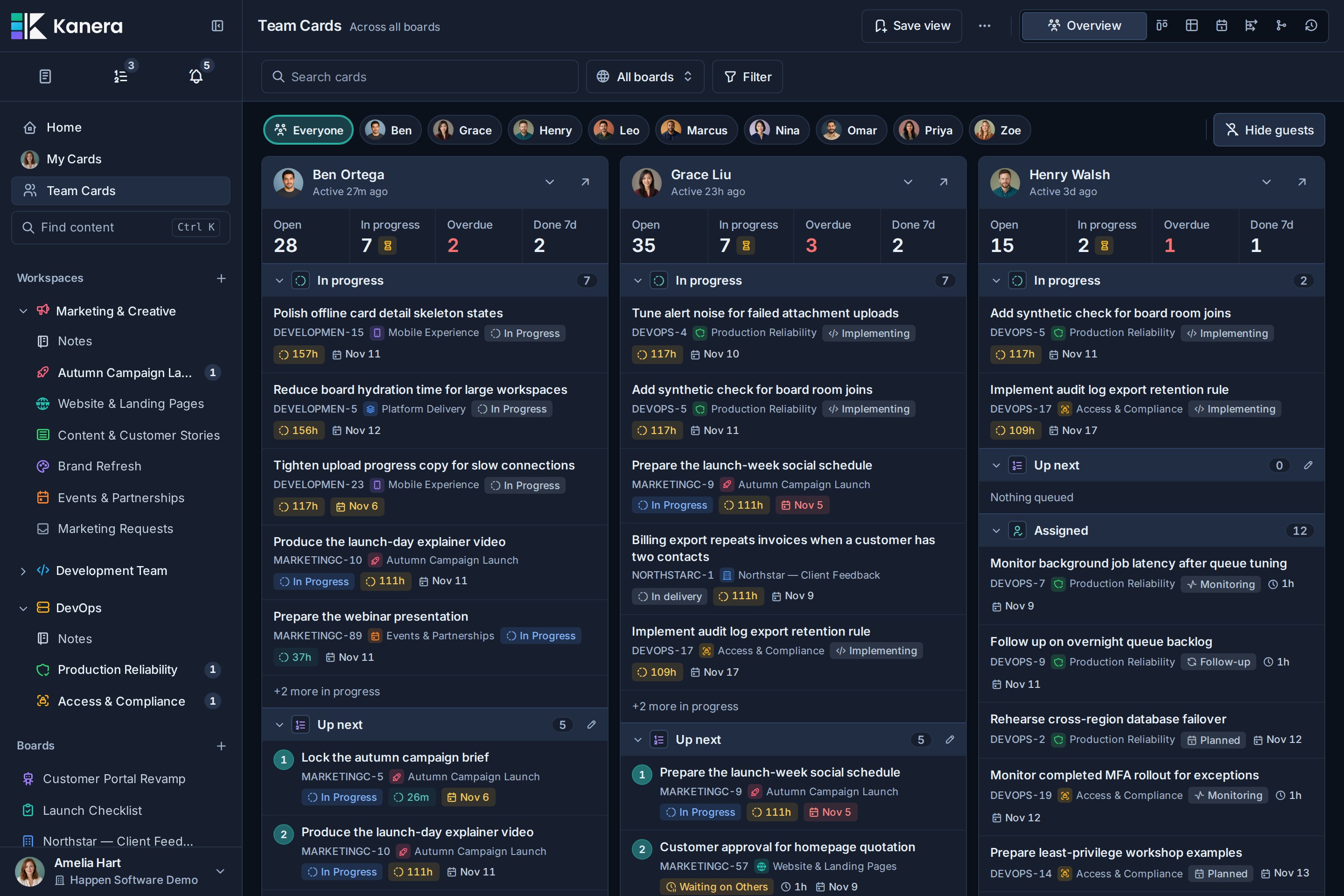
Open Overview in Team Cards to see everyone’s work across boards. One panel per teammate answers "what is each person working on, and what is next?" without opening each board in turn: their In progress cards longest-running first with time in progress, what they recently moved or created themselves, the head of their Up next queue, their other assigned cards by due date, and what they finished this week. Open, In progress, Overdue, and Done counts expand into the full list, in-progress work with no assignee gets its own panel, and folding a section folds it for everyone.
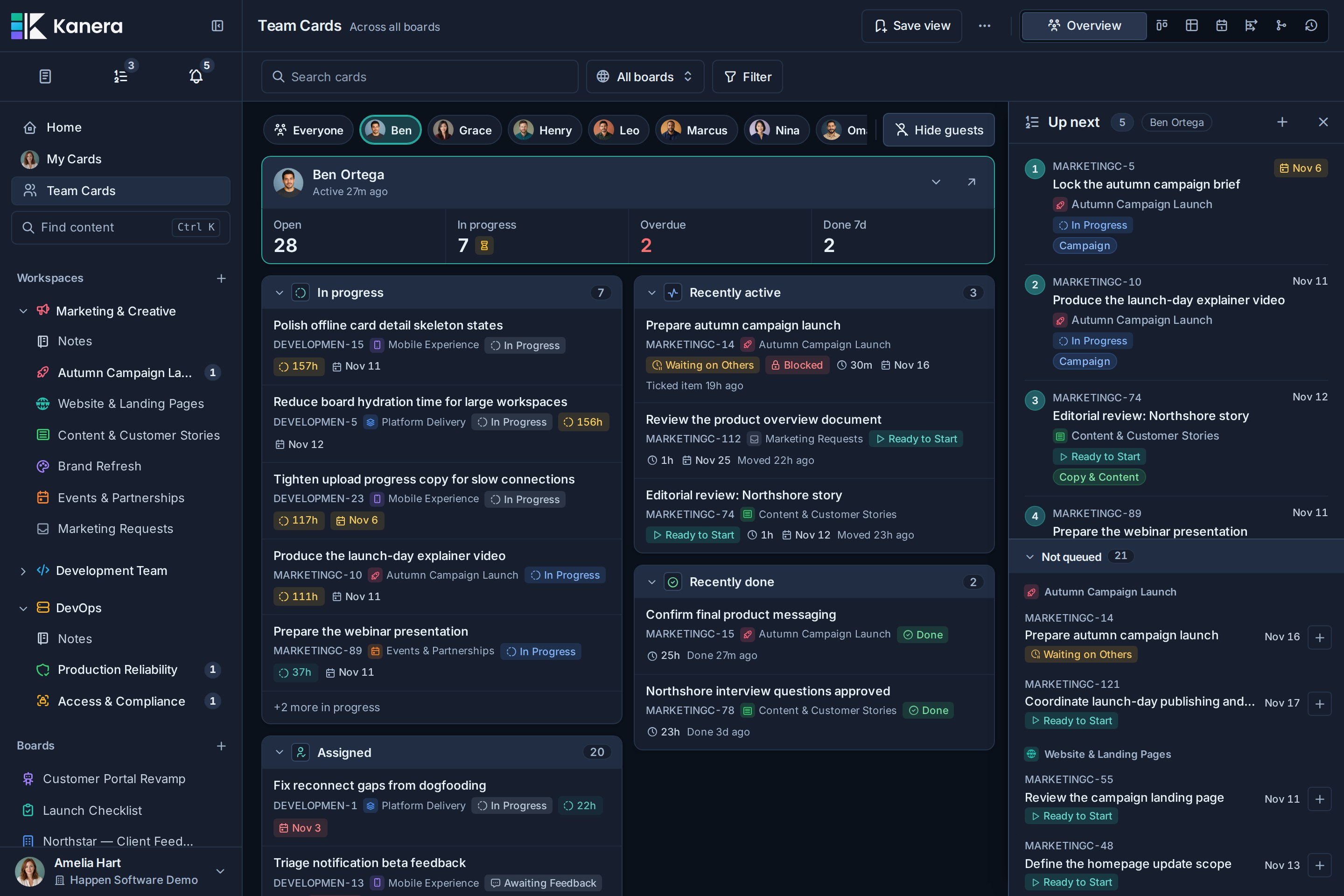
Pick one teammate to see just their panel with their Up next queue docked beside it. Reorder their queue, and queue what they should do next from the open cards they have not queued yet, listed soonest due first.
Dependencies show what can move next
Connect cards with Blocks, Blocked by, or Relates to relationships, including across boards. Kanera makes blocked work visible and shows when the last active prerequisite clears, helping the next person pick up the handoff.
Open Dependencies on a board, in My Cards, or in Team Cards. Follow the chain in Map, compare due weeks in Timeline, or read a numbered Steps list that adapts to your phone. On a workspace board, switch between the board's chains and the wider workspace while keeping each card's source and permissions intact.
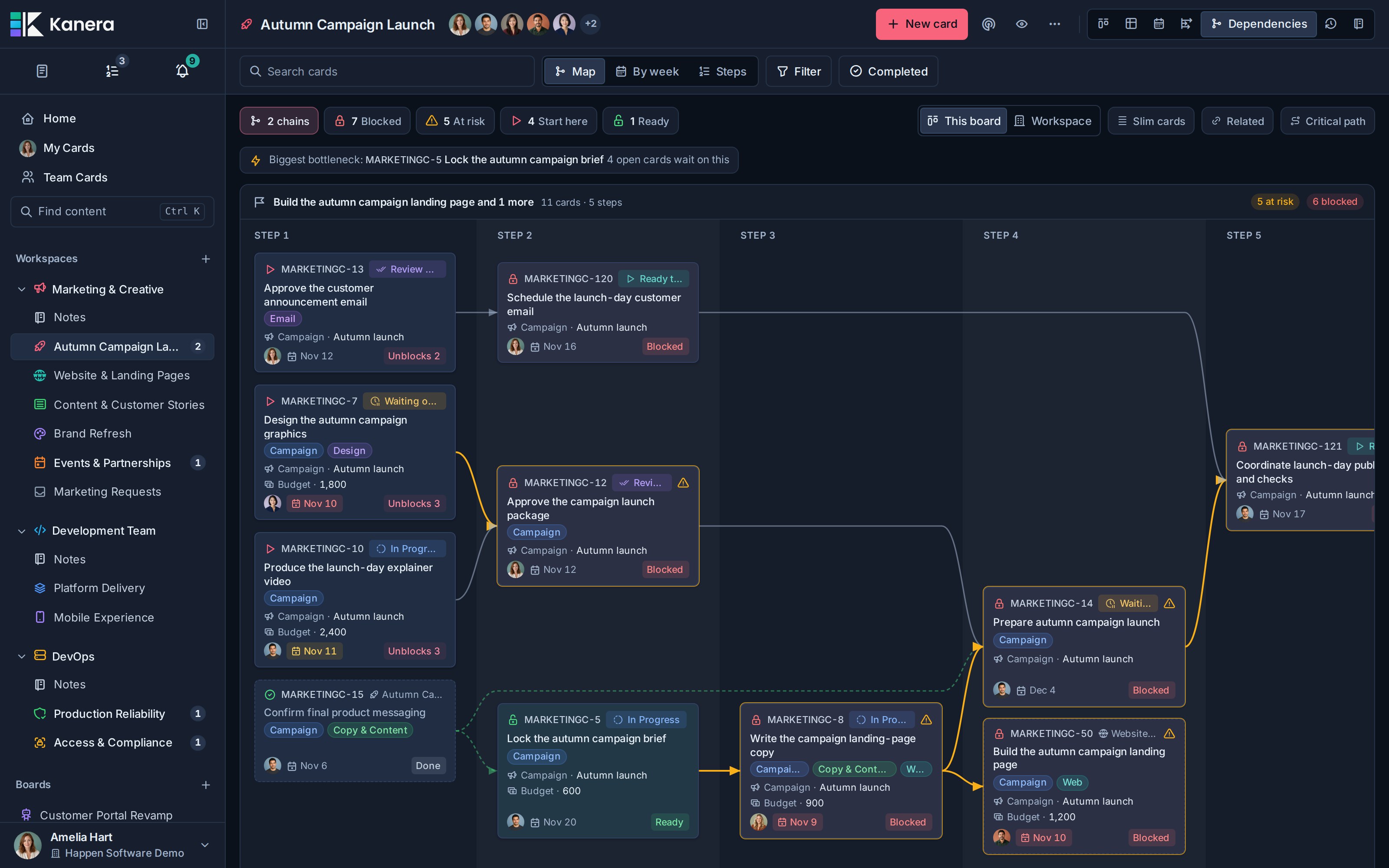
Find Blocked, At risk, Start here, and Ready work without losing the chain around it. The biggest bottleneck points to the card holding up the most open work; Critical path highlights the longest routes by number of open cards. Timeline aligns every chain to shared due-week columns and marks prerequisites due after their dependents in amber.
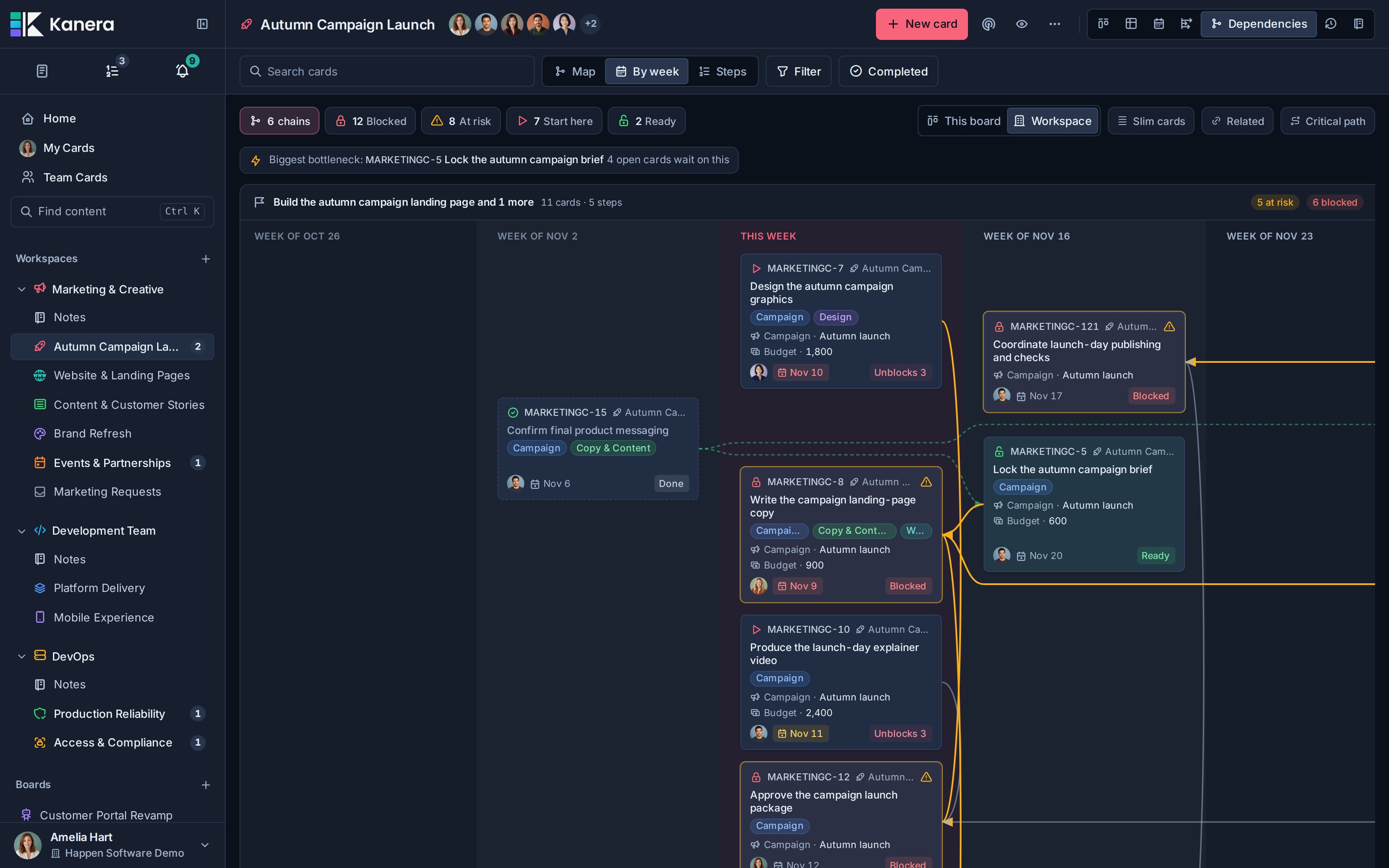
In Map or Timeline, drag from a card's + handle to add a blocking link, or select a connector to remove it. Tap-to-link and keyboard controls work too, with Undo and Redo for your map edits. Changes update live, and agents can inspect the same chains through MCP, the CLI, SDK, or REST API.
Read the Dependencies view, timeline, and editing guide or learn about card relationships and blocking.
Timeline view plans the work ahead
Give a card a start date next to its due date and the board's Timeline view draws it as a bar on a Gantt-style chart, grouped by list, assignee or label. Drag a bar to reschedule it (its working-day length is kept), pull an end to change its length, click an empty lane to place an unscheduled card, and drag from one bar's end to another to make the second wait on the first. Critical path runs a working-day schedule over the board's blocking links, highlights the chain with no slack, fades the rest and shows how far each other card could slip. Cards whose prerequisite is planned to finish after they start are flagged as scheduling conflicts.
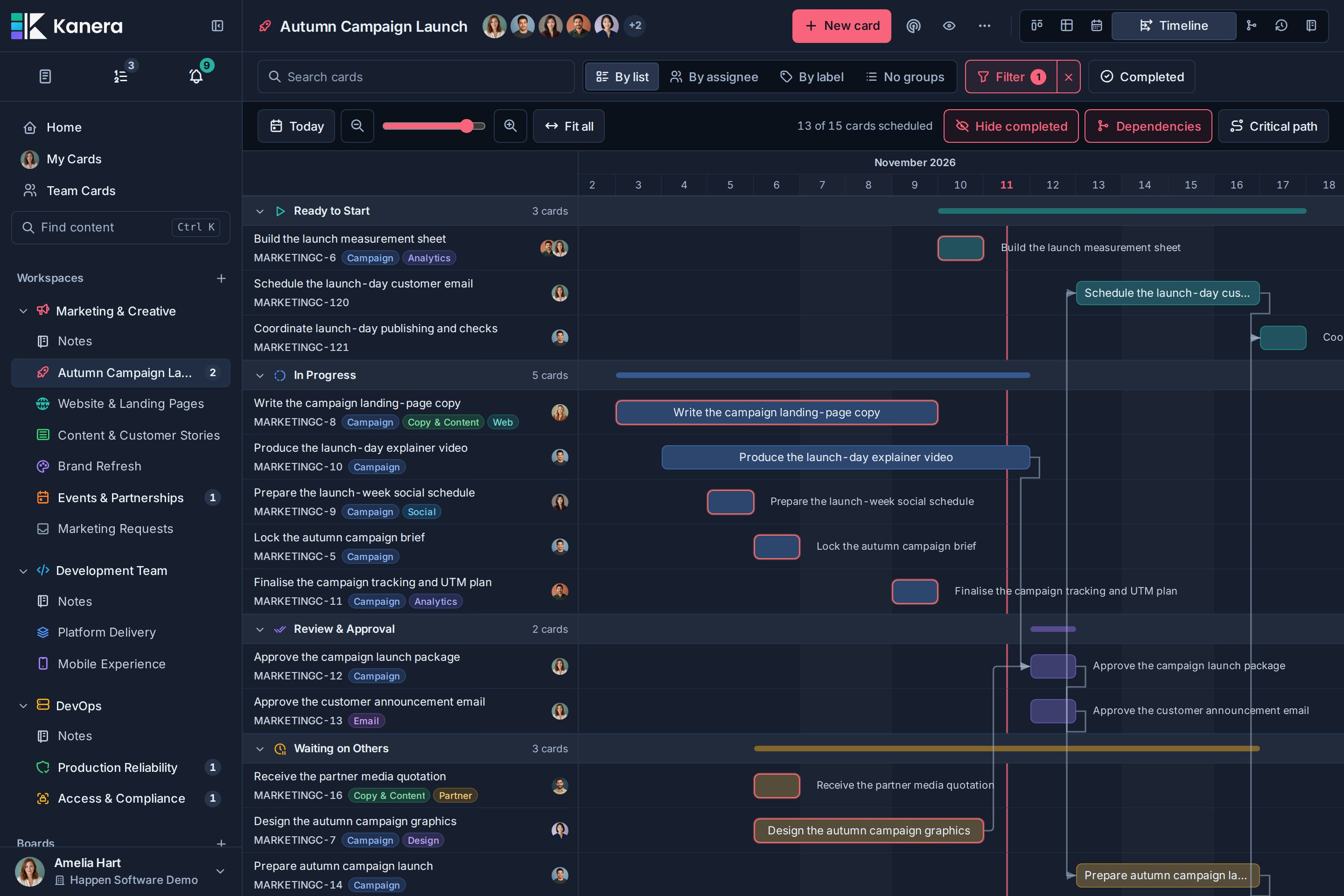
Read the Timeline and Start Dates guide for working-day scheduling, desktop and phone controls, MCP planning examples, and schedule events.
Keep GitHub pull requests and commits with the work
Keep implementation and review beside the task's requirements, discussion, and delivery history.
Pull requests link themselves and stay in sync
Connect your organisation's GitHub App, then include a card key such as KAN-123 in a pull request's branch name, title, or description. Copy branch name in card detail or the card menu gives you a branch name containing the key.
The card's Pull requests section shows the repository, PR number, title, and added and deleted lines when available. GitHub webhooks keep draft, open, merged, and closed states current, and linking and state changes appear in the card's activity. Open any entry to jump straight to the review on GitHub.
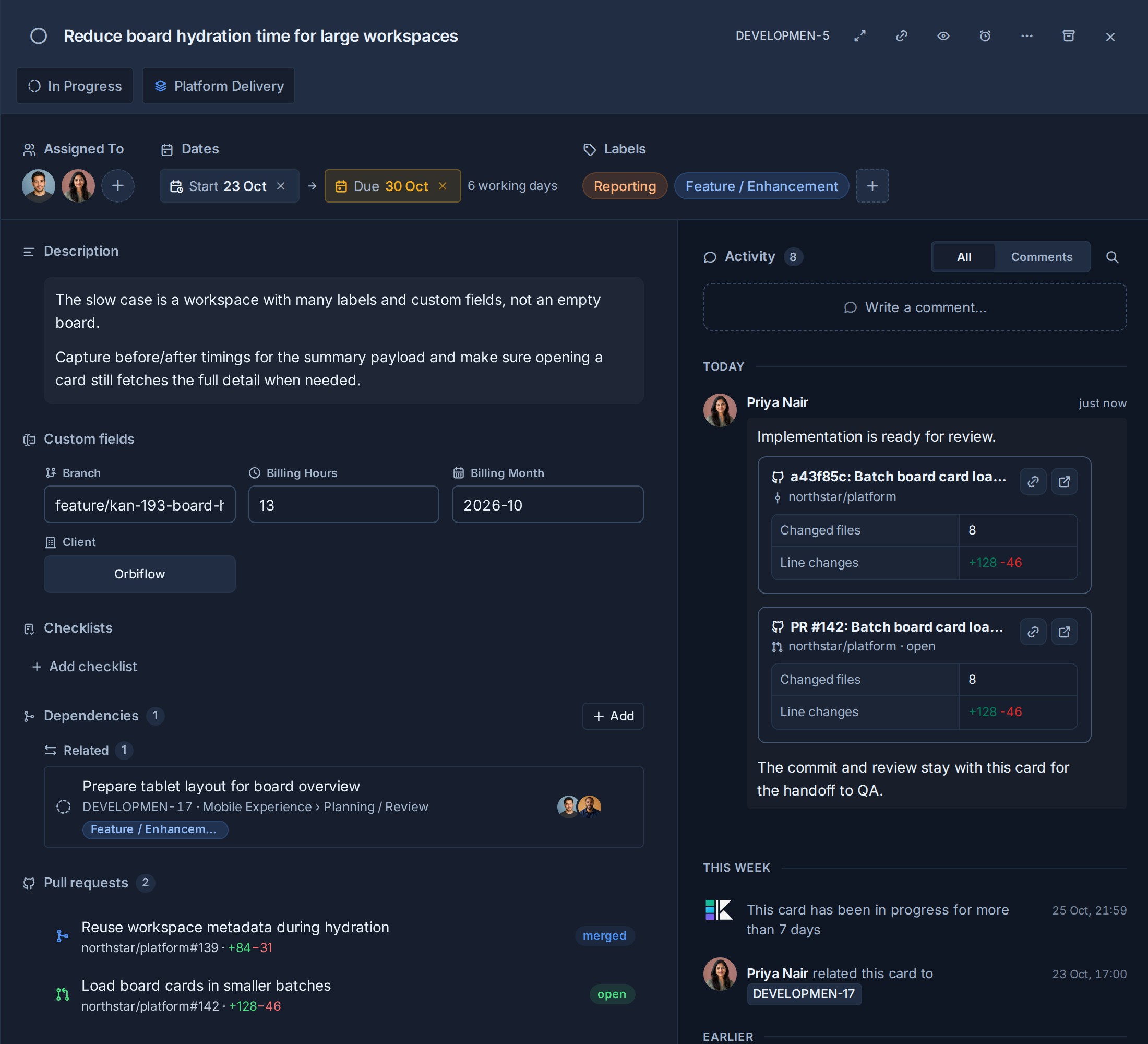
Pull requests from forks are ignored. Self-hosted deployments can bootstrap the GitHub App in-app or supply its credentials, and must configure webhook delivery for PR sync; see GitHub App setup and webhook configuration.
Commit links become readable change summaries
Paste a GitHub commit URL into a card comment and save it to see the commit title, short SHA, repository, changed-file count, and added and deleted lines when available. Pull request links also render rich previews, so implementation and review updates stay readable in the conversation. The same rendering works in descriptions and notes, with support for repository, issue, and release links too.
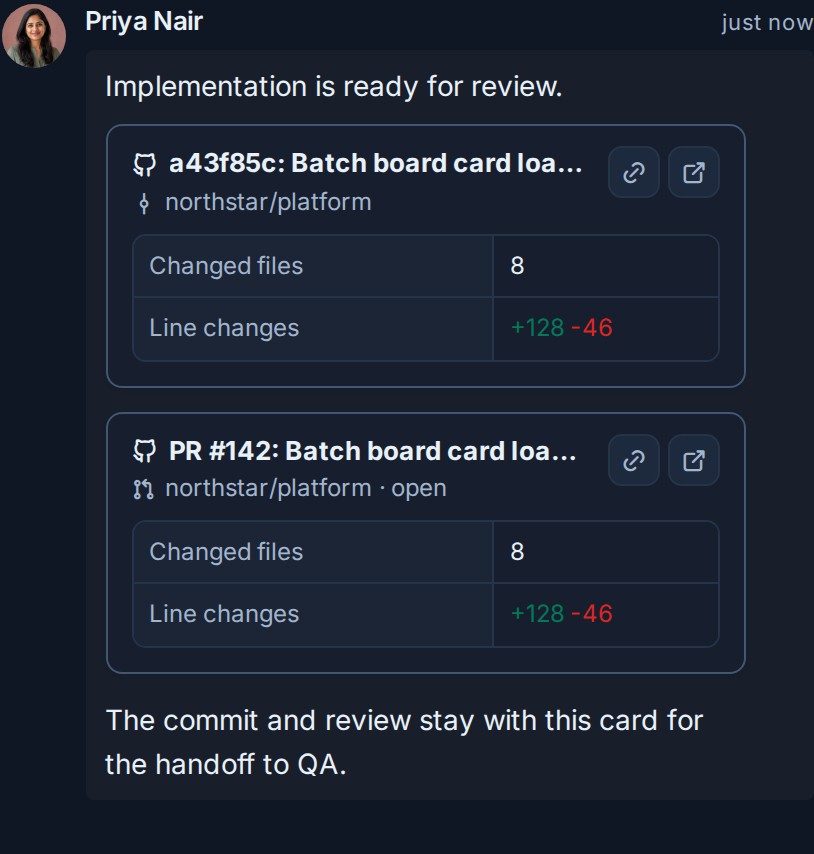
Public repository previews work without a GitHub App connection. Connect the App to preview private repositories it can access in workspace and board content.
Notifications keep important changes together
Review mentions, assignments, comments, due-date changes, and other updates without losing the board context behind them. Group the feed by day, board, or person, narrow it to one board or one colleague, and search it by card, board, or list.
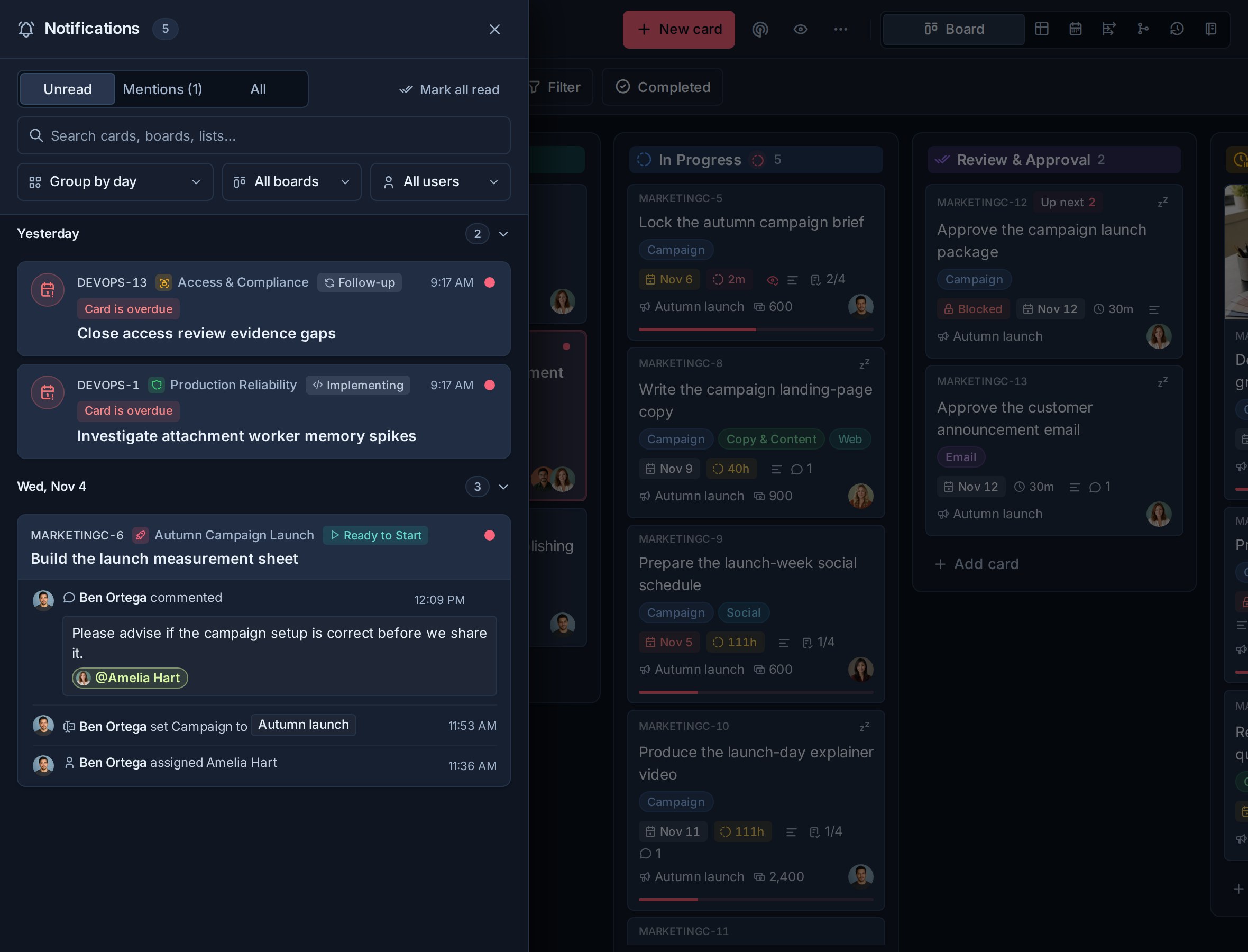
Then decide where each notification type reaches you: email, browser push, ntfy, Gotify, or a signed webhook of your own. Per-workspace rules pause or narrow a single noisy workspace without weakening your account defaults, and the in-app drawer always keeps the complete history regardless of what is switched off elsewhere.
Rich cards keep the work and its context together
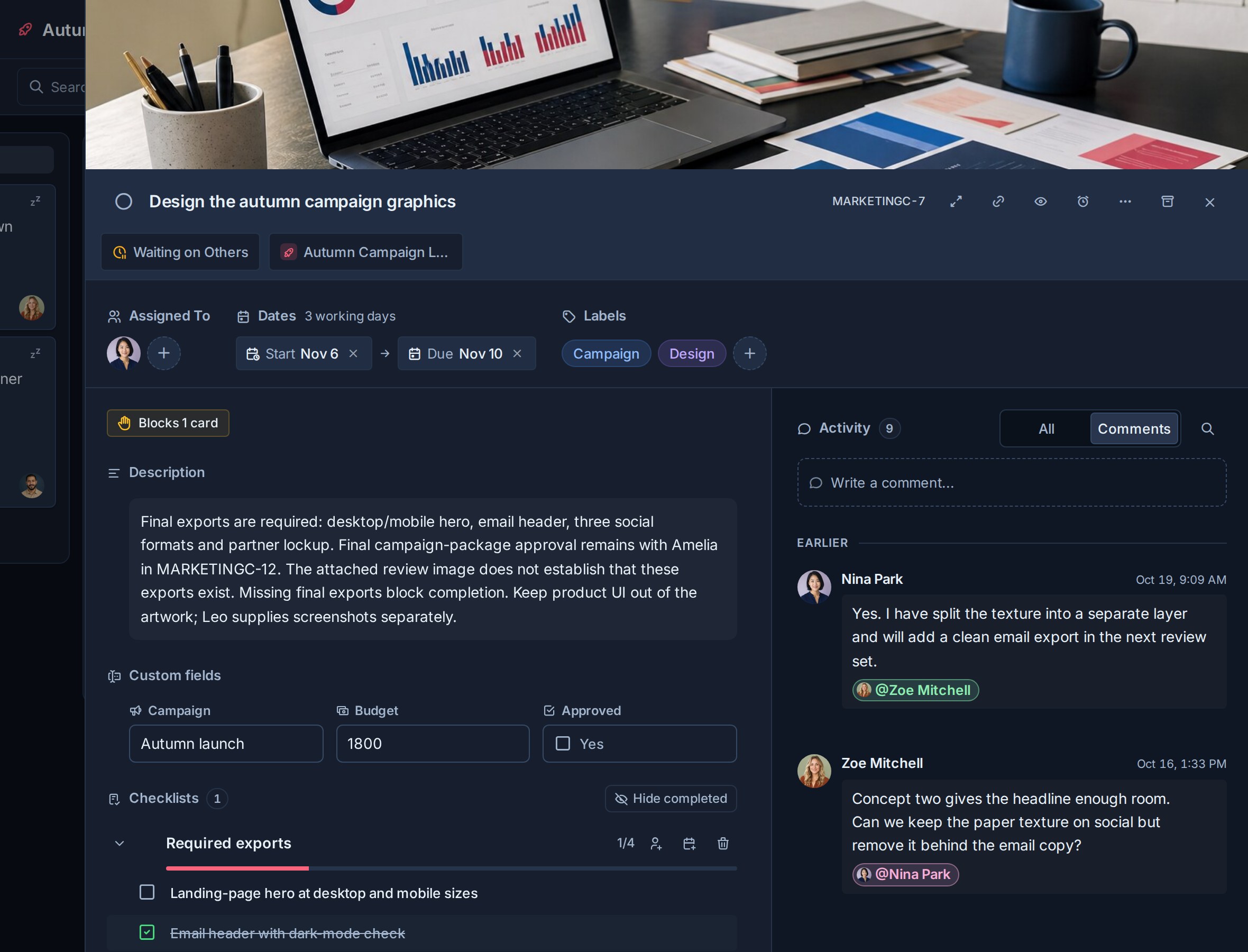
Descriptions, custom fields, checklists, due dates, comments, attachments, and activity all live in one focused card view.
Team Cards brings assigned work together across boards
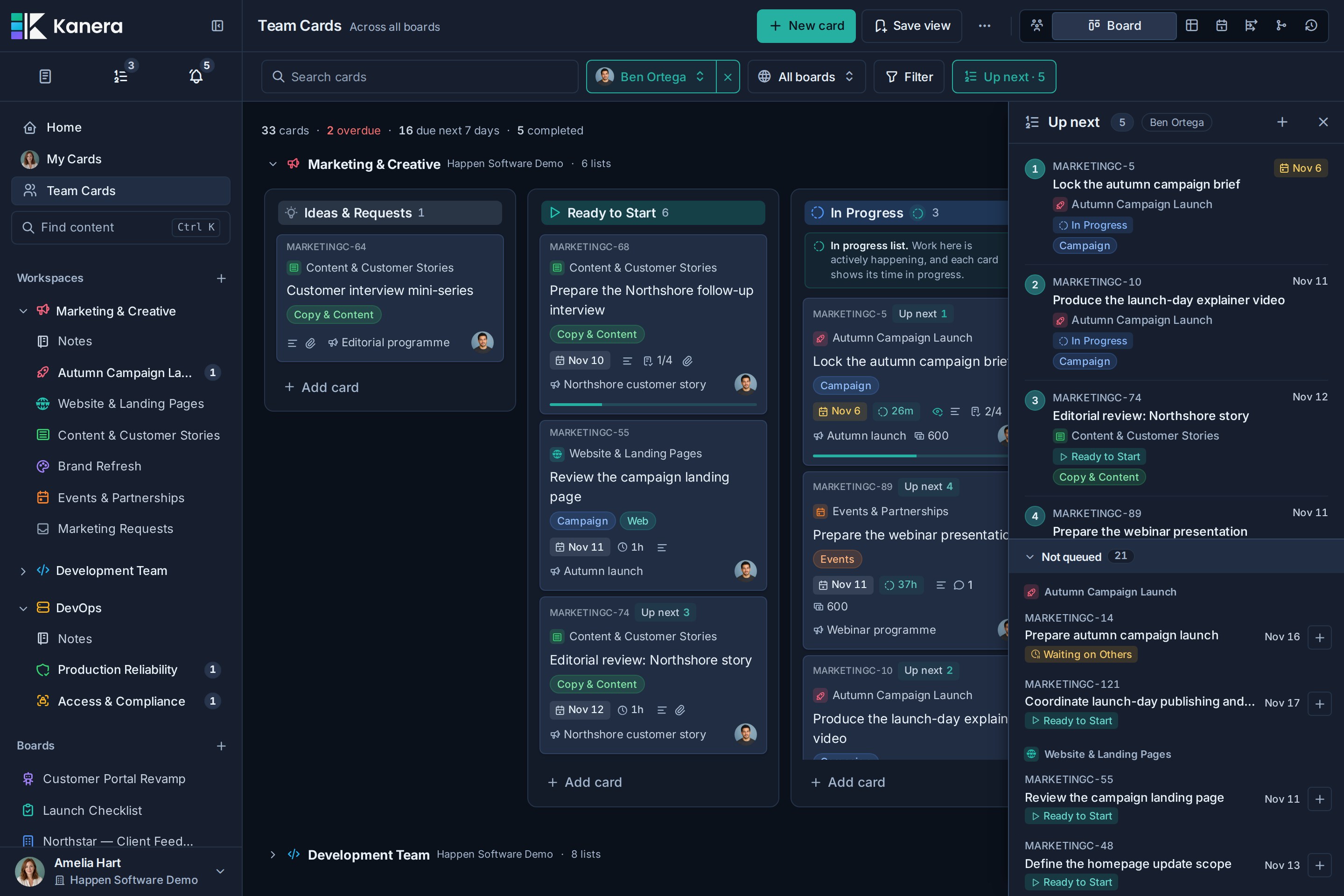
See the whole visible team or focus on one teammate without losing each card's board, list, fields, or permissions. Switch between Board, Team overview, Table, Calendar, Dependencies, and Work Done views to review ownership, workload, and execution order across projects.
Automations keep routine work moving
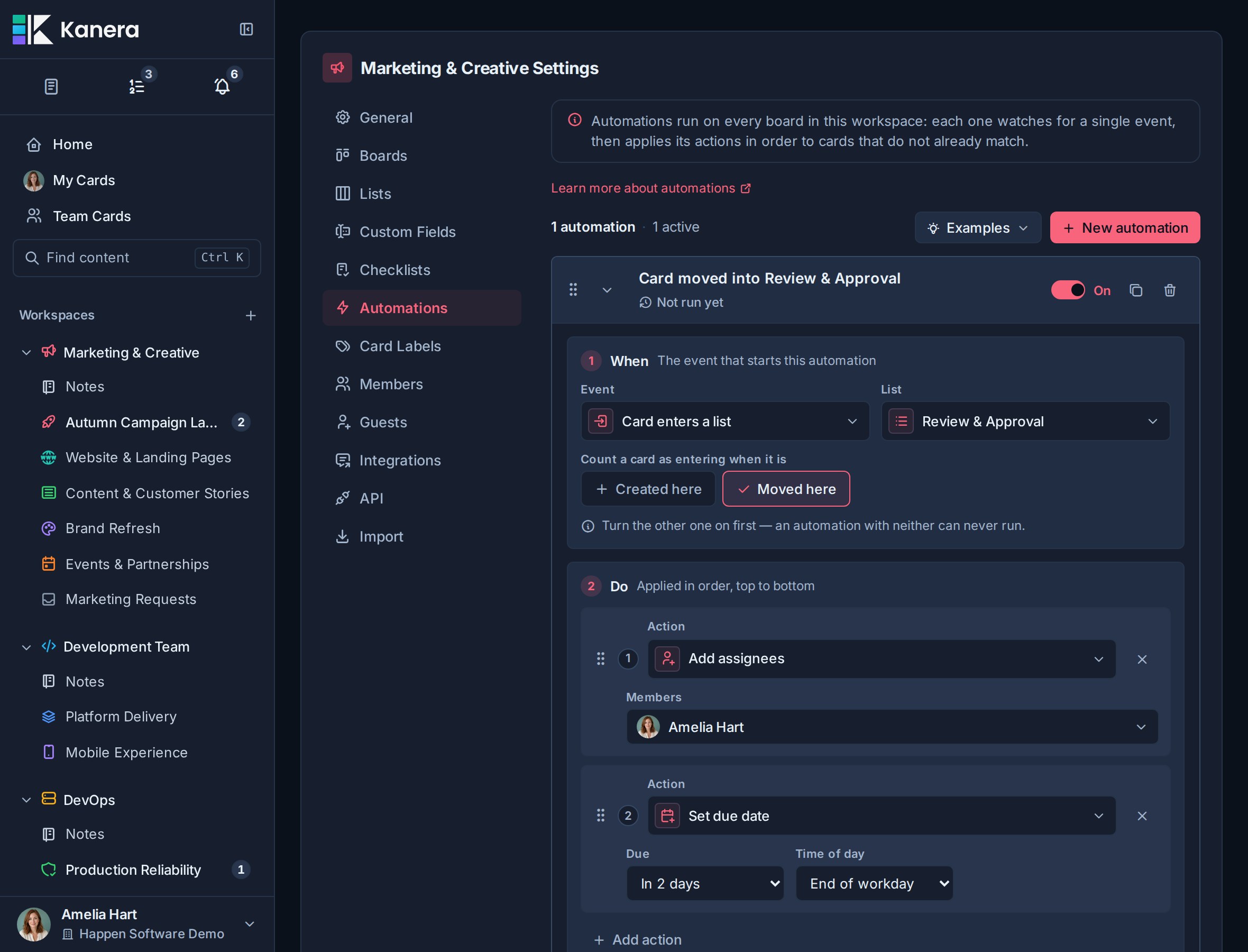
Build automations from a When trigger and ordered Do actions. Triggers can respond when cards enter or leave lists, a custom field changes to a selected value, a due date approaches or arrives, a start date arrives, assignments and labels change, checklists or cards complete, or a card reaches the configured inactivity period. Kanera can then add labels, assign people, apply checklist templates, set due dates and custom fields, move cards, or mark work complete. Automations can belong to one standalone board or run across every board in a workspace.
Work Done shows what actually moved forward
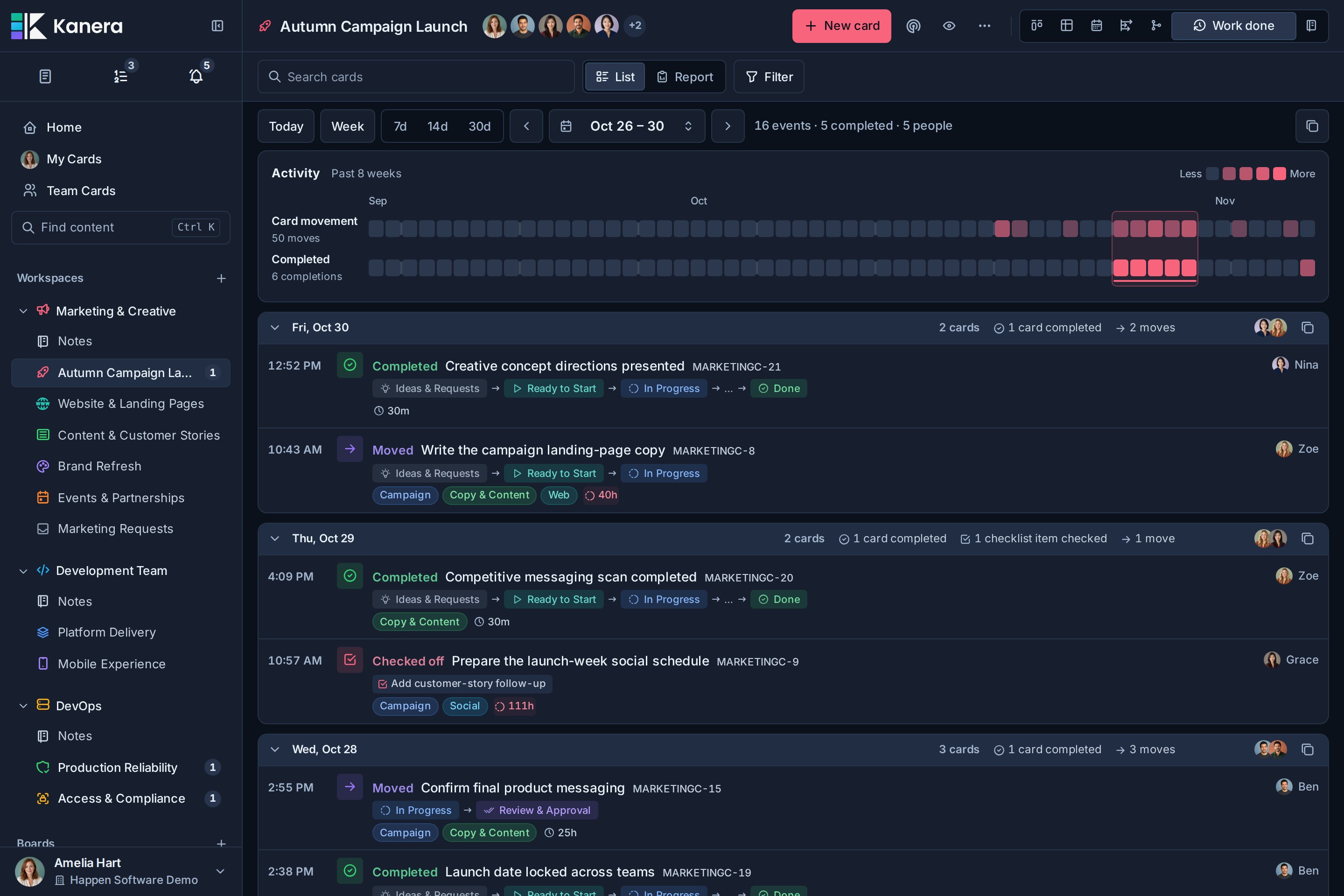
Review a daily history of cards created, moved, and completed, plus finished checklist items. Use it on a board, My Cards, or Team Cards for standups, async updates, progress reviews, and client check-ins.
Fully functional on mobile and installable as a PWA
Kanera's responsive, touch-friendly interface keeps boards, cards, Table, Calendar, My Cards, Team Cards, notifications, settings, and the rest of the product available on phones and tablets. Use it in the browser or install the PWA on iOS, Android, or desktop. Installed devices support push notifications, and recently opened boards remain available for browsing when the connection drops.
Explore the full product tour at kanera.app/features.
Move to Kanera without starting over
Kanera includes guided importers for Trello JSON, Kanera board JSON exports, and CSV files. Upload an export, map its columns or workspace data, review the result, then confirm a controlled one-time import. Kanera can preserve attachment links and copy supported uploaded files when Trello is connected for the import. Your original board or file stays unchanged, and later source changes are not synced automatically.
For Jira, ClickUp, Asana, monday.com, Notion, Linear, spreadsheets, or an internal system, export one representative project as CSV and use the CSV importer. Review its columns, users, dates, and multi-value fields before importing the full project.
Hosted or self-hosted
Hosted Kanera is the simplest way to get started. New accounts include a 30-day Pro trial with no card required; teams can then stay on Free or upgrade to Pro. Pro adds unlimited boards and automations, board guests for clients and contractors, the REST API, webhooks, chat destinations, personal notification channels, and email support, typically within one business day. See current pricing.
Self-hosted Kanera has no plan gating and no per-seat charges. Everything above is included, including guests, the REST API, webhooks, chat destinations, and personal notification channels. You control the infrastructure, storage, maintenance, and backups.
Kanera MCP 질문
Kanera MCP를 Claude Code에 추가하려면 어떻게 하나요?
터미널에서 claude mcp add --transport http kanera https://mcp.kanera.app/mcp를 실행합니다. 모든 프로젝트에서 사용할 수 있게 하려면 --scope user를 추가합니다.
Kanera MCP를 Cursor에 추가하려면 어떻게 하나요?
~/.cursor/mcp.json를 열고 mcpServers 아래에 서버를 추가합니다. 위 설치 섹션에 표시된 Cursor 구성을 사용합니다.
agent가 Kanera 보드에서 무엇을 할 수 있나요?
agent는 카드를 가져오고 컨텍스트를 읽으며, 작업을 수행한 뒤 실시간 실행 진행 상황과 작업 주체를 보고합니다.
agent가 변경한 사항은 어떻게 기록되나요?
OAuth 연결을 통해 댓글과 변경 사항에 agent가 대행한 사용자 이름과 via-agent 배지가 함께 표시됩니다.
agent에게 보드 완료 시점을 물어볼 수 있나요?
네, schedule 도구를 통해 보드 또는 워크스페이스의 크리티컬 패스, 영업일 기준 여유 시간, 충돌 사항 및 예상 완료일을 확인할 수 있습니다.
agent가 보고를 중단하면 어떻게 되나요?
보고가 중단된 실행은 15분 후 stalled 상태로 표시되어, 중단된 작업이 활성 상태로 오해받지 않도록 합니다.