
git, GitHub, GitLab, Bitbucket 및 Jira 액션을 래핑하여 AI 클라이언트가 저장소, 작업 항목, 커밋, 이슈 및 pull request를 관리할 수 있도록 합니다.
다른 이름 gitkraken/gk-cli, @gitkraken/gk
- 스타
- 467
- Tools
- —
- 다운로드, 30일
- 304,568
- 최신 버전
- 3.1.77
- 마지막 커밋
- 2026년 11월 12일
- 라이선스
- —
GitKraken MCP란?
GitKraken은(는) MCP server입니다. git, GitHub, GitLab, Bitbucket 및 Jira 액션을 래핑하여 AI 클라이언트가 저장소, 작업 항목, 커밋, 이슈 및 pull request를 관리할 수 있도록 합니다.
프로젝트 README에서 생성된 요약
GitKraken MCP server 정보
gk-cli를 사용하면 AI 클라이언트에서 여러 저장소와 개발 작업을 관리할 수 있습니다. 이 로컬 MCP server는 git, GitHub, GitLab, Bitbucket 및 Jira 액션을 래핑하여 LLM과 개발 워크플로 사이의 가교 역할을 합니다. 개발자는 여러 저장소에서 동시에 작업하더라도 통합된 인터페이스를 통해 작업 항목, 이슈 및 pull request를 처리할 수 있습니다.
사용자는 macOS, Windows 또는 Unix 시스템에서 서버를 설정하여 사용할 수 있습니다. 설정을 위해서는 auth 명령어를 통해 GitKraken 플랫폼에 인증하고, 사용하는 호스팅 서비스에 맞는 provider token을 추가해야 합니다. 설정이 완료되면 AI 기반 커밋 메시지 생성 및 자동 pull request 생성 도구를 사용할 수 있습니다. 또한 표준 git 명령어 패스스루를 지원하므로 AI가 인터페이스를 통해 status나 remote와 같은 명령어를 직접 실행할 수 있습니다.
활용 사례
- 1커밋 및 PR 자동 생성AI 클라이언트가 서버를 사용하여 인공지능 기반의 커밋 메시지를 작성하고 pull request를 생성할 수 있습니다.
- 2다중 저장소 작업 관리개발자는 서로 다른 저장소를 하나의 작업 항목으로 그룹화하여 코드베이스 전반의 복잡한 기능을 관리할 수 있습니다.
- 3이슈 및 작업 항목 추적통합된 provider 액션을 사용하여 AI에게 개발 백로그를 관리하고 특정 이슈를 추적하도록 지시할 수 있습니다.
프로젝트의 README를 바탕으로 작성되었습니다. 모든 활용 사례는 해당 내용의 인용문과 대조하여 확인합니다.
GitKraken MCP 설치 방법
형식 확인: 2026년 11월 10일Cursor에 추가Goose에 추가Claude Code에 GitKraken MCP 설치
$ claude mcp add gk-cli -- npx -y @gitkraken/gkCursor에 GitKraken MCP 설치
~/.cursor/mcp.json
{
  "mcpServers": {
    "gk-cli": {
      "command": "npx",
      "args": [
        "-y",
        "@gitkraken/gk"
      ]
    }
  }
}VS Code에 GitKraken MCP 설치
.vscode/mcp.json
{
  "servers": {
    "gk-cli": {
      "type": "stdio",
      "command": "npx",
      "args": [
        "-y",
        "@gitkraken/gk"
      ]
    }
  }
}VS Code CLI에 GitKraken MCP 설치
$ code --add-mcp '{"name":"gk-cli","type":"stdio","command":"npx","args":["-y","@gitkraken/gk"]}'Claude Desktop에 GitKraken MCP 설치
claude_desktop_config.json
{
  "mcpServers": {
    "gk-cli": {
      "command": "npx",
      "args": [
        "-y",
        "@gitkraken/gk"
      ]
    }
  }
}Codex에 GitKraken MCP 설치
$ codex mcp add gk-cli -- npx -y @gitkraken/gkCodex config.toml에 GitKraken MCP 설치
~/.codex/config.toml
[mcp_servers.gk-cli]
command = "npx"
args = ["-y", "@gitkraken/gk"]
Gemini CLI에 GitKraken MCP 설치
$ gemini mcp add -s user gk-cli npx -- -y @gitkraken/gkGemini settings.json에 GitKraken MCP 설치
~/.gemini/settings.json
{
  "mcpServers": {
    "gk-cli": {
      "command": "npx",
      "args": [
        "-y",
        "@gitkraken/gk"
      ]
    }
  }
}자동 검사
2026년 11월 12일에 실행됨전체 보고서 →자동 검사를 통과했습니다. 이는 보안 감사가 아닙니다. 코드를 직접 읽고 서버에 필요한 최소한의 권한만 부여하십시오. 검사 방식 · 점수를 높이기 위해 수정할 항목

- 소스 저장소 연결 및 접근 가능통과
- 오픈 소스 라이선스 (OSI)No license결함 발견
- 최근 1년 내 커밋 또는 릴리스통과
- 패키지 이름이 인기 패키지와 유사하지 않음통과
- 원격 엔드포인트가 HTTPS 사용검사되지 않음
- 파괴적인 도구에 라벨 표시됨검사되지 않음
- 모델에 대한 숨겨진 지침 없음통과
- 패키지 및 해당 종속성에 중요한 보안 권고 없음통과
README
GitHub에서 보기🚀 GitKraken CLI
gk is GitKraken on the command line. The core functionality is focused on "Work Items" which can be thought of as the feature or issue you are trying to tackle. This allows you to work with multiple repos at once and get the same UX as if you were in a monorepo. We also provide robust AI-powered commit messages and Pull Request generation. It also provides an MCP server that streamlines working with git and your Issue and git hosting providers.
GitKraken CLI is available on macOS, Windows, and Unix systems.

Table of Contents
MCP Server
The GitKraken MCP server is a local MCP server that is powerful and easy to use. It wraps git, GitHub, Jira MCP actions as well as provides tools to LLMs that work with GitKraken APIs and functionality. You can find specific installation instructions based on your chosen AI application in the Help Center.
If you want to read more about the MCP server, you can check out the introduction blog post
Documentation
gk help is going to be your best source for exploring the CLI. But also see the workflows below.
Welcome to GitKraken CLI, a premium CLI experience for managing multiple repositories with familiar GIT CLI commands

Usage:
  gk [flags]
  gk [command]

AUTHENTICATING
  auth         Authenticate with the GitKraken platform
  provider     Add or remove provider tokens

CORE COMMANDS
  graph        Display commit graph in current repository
  issue        Manage your issues
  organization Manage your Gitkraken organizations
  work         Interact with your work.
  workspace    Interact with your workspaces. Alias: 'ws'

Additional Commands:
  help         Help about any command
  setup        Display information about your current system configuration
  version      Print the version number of GK CLI

Flags:
  -h, --help   help for gk

Use "gk [command] --help" for more information about a command.
Workflows
Start with a single repo. You can add more later.
In general, your process will look like this:
# Authenticate
gk auth login

# Navigate to a git repo directory on your filesystem
cd ./path/to/repo

# Then create a Work Item and the current directory
# will be automatically added to the Work Item
gk work create "My new work item"

# Edit files...
# ...

# Commit your changes using AI
gk work commit --ai

# Push your changes
gk work push

# Create a Pull Request
gk work pr create --ai
Once you have familiarized yourself with using a single repo, try out creating work items and generating commits and PRs for multiple repos at a time by just adding multiple repos to a new Work Item.
# Add a repo to the current work item
gk work add ./path/to/repo # path could be as simple as "." if you are in the directory already
git Command Passthrough
You can also use gk to pass through any git command. eg:
gk status
gk remote -v
# etc
Installation
macOS
gk is available from Homebrew with the following command:
Homebrew:
brew install gitkraken-cli
Or download it from the releases page and add it to your binaries folder:
mv ~/Downloads/gk /usr/local/bin/gk
Unix / Ubuntu

gk is available as a downloadable binary from the releases page. Once you have it, add it to your binaries folder:
mv ~/Downloads/gk /usr/local/bin/gk
Or create a new directory, move the binary and add it to $PATH:
mkdir "$HOME/cli"
mv ~/Downloads/gk "$HOME/cli"
export PATH="$HOME/gk:$PATH"
You can also [download][releases page] your corresponding package (.deb, .rpm) and install it with:
sudo apt install ./gk.deb
or
sudo rpm -i ./gk.rpm
Windows
gk is available from [Winget][winget] with the following command:
winget install gitkraken.cli
⚙️ Configuration
Nerd Fonts
The GitKraken CLI supports Nerd Fonts to display icons for some commands. To ensure correct icon rendering, please obtain and install a Nerd Font available at https://www.nerdfonts.com/. After installation, set the selected Nerd Font as the default font for your terminal.
Troubleshooting
gk login freezes after authenticating in browser
This problem is due to the browser. Currently we know that Safari and Brave do not allow to respond to localhost through port 1314. To fix this, change your default browser or copy the URL before the redirect and open it in another browser.
gk from Oh-My-Zsh
Oh-My-Zsh has gitk aliased as gk and that can create some problems. To fix this, type in your terminal:
unalias gk
Manual macOS Installation
If you install the CLI manually from the releases page on macOS, you will likely run into a security error that looks like this:
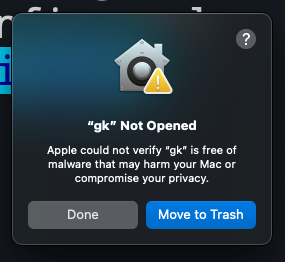
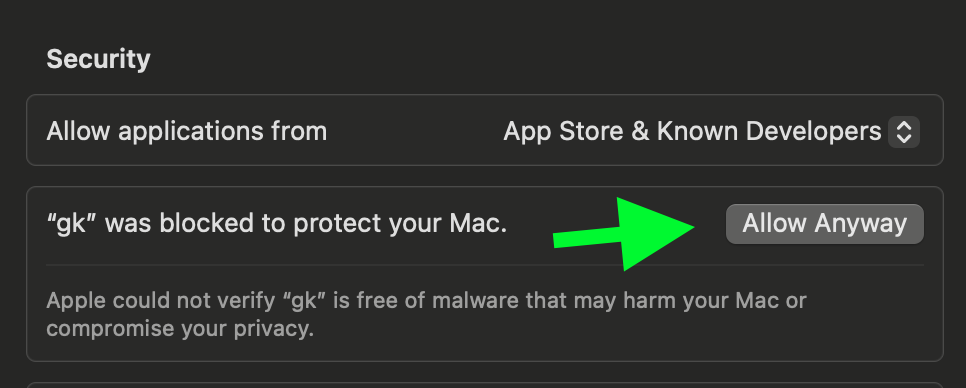
To fix this, go to Settings > Security & Privacy > General and click "Allow Anyway".
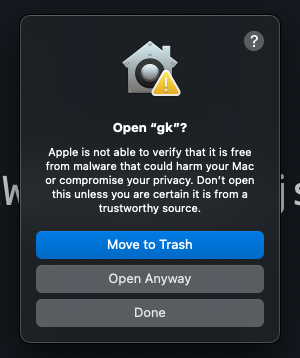
Try running gk setup again and then click "Open Anyway" to continue.
GitKraken MCP 질문
GitKraken MCP를 Claude Code에 추가하려면 어떻게 하나요?
터미널에서 claude mcp add gk-cli -- npx -y @gitkraken/gk를 실행합니다. 모든 프로젝트에서 사용할 수 있게 하려면 --scope user를 추가합니다.
GitKraken MCP를 Cursor에 추가하려면 어떻게 하나요?
~/.cursor/mcp.json를 열고 mcpServers 아래에 서버를 추가합니다. 위 설치 섹션에 표시된 Cursor 구성을 사용합니다.
GitKraken MCP server는 어떤 역할을 하나요?
git, GitHub 및 Jira 액션을 래핑하여 LLM이 GitKraken API 및 기능을 사용할 수 있도록 도구를 제공하는 로컬 MCP server입니다.
GitKraken CLI 인증은 어떻게 하나요?
gk auth login을 실행하여 GitKraken 플랫폼에 인증합니다. 호스팅 서비스용 provider token은 gk provider로 추가할 수 있습니다.
GitKraken이 AI로 커밋 메시지와 pull request를 생성할 수 있나요?
네, gk work commit --ai로 AI 기반 커밋 메시지를 생성하고 gk work pr create --ai로 pull request를 생성할 수 있습니다.
GitKraken CLI는 여러 저장소를 동시에 지원하나요?
네, 작업 항목에 여러 저장소를 포함할 수 있어 모노레포와 유사한 UX를 제공합니다.