
Rigor MCP server
2026년 11월 13일 커밋QA 팀이 테스트 코드를 작성하지 않고도 MCP tool, resource, prompt 및 contract에 대해 결정론적인 자연어 테스트를 수행할 수 있도록 지원합니다.
다른 이름 FusionOnePlatform/mcprigor
- 스타
- 3
- Tools
- —
- 다운로드, 30일
- —
- 최신 버전
- —
- 마지막 커밋
- 2026년 11월 13일
- 라이선스
- Apache-2.0
Rigor MCP란?
QA 팀이 테스트 코드를 작성하지 않고도 MCP tool, resource, prompt 및 contract에 대해 결정론적인 자연어 테스트를 수행할 수 있도록 지원합니다.
프로젝트 README에서 생성된 요약
Rigor MCP server 정보
QA 팀은 전통적인 테스트 코드를 작성하지 않고도 MCP tool, resource, prompt 및 contract에 대해 결정론적인 자연어 테스트를 수행할 수 있습니다. 테스터는 특화된 구문을 사용하여 tool 호출, resource 읽기 및 prompt 출력에 대한 기대값을 정의할 수 있습니다. 이 방식은 테스트 문구를 해석하는 데 AI 모델을 사용하지 않으므로 테스트 결과가 예측 가능한 상태로 유지됩니다.
사용자는 환경 변수를 통한 인증을 사용하여 로컬 stdio 서버, Python 서버 또는 원격 HTTP 서버를 대상으로 테스트를 실행할 수 있습니다. 이 시스템은 로컬 브라우저 기반 QA 워크스페이스, CI 통합을 위한 CLI, 라이브 서버에서 테스트를 생성하는 대화형 author mode 등 다양한 워크플로우를 지원합니다. 또한 parity 명령을 제공하여 로컬 환경과 배포 환경 간의 동작을 비교할 수 있습니다.
개발자는 CSV, JSON 또는 SQL 어댑터를 사용한 데이터 기반 시나리오를 통해 복잡한 테스트 요구 사항을 관리할 수 있습니다. 이 도구는 보안 감사, 백분위 제한을 이용한 성능 예산 설정, 멀티 서버 플릿을 위한 구성 확인과 같은 고급 기능을 포함합니다. VS Code extension을 통해 개발 워크플로우에 통합되며, 대화형 증거 타임라인이 포함된 상세한 HTML 보고서를 제공합니다.
활용 사례
- 1tool 출력 정확도 검증개발자가 시스템에 특정 인수를 사용하여 특정 tool을 호출하도록 지시하고, 반환된 구조화된 콘텐츠가 기대값과 일치하는지 확인할 수 있습니다.
- 2로컬 및 원격 환경 비교팀은 로컬 개발 서버와 배포된 QA 서버 모두에 대해 동일한 테스트 시나리오를 실행하여 의미론적 차이점을 식별할 수 있습니다.
- 3외부 데이터를 활용한 테스트 자동화테스터는 Excel 또는 SQL 데이터베이스와 같은 파일에서 가져온 여러 데이터 행에 대해 동일한 tool 호출을 실행할 수 있습니다.
- 4라이브 서버에서 테스트 생성파일을 수동으로 작성하는 대신, 가이드 프로세스를 사용하여 작업을 탐색하고 검토 가능한 테스트 파일을 자동으로 생성할 수 있습니다.
프로젝트의 README를 바탕으로 작성되었습니다. 모든 활용 사례는 해당 내용의 인용문과 대조하여 확인합니다.
구성
MCP_TOKEN
| 이름 | 설명 | 유형 |
|---|---|---|
| MCP_TOKEN | — |
자동 검사
2026년 11월 14일에 실행됨전체 보고서 →아직 인증되지 않았습니다. 서버는 80점 이상의 점수, 심각한 결함 없음, 그리고 검사에 충분한 데이터를 갖추어야 합니다. 검사 방식 · 점수를 높이기 위해 수정할 항목

- 소스 저장소 연결 및 접근 가능fusiononeplatform/mcprigor is public and reachablegithub.com/fusiononeplatform/mcprigor ↗통과
- 패키지가 이 저장소를 소스로 명시검사되지 않음
- 빌드 출처(Sigstore 증명)검사되지 않음
- 오픈 소스 라이선스 (OSI)Apache-2.0spdx.org/licenses/Apache-2.0.html ↗통과
- 최근 1년 내 커밋 또는 릴리스Last commit or release 2026-11-13github.com/fusiononeplatform/mcprigor ↗통과
- OpenSSF Scorecard검사되지 않음
- 패키지 이름이 인기 패키지와 유사하지 않음검사되지 않음
- 패키지 및 해당 종속성에 중요한 보안 권고 없음검사되지 않음
- 모델에 대한 숨겨진 지침 없음0 tool descriptions and the README read; no override phrases, credential paths or hidden characters통과
- 파괴적인 도구에 라벨 표시됨검사되지 않음
- 원격 엔드포인트가 MCP 핸드셰이크에 응답검사되지 않음
README
GitHub에서 보기MCP Rigor







Natural-language testing for Model Context Protocol servers.
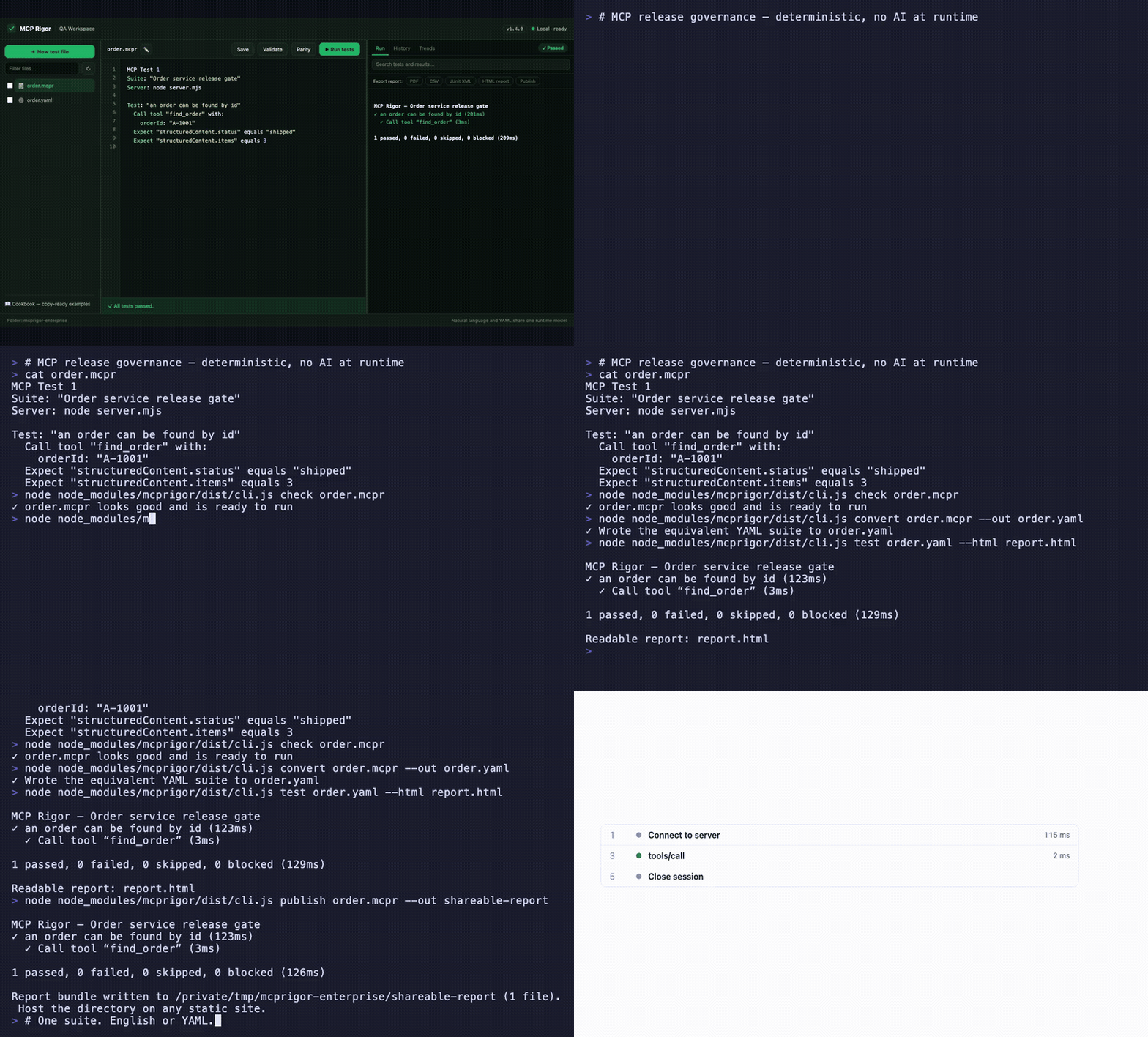
Visual QA workspace · English ⇄ YAML parity · interactive evidence timeline · CLI, CI, and shareable reports — watch the MP4
MCP Rigor lets QA teams test MCP tools, resources, prompts, contracts, and transports without writing test code. Tests are deterministic: no AI model interprets the wording.
Status:
1.5.0stable. Node.js 20 or 22 is required.
Install
MCP Rigor is published on npm as mcprigor. The package ships compiled code, ready to run:
npm install mcprigor
Or try it instantly without installing:
npx mcprigor@latest init tests/acceptance.mcpr
Use npx mcprigor in commands below, or install globally (npm install -g mcprigor) to use mcprigor directly. In a project where tests run only during development or CI, npm install --save-dev mcprigor keeps it out of production dependencies.
Install from source
Only needed if you want to modify MCP Rigor itself:
git clone https://github.com/FusionOnePlatform/mcprigor.git
cd mcprigor
npm ci
npm run check   # build + full test suite
npm link        # optional: use your local build as the global `mcprigor`
Write your first test
Create calculator.mcpr:
MCP Test 1

Suite: "Calculator acceptance tests"
Server: node dist/server.js

Test: "Adding 20 and 22 gives 42"
  Call tool "add" with:
    a: 20
    b: 22

  Expect "structuredContent.sum" equals 42
Check the wording, then run it:
npx mcprigor check calculator.mcpr
npx mcprigor test calculator.mcpr
Create a browser report:
npx mcprigor test calculator.mcpr --html report.html
Expected summary:
✓ Adding 20 and 22 gives 42

1 passed, 0 failed, 0 skipped, 0 blocked
Use the QA workspace
Start the local browser interface:
npx mcprigor workspace .
Or expose MCP Rigor to AI coding agents as an MCP server (docs):
npx mcprigor serve .
Open the printed http://127.0.0.1:... URL. You can select a suite, edit it, validate the wording, run tests, run transport parity, and review results.
The workspace is loopback-only and does not accept arbitrary commands from the browser.
Connect to an MCP server
Local stdio server:
Server: node dist/server.js
Python server:
Server: python -m my_mcp_server
Streamable HTTP server:
MCP URL: https://qa.example.com/mcp

Server options:
  headers:
    Authorization: "Bearer ${env.MCP_TOKEN}"
Run with an environment variable:
MCP_TOKEN="your-token" npx mcprigor test customer.mcpr
Do not place reusable credentials directly in test files.
Common test actions
Call tool "search" with:
  query: "red shoes"

Read resource "catalog://status"

Get prompt "write_summary" with:
  topic: "Release quality"

Expect it succeeds
Expect an error
Expect "structuredContent.total" equals 2
Expect "content[0].text" contains "complete"
Expect "items" has 3 items
See the natural-language cookbook for copy-ready examples.
Compare local and deployed behavior
MCP Test 1
Suite: "Calculator parity"

Compare target "Local": node dist/server.js
Compare target "QA": https://qa.example.com/mcp

Test: "Addition is consistent"
  Call tool "add" with:
    a: 20
    b: 22
  Expect "structuredContent.sum" equals 42
npx mcprigor parity calculator-parity.mcpr
MCP Rigor runs every scenario against both targets and reports semantic differences.
Create a test from a live server
Provide a small .mcpr file containing the target, then run:
npx mcprigor author server.mcpr --out search-customer.mcpr
The guided author discovers operations, asks for inputs, previews a response, and writes a reviewable natural-language test.
Use data-driven tests
Test: "Calculator examples"
  For each row:
    | caseId | a  | b  | expected |
    | basic  | 2  | 3  | 5        |
    | larger | 20 | 22 | 42       |

  Call tool "add" with:
    a: "${row.a}"
    b: "${row.b}"

  Expect "structuredContent.sum" equals "${row.expected}"
CSV, JSON, YAML, Excel, REST, Google Sheets, SQL adapters, typed columns, filters, joins, and deterministic sampling are also supported.
Use in CI
- uses: actions/setup-node@v4
  with:
    node-version: 20
- run: npm ci
- run: npx mcprigor check tests/acceptance.mcpr
- run: npx mcprigor test tests/acceptance.mcpr --junit reports/mcp.xml --evidence .mcprigor/ci-run
Exit codes:
| Code | Meaning |
|---|---|
0 |
Tests passed |
1 |
A test or comparison failed |
2 |
Usage, language, or configuration problem |
3 |
Server, transport, or internal failure |
Main commands
mcprigor workspace [DIRECTORY]        Start the local QA interface
mcprigor init FILE                    Create an example test
mcprigor check FILE                   Validate without connecting
mcprigor test FILE                    Run natural-language or YAML tests
mcprigor author TARGET --out FILE     Build a test interactively
mcprigor parity FILE                  Compare named targets
mcprigor audit FILE                   Run deterministic security probes
mcprigor composition-check FILE       Check a mounted server fleet
mcprigor composition-discover FILE    Save a combined fleet contract
mcprigor composition-drift FILE       Gate fleet contract drift
mcprigor discover FILE                Save the live MCP contract
mcprigor contract-check LOCK --target FILE
mcprigor evidence-show DIRECTORY
Performance and governance features new in 1.5.0:
Expect the call to finish within 800ms, percentile budgets, and--fail-on-regressionmcprigor auditdeterministic security probes with scored PDF/CSV/JSON reports- Multi-server test routing, collision checks, combined fleet locks, and composition drift
- GitHub Action with rich PR reports
- Live MCP surface and schema coverage with
--fail-under - Scheduled HTTP monitoring with failure/recovery webhooks
- Clickable HAR-style session timeline in HTML reports
- Contract drift markdown as a downloadable Action artifact
mcprigor publish— shareable static report URLs
See the complete CLI reference.
Editor support
The VS Code extension in editors/vscode adds syntax highlighting and inline mcprigor check diagnostics for .mcpr files. Package it with npx @vscode/vsce package from that directory, or install a release .vsix with code --install-extension.
Choose your next guide
- New QA user: Getting started
- Writing scenarios: Natural-language cookbook
- Using the browser UI: QA workspace
- Setting up targets and CI: Engineer setup
- Fixing failures: Troubleshooting
- All documentation: Documentation index
Scope and safety
MCP Rigor performs black-box behavior and contract testing. It complements MCP Inspector and official MCP Conformance; it does not provide certification.
Remote data and custom extensions are disabled unless explicitly enabled. Reports and evidence are sanitized, but business response data may still be sensitive. Review security and retention before storing CI artifacts.
Contributing
See CONTRIBUTING.md, then run:
npm ci
npm run check
Apache-2.0 licensed.
Rigor MCP 질문
MCP Rigor를 사용하여 서로 다른 서버 환경을 비교할 수 있나요?
네, parity 명령을 통해 로컬 대상과 QA 대상을 비교하여 의미론적 차이점을 보고할 수 있습니다.
데이터 기반 테스트를 지원하나요?
네, CSV, JSON, YAML, Excel, REST, Google Sheets, SQL 등 다양한 어댑터를 사용한 데이터 기반 테스트를 지원합니다.