
React, Vue, Swift, Kotlin 애플리케이션을 위한 JSON 폼 정의를 AI 에이전트가 작성, 검증 및 수정할 수 있도록 지원합니다.
다른 이름 formhaus-dev/formhaus, @formhaus/mcp
- 스타
- 8
- Tools
- —
- 다운로드, 30일
- 8,002
- 최신 버전
- —
- 마지막 커밋
- 2026년 11월 8일
- 라이선스
- MIT
formhaus MCP란?
formhaus은(는) MCP server입니다. React, Vue, Swift, Kotlin 애플리케이션을 위한 JSON 폼 정의를 AI 에이전트가 작성, 검증 및 수정할 수 있도록 지원합니다.
프로젝트 README에서 생성된 요약
formhaus MCP server 정보
Formhaus는 폼의 필드, 검증 및 분기 로직을 관리하는 단일 JSON 정의를 생성하는 시스템을 제공합니다. 이 방식을 사용하면 개발자는 폼을 한 번만 작성하여 React, Vue, Swift, Kotlin을 포함한 다양한 플랫폼에서 렌더링할 수 있습니다. 핵심 엔진은 프레임워크에 구애받지 않으므로 Svelte 또는 vanilla JavaScript 환경에서도 사용할 수 있습니다.
개발자는 npx를 통해 MCP server를 로컬에서 사용하여 Claude Desktop, Cursor 또는 Claude Code와 같은 AI 에이전트가 이러한 JSON 정의를 작성, 검증 및 수정하도록 할 수 있습니다. 호스팅 솔루션이 필요한 경우, Formhaus Cloud는 에이전트가 폼을 게시하고 응답을 직접 읽을 수 있도록 하는 원격 MCP server를 제공합니다. 이 시스템은 멀티 스텝 분기, 조건부 필드, 번역 카탈로그를 통한 국제화와 같은 복잡한 기능을 지원합니다.
활용 사례
- 1JSON 정의 검증 및 수정개발자는 MCP server를 사용하여 폼 JSON의 구문이 올바르고 논리적으로 타당한지 확인할 수 있습니다.
- 2디자인 도구에서 폼 프로토타이핑디자이너는 JSON 정의를 Figma 내에서 인터랙티브 프로토타입 또는 플로우 맵으로 변환할 수 있습니다.
프로젝트의 README를 바탕으로 작성되었습니다. 모든 활용 사례는 해당 내용의 인용문과 대조하여 확인합니다.
formhaus MCP 설치 방법
형식 확인: 2026년 11월 10일Cursor에 추가Goose에 추가Claude Code에 formhaus MCP 설치
$ claude mcp add formhaus -- npx -y @formhaus/mcpCursor에 formhaus MCP 설치
~/.cursor/mcp.json
{
  "mcpServers": {
    "formhaus": {
      "command": "npx",
      "args": [
        "-y",
        "@formhaus/mcp"
      ]
    }
  }
}VS Code에 formhaus MCP 설치
.vscode/mcp.json
{
  "servers": {
    "formhaus": {
      "type": "stdio",
      "command": "npx",
      "args": [
        "-y",
        "@formhaus/mcp"
      ]
    }
  }
}VS Code CLI에 formhaus MCP 설치
$ code --add-mcp '{"name":"formhaus","type":"stdio","command":"npx","args":["-y","@formhaus/mcp"]}'Claude Desktop에 formhaus MCP 설치
claude_desktop_config.json
{
  "mcpServers": {
    "formhaus": {
      "command": "npx",
      "args": [
        "-y",
        "@formhaus/mcp"
      ]
    }
  }
}Codex에 formhaus MCP 설치
$ codex mcp add formhaus -- npx -y @formhaus/mcpCodex config.toml에 formhaus MCP 설치
~/.codex/config.toml
[mcp_servers.formhaus]
command = "npx"
args = ["-y", "@formhaus/mcp"]
Gemini CLI에 formhaus MCP 설치
$ gemini mcp add -s user formhaus npx -- -y @formhaus/mcpGemini settings.json에 formhaus MCP 설치
~/.gemini/settings.json
{
  "mcpServers": {
    "formhaus": {
      "command": "npx",
      "args": [
        "-y",
        "@formhaus/mcp"
      ]
    }
  }
}자동 검사
2026년 11월 14일에 실행됨전체 보고서 →자동 검사를 통과했습니다. 이는 보안 감사가 아닙니다. 코드를 직접 읽고 서버에 필요한 최소한의 권한만 부여하십시오. 검사 방식

- 소스 저장소 연결 및 접근 가능formhaus-dev/formhaus is public and reachablegithub.com/formhaus-dev/formhaus ↗통과
- 패키지가 이 저장소를 소스로 명시@formhaus/mcp names formhaus-dev/formhaus as sourcenpmjs.com/package/@formhaus/mcp ↗통과
- 빌드 출처(Sigstore 증명)Sigstore attestation for @formhaus/mcpnpmjs.com/package/@formhaus/mcp/v/0.15.3#provenance ↗통과
- 오픈 소스 라이선스 (OSI)MITspdx.org/licenses/MIT.html ↗통과
- 최근 1년 내 커밋 또는 릴리스Last commit or release 2026-11-08github.com/formhaus-dev/formhaus ↗통과
- OpenSSF Scorecard검사되지 않음
- 패키지 이름이 인기 패키지와 유사하지 않음No popular package one edit away from @formhaus/mcp통과
- 패키지 및 해당 종속성에 중요한 보안 권고 없음검사되지 않음
- 모델에 대한 숨겨진 지침 없음0 tool descriptions and the README read; no override phrases, credential paths or hidden characters통과
- 파괴적인 도구에 라벨 표시됨검사되지 않음
- 원격 엔드포인트가 MCP 핸드셰이크에 응답검사되지 않음
README
GitHub에서 보기Add Formhaus to your coding agent
npx formhaus
Adds the Formhaus MCP server to Claude Code, Codex, Cursor and Claude Desktop. Writes, checks and repairs definitions locally, with no account · Setup for each client
Two independent ways to use it:
-
Use the library. MIT, no account, no key. The core is framework-agnostic and runs the form in any app; React and Vue renderers are ready to use. Your submit handler sends the data wherever you want. CI tests React 18 and 19, and Vue 3.3 and 3.5.
npm install @formhaus/core # plus @formhaus/react or @formhaus/vue -
Use Formhaus Cloud. A hosted form backend: a submission endpoint with server validation, a dashboard and webhooks, plus hosted links, embeds and a visual builder. The first form needs no account.
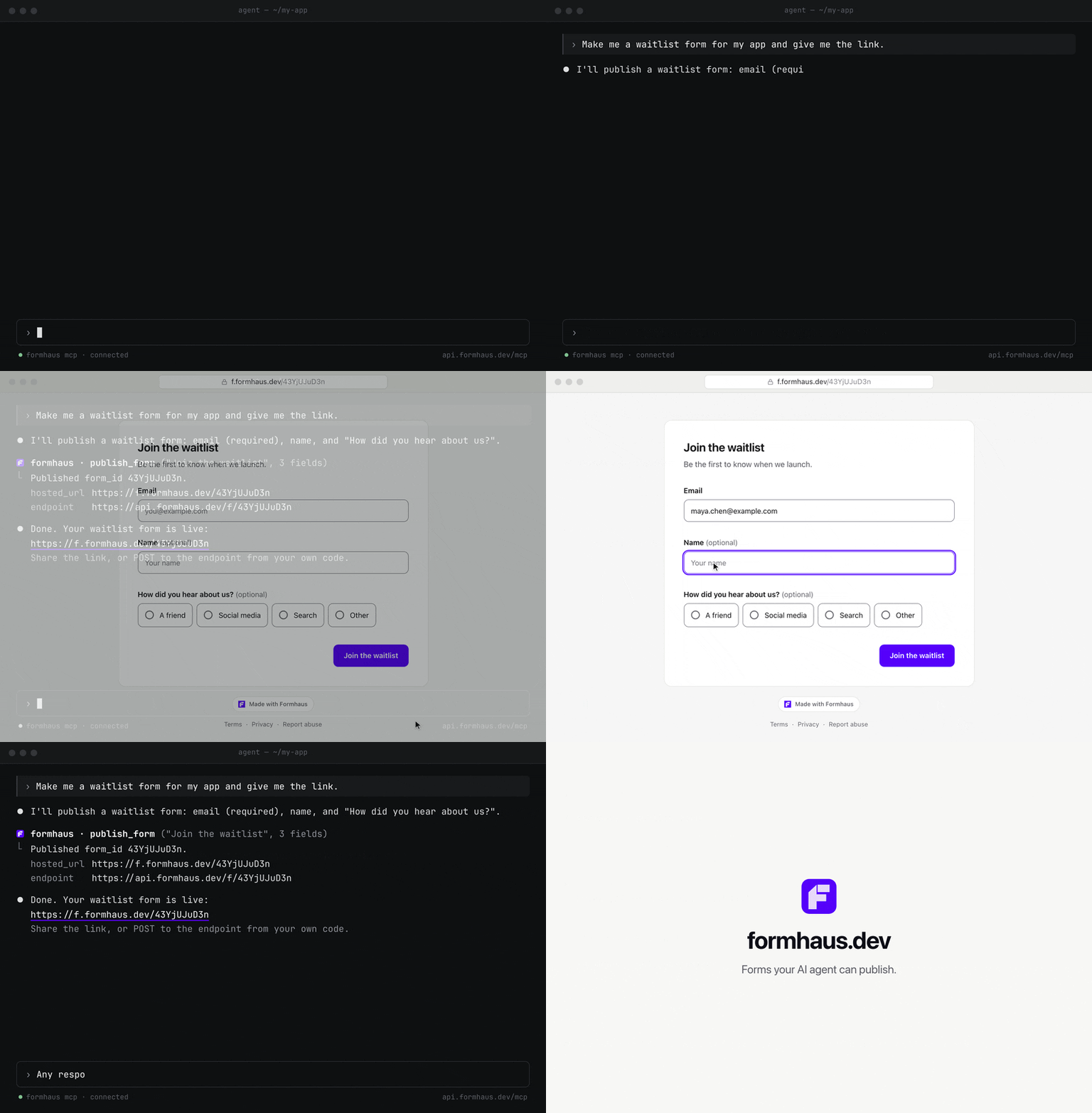
Build in the browser at app.formhaus.dev, or add the remote MCP server and ask your agent: "Make me a waitlist form and give me the link."
claude mcp add --transport http formhaus https://api.formhaus.dev/mcp
What you get
| Feature | |
|---|---|
| One definition | Fields, validation, conditional fields, steps, branching routes, sections and repeatable groups in one JSON file you keep in git |
| React and Vue | Native renderers with accessible defaults, or your own components through components |
| Validation | Built-in rules and custom validators. validateSubmission() checks the same definition on the server |
| Agents | The MCP server writes, validates and fixes definitions. Remote MCP publishes forms and reads responses |
| i18n | Translation catalogs and keys for labels, messages and options |
| Accessibility | Labels, error summary, focus management and live regions built in |
| Small core | Zero dependencies, tree-shakable ESM |
| Figma | The plugin renders mockups, flow maps and prototypes from the same definition |
| Cloud, optional | Hosted links, embeds, a submission endpoint, CSV export and webhooks |
What it's for
- Multi-step forms with branching in React or Vue.
- Rendering a form from JSON with your own components.
- Designing the form in Figma from the same file.
- Generating and checking definitions with AI agents: Claude Code skills, the MCP server (
claude plugin marketplace add formhaus-dev/formhaus && claude plugin install formhaus@formhaus), the JSON Schema and the format specification. - Translated forms with your own catalogs, or with i18next, vue-i18n and Lokalise keys.
- A headless engine for Svelte or vanilla JS.
Example
Business accounts get a company step; everyone converges on review.
{
  "$schema": "https://formhaus.dev/schema/form-definition.json",
  "id": "signup",
  "title": "Sign up",
  "submit": { "label": "Create account" },
  "steps": [
    {
      "id": "account",
      "title": "Account",
      "fields": [
        { "key": "email", "type": "email", "label": "Email", "validation": { "required": true } },
        { "key": "kind", "type": "radio", "label": "Account type", "autoAdvance": true,
          "options": [{ "value": "personal", "label": "Personal" }, { "value": "business", "label": "Business" }] }
      ],
      "routes": [
        { "to": "company", "show": [{ "field": "kind", "eq": "business" }] },
        { "to": "review" }
      ]
    },
    { "id": "company", "title": "Company", "routes": [{ "to": "review" }],
      "fields": [{ "key": "company", "type": "text", "label": "Company name", "validation": { "required": true } }] },
    { "id": "review", "title": "Review",
      "fields": [{ "key": "terms", "type": "checkbox", "label": "I accept the terms", "validation": { "required": true } }] }
  ]
}
import { FormRenderer } from '@formhaus/react';
import definition from './signup.json';

<FormRenderer definition={definition} onSubmit={save} />;
Compare with react-hook-form, react-jsonschema-form, JSON Forms and SurveyJS →
Packages
| Package | Description | npm |
|---|---|---|
@formhaus/core |
Zero-dependency form engine: types, validation, visibility, multi-step | npm i @formhaus/core |
@formhaus/react |
React adapter with native HTML defaults and custom component support | npm i @formhaus/core @formhaus/react |
@formhaus/vue |
Vue 3 adapter with native HTML defaults and custom component support | npm i @formhaus/core @formhaus/vue |
@formhaus/mcp |
MCP server: validate definitions and simulate paths from AI agents | claude mcp add formhaus -- npx -y @formhaus/mcp |
@formhaus/figma generates form mockups on the Figma canvas. It is not on Figma Community yet; build it locally, then import packages/figma/manifest.json.
Svelte, Solid, or anything else: use @formhaus/core directly. See the Svelte recipe.
Install
npm install @formhaus/core
If you need a framework adapter:
npm install @formhaus/core @formhaus/react   # React
npm install @formhaus/core @formhaus/vue     # Vue
Or use @formhaus/core directly with any framework. See the Svelte recipe.
Quick start
Define a form
Write the JSON by hand, or use the /formhaus:formhaus-create-form Claude Code skill to generate it from a text description, a CSV table, or a screenshot of an existing form.
{
  "$schema": "https://formhaus.dev/schema/form-definition.json",
  "id": "contact",
  "title": "Contact Us",
  "submit": { "label": "Send" },
  "fields": [
    {
      "key": "name",
      "type": "text",
      "label": "Name",
      "placeholder": "Your name",
      "validation": { "required": true, "minLength": 2 }
    },
    {
      "key": "email",
      "type": "email",
      "label": "Email",
      "placeholder": "you@example.com",
      "validation": {
        "required": true,
        "pattern": "^[^\\s@]+@[^\\s@]+\\.[^\\s@]+$",
        "patternMessage": "Please enter a valid email address"
      }
    },
    {
      "key": "message",
      "type": "textarea",
      "label": "Message",
      "placeholder": "How can we help?",
      "rows": 4,
      "validation": { "required": true }
    }
  ]
}
React
npm install @formhaus/core @formhaus/react
import { FormRenderer } from '@formhaus/react';
import definition from './contact-form.json';

function ContactPage() {
  async function handleSubmit(values: Record<string, unknown>) {
    await fetch('/api/contact', {
      method: 'POST',
      body: JSON.stringify(values),
    });
  }

  return <FormRenderer definition={definition} onSubmit={handleSubmit} />;
}
Vue
npm install @formhaus/core @formhaus/vue
<script setup lang="ts">
import { FormRenderer } from '@formhaus/vue';
import definition from './contact-form.json';

async function handleSubmit(values: Record<string, unknown>) {
  await fetch('/api/contact', {
    method: 'POST',
    body: JSON.stringify(values),
  });
}
</script>

<template>
  <FormRenderer :definition="definition" @submit="handleSubmit" />
</template>
By default, both adapters render native HTML inputs. A step can hide Next with next: false, and cancellable async hooks run before and after navigation and submission. See lifecycle hooks.
Custom components
Both adapters accept a components prop (a FieldComponentMap) that lets you swap native HTML inputs for your own UI kit.
import type { FieldComponentMap, FieldComponentProps } from '@formhaus/react';

function MyTextInput({ field, value, error, onChange, onBlur }: FieldComponentProps) {
  return (
    <div>
      <label>{field.label}</label>
      <input
        type={field.type}
        value={(value as string) ?? ''}
        placeholder={field.placeholder}
        onChange={(e) => onChange(e.target.value)}
        onBlur={onBlur}
      />
      {error && <span className="error">{error}</span>}
    </div>
  );
}

const components: FieldComponentMap = {
  text: MyTextInput,
  email: MyTextInput,
};

<FormRenderer definition={definition} onSubmit={handleSubmit} components={components} />;
<!-- MyTextInput.vue -->
<script setup lang="ts">
import type { FieldComponentProps } from '@formhaus/vue';

const props = defineProps<FieldComponentProps>();
const emit = defineEmits<{ (e: 'update:modelValue', value: unknown): void }>();
</script>

<template>
  <label>{{ props.field.label }}</label>
  <input
    :value="(props.modelValue as string) ?? ''"
    @input="emit('update:modelValue', ($event.target as HTMLInputElement).value)"
  />
</template>
<!-- Usage -->
<script setup>
import { FormRenderer } from '@formhaus/vue';
import MyTextInput from './MyTextInput.vue';
</script>

<template>
  <FormRenderer
    :definition="definition"
    :components="{ text: MyTextInput, email: MyTextInput }"
    @submit="handleSubmit"
  />
</template>
Each field component receives the full FormField descriptor, the current value, and any validation error. Implement as many or as few field types as you need. Unmapped types fall back to native HTML.
Figma plugin
@formhaus/figma renders form definitions in Figma with built-in Material 3 and iOS-like kits or with your own components. Branching forms get a flow map, multi-step forms a clickable prototype, and a generated form can be selected, edited and updated in place.
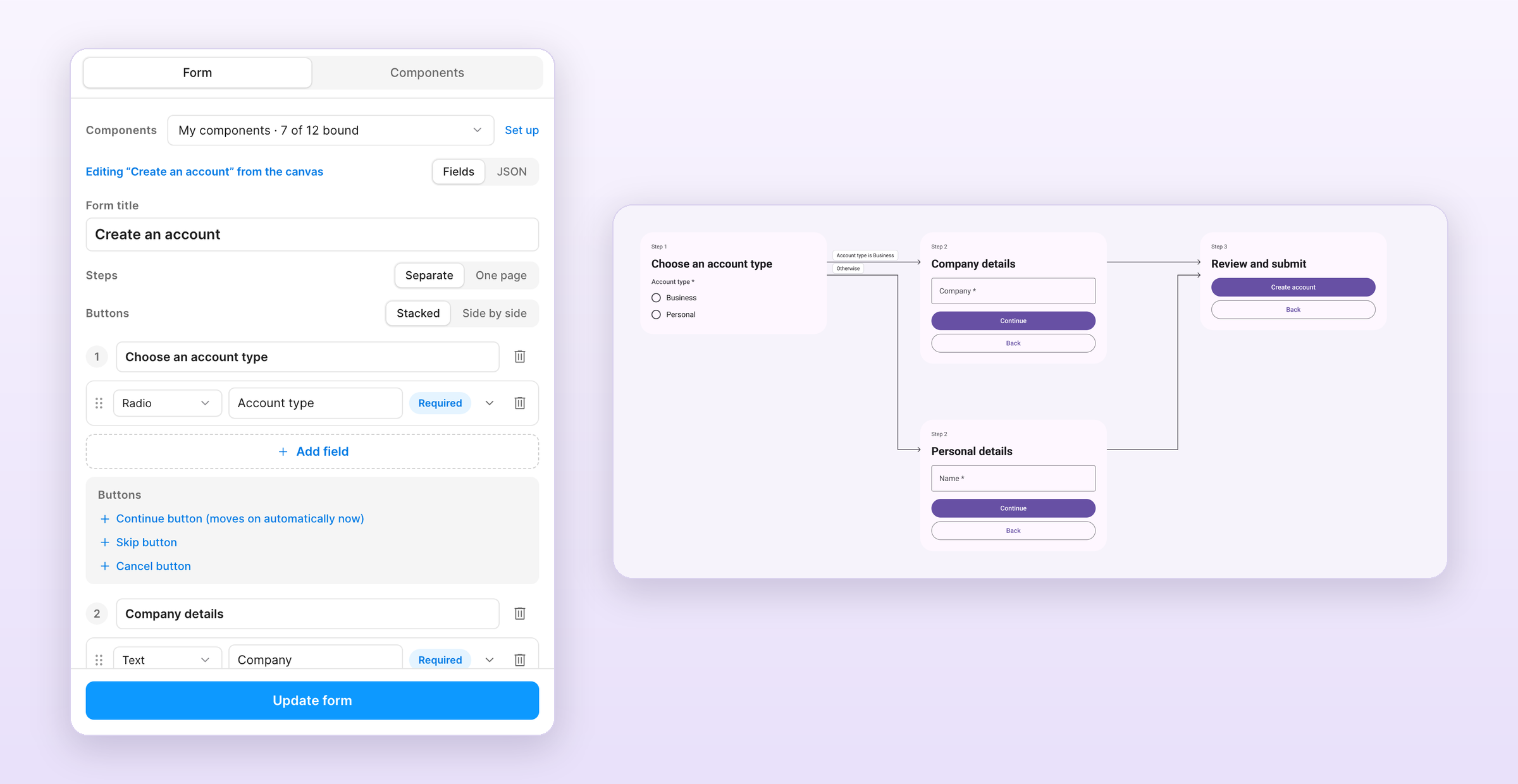
The /formhaus:formhaus-figma-connect Claude Code skill binds your library's components to the plugin. See the plugin guide for local installation.
Contributing
See CONTRIBUTING.md.
License
formhaus MCP 질문
formhaus MCP를 Claude Code에 추가하려면 어떻게 하나요?
터미널에서 claude mcp add formhaus -- npx -y @formhaus/mcp를 실행합니다. 모든 프로젝트에서 사용할 수 있게 하려면 --scope user를 추가합니다.
formhaus MCP를 Cursor에 추가하려면 어떻게 하나요?
~/.cursor/mcp.json를 열고 mcpServers 아래에 서버를 추가합니다. 위 설치 섹션에 표시된 Cursor 구성을 사용합니다.
Formhaus MCP server는 어떤 기능을 제공하나요?
이 MCP server를 사용하면 AI 에이전트가 계정 없이도 로컬에서 폼 정의를 작성, 확인 및 수정할 수 있습니다.
자체 UI 컴포넌트와 함께 Formhaus를 사용할 수 있나요?
네, React 및 Vue 어댑터 모두 components prop을 통해 기본 HTML input을 사용자 정의 컴포넌트로 교체할 수 있습니다.
Formhaus는 멀티 스텝 폼을 지원하나요?
네, JSON 정의를 통해 필드, 검증, 조건부 필드, 단계 및 분기 경로를 포함한 멀티 스텝 폼을 지원합니다.