
Agent Lighthouse MCP server
2026년 11월 13일 커밋AI 에이전트, LLM 크롤러, MCP 클라이언트가 웹사이트 콘텐츠를 효과적으로 탐색, 파싱, 인용 및 실행할 수 있는지 검사합니다.
다른 이름 ForkPoint/agent-lighthouse, @forkpoint/agent-lighthouse, @forkpoint/agent-lighthouse-core, @forkpoint/agent-lighthouse-mcp
- 스타
- 17
- Tools
- —
- 다운로드, 30일
- 10,490
- 최신 버전
- —
- 마지막 커밋
- 2026년 11월 13일
- 라이선스
- Apache-2.0
Agent Lighthouse MCP란?
Agent Lighthouse은(는) MCP server입니다. AI 에이전트, LLM 크롤러, MCP 클라이언트가 웹사이트 콘텐츠를 효과적으로 탐색, 파싱, 인용 및 실행할 수 있는지 검사합니다.
프로젝트 README에서 생성된 요약
Agent Lighthouse MCP server 정보
Agent Lighthouse는 개발자와 사이트 소유자가 웹사이트가 인공지능과 얼마나 잘 상호작용하는지 평가할 수 있는 전문적인 감사 프레임워크를 제공합니다. LLM 크롤러, 에이전틱 브라우저, MCP 클라이언트가 사이트 콘텐츠를 성공적으로 탐색, 파싱 및 실행할 수 있는지 평가합니다. 이 도구는 GPTBot 및 ClaudeBot과 같은 봇을 위한 robots.txt 정책, llms.txt와 같은 머신 디스커버리 파일, Schema.org를 통한 구조화된 데이터 등 핵심 요소를 검사합니다.
사용자는 npx를 사용하여 명령줄 인터페이스를 통해 감사를 실행하거나, MCP server를 통해 기능을 개발 워크플로우에 통합할 수 있습니다. 이를 통해 Claude Desktop 또는 Cursor와 같은 클라이언트에서 audit_website 도구를 직접 실행할 수 있습니다. 시스템은 터미널 요약, HTML 보고서, JSON 파일을 포함한 다양한 결과물을 생성합니다. 또한 사이트 점수가 지정된 최소 점수 미만일 경우 빌드를 실패하게 하여 지속적 통합 파이프라인에서 테스트를 자동화하는 GitHub Action을 제공합니다.
활용 사례
- 1AI 준비도 테스트 자동화웹사이트 변경 사항으로 인해 AI 접근성 점수가 특정 임계값 아래로 떨어지지 않도록 지속적 통합 체크를 설정합니다.
- 2에이전틱 커머스 역량 감사AI 에이전트가 제품 제안, 재고 현황 및 결제 프로세스를 처리하는 데 필요한 인터페이스를 웹사이트가 제공하는지 확인합니다.
- 3IDE를 통한 직접 감사Cursor와 같은 MCP 클라이언트를 통해 웹사이트 스캔을 실행하여 머신 디스커버리 및 인터페이스 준수 여부를 확인합니다.
프로젝트의 README를 바탕으로 작성되었습니다. 모든 활용 사례는 해당 내용의 인용문과 대조하여 확인합니다.
Agent Lighthouse MCP 설치 방법
형식 확인: 2026년 11월 10일Cursor에 추가Goose에 추가Claude Code에 Agent Lighthouse MCP 설치
$ claude mcp add agent-lighthouse -- npx -y @forkpoint/agent-lighthouseCursor에 Agent Lighthouse MCP 설치
~/.cursor/mcp.json
{
  "mcpServers": {
    "agent-lighthouse": {
      "command": "npx",
      "args": [
        "-y",
        "@forkpoint/agent-lighthouse"
      ]
    }
  }
}VS Code에 Agent Lighthouse MCP 설치
.vscode/mcp.json
{
  "servers": {
    "agent-lighthouse": {
      "type": "stdio",
      "command": "npx",
      "args": [
        "-y",
        "@forkpoint/agent-lighthouse"
      ]
    }
  }
}VS Code CLI에 Agent Lighthouse MCP 설치
$ code --add-mcp '{"name":"agent-lighthouse","type":"stdio","command":"npx","args":["-y","@forkpoint/agent-lighthouse"]}'Claude Desktop에 Agent Lighthouse MCP 설치
claude_desktop_config.json
{
  "mcpServers": {
    "agent-lighthouse": {
      "command": "npx",
      "args": [
        "-y",
        "@forkpoint/agent-lighthouse"
      ]
    }
  }
}Codex에 Agent Lighthouse MCP 설치
$ codex mcp add agent-lighthouse -- npx -y @forkpoint/agent-lighthouseCodex config.toml에 Agent Lighthouse MCP 설치
~/.codex/config.toml
[mcp_servers.agent-lighthouse]
command = "npx"
args = ["-y", "@forkpoint/agent-lighthouse"]
Gemini CLI에 Agent Lighthouse MCP 설치
$ gemini mcp add -s user agent-lighthouse npx -- -y @forkpoint/agent-lighthouseGemini settings.json에 Agent Lighthouse MCP 설치
~/.gemini/settings.json
{
  "mcpServers": {
    "agent-lighthouse": {
      "command": "npx",
      "args": [
        "-y",
        "@forkpoint/agent-lighthouse"
      ]
    }
  }
}자동 검사
2026년 11월 14일에 실행됨전체 보고서 →아직 인증되지 않았습니다. 서버는 80점 이상의 점수, 심각한 결함 없음, 그리고 검사에 충분한 데이터를 갖추어야 합니다. 검사 방식 · 점수를 높이기 위해 수정할 항목

- 소스 저장소 연결 및 접근 가능forkpoint/agent-lighthouse is public and reachablegithub.com/forkpoint/agent-lighthouse ↗통과
- 패키지가 이 저장소를 소스로 명시@forkpoint/agent-lighthouse, @forkpoint/agent-lighthouse-core name forkpoint/agent-lighthouse as sourcenpmjs.com/package/@forkpoint/agent-lighthouse ↗통과
- 빌드 출처(Sigstore 증명)No build attestation published for this release검사되지 않음
- 오픈 소스 라이선스 (OSI)Apache-2.0spdx.org/licenses/Apache-2.0.html ↗통과
- 최근 1년 내 커밋 또는 릴리스Last commit or release 2026-11-11github.com/forkpoint/agent-lighthouse ↗통과
- OpenSSF Scorecard검사되지 않음
- 패키지 이름이 인기 패키지와 유사하지 않음No popular package one edit away from @forkpoint/agent-lighthouse, @forkpoint/agent-lighthouse-core, @forkpoint/agent-lighthouse-mcp통과
- 패키지 및 해당 종속성에 중요한 보안 권고 없음검사되지 않음
- 모델에 대한 숨겨진 지침 없음0 tool descriptions and the README read; no override phrases, credential paths or hidden characters통과
- 파괴적인 도구에 라벨 표시됨검사되지 않음
- 원격 엔드포인트가 MCP 핸드셰이크에 응답검사되지 않음
README
GitHub에서 보기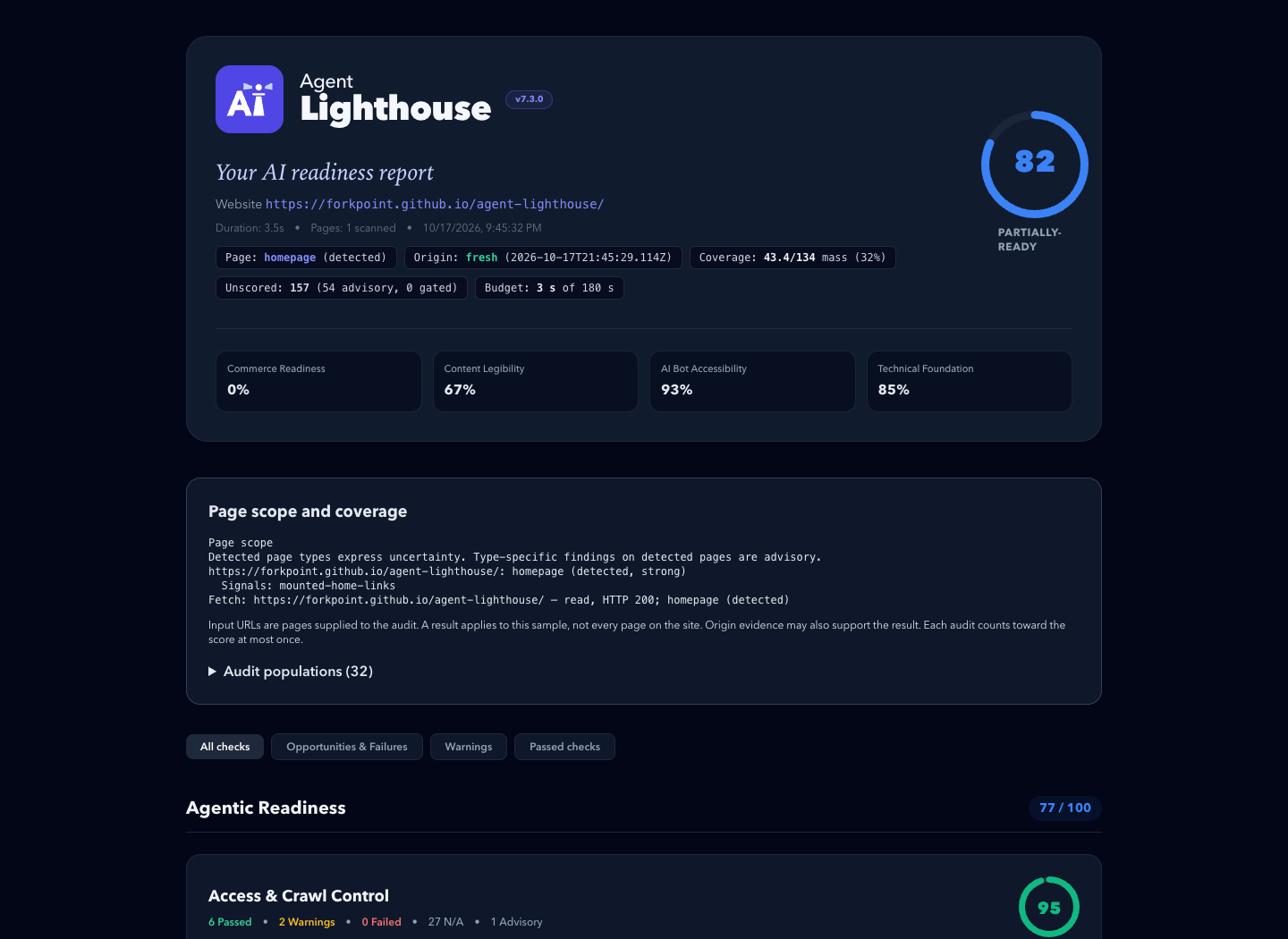
An example report. Its scores describe one past scan, not the site's current state.
⚡ Quickstart
Requires Node.js 22.22.2+ (22.x), 24.15.0+ (24.x), or 26+.
# Terminal report, plus HTML and JSON reports in ./reports
npx @forkpoint/agent-lighthouse https://example.com

# Open the HTML report in your browser
npx @forkpoint/agent-lighthouse https://example.com --view

# Fail (exit 1) below a score, for CI
npx @forkpoint/agent-lighthouse https://staging.example.com --min-score 85
Agentic readiness skill
The agent-lighthouse skill lets a coding agent turn a report into verified fixes, on any website stack. It traces findings through source files and hosting settings, and keeps local fixes apart from deployed scan results.
Install it from this repository's marketplace. In Claude Code:
claude plugin marketplace add ForkPoint/agent-lighthouse
claude plugin install agent-lighthouse@agent-lighthouse
In Codex:
codex plugin marketplace add ForkPoint/agent-lighthouse
codex plugin add agent-lighthouse@agent-lighthouse
From a local checkout, pass /absolute/path/to/agent-lighthouse to marketplace add. Start a new chat after installing. The CLI and MCP npm packages are separate. See the installation and workflow guide.
🎯 What Agent Lighthouse Checks
Agent Lighthouse evaluates websites across 8 agent-journey categories grouped into 3 readiness pillars:
├── 1. Agentic Readiness
│   ├── Access & Crawl Control (robots.txt rules for GPTBot, ClaudeBot, PerplexityBot, blocks, status codes)
│   ├── Machine Discovery (llms.txt, llms-full.txt, sitemaps, feeds, .well-known surfaces)
│   ├── Agent Interfaces (WebMCP manifests, OpenAPI specs, agents.json, search actions)
│   └── Agentic Commerce (product offers, availability, checkout and payment surfaces)
│
├── 2. AI Search Optimization
│   ├── Content Extraction (clean main content, semantic structure, render and response cost)
│   ├── Structured Data (Schema.org Product, Offer, SKU, GTIN, Organization, JSON-LD validity)
│   └── Answer Readiness (direct answerability, step lists, tables, unique data, citations)
│
└── 3. Technical Foundation
    └── Agent Operability & Safety (HTTPS, security.txt, tdmrep, stability, broken agent endpoints)
📦 Packages & Architecture
A pnpm monorepo published under the @forkpoint scope:
| Package | npm Package | Description |
|---|---|---|
packages/cli |
@forkpoint/agent-lighthouse |
Main CLI binary (npx @forkpoint/agent-lighthouse <url>). |
packages/core |
@forkpoint/agent-lighthouse-core |
Core gatherer-audit engine, scoring algorithms, and types. |
packages/report |
@forkpoint/agent-lighthouse-report |
Standalone HTML, Markdown, and unified report view-model. |
packages/mcp |
@forkpoint/agent-lighthouse-mcp |
Model Context Protocol (MCP) server for Claude / Cursor / IDEs. |
🛡️ GitHub Actions CI
- uses: ForkPoint/agent-lighthouse@main
  with:
    url: https://staging.example.com
    min-score: "85"
    github-token: ${{ secrets.GITHUB_TOKEN }}
The action writes terminal, HTML, JSON, and Markdown reports. With github-token it comments the Markdown summary on the pull request. Inputs and pinning are in the GitHub Action guide.
💻 Programmatic Node.js / TypeScript SDK
import { runScan } from "@forkpoint/agent-lighthouse-core";
import {
  buildReportView,
  generateHtmlReport,
} from "@forkpoint/agent-lighthouse-report";

const report = await runScan("https://example.com");
const view = buildReportView(report);

// overallScore is null when the scan saw too little to judge the site
console.log(`Overall Score: ${view.overallScore}/100 (${view.scoreTier})`);

const html = generateHtmlReport(report); // standalone HTML report
Options are in programmatic options.
🤖 Model Context Protocol (MCP) Server
Let Claude Desktop, Cursor or another MCP client run scans through the audit_website tool:
{
  "mcpServers": {
    "agent-lighthouse": {
      "command": "npx",
      "args": ["-y", "@forkpoint/agent-lighthouse-mcp"]
    }
  }
}
📣 Share Your Score
Reports are standalone files: attach them to pull requests, send them to clients, or publish a before/after. Put the score in a README with a badge. Share a public site's result through the site score template.
More: media kit (boilerplate, screenshots, logos) · brand guide · brand kit download
🛠️ Development
git clone https://github.com/ForkPoint/agent-lighthouse.git
cd agent-lighthouse
pnpm install
pnpm build
pnpm test   # deterministic tests with fixed inputs
Contributor rules, including how to add an audit, are in CLAUDE.md.
📄 License
Apache-2.0 © ForkPoint
Agent Lighthouse MCP 질문
Agent Lighthouse MCP를 Claude Code에 추가하려면 어떻게 하나요?
터미널에서 claude mcp add agent-lighthouse -- npx -y @forkpoint/agent-lighthouse를 실행합니다. 모든 프로젝트에서 사용할 수 있게 하려면 --scope user를 추가합니다.
Agent Lighthouse MCP를 Cursor에 추가하려면 어떻게 하나요?
~/.cursor/mcp.json를 열고 mcpServers 아래에 서버를 추가합니다. 위 설치 섹션에 표시된 Cursor 구성을 사용합니다.
Agent Lighthouse는 무엇을 확인하나요?
액세스 제어, 머신 디스커버리, 에이전트 인터페이스, 에이전틱 커머스, 콘텐츠 추출, 구조화된 데이터, 답변 준비도, 기술적 기반 등 8가지 에이전트 여정 카테고리에 걸쳐 웹사이트를 평가합니다.
CI/CD 파이프라인에서 사용할 수 있나요?
네, CLI를 사용하여 특정 점수 미만일 경우 빌드를 실패하게 하거나, 공식 GitHub Action을 사용하여 pull request에 Markdown 요약본을 댓글로 남길 수 있습니다.
Claude Desktop 또는 Cursor와 함께 어떻게 사용하나요?
npx를 통해 @forkpoint/agent-lighthouse-mcp 패키지를 사용하여 MCP server로 연결할 수 있습니다.