
EximAgent MCP server
2026년 10월 13일 커밋Enables AI clients to perform outbound prospecting, trade data analysis, and compliance checks for the export-import industry.
다른 이름 EximAgent/cursor-plugin, cursor-plugin
- 스타
- 1
- Tools
- —
- 다운로드, 30일
- —
- 최신 버전
- 0.1.1
- 마지막 커밋
- 2026년 10월 13일
- 라이선스
- MIT
EximAgent MCP란?
EximAgent은(는) MCP server입니다. Enables AI clients to perform outbound prospecting, trade data analysis, and compliance checks for the export-import industry.
프로젝트 README에서 생성된 요약
EximAgent MCP server 정보
EximAgent provides a specialized team of AI agents designed for professionals in the export-import industry. It connects to clients like Claude, Cursor, and Claude Code through a hosted MCP connector or a command-line tool. Users can integrate the service by signing in with a Google account via OAuth. The system functions through three distinct agent roles: Outbound for finding buyers and writing outreach, Analyst for examining trade flows and market trends, and Compliance for managing regulatory requirements.
Developers and trade professionals use this server to access real customs shipment records and trade data. The toolset includes specific capabilities for HS classification, tariff lookups, and OFAC sanctions screening. While the connector handles data through a streamable HTTP connection, assistants with terminal access can also utilize the eximagent CLI for scripts or long lists. The service is free to start and requires an EximAgent account for full access.
활용 사례
- 1Identify and contact new buyersFind importers of specific goods from customs records and generate personalized outreach emails.
- 2Analyze global trade trendsResearch market sizes, price trends, and primary trade routes for specific commodities.
- 3Verify regulatory complianceCheck company names against sanctions lists and determine applicable duties for specific trade lanes.
- 4Determine product classificationsIdentify the correct HS codes and associated tariffs for shipping goods between countries.
프로젝트의 README를 바탕으로 작성되었습니다. 모든 활용 사례는 해당 내용의 인용문과 대조하여 확인합니다.
EximAgent MCP 설치 방법
형식 확인: 2026년 11월 10일Cursor에 추가Goose에 추가Claude Code에 EximAgent MCP 설치
$ claude mcp add --transport http cursor-plugin https://mcp.eximagent.ai/mcpCursor에 EximAgent MCP 설치
~/.cursor/mcp.json
{
  "mcpServers": {
    "cursor-plugin": {
      "url": "https://mcp.eximagent.ai/mcp"
    }
  }
}VS Code에 EximAgent MCP 설치
.vscode/mcp.json
{
  "servers": {
    "cursor-plugin": {
      "type": "http",
      "url": "https://mcp.eximagent.ai/mcp"
    }
  }
}VS Code CLI에 EximAgent MCP 설치
$ code --add-mcp '{"name":"cursor-plugin","type":"http","url":"https://mcp.eximagent.ai/mcp"}'Codex에 EximAgent MCP 설치
$ codex mcp add cursor-plugin --url https://mcp.eximagent.ai/mcpCodex config.toml에 EximAgent MCP 설치
~/.codex/config.toml
[mcp_servers.cursor-plugin]
url = "https://mcp.eximagent.ai/mcp"
Gemini CLI에 EximAgent MCP 설치
$ gemini mcp add -s user --transport http cursor-plugin https://mcp.eximagent.ai/mcpGemini settings.json에 EximAgent MCP 설치
~/.gemini/settings.json
{
  "mcpServers": {
    "cursor-plugin": {
      "url": "https://mcp.eximagent.ai/mcp",
      "type": "http"
    }
  }
}자동 검사
2026년 11월 14일에 실행됨전체 보고서 →아직 인증되지 않았습니다. 서버는 80점 이상의 점수, 심각한 결함 없음, 그리고 검사에 충분한 데이터를 갖추어야 합니다. 검사 방식 · 점수를 높이기 위해 수정할 항목

- 소스 저장소 연결 및 접근 가능eximagent/cursor-plugin is public and reachablegithub.com/eximagent/cursor-plugin ↗통과
- 패키지가 이 저장소를 소스로 명시검사되지 않음
- 빌드 출처(Sigstore 증명)검사되지 않음
- 오픈 소스 라이선스 (OSI)MITspdx.org/licenses/MIT.html ↗통과
- 최근 1년 내 커밋 또는 릴리스Last commit or release 2026-10-13github.com/eximagent/cursor-plugin ↗통과
- OpenSSF Scorecard검사되지 않음
- 패키지 이름이 인기 패키지와 유사하지 않음검사되지 않음
- 패키지 및 해당 종속성에 중요한 보안 권고 없음검사되지 않음
- 모델에 대한 숨겨진 지침 없음0 tool descriptions and the README read; no override phrases, credential paths or hidden characters통과
- 파괴적인 도구에 라벨 표시됨검사되지 않음
- 원격 엔드포인트가 MCP 핸드셰이크에 응답HTTPS endpoint answered 401 (sign-in required)통과
README
GitHub에서 보기EximAgent plugin
EximAgent is a team of AI agents for the export-import industry, connected to Claude, Cursor and other AI clients through one MCP connector. Outbound finds importers and buyers and writes personalized outreach. Analyst digs into trade data: market size, price trends, trade flows and company profiles. Compliance handles HS classification, tariffs, landed cost and OFAC screening.
An AI sales team for export-import: Outbound, Analyst and Compliance, in Claude Code, Cursor and other AI clients. Free to start.
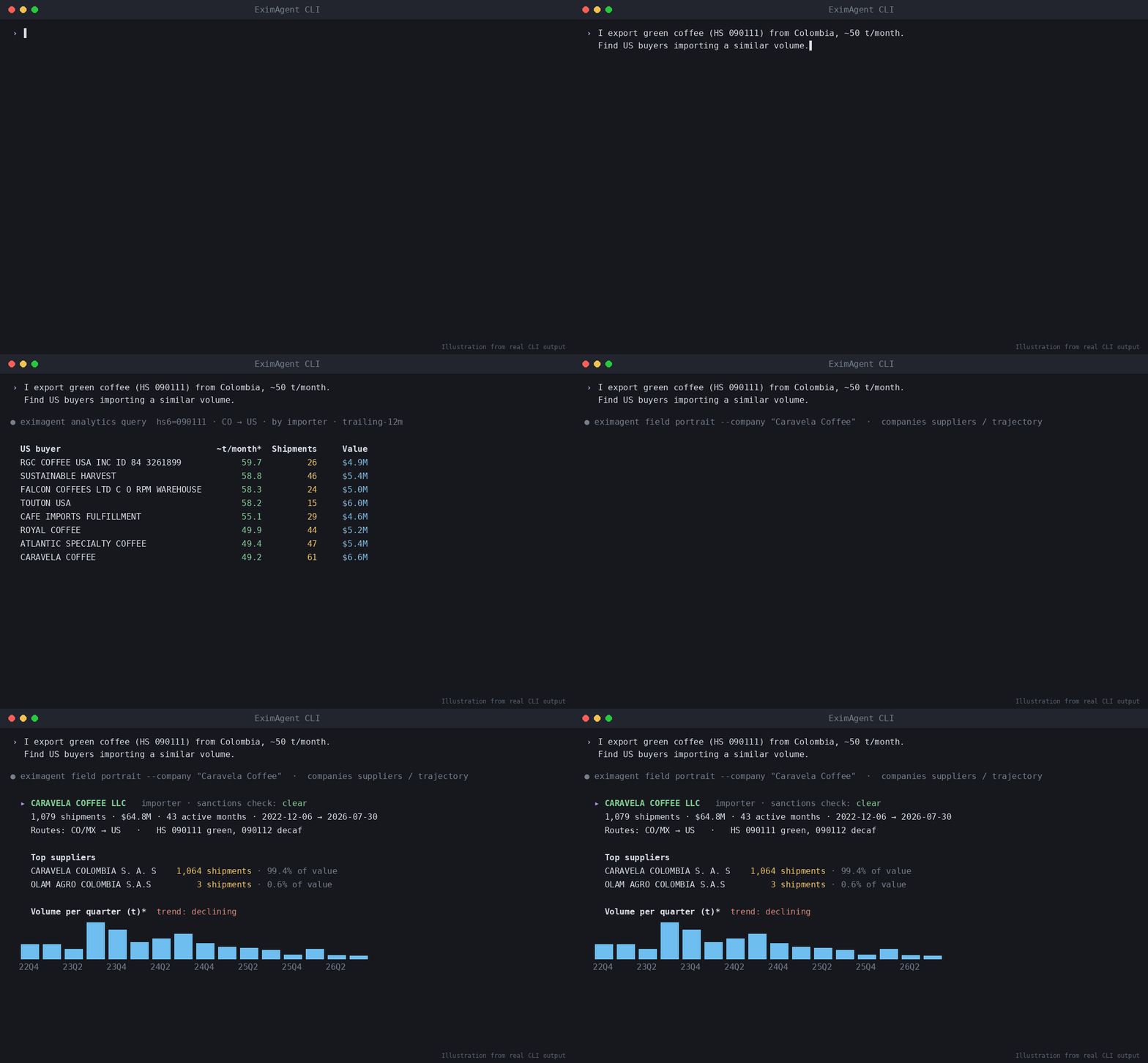
▶ Watch the demo video on YouTube
Ask in plain words, and your assistant uses EximAgent to:
- find importers, buyers and distributors from real customs shipment records
- look up HS codes, tariffs and duties for a trade lane
- screen company or person names against the OFAC sanctions list
- research a company from its website
- write personalized outreach emails to the buyers it finds
What's inside
| Part | What it does |
|---|---|
mcp.json |
Connects to the hosted EximAgent connector at https://mcp.eximagent.ai/mcp (streamable HTTP, OAuth sign-in) |
skills/eximagent |
Teaches the assistant to use the EximAgent connector: which agent and tool to use for prospecting, trade data analysis and compliance checks |
skills/eximagent-cli |
Teaches assistants that have a terminal to install and use the eximagent command-line tool |
Set up (about 2 minutes)
You need an EximAgent account. See pricing.
Cursor
Add the hosted connector to ~/.cursor/mcp.json:
{ "mcpServers": { "eximagent": { "url": "https://mcp.eximagent.ai/mcp" } } }
Then open Cursor's MCP settings, choose Connect on eximagent, and sign in with Google in the browser window that opens.
If you already use the eximagent CLI and are signed in, eximagent connect cursor writes this config for you.
Claude Code
claude mcp add --transport http eximagent https://mcp.eximagent.ai/mcp --scope user
Then run /mcp in Claude Code and sign in with Google. (CLI users who are signed in can run eximagent connect claude-code instead.)
Other assistants
- Grok Bot: open Connect Apps, find EximAgent, choose Add, then sign in with Google.
- Codex:
codex mcp add eximagent --url https://mcp.eximagent.ai/mcp, thencodex mcp login eximagent. - Claude desktop or web: Settings → Connectors → Add custom connector →
https://mcp.eximagent.ai/mcp.
Skills only (any agent that supports Agent Skills)
Add the two EximAgent skills to Claude Code, Codex, Cursor and other agents with the open-source skills CLI:
npx skills add EximAgent/cursor-plugin
To add one skill only, use --skill eximagent (for the connector) or --skill eximagent-cli (for the command-line tool). The skills work together with the EximAgent connector or the eximagent CLI.
Full connector guide: https://eximagent.ai/connectors
What you can ask
Outbound:
- "Find importers of green coffee in Germany from customs shipment records and shortlist the best five."
- "Research this buyer's website and write a personalized first email."
Analyst:
- "How big is the US market for frozen shrimp imports, and who are the top importers?"
- "Show the price trend and main trade routes for cashew nuts shipped into the Netherlands."
Compliance:
- "What HS code fits frozen shrimp, and what duty applies shipping it from Vietnam to Germany?"
- "Screen these three company names against the OFAC sanctions list."
Access
- Lookups (HS codes, tariffs, sanctions, trade questions) only read data.
- The connector reads the account you sign in with and the EximAgent trade data. It does not read your files, your mail or your other connectors.
Use the command-line tool
If your assistant can run terminal commands (for example Grok Bot, Cursor's terminal, Claude Code or Codex), it can also use
the eximagent command-line tool. This helps when the connector isn't set up, or for scripts and long lists. The
eximagent-cli skill tells the assistant how to install it with the official installer,
let you sign in yourself, and run the main commands. You sign in
in your own browser. Never paste a password or token into the chat.
Help
- Docs: https://eximagent.ai/docs
- Contact: brickai@eximagent.ai
- Command-line tool (for developers): https://github.com/EximAgent/cli
If this is useful, a star helps others find it. ⭐
License
The files in this repository (manifest, MCP config, skills and README) are released under the MIT License. See LICENSE. Using the EximAgent service is governed by the EximAgent Terms and Privacy Policy.
EximAgent MCP 질문
EximAgent MCP를 Claude Code에 추가하려면 어떻게 하나요?
터미널에서 claude mcp add --transport http cursor-plugin https://mcp.eximagent.ai/mcp를 실행합니다. 모든 프로젝트에서 사용할 수 있게 하려면 --scope user를 추가합니다.
EximAgent MCP를 Cursor에 추가하려면 어떻게 하나요?
~/.cursor/mcp.json를 열고 mcpServers 아래에 서버를 추가합니다. 위 설치 섹션에 표시된 Cursor 구성을 사용합니다.
Does the connector access my private files?
No, the connector only accesses your signed-in account and EximAgent trade data, not your files or email.