
코드베이스를 인덱싱하여 AI 클라이언트가 효율적으로 검색 가능한 코드 컨텍스트를 제공하며, 토큰 사용량을 줄여줍니다.
다른 이름 elara-labs/code-context-engine, code-context-engine
- 스타
- 459
- Tools
- —
- 다운로드, 30일
- 728
- 최신 버전
- 0.4.13
- 마지막 커밋
- 2026년 8월 23일
- 라이선스
- MIT
Code Context Engine MCP란?
Code Context Engine은(는) MCP server입니다. 코드베이스를 인덱싱하여 AI 클라이언트가 효율적으로 검색 가능한 코드 컨텍스트를 제공하며, 토큰 사용량을 줄여줍니다.
프로젝트 README에서 생성된 요약
Code Context Engine MCP server 정보
Code Context Engine은 로컬 코드베이스를 인덱싱하여 AI 클라이언트가 전체 파일을 다시 읽는 대신 관련 정보를 검색할 수 있는 방법을 제공합니다. 이 방식은 토큰 소비를 크게 줄여주며, 벤치마크 결과 입력 토큰을 최대 94%까지 절약할 수 있습니다. Claude Code, Cursor, VS Code, Gemini CLI와 같은 도구를 사용하는 개발자를 위해 설계되었으며, 서로 다른 에디터와 에이전트 간에 공유 가능한 단일 인덱스를 유지할 수 있습니다.
시스템은 클라우드 인덱싱을 사용하지 않고 완전히 로컬에서 실행되므로 코드 프라이버시를 보장합니다. macOS, Linux, Windows를 포함한 다양한 환경을 지원하며 Python 3.11 이상이 필요합니다. 사용자는 단일 명령으로 엔진을 설정할 수 있으며, 이 명령은 에디터를 자동으로 감지하고 필요한 파일을 구성합니다. Ollama를 사용하는 경우, 엔진이 localhost:11434의 로컬 인스턴스를 자동으로 감지하여 nomic-embed-text를 통한 임베딩을 처리할 수 있습니다.
활용 사례
- 1AI 코딩 비용 절감모델에 전체 파일을 전송하는 대신 인덱싱된 검색을 사용하여 월간 비용을 낮출 수 있습니다.
- 2코드베이스 프라이버시 유지팀은 인덱싱 과정에서 독점 코드가 로컬 머신을 벗어나지 않도록 보장할 수 있습니다.
- 3에디터 간 컨텍스트 동기화Cursor와 VS Code를 모두 사용하는 개발자는 두 도구에서 동일한 코드베이스 인덱스를 사용할 수 있습니다.
- 4세션 간 지식 유지AI 에이전트가 재시작 후에도 이전의 결정 사항과 특정 코드 영역을 기억할 수 있습니다.
프로젝트의 README를 바탕으로 작성되었습니다. 모든 활용 사례는 해당 내용의 인용문과 대조하여 확인합니다.
Code Context Engine MCP 설치 방법
형식 확인: 2026년 11월 10일Claude Code에 Code Context Engine MCP 설치
$ claude mcp add code-context-engine -- uvx code-context-engineCursor에 Code Context Engine MCP 설치
~/.cursor/mcp.json
{
  "mcpServers": {
    "code-context-engine": {
      "command": "uvx",
      "args": [
        "code-context-engine"
      ]
    }
  }
}VS Code에 Code Context Engine MCP 설치
.vscode/mcp.json
{
  "servers": {
    "code-context-engine": {
      "type": "stdio",
      "command": "uvx",
      "args": [
        "code-context-engine"
      ]
    }
  }
}Claude Desktop에 Code Context Engine MCP 설치
claude_desktop_config.json
{
  "mcpServers": {
    "code-context-engine": {
      "command": "uvx",
      "args": [
        "code-context-engine"
      ]
    }
  }
}Codex에 Code Context Engine MCP 설치
~/.codex/config.toml
[mcp_servers.code-context-engine]
command = "uvx"
args = ["code-context-engine"]
Gemini CLI에 Code Context Engine MCP 설치
~/.gemini/settings.json
{
  "mcpServers": {
    "code-context-engine": {
      "command": "uvx",
      "args": [
        "code-context-engine"
      ]
    }
  }
}자동 검사
2026년 11월 12일에 실행됨전체 보고서 →자동 검사를 통과했습니다. 이는 보안 감사가 아닙니다. 코드를 직접 읽고 서버에 필요한 최소한의 권한만 부여하십시오. 검사 방식

- 소스 저장소 연결 및 접근 가능통과
- 오픈 소스 라이선스 (OSI)통과
- 최근 1년 내 커밋 또는 릴리스통과
- 패키지 이름이 인기 패키지와 유사하지 않음통과
- 원격 엔드포인트가 HTTPS 사용검사되지 않음
- 파괴적인 도구에 라벨 표시됨검사되지 않음
- 모델에 대한 숨겨진 지침 없음통과
- 패키지와 의존성에 심각한 보안 권고 없음통과
README
GitHub에서 보기Use cases
| Use case | How CCE helps | |
|---|---|---|
| 💰 | Reduce Claude Code costs | 94% fewer input tokens per session |
| 🔒 | Keep code private | Everything local, no cloud indexing |
| 🔄 | Multi-editor teams | One index across Claude Code, Cursor, VS Code, Gemini CLI |
| 🧠 | Cross-session memory | Decisions and context survive restarts |
| ⚡ | Faster responses | Less context = faster Claude replies |
| 📊 | Track actual savings | Dollar amounts, not estimates |
Quick start
One command. 30 seconds.
uvx --from "code-context-engine[local]" cce init # install + index + configure, one shot
Or if you prefer a persistent install:
uv tool install "code-context-engine[local]"    # or: pipx install "code-context-engine[local]"
cd /path/to/your/project
cce init
Restart your editor. Done. Every question now hits the index instead of re-reading files.
Agent Plugin support: Run
cce init --pluginto generate a portable Agent Plugin directory that works with VS Code, Cursor, Copilot, Codex, ChatGPT, and Kiro. The plugin usesuvxto launch CCE on demand, so users don't need to pre-install the Python package. See Agent Plugin below.
Already have Ollama? Skip
[local]and useuv tool install code-context-engineinstead. CCE auto-detects Ollama at localhost:11434 and usesnomic-embed-text.
Python 3.11+ and a C compiler (for tree-sitter grammars).
| Platform | Setup |
|---|---|
| macOS | xcode-select --install |
| Ubuntu/Debian | sudo apt install build-essential cmake |
| Fedora/RHEL | sudo dnf install gcc gcc-c++ cmake |
| Windows | Visual Studio Build Tools (C++ workload) + CMake |
Tested on macOS, Linux, Windows with Python 3.11/3.12/3.13.
cce init auto-detects your editor and writes the right config. To target a
specific agent, use --agent claude, --agent codex, --agent copilot, --agent pi, or
--agent all.
| Editor | Config written | Instructions |
|---|---|---|
| Claude Code | .mcp.json |
CLAUDE.md |
| VS Code / Copilot | .vscode/mcp.json |
.github/copilot-instructions.md |
| Cursor | .cursor/mcp.json |
.cursorrules |
| Gemini CLI | .gemini/settings.json |
GEMINI.md |
| OpenAI Codex | ~/.codex/config.toml (user-global, per-project section) |
AGENTS.md |
| OpenCode | opencode.json |
|
| Tabnine | .tabnine/agent/settings.json |
TABNINE.md |
| Pi | .mcp.json |
AGENTS.md |
Multiple editors in the same project? All get configured in one command.
Codex note: Codex CLI reads MCP servers from ~/.codex/config.toml only —
it has no per-project config. cce init adds one [mcp_servers.cce-<project>-<hash>]
section per project so multiple projects coexist; cce uninstall removes only
the section for the current project.
Pi note: Pi does not support MCP natively. To use CCE with Pi, you need a
pi MCP adapter extension (e.g. pi-mcp-adapter)
that consumes the .mcp.json config and exposes CCE's tools to the Pi agent.
cce init sets up both .mcp.json and AGENTS.md (Pi loads the latter
automatically for startup instructions).
  my-project · 38 queries · last query 5m ago

  ⛁ ⛶ ⛶ ⛶ ⛶ ⛶ ⛶ ⛶ ⛶ ⛶  88% tokens saved

  Input savings   1.9M  tokens   $27.78
  Output savings  4.8k  tokens   $0.36
  ──────────────────────────────────────────
  Total saved   1.9M  tokens   $28.15

  Breakdown:
    retrieval              84%  ▰▰▰▰▰▰▰▰▰▰    1.8M   $26.76 · 12 calls
    chunk compression       3%  ▰▱▱▱▱▱▱▱▱▱   68.5k    $1.03 · 12 calls
    output compression*    <1%  ▰▱▱▱▱▱▱▱▱▱    4.8k    $0.36 · 12 calls

  Cost estimate based on Opus pricing (input $15.0/1M, output $75.0/1M)
Supports Anthropic, OpenAI, and Google model pricing. Configure via pricing.model in ~/.cce/config.yaml.
Why this matters
Input tokens are 85-95% of your Claude Code bill. CCE cuts them by 94% (benchmarked on FastAPI).
Without CCE:    Claude reads payments.py + shipping.py   = 45,000 tokens
With CCE:       context_search "payment flow"            =    800 tokens
| Without CCE | With CCE | |
|---|---|---|
| Session startup | Re-reads files every time | Queries the index |
| Finding a function | Read entire 800-line file | Get the 40-line function |
| Cross-session memory | None | Decisions + code areas persisted |
| Token cost (Sonnet, medium project) | ~$0.14/session | ~$0.04/session |
Benchmark: FastAPI (reproducible)
We benchmarked CCE against FastAPI (53 source files, 180K tokens) with 20 real coding questions. No cherry-picking, no synthetic queries.
Methodology: For each query, "without CCE" means reading the full content of every file the query touches. "With CCE" means the relevant chunks after compression.
Important baseline note: The 94% number is measured against full-file reads, not against what Claude Code actually does. In practice, Claude Code already uses grep, partial file reads, and targeted tools, so the real-world savings compared to normal Claude Code behavior will be lower than 94%. We use full-file as the baseline because it's reproducible and deterministic (no agent behavior variability). The benchmark measures CCE's retrieval efficiency, not a head-to-head comparison with Claude Code's built-in exploration.
| Metric | Result |
|---|---|
| Retrieval savings | 94% (83,681 → 4,927 tokens/query) |
| Compression (additional, on retrieved chunks) | 89% (4,927 → 523 tokens/query) |
| Recall@10 (found the right files) | 0.90 |
| Latency p50 | 0.4ms |
| Queries tested | 20 |
Per-Layer Savings (each measured independently)
| Layer | What it does | Savings | Method |
|---|---|---|---|
| Retrieval | Full files → relevant code chunks | 94% | measured |
| Chunk Compression | Raw chunks → signatures + docstrings | 89% | measured |
| Grammar | Drops articles/fillers from memory text | 13% | measured |
Output compression (reducing Claude's reply length) provides additional savings (~65% estimated) but is not included in the headline number above.
Multi-language benchmarks
| Repo | Language | Files | Retrieval savings | Recall@10 |
|---|---|---|---|---|
| FastAPI | Python | 53 | 94% | 0.90 |
| Django | Python (large) | 2,347 | 93% | 0.95 |
| Express | JavaScript | 6 | 94% | 1.00 |
| chi | Go | 94 | 76% | 0.67 |
| fiber | Go (monorepo) | 396 | 93% | 0.07 |
Django (2,347 files, 5.4M tokens) shows CCE scales to large codebases with 0.95 recall. Go's shorter files reduce the retrieval headroom (smaller baseline). Monorepos dilute recall at top-10 (fiber). Middleware queries with one-feature-per-file hit R=1.00 consistently.
Reproduce it yourself:
pip install code-context-engine
python benchmarks/run_benchmark.py --repo https://github.com/fastapi/fastapi.git --source-dir fastapi
python benchmarks/run_benchmark.py --repo https://github.com/go-chi/chi.git --source-dir .
Full results in benchmarks/results/. Queries and methodology in benchmarks/.
What you get
11 MCP tools that Claude uses automatically:
| Tool | What it does |
|---|---|
context_search |
Hybrid vector + BM25 search with graph expansion |
expand_chunk |
Full source for a compressed result |
related_context |
Find code via graph edges (calls, imports) |
session_recall |
Recall decisions from past sessions |
session_timeline |
Walk turn summaries for a session (drill into recall hits) |
session_event |
Inspect raw tool input/output for a specific event |
record_decision |
Save a decision for future sessions |
record_code_area |
Record which files were worked in |
index_status |
Check index freshness |
reindex |
Re-index a file or the full project |
set_output_compression |
Adjust response verbosity (off / lite / standard / max) |
Live dashboard with donut charts, file health, and session history:
cce dashboard
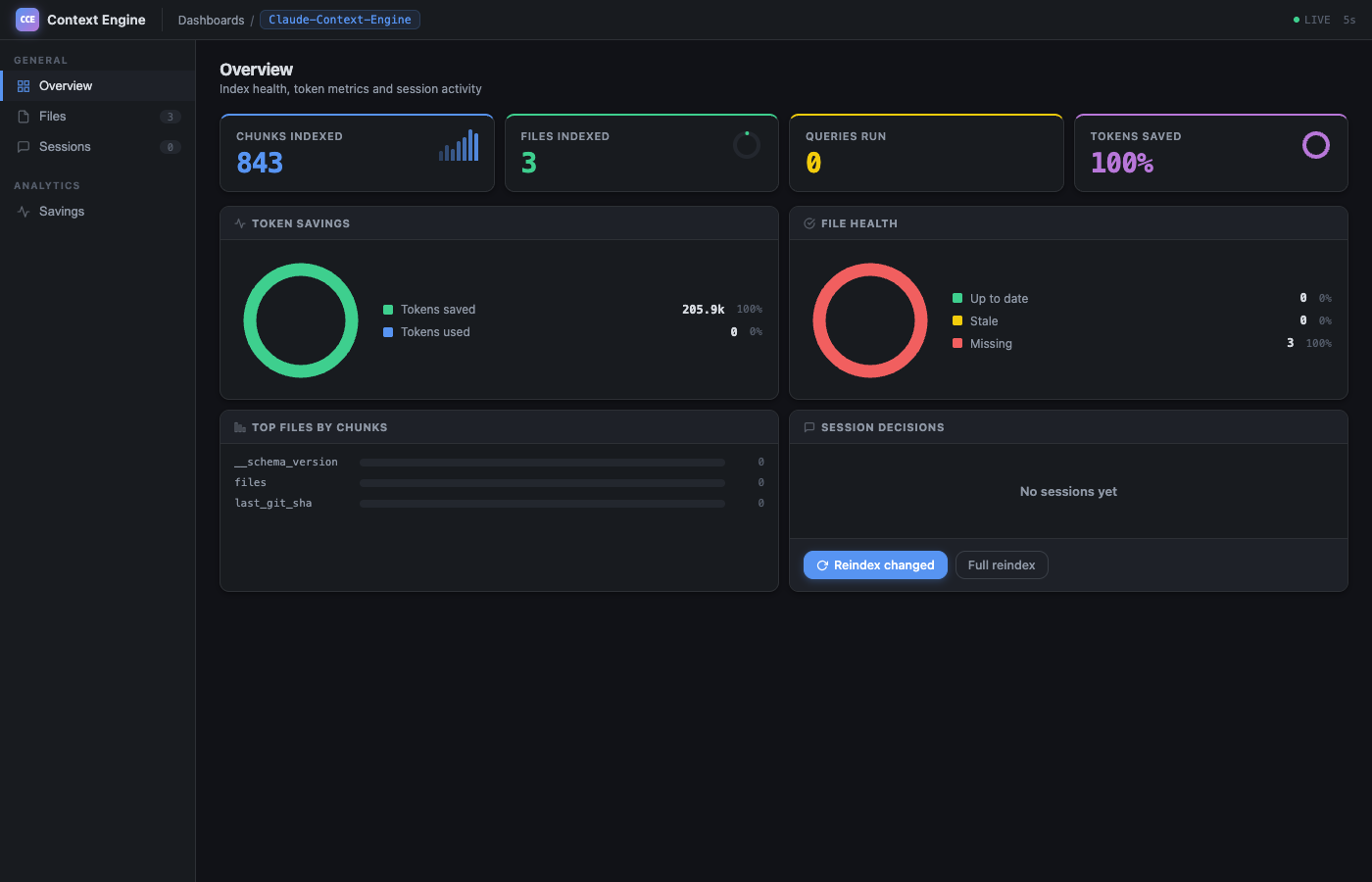
Dollar estimates with multi-provider pricing (Anthropic, OpenAI, Google):
cce savings --all # see savings across all projects
How it works
- Index: Tree-sitter parses your code into semantic chunks (functions, classes, modules). Stored as vector embeddings locally.
- Search: Claude calls
context_search. Hybrid vector + BM25 retrieval finds the right chunks. Code graph adds related files automatically. - Compress: Chunks are truncated to signatures + docstrings (or LLM-summarized if Ollama is running).
- Remember: Decisions and code areas persist across sessions via
session_recall. - Track: Every query is logged.
cce savingsshows exactly how much you saved.
Re-indexing after edits takes under 1 second (96% embedding cache hit rate). Git hooks keep the index current automatically.
What makes CCE different
It saves where the money is
Output compression tools (like Caveman) save 20-75% on output tokens. Output is 5-15% of your bill. Net savings: ~11%.
CCE saves on input tokens (94% retrieval savings on FastAPI, reproducibly benchmarked). Input is 85-95% of your bill.
It actually understands your code
Not a text search. Tree-sitter AST parsing creates semantic chunks. Hybrid retrieval merges vector similarity with BM25 keyword matching via Reciprocal Rank Fusion. A confidence scorer blends similarity (50%), keyword match (30%), and recency (20%). Graph expansion walks CALLS/IMPORTS edges to pull in related code.
It remembers
record_decision("use JWT for auth", reason="session tokens flagged by legal") is stored in SQLite and surfaces via session_recall in the next session. No re-explaining your architecture.
It tracks real savings
Not estimates. Actual tokens served vs full-file baseline, broken down by buckets (retrieval, compression, output, memory, grammar). Dollar costs fetched from Anthropic's pricing page. Savings summary shown at every session start.
It is secure by default
Secret files (.env, *.pem, credentials.json) are never indexed. Content is scanned for AWS keys, GitHub tokens, Slack tokens, Stripe keys, JWTs, and generic credentials. PII (emails, IPs, SSNs, credit cards) is scrubbed from memory writes. All MCP file paths are validated against path traversal.
Under the hood
SHA-256 fingerprint per chunk, salted with model name. Re-index skips unchanged code. Binary float32 storage (10x smaller than JSON). Typical re-index: 96% cache hit, under 1 second.
Replaced LanceDB with sqlite-vec. Same cosine-distance quality, 99% smaller install. WAL mode + PRAGMA NORMAL for 80% write speedup. Vectors, FTS5, code graph, and compression cache all in three SQLite files.
Memory entries compressed without LLM calls. Drops articles, fillers, pronouns. Three levels (lite/full/ultra, 20-60% savings). Code, paths, URLs preserved byte-for-byte. Same input always yields same output.
5 Claude Code lifecycle hooks capture session context. Every hook runs curl ... || true, so a crashed server never blocks the user. SessionStart injects bootstrap context; others capture silently.
Dollar estimates in cce savings support 15+ models across Anthropic, OpenAI, and Google. Static pricing ships with CCE, live Anthropic pricing is fetched and cached 7 days. Configure pricing.model (e.g. gpt-4o, gemini-2.5-pro, sonnet) or override with pricing.input / pricing.output for custom rates.
Running dozens of cce serve processes (one per project per AI session) can exhaust system memory. The resource governor caps ONNX Runtime threads per process, uses advisory file locks so only one process indexes a given project at a time, backs off under Linux memory pressure (PSI), and auto-shuts down idle servers after 30 minutes. Configure via serve.idle_timeout_minutes and serve.max_ort_threads.
CCE's cross-session memory depends on the agent calling record_decision and record_code_area. Memory nudges make recording ambient: after N searches without a recording, context_search results include a short reminder. At session end, the Stop hook summarizes unrecorded activity. Nudges re-arm after the first recording so they stay useful without being noisy.
cce serve --http exposes a POST /search endpoint for custom agent integrations that speak HTTP instead of MCP stdio. Same hybrid retrieval pipeline, structured JSON response with confidence scores. Input validation clamps top_k (1..100) and confidence_threshold (0.0..1.0).
7 buckets track every token saved: retrieval, chunk compression, output compression, memory recall, grammar, turn summarization, progressive disclosure. Survives restarts. Powers CLI and dashboard analytics.
Agent Plugin
Agent Plugins is an open standard (v1.0.0) backed by Amazon, Cursor, Microsoft, OpenAI, and Vercel for packaging AI skills and MCP servers into portable, zero-install bundles. CCE can generate a plugin directory that compatible editors can discover and load automatically.
cce init --plugin                          # Generate at .cce/plugin/
cce init --plugin --plugin-dir ~/plugins/cce  # Custom location
cce init --agent claude --plugin           # Both: agent config + plugin
What gets generated
.cce/plugin/
├── plugin.json                       # Agent Plugins v1.0.0 manifest
├── mcp.json                          # MCP server config (uvx + stdio)
├── skills/
│   └── code-context/
│       ├── SKILL.md                  # Agent instructions (frontmatter + body)
│       └── references/
│           └── tools.md              # Per-tool parameter docs (loaded on demand)
└── LICENSE
Compatible editors
VS Code, GitHub Copilot, ChatGPT, Codex, Cursor, and Kiro. The plugin uses uvx to launch CCE on demand, so users do not need to pre-install the Python package. The MCP server auto-discovers the project root by walking up from its working directory, looking for .context-engine.yaml or .git/.
When to use --plugin vs --agent
--agent (default) |
--plugin |
|
|---|---|---|
| Install method | Writes editor-specific config files | Generates a portable plugin directory |
| Zero-install | No, CCE must be on PATH | Yes, uvx fetches CCE on demand |
| Instruction updates | Stale until cce init re-run |
Stale until cce init --plugin re-run |
| Best for | Your own machine | Sharing with a team or distributing |
Both can be used together. --agent handles per-editor MCP config, --plugin provides a portable alternative.
CLI at a glance
cce init                    # Index + install hooks + register MCP
cce init --plugin           # Generate Agent Plugin for VS Code, Cursor, etc.
cce                         # Status banner
cce savings                 # Token savings with dollar estimates
cce savings --all           # All projects
cce dashboard               # Web dashboard with live charts
cce search "auth flow"      # Test a query
cce status                  # Index health + config
cce services                # Ollama + dashboard + MCP status
cce commands add-rule '...' # Project rules for Claude
cce uninstall               # Clean removal of all CCE artifacts
Run cce list for the full command reference.
Configuration
Zero-config by default. Override what you need in ~/.cce/config.yaml or .context-engine.yaml:
compression:
  level: standard          # minimal | standard | full
  output: standard         # off | lite | standard | max
  ollama_url: http://localhost:11434   # point at a remote Ollama if desired

retrieval:
  top_k: 20
  confidence_threshold: 0.5

pricing:
  model: opus              # opus | sonnet | haiku | gpt-4o | gemini-2.5-pro | ...
  # input: 15.0            # override $/1M input tokens
  # output: 75.0           # override $/1M output tokens
Remote Ollama: If you run Ollama on another machine in your network, set compression.ollama_url (e.g. http://nas.local:11434) or export CCE_OLLAMA_URL (the env var wins). CCE probes the endpoint and falls back to truncation-only compression when it's unreachable, so a flaky link won't break indexing.
Output Compression
CCE also compresses Claude's responses (same concept as Caveman):
| Level | Style | Savings |
|---|---|---|
off |
Full output | 0% |
lite |
No filler or hedging | ~30% |
standard |
Fragments, drop articles | ~65% |
max |
Telegraphic | ~75% |
Tell Claude: "switch to max compression" or "turn off compression". Code blocks and commands are never compressed.
Disk Footprint
| Component | Size |
|---|---|
| Core install (Ollama backend) | ~17 MB |
With [local] extra (fastembed + ONNX) |
~189 MB |
| Embedding model (one-time download) | ~60 MB (fastembed) or managed by Ollama |
| Index per project (small/medium/large) | 5-60 MB |
No GPU required. With Ollama, embeddings are handled by the Ollama server. With the [local] extra, the embedding model runs on CPU via ONNX Runtime.
Supported Languages
AST-aware chunking (tree-sitter parsed, 11 extensions):
| Language | Extensions |
|---|---|
| Python | .py |
| JavaScript | .js, .jsx |
| TypeScript | .ts, .tsx |
| PHP | .php |
| Go | .go |
| Rust | .rs |
| Java | .java |
| C# | .cs |
Language-aware fallback chunking (40+ extensions):
| Category | Languages |
|---|---|
| Web | HTML, CSS, SCSS, LESS, Vue, Svelte |
| Systems | C, C++, Zig, Nim |
| Mobile | Swift, Kotlin, Dart |
| Functional | Haskell, Scala, Clojure, Elixir, Erlang, F# |
| Scripting | Ruby, Perl, Lua, R, Bash/Zsh |
| Data/Config | JSON, YAML, TOML, XML, SQL, GraphQL, Protobuf |
| DevOps | Terraform, HCL, Dockerfile |
| Docs | Markdown |
All other text files are chunked by line range. Binary files are skipped.
Code Context Engine MCP 질문
Code Context Engine MCP를 Claude Code에 추가하려면 어떻게 하나요?
터미널에서 claude mcp add code-context-engine -- uvx code-context-engine를 실행합니다. 모든 프로젝트에서 사용할 수 있게 하려면 --scope user를 추가합니다.
Code Context Engine MCP를 Cursor에 추가하려면 어떻게 하나요?
~/.cursor/mcp.json를 열고 mcpServers 아래에 서버를 추가합니다. 위 설치 섹션에 표시된 Cursor 구성을 사용합니다.
토큰을 얼마나 절약할 수 있나요?
전체 파일을 다시 읽는 대신 인덱싱된 검색을 사용함으로써 최대 94%의 토큰 절약이 가능합니다.
어떤 에디터를 지원하나요?
Claude Code, VS Code, Cursor, Gemini CLI 등 다양한 도구를 지원합니다.
Ollama와 함께 사용할 수 있나요?
네, Ollama가 설치되어 있다면 CCE가 localhost:11434에서 자동으로 감지하여 nomic-embed-text를 사용합니다.