
AI 에이전트가 TypeScript, Python, Java, Go, Rust 저장소의 사전 계산된 코드 그래프를 쿼리하여 호출 흐름, 영향도 및 보안을 이해할 수 있도록 지원합니다.
다른 이름 devlensio/devlensOSS, devlensoss, @devlensio/cli
- 스타
- 70
- Tools
- —
- 다운로드, 30일
- 1,114
- 최신 버전
- 0.7.2
- 마지막 커밋
- 2026년 10월 28일
- 라이선스
- AGPL-3.0
DevLens MCP란?
DevLens은(는) MCP server입니다. AI 에이전트가 TypeScript, Python, Java, Go, Rust 저장소의 사전 계산된 코드 그래프를 쿼리하여 호출 흐름, 영향도 및 보안을 이해할 수 있도록 지원합니다.
프로젝트 README에서 생성된 요약
DevLens MCP server 정보
DevLens는 AI 에이전트가 파일을 한 줄씩 읽는 대신 사전 계산된 코드 그래프를 쿼리할 수 있게 하여 코드베이스 인텔리전스를 제공합니다. 타입 체크가 완료된 인터페이스, 프레임워크 라우트, ORM 데이터 엣지를 이해하는 네이티브 시맨틱 파서를 통해 TypeScript, Python, Java, Go, Rust를 지원합니다. 이 방식은 표준 검색 방식보다 훨씬 작은 작업 맞춤형 패킷을 전달하여 토큰 소모를 줄여줍니다.
사용자는 @devlensio/cli를 통해 도구를 설치하고 Claude Desktop, Cursor 또는 Codex와 같은 MCP 클라이언트에 연결할 수 있습니다. 이 서버는 resolve_context, find_symbols, get_node, impact, repo의 5가지 자기 기술적 도구를 제공합니다. 구조 중심의 분석은 오프라인에서도 작동하지만, devlens init 명령으로 AI 프로바이더를 설정하면 그래프의 모든 노드에 대해 기술적, 비즈니스적, 보안적 요약을 활성화할 수 있습니다.
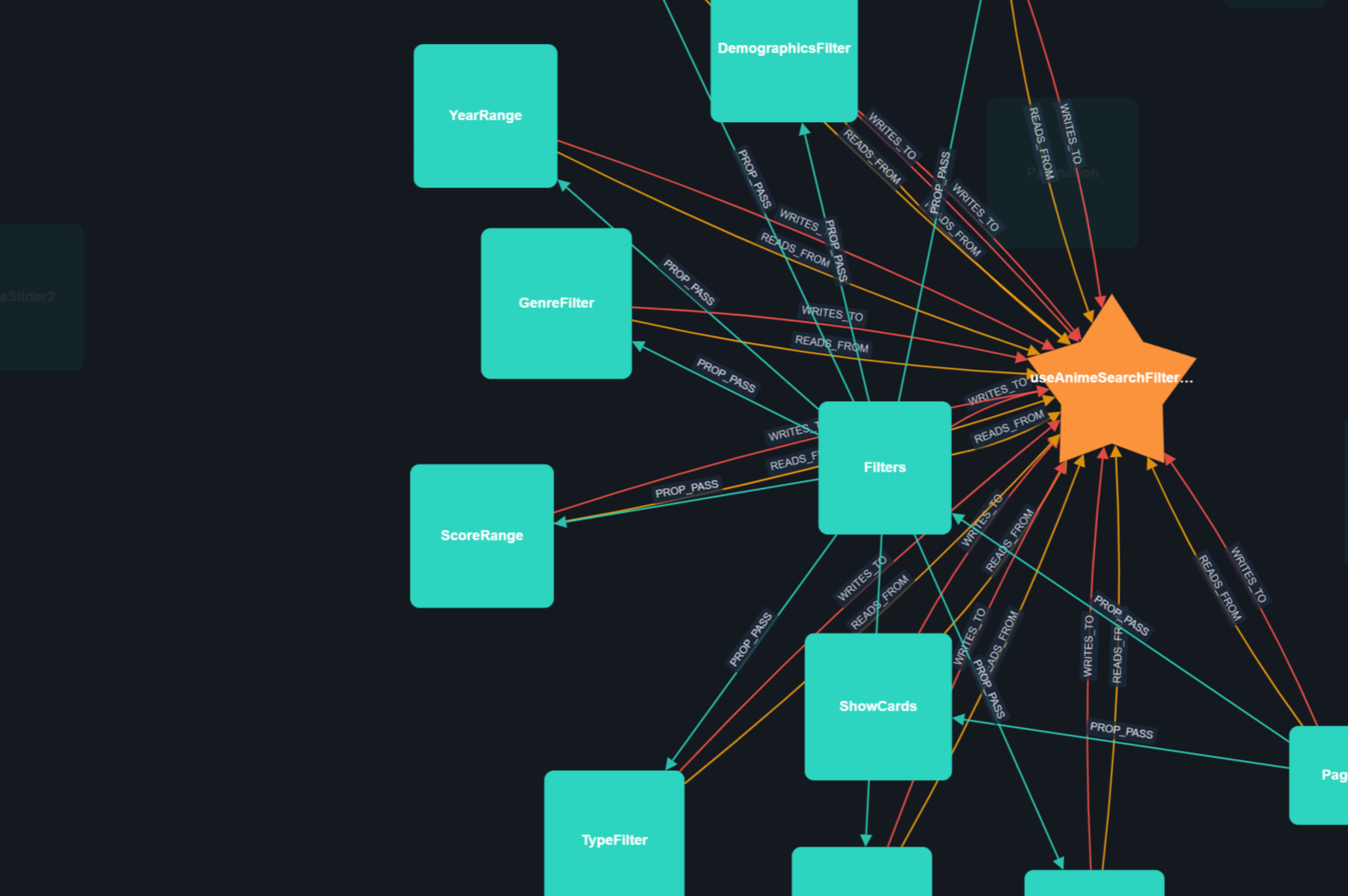
개발자는 Web UI를 사용하여 대화형 포스 디렉티드(force-directed) 캔버스를 통해 코드베이스를 탐색할 수도 있습니다. 이 인터페이스를 통해 수동 검색, 필터링 및 심볼 변경에 따른 영향 범위를 확인할 수 있습니다. 시스템은 호출당 67ms의 지연 시간을 기록할 정도로 빠르게 설계되었습니다.
활용 사례
- 1코드 변경 영향도 분석특정 심볼이 수정될 경우 시스템의 어느 부분이 영향을 받는지 확인합니다.
- 2복잡한 호출 흐름 이해AI 에이전트에게 인증 프로세스나 특정 로직이 저장소 내에서 어떻게 흐르는지 설명하도록 요청합니다.
프로젝트의 README를 바탕으로 작성되었습니다. 모든 활용 사례는 해당 내용의 인용문과 대조하여 확인합니다.
DevLens MCP 설치 방법
형식 확인: 2026년 11월 10일Cursor에 추가Goose에 추가Claude Code에 DevLens MCP 설치
$ claude mcp add devlensoss -- npx -y @devlensio/cliCursor에 DevLens MCP 설치
~/.cursor/mcp.json
{
  "mcpServers": {
    "devlensoss": {
      "command": "npx",
      "args": [
        "-y",
        "@devlensio/cli"
      ]
    }
  }
}VS Code에 DevLens MCP 설치
.vscode/mcp.json
{
  "servers": {
    "devlensoss": {
      "type": "stdio",
      "command": "npx",
      "args": [
        "-y",
        "@devlensio/cli"
      ]
    }
  }
}VS Code CLI에 DevLens MCP 설치
$ code --add-mcp '{"name":"devlensoss","type":"stdio","command":"npx","args":["-y","@devlensio/cli"]}'Claude Desktop에 DevLens MCP 설치
claude_desktop_config.json
{
  "mcpServers": {
    "devlensoss": {
      "command": "npx",
      "args": [
        "-y",
        "@devlensio/cli"
      ]
    }
  }
}Codex에 DevLens MCP 설치
$ codex mcp add devlensoss -- npx -y @devlensio/cliCodex config.toml에 DevLens MCP 설치
~/.codex/config.toml
[mcp_servers.devlensoss]
command = "npx"
args = ["-y", "@devlensio/cli"]
Gemini CLI에 DevLens MCP 설치
$ gemini mcp add -s user devlensoss npx -- -y @devlensio/cliGemini settings.json에 DevLens MCP 설치
~/.gemini/settings.json
{
  "mcpServers": {
    "devlensoss": {
      "command": "npx",
      "args": [
        "-y",
        "@devlensio/cli"
      ]
    }
  }
}자동 검사
2026년 11월 12일에 실행됨전체 보고서 →자동 검사를 통과했습니다. 이는 보안 감사가 아닙니다. 코드를 직접 읽고 서버에 필요한 최소한의 권한만 부여하십시오. 검사 방식

- 소스 저장소 연결 및 접근 가능통과
- 오픈 소스 라이선스 (OSI)통과
- 최근 1년 내 커밋 또는 릴리스통과
- 패키지 이름이 인기 패키지와 유사하지 않음통과
- 원격 엔드포인트가 HTTPS 사용검사되지 않음
- 파괴적인 도구에 라벨 표시됨검사되지 않음
- 모델에 대한 숨겨진 지침 없음통과
- 패키지 및 해당 종속성에 중요한 보안 권고 없음통과
README
GitHub에서 보기DevLens
Codebase Intelligence for AI agents and Developers.
Analyze your repo once. Your AI agent then queries a precomputed code graph through MCP — ranked files, call flow, impact, and security — instead of re-reading your codebase file by file. Five self-describing MCP tools, plain-text packets measured at a third of the tokens of reading the code, and the smallest response in its benchmark field.



Join the DevLens Cloud Waitlist →
Why DevLens?
- Your agent stops burning tokens. One MCP call returns a task-shaped packet — the files and symbols that matter, ranked, within a token budget. No grep loops, no re-reading files.
- It wins the benchmark. First of nine tools on correctness, F1, recall, and precision — the only tool that leads every quality column.
- It is fast and small. 67 ms per call, packets 6.7× smaller than the closest graph competitor, and it never exceeds the token budget you set.
- Developers get it too. Interactive graph visualization, blast radius before you change a symbol, PR review packets, and per-node security analysis.
Benchmarks
We benchmarked DevLens MCP against the other code graph and retrieval tools — Graphify, codegraph, semble, bm25 — on one headless coding agent, one model, one real TypeScript repository, and 133 real questions written from actual pull requests and symbols:
| DevLens V3 (5 tools) | Graphify | codegraph | semble | bm25 | |
|---|---|---|---|---|---|
| Correctness (agent loop, same run) | 0.643 | 0.619 | 0.667 | 0.714 | 0.667 |
| F1 (agent loop, same run) | 0.529 | 0.526 | 0.604 | 0.636 | 0.581 |
| Correctness (retrieval layer) | 0.694 | 0.662 | 0.674 | 0.652 | 0.664 |
| Response packet | 2,230 tokens | 15,020 tokens | 6,339 tokens | 736 tokens | 721 tokens |
| Latency per call | 67 ms | 2,469 ms | 2,736 ms | 508 ms | 108 ms |
Head-to-head against Graphify — the most direct competitor (tree-sitter graph, MCP server) — DevLens wins on every axis: correctness in the agent loop (0.643 vs 0.619, same run) and in the retrieval layer (0.694 vs 0.662, paired 15 wins to 9 losses on identical questions), a 6.7× smaller packet (2,230 vs 15,020 tokens, smaller on all 54 of 54 comparable questions), and ~37× faster per call (67 ms vs 2,469 ms). Graphify's graph is also 64% larger with 3.6× the edges (16,999 nodes / 71,694 edges vs 10,346 / 19,847) for the lower quality.
The pattern behind the numbers: syntactic tools return big blobs or bare line lists. DevLens returns a task-shaped packet from a type-resolved graph — the files that matter, ranked, within your token budget, in milliseconds.
Full methodology, per-type tables, and the nine-tool round: docs/PUBLIC-BENCHMARKS.md
How DevLens compares
DevLens is the only tool in this space that combines native semantic parsing, per-node AI summaries with per-node security analysis, and framework-aware data edges — and the only option you can use commercially under AGPL.
| Dimension | DevLens | Graphify | GitNexus | Sourcegraph | DeepWiki |
|---|---|---|---|---|---|
| Parsing depth | Native semantic parsers (TS compiler, Python ast, go/types, JavaParser, syn), type-resolved |
tree-sitter (syntactic, no type info) | tree-sitter + native bindings (no type info) | SCIP/LSIF symbol index + language servers (no semantic parse) | LLM reads source directly (no structured parser) |
| Edge quality | Type-checked IMPLEMENTS/EXTENDS, framework routes (Next.js, Django, Spring, Gin, axum), ORM data edges (READS_FROM/WRITES_TO) |
EXTRACTED/INFERRED/AMBIGUOUS tags, no type or framework awareness |
call chains, clusters, route_map, no ORM or data edges |
precise symbol cross-references (SCIP), no type-checked inheritance | docs-level relationships (no structured graph) |
| Per-node AI summaries | Technical + business + security with severity on every node | No (LLM used for docs and concepts) | No (embeddings for semantic query) | Via Cody (hover and inline docs, chat-level) | Auto-generated docs per symbol (no security, no technical/business split) |
| Security analysis | Per-node severity + blast-radius reach with real exploit descriptions | No | Partial (opt-in PDG/taint) | No (compliance certifications only) | No |
| Agent / MCP integration | CLI + self-describing MCP server + Web UI | CLI + local skill (no MCP) | CLI + 17-tool MCP + hooks (AGENTS.md) |
MCP server (cross-repo search, not per-repo graph queries) | Unknown (no public MCP integration) |
| Language coverage | TS/JS, Python, Java, Go, Rust with native parsers for each | 12 code families + docs/images (shallow syntactic) | Many via tree-sitter (Dart/Kotlin/Swift), shallow syntactic | 30+ via language servers (symbol-level, no semantic edges) | Any (LLM reads source, no structured extraction) |
| License / pricing | AGPL-3.0, free, including commercial use | Apache-2.0 | PolyForm Noncommercial (cannot use commercially) | Open-source core, Enterprise paid | Free for public repos, enterprise tiers unlisted |
(Feature comparison from public sources, Aug 2026.)
Why teams choose DevLens: semantic edges that syntactic tools cannot produce, per-node security analysis no other open-source tool provides, benchmark-winning retrieval quality, and a single MCP front door — free for commercial use.
Quick Start
Step 1 — Install the CLI
npm install -g @devlensio/cli
Or install the standalone binary (no Node.js needed):
# Linux / macOS
curl -fsSL https://raw.githubusercontent.com/devlensio/devlensOSS/main/scripts/install.sh | sh

# Windows (PowerShell)
irm https://raw.githubusercontent.com/devlensio/devlensOSS/main/scripts/install.ps1 | iex
Step 2 — Configure a model (optional)
Only needed if you want AI summaries. Structure-only analysis works offline with no API key.
devlens init
This walks you through picking a provider, API type, key, endpoint, and model interactively — press ESC at any step to go back a stage. See Configuration for recommended models.
Step 3 — Analyze your repo
cd your-project
devlens analyze . --summarize
This builds the graph, generates summaries, and creates the search index — once. After this, everything below is instant.
Step 4 — Connect your AI agent
Start the MCP server:
devlens mcp
Then register it in your agent. Pick your tool:
Claude Code / Claude Desktop
claude mcp add devlens -- devlens mcp
Cursor — add to .cursor/mcp.json:
{
  "mcpServers": {
    "devlens": { "command": "devlens", "args": ["mcp"] }
  }
}
Codex — add to ~/.codex/config.toml:
[mcp_servers.devlens]
command = "devlens"
args = ["mcp"]
Hermes — add to config.yaml:
mcp:
  servers:
    devlens:
      command: devlens
      args: [mcp]
Any other MCP client — the server speaks standard MCP over stdio. Point your client at the command devlens mcp. For an HTTP transport instead:
devlens mcp http -p 7000
The server self-describes its full tool list through tools/list, so your agent discovers everything on its own. That's it — ask your agent "how does auth work in this repo?" and watch it query the graph instead of reading files.
What your agent can ask
The server self-describes every tool's parameters through tools/list — your agent fills them in automatically. Five tools, no graphId anywhere — the repo is resolved from your working folder.
| Tool | Key arguments | What it does |
|---|---|---|
resolve_context |
task (required), intent?, focus?, tokenBudget? |
The front door. One call returns a task-shaped plain-text packet: an ANSWER line, ranked nodes with one-line meanings, call flow, involved files with matched-line snippets, and an id map — all within a token budget. Intents: pinpoint, reference-list, flow, overview, concept, security-audit, exploratory. |
find_symbols |
query (required), limit? |
Cheap BM25F name lookup: nodeIds plus file:line, no graph, no source. |
get_node |
node (required), include? |
Full detail for one node: technical, business, and security summaries plus callers, callees, and (opt-in) raw source. |
impact |
target? or from+to commits |
Change impact: what breaks if a symbol changes; commit-range diff mode for two analyzed commits. |
repo |
action |
Manage analyzed graphs: list, analyze, freshness, health. |
Every response carries a provenance block (commitHash, analyzedAt, hasGit), so your agent always knows which snapshot answered the question.
Full reference:
docs/mcp-reference.md
Supported languages
DevLens parses five language families with native parsers (no AI, no regex, no tree-sitter) and understands their frameworks. Summaries are never generated silently: you confirm before tokens are spent, and structure-only analysis needs no provider at all.
| Language | Frameworks / stacks the graph understands | What gets parsed |
|---|---|---|
| TypeScript / JavaScript | React, Next.js (app and pages router), Express/Hono/Fastify, React Router, TanStack Router, any Node | components, hooks, state stores, classes, methods, functions, routes |
| Python | FastAPI, Flask, Django (+DRF), SQLAlchemy / Django ORM, Celery, Pydantic | classes, methods, functions, routes, data models |
| Java | Spring Boot (controllers, JPA, Spring Data repositories) | classes, methods, interfaces, enums, routes |
| Go | net/http, Gin, Echo, chi, Fiber, GORM, database/sql | structs, interfaces, methods, functions, routes |
| Rust | axum, actix-web, rocket, utoipa, Diesel | structs, enums, traits, impl blocks, methods, functions, routes |
Each repo is analyzed with its language's own parser (Python ast, JavaParser, Go go/ast plus go/types, Rust syn, TS compiler API), so edges are real: type-checked interfaces (IMPLEMENTS), framework routes (HANDLES), and ORM data layers (READS_FROM, WRITES_TO).
For developers: the Web UI
For when you want to see your codebase laid out as an interactive graph.
Open the Web UI, paste your repo path, and explore a force-directed canvas. Click any node to see its summaries, callers, callees, and security flags. Search, filter, and diff commits across versions. The Project panel shows search index readiness with a one-click reindex action.
bun start # from the source repo: API + Web UI on one port (http://localhost:3000)
The Web UI runs from the source tree, it is not bundled into the installed CLI binary.
CLI
For scripts, CI, and fast answers without leaving the terminal. Every command supports --json for piping into scripts, -v/--verbose for diagnostics, and --quiet for minimal output.
Analyze and summarize
| Command | What it does |
|---|---|
devlens detect [path] [--deps] |
Inspect a repo before analyzing: language, manifest, dependency count, source files |
devlens analyze [path] [--summarize] [--force-summarize] |
Build the graph and its search index (optionally add AI summaries) |
devlens summarize [target] |
(Re)generate technical, business, and security summaries |
devlens status |
Which repos are analyzed, their language and summary coverage |
devlens doctor |
Environment health check: git, storage, LLM provider, and the four extractor runtimes (go, rust, java, python) |
devlens init |
First-time setup: configure the LLM provider interactively |
Explore and understand
| Command | What it does |
|---|---|
devlens overview |
Big picture: language, framework, stats, central nodes |
devlens top-nodes [-l <n>] |
Highest-scoring (most central) nodes |
devlens find-nodes <name> [-t <type>] |
Search by name, type, file, or severity (for example -t ROUTE) |
devlens nodes-in-path <path> |
All nodes in a file or folder |
devlens get-node <id> |
Full detail for one node: summaries, callers, callees |
devlens node-code <id> |
Raw source for a node (expensive, prefer get-node) |
devlens architecture |
One-call architecture brief: modules, routes, flows, health |
devlens get-context <query> |
Token-budgeted context packet for an agent |
Impact and quality
| Command | What it does |
|---|---|
devlens blast-radius <id> |
What breaks if I change this (upstream dependents) |
devlens khop <id> |
What does it depend on (downstream) |
devlens subgraph <seed> |
The cohesive cluster (module) a node belongs to |
devlens cycles |
Circular dependencies |
devlens security [--min-severity ...] |
Security findings with severity and explanation |
devlens security-brief |
Ranked security report with blast-radius reach |
devlens diff <from> <to> |
Compare two analyzed commits |
devlens review-pr <from> <to> |
PR review packet: diff, impact, tests, security delta |
devlens check-freshness |
Is the graph stale versus HEAD? |
Manage and integrate
| Command | What it does |
|---|---|
devlens config |
View or set LLM provider config (~/.devlens/config.json) |
devlens repos |
List analyzed repos |
devlens graphs list | delete |
Manage stored graphs |
devlens reindex [graphId] [commitHash] [--force] |
Rebuild the local search index (.search.json) without re-analyzing. No arguments reindexes the latest commit of every graph |
devlens serve |
Start the backend HTTP API only (used by the MCP server and the Web UI) |
devlens mcp |
Run the MCP server (see Quick Start) |
devlens update [--check] |
Update the CLI to the latest published version — package manager auto-detected (npm/pnpm/yarn/bun). --check only checks and reports (pipeable with --json); offline, up-to-date, source-checkout, and non-global installs each get an explicit message |
Hands-on examples
devlens analyze . --summarize             # graph + summaries + search index
devlens find-nodes -t ROUTE               # every route in the app
devlens blast-radius "src/auth/login.ts::login"
devlens reindex                          # index everything up front
Full reference:
src/cli/README.mdfor every command with options and examples.
How to summarize
Summaries are per-node AI descriptions that make querying much richer. Run them during analysis, or any time later:
devlens analyze . --summarize                  # during analysis (recommended)
devlens summarize .                            # current directory's repo
devlens summarize <graphId>                    # a stored graph
devlens summarize . --force-summarize          # re-generate even if summarized
devlens summarize . --provider openai --provider-name deepseek --model deepseek-v4-flash
When a repo is re-summarized, only nodes without summaries are processed, so tokens are not spent twice. Configure your provider once with devlens init.
Configuration
Config lives in ~/.devlens/config.json, set via devlens init or devlens config. Models are discovered dynamically from each provider's /models endpoint, so there are no hardcoded model lists — pick whatever fits your budget and quality bar.
devlens config --set                            # interactive setup
devlens config --provider openai --provider-name deepseek --model deepseek-v4-flash --api-key <key>
devlens config --active openai:deepseek         # switch saved provider
devlens doctor                                  # health check
What DevLens understands
A graph is per repo and per language. Node types include FILE, FUNCTION, METHOD, CLASS, INTERFACE, STRUCT, ENUM, TRAIT, IMPL_BLOCK, ROUTE, COMPONENT, HOOK, STATE_STORE, UTILITY, TEST, STORY, and THIRD_PARTY (language dependent). Every node carries an importance score plus its functional, technical, and security summaries once summarized.
Edge types (the connections the graph draws): CALLS, IMPORTS, READS_FROM, WRITES_TO, PROP_PASS, EMITS, LISTENS, WRAPPED_BY, GUARDS, HANDLES, TESTS, USES, NEXTJS_API_CALL, NAVIGATES_TO, IMPLEMENTS (class to interface, trait, or ABC), EXTENDS (class to base class). EXPORTS, THROWS, MODULE, and PACKAGE are reserved for future languages.
Router awareness: routes are real graph nodes, for Next.js (app and pages), React Router, TanStack Router, wouter, Express, Fastify, Hono, Koa, Django URLconf and DRF, Flask blueprints, @RestController (Spring), Gin, Echo, chi, plain HTTP handlers, axum, actix, and rocket.
Search index
Each analyzed commit gets a derived BM25F search index next to the graph, at ~/.devlens/graphs/<graphId>/commits/<commitHash>.search.json.
- Every
devlens analyzeanddevlens summarizerebuilds the index for the commit it produced, so search is ready immediately. - Graphs built by older DevLens versions have no index. They are indexed lazily on the first search, or you can index everything up front with
devlens reindex. - The index is derived data: deleting it is safe, it rebuilds on demand.
devlens reindex                                  # latest commit of every graph
devlens reindex <graphId>                        # every commit of one graph
devlens reindex <graphId> <commitHash> --force   # one commit, rebuilt even if present
The same operations are available over HTTP: POST /api/reindex and POST /api/reindex/:graphId?commitHash=...&force=1.
Screenshots
Why it's fast and cheaper
A node summary is roughly 50 tokens. The file it describes is roughly 2,000. Querying summaries and graph slices costs a fraction of reading files, so humans get answers faster and AI agents spend dramatically fewer tokens on the same task.
Who is this for
- Developers and teams: onboard in hours not weeks, review PRs with impact context, catch circular dependencies and god-files, keep living documentation.
- Engineering leaders: a bird's-eye architecture view, spot debt before it becomes a crisis.
- AI-augmented developers: stop letting your agent burn tokens re-reading files; it queries the graph instead.
Repository layout
devlensOSS/
├── src/
│   ├── cli/                  # `devlens` CLI (commander program + commands)
│   ├── core/                 # Shared query core (CLI + MCP, they never drift)
│   ├── mcp/                  # MCP server (stdio + HTTP) and packet renderer
│   ├── search/               # Local BM25F search stack (index, query, cache)
│   └── server/               # HTTP API for the Web UI + Next.js proxy
├── frontend/                 # Next.js graph visualizer (Cytoscape)
├── plugins/devlens/          # Deprecated agent skill source (old installs)
├── packages/skill-installer/ # @devlensio/skill (deprecated)
├── bin/ + npm/<platform>/    # Launcher and prebuilt binary packages
├── scripts/                  # Release tooling + start.mjs (bun start build-or-skip)
└── server.json               # MCP registry manifest
The analysis engine (native parsers and graph build) ships as the separate devlensio package.
DevLens Cloud
A hosted version is in development: shareable graphs, team workspaces, live per-commit documentation with node summaries, detailed PR analysis (summary, impact, security), commit diffs showing added/modified/deleted nodes, an AI-native chat over your codebase, and no local setup.
License
AGPL-3.0. Part of the devlensio family of tools.
DevLens MCP 질문
DevLens MCP를 Claude Code에 추가하려면 어떻게 하나요?
터미널에서 claude mcp add devlensoss -- npx -y @devlensio/cli를 실행합니다. 모든 프로젝트에서 사용할 수 있게 하려면 --scope user를 추가합니다.
DevLens MCP를 Cursor에 추가하려면 어떻게 하나요?
~/.cursor/mcp.json를 열고 mcpServers 아래에 서버를 추가합니다. 위 설치 섹션에 표시된 Cursor 구성을 사용합니다.
DevLens는 어떤 언어를 지원하나요?
DevLens는 네이티브 시맨틱 파서를 사용하여 TypeScript/JavaScript, Python, Java, Go, Rust를 지원합니다.
DevLens는 AI 에이전트의 토큰 사용량을 어떻게 줄여주나요?
에이전트가 파일 전체를 읽을 필요 없이, 지정된 토큰 예산 내에서 관련 파일과 심볼만 포함된 작업 맞춤형 패킷을 반환합니다.
상업적 용도로 사용할 수 있나요?
네, DevLens는 AGPL-3.0 라이선스 하에 제공되며 상업적 이용이 가능합니다.