
자연어를 사용하여 AI 어시스턴트가 Dev Proxy 설정을 생성하고, 문서를 검색하며, 설치된 버전을 확인할 수 있도록 지원합니다.
다른 이름 dev-proxy-tools/mcp, @devproxy/mcp
- 스타
- 4
- Tools
- —
- 다운로드, 30일
- 710
- 최신 버전
- 0.3.1
- 마지막 커밋
- 2026년 11월 12일
- 라이선스
- MIT
Dev Proxy MCP란?
Dev Proxy은(는) MCP server입니다. 자연어를 사용하여 AI 어시스턴트가 Dev Proxy 설정을 생성하고, 문서를 검색하며, 설치된 버전을 확인할 수 있도록 지원합니다.
프로젝트 README에서 생성된 요약
Dev Proxy MCP server 정보
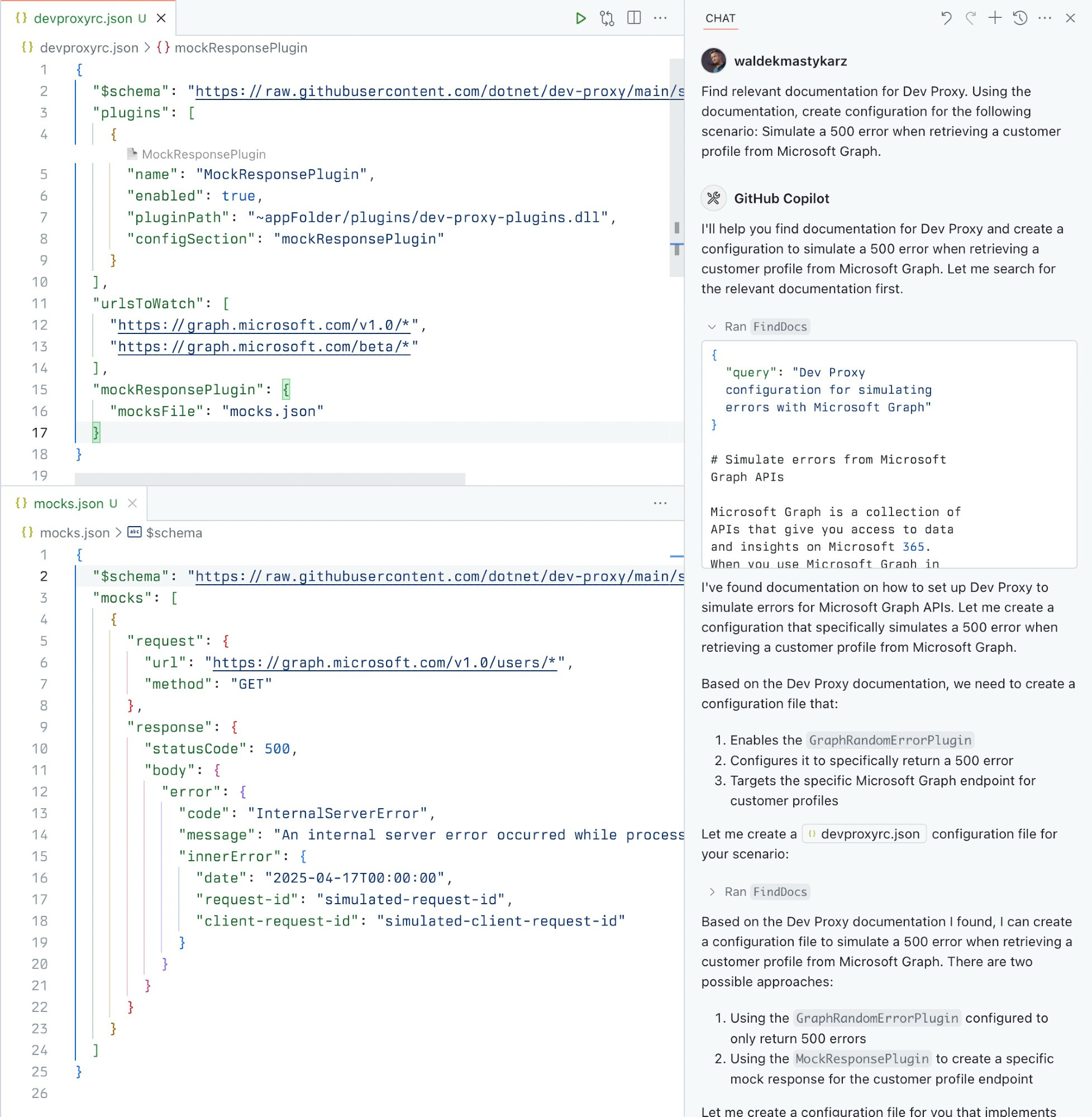
이 MCP server는 AI 어시스턴트를 사용하는 개발자가 자연어를 통해 API 시뮬레이션 설정을 관리할 수 있게 해줍니다. VS Code와 같은 MCP 호환 클라이언트와 Dev Proxy API 시뮬레이터 사이의 가교 역할을 합니다. npx를 통해 stdio 방식으로 연결하면, 애플리케이션 코드를 수정하지 않고도 에러 처리, 속도 제한 및 느린 네트워크 응답을 테스트하기 위한 설정을 AI가 구축하도록 도울 수 있습니다.
사용자는 특정 도구를 통해 서버와 상호작용하며 테스트 워크플로우를 간소화할 수 있습니다. GetBestPractices 도구는 설정 가이드를 제공하며, FindDocs를 사용하면 자연어 쿼리로 관련 문서를 찾을 수 있습니다. 또한 GetVersion을 사용하여 현재 설치된 Dev Proxy 버전이 생성 중인 설정과 호환되는지 확인할 수 있습니다. 이 설정을 위해서는 Node.js LTS와 로컬 환경에 Dev Proxy가 전역으로 설치되어 있어야 합니다.
활용 사례
- 1API 에러 시뮬레이션 생성애플리케이션의 응답 방식을 테스트하기 위해 API 에러를 모방하는 설정을 생성하도록 AI에게 요청합니다.
- 2기술 문서 검색다양한 네트워크 조건을 시뮬레이션하는 방법에 대한 특정 지침을 찾기 위해 어시스턴트에게 문의합니다.
- 3설정 베스트 프랙티스 적용API 시뮬레이터 설정을 위한 권장 설정 목록을 요청합니다.
프로젝트의 README를 바탕으로 작성되었습니다. 모든 활용 사례는 해당 내용의 인용문과 대조하여 확인합니다.
Dev Proxy MCP 설치 방법
형식 확인: 2026년 11월 10일Cursor에 추가Goose에 추가Claude Code에 Dev Proxy MCP 설치
$ claude mcp add mcp -- npx -y @devproxy/mcpCursor에 Dev Proxy MCP 설치
~/.cursor/mcp.json
{
  "mcpServers": {
    "mcp": {
      "command": "npx",
      "args": [
        "-y",
        "@devproxy/mcp"
      ]
    }
  }
}VS Code에 Dev Proxy MCP 설치
.vscode/mcp.json
{
  "servers": {
    "mcp": {
      "type": "stdio",
      "command": "npx",
      "args": [
        "-y",
        "@devproxy/mcp"
      ]
    }
  }
}VS Code CLI에 Dev Proxy MCP 설치
$ code --add-mcp '{"name":"mcp","type":"stdio","command":"npx","args":["-y","@devproxy/mcp"]}'Claude Desktop에 Dev Proxy MCP 설치
claude_desktop_config.json
{
  "mcpServers": {
    "mcp": {
      "command": "npx",
      "args": [
        "-y",
        "@devproxy/mcp"
      ]
    }
  }
}Codex에 Dev Proxy MCP 설치
$ codex mcp add mcp -- npx -y @devproxy/mcpCodex config.toml에 Dev Proxy MCP 설치
~/.codex/config.toml
[mcp_servers.mcp]
command = "npx"
args = ["-y", "@devproxy/mcp"]
Gemini CLI에 Dev Proxy MCP 설치
$ gemini mcp add -s user mcp npx -- -y @devproxy/mcpGemini settings.json에 Dev Proxy MCP 설치
~/.gemini/settings.json
{
  "mcpServers": {
    "mcp": {
      "command": "npx",
      "args": [
        "-y",
        "@devproxy/mcp"
      ]
    }
  }
}자동 검사
2026년 11월 14일에 실행됨전체 보고서 →자동 검사를 통과했습니다. 이는 보안 감사가 아닙니다. 코드를 직접 읽고 서버에 필요한 최소한의 권한만 부여하십시오. 검사 방식

- 소스 저장소 연결 및 접근 가능dev-proxy-tools/mcp is public and reachablegithub.com/dev-proxy-tools/mcp ↗통과
- 패키지가 이 저장소를 소스로 명시@devproxy/mcp names dev-proxy-tools/mcp as sourcenpmjs.com/package/@devproxy/mcp ↗통과
- 빌드 출처(Sigstore 증명)Sigstore attestation for @devproxy/mcpnpmjs.com/package/@devproxy/mcp/v/0.3.1#provenance ↗통과
- 오픈 소스 라이선스 (OSI)MITspdx.org/licenses/MIT.html ↗통과
- 최근 1년 내 커밋 또는 릴리스Last commit or release 2026-11-12github.com/dev-proxy-tools/mcp ↗통과
- OpenSSF Scorecard검사되지 않음
- 패키지 이름이 인기 패키지와 유사하지 않음No popular package one edit away from @devproxy/mcp통과
- 패키지 및 해당 종속성에 중요한 보안 권고 없음99 resolved dependencies checked; no critical advisoryosv.dev ↗통과
- 모델에 대한 숨겨진 지침 없음0 tool descriptions and the README read; no override phrases, credential paths or hidden characters통과
- 파괴적인 도구에 라벨 표시됨검사되지 않음
- 원격 엔드포인트가 MCP 핸드셰이크에 응답검사되지 않음
README
GitHub에서 보기Dev Proxy MCP Server


A Model Context Protocol (MCP) server for Dev Proxy that enables AI assistants to interact with Dev Proxy capabilities using the MCP standard. Use this server to:
- Create Dev Proxy configurations using natural language
- Get contextual help for working with Dev Proxy
- Discover Dev Proxy features and capabilities
What is Dev Proxy?
Dev Proxy is an API simulator that helps you effortlessly test your app beyond the happy path. It allows you to:
- Test API error handling: See how your app responds to API errors without changing your code
- Verify rate limit handling: Simulate API rate limits to improve user experience
- Test slow API responses: See how your app handles slow APIs to implement necessary affordances
- Create mock APIs: Quickly stand up mock APIs without writing code you won't ship
Dev Proxy works with any type of app and tech stack as it intercepts network requests at the proxy level.
What This Package Does
This package provides a Model Context Protocol (MCP) server interface to Dev Proxy. It allows AI assistants and other MCP-compatible clients to:
- Find Dev Proxy documentation using natural language queries
- Get the installed Dev Proxy version
Prerequisites
Usage
To set up and use the MCP server, refer to the instructions for your MCP host, such as Visual Studio Code. The Dev Proxy MCP server is published on npm under @devproxy/mcp.
Use the following values:
- Type:
stdio - Command:
npx - Arguments:
-y@devproxy/mcp
- Environment: none
[!TIP] If you want to test the preview version of the server using
@devproxy/mcp@next.
Connect with an MCP Client
This MCP server exposes the following tools:
GetBestPractices
Gets a list of best practices for configuring and using Dev Proxy. Call it for any code generation or operation involving Dev Proxy. These best practices do not change so once it has been called during the current session, you do not need to invoke it again.
_Best practices in markdown_
FindDocs
Finds relevant Dev Proxy documentation related to a specific query.
{
  "query": "How to simulate API errors"
}
GetVersion
Gets the currently installed Dev Proxy version. This is useful to ensure that the generated configuration is compatible with the installed version of Dev Proxy.
{}
Development
# Clone the repository
git clone https://github.com/waldekmastykarz/dev-proxy-mcp.git
cd dev-proxy-mcp

# Install dependencies
npm install

# Build the project
npm run build

# Run the server
npm start

# Run with MCP inspector for debugging
npm run inspect
Contributing
Contributions are welcome! Please feel free to submit a Pull Request.
- Fork the repository
- Create your feature branch (
git checkout -b feature/amazing-feature) - Commit your changes (
git commit -m 'Add some amazing feature') - Push to the branch (
git push origin feature/amazing-feature) - Open a Pull Request
License
This project is licensed under the MIT License - see the LICENSE file for details.
Related Projects
- Dev Proxy - The core Dev Proxy tool
- Model Context Protocol (MCP) - Protocol specification for AI assistant tools
Dev Proxy MCP 질문
Dev Proxy MCP를 Claude Code에 추가하려면 어떻게 하나요?
터미널에서 claude mcp add mcp -- npx -y @devproxy/mcp를 실행합니다. 모든 프로젝트에서 사용할 수 있게 하려면 --scope user를 추가합니다.
Dev Proxy MCP를 Cursor에 추가하려면 어떻게 하나요?
~/.cursor/mcp.json를 열고 mcpServers 아래에 서버를 추가합니다. 위 설치 섹션에 표시된 Cursor 구성을 사용합니다.
Dev Proxy로 무엇을 할 수 있나요?
Dev Proxy는 API 에러 처리 테스트, 속도 제한(rate limit) 처리 검증, 느린 API 응답 테스트 및 Mock API 생성을 지원하는 API 시뮬레이터입니다.