
Codebase MCP server
2026년 10월 29일 커밋시맨틱 코드 검색, 지속성 메모리, AI 지원 편집 파이프라인을 통해 Claude Desktop을 코딩 어시스턴트로 변환합니다.
다른 이름 danyQe/codebase-mcp
- 스타
- 50
- Tools
- 16
- 다운로드, 30일
- —
- 최신 버전
- —
- 마지막 커밋
- 2026년 10월 29일
- 라이선스
- Apache-2.0
Codebase MCP란?
Codebase은(는) MCP server입니다. 시맨틱 코드 검색, 지속성 메모리, AI 지원 편집 파이프라인을 통해 Claude Desktop을 코딩 어시스턴트로 변환합니다. 16개 도구를 제공합니다. 예: session_tool, memory_tool, git_tool.
프로젝트 README에서 생성된 요약
Codebase MCP server 정보
codebase-mcp는 추가적인 월간 비용을 지불하지 않고 기존 Claude Pro 또는 Team 구독을 활용하려는 개발자를 위해 Claude Desktop을 전문 코딩 어시스턴트로 변환해 줍니다. Model Context Protocol을 통해 연결함으로써 Cursor와 같은 유료 서비스의 오픈 소스 대안을 제공합니다. 이 시스템은 로컬 임베딩과 FAISS 인덱싱을 사용하여 Python, JavaScript, TypeScript 파일 전체에서 1초 미만의 시맨틱 검색을 수행합니다.
사용자는 Python 3.11과 uv 패키지 매니저를 사용하여 서버를 로컬에 구축하고, 핵심 엔진 관리를 위해 FastAPI 백엔드를 구성합니다. 프라이버시 보장을 위해 대부분의 프로세싱은 로컬에서 유지되지만, AI 지원 코드 수정을 원활하게 하기 위해 edit_file 도구는 Gemini API 키를 필요로 합니다. 이 서버는 16개의 개별 도구를 제공합니다. 여기에는 아키텍처 학습 내용과 실수를 분류하는 지속성 메모리 시스템, 격리된 기능 개발을 위한 세션 기반 Git 워크플로우, 그리고 커밋 전 코드가 특정 표준을 충족하는지 확인하기 위해 Black과 Ruff를 사용하는 자동 품질 게이트가 포함됩니다.
활용 사례
- 1컨텍스트를 활용한 신규 기능 구현AI가 기존 패턴을 자동으로 검색하고 전용 개발 브랜치를 관리하면서 새로운 API 엔드포인트를 생성하도록 요청할 수 있습니다.
- 2지능형 코드 리팩토링 수행품질 게이트를 통해 변경 사항을 검증하는 AI 지원 편집 기능을 사용하여 서비스의 구조적 변경을 요청할 수 있습니다.
- 3장기적인 프로젝트 지식 유지지속성 메모리 시스템을 사용하여 어시스턴트가 이전의 아키텍처 결정 사항을 기억하고 과거의 실수를 반복하지 않도록 합니다.
- 4복잡한 코드베이스 탐색프로젝트 내에서 특정 함수나 클래스를 찾기 위해 시맨틱 검색 또는 심볼 레벨 검색을 수행할 수 있습니다.
프로젝트의 README를 바탕으로 작성되었습니다. 모든 활용 사례는 해당 내용의 인용문과 대조하여 확인합니다.
Codebase MCP 도구 16
README에서 감지됨session_toolmemory_toolgit_toolwrite_tooledit_filesearch_toolread_code_toolproject_context_toollist_directory_toolcode_analysis_toollist_file_symbols_toolread_symbol_from_database
| session_tool | — | |
| memory_tool | — | |
| git_tool | — | |
| write_tool | — | |
| edit_file | — | |
| search_tool | — | |
| read_code_tool | — | |
| project_context_tool | — | |
| list_directory_tool | — | |
| code_analysis_tool | — | |
| list_file_symbols_tool | — | |
| read_symbol_from_database | — |
도구 16개 모두 보기도구 수 줄이기
project_structure_toolfile_toolexecute_toolshow_directory_tree
| project_structure_tool | — | |
| file_tool | — | |
| execute_tool | — | |
| show_directory_tree | — |
구성
GEMINI_API_KEY
| 이름 | 설명 | 유형 |
|---|---|---|
| GEMINI_API_KEY | — |
자동 검사
2026년 11월 13일에 실행됨전체 보고서 →아직 인증되지 않았습니다. 서버는 80점 이상의 점수, 심각한 결함 없음, 그리고 검사에 충분한 데이터를 갖추어야 합니다. 검사 방식

- 소스 저장소 연결 및 접근 가능통과
- 오픈 소스 라이선스 (OSI)통과
- 최근 1년 내 커밋 또는 릴리스통과
- 패키지 이름이 인기 패키지와 유사하지 않음검사되지 않음
- 원격 엔드포인트가 HTTPS 사용검사되지 않음
- 파괴적인 도구에 라벨 표시됨검사되지 않음
- 모델에 대한 숨겨진 지침 없음통과
- 패키지와 의존성에 심각한 보안 권고 없음검사되지 않음
README
GitHub에서 보기Codebase MCP
Privacy-first AI development assistant via MCP | Turn Claude into your personal coding assistant | Semantic code search • AI-assisted editing • Quality-checked generation • Persistent memory | Free open-source alternative to Cursor & paid AI coding tools | Python, React, TypeScript, FastAPI
Open Source**


Codebase MCP is an open-source AI-powered development assistant that connects Claude Desktop (or any MCP-compatible LLM) to your codebase through the Model Context Protocol. Stop paying for separate coding assistants - if you already have a Claude subscription, that's all you need.
📖 Read Full Documentation | 🏗️ Architecture | 🤝 Contributing
🌟 Why Codebase MCP?
The Problem
Modern AI coding assistants like Cursor, Windsurf, and others charge $20-40+/month on top of your existing LLM subscription. If you already pay for Claude, why pay again for a coding assistant?
The Solution
Codebase MCP turns your existing Claude subscription into a powerful coding assistant:
- ✅ One subscription - Use your existing Claude Pro/Team plan
- ✅ Privacy-first - Local embeddings and processing (except edit operations)
- ✅ Open source - Apache 2.0 license, community-driven
- ✅ Extensible - Works with any MCP-compatible LLM via Model Context Protocol
- ✅ Lightweight - ~100MB memory footprint for medium projects
- ✅ Fast - Sub-second semantic search with local FAISS indexing
⚡ Quick Start
Prerequisites
- Python 3.11+
- Claude Desktop (or any MCP-compatible client)
- Git installed
- uv package manager (recommended)
Installation
1. Clone the repository:
git clone https://github.com/danyQe/codebase-mcp.git
cd codebase-mcp
2. Install globally (recommended):
# Install uv if you haven't
pip install uv

# Create virtual environment and install dependencies
uv venv
source .venv/bin/activate  # On Windows: .venv\Scripts\activate
uv pip install -r requirements.txt

# Install formatters globally (required for code formatting)
pip install black ruff
3. Configure Gemini API (for edit tool):
# Create .env file
cp .env.example .env

# Get free API key from: https://aistudio.google.com/app/apikey
# Add to .env:
GEMINI_API_KEY=your_api_key_here
4. Configure Claude Desktop:
Add to your claude_desktop_config.json:
{
  "mcpServers": {
    "codebase-manager": {
      "command": "/path/to/your/.venv/bin/python",
      "args": [
        "/path/to/codebase-mcp/mcp_server.py"
      ]
    }
  }
}
5. Start the FastAPI server:
# In a separate terminal, navigate to your project directory
python main.py /path/to/your/project

# Server starts on http://localhost:6789
# You can access the web dashboard at: http://localhost:6789
6. Use with Claude Desktop:
- Restart Claude Desktop
- Start chatting - Claude now has access to 16 MCP tools for codebase management!
🎯 Key Features
🔍 Semantic Code Search
- AI-powered code understanding with local embeddings
- Multi-language support (Python, JavaScript, TypeScript)
- Symbol-level indexing (functions, classes, interfaces)
- Fuzzy search and exact matching modes
🧠 Persistent Memory System
- Remember context across chat sessions
- Categorize learnings: progress, mistakes, solutions, architecture
- Semantic memory search with importance scoring
- Never repeat the same mistake twice
🌿 Session-Based Git Workflow
- Isolated development branches for each feature
- Automatic commit tracking in
.codebasedirectory - Separate from user's
.git- track AI changes independently - Auto-merge support with quality gates
✍️ Intelligent Code Writing
- Write Tool: Create new files with auto-formatting and quality scoring
- Edit Tool: AI-assisted editing with Gemini integration (inspired by Cursor)
- Quality Gates: Auto-commit only when code quality ≥ 80%
- Dependency Checking: Prevent code duplication and missing imports
🎨 Auto-Formatting
- Python: Black + Ruff (PEP 8 compliant)
- TypeScript/JavaScript: Prettier (run through npx), plus a few simple lint-style warnings (no ESLint)
- Quality Scoring: Automatic code quality assessment
- Error Recovery: Intelligent retry with corrections
📊 Project Intelligence
- Real-time codebase analysis
- File structure visualization
- Dependency tracking
- Symbol extraction and indexing
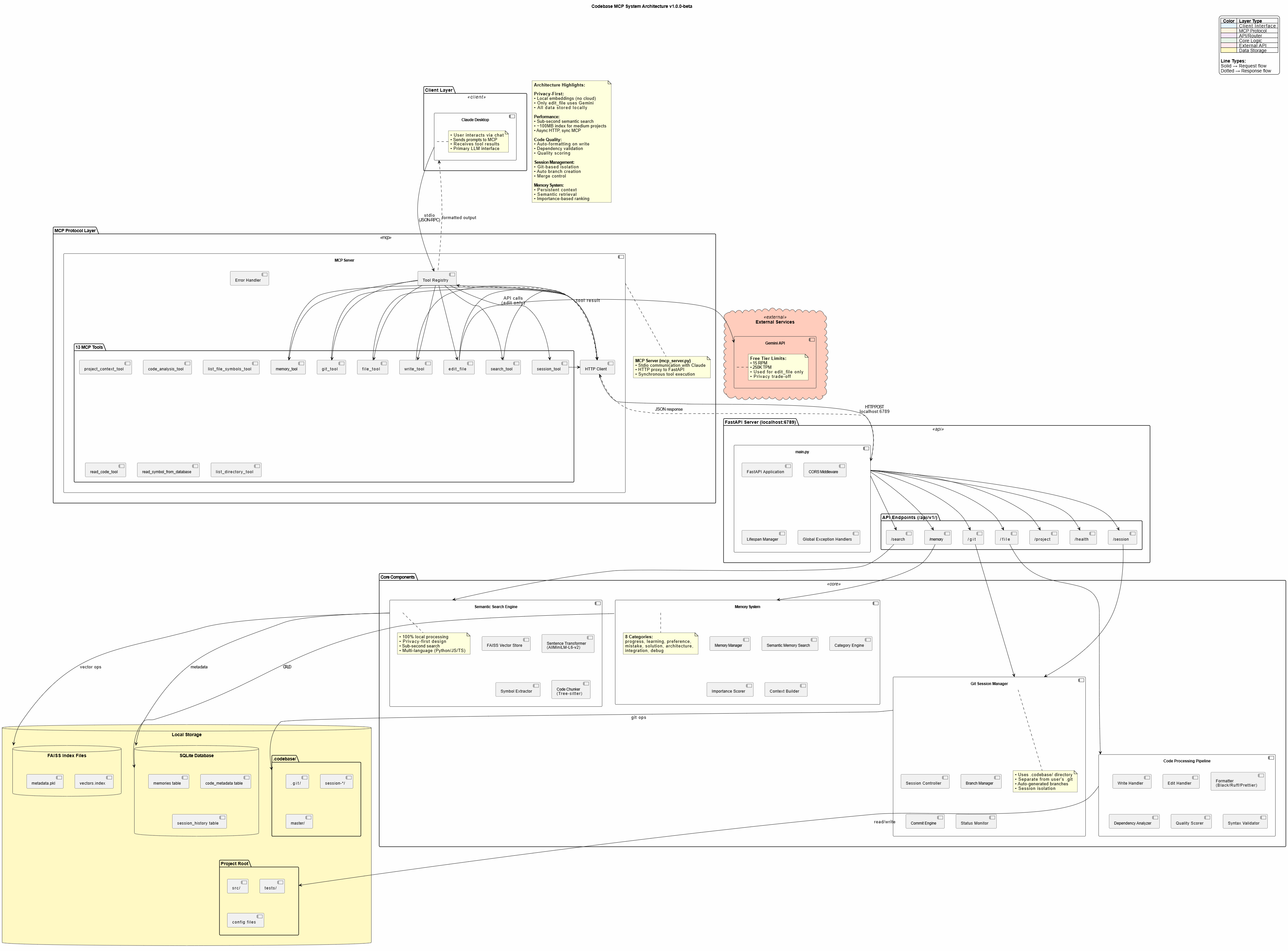
🏗️ Architecture
┌─────────────────┐
│ Claude Desktop  │  User interacts via chat
└────────┬────────┘
         │ MCP Protocol (stdio)
         ↓
┌─────────────────┐
│   MCP Server    │  16 Tools (proxy layer)
│  (mcp_server.py)│  Lightweight, fast
└────────┬────────┘
         │ HTTP/REST
         ↓
┌─────────────────┐
│ FastAPI Server  │  Port 6789 (main.py)
│   Core Engine   │  40+ API endpoints
└────────┬────────┘
         │
    ┌────┴─────┬─────────┬──────────┐
    ↓          ↓         ↓          ↓
┌────────┐ ┌──────┐ ┌────────┐ ┌───────────┐
│Semantic│ │Memory│ │  Git   │ │Code Tools │
│ Search │ │System│ │Manager │ │  Pipeline │
└────────┘ └──────┘ └────────┘ └───────────┘
    │          │         │          │
    └──────────┴─────────┴──────────┘
               ↓
    ┌──────────────────────┐
    │   Local Storage      │
    │ • FAISS (vectors)    │
    │ • SQLite (metadata)  │
    │ • .codebase (git)    │
    └──────────────────────┘
Privacy Note: All processing is local except the edit tool, which uses Google's free Gemini API for AI-assisted code editing. Only the edited file is sent to Gemini - no project context or history.
🛠️ Available Tools
Codebase MCP provides 16 MCP tools for comprehensive development automation:
| Tool | Purpose | Key Features |
|---|---|---|
session_tool |
Manage dev sessions | Create branches, auto-commit, merge |
memory_tool |
Store/retrieve knowledge | Persistent context, semantic search |
git_tool |
Git operations | Status, diff, log, commit, branches |
write_tool |
Intelligent file creation | Auto-format, quality scoring, dependency check |
edit_file |
AI-assisted editing | Gemini-powered, error recovery, format validation |
search_tool |
Semantic code search | 4 modes: semantic, fuzzy, text, symbol |
read_code_tool |
Smart code reading | Symbol-level, line ranges, whole file |
project_context_tool |
Project analysis | Structure, dependencies, overview |
list_directory_tool |
Directory exploration | Tree view, metadata, gitignore support |
code_analysis_tool |
Code quality checks | Syntax, linting, imports, dependencies |
list_file_symbols_tool |
Symbol extraction | Functions, classes, interfaces |
read_symbol_from_database |
DB symbol lookup | Fast indexed retrieval |
project_structure_tool |
Project visualization | Enhanced tree with stats |
file_tool |
Basic file operations (legacy) | Read and write by line range; write_tool is preferred for new code |
execute_tool |
Run a command | Arguments, timeout and working directory |
show_directory_tree |
Compact directory tree | Depth 1 to 5, tuned for LLM context |
📈 Performance
- Semantic Search: Sub-second response for typical codebases
- Memory Footprint: ~100MB for medium projects (<20k lines)
- Indexing Speed: ~30 seconds for 10k lines initial index
- Edit Operations: 5-15 seconds (Gemini API + formatting)
- Optimal Project Size: <20,000 lines (tested and verified)
Note: Edit tool can be slow due to Gemini API latency and code formatting. Claude Desktop may timeout on very large edits (use smaller, focused edits).
🎓 Usage Examples
Creating a New Feature
User: "Create a FastAPI endpoint for user authentication with JWT tokens"

Claude:
✅ Searching for existing auth patterns...
✅ Creating session: feat/user-auth
✅ Writing authentication.py with JWT implementation
✅ Auto-formatted with Black + Ruff
✅ Quality score: 95% - Auto-committed
✅ Storing solution in memory
Refactoring Code
User: "Refactor the user service to use dependency injection"

Claude:
✅ Reading current user service implementation
✅ Searching for DI patterns in codebase
✅ Editing with AI assistance (Gemini)
✅ Validating changes with quality gates
✅ Session: refactor/user-di ready for review
Memory-Driven Development
User: "Continue working on the payment integration"

Claude:
✅ Loading memory context...
✅ Found previous progress: Stripe API setup complete
✅ Found previous mistake: Don't use synchronous requests in async endpoints
✅ Continuing from last checkpoint...
🔐 Privacy & Security
Privacy-First Design
- Local Embeddings: AllMiniLM-L6-v2 runs entirely on your machine
- Local Processing: FAISS vector store, SQLite metadata - all local
- No Cloud Dependencies: Except for Gemini API (edit tool only)
Gemini API Usage
- Scope: Only
edit_filetool uses Gemini - Data Sent: Only the file being edited (no project context)
- Alternative: Contributors can add local LLM support (GPU required)
- Cost: Free tier (15 RPM, 250K TPM, 1K RPD)
Security Best Practices
- Never commit
.envwith API keys - Use
.gitignorefor sensitive files - Review AI-generated code before production deployment
- Keep dependencies updated
🤝 Contributing
We welcome contributions! This project was built to be community-driven and extensible.
Priority Areas:
- 🌐 Language Support: Add Java, Go, Rust, PHP, etc.
- 🧠 Local LLM Integration: Replace Gemini with local models
- 🔍 Search Improvements: Enhanced semantic algorithms
- 📊 UI/UX: Improve web dashboard
- ⚡ Performance: Optimization for larger codebases
See CONTRIBUTING.md for detailed guidelines.
📄 License
This project is licensed under the Apache License 2.0 - see LICENSE file for details.
Credits:
- Edit tool techniques inspired by Cursor
- Built with Claude Sonnet 4 and 4.5
- Powered by Model Context Protocol
🗺️ Roadmap
Current Version: v1.0.0-beta
Upcoming Features:
- Community-driven enhancements
- More language support
- Local LLM alternatives
- Performance optimizations
- Advanced prompt engineering templates
📞 Support
- 📖 Documentation: https://danyqe.github.io/codebase-mcp/
- 🐛 Issues: https://github.com/danyQe/codebase-mcp/issues
- 💬 Discussions: https://github.com/danyQe/codebase-mcp/discussions
- 🌟 Star this repo if you find it useful!
🎉 Acknowledgments
Special thanks to:
- Anthropic for Claude and the Model Context Protocol
- Google for the free Gemini API
- Cursor team for pioneering AI-assisted editing techniques
- Open source community for making this possible
Made with ❤️ by developers, for developers
Stop paying for coding assistants. Start building with your own LLM.
Codebase MCP 질문
Codebase MCP는 어떤 도구를 제공하나요?
16개 도구를 제공합니다. 예: session_tool, memory_tool, git_tool, write_tool, edit_file.
별도의 구독이 필요한가요?
아니요, 기존 Claude Pro 또는 Team 플랜을 사용하며 Cursor와 같은 유료 도구의 오픈 소스 대안 역할을 합니다.
코드가 비공개로 유지되나요?
네, 로컬 임베딩 및 프로세싱을 사용하는 프라이버시 우선 설계 방식을 채택하고 있습니다. 편집 중인 특정 파일만 Gemini API로 전송됩니다.
지원되는 프로그래밍 언어는 무엇인가요?
현재 Python, JavaScript, TypeScript를 지원합니다.