
코드베이스를 인덱싱하여 AI 어시스턴트가 grep보다 훨씬 적은 컨텍스트로 코드, 문서, 노트를 검색할 수 있게 합니다.
다른 이름 CSCSoftware/AiDex, aidex-mcp
- 스타
- 48
- Tools
- 31
- 다운로드, 30일
- —
- 최신 버전
- 1.8.0
- 마지막 커밋
- 2026년 11월 14일
- 라이선스
- MIT
AiDex MCP란?
AiDex은(는) MCP server입니다. 코드베이스를 인덱싱하여 AI 어시스턴트가 grep보다 훨씬 적은 컨텍스트로 코드, 문서, 노트를 검색할 수 있게 합니다. 31개 도구를 제공합니다. 예: exact, semantic, aidex_init.
프로젝트 README에서 생성된 요약
AiDex MCP server 정보
AiDex는 코드베이스를 인덱싱하여 AI 어시스턴트에게 시맨틱 메모리와 효율적인 검색 기능을 제공합니다. Claude Desktop, Cursor, Windsurf, VS Code Copilot과 같은 MCP 호환 클라이언트를 사용하는 개발자를 위해, 무거운 grep 기반 검색을 가벼운 식별자 기반 인덱스로 대체합니다. 이 방식은 토큰 소모를 크게 줄여주며, 기존 방식으로는 수천 개의 토큰이 필요했을 쿼리를 단 50개의 토큰만으로 처리할 수 있는 경우가 많습니다.
사용자는 코드, 문서, 워크스페이스 노트를 대상으로 정확한 검색, 시맨틱 검색 또는 하이브리드 검색을 수행할 수 있습니다. 이 서버는 TypeScript, Python, Rust, Go를 포함한 14개 언어를 지원합니다. 파일 전체를 읽지 않고도 파일 시그니처를 가져오는 특화된 도구, 예약된 항목으로 태스크 백로그를 관리하는 기능, 그리고 서로 다른 채팅 간에도 유지되는 세션 노트를 관리하는 기능을 포함합니다. 디버깅을 위해 HTTP를 통해 실시간 텔레메트리를 수신하는 Log Hub와 시각적 컨텍스트를 위한 최적화된 스크린샷 도구도 갖추고 있습니다.
설정은 로컬 우선 방식이며 모델에 구애받지 않습니다. 로컬 임베딩을 사용하여 완전히 오프라인으로 작동하지만, 사용자는 쿼리를 번역하거나 결과를 재순위화하기 위해 Anthropic, OpenAI 또는 Ollama를 통해 LLM 레이어를 선택적으로 구성할 수 있습니다. 개인정보 보호 스위치를 통해 명시적으로 활성화하지 않는 한 코드 본문은 로컬에 유지됩니다.
활용 사례
- 1효율적인 코드 탐색관련 없는 텍스트 매칭으로 AI 컨텍스트를 채우지 않고도 특정 클래스나 메서드 정의를 찾을 수 있습니다.
- 2구조적 코드 분석파일 전체 내용을 읽지 않고도 파일 내 클래스와 메서드의 시그니처를 가져와 구조를 파악할 수 있습니다.
- 3프로젝트 간 탐색워크스페이스 내의 모든 인덱싱된 저장소에서 특정 식별자나 패턴을 동시에 검색할 수 있습니다.
- 4지속적인 태스크 관리AI가 향후 세션에서 참조할 수 있도록 우선순위와 태그가 포함된 코딩 태스크를 생성하고 추적할 수 있습니다.
- 5실시간 애플리케이션 모니터링실시간 애플리케이션 로그를 AI로 직접 스트리밍하여 코드 동작을 실시간으로 관찰할 수 있습니다.
프로젝트의 README를 바탕으로 작성되었습니다. 모든 활용 사례는 해당 내용의 인용문과 대조하여 확인합니다.
AiDex MCP 설치 방법
형식 확인: 2026년 11월 10일Cursor에 추가Goose에 추가Claude Code에 AiDex MCP 설치
$ claude mcp add aidex -- npx -y aidex-mcpCursor에 AiDex MCP 설치
~/.cursor/mcp.json
{
  "mcpServers": {
    "aidex": {
      "command": "npx",
      "args": [
        "-y",
        "aidex-mcp"
      ]
    }
  }
}VS Code에 AiDex MCP 설치
.vscode/mcp.json
{
  "servers": {
    "aidex": {
      "type": "stdio",
      "command": "npx",
      "args": [
        "-y",
        "aidex-mcp"
      ]
    }
  }
}VS Code CLI에 AiDex MCP 설치
$ code --add-mcp '{"name":"aidex","type":"stdio","command":"npx","args":["-y","aidex-mcp"]}'Claude Desktop에 AiDex MCP 설치
claude_desktop_config.json
{
  "mcpServers": {
    "aidex": {
      "command": "npx",
      "args": [
        "-y",
        "aidex-mcp"
      ]
    }
  }
}Codex에 AiDex MCP 설치
$ codex mcp add aidex -- npx -y aidex-mcpCodex config.toml에 AiDex MCP 설치
~/.codex/config.toml
[mcp_servers.aidex]
command = "npx"
args = ["-y", "aidex-mcp"]
Gemini CLI에 AiDex MCP 설치
$ gemini mcp add -s user aidex npx -- -y aidex-mcpGemini settings.json에 AiDex MCP 설치
~/.gemini/settings.json
{
  "mcpServers": {
    "aidex": {
      "command": "npx",
      "args": [
        "-y",
        "aidex-mcp"
      ]
    }
  }
}AiDex MCP 도구 31
README에서 감지됨exactsemanticaidex_initaidex_queryaidex_signatureaidex_signaturesaidex_updateaidex_removeaidex_summaryaidex_treeaidex_describeaidex_link
| exact | — | |
| semantic | — | |
| aidex_init | — | |
| aidex_query | — | |
| aidex_signature | — | |
| aidex_signatures | — | |
| aidex_update | — | |
| aidex_remove | — | |
| aidex_summary | — | |
| aidex_tree | — | |
| aidex_describe | — | |
| aidex_link | — |
도구 31개 모두 보기도구 수 줄이기
aidex_unlinkaidex_linksaidex_statusaidex_scanaidex_filesaidex_noteaidex_sessionaidex_vieweraidex_taskaidex_tasksaidex_screenshotaidex_windowsaidex_global_initaidex_global_statusaidex_global_queryaidex_global_signaturesaidex_global_refreshaidex_global_guidelineaidex_log
| aidex_unlink | — | |
| aidex_links | — | |
| aidex_status | — | |
| aidex_scan | — | |
| aidex_files | — | |
| aidex_note | — | |
| aidex_session | — | |
| aidex_viewer | — | |
| aidex_task | — | |
| aidex_tasks | — | |
| aidex_screenshot | — | |
| aidex_windows | — | |
| aidex_global_init | — | |
| aidex_global_status | — | |
| aidex_global_query | — | |
| aidex_global_signatures | — | |
| aidex_global_refresh | — | |
| aidex_global_guideline | — | |
| aidex_log | — |
자동 검사
2026년 11월 12일에 실행됨전체 보고서 →자동 검사를 통과했습니다. 이는 보안 감사가 아닙니다. 코드를 직접 읽고 서버에 필요한 최소한의 권한만 부여하십시오. 검사 방식

- 소스 저장소 연결 및 접근 가능통과
- 오픈 소스 라이선스 (OSI)통과
- 최근 1년 내 커밋 또는 릴리스통과
- 패키지 이름이 인기 패키지와 유사하지 않음통과
- 원격 엔드포인트가 HTTPS 사용검사되지 않음
- 파괴적인 도구에 라벨 표시됨통과
- 모델에 대한 숨겨진 지침 없음통과
- 패키지 및 해당 종속성에 중요한 보안 권고 없음통과
README
GitHub에서 보기AiDex



The persistent brain for AI coding agents.
AiDex is an MCP server that gives AI coding assistants a memory, semantic search, and live telemetry — local-first, model-agnostic. Works with any MCP-compatible AI assistant: Claude Code, Claude Desktop, Cursor, Windsurf, Gemini CLI, VS Code Copilot, and more.
Three Pillars
🧠 Memory — Tasks, notes, and session-notes survive every chat. Auto-logged history, scheduled tasks, cross-session continuity. Your AI knows tomorrow what mattered today.
🔍 Search — Three modes: exact (identifier), semantic (concept), hybrid (RRF fusion of both). Embeds code, docs, and workspace items into one ranking. Cross-project — every repo in one query. Optional LLM layer translates non-English queries and reranks results.
🌐 Telemetry — LogHub receives live logs from any app via HTTP (no SDK). The AI watches what your code actually does, not just what it says. Live-streamed in the Viewer.
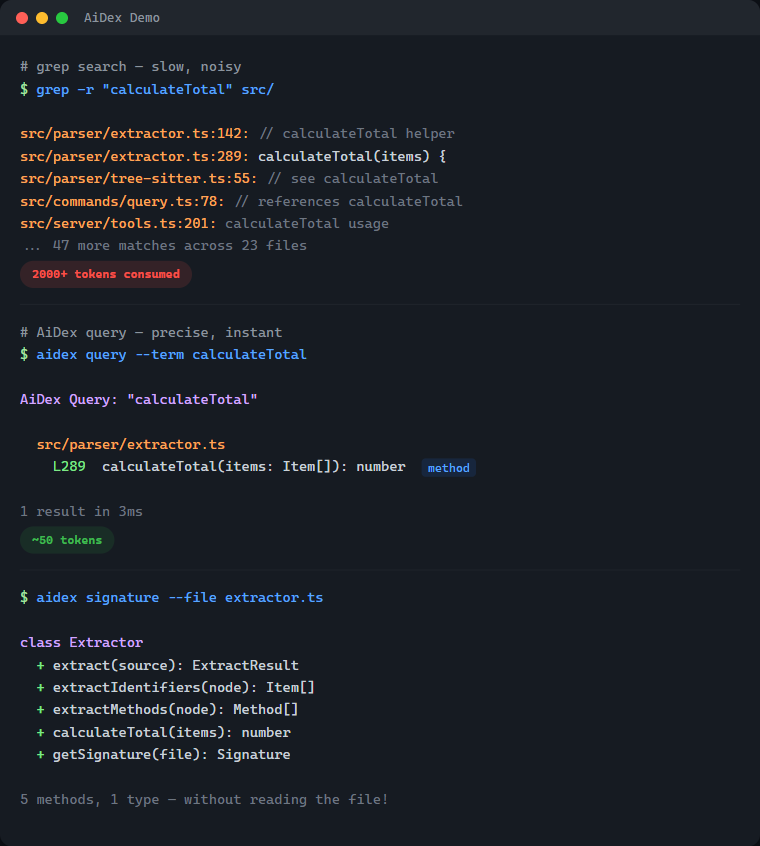
| Without AiDex | With AiDex | |
|---|---|---|
Find PlayerHealth |
Grep → 200 hits in 40 files → reads 5 files → 2,000+ tokens | 1 query → 3 exact locations → ~50 tokens |
| Get file structure | Reads entire 500-line file → 1,500 tokens | Signatures → classes + methods → ~80 tokens |
| What changed today? | git diff + grep + context → 3,000+ tokens |
Time-filtered query → ~50 tokens |
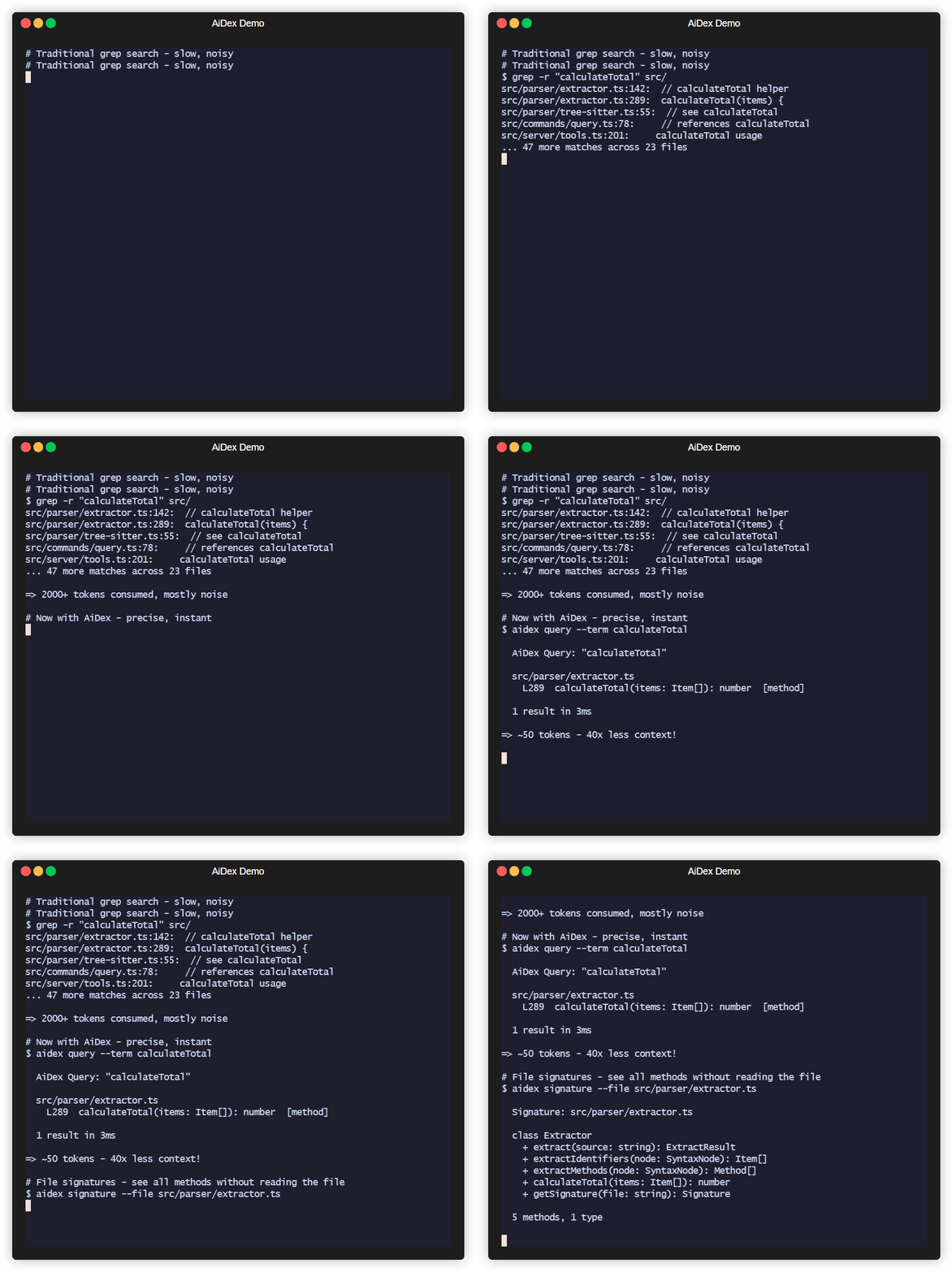
What's Inside — 33 Tools in One Server
| Category | Tools | What it does |
|---|---|---|
| Semantic Search 🆕 | search, settings |
Hybrid / semantic / exact retrieval over code, docs & workspace. Settings tab to configure embeddings + LLM layer |
| Index & Identifier Search | init, query, update, remove, status |
Index your project, search identifiers by name (exact/contains/starts_with), time-based filtering |
| Signatures | signature, signatures |
Get classes + methods of any file without reading it — single file or glob pattern |
| Project Overview | summary, tree, describe, files |
Entry points, language breakdown, file tree with stats, file listing by type |
| Cross-Project | link, unlink, links, scan |
Link dependencies, discover indexed projects |
| Global Search | global_init, global_query, global_signatures, global_status, global_refresh |
Search identifiers across ALL your projects — "Have I ever written X?" |
| Guidelines | global_guideline |
Persistent AI instructions & coding conventions — shared across all projects |
| Sessions | session, note |
Track sessions, detect external changes, leave notes for next session (with searchable history) |
| Task Backlog | task, tasks |
Built-in task management with priorities, tags, auto-logged history, and scheduled/recurring tasks |
| Log Hub | log |
Universal log receiver — any program sends logs via HTTP, queryable by the AI, live in Viewer |
| Screenshots | screenshot, windows |
Cross-platform screen capture with LLM optimization — scale + color reduction saves up to 95% tokens |
| Viewer | viewer |
Interactive browser UI with file tree, signatures, tasks, logs, search, and live reload |
14 languages — C#, TypeScript, JavaScript, Rust, Python, C, C++, Java, Go, PHP, Ruby, HCL/Terraform, Kotlin, Swift — plus Astro frontmatter
# Find where "PlayerHealth" is defined — 1 call, ~50 tokens
aidex_query({ term: "PlayerHealth" })
→ Engine.cs:45, Player.cs:23, UI.cs:156

# All methods in a file — without reading the whole file
aidex_signature({ file: "src/Engine.cs" })
→ class GameEngine { Update(), Render(), LoadScene(), ... }

# What changed in the last 2 hours?
aidex_query({ term: "render", modified_since: "2h" })

# Search across ALL your projects at once
aidex_global_query({ term: "TransparentWindow", mode: "contains" })
→ Found in: LibWebAppGpu (3 hits), DebugViewer (1 hit)

# Leave a note for your next session
aidex_note({ path: ".", note: "Test the parser fix after restart" })

# Create a task while working
aidex_task({ path: ".", action: "create", title: "Fix edge case in parser", priority: 1, tags: "bug" })
Table of Contents
- What's Inside
- Semantic Search & LLM Layer 🆕
- The Problem
- The Solution
- Why Not Just Grep?
- How It Works
- Features
- Supported Languages
- Quick Start
- Available Tools
- Time-based Filtering
- Project Structure
- Session Notes
- Task Backlog
- Global Search
- AI Guidelines
- Log Hub
- Debug Dashboard
- Screenshots — LLM-Optimized
- Interactive Viewer
- CLI Usage
- Performance
- Technology
- Contributing
- License
Semantic Search & LLM Layer
v2.0 added semantic search via locally-run embeddings — your AI can find a function even when it doesn't know the exact identifier.
Three modes — pick the right tool for the question
| Mode | What it does | When to use |
|---|---|---|
exact |
Identifier match (same as aidex_query) |
You know the name. PlayerHealth → 3 hits |
semantic |
Vector KNN over embedded code+docs+workspace | You know the concept. "how do we cache the model" → finds getQueryEmbedder |
hybrid (default) |
RRF fusion of both | Mixed queries. Robust by default |
What gets embedded
- Code — every method and type, three-tier chunking (signature + doc-comment + weighted identifier bag)
- Docs — Markdown sections (README, CHANGELOG, docs/, plan files), split at heading boundaries
- Workspace — tasks, task logs, session notes, archived note history
One ranking, all kinds. A query like "how to write logs from external programs" surfaces the README's ## Log Hub section first, then the log method in commands/log.ts, then any related task.
Setup
// Enable embeddings on a project (one-time, ~30s for AiDex itself, cached afterwards)
aidex_init({ path: ".", embeddings: true })

// Search
aidex_search({ query: "how do we batch requests to the LLM", path: "." })
aidex_search({ query: "retry with backoff", scope: "all" })  // across every embedded project
Or use the Settings tab in the Viewer (aidex_settings({ path: ".", open: true })) — toggles for embeddings, LLM provider, model, and the privacy switch.
Optional LLM layer
When an Anthropic / OpenAI / OpenRouter / Ollama / HuggingFace API key is configured, AiDex can:
- Translate non-English queries → "wie speichere ich Logs lokal" finds the right code
- Expand vague queries into 2-4 concrete subqueries (RRF-merged)
- Rerank top-N retrieval candidates
Privacy switch llm_send_code defaults to off — only your literal query and metadata (paths, names, anchors) are sent. Code bodies stay local. Per-project, easy to verify in Settings.
Local-first: works fully offline with pure embeddings. The LLM layer is opt-in, never required.
The Problem
Every time your AI assistant searches for code, it:
- Greps through thousands of files → hundreds of results flood the context
- Reads file after file to understand the structure → more context consumed
- Forgets everything when the session ends → repeat from scratch
A single "Where is X defined?" question can eat 2,000+ tokens. Do that 10 times and you've burned half your context on navigation alone.
The Solution
Index once, query forever:
# Before: grep flooding your context
AI: grep "PlayerHealth" → 200 hits in 40 files
AI: read File1.cs, File2.cs, File3.cs...
→ 2000+ tokens consumed, 5+ tool calls

# After: precise results, minimal context
AI: aidex_query({ term: "PlayerHealth" })
→ Engine.cs:45, Player.cs:23, UI.cs:156
→ ~50 tokens, 1 tool call
Result: 50-80% less context used for code navigation.
Why Not Just Grep?
| Grep/Ripgrep | AiDex | |
|---|---|---|
| Context usage | 2000+ tokens per search | ~50 tokens |
| Results | All text matches | Only identifiers |
| Precision | log matches catalog, logarithm |
log finds only log |
| Persistence | Starts fresh every time | Index survives sessions |
| Structure | Flat text search | Knows methods, classes, types |
The real cost of grep: Every grep result includes surrounding context. Search for User in a large project and you'll get hundreds of hits - comments, strings, partial matches. Your AI reads through all of them, burning context tokens on noise.
AiDex indexes identifiers: It uses Tree-sitter to actually parse your code. When you search for User, you get the class definition, the method parameters, the variable declarations - not every comment that mentions "user".
How It Works
-
Index your project once (~1 second per 1000 files)
aidex_init({ path: "/path/to/project" }) -
AI searches the index instead of grepping
aidex_query({ term: "Calculate", mode: "starts_with" }) → All functions starting with "Calculate" + exact line numbers aidex_query({ term: "Player", modified_since: "2h" }) → Only matches changed in the last 2 hours -
Get file overviews without reading entire files
aidex_signature({ file: "src/Engine.cs" })
→ All classes, methods, and their signatures
The index lives in .aidex/index.db (SQLite) - fast, portable, no external dependencies.
Features
- Tree-sitter Parsing: Real code parsing, not regex — indexes identifiers, ignores keywords and noise
- ~50 Tokens per Search: vs 2000+ with grep — your AI keeps its context for actual work
- Persistent Index: Survives between sessions — no re-scanning, no re-reading
- Incremental Updates: Re-index single files after changes, not the whole project
- Time-based Filtering: Find what changed in the last hour, day, or week
- Auto-Cleanup: Excluded files (e.g., build outputs) are automatically removed from index
- Zero Dependencies: SQLite with WAL mode — single file, fast, portable
Supported Languages
| Language | Extensions |
|---|---|
| C# | .cs |
| TypeScript | .ts, .tsx |
| JavaScript | .js, .jsx, .mjs, .cjs |
| Rust | .rs |
| Python | .py, .pyw |
| C | .c, .h |
| C++ | .cpp, .cc, .cxx, .hpp, .hxx |
| Java | .java |
| Go | .go |
| PHP | .php |
| Ruby | .rb, .rake |
| HCL/Terraform | .tf, .tfvars, .hcl |
| Kotlin | .kt, .kts |
| Swift | .swift |
| Astro | .astro (TypeScript frontmatter) |
Quick Start
Prerequisites
- Node.js ≥ 20 (check with
node --version)- macOS:
brew install nodeornvm install 20 && nvm use 20 - Linux: use your package manager or nvm
- Windows: nodejs.org
- If you use
nvm, the repo ships a.nvmrc—nvm usepicks the right version automatically.
- macOS:
1. Install
npm install -g aidex-mcp
That's it. Setup runs automatically after install — it detects your installed AI clients (Claude Code, Claude Desktop, Cursor, Windsurf, Gemini CLI, VS Code Copilot) and registers AiDex as an MCP server. It also adds usage instructions to your AI's config (~/.claude/CLAUDE.md, ~/.gemini/GEMINI.md).
To re-run setup manually: aidex setup | To unregister: aidex unsetup | To skip auto-setup: AIDEX_NO_SETUP=1 npm install -g aidex-mcp
2. Or register manually with your AI assistant
For Claude Code (~/.claude/settings.json or ~/.claude.json):
{
  "mcpServers": {
    "aidex": {
      "type": "stdio",
      "command": "aidex",
      "env": {}
    }
  }
}
For Claude Desktop (%APPDATA%/Claude/claude_desktop_config.json on Windows):
{
  "mcpServers": {
    "aidex": {
      "command": "aidex"
    }
  }
}
Note: Both
aidexandaidex-mcpwork as command names.
Important: The server name in your config determines the MCP tool prefix. Use
"aidex"as shown above — this gives you tool names likeaidex_query,aidex_signature, etc. Using a different name (e.g.,"codegraph") would change the prefix accordingly.
For Gemini CLI (~/.gemini/settings.json):
{
  "mcpServers": {
    "aidex": {
      "command": "aidex"
    }
  }
}
For VS Code Copilot (run MCP: Open User Configuration in Command Palette):
{
  "servers": {
    "aidex": {
      "type": "stdio",
      "command": "aidex"
    }
  }
}
For other MCP clients: See your client's documentation for MCP server configuration.
3. Make your AI actually use it
Add to your AI's instructions (e.g., ~/.claude/CLAUDE.md for Claude Code, or the equivalent for your AI client). This tells the AI when and how to use AiDex instead of grepping:
## AiDex - Persistent Code Index (MCP Server)

AiDex provides fast, precise code search through a pre-built index.
**Always prefer AiDex over Grep/Glob for code searches.**

### REQUIRED: Before using Grep/Glob/Read for code searches
Do I want to search code? ├── .aidex/ exists → STOP! Use AiDex instead ├── .aidex/ missing → run aidex_init (don't ask), THEN use AiDex └── Config/Logs/Text → Grep/Read is fine
**NEVER do this when .aidex/ exists:**
- ❌ `Grep pattern="functionName"` → ✅ `aidex_query term="functionName"`
- ❌ `Grep pattern="class.*Name"` → ✅ `aidex_query term="Name" mode="contains"`
- ❌ `Read file.cs` to see methods → ✅ `aidex_signature file="file.cs"`
- ❌ `Glob pattern="**/*.cs"` + Read → ✅ `aidex_signatures pattern="**/*.cs"`

### Session-Start Rule (REQUIRED — every session, no exceptions)

1. Call `aidex_session({ path: "<project>" })` — detects external changes, auto-reindexes
2. If `.aidex/` does NOT exist → run `aidex_init` automatically (don't ask)
3. If a session note exists → **show it to the user** before continuing
4. **Before ending a session:** always leave a note about what to do next

### Question → Right Tool

| Question | Tool |
|----------|------|
| "Where is X defined?" | `aidex_query term="X"` |
| "Find anything containing X" | `aidex_query term="X" mode="contains"` |
| "All functions starting with X" | `aidex_query term="X" mode="starts_with"` |
| "What methods does file Y have?" | `aidex_signature file="Y"` |
| "Explore all files in src/" | `aidex_signatures pattern="src/**"` |
| "Project overview" | `aidex_summary` + `aidex_tree` |
| "What changed recently?" | `aidex_query term="X" modified_since="2h"` |
| "What files changed today?" | `aidex_files path="." modified_since="8h"` |
| "Have I ever written X?" | `aidex_global_query term="X" mode="contains"` |
| "Which project has class Y?" | `aidex_global_signatures term="Y" kind="class"` |
| "All indexed projects?" | `aidex_global_status` |

### Search Modes

- **`exact`** (default): Finds only the exact identifier — `log` won't match `catalog`
- **`contains`**: Finds identifiers containing the term — `render` matches `preRenderSetup`
- **`starts_with`**: Finds identifiers starting with the term — `Update` matches `UpdatePlayer`, `UpdateUI`

### All Tools (30)

| Category | Tools | Purpose |
|----------|-------|---------|
| Search & Index | `aidex_init`, `aidex_query`, `aidex_update`, `aidex_remove`, `aidex_status` | Index project, search identifiers (exact/contains/starts_with), time filter |
| Signatures | `aidex_signature`, `aidex_signatures` | Get classes + methods without reading files |
| Overview | `aidex_summary`, `aidex_tree`, `aidex_describe`, `aidex_files` | Entry points, file tree, file listing by type |
| Cross-Project | `aidex_link`, `aidex_unlink`, `aidex_links`, `aidex_scan` | Link dependencies, discover projects |
| Global Search | `aidex_global_init`, `aidex_global_query`, `aidex_global_signatures`, `aidex_global_status`, `aidex_global_refresh` | Search across ALL projects |
| Guidelines | `aidex_global_guideline` | Persistent AI instructions & conventions (key-value, global) |
| Sessions | `aidex_session`, `aidex_note` | Track sessions, leave notes (with searchable history) |
| Tasks | `aidex_task`, `aidex_tasks` | Built-in backlog with priorities, tags, summaries, auto-logged history, scheduled/recurring tasks |
| Log Hub | `aidex_log` | Universal log receiver — any program sends logs via HTTP, AI queries them, live in Viewer |
| Screenshots | `aidex_screenshot`, `aidex_windows` | Screen capture with LLM optimization (scale + color reduction, no index needed) |
| Viewer | `aidex_viewer` | Interactive browser UI with file tree, signatures, tasks, and live logs |

**14 languages:** C#, TypeScript, JavaScript, Rust, Python, C, C++, Java, Go, PHP, Ruby, HCL/Terraform, Kotlin, Swift — plus Astro frontmatter

### Session Notes

Leave notes for the next session — they persist in the database:
aidex_note({ path: ".", note: "Test the fix after restart" }) # Write aidex_note({ path: ".", note: "Also check edge cases", append: true }) # Append aidex_note({ path: "." }) # Read aidex_note({ path: ".", search: "parser" }) # Search history aidex_note({ path: ".", clear: true }) # Clear
- **Before ending a session:** automatically leave a note about next steps
- **User says "remember for next session: ..."** → write it immediately

### Task Backlog

Track TODOs, bugs, and features right next to your code index:
aidex_task({ path: ".", action: "create", title: "Fix bug", priority: 1, tags: "bug" }) aidex_task({ path: ".", action: "update", id: 1, status: "done" }) aidex_task({ path: ".", action: "log", id: 1, note: "Root cause found" }) aidex_tasks({ path: ".", status: "active" })
Scheduled & recurring tasks
aidex_task({ path: ".", action: "create", title: "Check PR status", due: "3d", interval: "3d", task_action: "gh pr list" })
Priority: 1=high, 2=medium, 3=low | Status: `backlog → active → done | cancelled`

### Global Search (across all projects)
aidex_global_init({ path: "/path/to/all/repos" }) # Scan & register aidex_global_init({ path: "...", index_unindexed: true }) # + auto-index small projects aidex_global_query({ term: "TransparentWindow", mode: "contains" }) # Search everywhere aidex_global_signatures({ term: "Render", kind: "method" }) # Find methods everywhere aidex_global_status({ sort: "recent" }) # List all projects
### Screenshots
aidex_screenshot() # Full screen aidex_screenshot({ mode: "active_window" }) # Active window aidex_screenshot({ mode: "window", window_title: "VS Code" }) # Specific window aidex_screenshot({ scale: 0.5, colors: 2 }) # B&W, half size (ideal for LLM) aidex_screenshot({ colors: 16 }) # 16 colors (UI readable) aidex_windows({ filter: "chrome" }) # Find window titles
No index needed. Returns file path → use `Read` to view immediately.

**LLM optimization strategy:** Always start with aggressive settings, then retry if unreadable:
1. First try: `scale: 0.5, colors: 2` (B&W, half size — smallest possible)
2. If unreadable: retry with `colors: 16` (adds shading for UI elements)
3. If still unclear: `scale: 0.75` or omit `colors` for full quality
4. **Remember** what works for each window/app during the session — don't retry every time.
4. Index your project
Ask your AI: "Index this project with AiDex"
Or manually in the AI chat:
aidex_init({ path: "/path/to/your/project" })
Available Tools
| Tool | Description |
|---|---|
aidex_init |
Index a project (creates .aidex/) |
aidex_query |
Search by term (exact/contains/starts_with) |
aidex_signature |
Get one file's classes + methods |
aidex_signatures |
Get signatures for multiple files (glob) |
aidex_update |
Re-index a single changed file |
aidex_remove |
Remove a deleted file from index |
aidex_summary |
Project overview |
aidex_tree |
File tree with statistics |
aidex_describe |
Add documentation to summary |
aidex_link |
Link another indexed project |
aidex_unlink |
Remove linked project |
aidex_links |
List linked projects |
aidex_status |
Index statistics |
aidex_scan |
Find indexed projects in directory tree |
aidex_files |
List project files by type (code/config/doc/asset) |
aidex_note |
Read/write session notes (persists between sessions) |
aidex_session |
Start session, detect external changes, auto-reindex |
aidex_viewer |
Open interactive project tree in browser |
aidex_task |
Create, read, update, delete tasks with priority and tags |
aidex_tasks |
List and filter tasks by status, priority, or tag |
aidex_screenshot |
Take a screenshot (fullscreen, window, region) with optional scale + color reduction |
aidex_windows |
List open windows for screenshot targeting |
aidex_global_init |
Scan directory tree, register all indexed projects in global DB |
aidex_global_status |
List all registered projects with stats |
aidex_global_query |
Search terms across ALL registered projects |
aidex_global_signatures |
Search methods/types by name across all projects |
aidex_global_refresh |
Update stats and remove stale projects from global DB |
aidex_global_guideline |
Store/retrieve AI guidelines and coding conventions (key-value, global) |
aidex_log |
Universal log receiver — start HTTP server, query logs, live stream in Viewer |
Time-based Filtering
Track what changed recently with modified_since and modified_before:
aidex_query({ term: "render", modified_since: "2h" })   # Last 2 hours
aidex_query({ term: "User", modified_since: "1d" })     # Last day
aidex_query({ term: "API", modified_since: "1w" })      # Last week
Supported formats:
- Relative:
30m(minutes),2h(hours),1d(days),1w(weeks) - ISO date:
2026-01-27or2026-01-27T14:30:00
Perfect for questions like "What did I change in the last hour?"
Project Structure
AiDex indexes ALL files in your project (not just code), letting you query the structure:
aidex_files({ path: ".", type: "config" })  # All config files
aidex_files({ path: ".", type: "test" })    # All test files
aidex_files({ path: ".", pattern: "**/*.md" })  # All markdown files
aidex_files({ path: ".", modified_since: "30m" })  # Changed this session
File types: code, config, doc, asset, test, other, dir
Use modified_since to find files changed in this session - perfect for "What did I edit?"
AiDex MCP 질문
AiDex MCP를 Claude Code에 추가하려면 어떻게 하나요?
터미널에서 claude mcp add aidex -- npx -y aidex-mcp를 실행합니다. 모든 프로젝트에서 사용할 수 있게 하려면 --scope user를 추가합니다.
AiDex MCP를 Cursor에 추가하려면 어떻게 하나요?
~/.cursor/mcp.json를 열고 mcpServers 아래에 서버를 추가합니다. 위 설치 섹션에 표시된 Cursor 구성을 사용합니다.
AiDex MCP는 어떤 도구를 제공하나요?
31개 도구를 제공합니다. 예: exact, semantic, aidex_init, aidex_query, aidex_signature.
AiDex는 어떤 언어를 인덱싱하나요?
C#, TypeScript, JavaScript, Rust, Python, C, C++, Java, Go, PHP, Ruby, HCL/Terraform, Kotlin, Swift를 포함한 14개 언어를 지원합니다.
AiDex를 사용하려면 API 키나 인터넷 연결이 필요한가요?
아니요. 시맨틱 검색은 로컬 임베딩을 통해 완전히 오프라인으로 작동하며, LLM 레이어는 선택 사항입니다.
AiDex 인덱스는 어디에 저장되나요?
인덱스는 프로젝트 내부의 .aidex/index.db 경로에 SQLite 데이터베이스 파일로 저장됩니다.
AiDex는 어떤 검색 모드를 제공하나요?
정확한 식별자 매칭, 시맨틱 벡터 검색, 그리고 두 랭킹을 결합한 하이브리드 모드를 제공합니다.