
Scraper MCP server
2026년 11월 12일 커밋웹 콘텐츠를 markdown으로 변환하고 서버 측 CSS 필터링을 적용하여 최적화된 웹 스크래핑을 수행함으로써 LLM 토큰 사용량을 줄여줍니다.
다른 이름 cotdp/scraper-mcp
- 스타
- 8
- Tools
- 6
- 다운로드, 30일
- —
- 최신 버전
- —
- 마지막 커밋
- 2026년 11월 12일
- 라이선스
- MIT
Scraper MCP란?
웹 콘텐츠를 markdown으로 변환하고 서버 측 CSS 필터링을 적용하여 최적화된 웹 스크래핑을 수행함으로써 LLM 토큰 사용량을 줄여줍니다. 6개 도구를 제공합니다. 예: scrape_url, scrape_url_html, scrape_url_text.
프로젝트 README에서 생성된 요약
Scraper MCP server 정보
scraper-mcp는 HTML을 최적화된 markdown으로 변환하여 AI 모델을 위한 깨끗한 웹 콘텐츠 추출을 가능하게 합니다. 이 server는 서버 측 CSS 필터링과 타겟 콘텐츠 추출을 통해 토큰 소비를 70-90%까지 줄여줍니다. Claude Code 또는 Claude Desktop과 같은 클라이언트를 사용하는 개발자를 위해 설계되었으며, Docker를 통해 로컬에서 실행하거나 원격 서비스로 운영할 수 있습니다.
사용자는 raw HTML, markdown, plain text, link extraction을 포함한 네 가지 스크래핑 모드 중 하나를 선택할 수 있습니다. 단일 페이지 애플리케이션(SPA) 또는 동적 콘텐츠가 있는 사이트의 경우, server는 Playwright를 활용하여 JavaScript 렌더링을 수행합니다. 또한 웹 검색 및 복잡한 추론을 위해 Perplexity AI 도구가 통합되어 있으며, 이를 사용하려면 Perplexity 또는 OpenRouter API 키가 필요합니다.
내장된 모니터링 대시보드는 실시간 통계, 캐시 메트릭 및 도구 테스트를 위한 인터랙티브 플레이그라운드를 제공합니다. 보안 유지를 위해 MCP 엔드포인트는 신뢰할 수 있는 클라이언트를 대상으로 하며, loopback 주소에 두거나 인증된 게이트웨이 뒤에 배치해야 합니다. 관리 기능은 토큰 기반 인증 시스템으로 보호됩니다.
활용 사례
- 1LLM 토큰 비용 절감웹 페이지를 markdown으로 변환하고 CSS selector를 사용하여 불필요한 HTML 요소를 제거합니다.
- 2동적 단일 페이지 애플리케이션 스크래핑데이터 표시를 위해 JavaScript 실행이 필요한 React 또는 Vue 애플리케이션의 콘텐츠를 렌더링합니다.
- 3AI 기반 웹 리서치 수행통합된 Perplexity AI 기능을 사용하여 복잡한 검색 및 추론 작업을 수행합니다.
- 4스크래핑 성능 모니터링시각적 인터페이스를 통해 요청 통계 및 캐시 히트율을 추적합니다.
프로젝트의 README를 바탕으로 작성되었습니다. 모든 활용 사례는 해당 내용의 인용문과 대조하여 확인합니다.
Scraper MCP 도구 6
README에서 감지됨scrape_urlscrape_url_htmlscrape_url_textscrape_extract_linksperplexityperplexity_reason
| scrape_url | — | |
| scrape_url_html | — | |
| scrape_url_text | — | |
| scrape_extract_links | — | |
| perplexity | — | |
| perplexity_reason | — |
구성
ENABLE_PROMPTSENABLE_RESOURCESOPENROUTER_API_KEYPERPLEXITY_API_KEYPERPLEXITY_PROVIDERPLAYWRIGHT_DISABLE_GPUPLAYWRIGHT_MAX_CONTEXTSPLAYWRIGHT_TIMEOUTSCRAPEOPS_API_KEYSCRAPEOPS_RENDER_JS
| 이름 | 설명 | 유형 |
|---|---|---|
| ENABLE_PROMPTS | — | |
| ENABLE_RESOURCES | — | |
| OPENROUTER_API_KEY | — | |
| PERPLEXITY_API_KEY | — | |
| PERPLEXITY_PROVIDER | — | |
| PLAYWRIGHT_DISABLE_GPU | — | |
| PLAYWRIGHT_MAX_CONTEXTS | — | |
| PLAYWRIGHT_TIMEOUT | — | |
| SCRAPEOPS_API_KEY | — | |
| SCRAPEOPS_RENDER_JS | — |
자동 검사
2026년 11월 14일에 실행됨전체 보고서 →아직 인증되지 않았습니다. 서버는 80점 이상의 점수, 심각한 결함 없음, 그리고 검사에 충분한 데이터를 갖추어야 합니다. 검사 방식 · 점수를 높이기 위해 수정할 항목

- 소스 저장소 연결 및 접근 가능cotdp/scraper-mcp is public and reachablegithub.com/cotdp/scraper-mcp ↗통과
- 패키지가 이 저장소를 소스로 명시검사되지 않음
- 빌드 출처(Sigstore 증명)검사되지 않음
- 오픈 소스 라이선스 (OSI)MITspdx.org/licenses/MIT.html ↗통과
- 최근 1년 내 커밋 또는 릴리스Last commit or release 2026-11-12github.com/cotdp/scraper-mcp ↗통과
- OpenSSF Scorecard검사되지 않음
- 패키지 이름이 인기 패키지와 유사하지 않음검사되지 않음
- 패키지 및 해당 종속성에 중요한 보안 권고 없음검사되지 않음
- 모델에 대한 숨겨진 지침 없음6 tool descriptions and the README read; no override phrases, credential paths or hidden characters통과
- 파괴적인 도구에 라벨 표시됨No tool named like delete, drop or exec통과
- 원격 엔드포인트가 MCP 핸드셰이크에 응답검사되지 않음
README
GitHub에서 보기Scraper MCP



A context-optimized MCP server for web scraping. Reduces LLM token usage by 70-90% through server-side HTML filtering, markdown conversion, and CSS selector targeting.
The latest Docker image updates on version tags or a manual Docker publish run.
Quick Start
# Run with Docker (GitHub Container Registry)
docker run -d -p 127.0.0.1:8000:8000 --name scraper-mcp ghcr.io/cotdp/scraper-mcp:latest

# Add to Claude Code
claude mcp add --transport http scraper http://localhost:8000/mcp --scope user
Try it:
> scrape https://example.com
> scrape and filter .article-content from https://blog.example.com/post
Endpoints:
- MCP:
http://localhost:8000/mcp - Dashboard:
http://localhost:8000/
The MCP endpoint is for trusted clients and can scrape private network addresses.
Keep it on loopback or behind an authenticated gateway. To enable the dashboard,
inject SCRAPER_ADMIN_TOKEN into the container (for example, add
-e SCRAPER_ADMIN_TOKEN when the value is already exported) and sign in with
username admin and the token as the password. Administration is disabled without
a token; /healthz remains public. See Security and the
0.5.0 migration notes before upgrading.
Features
Web Scraping
- 4 scraping modes: Raw HTML, markdown, plain text, link extraction
- JavaScript rendering: Optional Playwright-based rendering for SPAs and dynamic content
- CSS selector filtering: Extract only relevant content server-side
- Batch operations: Process multiple URLs concurrently
- Smart caching: Three-tier cache system (realtime/default/static)
- Retry logic: Exponential backoff for transient failures
Perplexity AI Integration
- Web search: AI-powered search with citations (
perplexitytool) - Reasoning: Complex analysis with step-by-step reasoning (
perplexity_reasontool) - Requires
PERPLEXITY_API_KEYand/orOPENROUTER_API_KEY(overridable at runtime) - OpenRouter backend: serve the same Sonar models via OpenRouter — set
PERPLEXITY_PROVIDER=openrouter(or leave onautoto fall back when only an OpenRouter key is present) - Model allowlist (opt-in): only
sonaris enabled by default;sonar-pro,sonar-reasoning,sonar-reasoning-pro, andsonar-deep-researchmust be enabled explicitly to control cost (see docs/CONFIGURATION.md)
Monitoring Dashboard
- Real-time request statistics and cache metrics
- Interactive API playground for testing tools
- Runtime configuration without restarts
- Token authentication and credential-safe configuration responses
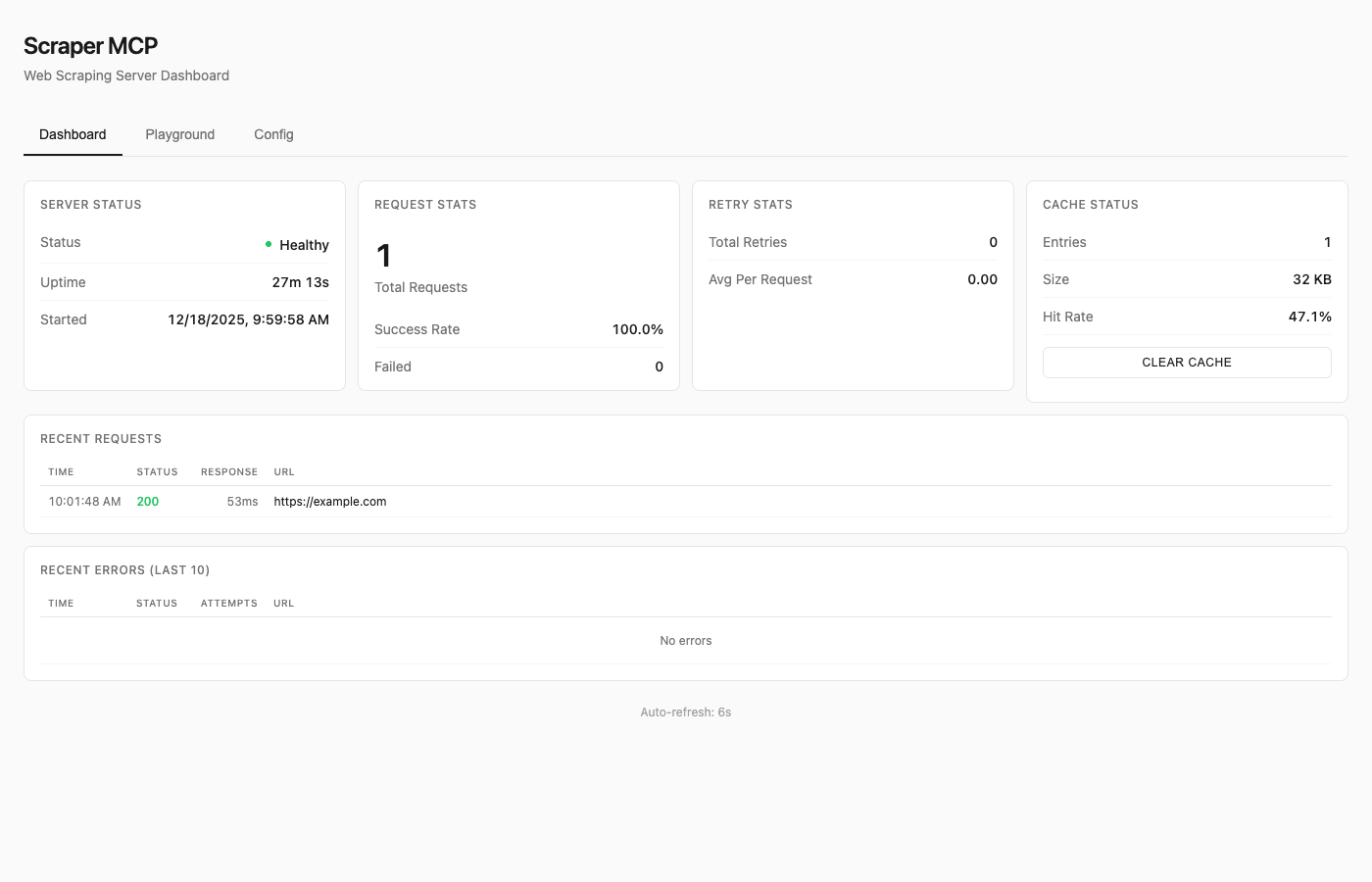
See Dashboard Guide for details.
Available Tools
| Tool | Description |
|---|---|
scrape_url |
HTML converted to markdown (best for LLMs) |
scrape_url_html |
Raw HTML content |
scrape_url_text |
Plain text extraction |
scrape_extract_links |
Extract all links with metadata |
perplexity |
AI web search with citations |
perplexity_reason |
Complex reasoning tasks |
All tools support:
- Single URL or batch operations (pass array)
timeoutandmax_retriesparameterscss_selectorfor targeted extractionrender_jsfor JavaScript rendering (SPAs, dynamic content)
Resources
Note: Resources are disabled by default to reduce context overhead. Enable with
--enable-resourcesflag orENABLE_RESOURCES=trueenvironment variable.
MCP resources provide read-only data access via URI-based addressing:
| URI | Description |
|---|---|
cache://stats |
Cache hit rate, size, entry counts |
cache://requests |
List of recent request IDs |
cache://request/{id} |
Retrieve cached result by ID |
config://current |
Current runtime configuration |
config://scraping |
Timeout, retries, concurrency |
server://info |
Version, uptime, capabilities |
server://metrics |
Request counts, success rates |
Prompts
Note: Prompts are disabled by default to reduce context overhead. Enable with
--enable-promptsflag orENABLE_PROMPTS=trueenvironment variable.
MCP prompts provide reusable workflow templates:
| Prompt | Description |
|---|---|
analyze_webpage |
Structured webpage analysis |
summarize_content |
Generate content summaries |
extract_data |
Extract specific data types |
seo_audit |
Comprehensive SEO check |
link_audit |
Analyze internal/external links |
research_topic |
Multi-source research |
fact_check |
Verify claims across sources |
See API Reference for complete documentation.
JavaScript Rendering
For SPAs (React, Vue, Angular) and pages with dynamic content, enable JavaScript rendering:
# Enable JS rendering with render_js=True
scrape_url(["https://spa-example.com"], render_js=True)

# Combine with CSS selector for targeted extraction
scrape_url(["https://react-app.com"], render_js=True, css_selector=".main-content")
When to use render_js=True:
- Single-page applications (SPAs) - React, Vue, Angular, etc.
- Sites with lazy-loaded content
- Pages requiring JavaScript execution
- Dynamic content loaded via AJAX/fetch
When NOT needed:
- Static HTML pages (most blogs, news sites, documentation)
- Server-rendered content
- Simple websites without JavaScript dependencies
How it works:
- Uses Playwright with headless Chromium
- Single browser instance with pooled contexts (~300MB base + 10-20MB per context)
- Lazy initialization (browser only starts when first JS render is requested)
- Semaphore-controlled concurrency (default: 5 concurrent contexts)
Memory considerations:
- Base requests provider: ~50MB
- With Playwright active: ~300-500MB depending on concurrent contexts
- Recommend minimum 1GB container memory when using JS rendering
Testing JS rendering:
Use the dashboard playground at http://localhost:8000/ to test JavaScript rendering interactively with the toggle switch.
Docker Deployment
Quick Run
# Using GitHub Container Registry (recommended)
docker run -d -p 127.0.0.1:8000:8000 --name scraper-mcp ghcr.io/cotdp/scraper-mcp:latest

# With JavaScript rendering (requires more memory)
docker run -d -p 127.0.0.1:8000:8000 --memory=1g --name scraper-mcp ghcr.io/cotdp/scraper-mcp:latest

# With Perplexity AI (direct API)
docker run -d -p 127.0.0.1:8000:8000 -e PERPLEXITY_API_KEY=your_key ghcr.io/cotdp/scraper-mcp:latest

# With Perplexity via OpenRouter
docker run -d -p 127.0.0.1:8000:8000 -e OPENROUTER_API_KEY=your_key ghcr.io/cotdp/scraper-mcp:latest
Docker Compose
For persistent storage and custom configuration:
# docker-compose.yml
services:
  scraper-mcp:
    image: ghcr.io/cotdp/scraper-mcp:latest
    ports:
      - "127.0.0.1:8000:8000"
    volumes:
      - cache:/app/cache
    environment:
      - PERPLEXITY_API_KEY=${PERPLEXITY_API_KEY:-}
      - PLAYWRIGHT_MAX_CONTEXTS=5
    deploy:
      resources:
        limits:
          memory: 1G  # Recommended for JS rendering
    restart: unless-stopped

volumes:
  cache:
docker-compose up -d
Production deployment (pre-built image from GHCR):
docker-compose -f docker-compose.prod.yml up -d
Upgrading
To upgrade an existing deployment to the latest version:
# Pull the latest image
docker pull ghcr.io/cotdp/scraper-mcp:latest

# Restart with new image (docker-compose)
docker-compose down && docker-compose up -d

# Or for production deployments
docker-compose -f docker-compose.prod.yml pull
docker-compose -f docker-compose.prod.yml up -d

# Or restart a standalone container
docker stop scraper-mcp && docker rm scraper-mcp
docker run -d -p 127.0.0.1:8000:8000 --name scraper-mcp ghcr.io/cotdp/scraper-mcp:latest
Your cache data persists in the named volume across upgrades.
Available Tags
| Tag | Description |
|---|---|
latest |
Latest stable release |
0.5.0 |
Specific version, after the release is published |
Configuration
Create a .env file for custom settings:
# Perplexity AI (optional; either key enables the AI tools)
PERPLEXITY_API_KEY=your_key_here
# ...or via OpenRouter
OPENROUTER_API_KEY=your_key_here
PERPLEXITY_PROVIDER=openrouter  # auto | perplexity | openrouter (default: auto)

# JavaScript rendering (optional, requires Playwright)
PLAYWRIGHT_MAX_CONTEXTS=5       # Max concurrent browser contexts
PLAYWRIGHT_TIMEOUT=30000        # Page load timeout in ms
PLAYWRIGHT_DISABLE_GPU=true     # Reduce memory in containers

# MCP features (disabled by default to reduce context overhead)
ENABLE_RESOURCES=true           # Enable MCP resources
ENABLE_PROMPTS=true             # Enable MCP prompts

# Proxy (optional)
HTTP_PROXY=http://proxy.example.com:8080
HTTPS_PROXY=http://proxy.example.com:8080

# ScrapeOps proxy service (optional)
SCRAPEOPS_API_KEY=your_key_here
SCRAPEOPS_RENDER_JS=true
See Configuration Guide for all options.
Claude Desktop
Add to your MCP settings:
{
  "mcpServers": {
    "scraper": {
      "url": "http://localhost:8000/mcp"
    }
  }
}
Claude Code Skills
This project includes Agent Skills that provide Claude Code with specialized knowledge for using the scraper tools effectively.
| Skill | Description |
|---|---|
| web-scraping | CSS selectors, batch operations, retry configuration |
| perplexity | AI search, reasoning tasks, conversation patterns |
Install Skills
Copy the skills to your Claude Code skills directory:
# Clone or download this repo, then:
cp -r .claude/skills/web-scraping ~/.claude/skills/
cp -r .claude/skills/perplexity ~/.claude/skills/
Or install directly:
# web-scraping skill
mkdir -p ~/.claude/skills/web-scraping
curl -o ~/.claude/skills/web-scraping/SKILL.md \
  https://raw.githubusercontent.com/cotdp/scraper-mcp/main/.claude/skills/web-scraping/SKILL.md

# perplexity skill
mkdir -p ~/.claude/skills/perplexity
curl -o ~/.claude/skills/perplexity/SKILL.md \
  https://raw.githubusercontent.com/cotdp/scraper-mcp/main/.claude/skills/perplexity/SKILL.md
Once installed, Claude Code will automatically use these skills when performing web scraping or Perplexity AI tasks.
Documentation
| Document | Description |
|---|---|
| API Reference | Complete tool documentation, parameters, CSS selectors |
| Configuration | Environment variables, proxy setup, ScrapeOps |
| Dashboard | Monitoring UI, playground, runtime config |
| Development | Local setup, architecture, contributing |
| Testing | Test suite, coverage, adding tests |
Local Development
# Install
uv pip install -e ".[dev]"

# Run
python -m scraper_mcp

# Test
pytest

# Lint
ruff check . && mypy src/
See Development Guide for details.
License
MIT License
Last updated: December 23, 2025
Scraper MCP 질문
Scraper MCP는 어떤 도구를 제공하나요?
6개 도구를 제공합니다. 예: scrape_url, scrape_url_html, scrape_url_text, scrape_extract_links, perplexity.
이 server는 어떻게 LLM 토큰 사용량을 줄이나요?
서버 측 HTML 필터링, markdown 변환, CSS selector 타겟팅을 사용하여 불필요한 데이터를 제거합니다.
JavaScript로 콘텐츠를 로드해야 하는 웹사이트도 스크래핑할 수 있나요?
네, render_js 파라미터를 사용하여 SPA 및 동적 콘텐츠를 위한 Playwright 기반 렌더링을 활성화할 수 있습니다.