
Onlyboxes MCP server
2026년 10월 26일 커밋자체 호스팅 샌드박스에서 AI 클라이언트가 Python 코드를 실행하고, 상태 유지 터미널 세션을 사용하며, 생성된 이미지를 읽을 수 있도록 지원합니다.
다른 이름 Coooolfan/onlyboxes
- 스타
- 54
- Tools
- —
- 다운로드, 30일
- —
- 최신 버전
- —
- 마지막 커밋
- 2026년 10월 26일
- 라이선스
- AGPL-3.0
Onlyboxes MCP란?
Onlyboxes은(는) MCP server입니다. 자체 호스팅 샌드박스에서 AI 클라이언트가 Python 코드를 실행하고, 상태 유지 터미널 세션을 사용하며, 생성된 이미지를 읽을 수 있도록 지원합니다.
프로젝트 README에서 생성된 요약
Onlyboxes MCP server 정보
Onlyboxes는 개인과 소규모 팀이 코드 실행을 위한 자체 호스팅 샌드박스를 구축할 수 있도록 지원합니다. 제어 평면인 콘솔과 작업을 관리하는 확장 가능한 워커 노드로 구성된 분리형 아키텍처를 사용합니다. 사용자는 Docker와 systemd를 사용하여 Linux에 시스템을 배포할 수 있으며, AI 클라이언트를 MCP 엔드포인트에 연결하여 복잡한 계산 작업을 수행할 수 있습니다.
개발자는 특정 MCP 도구인 pythonExec로 Python 코드를 실행하고, terminalExec로 상태 유지 터미널 세션을 관리하며, readImage를 통해 모델이 생성된 시각적 출력을 볼 수 있도록 할 수 있습니다. 이 플랫폼은 상태 유지 컨테이너를 통해 서로 다른 계정 간의 리소스 격리를 보장합니다. 시스템을 직접 호스팅하므로 실행 환경과 워커 노드 내에서 처리되는 데이터에 대한 제어권을 유지할 수 있습니다.
환경을 설정하려면 콘솔 노드와 worker-docker 구현체와 같은 최소 하나 이상의 워커 노드가 필요합니다. LLM 채팅 클라이언트를 연결하려면 웹 대시보드에서 액세스 토큰을 생성하고 MCP 엔드포인트 URL을 제공해야 합니다. 보안을 위해 HTTP 및 gRPC 포트를 리버스 프록시 뒤에 배치하여 TLS를 적용하는 것을 권장합니다.
활용 사례
- 1실행 리소스 확장팀은 아키텍처에 더 많은 워커 노드를 추가하여 컴퓨팅 용량을 확장할 수 있습니다.
프로젝트의 README를 바탕으로 작성되었습니다. 모든 활용 사례는 해당 내용의 인용문과 대조하여 확인합니다.
구성
WORKER_CONSOLE_GRPC_TARGETWORKER_CONSOLE_INSECUREWORKER_IDWORKER_SECRET
| 이름 | 설명 | 유형 |
|---|---|---|
| WORKER_CONSOLE_GRPC_TARGET | — | |
| WORKER_CONSOLE_INSECURE | — | |
| WORKER_ID | — | |
| WORKER_SECRET | — |
자동 검사
2026년 11월 14일에 실행됨전체 보고서 →아직 인증되지 않았습니다. 서버는 80점 이상의 점수, 심각한 결함 없음, 그리고 검사에 충분한 데이터를 갖추어야 합니다. 검사 방식 · 점수를 높이기 위해 수정할 항목

- 소스 저장소 연결 및 접근 가능coooolfan/onlyboxes is public and reachablegithub.com/coooolfan/onlyboxes ↗통과
- 패키지가 이 저장소를 소스로 명시검사되지 않음
- 빌드 출처(Sigstore 증명)검사되지 않음
- 오픈 소스 라이선스 (OSI)AGPL-3.0spdx.org/licenses/AGPL-3.0.html ↗통과
- 최근 1년 내 커밋 또는 릴리스Last commit or release 2026-10-26github.com/coooolfan/onlyboxes ↗통과
- OpenSSF Scorecard검사되지 않음
- 패키지 이름이 인기 패키지와 유사하지 않음검사되지 않음
- 패키지 및 해당 종속성에 중요한 보안 권고 없음검사되지 않음
- 모델에 대한 숨겨진 지침 없음0 tool descriptions and the README read; no override phrases, credential paths or hidden characters통과
- 파괴적인 도구에 라벨 표시됨검사되지 않음
- 원격 엔드포인트가 MCP 핸드셰이크에 응답검사되지 않음
README
GitHub에서 보기Onlyboxes
Onlyboxes is a self-hosted code execution sandbox platform for individuals and small teams.
It uses a control-plane (console) and execution-plane (worker) architecture, and exposes both REST APIs and MCP tools.
Key Features
- Self-hosted all components: control node (
console) + worker nodes (worker) - Separated control and execution planes:
- Workers support horizontal scaling
- Workers support multi-language heterogeneous implementations
- Workers support multiple runtimes
- Full account system: resource isolation (stateful containers, sessions) between accounts
- MCP tools:
pythonExec: Python code executionterminalExec: stateful terminal sessionsreadImage: model-readable images
- REST API: all MCP tools also available via HTTP + async task API
[!WARNING]
In the current release, console (gRPC + HTTP) does not provide built-in TLS/mTLS.
workerrejects insecure console endpoints by default; plaintext is allowed only whenWORKER_CONSOLE_INSECURE=trueis explicitly set.Put both console HTTP (
:8089) and gRPC (:50051) endpoints behind your reverse proxy/gateway and enforce TLS for external traffic.
Architecture
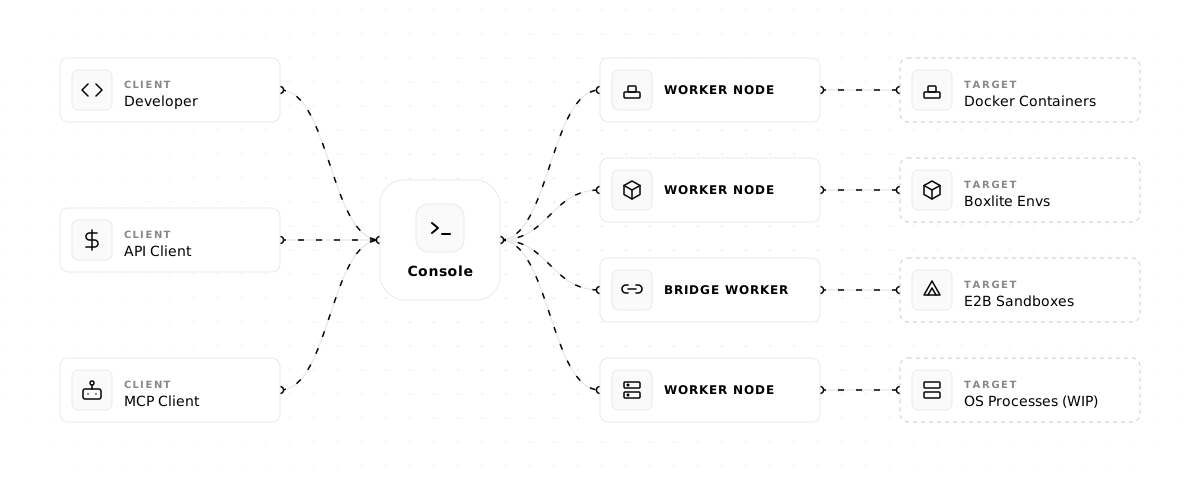
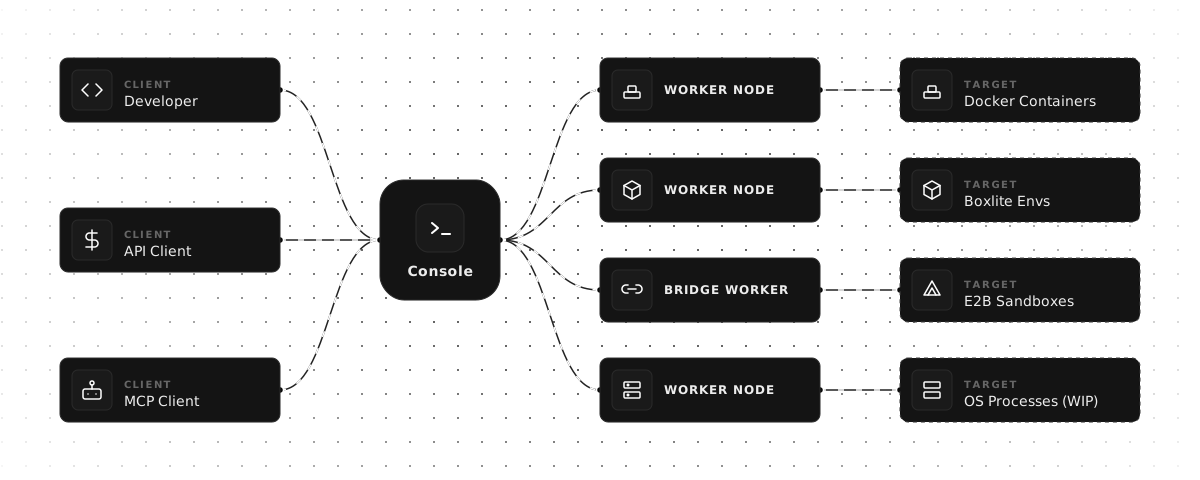
One-Click Installer (Linux)
For a single-machine deployment of console + worker-docker, run:
curl -fsSL https://onlybox.es/install.sh | bash
The installer will:
- Check the environment (Linux, Docker, Docker Compose v2, systemd)
- Download and render the compose template with auto-generated credentials
- Start the console via
docker compose up -d - Create a
normalworker - Download the architecture-matched
worker-dockerrelease binary for the default latest version, or your--tagoverride - Generate and enable a systemd service for the worker
- Poll until the worker comes online and print a result summary
Available options:
| Flag | Default | Description |
|---|---|---|
--tag |
latest published release | Optional release version override |
--workdir |
$PWD/onlyboxes |
Working directory |
--yes / -y |
false |
Non-interactive mode, skip confirmations |
--console-http-port |
8089 |
Console HTTP port (host side) |
--console-grpc-port |
50051 |
Console gRPC port (host side) |
--service-name |
onlyboxes-worker-docker |
systemd service name |
Requirements: Linux, systemd, Docker Engine, Docker Compose v2, Python 3.
Quick Start (Manual)
1) Prerequisites
- Control node:
- Docker Engine (binaries are also available in releases — no Docker needed if deploying via binary)
- Worker node:
- Docker Engine (required by
worker-docker)
- Docker Engine (required by
2) Start the console service
-
Create a working directory and a
docker-compose.ymlfile in it:mkdir -p onlyboxes-console && cd onlyboxes-consoleservices: console: image: coolfan1024/onlyboxes:latest container_name: onlyboxes-console restart: unless-stopped environment: CONSOLE_HASH_KEY: "replace-with-long-random-key" CONSOLE_ENABLE_REGISTRATION: "true" CONSOLE_DASHBOARD_USERNAME: "admin" # only for first run CONSOLE_DASHBOARD_PASSWORD: "change-me" # only for first run ports: - "8089:8089" - "50051:50051" volumes: - ./db:/app/db -
Replace at least:
CONSOLE_HASH_KEYCONSOLE_DASHBOARD_PASSWORD
-
Start console:
docker compose up -d
Default endpoints:
- Console Web UI / HTTP REST API / MCP endpoint:
http://127.0.0.1:8089 - gRPC:
127.0.0.1:50051
3) Sign in and create an access token
- Open
http://127.0.0.1:8089in your browser. - Sign in with the initialized admin account.
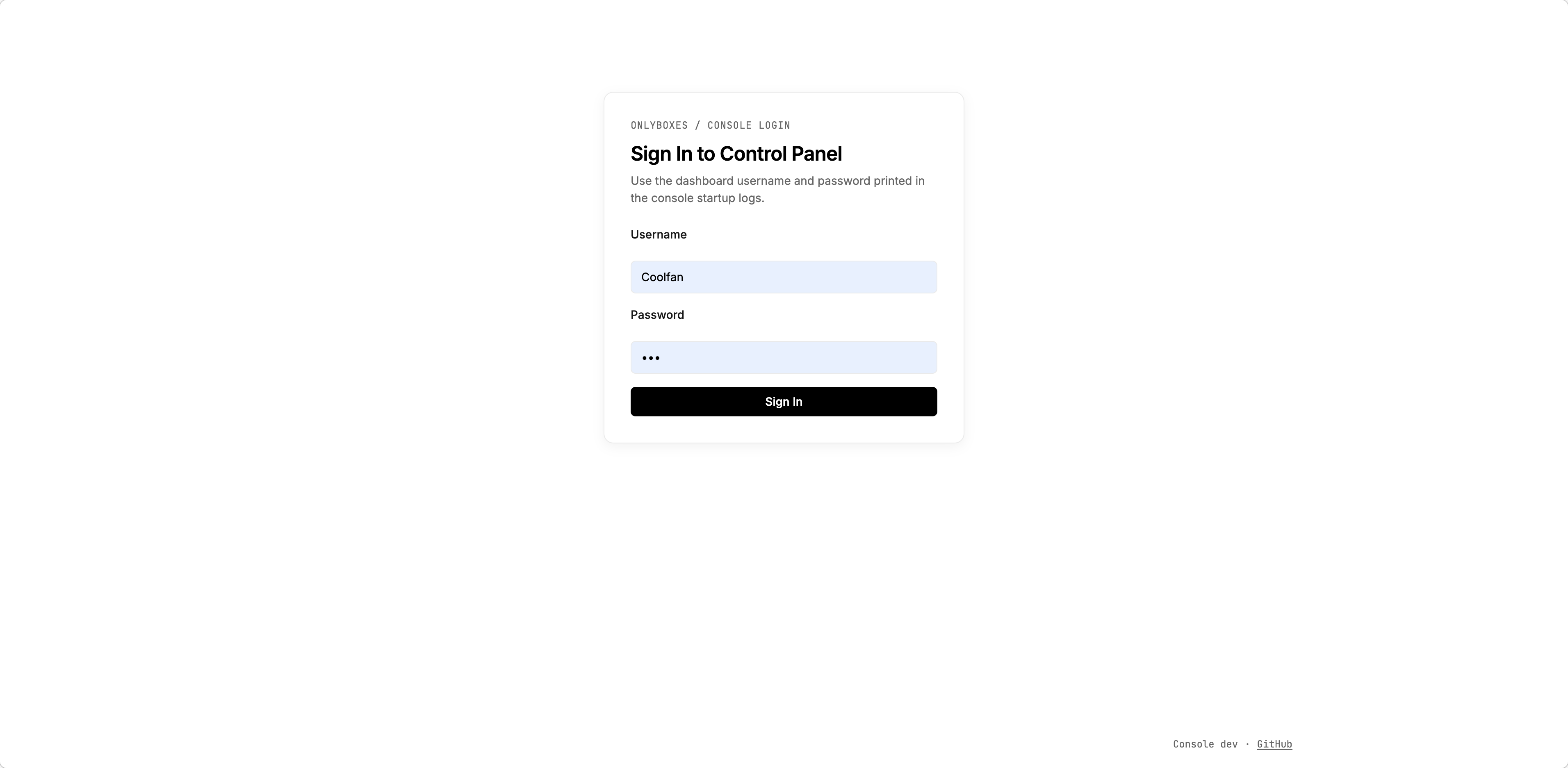
- Go to the token management page and create an access token.
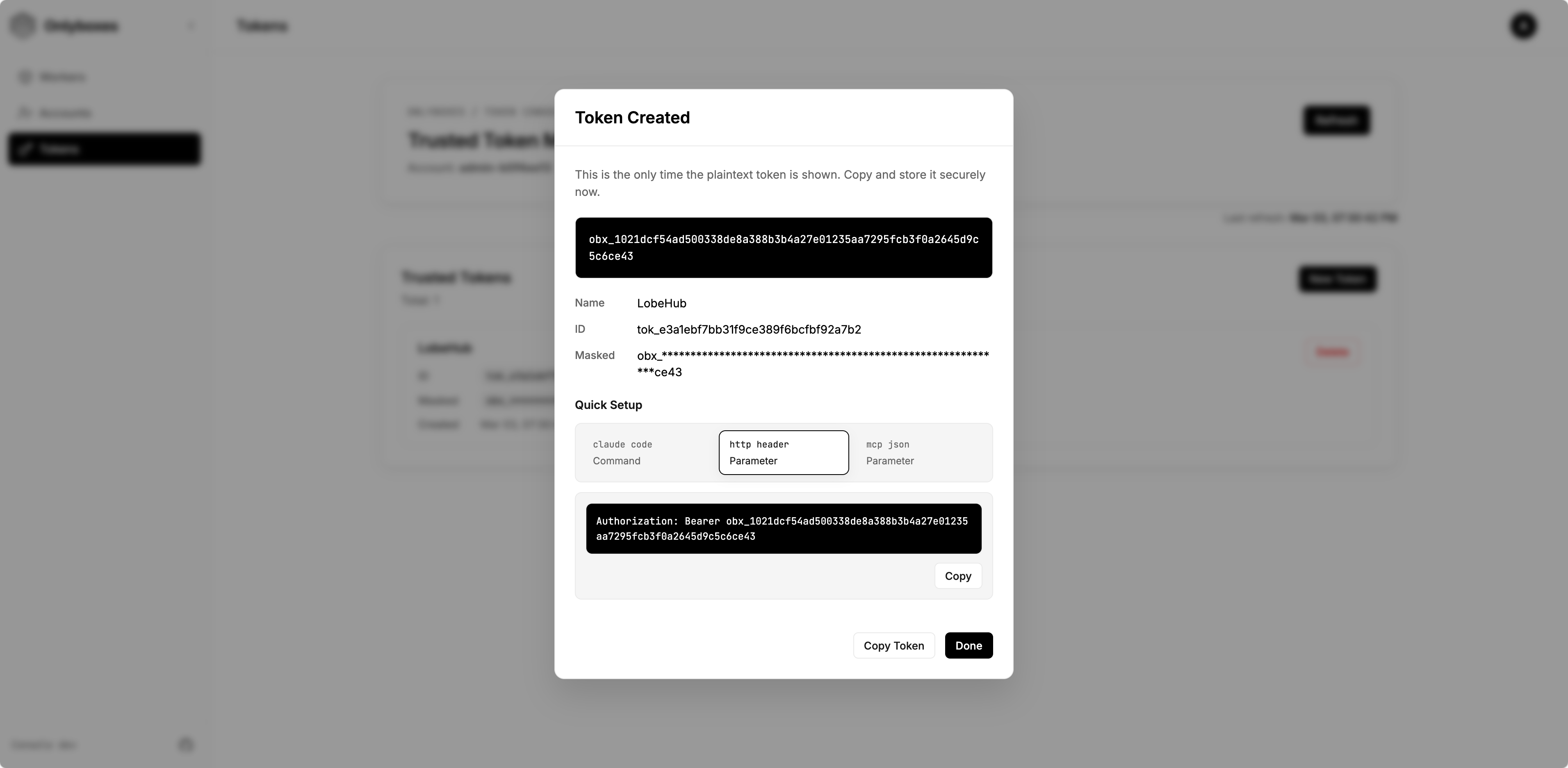
- Save the plaintext token immediately (it is returned only once).
4) Create a worker
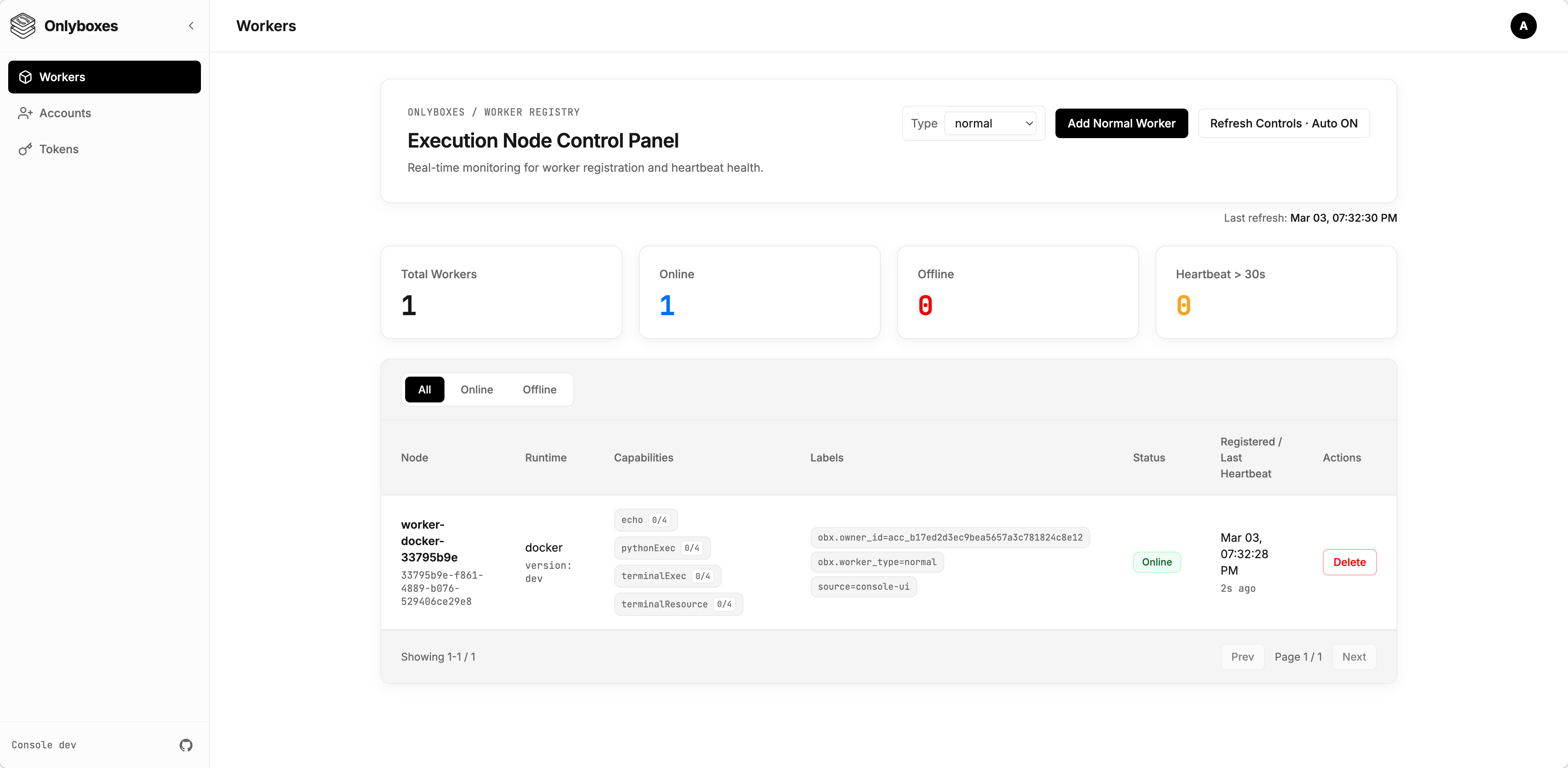
- Go to Workers page and create a worker.
- Copy and securely store the startup command from the creation dialog (
WORKER_SECRETis one-time visible).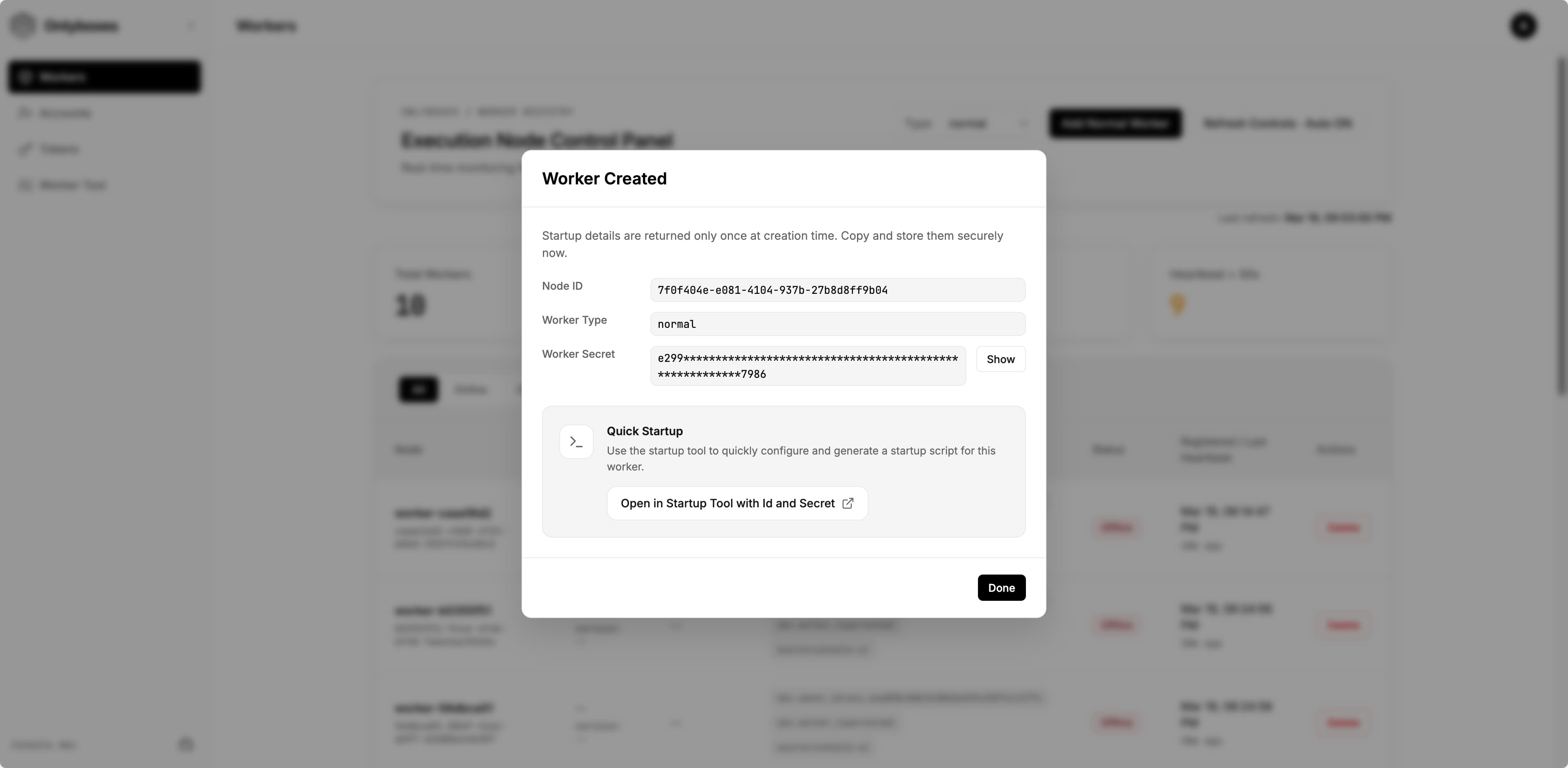
- (Optional) Click
Open in Startup Tool with Id and Secretto open the startup command builder with the worker id and secret pre-filled.- On the opened page, you can edit all available options. The generated startup command appears at the bottom of the page — copy and save it.
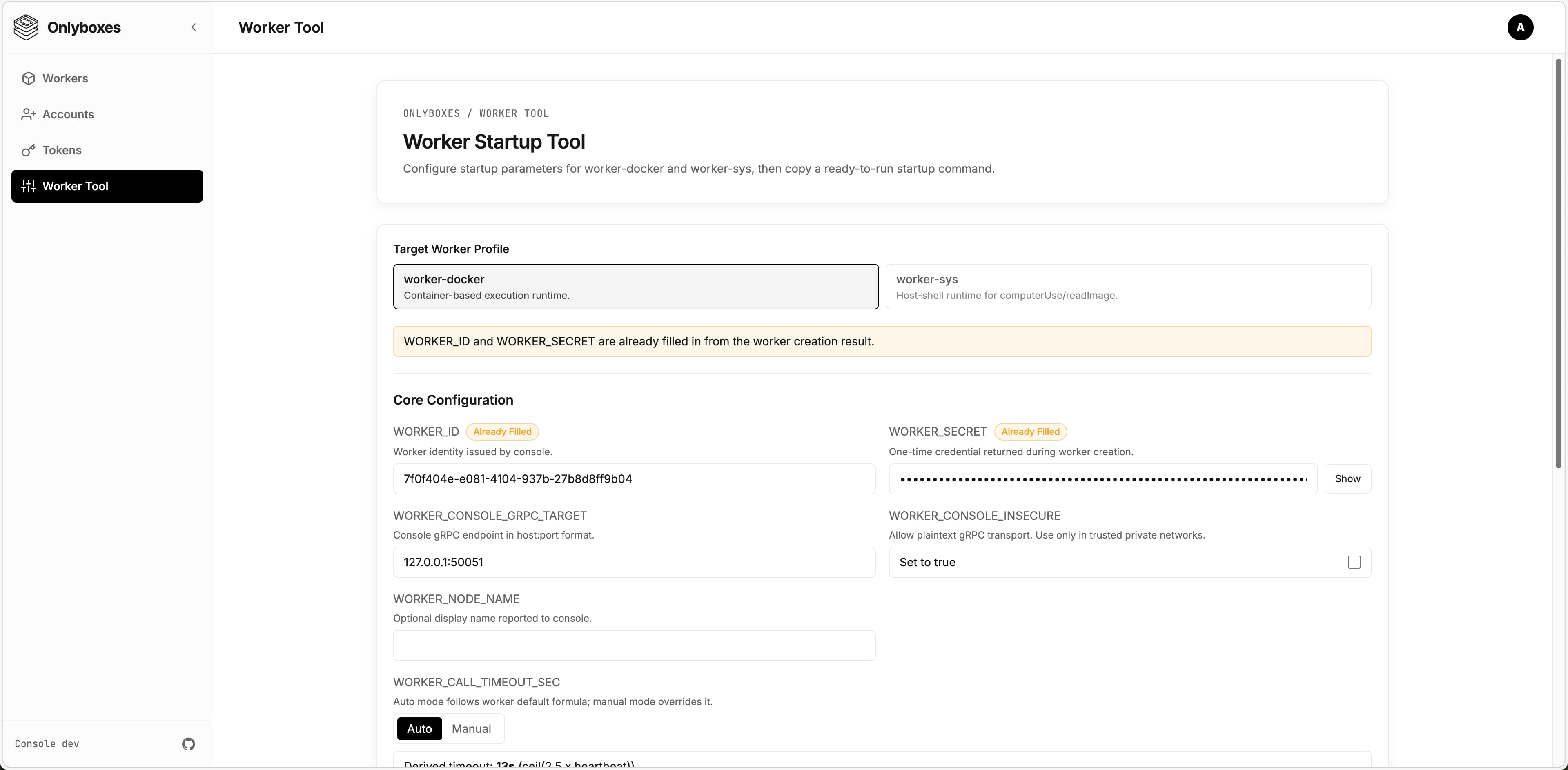
- On the opened page, you can edit all available options. The generated startup command appears at the bottom of the page — copy and save it.
5) Run worker
[!WARNING] Workers support different runtimes and environments. The current release only provides
worker-docker. This section uses the Docker runtime as an example.
-
Log in to the machine where the worker will be deployed.
- Ensure Docker Engine is installed.
- Ensure the worker can reach the console gRPC endpoint.
-
Download the latest
worker-dockerbinary from GitHub Releases:https://github.com/onlyboxes/onlyboxes/releases/latest
-
Use the startup command values from the dashboard, and replace the executable path on the last line with your downloaded binary.
- Workers reject insecure console endpoints by default; set
WORKER_CONSOLE_INSECURE=trueonly to allow plaintext connections.
# Example WORKER_CONSOLE_INSECURE=true \ WORKER_CONSOLE_GRPC_TARGET=127.0.0.1:50051 \ WORKER_ID=<worker_id> \ WORKER_SECRET=<worker_secret> \ /path/to/onlyboxes-worker-docker - Workers reject insecure console endpoints by default; set
6) Verify readiness
- Confirm the worker is
onlineon the dashboard Workers page. - For REST API request examples, see
docs/API.md. - If no tokens are configured,
/mcpand execution APIs return401by design. - Add the MCP endpoint
http://127.0.0.1:8089/mcpin any LLM Chat Client, set the token, and verify it works correctly.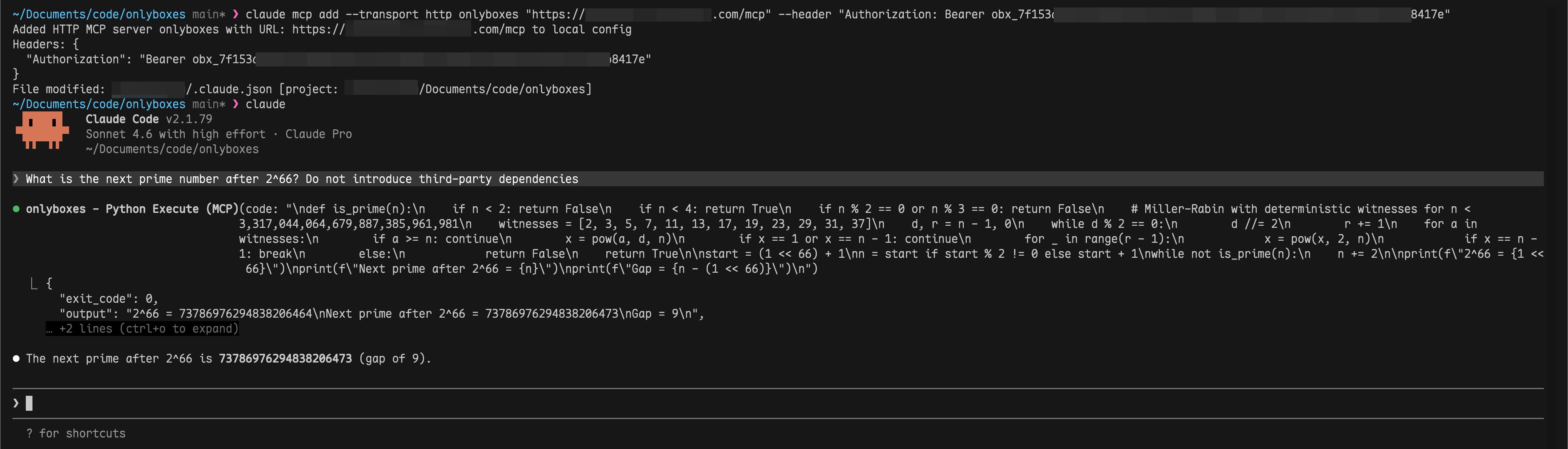
FAQ
-
Q: Worker stays
offlineafter starting? A: Check thatWORKER_CONSOLE_GRPC_TARGETpoints to the correct console gRPC address and verify network connectivity. -
Q: Can a worker be deployed on the same machine as the console? A: Yes.
-
Q: Can a worker run inside Docker? A: In theory, yes. However, it is not recommended because the worker needs access to the host Docker daemon. You would need to handle Docker-in-Docker yourself.
Production Checklist
- Replace all default credentials.
- Use a reverse proxy to enforce TLS for
:8089and:50051. - Persist and back up the SQLite data directory (
CONSOLE_DB_PATH). - Run workers on isolated hosts to avoid sharing the Docker daemon with the console.
- Read the
Configuration Referencebelow for all available options and adjust as needed.
Configuration Reference
Console (console)
| Environment Variable | Default | Notes |
|---|---|---|
CONSOLE_HTTP_ADDR |
:8089 |
Dashboard + REST API listen address |
CONSOLE_GRPC_ADDR |
:50051 |
Worker registry gRPC listen address |
CONSOLE_WORKER_CONNECTION_CONFLICT_POLICY |
REPLACE |
Duplicate Worker connection policy: REPLACE disconnects the existing connection; REJECT rejects the new connection |
CONSOLE_HASH_KEY |
(required) | HMAC key for hashing worker secrets and access tokens |
CONSOLE_DB_PATH |
./db/onlyboxes-console.db |
SQLite database path |
CONSOLE_DB_BUSY_TIMEOUT_MS |
5000 |
SQLite busy timeout |
CONSOLE_TASK_RETENTION_DAYS |
30 |
Retention for completed task records |
CONSOLE_ENABLE_REGISTRATION |
false |
Allow admin to register non-admin accounts |
CONSOLE_DASHBOARD_USERNAME |
(empty) | Used only for first admin initialization |
CONSOLE_DASHBOARD_PASSWORD |
(empty) | Used only for first admin initialization |
Worker (worker-docker)
| Environment Variable | Default | Notes |
|---|---|---|
WORKER_ID |
(required) | Issued by POST /api/v1/workers |
WORKER_SECRET |
(required) | Issued once by POST /api/v1/workers |
WORKER_CONSOLE_GRPC_TARGET |
127.0.0.1:50051 |
Console gRPC target |
WORKER_CONSOLE_INSECURE |
false |
false enforces TLS endpoint; set true only to allow plaintext console gRPC |
WORKER_HEARTBEAT_INTERVAL_SEC |
5 |
Worker heartbeat interval |
WORKER_HEARTBEAT_JITTER_PCT |
20 |
Heartbeat jitter percent |
WORKER_PYTHON_EXEC_DOCKER_IMAGE |
ghcr.io/astral-sh/uv:python3.12-bookworm-slim |
Runtime image for pythonExec |
WORKER_TERMINAL_EXEC_DOCKER_IMAGE |
coolfan1024/onlyboxes-runtime:default |
Runtime image for terminalExec |
WORKER_TERMINAL_OUTPUT_LIMIT_BYTES |
1048576 |
Per-stream output limit |
API Surfaces
- Authentication:
/api/v1/auth/* - Resource management:
/api/v1/accounts*,/api/v1/api-keys*,/api/v1/tokens*,/api/v1/sessions*,/api/v1/workers*,/api/v1/proxy-routes* - Command execution:
/api/v1/commands/* - Task execution:
/api/v1/tasks* - MCP (Streamable HTTP):
POST /mcp
Development
Local dev orchestration
scripts/dev.sh runs console / web / website in a tmux session. Every subcommand returns immediately, and logs land in scripts/.dev/<svc>.log.
scripts/dev.sh start              # start all three
scripts/dev.sh start console web  # console + web only
scripts/dev.sh status             # session, port listeners, window state
scripts/dev.sh logs console       # last 200 log lines
scripts/dev.sh creds              # console admin credentials
scripts/dev.sh stop               # stop everything
Web dev URL defaults to http://127.0.0.1:5178 and proxies /api/* and /mcp to http://127.0.0.1:8089.
Workers are not orchestrated — their startup arguments vary per implementation, so start them manually. Full usage: scripts/README.md.
Useful docs
- Unified API reference:
docs/API.md - Console internals:
console/README.md - Worker internals:
worker/worker-docker/README.md - API/proto guide:
api/README/proto.md - Web app guide:
web/README.md
Release & Images
- GitHub workflow:
.github/workflows/package-release.yml— run it manually from the Actions tab, pick the branch and enter the version (e.g.0.7.2); the tag is created from that branch. Turn offlatestwhen patching an older line so the newest release keeps the label - Website-only deploy:
.github/workflows/deploy-website.yml— manual, independent of a release - Console Docker image:
coolfan1024/onlyboxes:<version>andcoolfan1024/onlyboxes:latest - Terminal runtime images:
coolfan1024/onlyboxes-runtime:<version>-default,<version>-default-cn, and<version>-lobehub; stable aliases aredefault,default-cn,lobehub, andlatest(same asdefault) - Console binary includes embedded web assets
Security and Operational Notes
- Console does not provide built-in TLS/mTLS in this release;
worker-dockerrequires explicitWORKER_CONSOLE_INSECURE=trueto connect over plaintext. - Put console HTTP (
:8089) and gRPC (:50051) behind a reverse proxy/gateway and enforce TLS on public/external links. WORKER_SECRETand access token plaintext values are returned only at creation time.- Dashboard login sessions are in-memory and are invalidated when
consolerestarts.
Links
License
Onlyboxes MCP 질문
Onlyboxes는 어떤 MCP 도구를 제공하나요?
Python 코드 실행을 위한 pythonExec, 상태 유지 터미널 세션을 위한 terminalExec, 모델이 읽을 수 있는 이미지를 위한 readImage를 제공합니다.
시작 후 워커(worker)가 오프라인 상태로 유지됩니다.
WORKER_CONSOLE_GRPC_TARGET이 올바른 콘솔 gRPC 주소를 가리키고 있는지 확인하고 네트워크 연결 상태를 점검하십시오.
워커를 콘솔과 동일한 머신에 배포할 수 있나요?
네, 워커를 콘솔과 동일한 머신에서 실행할 수 있습니다. 다만 운영 환경에서는 격리된 호스트 사용을 권장합니다.
Onlyboxes는 TLS를 기본적으로 제공하나요?
아니요, 현재 버전의 콘솔에는 내장된 TLS/mTLS가 없습니다. 콘솔의 HTTP 및 gRPC 엔드포인트를 리버스 프록시나 게이트웨이 뒤에 배치하여 TLS를 적용하십시오.