
AI 에이전트가 CometChat 문서를 검색하고 채팅, 음성, 영상 및 모더레이션 기능을 위한 구현 코드를 생성할 수 있도록 합니다.
다른 이름 cometchat/docs-mcp, docs-mcp
- 스타
- 148
- Tools
- 4
- 다운로드, 30일
- —
- 최신 버전
- 0.2.1
- 마지막 커밋
- 2026년 11월 13일
- 라이선스
- Apache-2.0
CometChat Docs MCP란?
CometChat Docs은(는) MCP server입니다. AI 에이전트가 CometChat 문서를 검색하고 채팅, 음성, 영상 및 모더레이션 기능을 위한 구현 코드를 생성할 수 있도록 합니다. 4개 도구를 제공합니다. 예: search_cometchat_docs, fetch_cometchat_doc_page, get_cometchat_implementation_bundle.
프로젝트 README에서 생성된 요약
CometChat Docs MCP server 정보
CometChat Docs는 AI 코딩 에이전트가 애플리케이션에 실시간 통신 기능을 통합할 수 있도록 지원하는 MCP server를 제공합니다. Claude, Cursor, Windsurf 또는 VS Code Copilot과 같은 호환 클라이언트를 사용하는 개발자는 자연어를 사용하여 채팅, 음성, 영상 및 모더레이션 기능을 구현할 수 있습니다. 이 server는 에이전트와 공식 CometChat 문서 사이의 가교 역할을 하여, AI가 기술적 세부 정보를 찾고 프로젝트에 필요한 통합 코드를 직접 작성할 수 있게 합니다.
이 서비스는 읽기 전용이며 작동을 위해 계정, API key 또는 인증이 필요하지 않습니다. 단일 HTTP 엔드포인트를 통해 작동하며, SDK 또는 API 정보를 찾는 search_cometchat_docs 및 특정 시나리오에 대한 사전 컴파일된 문서 세트를 가져오는 get_cometchat_implementation_bundle과 같은 특정 도구를 제공합니다. React, React Native, Flutter, iOS, Android, Angular를 포함한 다양한 프레임워크와 Webflow 또는 WordPress용 채팅 위젯과 같은 노코드 옵션을 지원합니다.
활용 사례
- 1UI Kit 구현에이전트에게 모바일 또는 웹 프레임워크에 맞는 특정 UI Kit를 설치하고 초기화하도록 요청합니다.
- 2콘텐츠 모더레이션 설정채팅에서 금지된 단어가 전달되지 않도록 차단하는 자동화 시스템을 설정하도록 AI에게 지시합니다.
- 3실시간 상태 표시 추가기존 대화 인터페이스에 접속 상태 표시기나 타이핑 애니메이션을 추가하도록 요청합니다.
- 4멀티테넌트 아키텍처 개발App Management API를 사용하여 격리된 워크스페이스를 가진 SaaS 애플리케이션을 구축하도록 에이전트의 안내를 받습니다.
프로젝트의 README를 바탕으로 작성되었습니다. 모든 활용 사례는 해당 내용의 인용문과 대조하여 확인합니다.
CometChat Docs MCP 설치 방법
형식 확인: 2026년 11월 10일Cursor에 추가Goose에 추가Claude Code에 CometChat Docs MCP 설치
$ claude mcp add --transport http docs-mcp https://mcp.cometchat.com/mcpCursor에 CometChat Docs MCP 설치
~/.cursor/mcp.json
{
  "mcpServers": {
    "docs-mcp": {
      "url": "https://mcp.cometchat.com/mcp"
    }
  }
}VS Code에 CometChat Docs MCP 설치
.vscode/mcp.json
{
  "servers": {
    "docs-mcp": {
      "type": "http",
      "url": "https://mcp.cometchat.com/mcp"
    }
  }
}VS Code CLI에 CometChat Docs MCP 설치
$ code --add-mcp '{"name":"docs-mcp","type":"http","url":"https://mcp.cometchat.com/mcp"}'Codex에 CometChat Docs MCP 설치
$ codex mcp add docs-mcp --url https://mcp.cometchat.com/mcpCodex config.toml에 CometChat Docs MCP 설치
~/.codex/config.toml
[mcp_servers.docs-mcp]
url = "https://mcp.cometchat.com/mcp"
Gemini CLI에 CometChat Docs MCP 설치
$ gemini mcp add -s user --transport http docs-mcp https://mcp.cometchat.com/mcpGemini settings.json에 CometChat Docs MCP 설치
~/.gemini/settings.json
{
  "mcpServers": {
    "docs-mcp": {
      "url": "https://mcp.cometchat.com/mcp",
      "type": "http"
    }
  }
}CometChat Docs MCP 도구 4
README에서 감지됨search_cometchat_docsfetch_cometchat_doc_pageget_cometchat_implementation_bundlelist_cometchat_bundles
| search_cometchat_docs | — | |
| fetch_cometchat_doc_page | — | |
| get_cometchat_implementation_bundle | — | |
| list_cometchat_bundles | — |
구성
DOCS_REPO
| 이름 | 설명 | 유형 |
|---|---|---|
| DOCS_REPO | — |
자동 검사
2026년 11월 12일에 실행됨전체 보고서 →자동 검사를 통과했습니다. 이는 보안 감사가 아닙니다. 코드를 직접 읽고 서버에 필요한 최소한의 권한만 부여하십시오. 검사 방식

- 소스 저장소 연결 및 접근 가능통과
- 오픈 소스 라이선스 (OSI)통과
- 최근 1년 내 커밋 또는 릴리스통과
- 패키지 이름이 인기 패키지와 유사하지 않음검사되지 않음
- 원격 엔드포인트가 HTTPS 사용통과
- 파괴적인 도구에 라벨 표시됨통과
- 모델에 대한 숨겨진 지침 없음통과
- 패키지 및 해당 종속성에 중요한 보안 권고 없음검사되지 않음
README
GitHub에서 보기CometChat MCP Server
Add real-time chat, voice, video, and moderation to your app through your AI coding agent.





Docs • CometChat • Get an account (free, 100 MAU)
CometChat's first-party MCP server. Connect Claude, Cursor, Windsurf, VS Code Copilot, Codex, or any other Model Context Protocol–compatible agent and integrate CometChat into your app from natural-language prompts.
Ask the agent: "add a chat tab where users can DM each other" — it reads CometChat's documentation, picks the right components for your stack, and writes the integration code.
Read-only. No account, no API key, no authentication required.
Demo
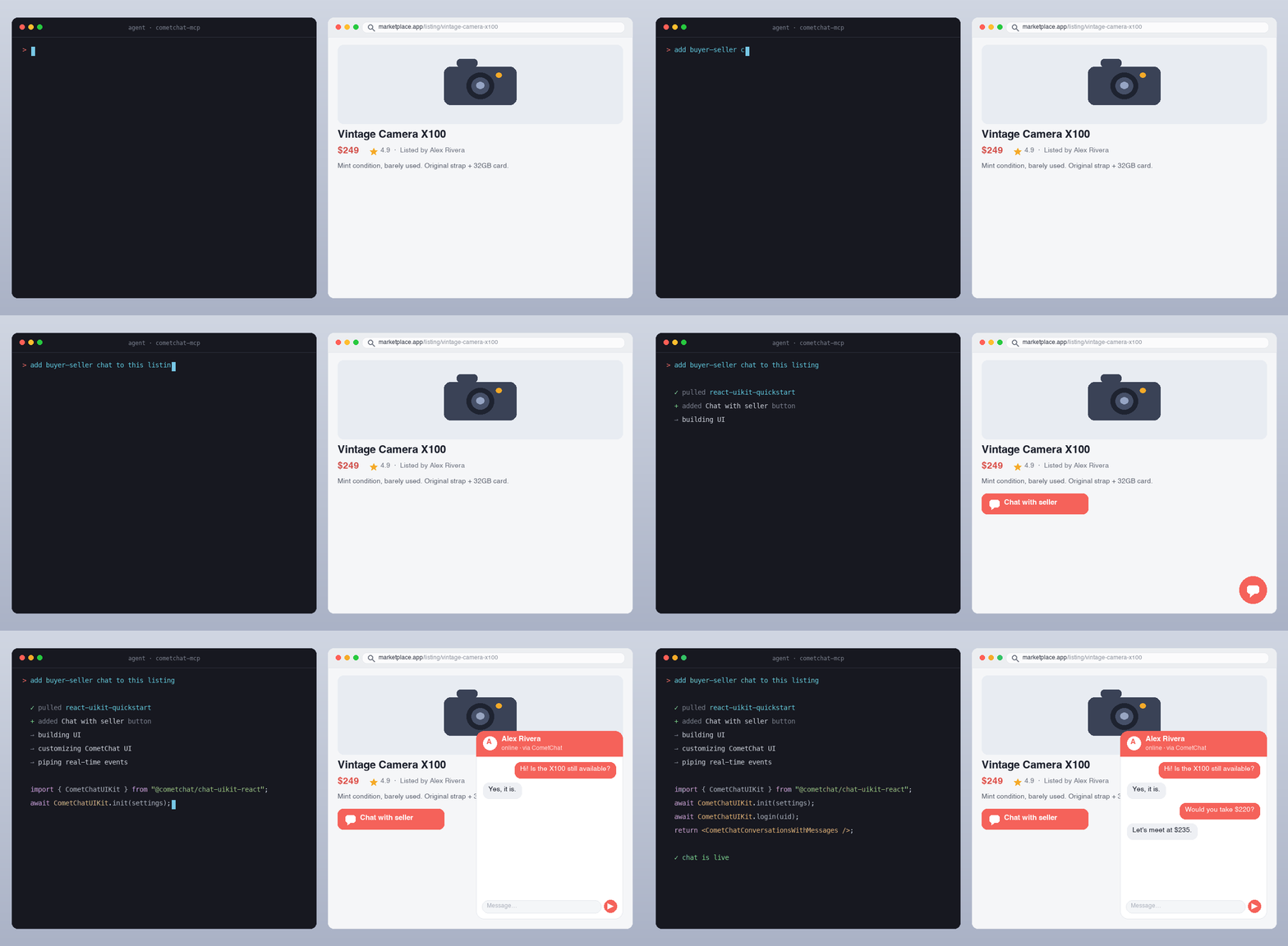
An AI agent reading CometChat's docs and writing a working chat integration from a single prompt.
Quick install
| Agent | How to add |
|---|---|
| Claude.ai / Claude Desktop | Settings → Connectors → Add custom connector → URL: https://mcp.cometchat.com/mcp |
| Cursor | Cmd+Shift+P → Open MCP settings → Add custom MCP → paste config below |
| Windsurf | Plugins (hammer icon) → Manage plugins → View raw config → paste config below |
| VS Code (Copilot Agent) | Cmd+Shift+P → MCP: Add MCP Server → URL: https://mcp.cometchat.com/mcp, Transport: HTTP |
| Claude Code (CLI) | claude mcp add --transport http cometchat https://mcp.cometchat.com/mcp |
| Claude Code (plugin) | claude plugin marketplace add cometchat/docs-mcp && claude plugin install cometchat@cometchat |
| Codex CLI (plugin) | codex plugin marketplace add cometchat/docs-mcp && codex plugin add cometchat@cometchat |
Config snippet (Cursor / Windsurf / generic MCP clients)
{
  "mcpServers": {
    "cometchat": {
      "url": "https://mcp.cometchat.com/mcp"
    }
  }
}
Usage
After connecting, prompt your agent with any of these:
- "How do I install the React UI Kit in my Vite project?"
- "Walk me through multi-tenant chat for a Next.js SaaS where workspaces are isolated."
- "Show me how to add presence indicators and typing dots to my iOS conversation list."
- "Set up content moderation so banned words are blocked before delivery."
- "Build a no-code chat widget for my Webflow site."
- "What's the rate limit for sending messages, and what error code do I get when I hit it?"
The agent reads CometChat's documentation, pulls the relevant implementation bundle, and writes the integration code into your project.
Tools
search_cometchat_docs— Search the SDK, UI Kit, Calls, REST API, AI agent, notification and moderation docs by topic, API name or error message. Returns ranked snippets with page URLs, current versions first. Optionalversionfilter andlimit(up to 25).fetch_cometchat_doc_page— Fetch one documentation page in full as markdown by URL or path, following moved pages. Pages over 50 KiB are truncated with a link to the full page.get_cometchat_implementation_bundle— Return the implementation bundle for a named scenario: the scenario's current docs pages (for a UI Kit: its integration guide, then the platform's AI reference page) compiled into one document, plus related page paths.list_cometchat_bundles— List every available implementation bundle (identifier, title, framework, date its page list was reviewed) for discovery.
All four carry readOnlyHint: true, a title annotation, and a declared outputSchema with structured results. Names are ≤ 64 characters. Each description states what the tool does, when it fits and its limits (errors, rate limit), naming this server's other tools only where one serves a specific need ("identifiers come from list_cometchat_bundles"). They carry no directives to the agent, no references to other servers or products, and no marketing language. tests/tools.test.ts guards the tool, parameter and output-field descriptions and the initialize instructions against a list of banned phrasings, and checks that list still rejects the shapes it was written for; it is a banlist, not a proof.
Resources
| URI | Purpose |
|---|---|
cometchat://skills/overview |
Agent orientation skill — Product summary, decision guidance, workflow, common gotchas, verification checklist |
cometchat://bundles/react-uikit-quickstart |
React UI Kit install + init + login + chat surface |
cometchat://bundles/react-native-uikit-quickstart |
React Native UI Kit with navigation and chat screen |
cometchat://bundles/flutter-uikit-quickstart |
Flutter UI Kit install + init + basic chat |
cometchat://bundles/ios-uikit-quickstart |
iOS UI Kit install + chat view |
cometchat://bundles/android-uikit-quickstart |
Android UI Kit install + chat screen |
cometchat://bundles/angular-uikit-quickstart |
Angular UI Kit install + init + login + chat surface |
cometchat://bundles/js-sdk-messaging-basics |
Vanilla JS SDK — send/receive text and media messages |
cometchat://bundles/widget-embed |
No-code widget embed for HTML, with pointers to WordPress, Webflow and Squarespace |
cometchat://bundles/moderation-setup |
Moderation getting started, with pointers to rules, lists and flagged messages |
cometchat://bundles/multi-tenant-chat |
Multi-tenancy — isolated apps under one plan, App Management APIs |
cometchat://bundles/presence-and-typing |
Online presence, typing indicators, read receipts |
How it works
- You prompt your agent in natural language.
- The agent reads the orientation skill (
cometchat://skills/overview) to understand which tool/bundle fits your request. - For top scenarios, the agent pulls an implementation bundle — the current docs pages for that integration in one document.
- For long-tail questions, the agent searches CometChat's docs and reads specific reference pages.
- The agent writes the code into your project, using the bundle as the source of truth and your project structure as the constraint.
CometChat in 30 seconds
CometChat is a real-time communications platform for adding chat, voice, and video calling to web and mobile apps. Used in production across SaaS, marketplaces, gaming, healthcare, education, and creator platforms.
- Free tier: first 100 monthly active users, no credit card required.
- SDKs: JavaScript, React Native, iOS, Android, Flutter.
- UI Kits: React, React Native, iOS, Android, Flutter, Angular, Vue.
- No-code: chat widget for any HTML site.
- Sign up:
app.cometchat.com— you'll need an App ID, Auth Key, and Region to build with the code the agent writes.
Server identity
| Field | Value |
|---|---|
| Display name | CometChat Docs |
| Version | 0.1.7 |
| Protocol | MCP 2025-11-25; earlier protocol versions are negotiated down |
| Transport | Streamable HTTP (with SSE) |
| Authentication | None (public docs only) |
| Capabilities | tools, resources |
| Health endpoint | GET https://mcp.cometchat.com/health |
Architecture
Your agent (Claude / Cursor / Windsurf / …)
        ↓ MCP over Streamable HTTP
        ↓
  mcp.cometchat.com/mcp  (this server)
        ↓
  ├── search_cometchat_docs     → SQLite FTS5 index of cometchat/docs
  ├── fetch_cometchat_doc_page  → cometchat.com/docs/*.md (first-party)
  └── get_cometchat_implementation_bundle → live docs pages listed in src/bundles/manifest.ts
- Stateless server, single universal endpoint, no user-specific state.
- Search index rebuilds from
github.com/cometchat/docson every push to that repo'smainbranch. - Implementation bundles have no content of their own. Each is a list of docs pages (
src/bundles/manifest.ts), read from the live docs on request, so a docs fix reaches the bundle with no MCP change. A built bundle is served for 10 minutes; after that a call still gets it at once and starts one background rebuild. A rebuild that hits a timeout or 5xx never replaces the cached bundle and is retried with a backoff (30 s, doubling, up to 10 minutes), so a docs outage neither drops bundles nor floods the docs site. A deleted page (404) is what the docs say: once a second build in a row agrees, that rebuild is kept and names the missing page.npm run verify:bundlesfails when a listed page moves, disappears, no longer fits in its bundle, is no longer the current version in docs.json, or tells people to install a package version that is unpublished, on an older major, or an exact pin a minor behind (checked against npm, pub.dev, CometChat's Maven repo, CocoaPods trunk and GitHub); the maintainers run it daily.
Local development
# Clone the docs repo (used to build the search index)
git clone --depth 1 https://github.com/cometchat/docs.git ../cometchat-docs-repo

# Install + build the FTS index + run the server
npm install
DOCS_REPO=../cometchat-docs-repo npm run build:index
npm run dev

# Run the test suite (vitest: validation, truncation, bundles, tools, resources, fetch,
#  search ranking and the index builder)
npm test

# Score search ranking on the index you built (CI pins the docs commit: see DEPLOY.md)
DOCS_REPO=../cometchat-docs-repo npm run eval:search

# Check every docs page a bundle lists still exists and is current (network)
npm run verify:bundles
The server listens on http://0.0.0.0:3000 by default. Health probe at GET /health, MCP endpoint at POST /mcp.
Inspect with the MCP Inspector
npx @modelcontextprotocol/inspector
# add server: http://localhost:3000/mcp
You should see all 4 tools with readOnlyHint: true and all 11 resources.
Repo layout
docs-mcp/
├── src/
│   ├── server.ts                  # MCP server entry, transport, tool dispatch
│   ├── tools/{search,fetch,bundle}.ts
│   ├── search/sqlite.ts           # SQLite FTS5 client
│   ├── bundles/manifest.ts        # each bundle's docs pages
│   ├── bundles/loader.ts          # compiles bundles from live docs pages
│   ├── resources/registry.ts      # skill + bundle resources
│   └── lib/{errors,truncate,validation,logger}.ts
├── scripts/build-index.ts         # builds SQLite FTS5 index from cometchat/docs
├── skills/overview.md             # agent orientation skill
├── tests/                         # vitest suite
├── .claude-plugin/
│   ├── plugin.json                # Claude Code plugin manifest
│   └── marketplace.json           # Claude Code marketplace manifest
├── .codex-plugin/plugin.json      # Codex plugin manifest
├── .cursor-plugin/plugin.json     # Cursor Marketplace manifest
├── .mcp.json                      # MCP config (Claude Code auto-discovery)
├── mcp.json                       # Open Plugins standard manifest
└── assets/logo.svg                # CometChat logo
Configuration
| Env var | Default | Notes |
|---|---|---|
PORT |
3000 |
HTTP port |
HOST |
0.0.0.0 |
Bind host |
DOCS_BASE_URL |
https://www.cometchat.com/docs |
Used for URLs in responses + the .md fetch fallback |
INDEX_PATH |
./data/index.sqlite |
SQLite FTS5 index location. Server still boots if missing; search returns backend_unavailable and /health is 503. |
SKILLS_DIR |
./skills |
Orientation skill (overview.md) directory |
FETCH_TIMEOUT_MS |
5000 |
Per-fetch HTTP timeout |
LOG_LEVEL |
info |
debug / info / warn / error |
NODE_ENV |
development |
Standard Node.js setting (Express runs in production mode); set production in containers |
ALLOWED_HOSTS |
<HOST>:<PORT>,localhost:<PORT>,127.0.0.1:<PORT> |
Comma-separated Host header allowlist for DNS-rebinding protection |
ALLOWED_ORIGINS |
unset | Comma-separated browser Origin allowlist for /mcp. Unset allows none: a request with an Origin gets 403. Clients that send no Origin (IDEs, CLIs, hosted connectors) are unaffected |
DNS_REBINDING_PROTECTION |
true |
Set false only if an upstream already validates Host |
RATE_LIMIT_ENABLED |
true |
Set false to disable per-IP rate limiting on /mcp. Exactly true or false; other values fail startup |
RATE_LIMIT_MAX |
120 |
Max requests per window per IP. Positive integer; 0 fails startup (disable with RATE_LIMIT_ENABLED=false) |
RATE_LIMIT_WINDOW_MS |
60000 |
Rate-limit window in ms. Positive integer |
INDEX_AUTO_REFRESH |
false |
Set true to rebuild the search index in-container when cometchat/docs changes. Requires git in the image and a writable INDEX_WORK_DIR. |
INDEX_POLL_INTERVAL_MS |
600000 |
How often to check the docs repo for a new commit (a git ls-remote, ~1s) |
INDEX_WORK_DIR |
./data/generations |
Where rebuilt index generations are written (tmpfs in production) |
INDEX_KEEP_GENERATIONS |
2 |
Previous index generations retained on disk for instant fallback |
INDEX_MIN_PAGES |
2000 |
Absolute floor: a candidate index with fewer pages is rejected |
INDEX_MAX_DROP_RATIO |
0.2 |
Relative floor: reject a candidate losing more than this fraction of the served page count, or of the served pages whose versions come from docs.json navigation |
DOCS_REPO_URL |
https://github.com/cometchat/docs.git |
Public docs repo; cloned anonymously, no credentials |
DOCS_REF |
main |
Branch to follow |
DOCS_COMMIT_PIN |
unset | Freeze on one commit and stop following HEAD (incident escape hatch) |
POSTHOG_KEY |
unset | PostHog project API key. Unset = usage analytics fully disabled (no-op) |
POSTHOG_HOST |
https://us.i.posthog.com |
PostHog instance host |
ANALYTICS_SALT |
unset | Required when POSTHOG_KEY is set (analytics stays off without it). Salts client fingerprints/IP hashes; rotating it resets all fingerprints |
Deployment
See DEPLOY.md for container build, environment, and platform notes.
Marketplaces
The same server URL is listed in these registries and directories:
| Listing | Where |
|---|---|
| Official MCP Registry | io.github.cometchat/docs-mcp |
| GitHub MCP Registry | github.com/mcp/cometchat/docs-mcp |
| Claude connector directory | claude.com/marketplace/connectors/cometchat |
| Cursor Directory | cursor.directory/plugins/cometchat |
| Smithery | smithery.ai/servers/cometchat/docs-mcp |
| Glama | glama.ai/mcp/servers/cometchat/docs-mcp |
| mcp.so | mcp.so/servers/docs-mcp-cometchat |
| PulseMCP | pulsemcp.com/servers/cometchat-docs |
| LightNow | lightnow.ai/servers/io.github.cometchat/docs-mcp |
| ClaudePluginHub | claudepluginhub.com/plugins/cometchat-cometchat |
Support
- Issues / feedback: open an issue in this repo.
- CometChat support:
support@cometchat.com. - Live MCP status:
curl https://mcp.cometchat.com/healthreturns{"status":"ok"}when healthy.
Contributing
PRs welcome — especially:
- New implementation bundles: add an entry to
src/bundles/manifest.tslisting existing docs pages. If no page covers the scenario, write the page incometchat/docsfirst; bundle content always comes from the docs. - Tool improvements behind the existing read-only contract.
Out of scope today:
- Tools that write to a customer's CometChat app (separate authenticated connector, on the roadmap).
- Mixed read/write tools (Anthropic auto-rejection rule).
Privacy
The CometChat MCP server is read-only and requires no account, API key, or authentication. It serves only CometChat's public documentation and does not request, store, or transmit your code, prompts, or personal data. Standard request metadata (such as IP address) may be processed transiently for rate limiting and abuse prevention.
For full details, see CometChat's privacy policy: cometchat.com/legal-privacy-policy.
License
Apache-2.0. See LICENSE.
CometChat Docs MCP 질문
CometChat Docs MCP를 Claude Code에 추가하려면 어떻게 하나요?
터미널에서 claude mcp add --transport http docs-mcp https://mcp.cometchat.com/mcp를 실행합니다. 모든 프로젝트에서 사용할 수 있게 하려면 --scope user를 추가합니다.
CometChat Docs MCP를 Cursor에 추가하려면 어떻게 하나요?
~/.cursor/mcp.json를 열고 mcpServers 아래에 서버를 추가합니다. 위 설치 섹션에 표시된 Cursor 구성을 사용합니다.
CometChat Docs MCP는 어떤 도구를 제공하나요?
4개 도구를 제공합니다. 예: search_cometchat_docs, fetch_cometchat_doc_page, get_cometchat_implementation_bundle, list_cometchat_bundles.
이 MCP server를 사용하려면 계정이나 API key가 필요한가요?
아니요, 이 server는 읽기 전용이며 계정, API key 또는 인증이 필요하지 않습니다.
에이전트로 CometChat 문서에서 무엇을 할 수 있나요?
에이전트는 SDK, UI Kit, API 문서를 검색하고 전체 문서 페이지를 가져올 수 있으며, React 또는 Flutter 통합과 같은 특정 시나리오에 대한 구현 번들을 검색할 수 있습니다.
CometChat 비용은 얼마인가요?
CometChat는 신용카드 등록 없이 월간 활성 사용자(MAU) 첫 100명까지 사용할 수 있는 무료 티어를 제공합니다 Mindset.