
서로 다른 AI 코딩 에이전트가 컨텍스트를 공유하고 이전 작업이 중단된 지점부터 다시 시작할 수 있도록 로컬 우선 방식의 메모리 및 연속성 레이어를 제공합니다.
다른 이름 Coder8124/logos, @noeton/logos
- 스타
- 4
- Tools
- —
- 다운로드, 30일
- —
- 최신 버전
- —
- 마지막 커밋
- 2026년 11월 9일
- 라이선스
- Apache-2.0
Logos MCP란?
Logos은(는) MCP server입니다. 서로 다른 AI 코딩 에이전트가 컨텍스트를 공유하고 이전 작업이 중단된 지점부터 다시 시작할 수 있도록 로컬 우선 방식의 메모리 및 연속성 레이어를 제공합니다.
프로젝트 README에서 생성된 요약
Logos MCP server 정보
여러 AI 코딩 에이전트를 사용하는 개발자는 logos를 사용하여 서로 다른 세션과 도구 간의 연속성을 유지할 수 있습니다. 이는 Claude Code, Cursor, Codex와 같은 에이전트가 단일 마크다운 파일 볼트를 공유하는 로컬 우선 메모리 레이어 역할을 합니다. 이 설정을 통해 한 에이전트가 진행 상황을 체크포인트로 저장하면, 다른 모델이나 도구가 이전 작업이 멈춘 정확한 지점에서 작업을 재개할 수 있습니다.
시스템은 사용자의 기기에서 완전히 작동하며, 볼트를 로컬에 유지하여 데이터 프라이버시를 보장합니다. 캐싱을 위해 SQLite 인덱스를 사용하며, 데이터 손실 없이 logos index 명령어를 사용하여 인덱스를 다시 구축할 수 있습니다. 사용자는 macOS 및 Linux에서는 Homebrew를 통해, Windows에서는 npm을 통해 설치할 수 있습니다. 이 서버는 Claude Desktop, Cline, Devin, GitHub Copilot을 포함한 다양한 호스트를 지원하며, 셸 액세스만 가능한 에이전트를 위한 CLI를 제공합니다.
단순한 작업 재개를 넘어, 이 서버는 before_you_try 도구를 통해 에이전트가 실패한 접근 방식을 반복하지 않도록 도와줍니다. 또한 why 명령어를 사용하여 특정 코드 변경 뒤에 숨겨진 추론 과정을 쿼리할 수 있습니다. git history, Cursor rules 또는 CLAUDE.md와 같은 소스에서 기존 프로젝트 기록을 가져와 메모리 볼트를 채울 수 있습니다.
활용 사례
- 1중단된 코딩 작업 재개마지막으로 확인된 상태와 미결 작업을 불러와 한 AI 에이전트에서 다른 에이전트로 프로젝트를 인계합니다.
- 2반복적인 코딩 오류 방지새로운 에이전트가 이미 실패한 것으로 증명된 해결책을 다시 시도하는 것을 방지합니다.
- 3과거 코드 결정 사항 이해AI에게 특정 파일의 현재 구현 방식에 대한 근거를 설명하도록 요청합니다.
- 4기존 에이전트 메모리 마이그레이션이전에 사용하던 브레인 볼트를 새로운 logos 시스템으로 이동합니다.
프로젝트의 README를 바탕으로 작성되었습니다. 모든 활용 사례는 해당 내용의 인용문과 대조하여 확인합니다.
Logos MCP 설치 방법
형식 확인: 2026년 11월 10일Cursor에 추가Goose에 추가Claude Code에 Logos MCP 설치
$ claude mcp add logos -- npx -y @noeton/logosCursor에 Logos MCP 설치
~/.cursor/mcp.json
{
  "mcpServers": {
    "logos": {
      "command": "npx",
      "args": [
        "-y",
        "@noeton/logos"
      ]
    }
  }
}VS Code에 Logos MCP 설치
.vscode/mcp.json
{
  "servers": {
    "logos": {
      "type": "stdio",
      "command": "npx",
      "args": [
        "-y",
        "@noeton/logos"
      ]
    }
  }
}VS Code CLI에 Logos MCP 설치
$ code --add-mcp '{"name":"logos","type":"stdio","command":"npx","args":["-y","@noeton/logos"]}'Claude Desktop에 Logos MCP 설치
claude_desktop_config.json
{
  "mcpServers": {
    "logos": {
      "command": "npx",
      "args": [
        "-y",
        "@noeton/logos"
      ]
    }
  }
}Codex에 Logos MCP 설치
$ codex mcp add logos -- npx -y @noeton/logosCodex config.toml에 Logos MCP 설치
~/.codex/config.toml
[mcp_servers.logos]
command = "npx"
args = ["-y", "@noeton/logos"]
Gemini CLI에 Logos MCP 설치
$ gemini mcp add -s user logos npx -- -y @noeton/logosGemini settings.json에 Logos MCP 설치
~/.gemini/settings.json
{
  "mcpServers": {
    "logos": {
      "command": "npx",
      "args": [
        "-y",
        "@noeton/logos"
      ]
    }
  }
}자동 검사
2026년 11월 14일에 실행됨전체 보고서 →자동 검사를 통과했습니다. 이는 보안 감사가 아닙니다. 코드를 직접 읽고 서버에 필요한 최소한의 권한만 부여하십시오. 검사 방식

- 소스 저장소 연결 및 접근 가능coder8124/logos is public and reachablegithub.com/coder8124/logos ↗통과
- 패키지가 이 저장소를 소스로 명시@noeton/logos names coder8124/logos as sourcenpmjs.com/package/@noeton/logos ↗통과
- 빌드 출처(Sigstore 증명)Sigstore attestation for @noeton/logosnpmjs.com/package/@noeton/logos/v/0.5.8#provenance ↗통과
- 오픈 소스 라이선스 (OSI)Apache-2.0spdx.org/licenses/Apache-2.0.html ↗통과
- 최근 1년 내 커밋 또는 릴리스Last commit or release 2026-11-09github.com/coder8124/logos ↗통과
- OpenSSF Scorecard검사되지 않음
- 패키지 이름이 인기 패키지와 유사하지 않음No popular package one edit away from @noeton/logos통과
- 패키지 및 해당 종속성에 중요한 보안 권고 없음검사되지 않음
- 모델에 대한 숨겨진 지침 없음0 tool descriptions and the README read; no override phrases, credential paths or hidden characters통과
- 파괴적인 도구에 라벨 표시됨검사되지 않음
- 원격 엔드포인트가 MCP 핸드셰이크에 응답검사되지 않음
README
GitHub에서 보기Logos
When one coding agent stops, the next one continues the work.











Docs · Quick Start · Benchmark · Site · Issues
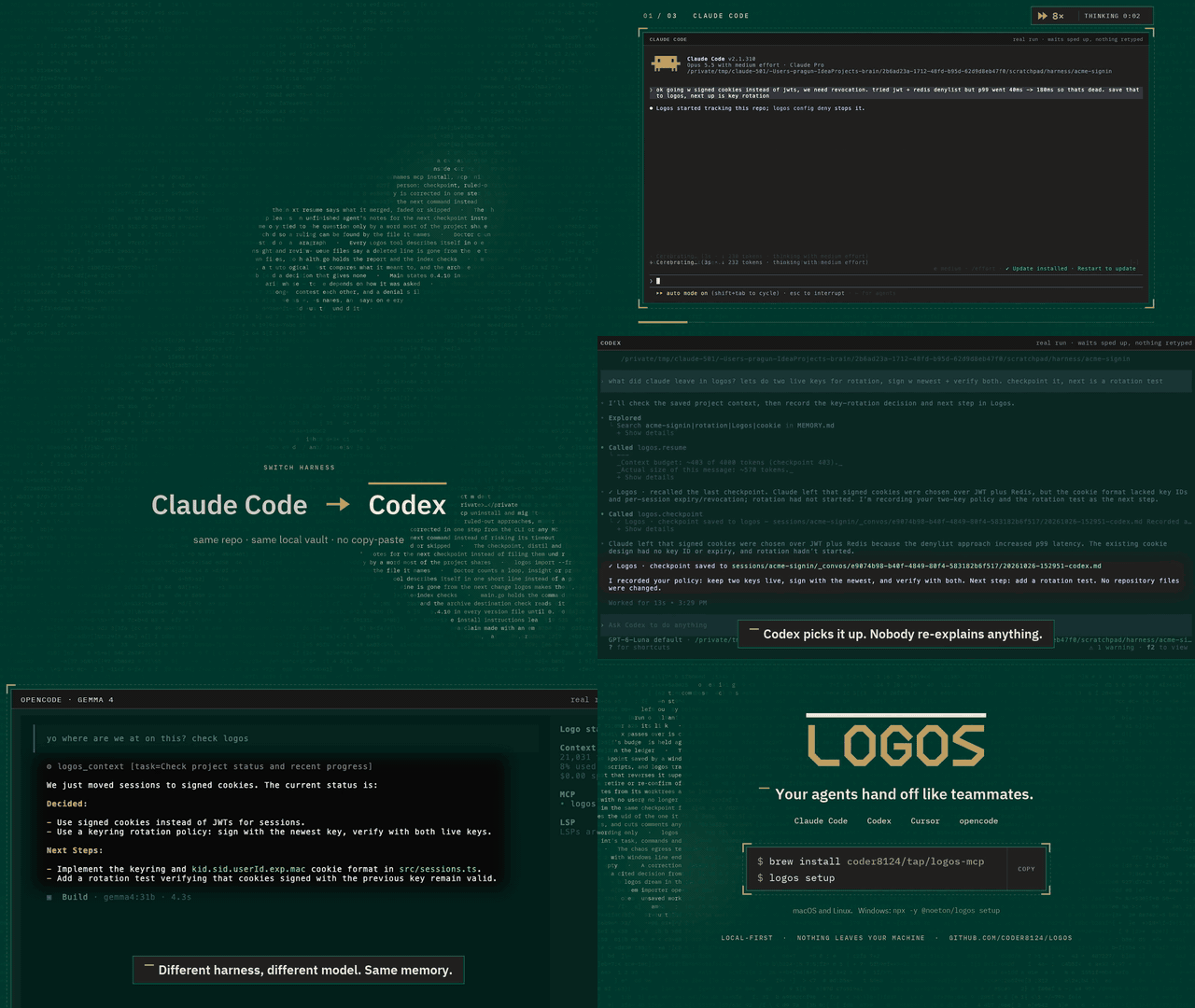
Logos is a local-first memory and continuity layer for coding agents. Claude Code, Codex, Cursor and your own agents share one vault over MCP. An agent checkpoints what it did, and the next one resumes where it stopped, even if it is a different model, in a different tool, on a different day.
Claude Code  ──▶  checkpoint  ──▶  Logos  ──▶  resume  ──▶  Cursor
                                (your vault)
The vault is a folder of markdown files on your machine. Nothing is uploaded,
and the SQLite index beside it is a cache: delete it, run logos index, and you
lose nothing.
Quick start
brew install coder8124/tap/logos-mcp && logos setup    # macOS and Linux
npm i -g @noeton/logos && logos setup                  # Windows
setup picks a vault, shows which agents it would wire, and asks before
touching any of them (--dry-run writes nothing). For Claude Code it also
installs the plugin, so the last handoff is in front of the model before it does
anything.
The formula is logos-mcp: a bare brew install logos installs Logos Bible
Software. Building from source, hand-wiring a host and the one-click buttons are
in Installation.
What it does
- Resume where the last agent stopped.
resumeshows what was done, what was verified and what is still open. - Stop the next agent repeating a dead end. Ruled-out approaches are their
own field, and
before_you_trychecks a plan against them. - Keep "verified" apart from "claimed". Resume marks another agent's verified items as its claim, and flags a command the activity log never saw.
- Answer "why is this code like this?"
why <path>shows what was being decided when a file was last worked on. - Remember what lasts. Decisions, constraints and procedures, reviewed before they become project memory.
- Bring your history. Import CLAUDE.md, AGENTS.md, Cursor rules, claude-mem, Claude Code's auto memory, transcripts or git history.
Every write returns a receipt, so you can see it working. The Handoff Loop shows how an agent uses it, step by step.
Works with
Claude Code, Codex, Cursor, Claude Desktop, Cline, Devin, GitHub Copilot, opencode, Amp, Grok Build, and anything else that speaks MCP. Agents with only a shell get a CLI command for every tool. See Agent Hosts.
Does it work?
On a handoff suite built for this (32 scenarios, nine memory systems, one machine), Logos passes 84.4%. The next best system passes 46.9%.
Every real system retrieves about equally well. What separates them is whether the agent that resumes gets the current answer, or gets it next to the stale one it replaced. Method, per-scenario scores and the cases Logos loses are in the benchmark.
Local, private and durable
- No model required. Search falls back from local embeddings (Ollama) to full-text search, and nothing breaks.
- Nothing is observed. Logos does not watch your screen, browser or files. The vault holds what agents wrote there, plus the Claude Code plugin's activity log, which you can turn off.
- Nothing leaves.
logos doctor --egresslists every address Logos can contact, and when. - Hard to break. It survives SIGKILL mid-write, a full disk, sync-client
conflict copies and two worktrees racing on one vault (
chaos/).
Exactly what is recorded, and every switch for it, is in Settings and Privacy.
Documentation
Everything lives in the wiki.
| Start | Use | Look up |
|---|---|---|
| Installation | The Handoff Loop | CLI Reference |
| Quick Start | Memory | MCP Tools Reference |
| Core Concepts | Importing History | Agent Hosts |
| Troubleshooting | The Vault | Embedding in Go |
Contributing
Contributions are welcome. CONTRIBUTING.md covers the build,
the test tiers and the two load-bearing conventions: the vault is the truth, and
every feature announces itself. Agents working here get the context-connect
and continuity skills from the plugin (plugin/skills/); this repository
dogfoods its own plugin.
Coming from brain? Since 0.5.0 the old names are not read. logos migrate
moves a ~/brain vault; see
Moving a 0.4 vault.
License
Apache 2.0. See LICENSE. Git history satisfies §4(b), so there are no change notices to add and no CLA (details). Prior work that shaped the ideas is in systemmd/CREDITS.md.
Logos MCP 질문
Logos MCP를 Claude Code에 추가하려면 어떻게 하나요?
터미널에서 claude mcp add logos -- npx -y @noeton/logos를 실행합니다. 모든 프로젝트에서 사용할 수 있게 하려면 --scope user를 추가합니다.
Logos MCP를 Cursor에 추가하려면 어떻게 하나요?
~/.cursor/mcp.json를 열고 mcpServers 아래에 서버를 추가합니다. 위 설치 섹션에 표시된 Cursor 구성을 사용합니다.
Logos는 데이터 프라이버시를 어떻게 처리하나요?
Logos는 로컬 우선 방식으로 작동합니다. 볼트는 사용자의 기기에 있는 마크다운 파일 폴더이며, 어떤 데이터도 업로드되지 않습니다.
Logos를 서로 다른 AI 에이전트와 함께 사용할 수 있나요?
네, Claude Code, Codex, Cursor, Claude Desktop, Cline, Devin, GitHub Copilot 및 MCP를 지원하는 다른 모든 도구와 함께 사용할 수 있습니다.
인덱스 파일을 삭제하면 어떻게 되나요?
데이터를 잃지 않습니다. index 명령어를 실행하여 인덱스를 다시 구축하기만 하면 됩니다.
작동을 위해 LLM이 필요한가요?
기본 기능을 위해 모델은 필요하지 않습니다. 로컬 임베딩을 사용할 수 없는 경우 검색은 전체 텍스트 검색으로 대체됩니다.