
AI 코딩 에이전트에게 작업 관련 리포지토리 컨텍스트와 근거 기반의 파일 번들을 제공하여 정확도를 높이고 토큰 사용량을 줄여줍니다.
다른 이름 codeledgerECF/codeledger, @codeledger/cli
- 스타
- 8
- Tools
- —
- 다운로드, 30일
- 4,468
- 최신 버전
- 0.10.82
- 마지막 커밋
- 2026년 11월 11일
- 라이선스
- —
CodeLedger MCP란?
CodeLedger은(는) MCP server입니다. AI 코딩 에이전트에게 작업 관련 리포지토리 컨텍스트와 근거 기반의 파일 번들을 제공하여 정확도를 높이고 토큰 사용량을 줄여줍니다.
프로젝트 README에서 생성된 요약
CodeLedger MCP server 정보
CodeLedger는 AI 코딩 에이전트의 정확도를 높이고 토큰 소비를 줄이기 위해 로컬 우선 방식의 컨텍스트 제어 기능을 제공합니다. 이 도구는 리포지토리를 스캔하여 의존성 구조 및 테스트 파일과 같은 시그널을 파악하고, 작업과 관련된 제한된 파일 세트를 선택합니다. 이 정보는 .codeledger/active-bundle.md라는 특정 아티팩트에 기록되며, Claude Code, Cursor 또는 GitHub Copilot과 같은 에이전트가 작업을 시작하기 전에 이를 읽을 수 있습니다.
개발자는 CLI를 사용하여 리포지토리를 초기화하고 ready 명령어를 통해 특정 작업을 준비할 수 있습니다. 이 도구는 기본적으로 분석을 로컬에서 실행하며 텔레메트리를 통해 소스 코드를 전송하지 않습니다. 또한 명령줄을 통해 실행하여 호환되는 클라이언트와 통합할 수 있는 MCP server를 포함하고 있습니다. 사용자는 compare 명령어를 실행하여 토큰 사용량 및 테스트 통과율과 같은 지표에서 성능 개선 사항을 측정할 수도 있습니다.
활용 사례
- 1작업별 컨텍스트 준비AI 에이전트가 특정 버그 수정이나 기능 요청과 관련된 집중된 파일 번들을 전달받을 수 있습니다.
- 2에이전트 변경 사항 검증사용자는 세션 요약 및 영수증을 통해 에이전트가 수정한 내용을 검토할 수 있습니다.
프로젝트의 README를 바탕으로 작성되었습니다. 모든 활용 사례는 해당 내용의 인용문과 대조하여 확인합니다.
CodeLedger MCP 설치 방법
형식 확인: 2026년 11월 10일Claude Code에 CodeLedger MCP 설치
$ claude mcp add codeledger -- npx -y @codeledger/cliCursor에 CodeLedger MCP 설치
~/.cursor/mcp.json
{
  "mcpServers": {
    "codeledger": {
      "command": "npx",
      "args": [
        "-y",
        "@codeledger/cli"
      ]
    }
  }
}VS Code에 CodeLedger MCP 설치
.vscode/mcp.json
{
  "servers": {
    "codeledger": {
      "type": "stdio",
      "command": "npx",
      "args": [
        "-y",
        "@codeledger/cli"
      ]
    }
  }
}Claude Desktop에 CodeLedger MCP 설치
claude_desktop_config.json
{
  "mcpServers": {
    "codeledger": {
      "command": "npx",
      "args": [
        "-y",
        "@codeledger/cli"
      ]
    }
  }
}Codex에 CodeLedger MCP 설치
~/.codex/config.toml
[mcp_servers.codeledger]
command = "npx"
args = ["-y", "@codeledger/cli"]
Gemini CLI에 CodeLedger MCP 설치
~/.gemini/settings.json
{
  "mcpServers": {
    "codeledger": {
      "command": "npx",
      "args": [
        "-y",
        "@codeledger/cli"
      ]
    }
  }
}자동 검사
2026년 11월 14일에 실행됨전체 보고서 →자동 검사를 통과했습니다. 이는 보안 감사가 아닙니다. 코드를 직접 읽고 서버에 필요한 최소한의 권한만 부여하십시오. 검사 방식

- 소스 저장소 연결 및 접근 가능codeledgerecf/codeledger is public and reachablegithub.com/codeledgerecf/codeledger ↗통과
- 패키지가 이 저장소를 소스로 지정@codeledger/cli names github:codeledgerECF/codeledger as its sourcenpmjs.com/package/@codeledger/cli ↗결함 발견
- 빌드 출처(Sigstore 증명)No build attestation published for this release검사되지 않음
- 오픈 소스 라이선스 (OSI)No license결함 발견
- 최근 1년 내 커밋 또는 릴리스Last commit or release 2026-11-11github.com/codeledgerecf/codeledger ↗통과
- OpenSSF Scorecard검사되지 않음
- 패키지 이름이 인기 패키지와 유사하지 않음No popular package one edit away from @codeledger/cli통과
- 패키지와 의존성에 심각한 보안 권고 없음1 resolved dependencies checked; no critical advisoryosv.dev ↗통과
- 모델에 대한 숨겨진 지침 없음0 tool descriptions and the README read; no override phrases, credential paths or hidden characters통과
- 파괴적인 도구에 라벨 표시됨검사되지 않음
- 원격 endpoint가 MCP 핸드셰이크에 응답검사되지 않음
README
GitHub에서 보기CodeLedger
Give AI coding agents the right repo context before they start - then verify what changed.
CodeLedger is local-first context control for AI coding agents. It scans a repository, selects a bounded task-relevant set of files, and writes an evidence-backed context bundle before the agent begins work.
Works with Claude Code, Codex, Cursor, GitHub Copilot, Gemini CLI, and other CLI or MCP-compatible coding agents.
Try It
npm install -g @codeledger/cli
cd your-project
codeledger ready --task "Fix null handling in user service"
CodeLedger initializes the repo if needed, refreshes the index, and creates the
task-specific bundle at .codeledger/active-bundle.md. Your agent reads that
artifact first so it starts with the files most relevant to the task.
Runtime analysis is local by default. Installing or updating may fetch packages or release artifacts from npm and GitHub Releases; CodeLedger runtime analysis does not send your source code through CodeLedger telemetry by default.
Example Benchmark
Example result from a mid-sized Node.js service. Results vary by repository, task, agent, and scenario.
| Metric | Without CodeLedger | With CodeLedger | Change |
|---|---|---|---|
| Tests Passed | 78% | 94% | +16% |
| Iterations | 4 | 2 | -50% |
| Files Changed | 17 | 9 | -47% |
| Time to Finish | 6m 12s | 3m 40s | -41% |
| Token Usage | 28k | 18k | -36% |
Do not take the benchmark on faith - measure CodeLedger on your own repo:
codeledger compare \
  --scenario .codeledger/harness/scenarios/auth-rate-limit.json \
  --guided
If CodeLedger improves your coding-agent workflow, star the repo to follow releases and help other developers discover it.
Start Here
- Getting Started
- CLI Reference
- How It Works
- MCP Server
- Feature Tiers
- Security
- Contributing
- Latest Release
- npm package
How It Works
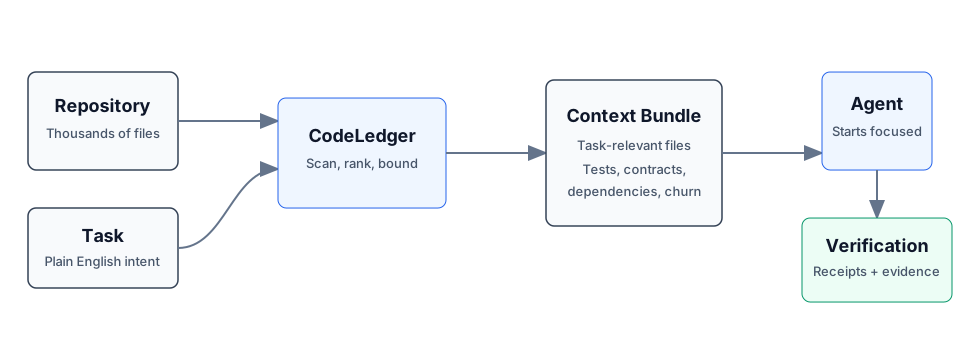
- CodeLedger scans the repo for deterministic local signals such as dependency structure, churn, tests, contracts, and task keywords.
- It ranks and packs a bounded set of task-relevant files.
- It writes
.codeledger/active-bundle.mdfor your coding agent. - After work, verification, receipts, and session summaries help show what changed and whether the selected context was useful.
Same task plus same repo state produces the same file ranking behavior.
Core Capabilities
- Give agents the right context: deterministic file selection, scope inference, bounded budgets, blast-radius hints, and co-change context.
- Keep work continuous: session summaries, checkpoints, mid-session refine, and handoff/recovery commands.
- Keep agents inside the task: scope contracts, intent governance, loop detection, and multi-agent conflict checks.
- Prove what happened: review intelligence, receipts, provenance, audit exports, and release evidence.
For the full command surface, see the CLI Reference.
Agent Integration
Claude Code can use CodeLedger hooks after codeledger ready initializes the
repo. Cursor, Codex, GitHub Copilot, Gemini CLI, Aider, Windsurf, and other
agents can read CLAUDE.md plus .codeledger/active-bundle.md, or use the
repo-local wrappers when available.
CodeLedger also includes an MCP server for supported tiers:
codeledger mcp start
codeledger mcp status
See MCP Server and Feature Tiers for setup and tier details.
Trust And Verification
- Runtime source analysis runs locally by default.
- Source code is not sent through CodeLedger telemetry by default.
- No account is required for the local CLI flow.
- Public releases include
SHA256SUMSand release-evidence artifacts. codeledger doctorchecks the local install, hooks, config, index, and ledger health.- The public wrapper, docs, harness, and scanning surface are inspectable in
this repo; the protected hardened runtime is covered by
LICENSE-CORE.
Install
npm install -g @codeledger/cli
codeledger --version
Or use the release zip:
- Download the latest release.
- Extract it.
- Run
install.sh.
The installer uses the bundled package from the zip, so the installed wrapper version matches the release. The wrapper then fetches the matching hardened binary from the GitHub release unless your environment already provides it.
Everyday Flow
cd your-project
codeledger ready
codeledger ready --task "Fix null handling in user service"
Inside an initialized repo, you can also use:
codeledger activate --task "Fix null handling in user service"
codeledger doctor
Browser, cloud, and sandboxed environments can use the repo-local runtime
deployed under .codeledger/bin/ after initialization or vendoring.
Architecture
CodeLedger has an open public surface and a protected hardened runtime:
PUBLIC:    CLI wrapper, types, repo scanner, harness, reports, docs, hooks
PROTECTED: Scoring engine, selection algorithm, confidence internals
Use codeledger about, codeledger doctor, and command-specific --explain
output to inspect behavior and evidence without exposing protected
implementation internals.
Privacy
- Installation may use npm and GitHub Releases.
- Runtime analysis runs on your local machine by default.
- Runtime analysis makes zero source-code telemetry calls by default.
- Your source code is not required to leave your machine for the local CLI flow.
- Uninstall at any time.
License
- Public wrapper, types, repo scanning, harness, reports, docs, and examples: MIT
- Downloaded hardened binary: CodeLedger Core License
GitHub may classify the combined licensing structure as "Other" because the repo includes both MIT-covered public files and separately licensed protected runtime terms. Changing the license files should be a human legal decision.
Part Of ContextECF
CodeLedger applies Intelligent Context AI's context-control architecture to software engineering. For enterprise-wide governed context across applications and agents, see ContextECF.
CodeLedger is produced by Intelligent Context AI, Inc. See codeledger.dev.
CodeLedger MCP 질문
CodeLedger MCP를 Claude Code에 추가하려면 어떻게 하나요?
터미널에서 claude mcp add codeledger -- npx -y @codeledger/cli를 실행합니다. 모든 프로젝트에서 사용할 수 있게 하려면 --scope user를 추가합니다.
CodeLedger MCP를 Cursor에 추가하려면 어떻게 하나요?
~/.cursor/mcp.json를 열고 mcpServers 아래에 서버를 추가합니다. 위 설치 섹션에 표시된 Cursor 구성을 사용합니다.
CodeLedger가 소스 코드를 서버로 전송하나요?
아니요, 런타임 분석은 기본적으로 로컬에서 수행되며 CodeLedger 텔레메트리를 통해 소스 코드를 전송하지 않습니다.
어떤 AI 코딩 에이전트와 호환되나요?
Claude Code, Codex, Cursor, GitHub Copilot, Gemini CLI, Aider, Windsurf 및 기타 CLI 또는 MCP 호환 에이전트와 함께 사용할 수 있습니다.
CodeLedger는 코딩 워크플로우를 어떻게 개선하나요?
작업 관련 파일을 선별하여 테스트 통과율을 높이고, 반복 작업을 줄이며, 토큰 사용량을 절감하는 데 도움을 줍니다.
로컬 CLI를 사용하려면 계정이 필요한가요?
로컬 CLI 흐름에는 계정이 필요하지 않습니다.