
fusionwright MCP server
2026년 10월 27일 커밋AI 어시스턴트를 Autodesk Fusion에 연결하여 검증 루프를 통해 3D 모델링, 검증, 렌더링 및 파일 내보내기를 자동화합니다.
다른 이름 Cocoloco20/fusionwright
- 스타
- 2
- Tools
- 10
- 다운로드, 30일
- —
- 최신 버전
- —
- 마지막 커밋
- 2026년 10월 27일
- 라이선스
- MIT
fusionwright MCP란?
AI 어시스턴트를 Autodesk Fusion에 연결하여 검증 루프를 통해 3D 모델링, 검증, 렌더링 및 파일 내보내기를 자동화합니다. 10개 도구를 제공합니다. 예: fusion_status, fusion_api, fusion_run.
프로젝트 README에서 생성된 요약
fusionwright MCP server 정보
fusionwright는 엔지니어와 디자이너가 Autodesk Fusion 내에서 3D 모델링 및 기계적 검증을 자동화할 수 있도록 지원합니다. Claude 또는 Cursor와 같은 AI 어시스턴트를 실시간 Fusion 세션에 연결하면, 사용자는 복잡한 부품을 설명하기만 하면 됩니다. 그러면 어시스턴트가 필요한 Python 코드를 작성, 실행 및 검증합니다. 이 설정은 로컬 브리지 애드인을 사용하여 macOS 또는 Windows에서 작동하며, Python 3.10 이상이 필요합니다.
단순한 스크립팅 브리지와 달리, 이 server는 정확성을 보장하기 위해 검증 루프를 구현합니다. 코드를 실행하는 fusion_run, Fusion 커널을 사용하여 부피와 간섭을 확인하는 fusion_check, 다각도 스크린샷을 캡처하는 fusion_look 등의 도구를 사용합니다. 또한 fusion_render를 통해 실사 렌더링을 수행하거나 STEP, STL, OBJ 등의 형식으로 파일을 내보낼 수 있습니다. 이러한 방식을 통해 AI는 최종 디자인이 완료되기 전에 기하학적 오류를 식별하고 수정할 수 있습니다.
활용 사례
- 1인클로저 생성 및 내보내기AI에게 통풍 슬롯이 있는 특정 PCB 인클로저를 생성하고 STEP 파일로 내보내도록 요청합니다.
- 2기계적 정확성 검증어시스턴트가 부품의 잘못된 바디나 간섭을 확인하고 자동으로 수정하도록 합니다.
- 3미적 마무리 자동화모든 외부 모서리에 필렛(fillet)을 추가하고 특정 재질로 렌더링하도록 요청합니다.
- 4산술 연산을 통한 기하학적 검증Fusion 커널을 사용하여 생성된 3D 부피가 특정 계산 값과 일치하는지 확인합니다.
프로젝트의 README를 바탕으로 작성되었습니다. 모든 활용 사례는 해당 내용의 인용문과 대조하여 확인합니다.
fusionwright MCP 도구 10
README에서 감지됨fusion_statusfusion_apifusion_runfusion_rollbackfusion_inspectfusion_checkfusion_lookfusion_renderfusion_exportfusion_ui_command
| fusion_status | — | |
| fusion_api | — | |
| fusion_run | — | |
| fusion_rollback | — | |
| fusion_inspect | — | |
| fusion_check | — | |
| fusion_look | — | |
| fusion_render | — | |
| fusion_export | — | |
| fusion_ui_command | — |
자동 검사
2026년 11월 14일에 실행됨전체 보고서 →아직 인증되지 않았습니다. 서버는 80점 이상의 점수, 심각한 결함 없음, 그리고 검사에 충분한 데이터를 갖추어야 합니다. 검사 방식 · 점수를 높이기 위해 수정할 항목

- 소스 저장소 연결 및 접근 가능cocoloco20/fusionwright is public and reachablegithub.com/cocoloco20/fusionwright ↗통과
- 패키지가 이 저장소를 소스로 명시검사되지 않음
- 빌드 출처(Sigstore 증명)검사되지 않음
- 오픈 소스 라이선스 (OSI)MITspdx.org/licenses/MIT.html ↗통과
- 최근 1년 내 커밋 또는 릴리스Last commit or release 2026-10-27github.com/cocoloco20/fusionwright ↗통과
- OpenSSF Scorecard검사되지 않음
- 패키지 이름이 인기 패키지와 유사하지 않음검사되지 않음
- 패키지 및 해당 종속성에 중요한 보안 권고 없음검사되지 않음
- 모델에 대한 숨겨진 지침 없음10 tool descriptions and the README read; no override phrases, credential paths or hidden characters통과
- 파괴적인 도구에 라벨 표시됨No tool named like delete, drop or exec통과
- 원격 엔드포인트가 MCP 핸드셰이크에 응답검사되지 않음
README
GitHub에서 보기fusionwright
Let an AI build in Autodesk Fusion for you.
An open-source MCP server that connects an AI assistant (Claude, ChatGPT, Cursor, anything that speaks MCP) to your live Fusion session. You describe what you want; the AI writes the Fusion code, looks at the result from several angles, measures and verifies it with Fusion's own kernel, fixes its mistakes, then renders it and exports files you can print, machine or send on. It is not tied to any kind of object: brackets, enclosures, gears, jigs, furniture, product mock-ups, anything solid.
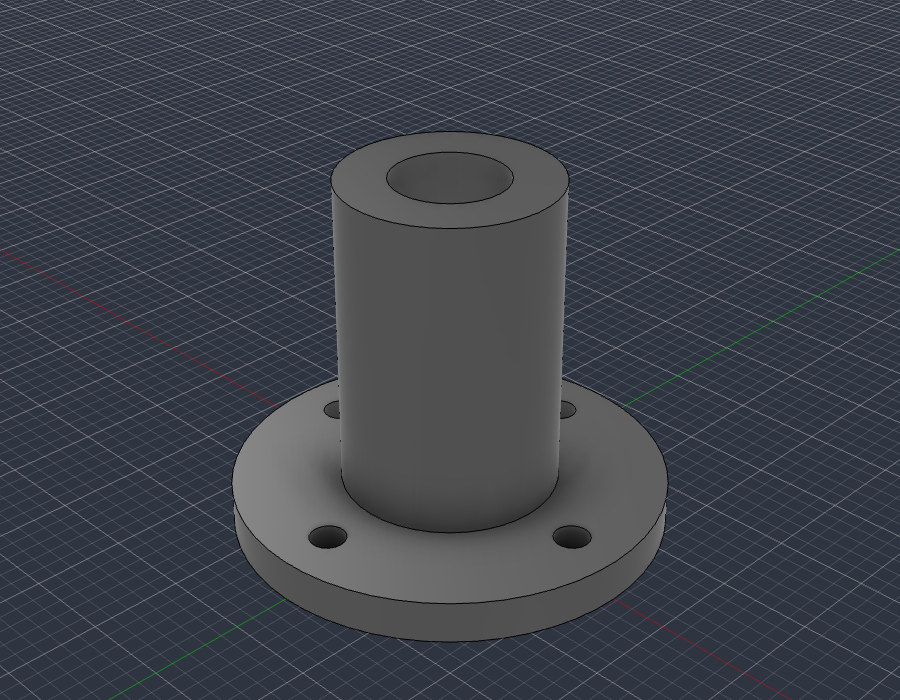
examples/flange_fusion_run.py, run through fusion_run in a live Fusion document: sketch, extrude, join, cut. The script checks Fusion's volume (37.542 cm3) against the hand-computed value (37.542 cm3), then fusion_look took this picture.
What you can ask for
- "Make an 80 x 50 x 25 mm enclosure for a PCB with four screw posts and vent slots, then export a STEP and an STL."
- "Model an M6 flange bracket with a 4-hole bolt circle, check it, and show me from the front."
- "Take the part open in Fusion, find any invalid bodies or interferences and fix them."
- "Add a 2 mm fillet to every outside edge and render it in brushed aluminium."
- "Build a 24-inch bookcase from 3/4 inch plywood and give me every part as its own component."
The loop that makes it dependable: write code, look at it, measure it against the arithmetic, repair, repeat. Executable CAD is often not correct CAD (research), and a validation loop sharply improves results, so the tools are built around checking the work.
Requirements
- Autodesk Fusion on macOS (tested) or Windows (untested). The free Personal-use tier works.
- Python 3.10+ and an MCP client.
It only uses Autodesk's documented public API and a legitimately licensed Fusion; it does not touch licensing.
Quick start
-
Install the bridge add-in (once): run
./scripts/install_addin.sh, then in Fusion pressShift+S, pick FusionBridge, click Run (tick Run on Startup to make it automatic). -
Register the server with your client.
Claude Desktop (
claude_desktop_config.json):{ "mcpServers": { "fusionwright": { "command": "uvx", "args": ["--from", "git+https://github.com/Cocoloco20/fusionwright", "fusionwright"] } } }Claude Code:
claude mcp add fusionwright -- uvx --from git+https://github.com/Cocoloco20/fusionwright fusionwright -
Ask. Exports land in
~/fusionwright-projects/(override withFUSIONWRIGHT_HOME).
Tools (10)
A small surface on purpose: fewer, higher-level tools beat dozens of thin wrappers.
| Tool | Purpose |
|---|---|
fusion_status |
Is Fusion reachable? Which document is open? |
fusion_api |
Look up the real Fusion API (class members with docs) before writing code |
fusion_run |
Run Python inside Fusion (helpers predefined); returns a rollback checkpoint |
fusion_rollback |
Undo everything after a checkpoint |
fusion_inspect |
Compact design state: sizes, volume, invalid bodies, timeline problems |
fusion_check |
Kernel validation: body validity, timeline health, interference, expected size |
fusion_look |
Screenshots from iso / front / back / left / right / top / bottom |
fusion_render |
Photoreal render with Fusion's local renderer |
fusion_export |
STEP, STL, F3D, OBJ, 3MF, IGES, SAT (local files only) |
fusion_ui_command |
Run any of Fusion's ~3,000 UI commands by id, or search them |
Inside fusion_run the names app, ui, design, root, adsk, P3, VI, FO, IN, coll() and board() are predefined; assign your answer to result. Fusion works in centimetres internally.
Examples
| File | What it shows |
|---|---|
examples/flange_fusion_run.py |
sketches, extrude / join / cut, picking profiles by area, checking against hand arithmetic |
Contributions of more examples (enclosures, gears, sheet metal, assemblies, anything) are welcome.
How it compares
- Autodesk's official Fusion MCP (announced May 2026) is a thin scripting bridge: read / screenshot, run a script, undo / redo. fusionwright adds a verification layer (kernel checks, multi-angle images, rollback checkpoints, an API lookup, UI-command access).
- Community Fusion MCPs expose dozens of low-level CAD operations (the biggest lists 89 tools) and mostly stop there. fusionwright is deliberately small and runs its bridge on an authenticated loopback port.
Safety
See SECURITY.md. In short: loopback only, bearer token (~/.fusion-bridge-token, mode 0600), Host-header guard, request-size cap; fusion_run blocks file deletion, network access and cloud saves by default and returns a rollback checkpoint. It is a safety net, not a sandbox: code you let an AI run inside Fusion is powerful. Save your work first.
What's tested
- 9 unit tests: the add-in's HTTP layer with a stubbed Fusion (token, host guard, size cap, error tracebacks) and a real stdio MCP round trip (tool list, safety guard, error messages).
- Live tests against a real Fusion (
pytest tests/integration): build a part and verify sizes, volume and interference with the kernel, views that must differ from each other, 5 export formats, a real render, rollback, API lookup, UI-command search, and a full MCP client round trip that returns images. - A 30-case capability suite (
tests/integration/capability_suite.py) covering sketches, constraints, extrude / cut / revolve / sweep / loft, fillet / shell / chamfer / hole, patterns, booleans, components and joints, parameters, timeline edits, materials, measurement, 8 export formats, STEP re-import, CAM setup creation, configurations, rendering and more.
See docs/COVERAGE.md for what the Fusion API can and cannot do and docs/GOTCHAS.md for API traps found along the way.
Known limitations
- Fusion-native drawings (
adsk.drawing) can only be created from a design saved to your Autodesk cloud, so they are not automated here. Verify every dimension before cutting, printing or machining. - "Everything a human can do in Fusion" is not literally achievable through its API.
fusion_ui_commandandfusion_runcover a great deal, but some interactions (some drag gestures, cloud workflows) remain manual.
Roadmap
Adapter for Autodesk's official Fusion MCP as an alternative transport · more verified examples · driving models from Fusion user parameters · MCP Apps live 3D preview · MCP Tasks for long renders · a cross-model evaluation suite.
Not affiliated
fusionwright is an independent project, not affiliated with or endorsed by Autodesk, Anthropic or OpenAI. "Autodesk" and "Fusion" are trademarks of Autodesk, Inc.
MIT licensed. Contributions welcome.
fusionwright MCP 질문
fusionwright MCP는 어떤 도구를 제공하나요?
10개 도구를 제공합니다. 예: fusion_status, fusion_api, fusion_run, fusion_rollback, fusion_inspect.
지원되는 운영 체제는 무엇인가요?
macOS에서 테스트되었으며, 현재 Windows에서는 테스트되지 않았습니다.
Autodesk 유료 구독이 필요한가요?
아니요, Autodesk Fusion의 무료 개인용(Personal-use) 티어에서도 이 MCP server를 사용할 수 있습니다.
AI가 설계한 디자인의 정확성을 어떻게 보장하나요?
코드를 작성하고, Fusion 커널로 디자인을 검사하며, 산술 연산으로 측정하고, 오류를 수정하는 검증 루프를 사용합니다.
어떤 파일 형식으로 내보낼 수 있나요?
STEP, STL, F3D, OBJ, 3MF, IGES, SAT 형식으로 파일을 내보낼 수 있습니다.