
EC2, S3, Lambda 등 다양한 서비스를 대상으로 로컬 읽기 전용 스캔을 실행하여 AWS 비용 낭비 요소를 식별합니다.
다른 이름 cloudwise-app/cloudcostwise
- 스타
- 1
- Tools
- 31
- 다운로드, 30일
- 2,088
- 최신 버전
- 0.1.23
- 마지막 커밋
- 2026년 11월 13일
- 라이선스
- Apache-2.0
cloudcostwise MCP란?
cloudcostwise은(는) MCP server입니다. EC2, S3, Lambda 등 다양한 서비스를 대상으로 로컬 읽기 전용 스캔을 실행하여 AWS 비용 낭비 요소를 식별합니다. 31개 도구를 제공합니다. 예: ami_orphaned_snapshot, classic_lb_migration, elasticache_data_tiering_opportunity.
프로젝트 README에서 생성된 요약
cloudcostwise MCP server 정보
cloudcostwise는 개발자와 클라우드 엔지니어가 EC2, S3, Lambda와 같은 서비스에 대해 로컬 읽기 전용 스캔을 실행하여 AWS 비용 낭비를 식별할 수 있도록 지원합니다. 이 도구는 사용자의 로컬 머신에서 기존 AWS 자격 증명을 사용하여 실행되므로 계정 수정 위험 없이 점검을 수행할 수 있습니다. Describe, List, Get, Search 또는 Lookup 작업이 아닌 모든 명령은 거부하도록 설계되어 안전합니다.
사용자는 터미널이나 MCP 프로토콜을 사용하는 AI 어시스턴트를 통해 도구와 상호작용할 수 있습니다. 이 MCP server는 SageMaker, Lambda, DynamoDB, ElastiCache를 포함한 광범위한 리소스를 커버하는 20가지 서비스 점검 항목을 포함합니다. 대부분의 점검은 무료이지만, Cost Explorer를 통해 RI 또는 Savings Plans를 확인하는 경우 요청당 소액의 AWS 비용이 발생합니다. 또한 특정 리소스를 로컬 제외 목록에 추가하여 향후 스캔 결과에 나타나지 않도록 관리할 수 있습니다.
활용 사례
- 1AWS 비용 낭비 스캔AWS 환경 전체를 포괄적으로 스캔하여 유휴 리소스나 비용이 많이 드는 리소스를 찾습니다.
- 2누락된 절감 기회 식별표준 AWS 도구가 놓칠 수 있는 고립된 EBS 스냅샷이나 유휴 Lightsail 인스턴스와 같은 구체적인 낭비 요소를 감지합니다.
- 3보고서에서 특정 리소스 제외의도적으로 유지 중인 특정 리소스가 낭비 항목으로 분류되지 않도록 방지합니다.
- 4공유를 위한 스캔 결과 익명화공유하기 전에 민감한 계정 및 리소스 식별자를 플레이스홀더로 대체한 보고서를 생성합니다.
프로젝트의 README를 바탕으로 작성되었습니다. 모든 활용 사례는 해당 내용의 인용문과 대조하여 확인합니다.
cloudcostwise MCP 설치 방법
형식 확인: 2026년 11월 10일Claude Code에 cloudcostwise MCP 설치
$ claude mcp add cloudcostwise -- uvx cloudcostwiseCursor에 cloudcostwise MCP 설치
~/.cursor/mcp.json
{
  "mcpServers": {
    "cloudcostwise": {
      "command": "uvx",
      "args": [
        "cloudcostwise"
      ]
    }
  }
}VS Code에 cloudcostwise MCP 설치
.vscode/mcp.json
{
  "servers": {
    "cloudcostwise": {
      "type": "stdio",
      "command": "uvx",
      "args": [
        "cloudcostwise"
      ]
    }
  }
}Claude Desktop에 cloudcostwise MCP 설치
claude_desktop_config.json
{
  "mcpServers": {
    "cloudcostwise": {
      "command": "uvx",
      "args": [
        "cloudcostwise"
      ]
    }
  }
}Codex에 cloudcostwise MCP 설치
~/.codex/config.toml
[mcp_servers.cloudcostwise]
command = "uvx"
args = ["cloudcostwise"]
Gemini CLI에 cloudcostwise MCP 설치
~/.gemini/settings.json
{
  "mcpServers": {
    "cloudcostwise": {
      "command": "uvx",
      "args": [
        "cloudcostwise"
      ]
    }
  }
}cloudcostwise MCP 도구 31
README에서 감지됨ami_orphaned_snapshotclassic_lb_migrationelasticache_data_tiering_opportunityelasticache_engine_migrationelasticache_extended_support_costempty_log_groupidle_lightsaillambda_arm64_migrationlambda_provisioned_concurrency_idlelightsail_idle_load_balancerlightsail_unattached_disklightsail_unattached_static_ip
| ami_orphaned_snapshot | — | |
| classic_lb_migration | — | |
| elasticache_data_tiering_opportunity | — | |
| elasticache_engine_migration | — | |
| elasticache_extended_support_cost | — | |
| empty_log_group | — | |
| idle_lightsail | — | |
| lambda_arm64_migration | — | |
| lambda_provisioned_concurrency_idle | — | |
| lightsail_idle_load_balancer | — | |
| lightsail_unattached_disk | — | |
| lightsail_unattached_static_ip | — |
도구 31개 모두 보기도구 수 줄이기
low_traffic_albmultiple_eips_per_instanceno_lifecycle_efsorphaned_ebs_snapshotprevious_gen_sagemaker_instances3_empty_bucketstopped_sagemaker_notebook_storagedynamodb_no_autoscalingelasticache_replication_wasteexcessive_retention_log_groupidle_efsidle_load_balancerincomplete_multipartlambda_excessive_timeoutno_retention_log_groupold_ecr_imagesoversized_sagemaker_endpoints3_rapid_growthuntagged_ecr_images
| low_traffic_alb | — | |
| multiple_eips_per_instance | — | |
| no_lifecycle_efs | — | |
| orphaned_ebs_snapshot | — | |
| previous_gen_sagemaker_instance | — | |
| s3_empty_bucket | — | |
| stopped_sagemaker_notebook_storage | — | |
| dynamodb_no_autoscaling | — | |
| elasticache_replication_waste | — | |
| excessive_retention_log_group | — | |
| idle_efs | — | |
| idle_load_balancer | — | |
| incomplete_multipart | — | |
| lambda_excessive_timeout | — | |
| no_retention_log_group | — | |
| old_ecr_images | — | |
| oversized_sagemaker_endpoint | — | |
| s3_rapid_growth | — | |
| untagged_ecr_images | — |
구성
AWS_PROFILEAWS profile to scan with (read-only access is enough). Defaults to the standard credential chain.
| 이름 | 설명 | 유형 |
|---|---|---|
| AWS_PROFILE | AWS profile to scan with (read-only access is enough). Defaults to the standard credential chain. |
자동 검사
2026년 11월 12일에 실행됨전체 보고서 →자동 검사를 통과했습니다. 이는 보안 감사가 아닙니다. 코드를 직접 읽고 서버에 필요한 최소한의 권한만 부여하십시오. 검사 방식

- 소스 저장소 연결 및 접근 가능통과
- 오픈 소스 라이선스 (OSI)통과
- 최근 1년 내 커밋 또는 릴리스통과
- 패키지 이름이 인기 패키지와 유사하지 않음통과
- 원격 엔드포인트가 HTTPS 사용검사되지 않음
- 파괴적인 도구에 라벨 표시됨통과
- 모델에 대한 숨겨진 지침 없음통과
- 패키지와 의존성에 심각한 보안 권고 없음통과
README
GitHub에서 보기cloudcostwise






Find AWS waste from your terminal or your AI assistant. cloudcostwise runs CloudWise's free waste
checks on your own machine, with your own read-only AWS credentials.
Before you run it with AWS credentials:
- It cannot change your account. Every AWS call a scan makes is checked, and anything that isn't a
Describe,List,Get,SearchorLookupis refused before it is sent, whatever your credentials allow. - It talks to AWS and nothing else, unless you say yes. After the first scan in a terminal it asks once
whether to share a summary (the CLI version, finding count, estimated savings and checks run, printed
before it asks; never account IDs, resource names, regions or ARNs). The default is no.
cloudcostwise share --offturns it off for good;CLOUDCOSTWISE_SHARE=noturns it off for that environment. See Sharing a summary. - Through an AI assistant (MCP), the findings, including your account ID and resource IDs, go to that assistant like any tool output.
- It is not quite free to run. The RI/Savings Plans checks call Cost Explorer, which AWS bills at
$0.01 a request, about
$0.09 a scan.
--no-cost-explorerskips them. - It stores up to two small files: your share answer in
~/.config/cloudcostwise/share.jsonand, only if you usecloudcostwise exclude, your exclude list in~/.config/cloudcostwise/exclude.json(it never leaves your machine). No report, cache or credentials are written. - Open source (Apache-2.0). Read the code: github.com/cloudwise-app/cloudcostwise.
Least-privilege IAM policy (71 read-only actions):
docs/iam-policy.json. See a real scan first, no credentials needed:
cloudcostwise.io/sample-scan.
- 20 of CloudWise's 46 service checks: EC2, Lambda, SageMaker, WorkSpaces, Lightsail, EBS, S3, EFS, ECR, RDS, DynamoDB, ElastiCache, Elastic IPs, NAT gateways and load balancers, VPC endpoints, dangling DNS records, CloudWatch logs and dashboards, security posture, RI/Savings Plans opportunities, and Compute Optimizer.
Install and run
pipx install cloudcostwise          # or: uvx cloudcostwise scan
cloudcostwise scan                      # us-east-1 plus your profile's region
cloudcostwise scan --profile prod --regions all
cloudcostwise scan --format json > waste.json
cloudcostwise scan --format json --anonymize > waste-to-share.json   # then read it through before you email it
Options:
| Option | Meaning |
|---|---|
--profile NAME |
AWS profile; otherwise the standard credential chain (env vars, SSO, instance role) |
--regions LIST |
Comma-separated regions, or all for every enabled region. Account-level checks (CloudWatch dashboards, orphaned DNS records, RI/Savings Plans) run once, in us-east-1, and are skipped with a warning if it is not listed |
--format table|markdown|json |
Output format |
--anonymize |
Replace the account ID and the resource IDs, names, ARNs and tag values it recognizes with stable placeholders (account-1, resource-1, ...; the same value always gets the same one). Waste type, region, savings, confidence, action wording, warnings and counts stay. Works with every --format; it runs locally and sends nothing. Anonymizing is not complete: it replaces the identifiers it recognizes, so review the file before you send it |
--no-exclude |
Ignore your exclude list (see below) for this run and show every finding |
--no-cost-explorer |
Make no Cost Explorer call. AWS bills those at $0.01 per request and a scan makes about 9. Skips the RI/Savings Plans checks and the one request that reads your last 30 days of spend, so the score falls back to "without spend data" |
--parallel N |
Regions scanned at once, each in its own process (default 4; --regions all takes ~2–3 min instead of ~10) |
--verbose |
Show data warnings (checks that could not read a metric report it as missing, never as zero) |
Leave resources out of every scan
A finding you have already decided to keep (a bucket that looks idle but is not, a snapshot you retain on purpose) can go on a local exclude list that survives the next run:
cloudcostwise exclude add vol-0abc123def4567890 --reason "kept for the audit"   # a resource ID or a full ARN
cloudcostwise exclude list
cloudcostwise exclude remove vol-0abc123def4567890
cloudcostwise scan --no-exclude                                                   # ignore the list for one run
- Matching: an identical ID always matches. An ARN you add matches a finding whose ID is that resource's name (the scan
reports an RDS instance, Lambda function, log group, load balancer or DynamoDB table by its bare name) or an ARN of the same
service and name (a load balancer is named by its name, not the hash in its ARN). A bare ID matches the ARN form
only when it is AWS-shaped (
vol-...,snap-...,i-...); a plain name such asdefaultormydbmatches only an identical ID, so it cannot hide unrelated resources. To hide a resource the scan reports by name, add either its name or its ARN. - The partner build ignores this list (its CLI and MCP never apply it).
- Every scan reads
~/.config/cloudcostwise/exclude.jsonfresh (next toshare.json) and leaves matching findings out of the table, Markdown, JSON and MCP output and out of the savings total and the score. It says how many under "Left out on purpose" ("2 findings left out by your exclude list (cloudcostwise exclude list)"); the JSON addsexcluded_by_list_countandexcluded_by_list_resource_ids. - With
--anonymize, the exclusion happens first; the excluded IDs are still scrubbed from warnings and notes, and the JSON list of excluded IDs is emptied, so none is printed; the count stays.--verboselists the excluded IDs under "Left out on purpose" (table and Markdown) when you are not anonymizing. - The list is never sent to CloudWise. The optional shared summary counts what the report showed, after exclusions, and never includes the list.
- A missing file is an empty list. A file that cannot be read is treated as empty with a warning on stderr; the scan still runs, and
exclude addleaves that file alone until you fix or delete it.
What AWS's free tools don't flag
This tool has 54 proven checks (L2 or above in VALIDATION.md: each fired on a real AWS resource built to trigger it and stayed silent on a healthy twin). 19 of them flag waste that none of AWS's own tools flag, and 12 more go further than the closest AWS check, going by AWS's lists of what its tools cover (Trusted Advisor, Cost Optimization Hub, Compute Optimizer; checked 2026-10-11).
| Check | What it finds | Closest AWS check |
|---|---|---|
ami_orphaned_snapshot |
EBS snapshots left behind by an AMI that was deregistered | None |
classic_lb_migration |
Classic Load Balancers that would cost less as an ALB or NLB | None |
elasticache_data_tiering_opportunity |
Redis OSS or Valkey replication groups on r6g/r7g nodes that would cost less on data-tiering r6gd nodes | None |
elasticache_engine_migration |
Redis OSS or Memcached clusters that would cost about 20% less on Valkey | None |
elasticache_extended_support_cost |
ElastiCache engine versions billed the Extended Support surcharge | None |
empty_log_group |
CloudWatch log groups that have stored nothing for 30+ days | None |
idle_lightsail |
Stopped or idle Lightsail instances that still bill their bundle price | None |
lambda_arm64_migration |
Lambda functions that would cost about 20% less on arm64 (Graviton) | None |
lambda_provisioned_concurrency_idle |
Lambda provisioned concurrency that is paid for and barely used | None |
lightsail_idle_load_balancer |
Idle Lightsail load balancers | None |
lightsail_unattached_disk |
Lightsail disks attached to nothing | None |
lightsail_unattached_static_ip |
Lightsail static IPs attached to nothing | None |
low_traffic_alb |
Application Load Balancers carrying almost no traffic | None |
multiple_eips_per_instance |
Extra Elastic IPs on one instance, each billed as a public IPv4 address | None |
no_lifecycle_efs |
Large EFS file systems with no Infrequent Access or Archive tiering | None |
orphaned_ebs_snapshot |
EBS snapshots whose source volume no longer exists | None |
previous_gen_sagemaker_instance |
SageMaker instances on a previous generation with a cheaper current one | None |
s3_empty_bucket |
Empty S3 buckets left behind for 30+ days | None |
stopped_sagemaker_notebook_storage |
Stopped SageMaker notebook instances whose ML storage volume keeps billing | None |
dynamodb_no_autoscaling |
Provisioned DynamoDB tables with no auto scaling on their read or write capacity | Idle recommendation for DynamoDB provisioned tables: Compute Optimizer (and Cost Optimization Hub) look at the same provisioned tables, but only flag ones with no consumed capacity at all. Security Hub CSPM control DynamoDB.1 (tables should scale capacity with demand) checks for auto scaling, but it is an availability control with no cost wording, and its Recover > Resilience category is one Trusted Advisor does not show (checked 2026-11-05). |
elasticache_replication_waste |
Replicas kept on non-production ElastiCache replication groups, each billed like a full node | Amazon ElastiCache Multi-AZ clusters: Trusted Advisor's check looks at the same clusters with the opposite aim, alerting when Multi-AZ is inactive and recommending at least one replica per shard. Compute Optimizer, the source of Cost Optimization Hub's idle recommendations, calls a Redis or Valkey cluster idle only when all its nodes are idle over 14 days. None of the three tools documents a check for replicas on a non-production group that is in use (checked 2026-11-02). |
excessive_retention_log_group |
Log groups keeping a year or more of data they are billed to store | Amazon CloudWatch Log Group Retention Period: Trusted Advisor checks log group retention but flags retention shorter than a minimum (365 days by default) for compliance, so long, costly retention passes it. |
idle_efs |
EFS file systems with no mount targets: nothing can read them, and they still bill | Amazon EFS no mount target redundancy: Trusted Advisor checks EFS mount targets for multi-AZ redundancy, not file systems with no mount targets at all, and EFS is not among the resources Compute Optimizer or Cost Optimization Hub cover. |
idle_load_balancer |
Idle Application and Network Load Balancers | Idle Load Balancers: Trusted Advisor flags idle Classic Load Balancers only (Business Support+ or higher); its documentation says Application and Network Load Balancers are not included. |
incomplete_multipart |
Incomplete S3 multipart uploads whose stored parts keep billing | Amazon S3 Incomplete Multipart Upload Abort Configuration: Trusted Advisor flags buckets whose lifecycle configuration lacks a rule to abort incomplete multipart uploads after 7 days; it does not find the incomplete uploads that are already stored and billing. |
lambda_excessive_timeout |
Lambda timeouts set far above what the function needs | AWS Lambda functions with excessive timeouts: Trusted Advisor flags functions where more than 10% of invocations time out; it does not flag a configured timeout set far above the function's real duration. |
no_retention_log_group |
Log groups set to never expire, so they grow every month | Amazon CloudWatch Log Group Retention Period: Trusted Advisor checks log group retention but flags retention below a minimum, so a log group set to never expire passes it. |
old_ecr_images |
Old ECR images still billed for storage | Amazon ECR Repository without lifecycle policy configured: Trusted Advisor checks that an ECR repository has a lifecycle policy; it does not flag the old images already stored. |
oversized_sagemaker_endpoint |
SageMaker endpoints serving traffic on bigger instances than they need | Idle recommendation for SageMaker endpoints: Compute Optimizer flags SageMaker endpoints with zero invocations over 14 days but gives no rightsizing for endpoints that serve traffic on oversized instances. |
s3_rapid_growth |
S3 buckets whose Standard storage at least doubled in 30 days and grew by 10 GB or more | Amazon S3 Bucket Lifecycle Policy Configured: Trusted Advisor's S3 cost checks (lifecycle policy configured, incomplete multipart upload abort, version-enabled buckets without a lifecycle policy) look at bucket configuration, not at how fast a bucket is growing. Neither Compute Optimizer nor Cost Optimization Hub lists S3 among its resource types, so none of the three tools documents a check for a bucket that grows quickly (checked 2026-11-03). |
untagged_ecr_images |
Untagged ECR images still billed for storage | Amazon ECR Repository without lifecycle policy configured: Trusted Advisor checks that an ECR repository has a lifecycle policy; it does not flag the untagged images already stored. |
For idle EC2, RDS and NAT gateways, rightsizing and Savings Plans, AWS's tools cover the same ground: use them too. Trusted Advisor's cost checks need a Business, Enterprise or Unified Operations support plan; Cost Optimization Hub and Compute Optimizer are free.
The hosted CloudWise product adds 23 more proven checks that none of AWS's tools flag, across AWS Backup, AppSync, CloudFront, Elastic Beanstalk, FSx, Glue, KMS, Kinesis, Route 53, Step Functions.
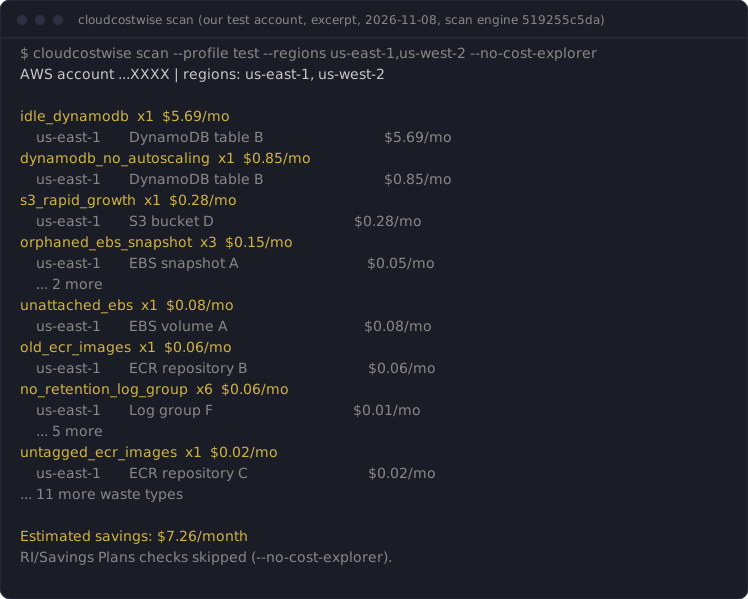
Excerpt of a real scan of our test account (cloudcostwise 0.1.15, us-east-1, 2026-10-27). The resources there are deliberately tiny, which is why the amounts are cents:
no_retention_log_group  x6  $0.06/mo
    us-east-1       /aws/lambda/cwfx-clo464-docdb-connect                               $0.01/mo
    us-east-1       /aws/lambda/cwfx-ec-hold-driver                                     $0.01/mo
    us-east-1       /aws/sagemaker/Endpoints/cwfx-w8b-ep-big                            $0.01/mo
    us-east-1       /aws/sagemaker/Endpoints/cwfx-w8b-ep-big-control                    $0.01/mo
    us-east-1       /aws/sagemaker/Endpoints/cwfx-w8b-ep-idle                           $0.01/mo
    us-east-1       /aws/sagemaker/Endpoints/cwfx-w8b-ep-idle-control                   $0.01/mo
old_ecr_images  x1  $0.06/mo
    us-east-1       cwfx-old-ecr-images                                                 $0.06/mo
untagged_ecr_images  x1  $0.02/mo
    us-east-1       cwfx-untagged-ecr-images                                            $0.02/mo
idle_efs  x1  $0.01/mo
    us-east-1       fs-090bfb32bd49de8b7                                                $0.01/mo
Use it from Claude Code, Codex or any MCP client
cloudcostwise mcp runs the same scan as an MCP server (stdio). Then ask your
assistant: "Where am I wasting money on AWS?"
The plugin and registry entries start the server with uvx, so install
uv first (brew install uv or pipx install uv).
Claude Code, as a plugin (asks for your AWS profile):
/plugin marketplace add cloudwise-app/cloudcostwise
/plugin install cloudcostwise@cloudcostwise
Claude Code, as a plain MCP server:
claude mcp add cloudcostwise -- uvx cloudcostwise mcp
# a specific profile:
claude mcp add cloudcostwise -e AWS_PROFILE=prod -- uvx cloudcostwise mcp
Codex (~/.codex/config.toml):
[mcp_servers.cloudcostwise]
command = "uvx"
args = ["cloudcostwise", "mcp"]
env = { AWS_PROFILE = "prod" }
Tools, all read-only: scan, list_findings, explain_finding,
fix_guidance. fix_guidance returns the steps and AWS CLI command as text
for you to review; nothing is ever executed. The assistant is told about the
Cost Explorer cost before it scans, and include_cost_explorer=false skips it.
Resources are read-only views of the last scan held by the running server. Reading one never starts a scan or calls AWS; before the first scan they say so:
cloudcostwise://scan/latest: the last scan's findings as JSON.cloudcostwise://scan/latest/summary: the one-screen text summary.cloudcostwise://checks: the checks and the waste types each can report.
Prompts appear in the slash menu of clients that support them: scan-account
(optional profile and regions), explain-finding and fix-guidance (each
takes a finding_id). None asks the assistant to change anything in AWS. In
Claude Code, /mcp__cloudcostwise__fix-guidance with a finding id from
list_findings presents the guidance with the read-only caveat first.
Permissions
The minimal policy the checks use is
in docs/iam-policy.json. AWS-managed ReadOnlyAccess also works, but it is much broader than the scan needs. It was derived from a scan of
an account with most supported resource types; if a check lacks a permission,
the scan says so in its data warnings instead of failing.
One of those reads, lambda:ListFunctions, returns each function's environment variables as plain text. The scan reads only
sizing and configuration fields and none of those values reaches a finding, a report or a file, but anyone holding the role can read them.
Sharing a summary (optional)
The default is no. After a scan prints, and only when both your input and output are a terminal, the CLI may ask once whether to share a summary with CloudWise. It prints exactly what it would send before it asks: the CLI version, the number of findings, the estimated monthly savings and the number of checks run. Never account IDs, resource IDs or names, regions, ARNs or tags.
Two further, separate yeses, asked only at that interactive prompt and only if you type an email address:
"please email me about this report" (nothing from the report is uploaded; you can produce it yourself with
--format markdown) and "tell me when new checks land" (marketing email; we confirm by reply before
adding you to anything, and you can withdraw consent at any time by replying to or emailing cloudwise@cloudcostwise.io). Answer once and it does not ask again on
that machine.
cloudcostwise share --status       # what is set
cloudcostwise share --off          # never ask, never send
cloudcostwise share --on           # send a summary after each scan
cloudcostwise share --reset        # forget the answer and ask once more
Without a terminal (a pipe, CI, a script) nothing is asked and nothing is sent unless you set
CLOUDCOSTWISE_SHARE=yes (or no) yourself, or write ~/.config/cloudcostwise/share.json. Those settings
carry the summary only (the CLI version, finding count, estimated savings and checks run, plus whether the scan came from the CLI or MCP), never an email address. The MCP server
never prompts, its scan tool has no sharing parameter, and it sends only when one of those settings says yes.
A failed or slow connection is ignored (about 3 seconds at most, after the results are printed).
How the numbers are counted
Each finding shows an estimated monthly saving. Advisory waste types, ones CloudWise could not validate against a real AWS resource, are listed but never added to the total.
For consultancies and MSPs
The partner licence runs on your own machine like this tool: the other 26 service checks, one scan across every client account, and a client report under your firm's name. One price per firm, unlimited client accounts: https://cloudcostwise.io/partners?utm_source=cloudcostwise&utm_medium=readme.
What the hosted product adds
The other 26 service checks (Glue, ECS, Step Functions, Backup, CloudFront, commitments and more), history and trends, alerts, and safe automated fixes: https://cloudcostwise.io/connect?utm_source=cloudcostwise&utm_medium=cli.
Tell us where it's wrong
A false positive, a miss, or a dollar figure that looks off: post it in issue #1, or email cloudwise@cloudcostwise.io if you'd rather not post in public. The waste types and counts from your scan are enough. Leave out account IDs and resource names. Every report gets a reply, and a confirmed false positive gets fixed in the next release.
License
Open source under the Apache License 2.0 (see LICENSE.md). 0.1.18 and later are Apache-2.0. 0.1.17 and earlier are FSL-1.1-ALv2 (each becomes Apache-2.0 two years after it ships).
How we know it's right
See VALIDATION.md: the validation level of every waste type this tool reports, from L0 (unit-tested) to L2 (fired on a real AWS resource and stayed silent on a healthy twin) and beyond.
cloudcostwise MCP 질문
cloudcostwise MCP를 Claude Code에 추가하려면 어떻게 하나요?
터미널에서 claude mcp add cloudcostwise -- uvx cloudcostwise를 실행합니다. 모든 프로젝트에서 사용할 수 있게 하려면 --scope user를 추가합니다.
cloudcostwise MCP를 Cursor에 추가하려면 어떻게 하나요?
~/.cursor/mcp.json를 열고 mcpServers 아래에 서버를 추가합니다. 위 설치 섹션에 표시된 Cursor 구성을 사용합니다.
cloudcostwise MCP는 어떤 도구를 제공하나요?
31개 도구를 제공합니다. 예: ami_orphaned_snapshot, classic_lb_migration, elasticache_data_tiering_opportunity, elasticache_engine_migration, elasticache_extended_support_cost.
AWS 자격 증명을 사용해도 안전한가요?
네, 읽기 전용 자격 증명을 사용하므로 계정 설정을 변경할 수 없습니다. 모든 AWS 호출은 Describe, List, Get, Search 또는 Lookup 작업인지 확인하여 안전성을 보장합니다.
도구가 데이터를 CloudWise로 전송하나요?
아니요, 로컬에서 실행되며 사용자가 명시적으로 동의한 경우에만 요약 정보를 전송합니다.
스캔 실행 시 발생하는 비용이 있나요?
도구 자체는 무료이지만, RI/Savings Plans 확인을 위해 AWS Cost Explorer를 호출할 경우 요청당 소액의 비용이 발생합니다.