
Bult DevOps 플랫폼을 통해 AI 코딩 에이전트로 클라우드 인프라, 데이터베이스 및 서비스를 배포하고 관리합니다.
다른 이름 bultcloud/mcp-server, mcp-server, @bultcloud/mcp-server
- 스타
- 2
- Tools
- 24
- 다운로드, 30일
- 128
- 최신 버전
- 1.0.1
- 마지막 커밋
- 2026년 10월 12일
- 라이선스
- MIT
Bult MCP란?
Bult은(는) MCP server입니다. Bult DevOps 플랫폼을 통해 AI 코딩 에이전트로 클라우드 인프라, 데이터베이스 및 서비스를 배포하고 관리합니다. 24개 도구를 제공합니다. 예: list-projects, get-project, create-project.
프로젝트 README에서 생성된 요약
Bult MCP server 정보
Bult는 AI 코딩 에이전트가 Bult DevOps 플랫폼을 통해 클라우드 인프라와 호스팅 리소스를 직접 관리할 수 있는 방법을 제공합니다. 개발자는 Claude Desktop, Claude Code, Cursor, Codex와 같은 클라이언트에서 이 MCP server를 사용하여 GitHub repository, Docker image 및 데이터베이스 서비스의 배포를 자동화할 수 있습니다. 이 서버는 stdio를 통해 작동하며, 작동을 위해 Bult API token과 Bult API URL이 필요합니다.
이 서버에는 전체 프로젝트 수명 주기를 관리하기 위한 광범위한 도구가 포함되어 있습니다. 특정 명령을 사용하여 프로젝트 목록을 확인하거나 생성하고, 데몬 및 데이터베이스 서비스를 관리하며, 영구 볼륨을 처리할 수 있습니다. 또한 라우트 및 도메인 매핑 설정, 프로젝트 템플릿 적용, 빌드 기록 조회를 지원합니다.
배포 외에도 이 서버는 서비스 로그에 대한 액세스를 제공하여 능동적인 문제 해결을 가능하게 합니다. 이를 통해 AI 에이전트는 배포 실패 원인을 조사하거나 애플리케이션 동작을 모니터링할 수 있습니다. 사용자는 Bult API 요청을 인증하기 위해 환경 변수를 통해 BULT_API_TOKEN을 제공해야 합니다.
활용 사례
- 1코드 리포지토리 배포AI 에이전트가 GitHub repository를 가져와 Bult 클라우드 플랫폼에 배포할 수 있습니다.
- 2배포 실패 문제 해결AI에게 서비스 로그를 검토하여 배포가 실패한 원인을 찾아달라고 요청할 수 있습니다.
- 3데이터베이스 서비스 관리개발자가 에이전트에게 새로운 데이터베이스 서비스를 생성하고 구성하도록 지시할 수 있습니다.
- 4네트워크 라우트 구성AI가 특정 서비스에 대한 퍼블릭 도메인 또는 경로 매핑을 설정할 수 있습니다.
프로젝트의 README를 바탕으로 작성되었습니다. 모든 활용 사례는 해당 내용의 인용문과 대조하여 확인합니다.
Bult MCP 설치 방법
형식 확인: 2026년 11월 10일Cursor에 추가Goose에 추가Claude Code에 Bult MCP 설치
$ claude mcp add --env 'BULT_API_TOKEN=<YOUR_BULT_API_TOKEN>' --env 'BULT_API_URL=<BULT_API_URL>' mcp-server -- npx -y @bultcloud/mcp-serverCursor에 Bult MCP 설치
~/.cursor/mcp.json
{
  "mcpServers": {
    "mcp-server": {
      "command": "npx",
      "args": [
        "-y",
        "@bultcloud/mcp-server"
      ],
      "env": {
        "BULT_API_TOKEN": "<YOUR_BULT_API_TOKEN>",
        "BULT_API_URL": "<BULT_API_URL>"
      }
    }
  }
}VS Code에 Bult MCP 설치
.vscode/mcp.json
{
  "servers": {
    "mcp-server": {
      "type": "stdio",
      "command": "npx",
      "args": [
        "-y",
        "@bultcloud/mcp-server"
      ],
      "env": {
        "BULT_API_TOKEN": "<YOUR_BULT_API_TOKEN>",
        "BULT_API_URL": "<BULT_API_URL>"
      }
    }
  }
}VS Code CLI에 Bult MCP 설치
$ code --add-mcp '{"name":"mcp-server","type":"stdio","command":"npx","args":["-y","@bultcloud/mcp-server"],"env":{"BULT_API_TOKEN":"<YOUR_BULT_API_TOKEN>","BULT_API_URL":"<BULT_API_URL>"}}'Claude Desktop에 Bult MCP 설치
claude_desktop_config.json
{
  "mcpServers": {
    "mcp-server": {
      "command": "npx",
      "args": [
        "-y",
        "@bultcloud/mcp-server"
      ],
      "env": {
        "BULT_API_TOKEN": "<YOUR_BULT_API_TOKEN>",
        "BULT_API_URL": "<BULT_API_URL>"
      }
    }
  }
}Codex에 Bult MCP 설치
$ codex mcp add mcp-server --env 'BULT_API_TOKEN=<YOUR_BULT_API_TOKEN>' --env 'BULT_API_URL=<BULT_API_URL>' -- npx -y @bultcloud/mcp-serverCodex config.toml에 Bult MCP 설치
~/.codex/config.toml
[mcp_servers.mcp-server]
command = "npx"
args = ["-y", "@bultcloud/mcp-server"]

[mcp_servers.mcp-server.env]
BULT_API_TOKEN = "<YOUR_BULT_API_TOKEN>"
BULT_API_URL = "<BULT_API_URL>"
Gemini CLI에 Bult MCP 설치
$ gemini mcp add -s user -e 'BULT_API_TOKEN=<YOUR_BULT_API_TOKEN>' -e 'BULT_API_URL=<BULT_API_URL>' mcp-server npx -- -y @bultcloud/mcp-serverGemini settings.json에 Bult MCP 설치
~/.gemini/settings.json
{
  "mcpServers": {
    "mcp-server": {
      "command": "npx",
      "args": [
        "-y",
        "@bultcloud/mcp-server"
      ],
      "env": {
        "BULT_API_TOKEN": "<YOUR_BULT_API_TOKEN>",
        "BULT_API_URL": "<BULT_API_URL>"
      }
    }
  }
}Bult MCP 도구 24
README에서 감지됨list-projectsget-projectcreate-projectupdate-projectdelete-projectdeploy-projectcontrol-projectlist-servicesget-servicecreate-serviceupdate-servicedelete-service
| list-projects | — | |
| get-project | — | |
| create-project | — | |
| update-project | — | |
| delete-project | — | |
| deploy-project | — | |
| control-project | — | |
| list-services | — | |
| get-service | — | |
| create-service | — | |
| update-service | — | |
| delete-service | — |
도구 24개 모두 보기도구 수 줄이기
control-servicecreate-volumeupdate-volumedelete-volumewipe-volumecreate-routeupdate-routedelete-routelist-templatesapply-templateget-service-logslist-builds
| control-service | — | |
| create-volume | — | |
| update-volume | — | |
| delete-volume | — | |
| wipe-volume | — | |
| create-route | — | |
| update-route | — | |
| delete-route | — | |
| list-templates | — | |
| apply-template | — | |
| get-service-logs | — | |
| list-builds | — |
구성
BULT_API_TOKEN필수비밀Bult API token used to authenticate requests.
BULT_API_URL필수Base URL of the Bult.ai API.
| 이름 | 설명 | 유형 |
|---|---|---|
| BULT_API_TOKEN | Bult API token used to authenticate requests. | 필수비밀 |
| BULT_API_URL | Base URL of the Bult.ai API. | 필수 |
자동 검사
2026년 11월 14일에 실행됨전체 보고서 →자동 검사를 통과했습니다. 이는 보안 감사가 아닙니다. 코드를 직접 읽고 서버에 필요한 최소한의 권한만 부여하십시오. 검사 방식

- 소스 저장소 연결 및 접근 가능bultcloud/mcp-server is public and reachablegithub.com/bultcloud/mcp-server ↗통과
- 패키지가 이 저장소를 소스로 명시@bultcloud/mcp-server names bultcloud/mcp-server as sourcenpmjs.com/package/@bultcloud/mcp-server ↗통과
- 빌드 출처(Sigstore 증명)No build attestation published for this release검사되지 않음
- 오픈 소스 라이선스 (OSI)MITspdx.org/licenses/MIT.html ↗통과
- 최근 1년 내 커밋 또는 릴리스Last commit or release 2026-10-12github.com/bultcloud/mcp-server ↗통과
- OpenSSF Scorecard검사되지 않음
- 패키지 이름이 인기 패키지와 유사하지 않음No popular package one edit away from @bultcloud/mcp-server통과
- 패키지 및 해당 종속성에 중요한 보안 권고 없음99 resolved dependencies checked; no critical advisoryosv.dev ↗통과
- 모델에 대한 숨겨진 지침 없음24 tool descriptions and the README read; no override phrases, credential paths or hidden characters통과
- 파괴적인 도구에 라벨 표시됨검사되지 않음
- 원격 엔드포인트가 MCP 핸드셰이크에 응답검사되지 않음
README
GitHub에서 보기@bultcloud/mcp-server

Official Model Context Protocol (MCP) server for Bult.ai, a DevOps platform and cloud hosting Platform-as-a-Service for deploying apps, GitHub repositories, Docker images, databases, and services with AI agents.
Use Bult MCP with Claude Desktop, Claude Code, Cursor, Codex, and other MCP-compatible clients to deploy apps, manage cloud infrastructure, inspect logs, and troubleshoot deployments through the Bult API.
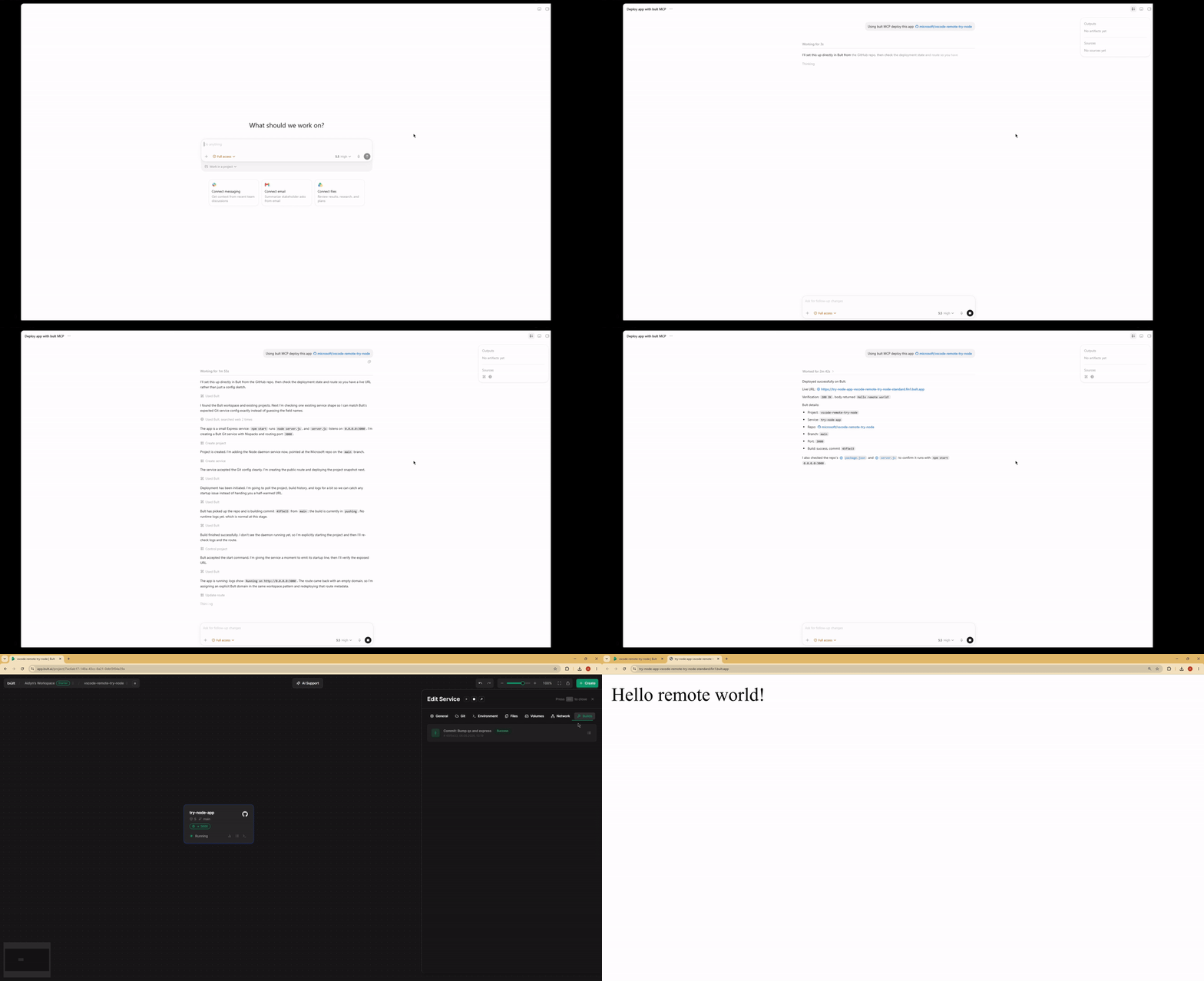
Demo
Features
- Deploy GitHub repositories, Docker images, databases, and app services from MCP-compatible AI agents.
- Project lifecycle tools: list, inspect, create, update, delete, deploy, start, stop, and discard changes.
- Service management for daemon and database services, including Docker image and Git-based deployments.
- Persistent volumes, route/domain mappings, templates, service logs, and build history.
- MCP tool annotations for read-only, idempotent, and destructive operations where supported.
- Works over stdio with Claude Desktop, Claude Code, Cursor, Google Antigravity and other MCP-compatible clients.
When to use Bult MCP
Use Bult MCP when you want an AI coding agent to deploy and operate cloud hosting resources for you. Common workflows include deploying a GitHub repo from Cursor, deploying the current project from Claude Code, launching a Docker image, creating a database service, adding a public route, checking build logs, and debugging failed deployments.
Requirements
- Node.js 18 or newer.
- Bult API token.
Installation
If you install the package globally, use the bult-mcp binary:
npm install -g @bultcloud/mcp-server
bult-mcp
You can also run it with npx from MCP client configs:
npx -y @bultcloud/mcp-server
Configuration
The server reads its configuration from environment variables.
| Variable | Required | Description |
|---|---|---|
BULT_API_URL |
Yes | Bult API base URL, https://app.bult.ai. |
BULT_API_TOKEN |
Yes | API token used for Bearer authentication. |
The server exits during startup if either variable is missing.
MCP Client Setup
Claude Desktop
Add the server to claude_desktop_config.json.
Using npx:
{
  "mcpServers": {
    "bult": {
      "command": "npx",
      "args": ["-y", "@bultcloud/mcp-server"],
      "env": {
        "BULT_API_URL": "https://app.bult.ai",
        "BULT_API_TOKEN": "your-token"
      }
    }
  }
}
Claude Code
Using npx:
claude mcp add bult \
  -e BULT_API_URL=https://app.bult.ai \
  -e BULT_API_TOKEN=your-token \
  -- npx -y @bultcloud/mcp-server
Codex CLI
Using npx:
codex mcp add \
  --env BULT_API_URL=https://app.bult.ai \
  --env BULT_API_TOKEN=your-token \
  bult \
  -- npx -y @bultcloud/mcp-server
Available Tools
Projects
| Tool | Description |
|---|---|
list-projects |
List all projects in the workspace. |
get-project |
Get a project overview with services, volumes, and routes. |
create-project |
Create a new project. |
update-project |
Update a project name. |
delete-project |
Delete a project and all of its resources. |
deploy-project |
Deploy project changes and create a version snapshot. |
control-project |
Start, stop, or discard project changes. |
Services
| Tool | Description |
|---|---|
list-services |
List all services in a project. |
get-service |
Get service details and configuration. |
create-service |
Create a daemon or database service. |
update-service |
Update service configuration. |
delete-service |
Delete a service. |
control-service |
Start, stop, or rebuild a service. |
Volumes
| Tool | Description |
|---|---|
create-volume |
Create a persistent storage volume. |
update-volume |
Update a volume name or size. |
delete-volume |
Delete a volume. |
wipe-volume |
Irreversibly wipe all data from a volume. |
Routes
| Tool | Description |
|---|---|
create-route |
Create a domain or path mapping for a service. |
update-route |
Update route configuration. |
delete-route |
Delete a route. |
Templates
| Tool | Description |
|---|---|
list-templates |
List available project templates. |
apply-template |
Apply a template to a project. |
Logs and Builds
| Tool | Description |
|---|---|
get-service-logs |
Read service logs with cursor-based pagination. |
list-builds |
List build history for a service. |
Example Prompts
- Deploy this GitHub repo to Bult and give me the public URL.
- Deploy the current project to Bult.
- Check why my deployment failed.
- Show the latest logs for my app.
- Set DATABASE_URL and restart the service.
- Deploy this Docker image to Bult.
- List my Bult projects and services.
Development
npm run dev      # run with tsx, no build step
npm run build    # compile TypeScript to dist/
npm run lint     # type-check without emitting files
Project layout:
src/index.ts          MCP server entrypoint
src/client.ts         Bult API client
src/tools/*.ts        MCP tool registrations by resource type
Security
BULT_API_TOKEN grants access to your Bult resources. Keep it out of
source control, shell history, issue reports, and screenshots. Prefer scoped or
rotatable tokens when available.
Some tools can create, delete, deploy, stop, or wipe resources. Review tool calls from your MCP client before approving destructive actions.
Privacy Policy
This MCP server connects your MCP client to Bult.ai using the API token you provide. Requests are sent to Bult.ai to perform actions such as listing projects, deploying services, managing routes and volumes, and reading logs.
The server does not store your API token. Tokens are passed through your MCP client configuration or extension settings. For Bult.ai data handling practices, see the Bult.ai Privacy Policy.
Contributing
Issues and pull requests are welcome at github.com/bultcloud/mcp-server.
Before opening a pull request, run:
npm run lint
npm run build
License
This project is licensed under the MIT License.
Bult MCP 질문
Bult MCP를 Claude Code에 추가하려면 어떻게 하나요?
터미널에서 claude mcp add --env 'BULT_API_TOKEN=<YOUR_BULT_API_TOKEN>' --env 'BULT_API_URL=<BULT_API_URL>' mcp-server -- npx -y @bultcloud/mcp-server를 실행합니다. 모든 프로젝트에서 사용할 수 있게 하려면 --scope user를 추가합니다.
Bult MCP를 Cursor에 추가하려면 어떻게 하나요?
~/.cursor/mcp.json를 열고 mcpServers 아래에 서버를 추가합니다. 위 설치 섹션에 표시된 Cursor 구성을 사용합니다.
Bult MCP는 어떤 도구를 제공하나요?
24개 도구를 제공합니다. 예: list-projects, get-project, create-project, update-project, delete-project.
Bult MCP로 무엇을 배포할 수 있나요?
GitHub repository, Docker image, 데이터베이스 및 다양한 앱 서비스를 배포할 수 있습니다.
Bult MCP와 호환되는 AI 클라이언트는 무엇인가요?
Claude Desktop, Claude Code, Cursor, Codex, Google Antigravity 및 기타 MCP 호환 클라이언트와 작동합니다.
설치를 위한 시스템 요구 사항은 무엇인가요?
Node.js 버전 18 이상과 유효한 Bult API token이 필요합니다.
서버를 어떻게 설정하나요?
BULT_API_URL 및 BULT_API_TOKEN 환경 변수를 사용하여 서버를 설정합니다.