
Dotplot MCP server
✓ 인증됨사용자별 dot plot을 사용하여 제품의 사용자 흐름과 리텐션을 분석하고, aha moment 및 퍼널 성능을 식별합니다.
다른 이름 brownglasses/dotplot-mcp
- 스타
- 1
- Tools
- —
- 다운로드, 30일
- 142
- 최신 버전
- 0.1.4
- 마지막 커밋
- 2026년 8월 14일
- 라이선스
- MIT
Dotplot MCP란?
Dotplot은(는) MCP server입니다. 사용자별 dot plot을 사용하여 제품의 사용자 흐름과 리텐션을 분석하고, aha moment 및 퍼널 성능을 식별합니다.
프로젝트 README에서 생성된 요약
Dotplot MCP server 정보
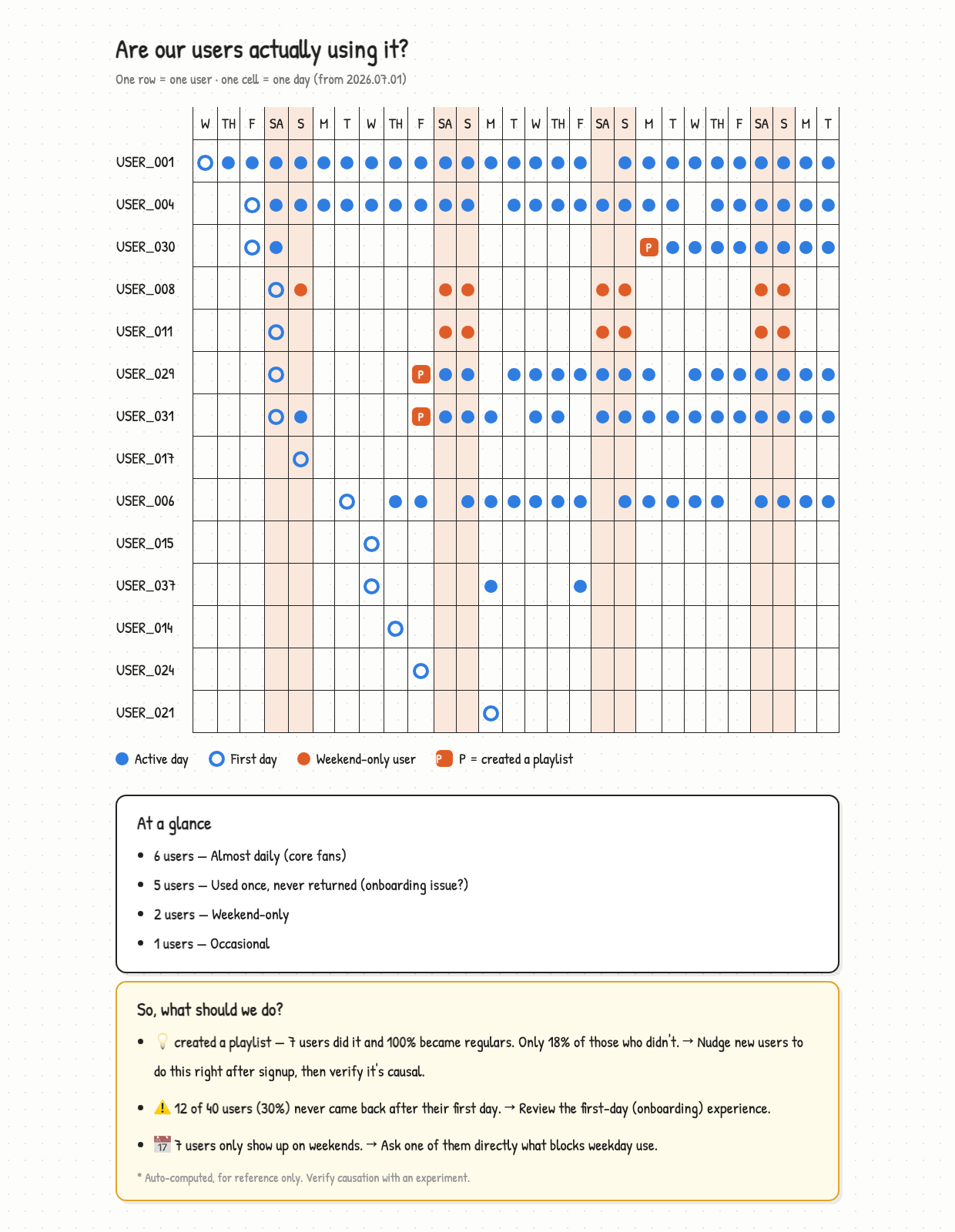
Dotplot MCP는 개발자가 사용자별 dot plot을 통해 제품의 사용자 흐름과 리텐션을 분석할 수 있는 방법을 제공합니다. DAU나 MAU와 같은 집계 차트에 의존하는 대신, 이 MCP server는 각 행이 단일 사용자를 나타내고 각 셀이 하루를 나타내는 시각적 표현을 생성하여 개별 사용자 행동에 집중합니다. 이러한 접근 방식은 특정 aha moment를 식별하고 소규모 사용자 기반에서 퍼널이 얼마나 잘 작동하는지 평가하는 데 도움이 됩니다.
사용자는 claude mcp add --scope user dotplot -- uvx dotplot-mcp 명령어를 사용하여 서버를 로컬에 설정할 수 있습니다. 이 시스템은 수학적 정확성을 보장하기 위해 AI가 코드로 계산된 데이터를 해석하는 방식으로 작동합니다. 별도의 이벤트 테이블 없이도 주문이나 위시리스트 아이템과 같은 기존 SQL 테이블을 이벤트 스트림으로 변환할 수 있습니다. 이 서버에는 전체 보고서를 위한 /dotplot-analyze-product, 누락된 로깅을 식별하기 위한 /dotplot-add-tracking, 그리고 현재 데이터를 이전 결과와 비교하기 위한 /dotplot-whats-changed와 같은 특정 슬래시 명령어가 포함되어 있습니다.
활용 사례
- 1전체 제품 분석 수행AI에게 제품의 사용자 리텐션 및 행동에 대한 종합 보고서를 생성하도록 요청합니다.
- 2누락된 이벤트 트래킹 식별에이전트가 코드베이스를 스캔하여 아직 구현하지 않은 로깅 코드를 찾아 작성하도록 합니다.
- 3시간 경과에 따른 리텐션 비교새 보고서를 이전 보고서와 비교하여 사용자 행동 패턴이 어떻게 변화했는지 확인합니다.
- 4SQL 테이블을 이벤트로 변환주문과 같은 표준 데이터베이스 테이블을 분석을 위한 이벤트 데이터로 변환합니다.
프로젝트의 README를 바탕으로 작성되었습니다. 모든 활용 사례는 해당 내용의 인용문과 대조하여 확인합니다.
Dotplot MCP 설치 방법
형식 확인: 2026년 11월 10일Cursor에 추가Goose에 추가Claude Code에 Dotplot MCP 설치
$ claude mcp add dotplot-mcp -- uvx dotplot-mcpCursor에 Dotplot MCP 설치
~/.cursor/mcp.json
{
  "mcpServers": {
    "dotplot-mcp": {
      "command": "uvx",
      "args": [
        "dotplot-mcp"
      ]
    }
  }
}VS Code에 Dotplot MCP 설치
.vscode/mcp.json
{
  "servers": {
    "dotplot-mcp": {
      "type": "stdio",
      "command": "uvx",
      "args": [
        "dotplot-mcp"
      ]
    }
  }
}VS Code CLI에 Dotplot MCP 설치
$ code --add-mcp '{"name":"dotplot-mcp","type":"stdio","command":"uvx","args":["dotplot-mcp"]}'Claude Desktop에 Dotplot MCP 설치
claude_desktop_config.json
{
  "mcpServers": {
    "dotplot-mcp": {
      "command": "uvx",
      "args": [
        "dotplot-mcp"
      ]
    }
  }
}Codex에 Dotplot MCP 설치
$ codex mcp add dotplot-mcp -- uvx dotplot-mcpCodex config.toml에 Dotplot MCP 설치
~/.codex/config.toml
[mcp_servers.dotplot-mcp]
command = "uvx"
args = ["dotplot-mcp"]
Gemini CLI에 Dotplot MCP 설치
$ gemini mcp add -s user dotplot-mcp uvx -- dotplot-mcpGemini settings.json에 Dotplot MCP 설치
~/.gemini/settings.json
{
  "mcpServers": {
    "dotplot-mcp": {
      "command": "uvx",
      "args": [
        "dotplot-mcp"
      ]
    }
  }
}자동 검사
2026년 11월 15일에 실행됨전체 보고서 →자동 검사를 통과했습니다. 이는 보안 감사가 아닙니다. 코드를 직접 읽고 서버에 필요한 최소한의 권한만 부여하십시오. 검사 방식

- 소스 저장소 연결 및 접근 가능brownglasses/dotplot-mcp is public and reachablegithub.com/brownglasses/dotplot-mcp ↗통과
- 패키지가 이 저장소를 소스로 명시dotplot-mcp names brownglasses/dotplot-mcp as sourcepypi.org/project/dotplot-mcp/ ↗통과
- 빌드 출처(Sigstore 증명)No build attestation published for this release검사되지 않음
- 오픈 소스 라이선스 (OSI)MITspdx.org/licenses/MIT.html ↗통과
- 최근 1년 내 커밋 또는 릴리스Last commit or release 2026-08-14github.com/brownglasses/dotplot-mcp ↗통과
- OpenSSF Scorecard검사되지 않음
- 패키지 이름이 인기 패키지와 유사하지 않음No popular package one edit away from dotplot-mcp통과
- 패키지 및 해당 종속성에 중요한 보안 권고 없음29 resolved dependencies checked; no critical advisoryosv.dev ↗통과
- 모델에 대한 숨겨진 지침 없음0 tool descriptions and the README read; no override phrases, credential paths or hidden characters통과
- 파괴적인 도구에 라벨 표시됨검사되지 않음
- 원격 엔드포인트가 MCP 핸드셰이크에 응답검사되지 않음
README
GitHub에서 보기Dot Plot MCP
See individual users, not aggregate charts.
English | 한국어
Install
Paste this to your agent and it sets everything up:
Set up Dotplot (MCP + skills) — instructions are here https://dotplot-reports.vercel.app/setup.md
claude mcp add --scope user dotplot -- uvx dotplot-mcp
Use
Say this in any project:
"Analyze my product"
You get the report above. That's it.
Or use the slash commands:
/dotplot-analyze-product    full analysis and report
/dotplot-add-tracking       find and write the logging you're missing
/dotplot-whats-changed      compare with the previous report
Claude finds your data, picks the action that means "this user got value", and
writes the report. No events table needed — your orders table already is one:
SELECT user_id, created_at::date AS date, 'purchase' AS event FROM orders
UNION ALL
SELECT user_id, added_at::date, 'add_to_wishlist' FROM wishlist_items
Nothing tracked yet? Say "add the tracking I'm missing" and Claude reads your code, writes the logging that's absent, and tells you when to come back.
git clone https://github.com/brownglasses/dotplot-mcp && cd dotplot-mcp
uv run sample_data.py   # 40 fake users with a pattern planted in them
uv run harness.py       # watch the whole pipeline run
Why this exists
DAU/MAU charts go "up and to the right" as long as new users arrive — even when nobody stays. Until you have hundreds of users, the most informative dashboard is YC's dot plot (David Lieb): one row per user, one cell per day.
Four rules keep it honest:
- Code computes, AI only interprets — same data, same numbers, every time
- Small samples withhold judgment — under 5 users in a group, it says nothing
- Correlation isn't cause — every finding ships with "test this before you believe it"
- Vanity metrics are refused — pick
open_appas your value event and the code says no
Reports come out in your language (English, 한국어, 日本語 built in; anything else translated on the fly with the numbers verified intact).
More
MIT
Dotplot MCP 질문
Dotplot MCP를 Claude Code에 추가하려면 어떻게 하나요?
터미널에서 claude mcp add dotplot-mcp -- uvx dotplot-mcp를 실행합니다. 모든 프로젝트에서 사용할 수 있게 하려면 --scope user를 추가합니다.
Dotplot MCP를 Cursor에 추가하려면 어떻게 하나요?
~/.cursor/mcp.json를 열고 mcpServers 아래에 서버를 추가합니다. 위 설치 섹션에 표시된 Cursor 구성을 사용합니다.
제품 분석을 어떻게 시작하나요?
에이전트에게 'Analyze my product'라고 말하면 보고서를 생성합니다.
아직 트래킹을 구현하지 않았다면 어떻게 하나요?
AI에게 누락된 로깅을 찾아 작성해 달라고 요청할 수 있습니다.
특정 이벤트 테이블이 필요한가요?
아니요, SQL을 사용하여 주문이나 위시리스트 아이템과 같은 기존 데이터베이스 테이블에서 이벤트를 도출할 수 있습니다.