
로컬 MCP server를 통해 Jetpack Compose UI 피드백과 소스 컨텍스트를 AI 코딩 에이전트에 전달합니다.
다른 이름 beyondwin/FixThis, @beyondwin/fixthis
- 스타
- 5
- Tools
- —
- 다운로드, 30일
- 357
- 최신 버전
- 1.5.0
- 마지막 커밋
- 2026년 10월 28일
- 라이선스
- MIT
FixThis MCP란?
FixThis은(는) MCP server입니다. 로컬 MCP server를 통해 Jetpack Compose UI 피드백과 소스 컨텍스트를 AI 코딩 에이전트에 전달합니다.
프로젝트 README에서 생성된 요약
FixThis MCP server 정보
Jetpack Compose로 작업하는 Android 개발자는 FixThis를 사용하여 시각적인 UI 버그와 소스 코드 컨텍스트 사이의 간극을 메울 수 있습니다. Compose 애플리케이션에 디버그 사이드킥을 연결하면, 사용자가 로컬 브라우저 콘솔에서 특정 UI 요소를 가리키고 원하는 변경 사항을 주석으로 달 수 있습니다. 이 프로세스는 스크린샷 범위, semantics, 소스 후보를 포함하는 압축된 핸드오프 데이터를 생성하며, 이를 코딩 에이전트에 직접 전송할 수 있습니다.
이 로컬 MCP server는 ADB와 localhost를 통해 실행되므로 외부 API로 데이터가 전송되지 않습니다. Claude Code 또는 Codex와 같은 에이전트와 함께 사용하도록 설계되었으며, 이러한 에이전트는 Gradle plugin 설치와 MCP 설정을 자동화할 수 있습니다. 사용자는 채팅 인터페이스를 위해 프롬프트를 수동으로 복사하거나, Save to MCP 기능을 사용하여 비식별 처리된 Android 진단 데이터를 요청에 첨부할 수 있습니다. 시스템은 에이전트가 정확한 composable 컴포넌트를 식별할 수 있도록 줄 번호 및 editSurface 힌트와 같은 구체적인 기술 세부 정보를 제공합니다.
활용 사례
- 1에이전트 설치 자동화AI 에이전트가 install-agent 명령을 실행하고 필요한 Gradle plugin을 적용하여 Jetpack Compose 프로젝트를 자동으로 구성할 수 있습니다.
- 2시각적 UI 디버깅개발자는 브라우저 기반 콘솔에서 특정 컴포넌트를 선택하거나 영역을 드래그하여 레이아웃 또는 간격 변경 사항을 설명할 수 있습니다.
- 3컨텍스트 기반 코드 핸드오프단순한 스크린샷 대신, 이 도구는 에이전트에게 정밀한 편집을 위한 상위 소스 후보와 줄 번호를 제공합니다.
- 4진단 데이터 첨부세션을 MCP 클라이언트에 저장할 때 범위가 지정되고 비식별 처리된 Android 진단 데이터를 포함할 수 있습니다.
프로젝트의 README를 바탕으로 작성되었습니다. 모든 활용 사례는 해당 내용의 인용문과 대조하여 확인합니다.
FixThis MCP 설치 방법
형식 확인: 2026년 11월 10일Cursor에 추가Goose에 추가Claude Code에 FixThis MCP 설치
$ claude mcp add fixthis -- npx -y @beyondwin/fixthisCursor에 FixThis MCP 설치
~/.cursor/mcp.json
{
  "mcpServers": {
    "fixthis": {
      "command": "npx",
      "args": [
        "-y",
        "@beyondwin/fixthis"
      ]
    }
  }
}VS Code에 FixThis MCP 설치
.vscode/mcp.json
{
  "servers": {
    "fixthis": {
      "type": "stdio",
      "command": "npx",
      "args": [
        "-y",
        "@beyondwin/fixthis"
      ]
    }
  }
}VS Code CLI에 FixThis MCP 설치
$ code --add-mcp '{"name":"fixthis","type":"stdio","command":"npx","args":["-y","@beyondwin/fixthis"]}'Claude Desktop에 FixThis MCP 설치
claude_desktop_config.json
{
  "mcpServers": {
    "fixthis": {
      "command": "npx",
      "args": [
        "-y",
        "@beyondwin/fixthis"
      ]
    }
  }
}Codex에 FixThis MCP 설치
$ codex mcp add fixthis -- npx -y @beyondwin/fixthisCodex config.toml에 FixThis MCP 설치
~/.codex/config.toml
[mcp_servers.fixthis]
command = "npx"
args = ["-y", "@beyondwin/fixthis"]
Gemini CLI에 FixThis MCP 설치
$ gemini mcp add -s user fixthis npx -- -y @beyondwin/fixthisGemini settings.json에 FixThis MCP 설치
~/.gemini/settings.json
{
  "mcpServers": {
    "fixthis": {
      "command": "npx",
      "args": [
        "-y",
        "@beyondwin/fixthis"
      ]
    }
  }
}자동 검사
2026년 11월 14일에 실행됨전체 보고서 →자동 검사를 통과했습니다. 이는 보안 감사가 아닙니다. 코드를 직접 읽고 서버에 필요한 최소한의 권한만 부여하십시오. 검사 방식

- 소스 저장소 연결 및 접근 가능beyondwin/fixthis is public and reachablegithub.com/beyondwin/fixthis ↗통과
- 패키지가 이 저장소를 소스로 명시@beyondwin/fixthis names beyondwin/fixthis as sourcenpmjs.com/package/@beyondwin/fixthis ↗통과
- 빌드 출처(Sigstore 증명)Sigstore attestation for @beyondwin/fixthisnpmjs.com/package/@beyondwin/fixthis/v/1.5.0#provenance ↗통과
- 오픈 소스 라이선스 (OSI)MITspdx.org/licenses/MIT.html ↗통과
- 최근 1년 내 커밋 또는 릴리스Last commit or release 2026-10-28github.com/beyondwin/fixthis ↗통과
- OpenSSF Scorecard검사되지 않음
- 패키지 이름이 인기 패키지와 유사하지 않음No popular package one edit away from @beyondwin/fixthis통과
- 패키지 및 해당 종속성에 중요한 보안 권고 없음1 resolved dependencies checked; no critical advisoryosv.dev ↗통과
- 모델에 대한 숨겨진 지침 없음0 tool descriptions and the README read; no override phrases, credential paths or hidden characters통과
- 파괴적인 도구에 라벨 표시됨검사되지 않음
- 원격 엔드포인트가 MCP 핸드셰이크에 응답검사되지 않음
README
GitHub에서 보기FixThis for Android Compose


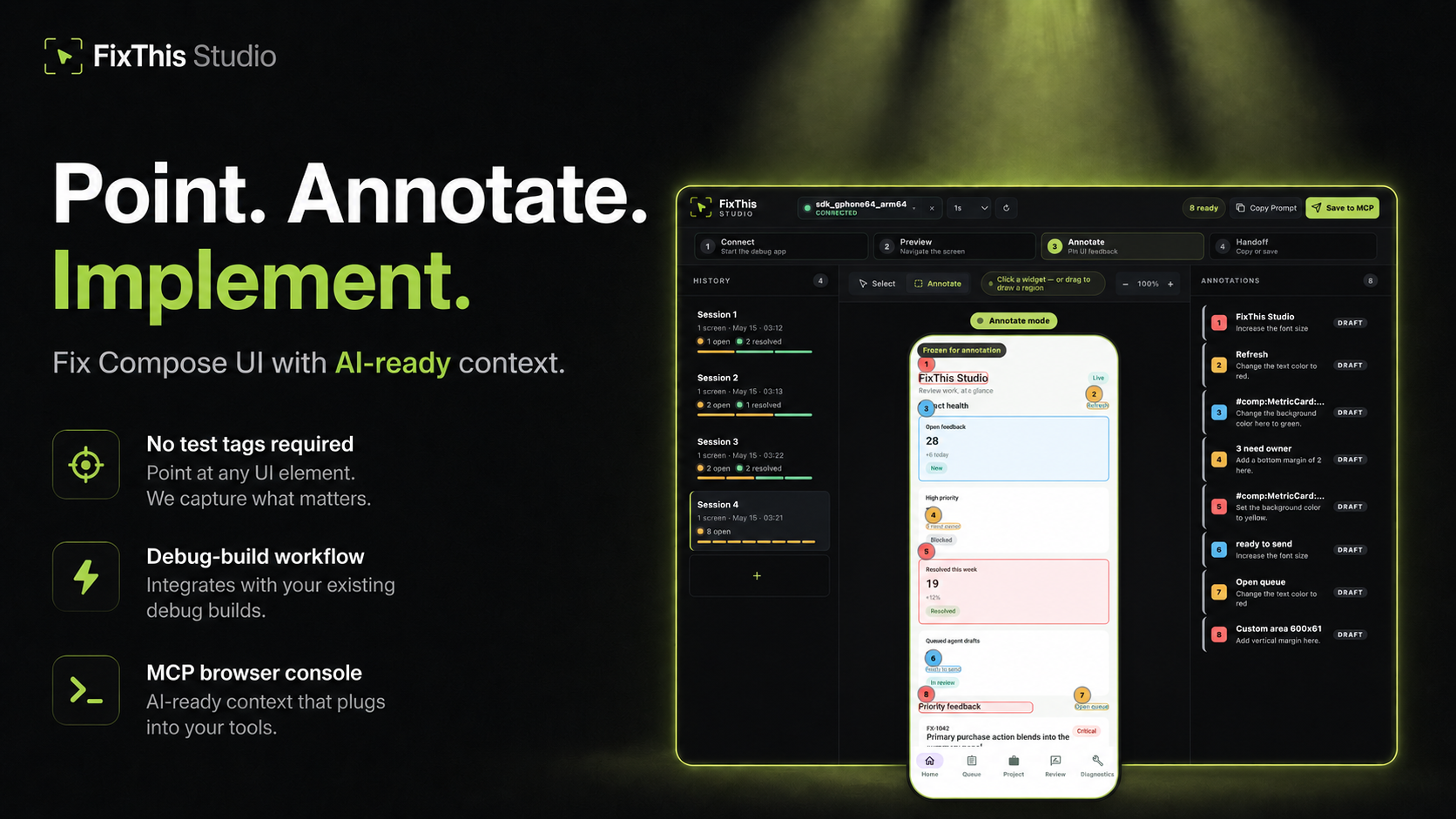
Point at a Jetpack Compose UI, write the change, and hand Claude, Codex, Cursor, or another coding agent the source context it needs.
FixThis is debug-only. It attaches a sidekick to a Compose debug app, mirrors the screen into a local browser console, and turns annotations into a compact handoff: screenshot bounds, semantics, source candidates, and confidence warnings.
Click a component to select it. Drag when the target is spacing, empty room, or something that is not a clean Compose node.
Works Today
- Try the sample app in about five minutes.
- Install the desktop CLI/MCP with Homebrew, npm, or GitHub Releases.
- Add it to an external app with the Gradle plugin
io.github.beyondwin.fixthis.compose. - Let Claude Code or Codex configure the sample with
./scripts/bootstrap-mcp.sh --sample. - Let an agent configure your app with
fixthis install-agent. - Use Copy Prompt with Cursor, ChatGPT, or any chat agent.
- Use Save to MCP with Claude Code or Codex.
- Save to MCP can attach a bounded, redacted Android diagnostics baseline. Switch the session to Manual or Off if you do not want that. Copy Prompt never starts collection.
- Runs locally over ADB and
127.0.0.1. No external API calls.
Quick Start: Agent Installs FixThis in Your App
Claude Code / Codex Bootstrap Prompt
Paste this into Claude Code or Codex from the root of a Jetpack Compose Android app:
Install FixThis in this project and configure it for this agent.

Use this order:
1. Run `fixthis install-agent --project-dir . --target all --verify --json`.
2. Use the JSON `readiness.state` and `actions[]` as the source of truth.
3. If `requiresUserAction` is true, tell me the exact blocking action.
4. Do not call `fixthis_open_feedback_console` until `readyForMcpTooling` is true, or until the report's `agent_after_restart` action is reached after restart.

Restart Claude Code or Codex if the report asks for it.
Do not configure release builds. Do not commit `.fixthis/`.
The agent should run:
# macOS
brew install beyondwin/tools/fixthis

# Node
npm install -g @beyondwin/fixthis

# macOS/Linux fallback
curl -fsSL https://raw.githubusercontent.com/beyondwin/FixThis/main/scripts/install-fixthis.sh \
  | bash -s -- --version v1.5.0

fixthis install-agent --project-dir . --target all --verify --json
If Homebrew already has it, run
brew update && brew upgrade beyondwin/tools/fixthis and check
fixthis --version.
fixthis install-agent applies the Gradle plugin, writes MCP config, and
writes .fixthis/project.json plus .fixthis/agent-setup.*. If doctor
reports NEEDS_INSTALL or metadata is missing, run ./gradlew fixthisSetup
and rerun fixthis install-agent --project-dir . --target all --verify --json.
Restart Claude Code or Codex when the report asks, then call
fixthis_open_feedback_console. For a manual check, use
fixthis doctor --project-dir . --json.
Published plugin:
plugins {
    id("io.github.beyondwin.fixthis.compose") version "1.5.0"
}
The plugin adds the debug-only sidekick and keeps release builds out.
Quick Start: Sample App to Agent Handoff
git clone <this-repo> && cd FixThis
./gradlew :fixthis-cli:installDist :fixthis-mcp:installDist
fixthis-cli/build/install/fixthis/bin/fixthis doctor --package io.github.beyondwin.fixthis.sample
fixthis-cli/build/install/fixthis/bin/fixthis run --package io.github.beyondwin.fixthis.sample
fixthis run installs the sample debug APK, launches it, and opens FixThis
Studio at http://127.0.0.1:<port>.
In the console:
- Click Annotate.
- Click a UI element, or drag an area.
- Type the change you want.
- Repeat for other spots on this screen.
- Copy Prompt for a chat agent, or Save to MCP for Claude Code / Codex.
You are done when a numbered annotation is visible and you have copied Markdown or saved a local MCP handoff.
Maintainers can prove that Copy Prompt path on a connected device:
npm run real-copy-prompt:smoke -- --strict
Pick Your Path
| Goal | Start here |
|---|---|
| Try it without touching your app | Sample quick start |
| Add it to your debug build | Add to your app |
| Connect an agent | Connect your agent |
| Bootstrap MCP from this repo | MCP.md |
| Use the console | Console tour |
| Understand the product | Product |
| Diagnose a failure | Troubleshooting |
| Inspect contracts | Docs index |
| Contribute | CONTRIBUTING.md |
| Reader | Start here |
|---|---|
| First-time user | Sample quick start |
| External app developer | Add to your app |
| Agent in this repo | AGENTS.md and project map |
| Maintainer | Docs index and project map |
| Contract or CLI change | Reference contracts |
Why not just a screenshot?
A screenshot is enough when the target is obvious. FixThis helps when the UI is dense, list-rendered, or named mostly by composable:
- Top-3 source candidates with line numbers and match reasons
editSurfacehints for call site vs component vs copy vs layout vs interop- Instance grouping so identical cards stay distinct
- Screen fingerprint so a rotated or changed screen cannot sneak into a save
- Honest confidence: visual-only, stale, or possible AndroidView/WebView
- Bounded runtime diagnostics on Save to MCP
- Retry-safe batches that do not duplicate work
Modules
| Module | Role |
|---|---|
:app (sample/) |
Validation sample |
:fixthis-compose-core |
Pure Kotlin domain |
:fixthis-compose-sidekick |
Debug Android runtime |
:fixthis-gradle-plugin |
Source index and debug wiring |
:fixthis-cli |
Desktop CLI |
:fixthis-mcp |
MCP server and local console |
More: Product, decisions, architecture.
Status
Public install paths:
- Gradle plugin
io.github.beyondwin.fixthis.compose - Maven
io.github.beyondwin:fixthis-compose-sidekickandfixthis-compose-core - Homebrew
brew install beyondwin/tools/fixthis - GitHub Release
fixthis-cli-mcp-vX.Y.Z.tar.gz - npm
@beyondwin/fixthis - MCP Registry
io.github.beyondwin/fixthis
Live dashboard: Release readiness.
main may be ahead of the latest tag. See CHANGELOG
and release notes.
Agents in this repo should read AGENTS.md.
Trust
FixThis stays on your machine. The sidekick talks over ADB, the console binds
to localhost, and Save to MCP writes under .fixthis/. Screenshots can
still contain sensitive pixels. Review them before sharing. Do not commit
.fixthis/.
Details: Privacy, Security, Threat model.
V1 stays narrow: Compose debug builds, local ADB, MCP-first handoff, best-effort source candidates, no cloud upload. See Roadmap.
License
FixThis MCP 질문
FixThis MCP를 Claude Code에 추가하려면 어떻게 하나요?
터미널에서 claude mcp add fixthis -- npx -y @beyondwin/fixthis를 실행합니다. 모든 프로젝트에서 사용할 수 있게 하려면 --scope user를 추가합니다.
FixThis MCP를 Cursor에 추가하려면 어떻게 하나요?
~/.cursor/mcp.json를 열고 mcpServers 아래에 서버를 추가합니다. 위 설치 섹션에 표시된 Cursor 구성을 사용합니다.
FixThis가 데이터를 클라우드로 전송하나요?
아니요, 외부 API 호출 없이 ADB와 localhost를 통해 로컬에서 실행됩니다.
Claude Code 또는 Codex에서 FixThis를 어떻게 사용하나요?
'Save to MCP' 기능을 사용하거나 제공된 bootstrap prompt를 사용하여 에이전트를 설정할 수 있습니다.