
오디오, 비주얼, 성능 데이터를 캡처하고 분석하여 AI 코딩 어시스턴트가 라이브 웹 애플리케이션에 직접적인 감각적 접근을 할 수 있도록 지원합니다.
다른 이름 asume21/webear
- 스타
- 1
- Tools
- —
- 다운로드, 30일
- —
- 최신 버전
- 1.2.4
- 마지막 커밋
- 2026년 10월 28일
- 라이선스
- MIT
webear MCP란?
webear은(는) MCP server입니다. 오디오, 비주얼, 성능 데이터를 캡처하고 분석하여 AI 코딩 어시스턴트가 라이브 웹 애플리케이션에 직접적인 감각적 접근을 할 수 있도록 지원합니다.
프로젝트 README에서 생성된 요약
webear MCP server 정보
Webear는 Web Audio API를 활용하여 AI 코딩 어시스턴트가 라이브 웹 애플리케이션에 직접적인 감각적 접근을 할 수 있도록 지원합니다. 이를 통해 AI는 실내 음향이나 마이크 하드웨어의 간섭 없이 브라우저 탭의 디지털 출력을 직접 들을 수 있습니다. 개발자는 로컬 개발 서버에서 Express 미들웨어를 사용하거나 SSE를 통해 호스팅된 릴레이에 연결하여 워크플로우에 통합할 수 있습니다. 이 MCP server는 stdio를 사용하여 Claude Code, Cursor 또는 Windsurf와 같은 IDE 내부에서 실행됩니다.
사용자는 capture_audio, analyze_audio, describe_audio, diff_audio와 같은 특정 도구를 통해 애플리케이션과 상호작용할 수 있습니다. 음량 및 클리핑과 같은 기본 분석은 ffmpeg를 통해 로컬에서 수행할 수 있지만, 스펙트럴 센트로이드, BPM, 타이밍 지터와 같은 고급 기능은 CodedSwitch API 키가 필요합니다. 이 시스템은 AI 어시스턴트를 통해 복잡한 오디오 그래프, 신시사이저 또는 믹싱 문제를 직접 디버깅해야 하는 웹 오디오 개발자, 게임 제작자 및 음악 앱 빌더를 위해 설계되었습니다.
활용 사례
- 1오디오 믹싱 문제 디버깅AI에게 라이브 오디오 스트림을 분석하도록 요청하여 특정 주파수 대역이 왜 뭉개지는지 확인합니다.
- 2오디오 회귀 탐지도구를 사용하여 서로 다른 코드 버전의 오디오 캡처를 비교하고 음량이나 톤의 변화를 찾아냅니다.
- 3신호 클리핑 모니터링웹 애플리케이션이 최대 피크 레벨을 초과하는 오디오를 생성하는지 확인합니다.
- 4리듬 일관성 분석웹 기반 음악 애플리케이션의 타이밍 지터와 BPM을 평가합니다.
프로젝트의 README를 바탕으로 작성되었습니다. 모든 활용 사례는 해당 내용의 인용문과 대조하여 확인합니다.
webear MCP 설치 방법
형식 확인: 2026년 11월 10일Cursor에 추가Goose에 추가Claude Code에 webear MCP 설치
$ claude mcp add --env 'CODEDSWITCH_API_KEY=<YOUR_CODEDSWITCH_API_KEY>' webear -- npx -y webearCursor에 webear MCP 설치
~/.cursor/mcp.json
{
  "mcpServers": {
    "webear": {
      "command": "npx",
      "args": [
        "-y",
        "webear"
      ],
      "env": {
        "CODEDSWITCH_API_KEY": "<YOUR_CODEDSWITCH_API_KEY>"
      }
    }
  }
}VS Code에 webear MCP 설치
.vscode/mcp.json
{
  "servers": {
    "webear": {
      "type": "stdio",
      "command": "npx",
      "args": [
        "-y",
        "webear"
      ],
      "env": {
        "CODEDSWITCH_API_KEY": "<YOUR_CODEDSWITCH_API_KEY>"
      }
    }
  }
}VS Code CLI에 webear MCP 설치
$ code --add-mcp '{"name":"webear","type":"stdio","command":"npx","args":["-y","webear"],"env":{"CODEDSWITCH_API_KEY":"<YOUR_CODEDSWITCH_API_KEY>"}}'Claude Desktop에 webear MCP 설치
claude_desktop_config.json
{
  "mcpServers": {
    "webear": {
      "command": "npx",
      "args": [
        "-y",
        "webear"
      ],
      "env": {
        "CODEDSWITCH_API_KEY": "<YOUR_CODEDSWITCH_API_KEY>"
      }
    }
  }
}Codex에 webear MCP 설치
$ codex mcp add webear --env 'CODEDSWITCH_API_KEY=<YOUR_CODEDSWITCH_API_KEY>' -- npx -y webearCodex config.toml에 webear MCP 설치
~/.codex/config.toml
[mcp_servers.webear]
command = "npx"
args = ["-y", "webear"]

[mcp_servers.webear.env]
CODEDSWITCH_API_KEY = "<YOUR_CODEDSWITCH_API_KEY>"
Gemini CLI에 webear MCP 설치
$ gemini mcp add -s user -e 'CODEDSWITCH_API_KEY=<YOUR_CODEDSWITCH_API_KEY>' webear npx -- -y webearGemini settings.json에 webear MCP 설치
~/.gemini/settings.json
{
  "mcpServers": {
    "webear": {
      "command": "npx",
      "args": [
        "-y",
        "webear"
      ],
      "env": {
        "CODEDSWITCH_API_KEY": "<YOUR_CODEDSWITCH_API_KEY>"
      }
    }
  }
}구성
CODEDSWITCH_API_KEY필수비밀API key from codedswitch.com for audio analysis
WEBEAR_BASE_URLURL of your dev server where WebEar middleware is mounted
| 이름 | 설명 | 유형 |
|---|---|---|
| CODEDSWITCH_API_KEY | API key from codedswitch.com for audio analysis | 필수비밀 |
| WEBEAR_BASE_URL | URL of your dev server where WebEar middleware is mounted |
자동 검사
2026년 11월 13일에 실행됨전체 보고서 →자동 검사를 통과했습니다. 이는 보안 감사가 아닙니다. 코드를 직접 읽고 서버에 필요한 최소한의 권한만 부여하십시오. 검사 방식

- 소스 저장소 연결 및 접근 가능asume21/webear is public and reachablegithub.com/asume21/webear ↗통과
- 패키지가 이 저장소를 소스로 명시webear names asume21/webear as sourcenpmjs.com/package/webear ↗통과
- 빌드 출처(Sigstore 증명)No build attestation published for this release검사되지 않음
- 오픈 소스 라이선스 (OSI)MITspdx.org/licenses/MIT.html ↗통과
- 최근 1년 내 커밋 또는 릴리스Last commit or release 2026-10-28github.com/asume21/webear ↗통과
- OpenSSF Scorecard검사되지 않음
- 패키지 이름이 인기 패키지와 유사하지 않음No popular package one edit away from webear통과
- 패키지 및 해당 종속성에 중요한 보안 권고 없음99 resolved dependencies checked; no critical advisoryosv.dev ↗통과
- 모델에 대한 숨겨진 지침 없음0 tool descriptions and the README read; no override phrases, credential paths or hidden characters통과
- 파괴적인 도구에 라벨 표시됨검사되지 않음
- 원격 엔드포인트가 MCP 핸드셰이크에 응답검사되지 않음
README
GitHub에서 보기webear


Give your AI real senses — hear, see, and feel any web app.
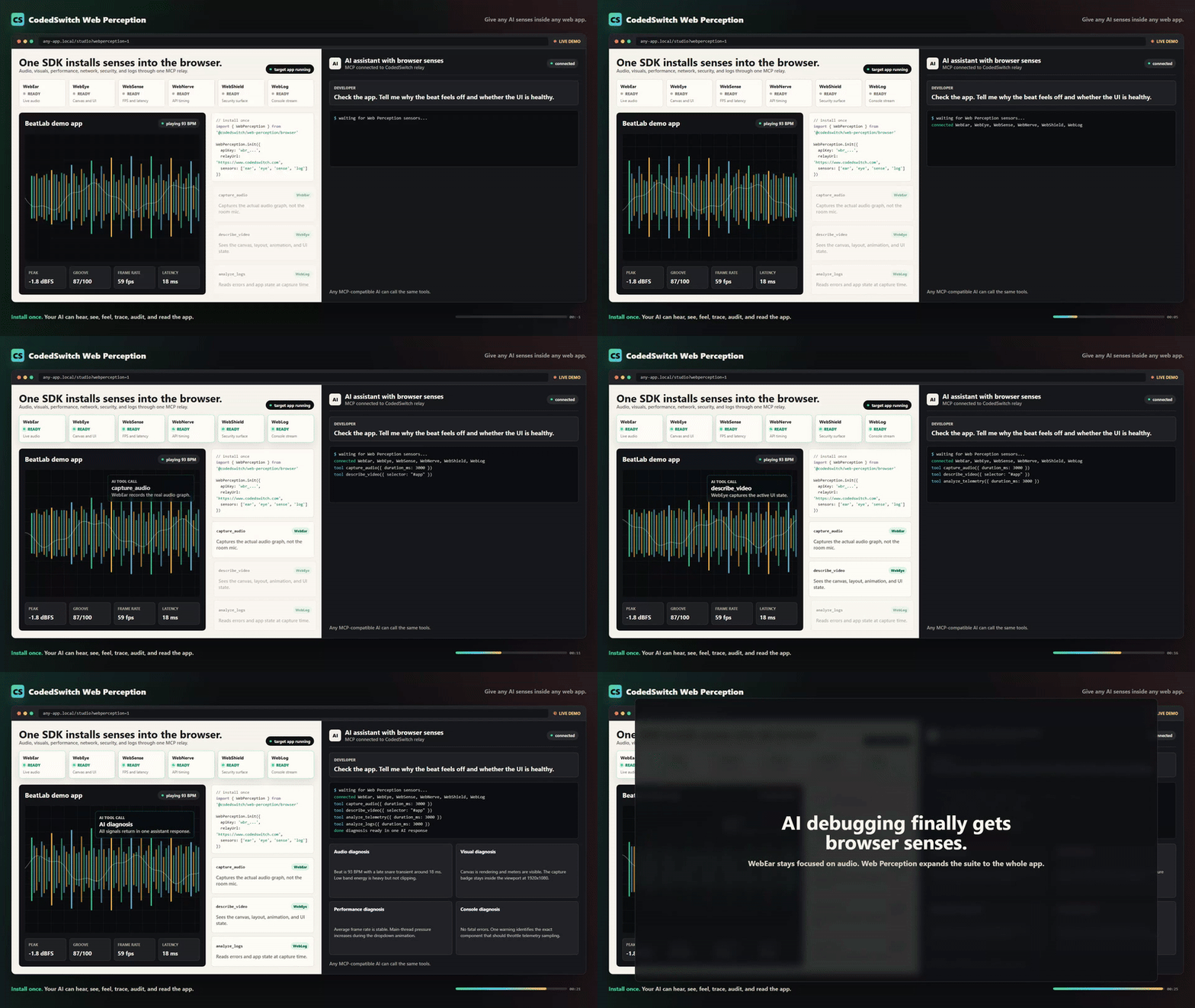
An MCP server + browser SDK that gives AI coding assistants direct sensory access to a live web application. Audio, visuals, performance, network, security, and console — captured from the browser, analyzed in real time, delivered via MCP.
"The beat sounds muddy" → your AI captures 3 seconds, measures the spectral centroid at 580 Hz with 45% energy below 250 Hz, and tells you exactly why.
What It Does
| Tool | Description |
|---|---|
capture_audio |
Record a short clip (500ms–30s) of what your web app is outputting right now |
analyze_audio |
Signal analysis: RMS, peak dB, clipping, spectral centroid, frequency bands, BPM, timing jitter |
describe_audio |
Plain-English AI description — "the kick is boomy with heavy sub buildup around 80 Hz" |
diff_audio |
Compare two captures and flag what changed — loudness, tone, timing, clipping |
How It Works
Browser (Web Audio API)
    ↓ MediaRecorder taps the AudioContext output node
    ↓ Uploads WebM blob via HTTP POST
Express Middleware (your dev server)
    ↓ Stores captures in memory, dispatches commands via SSE
MCP Server (stdio — runs inside your IDE)
    ↓ Retrieves captures, sends to CodedSwitch analysis API
AI Coding Assistant
    → "Your bass band is 42% of the mix (high), spectral centroid
       is 580 Hz (muddy), and timing jitter is 23ms — the scheduler
       is drifting under load."
The key difference from every other audio MCP: this taps the Web Audio graph directly, bypassing room acoustics, microphone hardware, and the need to export files.
Quick Start
1. Install
npm install webear
2. Add the Express middleware to your dev server
import express from 'express'
import { webearMiddleware } from 'webear/middleware'

const app = express()
app.use(express.json())

// Mount the audio debug bridge (automatically disabled in production)
app.use('/api/webear', webearMiddleware())

app.listen(5000)
3. Add the client snippet to your web app
Option A — auto-detect everything (Tone.js or raw Web Audio)
import WebEar from 'webear/client'
WebEar.init()
Option B — explicit AudioContext
const ctx = new AudioContext()
const masterGain = ctx.createGain()
masterGain.connect(ctx.destination)

WebEar.init({ audioContext: ctx, outputNode: masterGain })
Option C — Tone.js project
import * as Tone from 'tone'
WebEar.init({ toneJs: true })
Option D — Three.js WebGL Game
import * as THREE from 'three'
const listener = new THREE.AudioListener()
camera.add(listener)
WebEar.init({ tapNode: listener.getInput() })
Option E — plain script tag
<script src="node_modules/webear/client-snippet.js"></script>
<script>WebEar.init()</script>
4. Configure your IDE
Claude Code (.mcp.json in project root):
{
  "mcpServers": {
    "webear": {
      "command": "npx",
      "args": ["webear"],
      "env": {
        "WEBEAR_BASE_URL": "http://localhost:5000",
        "CODEDSWITCH_API_KEY": "your-key-here"
      }
    }
  }
}
Cursor (.cursor/mcp.json):
{
  "mcpServers": {
    "webear": {
      "command": "npx",
      "args": ["webear"],
      "env": {
        "WEBEAR_BASE_URL": "http://localhost:5000",
        "CODEDSWITCH_API_KEY": "your-key-here"
      }
    }
  }
}
Windsurf (mcp_config.json):
{
  "webear": {
    "command": "npx",
    "args": ["webear"],
    "disabled": false,
    "env": {
      "WEBEAR_BASE_URL": "http://localhost:5000",
      "CODEDSWITCH_API_KEY": "your-key-here"
    }
  }
}
5. Get an API key — optional, and not to start
analyze_audio works with no key and no account. If ffmpeg is on your PATH,
it decodes and analyzes the capture on your machine and returns a basic report:
duration, loudness, peak level and whether the audio is clipping. Nothing is
uploaded. Try the tool before you sign up for anything.
A key unlocks the parts that need more than arithmetic:
| No key | With key | |
|---|---|---|
capture_audio |
✓ | ✓ |
analyze_audio |
Basic — duration, loudness, peak, clipping (local) | Full — spectral centroid, band energy, crest factor, BPM, timing jitter |
describe_audio — what it SOUNDS like |
— | ✓ |
mix_coach — measured + heard |
— | ✓ |
diff_audio — before/after |
— | ✓ |
To get one:
- Create a free account at codedswitch.com.
- Go to codedswitch.com/developer (also in the account menu as Developer API).
- Click Generate API Key — that value is your
CODEDSWITCH_API_KEY. Keys start withwbr_.
Free tier: 50 analyses/day. No credit card required.
6. Start your dev server, open your app, play audio, then ask your AI:
"Capture 3 seconds and tell me why the bass sounds muddy."
"Compare the audio before and after my last commit."
"Is there any clipping in the high-frequency range?"
Example Output
analyze_audio
── Audio Analysis Report ──────────────────────────────
Duration:          3.02s

── Loudness ─────────────────────────────────────────
RMS:               -12.4 dBFS
Peak:              -1.2 dBFS
Dynamic range:     11.2 dB
Crest factor:      3.63
Clipping:          none

── Tone ──────────────────────────────────────────────
Spectral centroid: 2847 Hz
DC offset:         0.00012 (ok)

── Frequency Bands ───────────────────────────────────
Sub  (20-80 Hz):   8.2%
Bass (80-250 Hz):  22.1%
Mid  (250-2k Hz):  38.4%
Hi-mid (2-6k Hz):  21.8%
High (6k+ Hz):     9.5%

── Rhythm ────────────────────────────────────────────
Estimated BPM:     92
Onset count:       12
Timing jitter:     4.2 ms std dev

── Summary ───────────────────────────────────────────
Loudness: -12.4 dBFS RMS, peak -1.2 dBFS. Tone: balanced (centroid 2847 Hz).
Band mix — sub: 8% | bass: 22% | mid: 38% | hi-mid: 22% | high: 10%.
Rhythm: estimated 92 BPM, 12 onsets detected. Timing: very tight (< 5 ms jitter).
diff_audio
── Audio Diff: a1b2c3d4… → e5f6g7h8… ──

── Loudness ──────────────────────────────────────────
  RMS: -14.2 dBFS → -12.4 dBFS  (+1.8 dBFS)
⚠ Peak: -3.1 dBFS → -0.2 dBFS  (+2.9 dBFS)
⚠ CLIPPING INTRODUCED — gain staging regression

── Tone ──────────────────────────────────────────────
⚠ Spectral centroid: 2847.0 Hz → 1920.0 Hz  (-927.0 Hz)

── Interpretation ────────────────────────────────────
A gain bug was introduced that causes clipping.
Tonal character changed noticeably — EQ or filter behaviour may have shifted.
Configuration
Environment Variables
| Variable | Default | Description |
|---|---|---|
WEBEAR_BASE_URL |
http://localhost:4000 |
URL of your dev server (where middleware is mounted) |
CODEDSWITCH_API_KEY |
— | API key from codedswitch.com — required for analyze_audio and describe_audio |
MCP_API_URL |
https://www.codedswitch.com |
Override the analysis API base (advanced / self-hosted) |
Middleware Options
webearMiddleware({
  maxCaptures: 50,       // Max captures in memory (default: 50)
  maxAgeMins: 10,        // Auto-evict after N minutes (default: 10)
  maxUploadBytes: 50e6,  // Max upload size (default: 50MB)
  devOnly: true,         // Disable in production (default: true)
})
Client Options
WebEar.init({
  audioContext: myCtx,             // Your AudioContext instance
  outputNode: myGainNode,          // The node to tap (defaults to destination)
  toneJs: true,                    // Auto-detect Tone.js context
  bridgeBase: '/api/webear',  // Override API path
  devOnly: true,                   // Only init outside of production (default: true)
})
Requirements
- Node.js >= 18
- A browser that supports
MediaRecorder(Chrome, Firefox, Edge, Safari 14+) - A
CODEDSWITCH_API_KEYfor analysis (free at codedswitch.com)
Who Is This For?
- Web Audio / Tone.js developers — debug beats, synths, effects, and mixing without leaving your IDE
- Game audio developers — verify sound effects, spatial audio, and mixing in real-time
- Music app builders — catch regressions between code changes with
diff_audio - Podcast / streaming apps — validate audio quality, levels, and encoding
- Anyone whose app makes sound — if it has a Web Audio graph, your AI can now hear it
Why Not Just Use the Microphone?
Microphone MCPs capture room sound — your fan noise, chair creaks, and room reverb are all in the recording. webear taps the Web Audio API before it hits the DAC, giving you a clean digital signal with no room artifacts.
Web Perception — Full Sensor Suite
WebEar started as audio-only. Web Perception expands it to 6 senses:
| Sensor | What it perceives |
|---|---|
| WebEar | Audio — mix quality, rhythm, instruments, clipping |
| WebEye | Visual — canvas, UI layout, animations, screenshots |
| WebSense | Performance — frame rate, memory, audio latency |
| WebNerve | Network — API latencies, connection quality, storage |
| WebShield | Security — cookies, storage exposure, CSP, framing |
| WebLog | Console — logs, warnings, errors, uncaught exceptions |
Install the full browser SDK
import { WebPerception } from 'webear/perception'

WebPerception.init({
  apiKey: 'wbr_YOUR_API_KEY',
  relayUrl: 'https://www.codedswitch.com',
  sensors: ['ear', 'eye', 'sense', 'nerve', 'shield', 'log'],
})
Or use a single sensor:
import { WebEar } from 'webear/perception'

WebEar.init({
  apiKey: 'wbr_YOUR_API_KEY',
  ear: { audioContext: myCtx, audioNode: masterGain },
})
Connect via MCP (hosted relay — no local server required)
{
  "mcpServers": {
    "webear": {
      "url": "https://www.codedswitch.com/api/webear/mcp/sse",
      "headers": {
        "Authorization": "Bearer wbr_YOUR_API_KEY"
      }
    }
  }
}
Available MCP Tools
| Sensor | Tool | Credits | Description |
|---|---|---|---|
| Ear | capture_audio |
Free | Record live tab audio |
| Ear | analyze_audio |
1 | BPM, loudness, frequency bands, clipping, dynamic range |
| Ear | describe_audio |
2 | AI plain-English description — instruments, genre, mood, mix notes |
| Ear | diff_audio |
1 | Compare two captures — loudness, tone, timing deltas |
| Ear | groove_score |
2 | Grid alignment, swing factor, consistency (0–100%) |
| Ear | capture_and_analyze |
1 | Capture + analysis in one call |
| Ear | mix_coach |
3 | Structured mixing feedback |
| Eye | capture_video |
Free | Record canvas/video from the tab |
| Eye | describe_video |
2 | AI visual description — layout, colors, bugs |
| Eye | diff_visuals |
2 | Compare two visual captures |
| Sense | capture_telemetry |
Free | FPS, memory, layout shifts, audio latency |
| Sense | analyze_telemetry |
1 | Frame drops, memory pressure, audio underruns |
| Nerve | capture_nerve |
Free | API timings, connection quality, storage size |
| Nerve | analyze_nerve |
1 | Slow APIs, connection quality, storage bloat |
| Shield | capture_shield |
Free | Cookies, CSP, storage exposure, framing |
| Shield | analyze_shield |
1 | CORS issues, non-HttpOnly cookies, missing CSP |
| Log | capture_logs |
Free | Console output + uncaught exceptions |
| Log | analyze_logs |
1 | Error patterns, stack traces, repeated warnings |
Get an API Key
- Create a free account at codedswitch.com.
- Open codedswitch.com/developer — also linked as Developer API in the account menu.
- Click Generate API Key and copy it. Keys start with
wbr_.
Free tier: 50 analyses/day, no credit card required.
Changelog
2.0.1
- Fixed the getting-started path for API keys. The previous instruction ("Settings → WebEar") was wrong — there is no WebEar section under Settings. Keys live at codedswitch.com/developer (linked as Developer API in the account menu). Both the Quick Start and the Web Perception sections now point to the correct place.
- The SDK's "missing API key" console error now links straight to the key page.
Contributing
See CONTRIBUTING.md.
License
MIT — see LICENSE
Author
Built by @asume21 — CodedSwitch
webear MCP 질문
webear MCP를 Claude Code에 추가하려면 어떻게 하나요?
터미널에서 claude mcp add --env 'CODEDSWITCH_API_KEY=<YOUR_CODEDSWITCH_API_KEY>' webear -- npx -y webear를 실행합니다. 모든 프로젝트에서 사용할 수 있게 하려면 --scope user를 추가합니다.
webear MCP를 Cursor에 추가하려면 어떻게 하나요?
~/.cursor/mcp.json를 열고 mcpServers 아래에 서버를 추가합니다. 위 설치 섹션에 표시된 Cursor 구성을 사용합니다.
analyze_audio 사용 시 API 키가 필요한가요?
ffmpeg가 설치되어 있다면 재생 시간, 음량, 피크 레벨, 클리핑을 포함한 기본 분석은 키 없이 로컬에서 작동합니다. 스펙트럴 센트로이드(spectral centroid) 및 BPM과 같은 고급 메트릭은 CodedSwitch API 키가 필요합니다.