
Generate Tech Stack MCP server
✓ 인증됨코드베이스를 스캔하여 사용된 언어, 프레임워크, 데이터베이스 및 인프라를 시각적인 HTML 인벤토리로 생성합니다.
다른 이름 askuma/generate-tech-stack, generate-tech-stack, generate-tech-stack-mcp
- 스타
- 0
- Tools
- —
- 다운로드, 30일
- 93
- 최신 버전
- 0.2.2
- 마지막 커밋
- 2026년 7월 27일
- 라이선스
- MIT
Generate Tech Stack MCP란?
Generate Tech Stack은(는) MCP server입니다. 코드베이스를 스캔하여 사용된 언어, 프레임워크, 데이터베이스 및 인프라를 시각적인 HTML 인벤토리로 생성합니다.
프로젝트 README에서 생성된 요약
Generate Tech Stack MCP server 정보
이 도구는 개발자가 코드베이스의 의존성을 시각적인 인벤토리로 만들 수 있게 해줍니다. requirements.txt, package.json, Dockerfile과 같은 프로젝트 파일을 스캔하여 언어, 프레임워크, 데이터베이스 및 인프라를 식별합니다. 결과물은 아키텍처 다이어그램, 막대 그래프, 카테고리별 도구 카드, 가이드 투어 및 테마 전환 기능이 포함된 독립적인 TECH_STACK.html 파일입니다.
사용자는 이를 Claude Code skill, GitHub Copilot Extension 또는 stdio를 통한 표준 MCP server로 배포할 수 있습니다. pip 설치를 통해 로컬에서 실행하거나 원격 확장 기능으로 사용할 수 있습니다. Claude Desktop, Cursor 또는 Zed와 같은 클라이언트에서 MCP server를 사용할 때, generate_tech_stack 도구를 호출하여 보고서를 작성하거나 list_tech_stack을 사용하여 파일을 생성하지 않고 JSON 요약을 받을 수 있습니다. 핵심 분석 스크립트는 별도의 third-party dependency 없이 Python 3.8+ 환경에서 실행됩니다.
활용 사례
- 1시각적 아키텍처 보고서 생성AI에게 현재 디렉토리를 스캔하여 프로젝트의 모든 도구를 보여주는 테마가 적용된 HTML 페이지를 만들도록 요청하세요.
- 2가벼운 JSON 요약 정보 가져오기전체 HTML 파일을 생성하지 않고 기술 스택에 대한 텍스트 기반 개요를 요청하세요.
프로젝트의 README를 바탕으로 작성되었습니다. 모든 활용 사례는 해당 내용의 인용문과 대조하여 확인합니다.
Generate Tech Stack MCP 설치 방법
형식 확인: 2026년 11월 10일Cursor에 추가Goose에 추가Claude Code에 Generate Tech Stack MCP 설치
$ claude mcp add generate-tech-stack -- uvx generate-tech-stack-mcpCursor에 Generate Tech Stack MCP 설치
~/.cursor/mcp.json
{
  "mcpServers": {
    "generate-tech-stack": {
      "command": "uvx",
      "args": [
        "generate-tech-stack-mcp"
      ]
    }
  }
}VS Code에 Generate Tech Stack MCP 설치
.vscode/mcp.json
{
  "servers": {
    "generate-tech-stack": {
      "type": "stdio",
      "command": "uvx",
      "args": [
        "generate-tech-stack-mcp"
      ]
    }
  }
}VS Code CLI에 Generate Tech Stack MCP 설치
$ code --add-mcp '{"name":"generate-tech-stack","type":"stdio","command":"uvx","args":["generate-tech-stack-mcp"]}'Claude Desktop에 Generate Tech Stack MCP 설치
claude_desktop_config.json
{
  "mcpServers": {
    "generate-tech-stack": {
      "command": "uvx",
      "args": [
        "generate-tech-stack-mcp"
      ]
    }
  }
}Codex에 Generate Tech Stack MCP 설치
$ codex mcp add generate-tech-stack -- uvx generate-tech-stack-mcpCodex config.toml에 Generate Tech Stack MCP 설치
~/.codex/config.toml
[mcp_servers.generate-tech-stack]
command = "uvx"
args = ["generate-tech-stack-mcp"]
Gemini CLI에 Generate Tech Stack MCP 설치
$ gemini mcp add -s user generate-tech-stack uvx -- generate-tech-stack-mcpGemini settings.json에 Generate Tech Stack MCP 설치
~/.gemini/settings.json
{
  "mcpServers": {
    "generate-tech-stack": {
      "command": "uvx",
      "args": [
        "generate-tech-stack-mcp"
      ]
    }
  }
}자동 검사
2026년 11월 15일에 실행됨전체 보고서 →자동 검사를 통과했습니다. 이는 보안 감사가 아닙니다. 코드를 직접 읽고 서버에 필요한 최소한의 권한만 부여하십시오. 검사 방식

- 소스 저장소 연결 및 접근 가능askuma/generate-tech-stack is public and reachablegithub.com/askuma/generate-tech-stack ↗통과
- 패키지가 이 저장소를 소스로 명시generate-tech-stack-mcp names askuma/generate-tech-stack as sourcepypi.org/project/generate-tech-stack-mcp/ ↗통과
- 빌드 출처(Sigstore 증명)Sigstore attestation for generate-tech-stack-mcppypi.org/project/generate-tech-stack-mcp/ ↗통과
- 오픈 소스 라이선스 (OSI)MITspdx.org/licenses/MIT.html ↗통과
- 최근 1년 내 커밋 또는 릴리스Last commit or release 2026-07-27github.com/askuma/generate-tech-stack ↗통과
- OpenSSF Scorecard검사되지 않음
- 패키지 이름이 인기 패키지와 유사하지 않음No popular package one edit away from generate-tech-stack-mcp통과
- 패키지 및 해당 종속성에 중요한 보안 권고 없음29 resolved dependencies checked; no critical advisoryosv.dev ↗통과
- 모델에 대한 숨겨진 지침 없음0 tool descriptions and the README read; no override phrases, credential paths or hidden characters통과
- 파괴적인 도구에 라벨 표시됨검사되지 않음
- 원격 엔드포인트가 MCP 핸드셰이크에 응답검사되지 않음
README
GitHub에서 보기generate-tech-stack
Scan any project and generate a visual TECH_STACK.html page — light/dark theme, auto-adapting, zero config.
Works as a Claude Code skill, MCP server, or GitHub Copilot Extension.
Live demo → — generated from fastapi/full-stack-fastapi-template, unmodified.
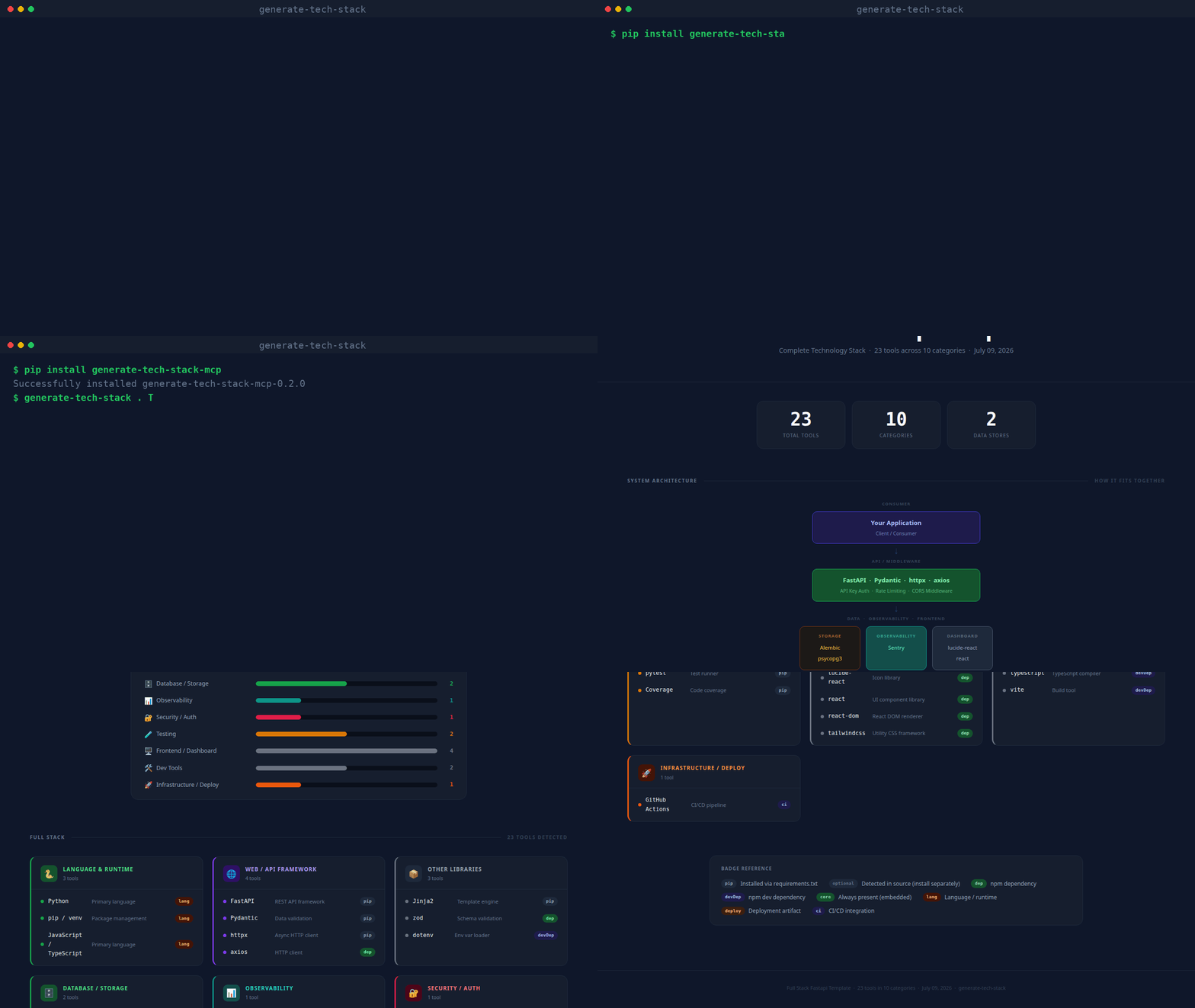
(real CLI output, unscripted — static screenshot if you'd rather not autoplay)
What it produces
Every generated page contains:
| Section | Description |
|---|---|
| Stat row | Total tools · Categories · AI Backends · Data Stores |
| Architecture diagram | Layered flow diagram (Consumer → API → AI/NLP → Data/Obs/Frontend) |
| Bar chart | Horizontal bars per category, colour-matched |
| Tool cards | One card per category; each tool shows a dot, name, description, and badge |
| Badge legend | Explains pip, dep, optional, core, deploy, ci, etc. |
| Footer | Project name · tool count · generation date |
| Guided tour | Spotlight walkthrough of every section, shown automatically the first time a report is opened; replay anytime with the ? button |
| Theme toggle | Sun/moon button next to the tour button switches between dark and light mode |
Repository layout
~/.claude/skills/generate-tech-stack/
├── SKILL.md                  ← Claude Code skill definition
├── INSTALL.md                ← detailed per-platform installation guide
├── README.md                 ← this file
├── scripts/
│   └── analyze.py            ← core scanner + HTML renderer (no dependencies)
├── mcp/
│   ├── server.py             ← MCP stdio server (pip install mcp)
│   └── requirements.txt
└── copilot/
    ├── index.js              ← GitHub Copilot Extension (Express)
    ├── package.json
    └── openai_function.json  ← OpenAI / Antigravity function definition
Usage
pip (CLI + MCP server)
pip install generate-tech-stack-mcp

generate-tech-stack . TECH_STACK.html    # CLI: scan and write the report
generate-tech-stack-mcp                   # stdio MCP server
With pip installed, any MCP host config reduces to:
{
  "mcpServers": {
    "generate-tech-stack": { "command": "generate-tech-stack-mcp" }
  }
}
Claude Code
/generate-tech-stack
Run it from any project directory. The skill calls scripts/analyze.py and opens the result in your browser.
MCP (Claude Desktop, VS Code, Cursor, Zed, Windsurf, Continue)
pip install mcp
Add to your host's MCP config (replace the path with your actual home directory):
{
  "mcpServers": {
    "generate-tech-stack": {
      "command": "python3",
      "args": ["/home/<you>/.claude/skills/generate-tech-stack/mcp/server.py"]
    }
  }
}
Then ask: generate my tech stack or /generate-tech-stack.
MCP tools exposed:
generate_tech_stack— scans a project, writesTECH_STACK.html, opens in browserlist_tech_stack— returns a JSON summary, no file written
GitHub Copilot Extension
cd copilot
npm install
npm start        # listens on port 3000
ngrok http 3000  # expose for GitHub to reach
Register a GitHub App with Copilot Extension enabled, set the Agent URL to https://your-url/agent, and install it on your account. Then in Copilot Chat:
@generate-tech-stack /generate-tech-stack
@generate-tech-stack /generate-tech-stack /path/to/project
Command line (standalone)
python3 ~/.claude/skills/generate-tech-stack/scripts/analyze.py /path/to/project
# output: /path/to/project/TECH_STACK.html

# custom output path:
python3 scripts/analyze.py . ~/Desktop/TECH_STACK.html
analyze.py has no third-party dependencies — just Python 3.8+.
What gets detected
| Source file | Detected tools |
|---|---|
requirements.txt / pyproject.toml |
Python packages (web, DB, AI, testing, observability, security…) |
package.json |
Node / npm packages (frameworks, frontend, DB drivers, tooling) |
go.mod |
Go language |
Cargo.toml |
Rust language |
pom.xml / build.gradle |
Java / Kotlin |
Gemfile |
Ruby |
composer.json |
PHP |
**/*.py source |
Optional/dynamic SDKs via importlib.find_spec() patterns |
docker-compose.yml / .env |
PostgreSQL, Redis, MongoDB, SQLite connection strings |
Dockerfile |
Docker |
docker-compose.yml |
Docker Compose |
.github/workflows/ |
GitHub Actions |
.gitlab-ci.yml |
GitLab CI |
alembic.ini |
Alembic migrations |
nginx.conf / Caddyfile |
Reverse proxy |
tsconfig.json / src/**/*.ts |
TypeScript |
Detected categories
| Category | Colour | Examples |
|---|---|---|
| Language & Runtime | Green | Python, Go, Rust, TypeScript |
| Web / API Framework | Purple | FastAPI, Express, Django, Next.js |
| Database / Storage | Green | SQLAlchemy, Prisma, Redis, ChromaDB |
| AI SDKs | Blue | OpenAI, Anthropic, LangChain, GuardrailsAI, NVIDIA NeMo, Presidio |
| NLP / ML | Teal | spaCy, Transformers, Sentence Transformers |
| Observability | Teal | Prometheus, OpenTelemetry, Sentry, Loguru |
| Testing | Yellow | pytest, Jest, Cypress, Playwright |
| Security / Auth | Rose | PyJWT, bcrypt, Authlib, Helmet |
| Infrastructure / Deploy | Orange | Docker, Kubernetes, Celery, Boto3 |
| Frontend / Dashboard | Gray | React, Vue, Tailwind, Recharts |
| Messaging / Comms | Blue | Kafka, RabbitMQ, Socket.io |
| Dev Tools | Gray | ESLint, Prettier, Vite, TypeScript |
Design
Dark by default with a light-mode toggle (top-right corner, no persistence — resets to dark on reload). Fonts: IBM Plex Sans (body) + JetBrains Mono (code/badges), loaded from Google Fonts. Vanilla JS powers the guided tour and theme toggle only — everything else is plain HTML + CSS. Self-contained single file, opens in any browser offline.
See also
- INSTALL.md — per-platform setup instructions
- SKILL.md — Claude Code skill specification
Generate Tech Stack MCP 질문
Generate Tech Stack MCP를 Claude Code에 추가하려면 어떻게 하나요?
터미널에서 claude mcp add generate-tech-stack -- uvx generate-tech-stack-mcp를 실행합니다. 모든 프로젝트에서 사용할 수 있게 하려면 --scope user를 추가합니다.
Generate Tech Stack MCP를 Cursor에 추가하려면 어떻게 하나요?
~/.cursor/mcp.json를 열고 mcpServers 아래에 서버를 추가합니다. 위 설치 섹션에 표시된 Cursor 구성을 사용합니다.
서버에서 어떤 결과물이 생성되나요?
아키텍처 다이어그램, 막대 그래프, 도구 카드 및 가이드 투어가 포함된 시각적인 TECH_STACK.html 페이지를 생성합니다.
생성된 보고서를 보려면 인터넷 연결이 필요한가요?
아니요, 보고서는 단일 파일로 구성되어 있어 브라우저를 통해 오프라인에서도 열 수 있습니다.