
OpenCode MCP server
2026년 11월 12일 커밋오케스트레이터 모델의 무거운 작업을 격리된 OpenCode subagent로 위임하여 컨텍스트 윈도우 품질을 유지하고 토큰 비용을 절감합니다.
다른 이름 alejandro-technology/opencode-mcp, mcp-server-opencode
- 스타
- 6
- Tools
- 10
- 다운로드, 30일
- —
- 최신 버전
- —
- 마지막 커밋
- 2026년 11월 12일
- 라이선스
- —
OpenCode MCP란?
OpenCode은(는) MCP server입니다. 오케스트레이터 모델의 무거운 작업을 격리된 OpenCode subagent로 위임하여 컨텍스트 윈도우 품질을 유지하고 토큰 비용을 절감합니다. 10개 도구를 제공합니다. 예: opencode_start_server, opencode_stop_server, opencode_list_agents.
프로젝트 README에서 생성된 요약
OpenCode MCP server 정보
opencode-mcp는 Claude Code, Codex, Cursor, Antigravity 또는 Pi를 사용하는 개발자가 오케스트레이터의 무거운 계산 작업을 격리된 subagent로 위임할 수 있게 해줍니다. 대용량 파일 읽기, 광범위한 검색, 반복적인 테스트 루프를 백그라운드 OpenCode subagent로 오프로딩함으로써 컨텍스트 윈도우의 비대화를 방지하고 토큰 비용을 줄일 수 있습니다. 이 방식은 리드 에이전트의 컨텍스트를 가볍게 유지하고 오케스트레이션에 집중하게 함으로써 기본 에이전트의 추론 품질을 보존합니다.
이 server를 사용하려면 Node.js 18+ 및 OpenCode 1.x가 시스템 PATH에 설치 및 설정되어 있어야 합니다. 이 server는 opencode_start_task 및 opencode_wait_for_task와 같은 특정 도구를 통해 비동기 작업을 관리하며, 여러 조사를 병렬로 실행할 수 있도록 지원합니다. 소스 변경 사항을 체계적으로 관리하기 위해 공유 디렉토리 또는 격리된 관리형 Git worktree 내에서 작업을 실행하는 것을 지원합니다. 또한 위임된 세션의 경제성을 추적할 수 있도록 provider 및 model별로 분류된 지표를 포함한 상세한 사용 보고서를 제공합니다.
활용 사례
- 1병렬 작업 실행오케스트레이터를 차단하지 않고 여러 조사 또는 구현 작업을 병렬로 처리합니다.
- 2컨텍스트 윈도우 보존대용량 파일 읽기나 광범위한 검색 결과로 인해 기본 에이전트의 컨텍스트가 오염되는 것을 방지합니다.
- 3반복적인 subagent 디버깅기존 작업 세션에 후속 프롬프트를 보내 subagent와 반복적인 상호 작용 작업을 수행합니다.
프로젝트의 README를 바탕으로 작성되었습니다. 모든 활용 사례는 해당 내용의 인용문과 대조하여 확인합니다.
OpenCode MCP 설치 방법
형식 확인: 2026년 11월 10일Cursor에 추가Goose에 추가Claude Code에 OpenCode MCP 설치
$ claude mcp add opencode-mcp -- npx -y mcp-server-opencodeCursor에 OpenCode MCP 설치
~/.cursor/mcp.json
{
  "mcpServers": {
    "opencode-mcp": {
      "command": "npx",
      "args": [
        "-y",
        "mcp-server-opencode"
      ]
    }
  }
}VS Code에 OpenCode MCP 설치
.vscode/mcp.json
{
  "servers": {
    "opencode-mcp": {
      "type": "stdio",
      "command": "npx",
      "args": [
        "-y",
        "mcp-server-opencode"
      ]
    }
  }
}VS Code CLI에 OpenCode MCP 설치
$ code --add-mcp '{"name":"opencode-mcp","type":"stdio","command":"npx","args":["-y","mcp-server-opencode"]}'Claude Desktop에 OpenCode MCP 설치
claude_desktop_config.json
{
  "mcpServers": {
    "opencode-mcp": {
      "command": "npx",
      "args": [
        "-y",
        "mcp-server-opencode"
      ]
    }
  }
}Codex에 OpenCode MCP 설치
$ codex mcp add opencode-mcp -- npx -y mcp-server-opencodeCodex config.toml에 OpenCode MCP 설치
~/.codex/config.toml
[mcp_servers.opencode-mcp]
command = "npx"
args = ["-y", "mcp-server-opencode"]
Gemini CLI에 OpenCode MCP 설치
$ gemini mcp add -s user opencode-mcp npx -- -y mcp-server-opencodeGemini settings.json에 OpenCode MCP 설치
~/.gemini/settings.json
{
  "mcpServers": {
    "opencode-mcp": {
      "command": "npx",
      "args": [
        "-y",
        "mcp-server-opencode"
      ]
    }
  }
}OpenCode MCP 도구 10
README에서 감지됨opencode_start_serveropencode_stop_serveropencode_list_agentsopencode_start_taskopencode_continue_taskopencode_cancel_taskopencode_cleanup_workspaceopencode_get_task_statusopencode_get_task_resultopencode_wait_for_task
| opencode_start_server | — | |
| opencode_stop_server | — | |
| opencode_list_agents | — | |
| opencode_start_task | — | |
| opencode_continue_task | — | |
| opencode_cancel_task | — | |
| opencode_cleanup_workspace | — | |
| opencode_get_task_status | — | |
| opencode_get_task_result | — | |
| opencode_wait_for_task | — |
구성
MCP_TOOL_TIMEOUTOPENCODE_MCP_SMOKE_MODEL
| 이름 | 설명 | 유형 |
|---|---|---|
| MCP_TOOL_TIMEOUT | — | |
| OPENCODE_MCP_SMOKE_MODEL | — |
자동 검사
2026년 11월 13일에 실행됨전체 보고서 →아직 인증되지 않았습니다. 서버는 80점 이상의 점수, 심각한 결함 없음, 그리고 검사에 충분한 데이터를 갖추어야 합니다. 검사 방식 · 점수를 높이기 위해 수정할 항목

- 소스 저장소 연결 및 접근 가능alejandro-technology/opencode-mcp is public and reachablegithub.com/alejandro-technology/opencode-mcp ↗통과
- 패키지가 이 저장소를 소스로 명시mcp-server-opencode names alejandro-technology/opencode-mcp as sourcenpmjs.com/package/mcp-server-opencode ↗통과
- 빌드 출처(Sigstore 증명)No build attestation published for this release검사되지 않음
- 오픈 소스 라이선스 (OSI)No license결함 발견
- 최근 1년 내 커밋 또는 릴리스Last commit or release 2026-11-12github.com/alejandro-technology/opencode-mcp ↗통과
- OpenSSF Scorecard검사되지 않음
- 패키지 이름이 인기 패키지와 유사하지 않음No popular package one edit away from mcp-server-opencode통과
- 패키지 및 해당 종속성에 중요한 보안 권고 없음검사되지 않음
- 모델에 대한 숨겨진 지침 없음10 tool descriptions and the README read; no override phrases, credential paths or hidden characters통과
- 파괴적인 도구에 라벨 표시됨No tool named like delete, drop or exec통과
- 원격 엔드포인트가 MCP 핸드셰이크에 응답검사되지 않음
README
GitHub에서 보기opencode-mcp



Keep your lead agent lean and save tokens by delegating heavy tasks to background subagents.
opencode-mcp is a Model Context Protocol (MCP) server that connects orchestrator hosts (Claude Code, Codex, Cursor, Antigravity, Pi) with OpenCode subagents. Instead of polluting your orchestrator's context window with large file reads, extensive search outputs, and repetitive test runs, you delegate those tasks to isolated subagents and receive only concise, structured results.
Why this matters (Context Window Economics)
- 🧠 Prevent Context Rot & Bloat: Monolithic agents suffer reasoning degradation as the context fills up. Keeping your lead agent as an orchestrator preserves high reasoning quality.
- 💰 Slash Token Costs: Running large exploratory reads or test-fix loops directly inside your primary (Fable/Opus, Astra/Sol) session repeatedly bills for thousands of cached tokens on every follow-up turn. Subagents run in isolated sessions using optimal models.
- ⚡ Asynchronous Parallel Execution: Dispatch multiple investigation or implementation tasks in parallel without blocking the orchestrator.
Quick install
Requires Node.js 18+ and OpenCode 1.x installed and configured (opencode must be on your PATH, with at least one provider/model set up) — this server spawns and drives OpenCode instances.
For Claude Code:
claude mcp add opencode -- npx -y mcp-server-opencode
For Codex:
codex mcp add opencode -- npx -y mcp-server-opencode
See Installation for manual config, and from-source options.
Tools
| Tool | Description |
|---|---|
opencode_start_server |
Start a new OpenCode server instance in the MCP process working directory |
opencode_stop_server |
Stop a running OpenCode server instance |
opencode_list_agents |
List agents/models available on a server instance (optional directory selects a project) |
opencode_start_task |
Delegate a task to an agent by starting a new session and prompt (optional agent / model override) |
opencode_continue_task |
Send a follow-up prompt to an existing task's session for iterative back-and-forth with the subagent |
opencode_cancel_task |
Abort a running delegated task by cancelling its session |
opencode_cleanup_workspace |
Explicitly remove an owned Git worktree after task reports finalize; dirty worktrees require opt-in discard |
opencode_get_task_status |
Poll the status of a delegated task (pending / running / completed / failed / empty / cancelled); optional include_progress adds a partial output snippet and the currently running tool while it's still running |
opencode_get_task_result |
Fetch the final result of a completed task |
opencode_wait_for_task |
Long-poll one or more delegated tasks until they finish (mode: "all" or "any") or the timeout elapses; optional include_progress best-effort enriches unfinished tasks within the same deadline, falling back to the last observed status/progress when time runs out |
Delegation workflow and model-selection guidance are provided through the MCP server instructions.
How it works
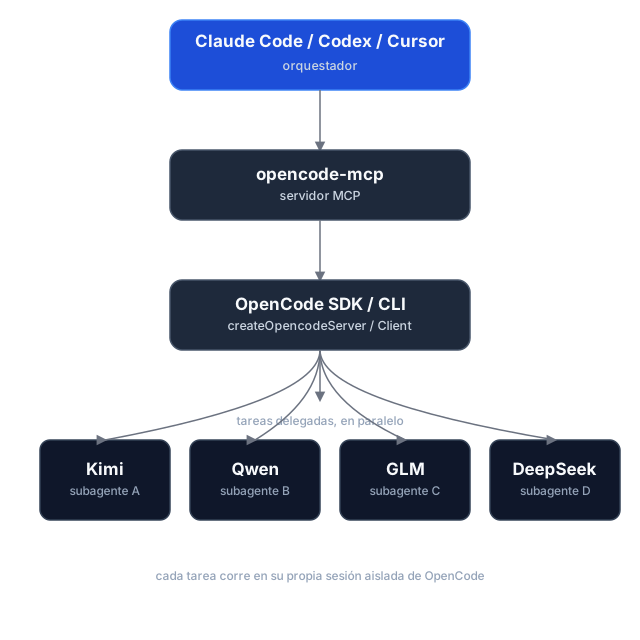
Task delegation is asynchronous: opencode_start_task returns a task_id and run_id without waiting, so hosts can start tasks in parallel. Tasks use the selected directory by default; managed Git worktrees are optional. Poll for status and retrieve results separately. If dispatch is uncertain, use the returned IDs to check or cancel the task instead of retrying it.
Execution reports and caller checks
Start and continuation calls can include expected_changes and checks. Status and result responses report workspace changes, verification, diagnostics, and evidence; pass a run_id to retrieve a historical run. Workspace changes are best-effort evidence, since concurrent writers can make attribution uncertain.
Shared directories and managed worktrees
Tasks run in the selected existing directory (shared, the default), or in an isolated managed Git worktree based on a commit. Worktrees are kept after execution; use opencode_cleanup_workspace with its workspace_id after reports are finalized. Cleanup only removes worktrees managed by this server, and dirty worktrees require explicit discard.
Usage reporting
Status, wait, and result responses include run and session usage snapshots, with metrics broken down by provider and model. Missing metrics remain unknown rather than zero, and cost is OpenCode-reported—not an invoice total. Finalized runs retain their snapshots for historical retrieval.
Task history and workspace ownership are held in memory for the lifetime of the MCP process. Restarting loses these records; retained worktrees are not automatically rediscovered.
Installation
Prerequisites
- Node.js 18+
- OpenCode 1.x installed and configured (
opencodemust be on yourPATH, with at least one provider/model set up) — this server spawns and drives OpenCode instances.
The current adapter uses the OpenCode v1 SDK/API and was validated against OpenCode 1.18.34 , 1.19.5. OpenCode 2.x is not yet supported.
Option 1 — npm (recommended)
The package is published as mcp-server-opencode. No cloning or building needed — point your MCP host at npx:
For Claude Code, one command does it:
claude mcp add opencode -- npx -y mcp-server-opencode
Or manually
{
  "mcpServers": {
    "opencode": {
      "command": "npx",
      "args": ["-y", "mcp-server-opencode"]
    }
  }
}
For Codex, add the server to ~/.codex/config.toml:
[mcp_servers.opencode]
command = "npx"
args = ["-y", "mcp-server-opencode"]
Or install it globally and use the binary directly:
npm install -g mcp-server-opencode
{
  "mcpServers": {
    "opencode": {
      "command": "opencode-mcp"
    }
  }
}
Option 2 — from source
git clone https://github.com/alejandro-technology/opencode-mcp.git
cd opencode-mcp
pnpm install
pnpm build
Then point your MCP host at the built entrypoint:
{
  "mcpServers": {
    "opencode": {
      "command": "node",
      "args": ["/path/to/opencode-mcp/build/src/index.js"]
    }
  }
}
Restart your MCP host after editing the config; the opencode_* tools should appear in its tool list.
Configuration
MCP_TOOL_TIMEOUT
opencode_wait_for_task accepts a timeout_ms input, but it's clamped to a server-side maximum so a single call stays inside the calling host's own MCP request timeout. That maximum defaults to 55000 ms and is configurable via MCP_TOOL_TIMEOUT.
The default is deliberately low: MCP hosts abort long tool requests with MCP error -32001: Request timed out before the tool can answer (observed on OpenCode hosts and the MCP Inspector at 100s+), so a graceful timed_out: true payload at 55s always beats a dead transport. Loop the wait — call opencode_wait_for_task again while timed_out is true — instead of raising timeout_ms. Raise this only when your host demonstrably tolerates longer tool requests.
MCP_TOOL_TIMEOUT can be set two ways:
-
Environment variable — set it in the MCP server config:
{ "mcpServers": { "opencode": { "command": "node", "args": ["/path/to/opencode-mcp/build/src/index.js"], "env": { "MCP_TOOL_TIMEOUT": "1200000" } } } } -
CLI argument — pass
MCP_TOOL_TIMEOUT=<ms>as an extra arg to the server process:{ "mcpServers": { "opencode": { "command": "node", "args": [ "/path/to/opencode-mcp/build/src/index.js", "MCP_TOOL_TIMEOUT=1200000" ] } } }
If both are present, the environment variable takes precedence over the CLI argument. Invalid or non-numeric values fall back to the 55000 ms default.
Permissions and trust
Headless tasks automatically answer permission prompts. Set OPENCODE_MCP_EXTERNAL_DIR to read-only (default), allow, or deny to control external-directory requests. An environment variable takes precedence over an OPENCODE_MCP_EXTERNAL_DIR=<policy> CLI argument; explicit OpenCode deny rules remain in effect.
Use this server only with trusted hosts and repositories. Git worktrees isolate source changes, not OS permissions: agents and caller-provided checks run as your local user, not in a security sandbox.
Development
Project structure
src/
├── index.ts                   # MCP server entrypoint (stdio transport, shutdown handlers)
└── modules/
    ├── tools/                 # One file per MCP tool, registered in index.ts
    └── shared/                # Cross-tool infrastructure (selected modules below)
        ├── server-registry.ts   # Tracks running OpenCode servers
        ├── task-registry.ts     # Task/session identity and per-run history
        ├── opencode-client.ts   # SDK clients, status derivation, and progress
        ├── run-observer.ts      # Background run finalization and result caching
        ├── execution-report.ts  # Workspace evidence and executable checks
        ├── execution-usage.ts   # Run/session usage aggregation
        ├── workspace-manager.ts # Managed Git worktree lifecycle
        ├── permissions.ts       # Headless permission decisions and responses
        ├── instructions.ts      # Delegation workflow and model-selection guidance
        ├── config.ts            # MCP_TOOL_TIMEOUT resolution
        └── mcp-result.ts        # JSON tool result helpers
Each module ships with a *.test.ts Vitest suite under the parallel tests/ tree mirroring src/.
Getting started
Use Node.js 22.18+ for development and smoke tests (native TypeScript execution); CI checks Node.js 22 and 24. The published server retains its Node.js 18+ runtime requirement.
pnpm install
pnpm dev     # runs the server through the MCP Inspector (tsx, no build needed)
Other scripts:
pnpm test           # vitest run
pnpm test:coverage  # vitest run --coverage
pnpm lint           # biome check
pnpm lint:write     # biome check --write
pnpm build          # clean tsc build to ./build (also the source typecheck)
Real OpenCode smoke tests
The opt-in smoke harness starts a real OpenCode server and removes its temporary fixtures afterward. It is not part of default CI.
pnpm smoke --message-id-only   # non-billable message-ID contract probe
pnpm smoke                     # full smoke; requires credentials and may incur model charges
The full smoke covers reports, usage, continuation, cancellation, isolated worktrees, and cleanup. Its default model is openai/gpt-6-luna; override it with an exact enabled model ID:
OPENCODE_MCP_SMOKE_MODEL=provider/model pnpm smoke
OpenCode MCP 질문
OpenCode MCP를 Claude Code에 추가하려면 어떻게 하나요?
터미널에서 claude mcp add opencode-mcp -- npx -y mcp-server-opencode를 실행합니다. 모든 프로젝트에서 사용할 수 있게 하려면 --scope user를 추가합니다.
OpenCode MCP를 Cursor에 추가하려면 어떻게 하나요?
~/.cursor/mcp.json를 열고 mcpServers 아래에 서버를 추가합니다. 위 설치 섹션에 표시된 Cursor 구성을 사용합니다.
OpenCode MCP는 어떤 도구를 제공하나요?
10개 도구를 제공합니다. 예: opencode_start_server, opencode_stop_server, opencode_list_agents, opencode_start_task, opencode_continue_task.
이 MCP server가 컨텍스트 윈도우 관리에 어떻게 도움이 되나요?
대용량 파일 읽기, 광범위한 검색, 반복적인 테스트 실행을 격리된 subagent에 위임하고 리드 에이전트에는 간결한 결과만 반환함으로써 컨텍스트 오염과 비대화를 방지합니다.
여러 작업을 동시에 실행할 수 있나요?
네, 작업 위임은 비동기 방식으로 이루어지므로 오케스트레이터를 차단하지 않고 여러 조사 또는 구현 작업을 병렬로 처리할 수 있습니다.
설치를 위한 시스템 요구 사항은 무엇인가요?
Node.js 18+ 및 OpenCode 1.x가 설치되어 있고 PATH에 설정되어 있어야 합니다.