
React 개발자가 타입이 지정된 앱 기능을 AI agent가 발견하고 호출할 수 있는 WebMCP 도구로 노출할 수 있게 합니다.
다른 이름 agentcathq/webmcp-react
- 스타
- 92
- Tools
- —
- 다운로드, 30일
- —
- 최신 버전
- —
- 마지막 커밋
- 2026년 10월 27일
- 라이선스
- MIT
webmcp-react MCP란?
webmcp-react은(는) MCP server입니다. React 개발자가 타입이 지정된 앱 기능을 AI agent가 발견하고 호출할 수 있는 WebMCP 도구로 노출할 수 있게 합니다.
프로젝트 README에서 생성된 요약
webmcp-react MCP server 정보
webmcp-react는 React 앱의 일부를 AI agent가 호출 가능한 도구로 노출하는 기능을 담당하며, 각 도구를 document.modelContext에 등록하는 hooks를 제공합니다. React 개발자는 앱을 WebMCPProvider로 감싸고 useMcpTool을 사용하여 도구를 선언하며, 각 도구에 이름, 설명, 입력 및 async handler를 부여합니다. 입력값은 handler에서 타입 추론을 위해 Zod로 정의하거나, Zod를 사용하지 않는 경우 inputSchema를 통해 raw JSON Schema로 정의할 수 있습니다. React 18 이상이 필요하며, Zod를 사용하는 경우 Zod 3.25 이상 또는 Zod 4가 peer dependency로 필요합니다.
브라우저에 네이티브 WebMCP 지원이 없는 경우 라이브러리가 가벼운 polyfill을 설치하며, 그 외에는 네이티브 API를 사용합니다. SSR 환경에서 안전하며 "use client" 지시어가 포함되어 있어 Next.js나 Remix에서 별도의 설정이 필요하지 않으며, StrictMode 환경에서 중복 등록이 발생하지 않도록 방지합니다. 도구는 마운트 시 등록되고 언마운트 시 해제되므로, 조건부 렌더링을 통해 agent가 볼 수 있는 도구를 제어할 수 있습니다. useMcpTool은 실행 상태(isExecuting, lastResult, error)를 반환하며, 각 호출은 고유한 AbortSignal을 받고 onSuccess 및 onError 콜백을 통해 side effect를 실행할 수 있습니다. 네 가지 어노테이션(readOnlyHint, untrustedContentHint, consequentialHint, debugging)을 통해 agent에게 동작 방식을 설명할 수 있습니다.
Codex와 같이 네이티브 WebMCP를 지원하는 agent는 페이지에서 도구를 직접 호출하며, Claude Code, Cursor 및 기타 MCP client는 Bridge 브라우저 확장을 통해 연결합니다. Wordle playground와 skills CLI로 설치된 Agent Skills는 도구의 데모 및 스캐폴딩을 제공합니다.
활용 사례
- 1Agent를 위한 카탈로그 검색 도구쿼리 문자열을 입력받아 일치하는 카탈로그 결과를 반환하는 검색 도구를 등록하여 AI client가 호출할 수 있게 합니다.
- 2취소 가능한 보고서 가져오기제공된 AbortSignal을 fetch에 연결하여, agent가 ID로 보고서를 가져오는 동안 호출이 취소되면 요청도 중단되도록 합니다.
- 3주문 확인 절차체크아웃 도구에 힌트를 표시하여, agent가 되돌리기 어려운 작업을 실행하기 전에 사용자에게 확인을 요청하도록 합니다.
- 4조건부 렌더링을 이용한 관리자 도구현재 사용자가 관리자인 경우에만 관리자 전용 도구를 노출하여, 마운트 및 언마운트 시점에 등록을 처리합니다.
- 5UI 내 도구 실행 상태 표시번역 도구 hook에서 반환된 실행 상태를 사용하여 버튼의 비활성화 상태와 메시지를 제어합니다.
프로젝트의 README를 바탕으로 작성되었습니다. 모든 활용 사례는 해당 내용의 인용문과 대조하여 확인합니다.
webmcp-react MCP 설치 방법
형식 확인: 2026년 11월 10일Cursor에 추가Goose에 추가Claude Code에 webmcp-react MCP 설치
$ claude mcp add webmcp-react -- npx -y webmcp-reactCursor에 webmcp-react MCP 설치
~/.cursor/mcp.json
{
  "mcpServers": {
    "webmcp-react": {
      "command": "npx",
      "args": [
        "-y",
        "webmcp-react"
      ]
    }
  }
}VS Code에 webmcp-react MCP 설치
.vscode/mcp.json
{
  "servers": {
    "webmcp-react": {
      "type": "stdio",
      "command": "npx",
      "args": [
        "-y",
        "webmcp-react"
      ]
    }
  }
}VS Code CLI에 webmcp-react MCP 설치
$ code --add-mcp '{"name":"webmcp-react","type":"stdio","command":"npx","args":["-y","webmcp-react"]}'Claude Desktop에 webmcp-react MCP 설치
claude_desktop_config.json
{
  "mcpServers": {
    "webmcp-react": {
      "command": "npx",
      "args": [
        "-y",
        "webmcp-react"
      ]
    }
  }
}Codex에 webmcp-react MCP 설치
$ codex mcp add webmcp-react -- npx -y webmcp-reactCodex config.toml에 webmcp-react MCP 설치
~/.codex/config.toml
[mcp_servers.webmcp-react]
command = "npx"
args = ["-y", "webmcp-react"]
Gemini CLI에 webmcp-react MCP 설치
$ gemini mcp add -s user webmcp-react npx -- -y webmcp-reactGemini settings.json에 webmcp-react MCP 설치
~/.gemini/settings.json
{
  "mcpServers": {
    "webmcp-react": {
      "command": "npx",
      "args": [
        "-y",
        "webmcp-react"
      ]
    }
  }
}자동 검사
2026년 11월 13일에 실행됨전체 보고서 →자동 검사를 통과했습니다. 이는 보안 감사가 아닙니다. 코드를 직접 읽고 서버에 필요한 최소한의 권한만 부여하십시오. 검사 방식

- 소스 저장소 연결 및 접근 가능통과
- 오픈 소스 라이선스 (OSI)통과
- 최근 1년 내 커밋 또는 릴리스통과
- 패키지 이름이 인기 패키지와 유사하지 않음통과
- 원격 엔드포인트가 HTTPS 사용검사되지 않음
- 파괴적인 도구에 라벨 표시됨검사되지 않음
- 모델에 대한 숨겨진 지침 없음통과
- 패키지 및 해당 종속성에 중요한 보안 권고 없음검사되지 않음
README
GitHub에서 보기webmcp-react
React hooks for exposing typed tools on document.modelContext, aligned with the current WebMCP specification.




- Zod-first. Define inputs with Zod and get full type inference in handlers
- JSON Schema support. Pass raw JSON Schema when you do not use Zod
- Built-in polyfill. Installs a lightweight polyfill when native WebMCP is unavailable
- SSR-safe. Works with Next.js, Remix, and other server-rendering frameworks
- StrictMode-safe. Prevents duplicate registrations and orphaned tools
- Spec-aligned. Tracks the WebMCP specification and native Chrome behavior release by release
Requirements
- React 18 or later
- Zod 3.25 or later, or Zod 4, as a peer dependency. Tools can also be defined with JSON Schema.
Install
npm install webmcp-react zod
Quick start
Wrap your app in <WebMCPProvider> and register tools with useMcpTool:
import { WebMCPProvider, useMcpTool } from "webmcp-react";
import { z } from "zod";

function SearchTool() {
  useMcpTool({
    name: "search",
    description: "Search the catalog",
    input: z.object({ query: z.string() }),
    handler: async ({ query }) => ({
      content: [{ type: "text", text: `Results for: ${query}` }],
    }),
  });
  return null;
}

export default function App() {
  return (
    <WebMCPProvider name="my-app" version="1.0">
      <SearchTool />
    </WebMCPProvider>
  );
}
The tool is now registered on document.modelContext and any WebMCP-compatible agent can call it.
Agent skills
This repository ships agent skills that install webmcp-react and scaffold tools for you. Install them with the skills CLI:
npx skills add agentcathq/webmcp-react
The skills work with Cursor, Claude Code, GitHub Copilot, Cline, and 18+ other agents.
Playground
Try it live: WebMCP Wordle Demo
The playground is a fully playable Wordle clone built on webmcp-react hooks. Tools register and unregister as the game moves through its phases (idle, playing, won, lost). You can make guesses with the keyboard or through an AI agent. A DevPanel shows the current tool state, and an easy-mode toggle enables a hint tool.
To play with an AI agent:
- Codex. Open the demo in Codex and ask it to play. Codex discovers and calls the page's WebMCP tools directly.
- Claude, Cursor, and other MCP clients. Install the WebMCP Bridge extension, open the demo in Chrome, and activate the extension for the page.
How it works
WebMCP is a proposed web standard from the W3C Web Machine Learning Community Group. It adds document.modelContext to the browser, an API that lets any page expose typed, callable tools to AI agents. Chrome ships the API in Early Preview.
This library provides the React bindings for that API. <WebMCPProvider> installs a polyfill when native support is absent, and each useMcpTool call registers a tool that agents can discover and execute.
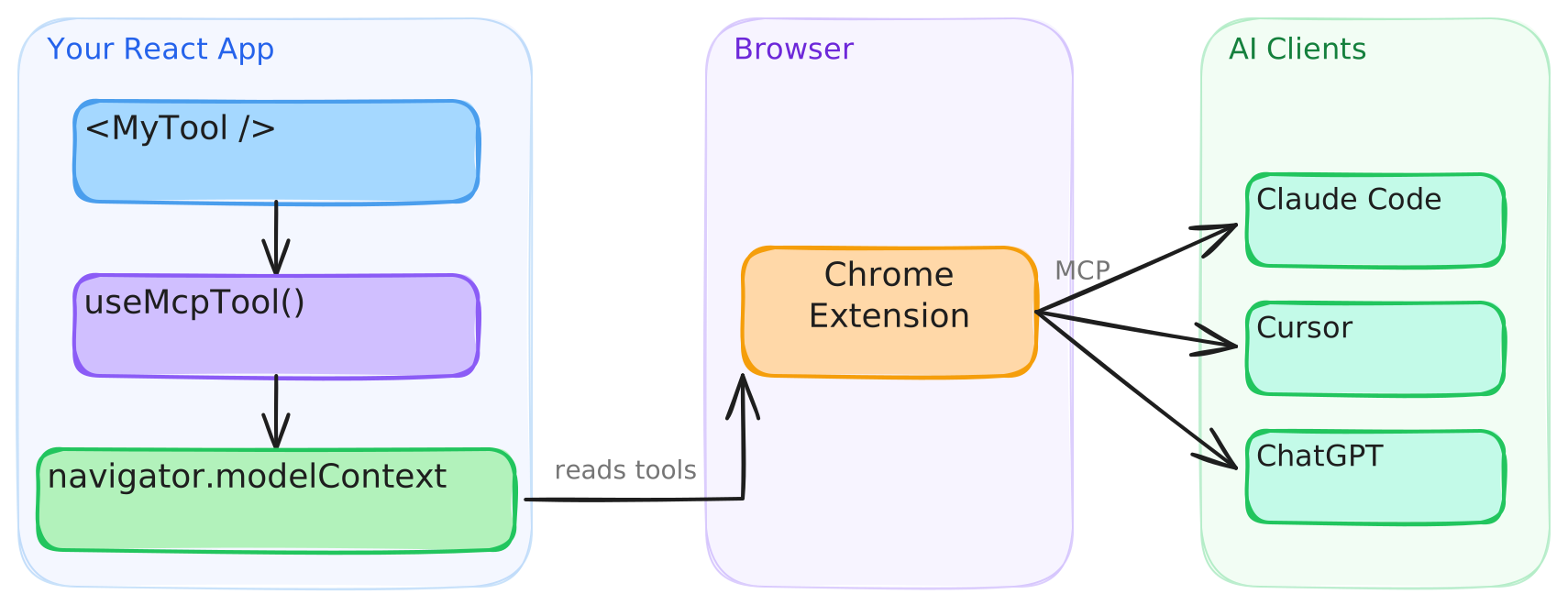
Connect to AI clients
Agents with built-in WebMCP browser support, such as Codex, discover and call tools directly from the page. Clients that cannot access document.modelContext directly, such as Claude Code and Cursor, connect through the WebMCP Bridge extension, which exposes your registered tools to any MCP client.
- Install the extension from the Chrome Web Store.
- Configure your MCP client. See the extension setup guide for details.
The extension will be deprecated when Chrome provides native bridging to desktop clients.
Testing in Chrome
Google's WebMCP extension lists a page's tools and runs an agent against them from a side panel, which is handy while building tools. It only sees tools registered through Chrome's native API, so on a page running the polyfill it finds nothing. Turn on chrome://flags/#enable-webmcp-testing (the extension needs Chrome 155 or newer) and <WebMCPProvider> will use the native API instead of the polyfill.
Usage
Execution state
useMcpTool returns reactive state you can use to build UI around tool execution:
function TranslateTool() {
  const { state, execute } = useMcpTool({
    name: "translate",
    description: "Translate text to Spanish",
    input: z.object({ text: z.string() }),
    handler: async ({ text }) => {
      const result = await translate(text, "es");
      return { content: [{ type: "text", text: result }] };
    },
  });

  return (
    <div>
      <button onClick={() => execute({ text: "Hello" })} disabled={state.isExecuting}>
        {state.isExecuting ? "Translating..." : "Translate"}
      </button>
      {state.lastResult && <p>{state.lastResult.content[0].text}</p>}
      {state.error && <p className="error">{state.error.message}</p>}
    </div>
  );
}
Cancellation
Each execution receives its own AbortSignal. Pass it to fetch and other cancellable work. Chrome 153+ aborts the signal when the agent cancels the call. On older browsers the library substitutes a never-aborting signal, so the second argument is always safe to use:
useMcpTool({
  name: "fetch_report",
  description: "Fetch a report by ID",
  input: z.object({ id: z.string() }),
  handler: async ({ id }, { signal }) => {
    const res = await fetch(`/api/reports/${id}`, { signal });
    return { content: [{ type: "text", text: await res.text() }] };
  },
});
Title and annotations
Give a tool a human-friendly display title, and describe its behavior to agents with annotations. The current WebMCP specification defines four annotations: readOnlyHint, untrustedContentHint, consequentialHint and debugging. Set consequentialHint on tools that do something hard to undo, like placing an order, so agents know to check with the user first.
useMcpTool({
  name: "search_users",
  title: "Search users",
  description: "Find users by name or email",
  input: z.object({ query: z.string() }),
  annotations: {
    readOnlyHint: true,
  },
  handler: async ({ query }) => { /* ... */ },
});
Dynamic tools
Tools register on mount and unregister on unmount. Render them conditionally like any React component:
function App({ user }) {
  return (
    <WebMCPProvider name="app" version="1.0">
      <PublicTools />
      {user.isAdmin && <AdminTools />}
    </WebMCPProvider>
  );
}
Callbacks
Run side effects on success or failure:
useMcpTool({
  name: "checkout",
  description: "Complete a purchase",
  input: z.object({ cartId: z.string() }),
  handler: async ({ cartId }) => { /* ... */ },
  onSuccess: (result) => analytics.track("checkout_complete"),
  onError: (error) => toast.error(error.message),
});
onError fires when the handler throws. A handler that returns { isError: true } on its own still counts as a success, so onSuccess fires for it.
JSON Schema
Pass inputSchema directly to define a tool without Zod:
useMcpTool({
  name: "calculate",
  description: "Basic arithmetic",
  inputSchema: {
    type: "object",
    properties: {
      a: { type: "number" },
      b: { type: "number" },
      op: { type: "string", enum: ["add", "subtract", "multiply", "divide"] },
    },
    required: ["a", "b", "op"],
  },
  handler: async (args) => {
    const { a, b, op } = args as { a: number; b: number; op: string };
    const result = { add: a + b, subtract: a - b, multiply: a * b, divide: a / b }[op];
    return { content: [{ type: "text", text: String(result) }] };
  },
});
TypeScript
webmcp-react already types document.modelContext, so theres no need to add Google's webmcp-types as well. The two packages declare the same global differently and clash if you install both, see TypeScript and webmcp-types for details and a workaround.
SSR
The library works with Next.js, Remix, and any server-rendering framework. The build includes a "use client" banner, so no extra configuration is needed.
Browser support
| Environment | Behavior |
|---|---|
Chrome with native document.modelContext |
The library uses the native API. The polyfill is not installed. |
| All other browsers | The library installs its polyfill, which implements the registration and consumer APIs. |
The polyfill follows native Chrome behavior. See the polyfill section of the API reference for the exact Chrome versions each behavior tracks.
Versioning and stability
webmcp-react follows Semantic Versioning. Breaking changes to the public API bump the major version. Every release is documented in the changelog, including the WebMCP specification and Chrome changes it tracks.
outputSchema and structuredContent are documented library extensions to the WebMCP specification. They are part of the public API and follow the same versioning policy.
API
See the full API reference.
Contributing
Bug reports, feature requests, and pull requests are welcome. Read the contributing guide before you open a pull request. This project follows the Contributor Covenant Code of Conduct.
License
webmcp-react MCP 질문
webmcp-react MCP를 Claude Code에 추가하려면 어떻게 하나요?
터미널에서 claude mcp add webmcp-react -- npx -y webmcp-react를 실행합니다. 모든 프로젝트에서 사용할 수 있게 하려면 --scope user를 추가합니다.
webmcp-react MCP를 Cursor에 추가하려면 어떻게 하나요?
~/.cursor/mcp.json를 열고 mcpServers 아래에 서버를 추가합니다. 위 설치 섹션에 표시된 Cursor 구성을 사용합니다.
webmcp-react는 무엇에 사용되나요?
document.modelContext에 타입이 지정된 도구를 등록할 수 있는 React hooks를 제공하여, AI agent가 웹 앱의 기능을 호출할 수 있도록 합니다.
브라우저에 네이티브 WebMCP 지원이 없어도 webmcp-react를 사용할 수 있나요?
네. 네이티브 WebMCP를 사용할 수 없는 경우 가벼운 polyfill을 설치하며, 지원되는 경우에는 네이티브 API를 사용합니다.
Zod 대신 JSON Schema로 도구를 정의할 수 있나요?
네. Zod를 사용하지 않고 도구를 정의하려면 inputSchema를 직접 전달하면 됩니다.
webmcp-react는 SSR 환경에서 안전한가요?
네. Next.js, Remix 및 기타 서버 렌더링 프레임워크와 함께 작동하며, 빌드 시 "use client" 지시어가 포함됩니다.
도구 등록은 어떻게 해제되나요?
도구는 마운트 시 등록되고 언마운트 시 해제되므로, 일반적인 React 컴포넌트처럼 조건부 렌더링을 통해 제어할 수 있습니다.