
Serveur MCP Ternimal
Commit 14 nov. 2026Fournit un terminal distant sécurisé permettant aux agents IA d'exécuter des commandes et de gérer des fichiers sur des hôtes distants via le Model Context Protocol.
Aussi connu sous ternimal/tern
- Étoiles
- 1
- Outils
- —
- Téléchargements, 30 jours
- —
- Dernière version
- —
- Dernier commit
- 14 nov. 2026
- Licence
- AGPL-3.0
Qu'est-ce que Ternimal MCP ?
Ternimal est un serveur MCP. Fournit un terminal distant sécurisé permettant aux agents IA d'exécuter des commandes et de gérer des fichiers sur des hôtes distants via le Model Context Protocol.
Résumé généré à partir du README du projet
À propos du MCP server Ternimal
La gestion de serveurs distants via une interface IA est possible avec Ternimal. Cet outil fournit un terminal distant sécurisé qui permet aux agents IA d'exécuter des commandes et de gérer des fichiers sur des hôtes distants en utilisant le Model Context Protocol. Il est conçu pour les administrateurs qui doivent accorder aux clients IA tels que Claude Desktop, Claude Code ou Cursor un accès contrôlé à leurs systèmes.
La configuration consiste à exécuter l'agent ternd sur l'hôte distant et à se connecter via le client tern. Les utilisateurs peuvent se connecter directement via un réseau local ou utiliser un relais ternr pour traverser un NAT sans avoir besoin d'ouvrir de ports entrants. La sécurité est assurée par un chiffrement TLS de bout en bout et une authentification obligatoire via des clés OpenSSH ou des jetons partagés.
Pour empêcher toute action non autorisée, le MCP server fonctionne selon une politique spécifique et est en lecture seule par défaut. Il conserve un journal d'audit de chaque appel et nécessite une approbation manuelle avant d'exécuter les actions choisies. Cela garantit que, bien qu'un agent IA puisse interagir avec les outils shell, exec, port forwarding et file copy, l'utilisateur humain conserve le contrôle de l'environnement distant.
Ce que vous pouvez faire avec
- 1Exécuter des commandes distantes via l'IADemandez à un agent IA d'exécuter des commandes shell spécifiques sur un hôte distant via l'interface MCP.
- 2Auditer les actions administratives de l'IAConsultez un journal complet de toutes les commandes et interactions effectuées par un agent IA sur votre système.
Extrait du README du projet. Chaque cas d'utilisation est vérifié par rapport à une citation du document.
Configuration
TERN_TOKEN
| Nom | Description | Type |
|---|---|---|
| TERN_TOKEN | — |
Vérifications automatisées
Exécuté le 15 nov. 2026Rapport complet →Pas encore vérifié. Un serveur nécessite un score de 80, aucune faille sérieuse et suffisamment de données pour que nous puissions effectuer les vérifications. Fonctionnement des vérifications · Ce qu'il faut corriger pour gagner des points

- Dépôt source lié et accessibleternimal/tern is public and reachablegithub.com/ternimal/tern ↗Réussi
- Le nom du package correspond au dépôt sourceNon vérifié
- Provenance du build (attestation Sigstore)Non vérifié
- Licence open source (OSI)AGPL-3.0spdx.org/licenses/AGPL-3.0.html ↗Réussi
- Commit ou version publiée au cours de l'année écouléeLast commit or release 2026-11-14github.com/ternimal/tern ↗Réussi
- OpenSSF ScorecardNon vérifié
- Nom du package non proche d'un package populaireNon vérifié
- Aucun avis critique dans le package ou ses dépendancesNon vérifié
- Aucune instruction cachée destinée au modèle0 tool descriptions and the README read; no override phrases, credential paths or hidden charactersRéussi
- Les outils destructifs sont étiquetésNon vérifié
- Le point de terminaison distant répond à la poignée de main MCPNon vérifié
README
Voir sur GitHubTernimal
+------------------------------------------------------------------+
| \\\_\                                                            |
| \\\( ^>     t e r n                                              |
|  \\\=/      A minimal, portable, secure remote terminal with MCP |
|  ~~~~~                                                           |
+------------------------------------------------------------------+


Ternimal (terminal + minimal) is a minimal, portable, secure remote terminal: SSH-style shells, command exec, port forwarding and file copy over end-to-end TLS, reached directly or through a relay for NAT traversal. One project, four small binaries:
| binary | role |
|---|---|
tern |
client: shells, exec, port forwarding, file copy, REST gateway, MCP server for AI agents |
ternd |
agent: hosts sessions for authenticated clients; listens directly or dials a relay |
ternr |
relay: bridges clients to agents behind NAT; a public rendezvous that only forwards opaque bytes |
rtern |
combined relay + client: catches an agent that dials in and drops you into its shell; one process instead of ternr + tern |
Client-to-agent traffic is end-to-end TLS (clients pin the agent's certificate) and authentication to the agent is mandatory. This is an administration tool, not a stealth tool: connections are logged and the agent has no unauthenticated mode. Only use it on systems you own or are authorized to access.
Installation
Download the zip for your OS and architecture from the
latest release, check it
against SHA256SUMS and, with the GitHub CLI, its
build provenance attestation, and put the four binaries on your PATH:
curl -LO https://github.com/ternimal/tern/releases/latest/download/ternimal-linux-amd64.zip
curl -LO https://github.com/ternimal/tern/releases/latest/download/SHA256SUMS
sha256sum --ignore-missing -c SHA256SUMS
gh attestation verify ternimal-linux-amd64.zip -R ternimal/tern
mkdir -p ~/.local/bin
unzip ternimal-linux-amd64.zip tern ternd ternr rtern -d ~/.local/bin
Or build them with Go 1.21 or later:
go install github.com/ternimal/tern/cmd/...@latest
Notes for macOS and Windows, building from source and the supported platforms are in docs/install.md.
Quick start
# agent: zero-config, listens on port 2222 on every IPv4 and IPv6 address,
# mints a token, prints its fingerprint
ternd

# client: connect by IP with the agent's fingerprint and token
TERN_TOKEN=<token> tern connect -a AGENT_IP:2222 -f <agent-fp>
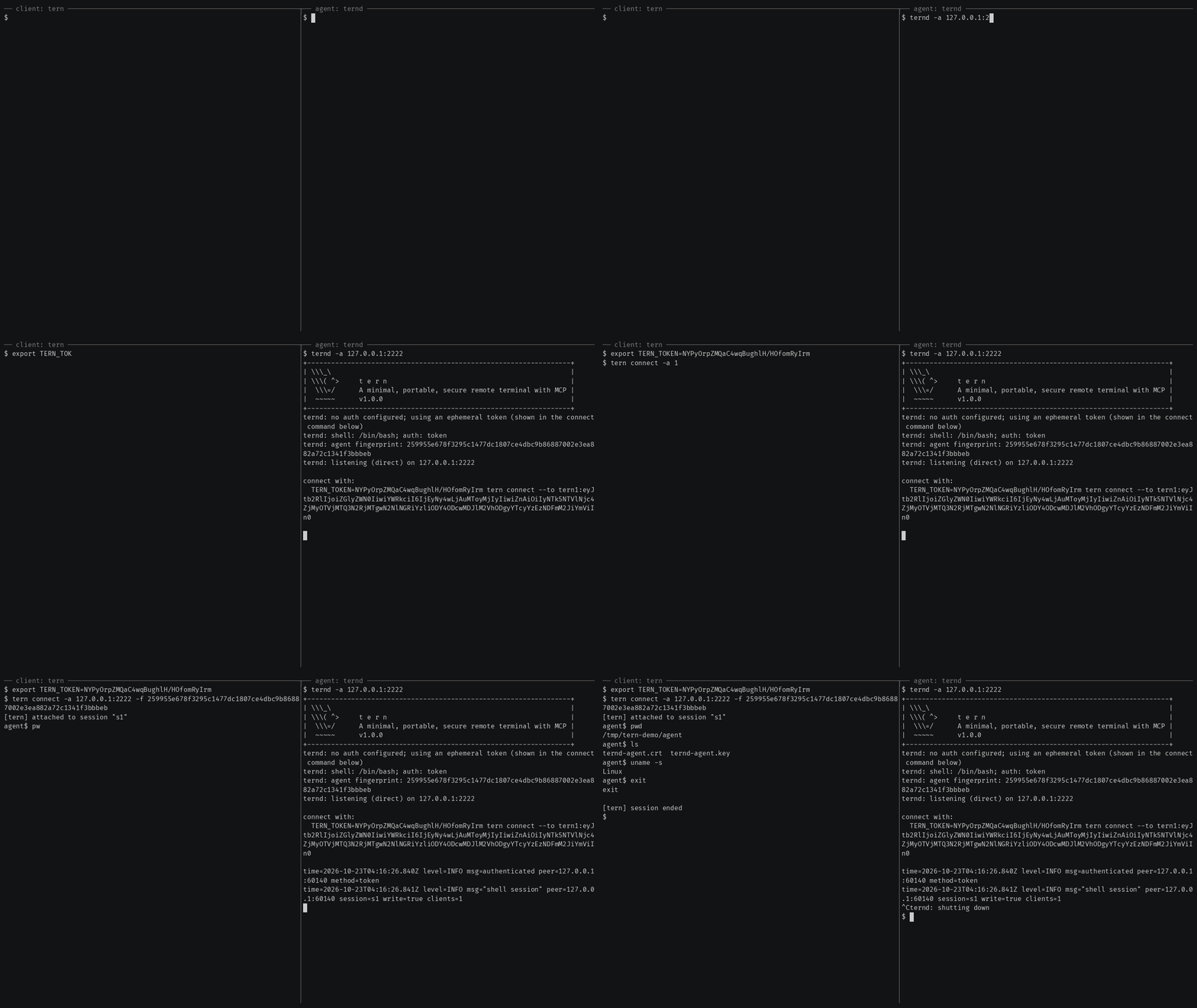
Getting started also covers reaching an agent
behind NAT through a relay, catching one with rtern and logging in with
OpenSSH keys instead of a token.
AI agents (tern mcp)
tern mcp lets an AI client such as Claude Code, Claude Desktop or Cursor work
on your agents through the
Model Context Protocol, under a policy you
set and with an audit log of every call. It is read-only by default, and asks
you before the actions you choose.
In Claude Code, install tern first, then the Ternimal plugin:
claude plugin marketplace add ternimal/tern
claude plugin install ternimal@ternimal
The plugin starts tern from your PATH and reads your hosts from a config
file, ~/.config/tern/mcp.json by default; its ternimal:setup skill walks
you through writing one. plugin/README.md says what it
runs and what it sends. Other clients, a one-line setup without a config
file, the tools and the safety model are in docs/mcp.md.
Features
- Direct or relay: reach an agent on your LAN directly, or reach one behind NAT through a relay, so that agent needs no inbound port.
- End-to-end encryption: TLS and authentication run between client and agent, so a relay only forwards ciphertext.
- Keys or tokens: OpenSSH public keys in
authorized_keysformat, or a shared token. - Resumable sessions:
tern connectreconnects on its own after a drop and resumes the session with scrollback replay; others can join it as read-only viewers. - One connection, many channels: one authenticated connection can carry a
shell,
exec, port forwards and file copy at once. - REST gateway and MCP server: run commands over HTTP, or let AI agents work under a policy.
- Recording: with
ternd --record-dir, the agent saves each session as an asciicast, playable withasciinema play. - Zero-config: run
terndwith no flags on a terminal and it mints a token and prints the line to connect with. - Portable: Linux, macOS, Windows and Android on amd64 and arm64.
All of them in detail: docs/features.md.
Documentation
- Getting started: direct, through a relay, with
rtern, with OpenSSH keys and the insecure flags for testing - Commands: every
terncommand, sharing and resuming sessions, copying files, port forwards - REST gateway: run commands on an agent over HTTP
- AI agents over MCP: the config file, profiles, tools, approvals and the audit log
- Install and build: checking a release, building from source, supported platforms
- Keys, tokens and files: the rules for the files tern reads
- Operating notes: listeners, shutdown, recordings and other details
- Security: the threat model, the dangerous flags and how to report a vulnerability
- Contributing: license terms, the CLA, development and the code layout
License
Ternimal is licensed under the GNU Affero General Public License v3.0 only (AGPL-3.0-only); see LICENSE. Running a modified version to provide a network service requires offering that version's source to its users.
A separate commercial license is available for uses that cannot comply with the AGPL, for example embedding Ternimal in a proprietary or hosted service; see NOTICE. Contributions are welcome; see CONTRIBUTING for the license terms and the CLA.
"Ternimal", the binary names (tern, ternd, ternr, rtern) and the
project logo are project trademarks and are not licensed under the AGPL; see
NOTICE.
Questions sur Ternimal MCP
Comment les agents IA peuvent-ils utiliser Ternimal ?
Les clients IA comme Claude Code ou Cursor peuvent piloter vos agents via le Model Context Protocol (MCP) en utilisant la commande tern mcp.
La connexion est-elle sécurisée ?
Oui, le trafic entre le client et l'agent utilise un chiffrement TLS de bout en bout avec une authentification obligatoire, garantissant que les relais ne font que transmettre des données chiffrées opaques.
Puis-je utiliser Ternimal pour atteindre une machine derrière un NAT ?
Oui, vous pouvez atteindre un agent derrière un NAT en utilisant un relais pour établir la connexion.
Quelles sont les permissions par défaut pour les agents IA ?
Par défaut, le MCP server est en lecture seule et demandera votre approbation avant d'effectuer les actions sélectionnées.