
Permet à un client IA d'écrire, de mettre à jour et d'interroger un wiki d'équipe auto-hébergé composé de pages et de tableaux avec un flux de révision intégré.
Aussi connu sous stuga-dev/stuga, @stuga/mcp
- Étoiles
- 6
- Outils
- —
- Téléchargements, 30 jours
- —
- Dernière version
- 0.2.1
- Dernier commit
- 12 nov. 2026
- Licence
- AGPL-3.0
Qu'est-ce que Stuga MCP ?
Stuga est un serveur MCP. Permet à un client IA d'écrire, de mettre à jour et d'interroger un wiki d'équipe auto-hébergé composé de pages et de tableaux avec un flux de révision intégré.
Résumé généré à partir du README du projet
À propos du MCP server Stuga
Stuga permet de gérer un wiki d'équipe via un client IA en autorisant les agents à écrire, mettre à jour et interroger des pages et des tableaux. Cette solution auto-hébergée s'exécute sur un Mac avec puce Apple silicon ou via Docker sur un serveur. Elle se connecte à divers clients MCP tels que Claude Desktop, Cursor et VS Code, en utilisant le modèle de l'agent, ce qui signifie qu'aucune clé IA distincte n'est requise pour le nœud lui-même.
Les utilisateurs peuvent contrôler la manière dont les informations sont mises à jour grâce à trois niveaux de révision distincts. Les modifications peuvent être révisées par la personne qui les a demandées, nécessiter l'approbation d'un collègue, ou s'appliquer directement au wiki. Le système utilise des outils comme Save to Stuga pour archiver des informations, Ask Stuga pour interroger le contenu approuvé, et Check Stuga pour identifier les pages obsolètes ou les liens rompus. Les données sont stockées localement via Postgres et SQLite, garantissant que la documentation de votre équipe reste sous votre contrôle.
Ce que vous pouvez faire avec
- 1Documentation de wiki automatiséeUn agent IA peut archiver automatiquement des notes de réunion ou des points d'e-mails dans les pages de wiki ou les lignes de tableau appropriées.
- 2Vérification collaborative de contenuLes équipes peuvent mettre en place un flux de travail où les modifications suggérées par une IA doivent être approuvées par un autre membre de l'équipe.
- 3Interrogation de connaissances vérifiéesLes développeurs peuvent demander à une IA de répondre à des questions en se basant uniquement sur les informations qui ont été officiellement approuvées.
- 4Maintenance et nettoyage du wikiUne IA peut scanner la documentation pour trouver et proposer des corrections pour les pages orphelines ou les liens rompus.
Extrait du README du projet. Chaque cas d'utilisation est vérifié par rapport à une citation du document.
Comment installer Stuga MCP
Formats vérifiés le 10 nov. 2026Ajouter à CursorAjouter à GooseInstaller Stuga MCP dans Claude Code
$ claude mcp add --env 'STUGA_URL=<STUGA_URL>' stuga -- npx -y @stuga/mcpInstaller Stuga MCP dans Cursor
~/.cursor/mcp.json
{
  "mcpServers": {
    "stuga": {
      "command": "npx",
      "args": [
        "-y",
        "@stuga/mcp"
      ],
      "env": {
        "STUGA_URL": "<STUGA_URL>"
      }
    }
  }
}Installer Stuga MCP dans VS Code
.vscode/mcp.json
{
  "servers": {
    "stuga": {
      "type": "stdio",
      "command": "npx",
      "args": [
        "-y",
        "@stuga/mcp"
      ],
      "env": {
        "STUGA_URL": "<STUGA_URL>"
      }
    }
  }
}Installer Stuga MCP dans VS Code CLI
$ code --add-mcp '{"name":"stuga","type":"stdio","command":"npx","args":["-y","@stuga/mcp"],"env":{"STUGA_URL":"<STUGA_URL>"}}'Installer Stuga MCP dans Claude Desktop
claude_desktop_config.json
{
  "mcpServers": {
    "stuga": {
      "command": "npx",
      "args": [
        "-y",
        "@stuga/mcp"
      ],
      "env": {
        "STUGA_URL": "<STUGA_URL>"
      }
    }
  }
}Installer Stuga MCP dans Codex
$ codex mcp add stuga --env 'STUGA_URL=<STUGA_URL>' -- npx -y @stuga/mcpInstaller Stuga MCP dans Codex config.toml
~/.codex/config.toml
[mcp_servers.stuga]
command = "npx"
args = ["-y", "@stuga/mcp"]

[mcp_servers.stuga.env]
STUGA_URL = "<STUGA_URL>"
Installer Stuga MCP dans Gemini CLI
$ gemini mcp add -s user -e 'STUGA_URL=<STUGA_URL>' stuga npx -- -y @stuga/mcpInstaller Stuga MCP dans Gemini settings.json
~/.gemini/settings.json
{
  "mcpServers": {
    "stuga": {
      "command": "npx",
      "args": [
        "-y",
        "@stuga/mcp"
      ],
      "env": {
        "STUGA_URL": "<STUGA_URL>"
      }
    }
  }
}Configuration
STUGA_URLRequisThe address you open Stuga at.
| Nom | Description | Type |
|---|---|---|
| STUGA_URL | The address you open Stuga at. | Requis |
Vérifications automatisées
Exécuté le 12 nov. 2026Rapport complet →A passé nos vérifications automatisées. Il ne s'agit pas d'un audit de sécurité : lisez le code et donnez au serveur l'accès le plus restreint dont il a besoin. Fonctionnement des vérifications

- Dépôt source lié et accessibleRéussi
- Licence open source (OSI)Réussi
- Commit ou version publiée au cours de l'année écouléeRéussi
- Nom du package non proche d'un package populaireRéussi
- L'endpoint distant utilise HTTPSRéussi
- Les outils destructifs sont étiquetésNon vérifié
- Aucune instruction cachée destinée au modèleRéussi
- Aucun avis critique dans le package ou ses dépendancesRéussi
README
Voir sur GitHubStuga
Your AI writes the team wiki. A colleague approves.
A team wiki of pages and tables, on a Mac or server you run. Say Save to Stuga to Claude, Codex or any MCP client, and it files each point on the right page or in the right table row. By default a change to the wiki waits for whoever asked the AI; set a folder to Reviewed by a colleague and someone else approves it. Ask Stuga answers from what is approved, and says what still waits.
Download for Mac (Apple silicon, macOS 15+) · Install with Docker
Install, then create your account and workspace and connect your AI. Help for people using Stuga: stuga.dev/docs.
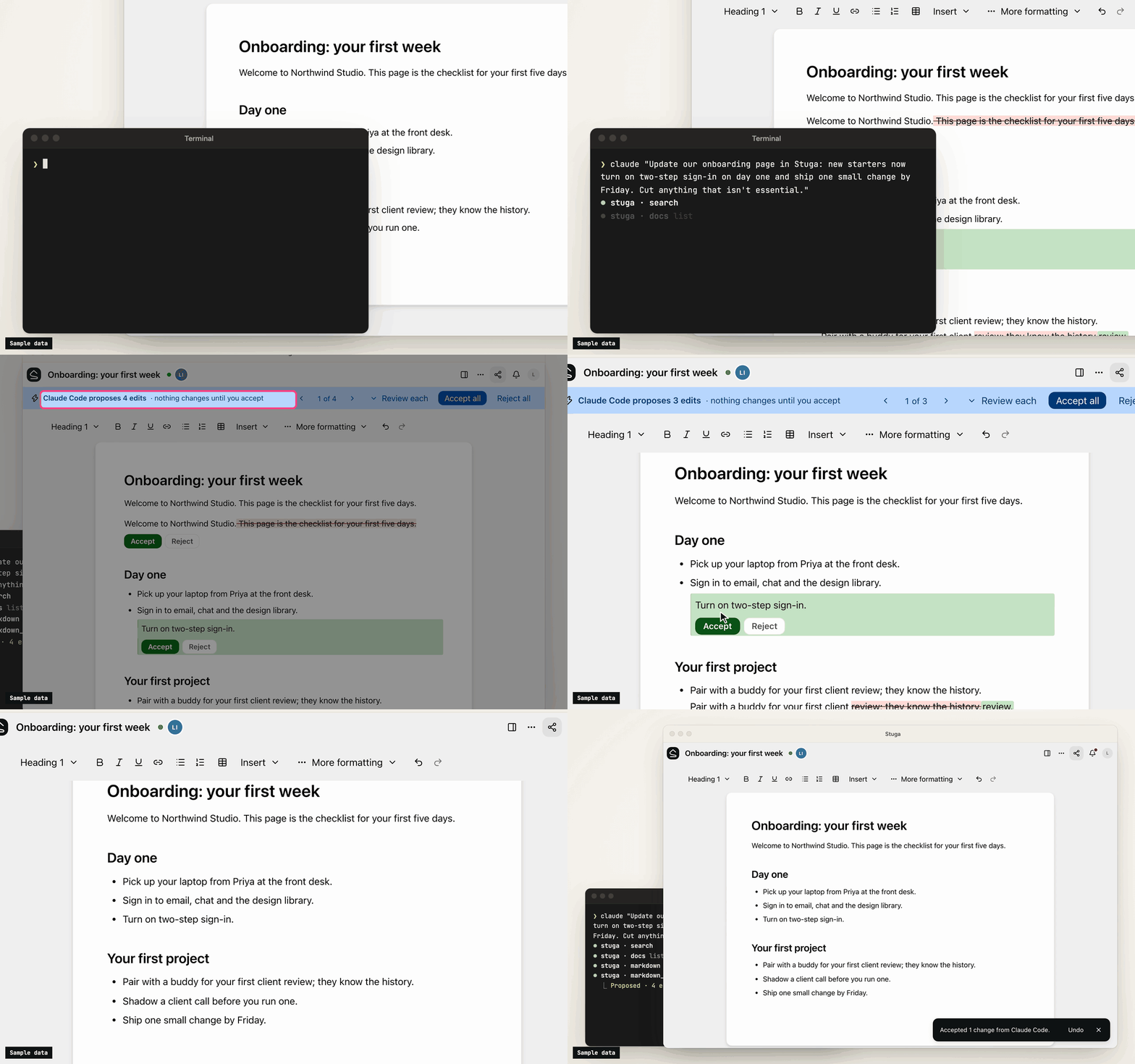
How the wiki stays right
- Save to Stuga. Your AI finds the page and section a point belongs in, or the row a fact fills, and corrects the sentence it changes rather than adding another. It cites the meeting or email a point came from, and tells you what it saved where and what waits. A point no page is about starts a page in the folder it belongs in, or goes in your own My notes.
- Three review levels. In Who reviews AI edits…, a folder, page or database is Reviewed by whoever asked the AI (the default), Reviewed by a colleague (someone else who can edit it, from the folder's approver group if it names one, never the person who asked), or AI edits apply directly (recorded, attributed and revertible). People's own edits go straight in.
- One card per change. Filing a meeting across several pages is one change, reviewed on one card laid out for a phone: each edit in its paragraph, with the sources it cites. Approve all, Ask for changes… or Decline… with a note the AI reads. A folder can post each change that waits for a colleague to a Slack channel.
- Ask Stuga. Your AI answers from the pages and tables, with who last changed each one and when, and what waits: "the page says 14 days; a change to 30 days waits for a colleague".
- Check Stuga. Linked from under each page, Needs checking when a page it cites changes, and Wiki → Index and Wiki → Log. Say Check Stuga and your AI finds stale pages, orphans and broken links, and proposes the fixes as one change.
- Instructions that stack. The workspace, folders, pages and databases can each tell agents what goes where. They advise the model; permissions and review decide what a write does.
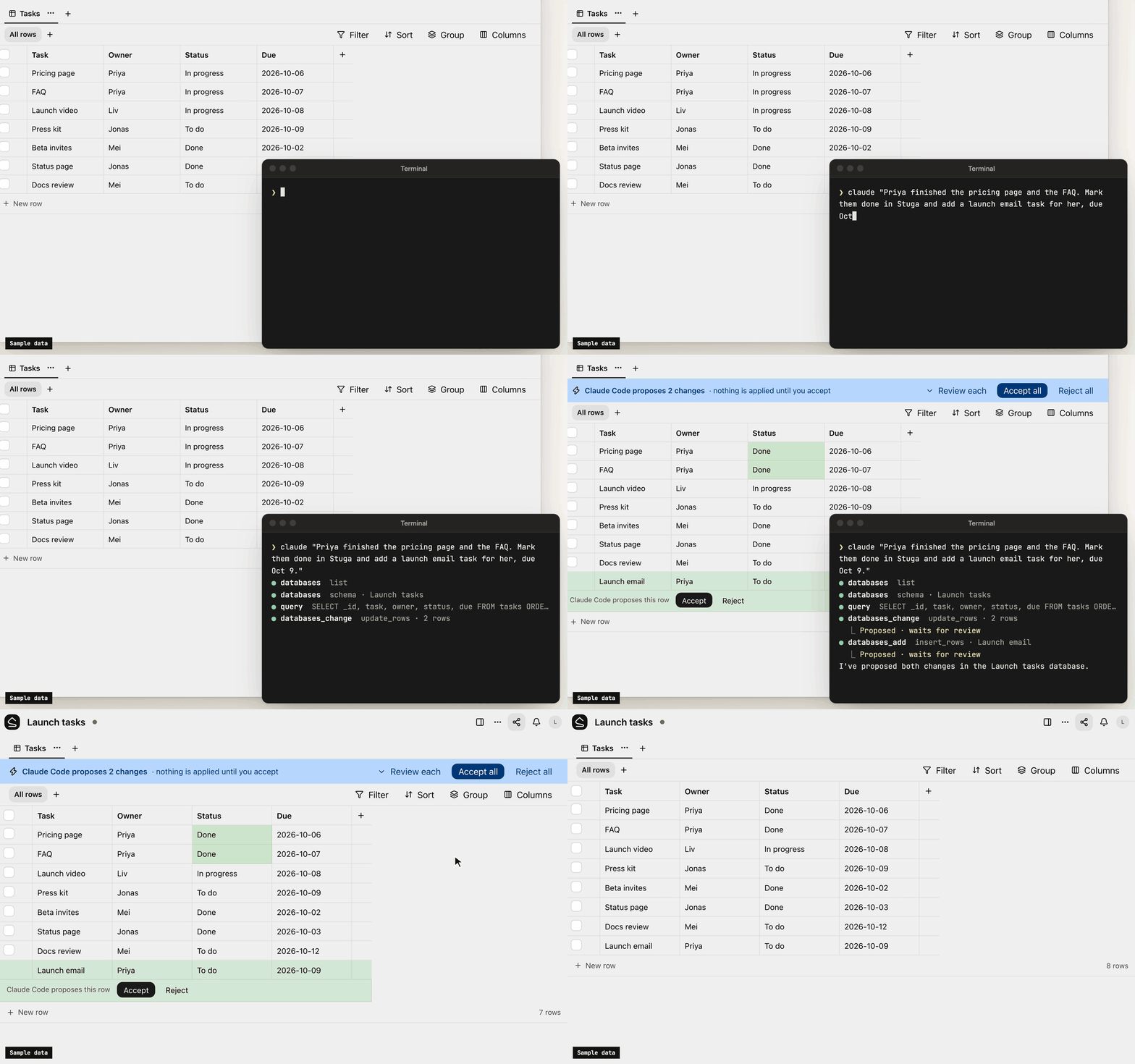
What's in it
- Pages written together. Real-time editing (Tiptap over a Yjs CRDT) with presence, comments, @mentions and version history.
- Tables beside the pages. Typed tables, each database its own SQLite file, with saved views, row pages and CSV import. Agents, Ask and the REST API run read-only SQL on them.
- Search that follows permissions. Keyword (BM25 over Postgres full-text search) and semantic (pgvector) search in one SQL statement, with access checked inside it. Chinese, Japanese, Korean and Thai work without setup.
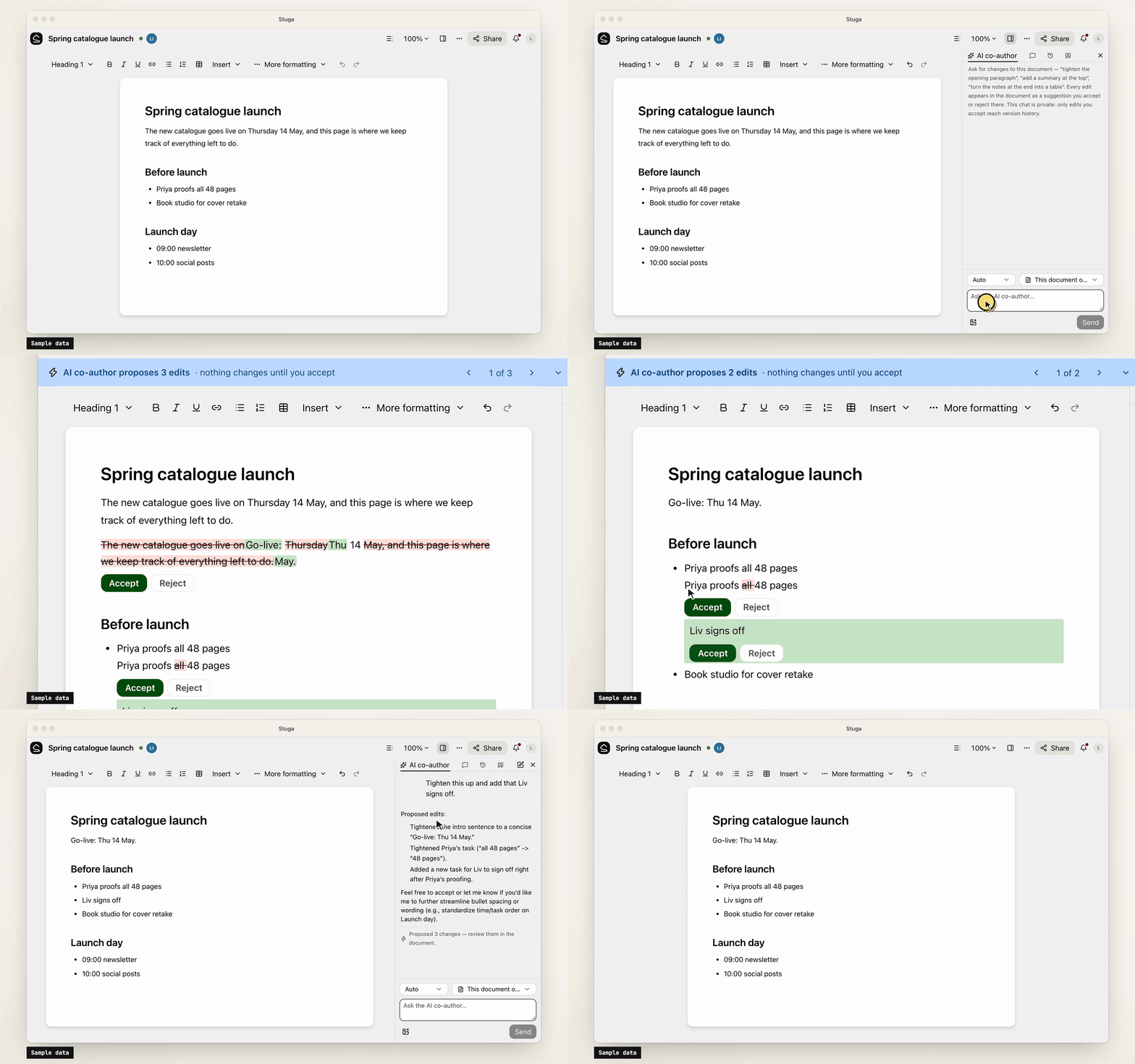
- Built-in AI, off until set up. A co-author and a table assistant, whose edits are reviewed like an agent's, and Ask, which cites sources. OpenAI, Anthropic, Gemini, DeepSeek and more, or Ollama.
- Sharing and sign-in. Workspaces, folders, per-page sharing, groups and guests. People join by invite link and sign in with a password or your OpenID Connect provider.
- Import and export. A Notion export, or a zipped Obsidian vault or folder of Markdown, becomes a
workspace; a workspace exports as one
.stuga.zipof Markdown, JSON Lines and its files.
Connect your AI
Agents connect over MCP. Settings → Your AI agents gives the setup for Claude Code, Claude Desktop, Codex, Antigravity, Cursor, VS Code, Kiro, Goose, LM Studio, DeepSeek Harness and Pi, with your node's address filled in, and the URL any other MCP client needs (docs/agents.md). Each agent brings its own model, so the node needs no AI key.
- Scoped sign-in. Most clients sign in through the browser, where you tick the workspaces an app may use and choose Read only or Read and suggest changes. Revoke ends its access.
- Narrow keys. A client without sign-in uses an API key, which can be confined to folders, made read-only or given an expiry.
- Content only. Agents change documents and databases. Renaming, moving, deleting, sharing and the review setting stay with people.
- Full audit. Every MCP call, reads included, is in the workspace's audit log. An event feed and signed webhooks report what changed.
Your data
Stuga sends no telemetry, and nothing reaches us unless a node admin turns on remote access. The node makes outbound requests only for features in use, such as an AI provider, and asks GitHub once a day for the list of releases unless a node admin turns that off. docs/privacy.md lists what the node sends and stores.
Install
-
A Mac with Apple silicon, on macOS 15 or later: open the package, or
Stuga-<version>.pkgfrom the latest release. It carries its own Postgres and Node.js (docs/install/macos.md). -
Docker on x86-64 or arm64, such as a Linux server or a NAS:
install.shstarts Postgres and the node with Compose (docs/install/docker.md):curl -fsSL https://github.com/stuga-dev/stuga/releases/latest/download/install.sh | bash
A node is one Node.js process and Postgres with pgvector; people open it in a browser. It backs itself up every day by default and before every upgrade (docs/operations.md). docs/getting-started.md walks through the first hour.
Questions and feedback
Ask a question or share an idea in Discussions; report a bug as an issue.
Contributing
Issues and pull requests are welcome. CONTRIBUTING.md covers running Stuga from source, the tests and the conventions, and RELEASING.md how a release is cut. Contributions are accepted under a Contributor License Agreement (CLA.md); a bot asks on your first pull request. Report a vulnerability privately, as SECURITY.md describes.
License
AGPL-3.0-only, except integrations/, which is MIT; copyright notice in NOTICE. If you modify Stuga and offer it to others over a network, you share your changes under the same terms. The name and logo are not covered by the license: TRADEMARKS.md says how you may use them.
Questions sur Stuga MCP
Comment ajouter Stuga MCP à Claude Code ?
Exécutez claude mcp add --env 'STUGA_URL=<STUGA_URL>' stuga -- npx -y @stuga/mcp dans votre terminal. Ajoutez --scope user pour le rendre disponible dans tous les projets.
Comment ajouter Stuga MCP à Cursor ?
Ouvrez ~/.cursor/mcp.json et ajoutez le serveur sous mcpServers, avec la configuration Cursor indiquée dans la section d'installation ci-dessus.
Comment l'IA met-elle à jour le wiki ?
L'IA identifie la page, la section ou la ligne de tableau correcte à modifier et corrige les phrases existantes plutôt que de simplement en ajouter de nouvelles.
Le serveur nécessite-t-il sa propre clé IA ?
Non, car chaque agent utilise son propre modèle, le nœud n'a donc pas besoin de clé IA.
Comment puis-je importer mes notes existantes ?
Vous pouvez importer un export Notion ou un dossier Markdown / coffre Obsidian compressé dans un espace de travail.