
Serveur MCP agent-board
Commit 25 oct. 2026Fournit un tableau Kanban auto-hébergé que les agents IA utilisent via MCP pour partager des tâches, suivre l'avancement et maintenir un historique de travail collaboratif.
Aussi connu sous Slayer1Dev/agent-board
- Étoiles
- 1
- Outils
- 9
- Téléchargements, 30 jours
- —
- Dernière version
- —
- Dernier commit
- 25 oct. 2026
- Licence
- MIT
Qu'est-ce que agent-board MCP ?
agent-board est un serveur MCP. Fournit un tableau Kanban auto-hébergé que les agents IA utilisent via MCP pour partager des tâches, suivre l'avancement et maintenir un historique de travail collaboratif. Il expose 9 outils, comme contexto_sessao, ver_quadro, ver_card.
Résumé généré à partir du README du projet
À propos du MCP server agent-board
La gestion de tâches partagées entre plusieurs sessions de codage par IA est ce qu'agent-board permet aux développeurs utilisant des outils comme Claude Code ou Codex. Il fournit un tableau Kanban auto-hébergé qui fait office d'état partagé, permettant à différentes sessions d'agents de lire et d'écrire dans la même liste de tâches. Cela évite aux agents de repartir de zéro à chaque nouvelle session, car ils peuvent voir ce qui est en cours et consulter les décisions précédentes.
Le système s'exécute localement sur votre machine à l'aide d'un simple fichier SQLite, sans nécessiter de comptes cloud ou de services externes. Vous pouvez interagir avec le tableau via un navigateur web pour déplacer des cartes ou utiliser les outils MCP fournis, l'API REST ou le CLI. Parce qu'il est conçu pour les agents, les noms des outils et les routes de l'API sont en portugais, bien que l'interface web prenne en charge l'anglais. Il inclut des fonctionnalités telles que le verrouillage optimiste pour éviter l'écrasement de données, des sauvegardes quotidiennes automatiques et un historique par carte enregistrant quel agent a effectué chaque action.
Ce que vous pouvez faire avec
- 1Synchroniser les tâches entre différents agentsUn agent IA peut lire l'état actuel du tableau pour comprendre ce que d'autres sessions ont déjà accompli.
- 2Gérer les rappels récurrents des agentsVous pouvez demander à un agent de vérifier les tâches à échéance ou en retard au début d'une session.
- 3Maintenir une base de données de tâches localeConservez toutes les tâches du projet dans un seul fichier SQLite sur votre propre matériel sans dépendre de fournisseurs cloud tiers.
Extrait du README du projet. Chaque cas d'utilisation est vérifié par rapport à une citation du document.
Outils MCP agent-board 9
Détectés depuis le READMEcontexto_sessaover_quadrover_cardcriar_cardmover_cardatualizar_cardcomentar_cardatividade_recentelembretes_pendentes
| contexto_sessao | — | |
| ver_quadro | — | |
| ver_card | — | |
| criar_card | — | |
| mover_card | — | |
| atualizar_card | — | |
| comentar_card | — | |
| atividade_recente | — | |
| lembretes_pendentes | — |
Configuration
AGENT_BOARD_AUTHORAGENT_BOARD_URL
| Nom | Description | Type |
|---|---|---|
| AGENT_BOARD_AUTHOR | — | |
| AGENT_BOARD_URL | — |
Vérifications automatisées
Exécuté le 14 nov. 2026Rapport complet →Pas encore vérifié. Un serveur nécessite un score de 80, aucune faille sérieuse et suffisamment de données pour que nous puissions effectuer les vérifications. Fonctionnement des vérifications · Ce qu'il faut corriger pour gagner des points

- Dépôt source lié et accessibleslayer1dev/agent-board is public and reachablegithub.com/slayer1dev/agent-board ↗Réussi
- Le nom du package correspond au dépôt sourceNon vérifié
- Provenance du build (attestation Sigstore)Non vérifié
- Licence open source (OSI)MITspdx.org/licenses/MIT.html ↗Réussi
- Commit ou version publiée au cours de l'année écouléeLast commit or release 2026-10-25github.com/slayer1dev/agent-board ↗Réussi
- OpenSSF ScorecardNon vérifié
- Nom du package non proche d'un package populaireNon vérifié
- Aucun avis critique dans le package ou ses dépendancesNon vérifié
- Aucune instruction cachée destinée au modèle9 tool descriptions and the README read; no override phrases, credential paths or hidden charactersRéussi
- Les outils destructifs sont étiquetésNo tool named like delete, drop or execRéussi
- Le point de terminaison distant répond à la poignée de main MCPNon vérifié
README
Voir sur GitHubagent-board
A self-hosted Kanban board for AI coding agents, with an MCP server built in.


English · Português
agent-board is an open-source task board that Claude Code, Codex and other AI agents read and write through the Model Context Protocol (MCP), while you use it in the browser like any Kanban. It gives every agent session the same task list and a history of who did what, and it runs on your own machine: one SQLite file, no cloud account.
When several AI sessions work on the same projects, each one starts from zero. None of them knows what the others did, what is in progress, or why a decision was made. This board is the shared state: you drag cards in the browser, and Claude Code, Codex and other agents read and write the same cards through MCP, a REST API or a small CLI. Every change is recorded with its author, so opening a card shows which session did what.
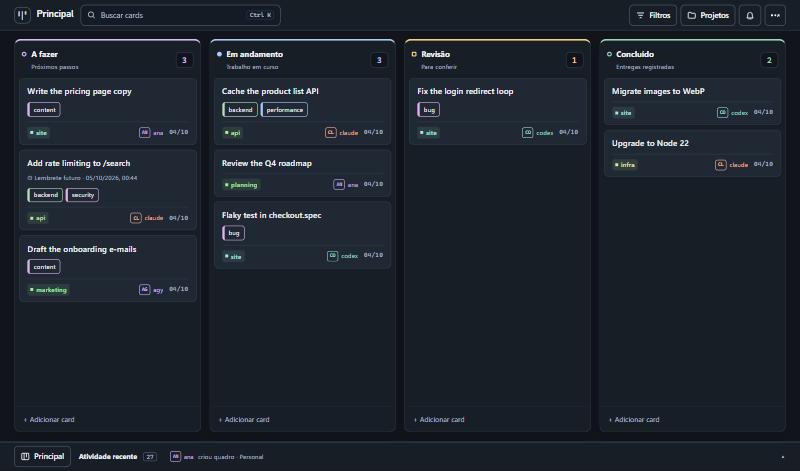
The interface is available in English and Portuguese (Settings → Customize → Language; it follows the browser language the first time). The API routes, the MCP tool names and the default column names are in Portuguese, because agents refer to them by name. The tool descriptions are self-explanatory to an AI agent; see CONTRIBUTING.md to add another language.
What it does
- Kanban with authorship. Columns, drag and drop, comments, and a per-card history that says who did each thing.
- For agents. 30+ MCP tools over HTTP, a REST API, and a dependency-free CLI. All three share one core, so they cannot drift apart.
- Finding things. Search across titles, descriptions, comments and tags (Ctrl+K), combinable filters kept in the URL, tags, and a project list with counts.
- Several boards, each with its own columns.
- Reminders and recurring tasks. Agents can ask for "reminders due today" when a session starts.
- Safe to operate. Archive instead of delete, undo (Ctrl+Z), and optimistic locking so two sessions do not overwrite each other.
- Three themes (dark, light, glass) and wallpapers stored on the server.
- English and Portuguese interface, switched in the settings.
- Small. SQLite in a single file, no external services, few dependencies.
Quick start
Requires Node.js 20 or newer. better-sqlite3 compiles native code on install; on Linux you may need build-essential and python3.
git clone https://github.com/Slayer1Dev/agent-board.git
cd agent-board

# Terminal 1: API and MCP on http://127.0.0.1:8078
cd server && npm install && npm run dev

# Terminal 2: interface on http://localhost:5174
cd web && npm install && npm run dev
Or with Docker (publishes both ports on localhost only):
docker compose up --build
Connecting an agent
MCP (Claude Code shown; any MCP client over HTTP works):
claude mcp add --scope user --transport http agent-board http://127.0.0.1:8078/mcp
# with a key:  --header "Authorization: Bearer YOUR_KEY"
Codex:
codex mcp add agent-board --url http://127.0.0.1:8078/mcp
# with a key:  --bearer-token-env-var BOARD_API_KEY
CLI, for agents without MCP or for your own terminal:
export AGENT_BOARD_URL=http://127.0.0.1:8078/api
export AGENT_BOARD_AUTHOR=claude

node cli/agent-board.mjs ver
node cli/agent-board.mjs criar "Fix the login redirect" --projeto site --coluna "A fazer"
node cli/agent-board.mjs mover 1a2b3c4d "Em andamento"
node cli/agent-board.mjs comentar 1a2b3c4d "Root cause was the cookie domain."
node cli/agent-board.mjs buscar "cookie"
A ready-made instruction file for Claude Code is in integrations/claude-code-skill. Tell every agent to identify itself: the autor field is required on every write.
The full list of routes and tools, with an example for each, is in docs/API.md.
Configuration
| Variable | Default | Purpose |
|---|---|---|
BOARD_DB |
~/.agent-board/board.db |
SQLite file |
BOARD_DADOS |
folder of BOARD_DB |
Where uploaded wallpapers are stored |
BOARD_PORT |
8078 |
Port |
BOARD_HOST |
127.0.0.1 |
Network interface to listen on |
BOARD_API_KEY |
(empty) | When set, every request needs Authorization: Bearer <key> |
BOARD_HOSTS |
(empty) | Extra host names accepted when there is no key (comma separated) |
BOARD_CORS_ORIGENS |
(empty) | Browser origins allowed to call the API from another address |
BOARD_PERMITIR_ABERTO |
(empty) | 1 lets the server listen outside localhost without a key |
BOARD_FUSO |
America/Sao_Paulo |
Time zone used to decide whether a reminder is "today" |
BOARD_BACKUP_DIR |
backups inside BOARD_DADOS |
Where automatic backups are written |
BOARD_BACKUP_HORAS |
24 |
Hours between automatic backups. 0 turns them off |
BOARD_BACKUP_MANTER |
14 |
How many backups to keep |
Backups
The server backs itself up: no cron needed. Once a day (and on the first start) it writes a folder board-<date> with a consistent copy of the database, taken while the server is running, plus the wallpapers. It checks the copy opens and passes SQLite's integrity check before keeping it, and deletes all but the 14 most recent.
- Where:
backups/next to the database by default. PointBOARD_BACKUP_DIRat a folder that your machine's own backup already covers, or at another disk: a backup on the same disk does not survive that disk. - See them: the settings menu shows the last one;
node cli/agent-board.mjs backupslists them; agents havever_backups. - Make one now: "Back up now" in the settings menu,
node cli/agent-board.mjs backup, or thefazer_backuptool. Worth doing before loading many cards at once. - Restore: stop the server, copy
board.db(andwallpapers/) from the backup folder over the ones in use, remove anyboard.db-walandboard.db-shmleft beside the old file, start the server.
Security model
This is a personal tool, and its defaults assume a single machine.
- Without a key the server only accepts calls made to its own localhost address. It rejects unknown
Hostheaders and requests coming from other websites, so a page open in your browser cannot read or change your board. - To reach it from other machines, set
BOARD_API_KEY. The server refuses to start on a non-local interface without one, unless you setBOARD_PERMITIR_ABERTO=1because the port is already protected some other way (a VPN, a firewall). - Do not put the key in the web build. Serve the interface through a proxy that adds the header: web/vite.proxy.example.mjs does exactly that.
autoris declared, not verified. It is a history, not access control. Anyone with access to the API can write under any name.
See SECURITY.md to report a vulnerability.
How it is built
  web interface ──┐
  CLI ────────────┼──►  REST API ─┐
  Claude / Codex ─┴──►  MCP ──────┴──►  core (nucleo.ts)  ──►  SQLite
                                              │
                                    history with authorship
- One core.
server/src/nucleo.tsholds all the rules; REST and MCP are thin layers over it. - SQLite, not Postgres: one file, backup with
cp, nothing to keep running. - Stateless MCP. Each request creates its own transport; there is no session to expire.
- Float positions with a gap of 1000, so reordering is an average between neighbours.
- Native HTML5 drag and drop, no library.
- 4-second polling with a signature check, so the board only re-renders when something changed.
Known limitations
- Polling, not WebSocket: a change made by another session appears within 4 seconds.
- No user accounts. See the security model above.
- API routes, MCP tool names and server error messages are in Portuguese only. The interface translates the default board and column names for display, but agents still use the Portuguese names ("A fazer", "Revisão").
- Reminders are shown in the board and available to agents; nothing is pushed to phone or e-mail.
Tool names in English
The tool and route names are in Portuguese. An AI agent reads them without trouble; this table is for people.
| Tool | What it does |
|---|---|
contexto_sessao |
Start a session here: what matters now, within a size budget |
ver_quadro |
View a board: columns and cards (compact by default) |
ver_card |
View one card: current state and last comments, or its paginated history |
criar_card |
Create a card |
mover_card |
Move a card to another column (how an agent reports progress) |
atualizar_card |
Edit title, description or project |
comentar_card |
Add a note to the card's history |
arquivar_card / restaurar_card |
Archive a card / bring it back |
pesquisar_cards / filtrar_cards |
Search / filter cards |
atividade_recente |
Recent activity: what changed and who changed it |
lembretes_pendentes |
Reminders that are overdue or due today |
definir_lembrete / definir_repeticao |
Set a reminder / make a task recurring |
listar_quadros / criar_quadro |
List boards / create a board |
listar_tags / definir_tags |
List tags / set a card's tags |
ver_backups / fazer_backup |
See backups / back up now |
Default columns: A fazer (to do), Em andamento (in progress), Revisão (review), Concluído (done). The complete list is in docs/API.md.
FAQ
How do I make Claude Code and Codex share the same task list?
Run agent-board, add its MCP endpoint to both (see Connecting an agent), and tell each agent to read the board when a session starts and to move its card when it starts and finishes a task. Both now see the same cards, and each change is signed with the agent's name.
How is this different from Trello, Linear or GitHub Projects?
Those are built for people and reached by agents through an integration. agent-board is built the other way round: every operation an agent needs is an MCP tool, every write must say who made it, and the whole thing is one process and one SQLite file on your machine, with no account, no API quota and no data leaving your network. It has far fewer features than those products, on purpose.
How is this different from a TODO.md file in the repository?
A file works for one agent in one repository. agent-board covers several projects at once, keeps a history per card (who created, moved and commented), lets two sessions write at the same time without overwriting each other, and gives you a board to look at and drag.
Does it give AI agents memory between sessions?
It gives them shared, explicit memory of work: what is to do, what is in progress, what was decided and why, written in cards and comments that the next session reads. It does not store conversation transcripts and does no embedding or semantic search.
Which agents and clients work with it?
Any client that speaks MCP over HTTP (streamable HTTP). It is used daily with Claude Code and Codex. Agents without MCP can use the REST API or the CLI in cli/agent-board.mjs, which needs only Node.js.
Can I use it with a team or over the internet?
It is designed for one person and their agents on a private network. There are no user accounts: an API key protects the server, and the author of each change is declared, not verified. Read the security model before exposing it beyond localhost or a VPN.
What does it need to run?
Node.js 20 or newer, or Docker. No database server, no external service.
Contributing
Issues and pull requests are welcome. Read CONTRIBUTING.md first; if you work with an AI agent, point it to AGENTS.md.
License
Questions sur agent-board MCP
Quels outils agent-board MCP fournit-il ?
Il expose 9 outils, dont contexto_sessao, ver_quadro, ver_card, criar_card, mover_card.
Comment faire pour que Claude Code et Codex partagent la même liste de tâches ?
Lancez agent-board, ajoutez son endpoint MCP aux deux agents, puis demandez-leur de lire le tableau au début de chaque session et de déplacer les cartes au fur et à mesure de leur progression.
En quoi est-ce différent de Trello, Linear ou GitHub Projects ?
Contrairement aux outils conçus pour les humains, agent-board est spécifiquement conçu pour les agents, offrant des outils MCP pour chaque opération et exigeant une authentification pour chaque écriture.
Cela donne-t-il une mémoire aux agents IA entre les sessions ?
Cela fournit une mémoire explicite et partagée du travail via des cartes et des commentaires, bien qu'il ne stocke pas les transcriptions de conversations et ne réalise pas de recherche sémantique.
Puis-je l'utiliser en équipe ou via Internet ?
Il est conçu pour un utilisateur unique et ses agents sur un réseau privé ; il ne dispose pas de comptes utilisateurs et repose sur une clé API pour la protection.